
Available on server load
And so, the goal of this topic is to visualize the load of the site on one regular server.

The article will use one site and one server as an example, try to look at the basic steps to reduce the load on the server.
Website: on Wordpress with daily attendance according to GA

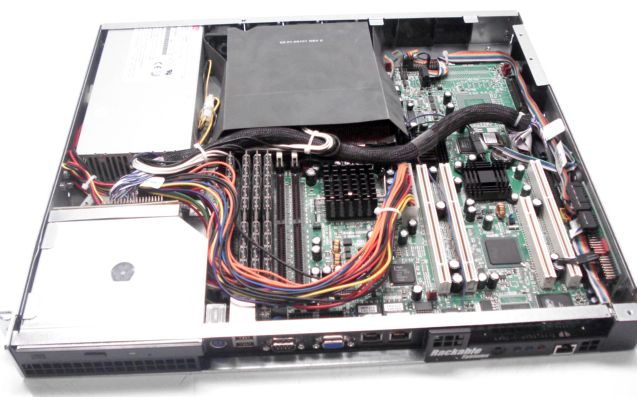
North data : with two Intel® Xeon (TM) processors 2.80GHz CPU with 4GB of RAM on board.
History: A couple of years ago the idea came up to create a small site for one local network in our city, time passed, traffic grew and the provider asked me to move to my hardware due to the large consumption of resources, the provider is ready to host the hardware in its server room.
So a regular ATX system unit with a p4 3000c processor and 1 GB of memory was assembled.
Ubuntu stood on the server Dextopny truth :) and the site was quietly developing resources enough for everything, but when the number of posts on the site exceeded 3000, the database grew to a gigabyte (then there was WP 2.3) and I had to transfer the database to another server, the server was found, had one 2.8 processor and a gig of memory, he took upon himself the load of the database. time passed, and in the evenings the server with the database simply stood at 100% load, while the site traffic was around 700-900 unique per day.
Then there was a terrible emergency and I lost all the data with fresh backups, and the old one did not make much sense to deploy. (Yes, yes, backup should be correct!) So life began from scratch, along the way I asked myself questions of optimization and load reduction.
Thus, Ubuntu 8.04 LTS was installed, Apache2 was hidden behind nginx, the content of the site contained almost one static: pictures, videos, flash drives. (About 80,000 files) Nginx gave a bang with static while consuming almost no resources.
Next was the "tuning" the database I will try to talk about it in a separate topic. :)
Along the way, I was bought on an ebay server for $ 127 delivery to Siberia + $ 100
Attendance grew, the database grew -> the load grew and free resources became less and less.
At that moment, she looked like this. CPU and memory.


Then the eAccelerator was connected,


here you can see a sharp decrease in memory consumption.
More on the benefits of caching plugins for wordpress.
Enable Hyper Cache Pluginalthough it is now included in the distribution, but I could be wrong.


The load on the processor drops noticeably.
We turn on the WP Super Cache plugin.


There is not much difference :)
Now a little about the test methodology. In fact, the test was carried out in reverse order, as the system is up and running perfectly. in turn, once a day, at about the same time, one element was turned off ...
The test was carried out for 4 days.
I would also like to hurt the performance of MYSQL and Wordpres in general. So far I can say that Wodrpress generates 70-100 queries to the database to load the 1st page, for which I would like to say special greetings to this CMS and to the creators of the plugins who did not pass the “database” course.
The article will use one site and one server as an example, try to look at the basic steps to reduce the load on the server.
Website: on Wordpress with daily attendance according to GA
North data : with two Intel® Xeon (TM) processors 2.80GHz CPU with 4GB of RAM on board.
History: A couple of years ago the idea came up to create a small site for one local network in our city, time passed, traffic grew and the provider asked me to move to my hardware due to the large consumption of resources, the provider is ready to host the hardware in its server room.
So a regular ATX system unit with a p4 3000c processor and 1 GB of memory was assembled.
Ubuntu stood on the server Dextopny truth :) and the site was quietly developing resources enough for everything, but when the number of posts on the site exceeded 3000, the database grew to a gigabyte (then there was WP 2.3) and I had to transfer the database to another server, the server was found, had one 2.8 processor and a gig of memory, he took upon himself the load of the database. time passed, and in the evenings the server with the database simply stood at 100% load, while the site traffic was around 700-900 unique per day.
Then there was a terrible emergency and I lost all the data with fresh backups, and the old one did not make much sense to deploy. (Yes, yes, backup should be correct!) So life began from scratch, along the way I asked myself questions of optimization and load reduction.
Thus, Ubuntu 8.04 LTS was installed, Apache2 was hidden behind nginx, the content of the site contained almost one static: pictures, videos, flash drives. (About 80,000 files) Nginx gave a bang with static while consuming almost no resources.
Next was the "tuning" the database I will try to talk about it in a separate topic. :)
Along the way, I was bought on an ebay server for $ 127 delivery to Siberia + $ 100
Attendance grew, the database grew -> the load grew and free resources became less and less.
At that moment, she looked like this. CPU and memory.
Then the eAccelerator was connected,
here you can see a sharp decrease in memory consumption.
More on the benefits of caching plugins for wordpress.
Enable Hyper Cache Pluginalthough it is now included in the distribution, but I could be wrong.
The load on the processor drops noticeably.
We turn on the WP Super Cache plugin.
There is not much difference :)
Now a little about the test methodology. In fact, the test was carried out in reverse order, as the system is up and running perfectly. in turn, once a day, at about the same time, one element was turned off ...
The test was carried out for 4 days.
I would also like to hurt the performance of MYSQL and Wordpres in general. So far I can say that Wodrpress generates 70-100 queries to the database to load the 1st page, for which I would like to say special greetings to this CMS and to the creators of the plugins who did not pass the “database” course.