New HyperX Alloy Elite and Alloy FPS Pro mechanical keypads: sport or comfort?
No one needs to be persuaded to pay extra for minimalism: the car from which air conditioning and rear seats are removed is called sports, and they sell such a model more expensive. Fitness enthusiasts gladly pay extra for low-fat cottage cheese instead of “normal”. But what can be improved (and not spoiled) in the mechanical keyboard, if everything is already fine with durability, compactness and switches? It turns out a lot of things - today we will tell you what it is worth to love the new HyperX Alloy Elite and Alloy FPS Pro, even if you are a fan of ascetic models.
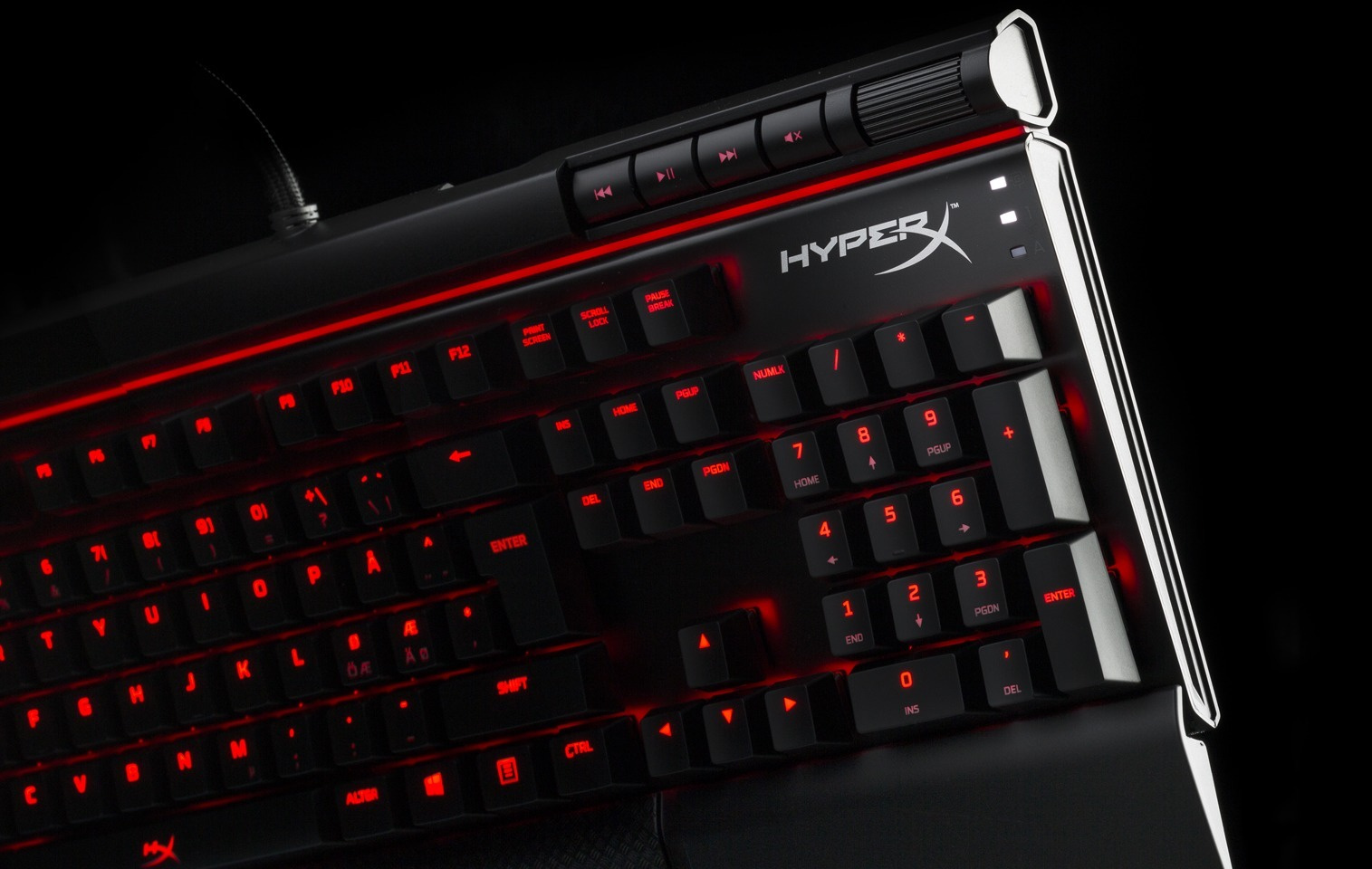
The first gaming keyboard HyperX, Alloy FPS, simply had to not go out "lump". Therefore, instead of amateur performances and “whistles”, the Kingston division designed the model as straightforward and harsh as an armored train. Only the necessary keys, no rich design forms - square, practice, gut. Fans of games like this design - no quirks, which would need to get used to, and a minimum of space when carrying (in someone else's LAN party with their steel walk).
But they do not want the maximum hardcore from their “keyboard mice”, and the home computer very rarely lives with the same, the only correct settings, like a PC in competitions. And find the combination Fn + F10, when the 7-channel system at maximum volume hits the web-site with the phrase “IEY GAMES! CHALENGE EVRIFING !!! ”is very difficult. Yes, and the edges of the keyboard flush with the body do not allow to relax and “lie down” with your wrists in the lazy mode of PC operation. You start to think on the topic of "sport vs comfort."
In order to choose between such matters it was not necessary, HyperX released Alloy Elite. The main changes are ergonomic:
• Soft attachment. Chelyabinsk gamers are so harsh that they bend a steel base under their wrists, but, seriously, the wrist rest area comes in handy in everyday use.
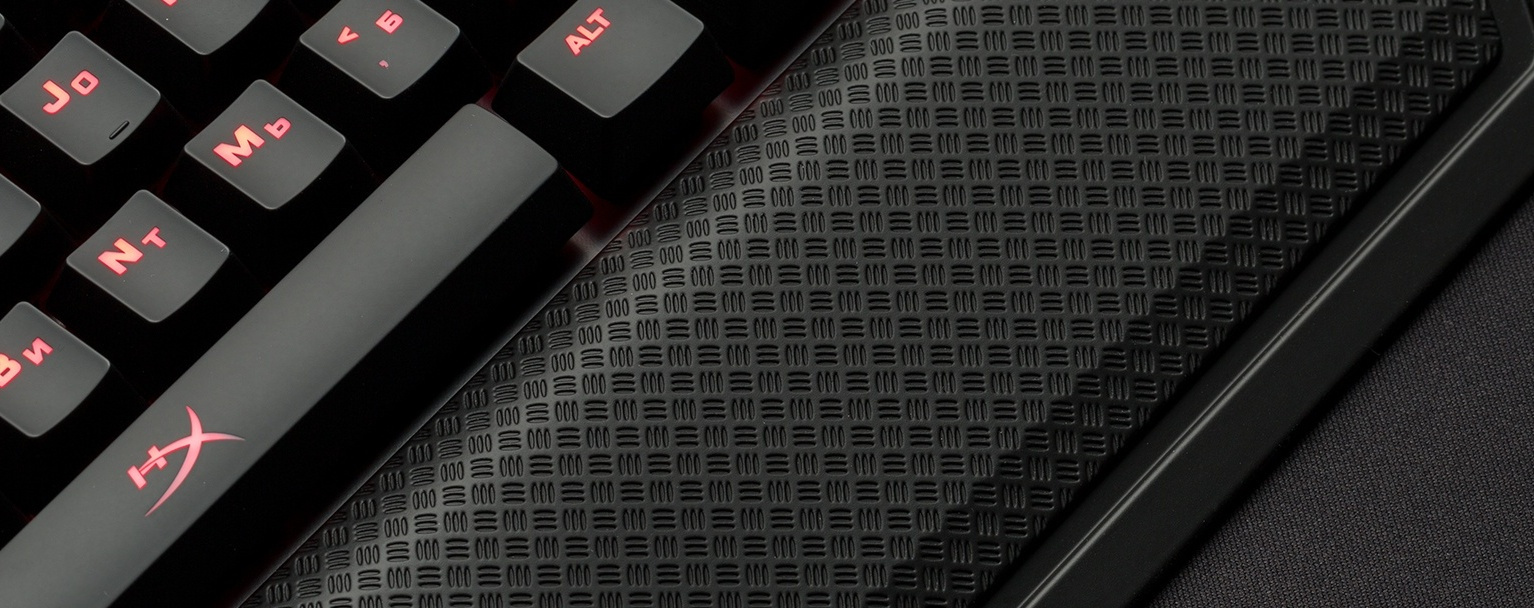
• Volume control wheel . So that you do not have to make a "bang-bang-bang" combination of Fn + F10 / F11. Analogous and convenient - you can at one stroke set the desired level in the speakers or headphones.
• Audio player control unit . Change tracks, pause and instantly turn off the volume. They are located instantly and do not distract, like global keyboard shortcuts from the Ctrl + Alt + piped into the player, to something else.
• Pass-through full-sized USB 2.0 port. It is useful to connect a mouse, drives or mobile phone. Previously, Alloy FPS had a USB connector for charging a smartphone, but the system unit in desktops is often located in the “hard-to-reach places” of the computer desk, so you need good reasons to access the ports on the case.
• Separate keys for switching on “game mode”, brightness control and backlight type . It took a minimum of time to turn off the “Windows” key, activate the “game” backlight (only WASD, numeric keys and Ctrl) or 5 more modes. As for the intensity adjustment of the LEDs. It is easy to find them even with peripheral vision - they are “cut off” by the red line from the F-keys. And beautiful and useful.

• Less “lean” design. If the keyboard is not aimed at carrying, there is no need to “cut the side of it” as much as possible. Yes, and a removable cable is not needed: connect it once and use it.

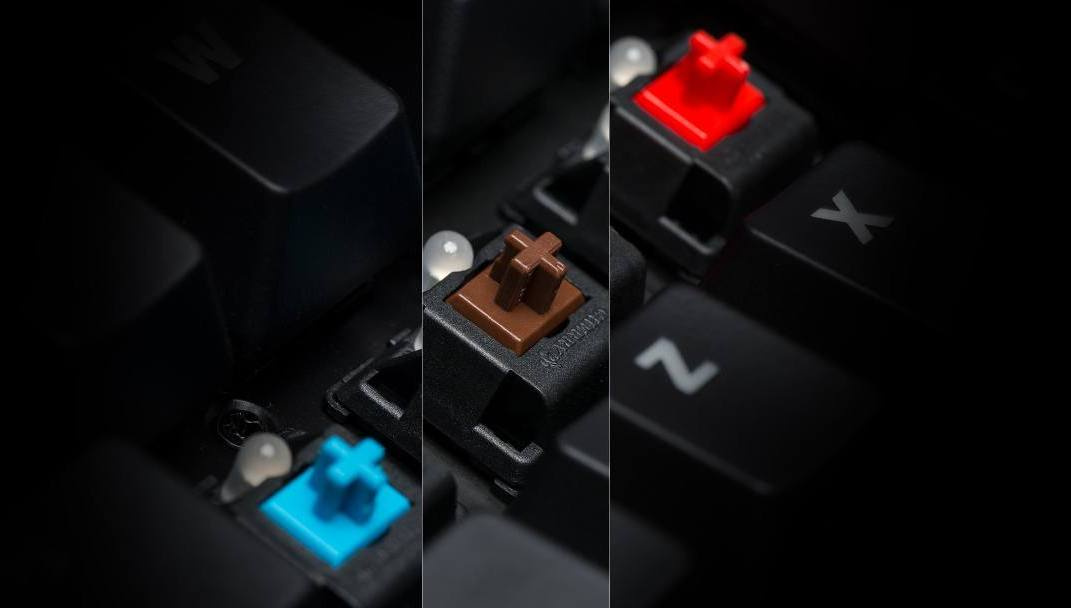
In this case, all the “chips” Alloy FPS remained in place: several types of switches Cherry MX (Red, Brown, Blue amateur "hard", "faster" or "softer") to choose from, steel, even larger steel frame, sticking protection and other gaming attributes. At the exit, we still get effective in games, but a more “civilian” and comfortable in non-tournament use model for almost the same money as the brutally ascetic Alloy FPS.
A proactive response to anyone who, when looking at Alloy Elite, complains that the “HyperX keyboards are getting greasy”. In Alloy FPS Pro even the holy of holies is eliminated - digital block or NumPad! And, while the accountants for such blasphemy throw glasses and boxes from under 1C in our direction, we have time to explain what dictates this construction.

This type of keyboard is called "tenkeyless" (ahem, "keyless") or simply TKL-keyboard. In part, it has become widespread due to laptops, where the usabilityist has fallen into the digital unit, but many gamers also love keyboards without a “calculator” - especially in shooters. In the midst of a match, when you merge with the keyboard together on nervous grounds, you “fix” it on the table, and every now and then you move the mouse over the table, the digital block, like a useless set of keys, takes up precious space. Without it, much more convenient.

The second reason is compactness. The keyboard without the NumPad is not just small, but very small. Less weight, easier to transport with the "adult" set of all gaming functions, like in full-size models. Therefore, Alloy FPS Pro is useful to anyone who is involved in counting and entering numbers much less often than intensive, “mobile” shooters for peripheral devices.
HyperX Alloy Elite with Cherry MX Blue, Red and Brown switches will go on sale in Russia at the end of the summer of 2017 at a price of 9,990 rubles. This is only slightly more expensive than the “simple” Alloy FPS - the extra charge for comfortable “dopes” is justified, especially since you will not stick to either the design or the warranty (2 years, by the way).
Alloy FPS Pro is more affordable - only 6 990 rubles. Less keys - lower price, more space for maneuvers with the mouse. A good reason to save if you use the keyboard much more often in games than in office applications.
Switches: Cherry MX
Type: mechanical
Backlight: single color (red)
Light effects: 6 modes and 4 brightness levels
Connection type: USB 2.0 (two USB connectors)
"Through" USB 2.0: yes
Poll frequency: 1000 Hz
Anti-ghosting: 100 %
Key Rollover: N-key mode
Multimedia control: yes
Game mode: yes
OS support: Windows 10, 8.1, 8, 7
Cable type: non-removable, braided
Cable length: 1.8 m
Dimensions: 444 mm x 226.8 mm x 36.3 mm
Weight (keyboard and cable): 1467 g
Switches: Cherry MX
Type: mechanical
Backlight: single color (red)
Light effects: 6 modes and 5 brightness levels
Connection type: USB 2.0 (one USB connector)
Poll frequency: 1000 Hz
Anti-ghosting: 100%
Key Rollover: N- mode key
Media control: yes
Game mode: yes
OS support: Windows 10, 8.1, 8, 7
Cable type: removable, braided
Cable length: 1.8 m
Dimensions (WGW): 359 mm x 130 mm x 34.5 mm
Weight (keyboard and cable): 900 g
Subscribe and stay with us - it will be interesting!
For more information about Kingston and HyperX products, visit the company's official website . In choosing your kit HyperX help page with visual aids .
HyperX Alloy Elite - a rare cocktail "comfortable, gaming, without the" whistles ""
The first gaming keyboard HyperX, Alloy FPS, simply had to not go out "lump". Therefore, instead of amateur performances and “whistles”, the Kingston division designed the model as straightforward and harsh as an armored train. Only the necessary keys, no rich design forms - square, practice, gut. Fans of games like this design - no quirks, which would need to get used to, and a minimum of space when carrying (in someone else's LAN party with their steel walk).
But they do not want the maximum hardcore from their “keyboard mice”, and the home computer very rarely lives with the same, the only correct settings, like a PC in competitions. And find the combination Fn + F10, when the 7-channel system at maximum volume hits the web-site with the phrase “IEY GAMES! CHALENGE EVRIFING !!! ”is very difficult. Yes, and the edges of the keyboard flush with the body do not allow to relax and “lie down” with your wrists in the lazy mode of PC operation. You start to think on the topic of "sport vs comfort."
In order to choose between such matters it was not necessary, HyperX released Alloy Elite. The main changes are ergonomic:
• Soft attachment. Chelyabinsk gamers are so harsh that they bend a steel base under their wrists, but, seriously, the wrist rest area comes in handy in everyday use.
• Volume control wheel . So that you do not have to make a "bang-bang-bang" combination of Fn + F10 / F11. Analogous and convenient - you can at one stroke set the desired level in the speakers or headphones.
• Audio player control unit . Change tracks, pause and instantly turn off the volume. They are located instantly and do not distract, like global keyboard shortcuts from the Ctrl + Alt + piped into the player, to something else.
• Pass-through full-sized USB 2.0 port. It is useful to connect a mouse, drives or mobile phone. Previously, Alloy FPS had a USB connector for charging a smartphone, but the system unit in desktops is often located in the “hard-to-reach places” of the computer desk, so you need good reasons to access the ports on the case.
• Separate keys for switching on “game mode”, brightness control and backlight type . It took a minimum of time to turn off the “Windows” key, activate the “game” backlight (only WASD, numeric keys and Ctrl) or 5 more modes. As for the intensity adjustment of the LEDs. It is easy to find them even with peripheral vision - they are “cut off” by the red line from the F-keys. And beautiful and useful.
• Less “lean” design. If the keyboard is not aimed at carrying, there is no need to “cut the side of it” as much as possible. Yes, and a removable cable is not needed: connect it once and use it.
In this case, all the “chips” Alloy FPS remained in place: several types of switches Cherry MX (Red, Brown, Blue amateur "hard", "faster" or "softer") to choose from, steel, even larger steel frame, sticking protection and other gaming attributes. At the exit, we still get effective in games, but a more “civilian” and comfortable in non-tournament use model for almost the same money as the brutally ascetic Alloy FPS.
HyperX Alloy FPS Pro - removed everything that could interfere with shooting
A proactive response to anyone who, when looking at Alloy Elite, complains that the “HyperX keyboards are getting greasy”. In Alloy FPS Pro even the holy of holies is eliminated - digital block or NumPad! And, while the accountants for such blasphemy throw glasses and boxes from under 1C in our direction, we have time to explain what dictates this construction.
This type of keyboard is called "tenkeyless" (ahem, "keyless") or simply TKL-keyboard. In part, it has become widespread due to laptops, where the usabilityist has fallen into the digital unit, but many gamers also love keyboards without a “calculator” - especially in shooters. In the midst of a match, when you merge with the keyboard together on nervous grounds, you “fix” it on the table, and every now and then you move the mouse over the table, the digital block, like a useless set of keys, takes up precious space. Without it, much more convenient.
The second reason is compactness. The keyboard without the NumPad is not just small, but very small. Less weight, easier to transport with the "adult" set of all gaming functions, like in full-size models. Therefore, Alloy FPS Pro is useful to anyone who is involved in counting and entering numbers much less often than intensive, “mobile” shooters for peripheral devices.
When, how much?
HyperX Alloy Elite with Cherry MX Blue, Red and Brown switches will go on sale in Russia at the end of the summer of 2017 at a price of 9,990 rubles. This is only slightly more expensive than the “simple” Alloy FPS - the extra charge for comfortable “dopes” is justified, especially since you will not stick to either the design or the warranty (2 years, by the way).
Alloy FPS Pro is more affordable - only 6 990 rubles. Less keys - lower price, more space for maneuvers with the mouse. A good reason to save if you use the keyboard much more often in games than in office applications.
What are Cherry?
| Specifications | Brown | Blue | Red |
| Trigger force | 45 sn | 50 sn | 45 sn |
| Stroke length | 4 mm | 4 mm | 4 mm |
| Tactile feedback | 55 sn | 60 sn | n / a |
| Life cycle | 50 million clicks | 50 million clicks | 50 million clicks |
Detailed Specifications
HyperX Alloy Elite features:
Switches: Cherry MX
Type: mechanical
Backlight: single color (red)
Light effects: 6 modes and 4 brightness levels
Connection type: USB 2.0 (two USB connectors)
"Through" USB 2.0: yes
Poll frequency: 1000 Hz
Anti-ghosting: 100 %
Key Rollover: N-key mode
Multimedia control: yes
Game mode: yes
OS support: Windows 10, 8.1, 8, 7
Cable type: non-removable, braided
Cable length: 1.8 m
Dimensions: 444 mm x 226.8 mm x 36.3 mm
Weight (keyboard and cable): 1467 g
HyperX Alloy FPS Pro features:
Switches: Cherry MX
Type: mechanical
Backlight: single color (red)
Light effects: 6 modes and 5 brightness levels
Connection type: USB 2.0 (one USB connector)
Poll frequency: 1000 Hz
Anti-ghosting: 100%
Key Rollover: N- mode key
Media control: yes
Game mode: yes
OS support: Windows 10, 8.1, 8, 7
Cable type: removable, braided
Cable length: 1.8 m
Dimensions (WGW): 359 mm x 130 mm x 34.5 mm
Weight (keyboard and cable): 900 g
Subscribe and stay with us - it will be interesting!
For more information about Kingston and HyperX products, visit the company's official website . In choosing your kit HyperX help page with visual aids .









