August 27, 2009 at 08:35
ScottGu on VS 2010 and .NET 4.0: Project Templates in VS 2010
- Transfer

This is the second article in a series of articles about the upcoming release of VS 2010 and .NET 4. [ first article on the hub ]
This time we will talk about another small, but it seems to me, interesting change that will appear in VS 2010 and .NET 4. The change concerns templates when creating ASP.NET projects, which now contain both “empty” ASP.NET projects and new templates with a set of basic functionality. These templates can help you get started creating new applications.
Creation of new projects
When you use the menu item File-> New Project or File-> New Web Site in VS 2010, you will see the “New Project” dialog, as shown in the picture below, which allows you to filter the list by language and type of application and select various project templates to create a new project:
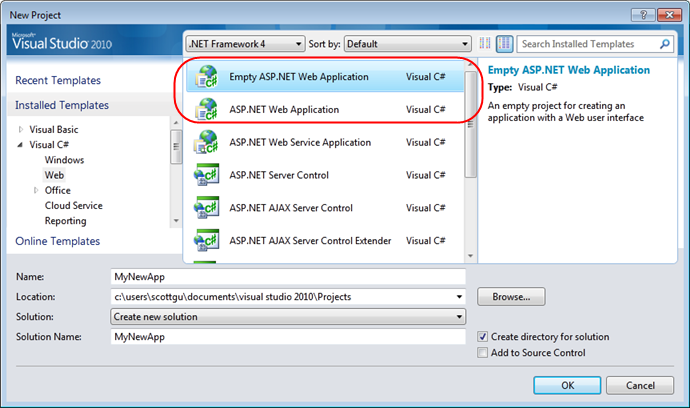
VS 2010 contains a new “empty” project template for creating new ASP.NET applications, which will allow you to create minimal start-up projects. In my previous article there is a screenshot that shows that it will create the “Empty ASP.NET Web Application” template if you use it.
Creating New Projects Using the Starter Template
VS 2010, among other things, contains start-up project templates that allow you to create new ASP.NET applications with some ready-made markup structure, with a set of CSS and already implemented common functionality.
For the first time we tried this solution for projects based on ASP.NET MVC 1.0, the template for this project contains a master page, CSS file, JavaScript libraries, authorization system, “home” and “about” pages. In VS 2010, this idea was also implemented for new projects such as ASP.NET Web Forms.
When you select the default ASP.NET Web Application template, you will find that the new ASP.NET Web Forms project is created with a ready-made set of directories and files:
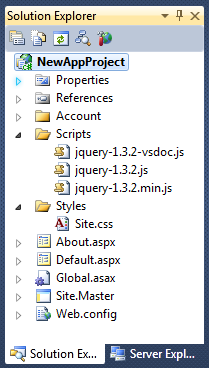
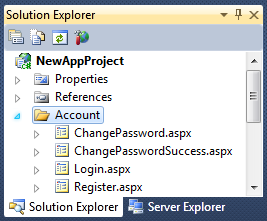
The created project contains a Site.Master master page that defines the basic layout for the entire site (with headers, footer, etc.) and which uses a CSS file for all styles. In addition, the project has a “Scripts” folder that contains jQuery (ASP.NET AJAX is accessible through the script manager element). The project also contains the pages “default.aspx” and “about.aspx” in the root directory, which are based on the master page and contain some basic content. There is also an Account folder in the project, which contains pages with the basic functionality for authorizing and registering users:
you can start the project without writing a line of code or any configuration and get a nice working site:
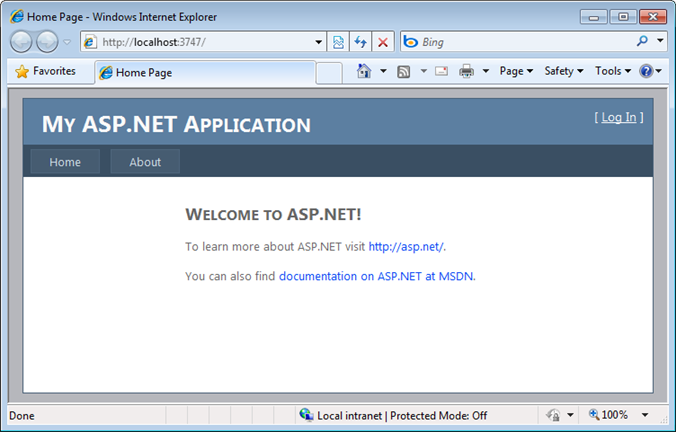
This site fully supports forms-based authentication and supports the ASP.NET Membership system for managing passwords for users:
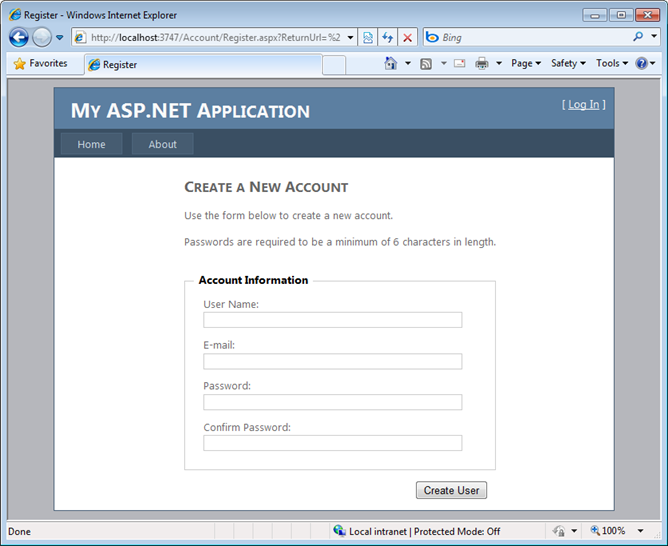
All the design and content of the site is CSS-based and the site uses new useful things from ASP.NET 4, such as improved work with client IDs ( no more names like "ctrl_ *", instead ASP.NET 4 gives you full control over the naming of controls) and CSS-based rendering of controls, instead of table-based ones, as before. I will cover these new features and changes in Web Forms more fully in the following articles in this series (with descriptions of many other features that have been added).
Online Template Gallery
In addition to the built-in templates, VS 2010 supports the ability to search for additional templates in the online gallery inside the dialogs “New Project” and “Add Item”. You can put your own templates in the gallery, evaluate other people's templates and write reviews for them. It is possible to search and filter the list of templates by project type, keyword and community rating. By choosing a template, you can easily download it and install it locally through the dialog:
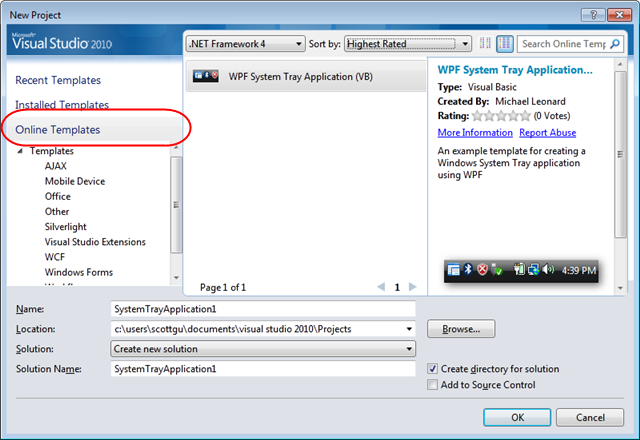
We hope that this functionality will contribute to the creation of a mass of useful templates for starting projects (not only for the web, but also for other areas), so that people can easily find and quickly get a solution for their tasks.
I hope this article has been helpful to you,
Scott.
PS In addition to blogging, I often use Twitter to quickly post posts and share links. You can follow me on Twitter: www.twitter.com/scottgu (@scottgu is my Twitter name).