 April 26, 2009 at 17:32
Muris nonpenis arcus *
* Arched tailless mouse (free translation into Latin)
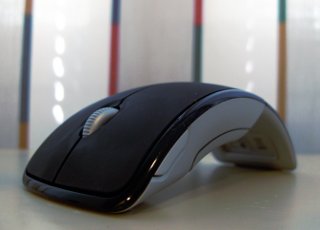 The attitude towards Microsoft products is, without a doubt, ambiguous. This is especially true of the results of the "software" department of the company (already Vista did not scold only lazy, probably). However, the devices developed in the "hardware" division often turn out successful, pleasing the eye with design, and hands with convenience. It's no accident that Microsoft Natural Keyboard is considered almost the standard of ergonomic keyboards.
Microsoft ® Arc TMThe Mouse (as it is written on the packaging), which will be discussed here, attracts the eye precisely due to the unusual design. And it is the unusual device of the mouse that makes one doubt its convenience for everyday use: after all, holding such a mouse is most likely inconvenient, and the center of mass is unusually located, and in general. So it seems at first glance. Is this really what I felt from my own experience.
I note right away that everything written below is only a personal impression of the work. My “review” does not pretend for completeness and comprehensiveness, and there will not be any description of all kinds of tests with accurate results in it, as well as mass-dimensional characteristics. I think that all of this is full in other reviews.
 The day I bought Arc Mouse, I was looking for a mouse for constant use with a laptop, which, by the way, I constantly drag from place to place. Naturally, I was looking for a device with the expectation that it could be easily transported, that is, it did not take up much space in a laptop bag. It would seem that small “notebook” mice are now in bulk in any store. However, I also wanted the mouse to be convenient to use, and the “notebook” rodents for me personally were not very convenient, and precisely because of their miniature size.
Combine incompatible (miniaturization and comfort at work) just allows Arc Mouse. The fact is that when folded, it becomes even smaller than a regular “laptop” mouse. This allows you to put it into a bag with magnetic clasps that comes with it without any problems and take it with you on the road. After turning on, which consists in unfolding the “flip”, Arc Mouse grows both in height and in length, approaching in size to its more familiar and convenient “desktop” brothers. The suspicion arising from visual contact that the Arc Mouse would be uncomfortable to hold because of an empty middle was not justified. The fingers - the holders (big and nameless in my case) fall just on the ledge in the front, where, by the way, the entire electronic-electric filling of the mouse is located, and do not slip on it.
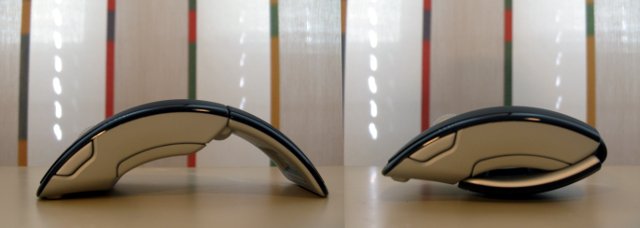 Working and off state of Arc Mouse. Profile view.
Nice Arc Mouse and touch. The top material is fashionable plastic that seems velvety to the touch. However, from experience with other "velvet" devices, I imagine what such plastic tends to turn after some time of active use of things. Already now on the buttons there are noticeable small scuffs from the fingers, which, as you know, are forever covered with something: either grease, then later, or even one and the other at once. What “velvet” will turn into in about a year - we'll see.
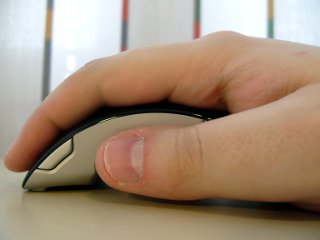 In terms of its functional filling, Arc Mouse does not stand out: the optical sensor, two buttons, a push wheel, one additional button on the side, which is useless, in my opinion. This side button is so far forward that it’s very uncomfortable to press it with your thumb, as apparently was supposed by the developers: it simply doesn’t reach it.
The first few hours of working with Arc Mouse went on getting used to it. Since this mouse is lighter than the one I used before, it wasn’t very easy at first to accurately and quickly point the cursor to the right place: it constantly flew over. As soon as the hand got used to the new weight, everything returned to normal. Now there are no problems, it works quite quickly and conveniently. At the same time, I liked that Arc Mouse works on almost any surface except glass, perhaps.
With the connection to the laptop, of course, no problems. The transmitter at Arc Mouse is very small, which is good news. On the other hand, the transmitter is not so small that you can just leave it stuck in the USB port and forget about it, as I did, for example, with the mobiledata UBT 207 Bluetooth adapter . Therefore, there is a legitimate fear in its safety, because a small accessory is very easy to lose. Fortunately, the developers thought over this moment. For carrying, the transmitter is attached to the underside of the mouse flip using a magnet, entering a recess specially designed for it. After switching off, the transmitter is in a “cocoon” and cannot get away anywhere, especially if you carry the mouse in a special bag, which also has magnetic fasteners. However, I already spoke about this.
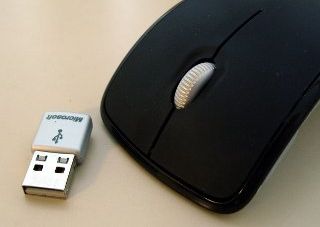

As an additional "bun" to Arc Mouse comes MS IntelliPoint - a sort of center for controlling mouse behavior. Of course, it is not specific to this model specifically, but is used with almost the entire MicroSoft mouse family, however, I cannot but mention it here. The fact is that IntelliPoint offers such options for customizing the action of buttons, which I have not seen more than any manufacturer. Here and the macro editor, and some specific game modes, and separate settings for different programs. But most of all I liked the “ergonomic scrolling”. When you call this function, the system displays a grid with windows of all open programs, which allows you to quickly switch between them. Initially, “scrolling” is triggered when the wheel is clicked; I personally moved it to the side button.
 Ergonomic Scrolling in action.
In summary, I’ll say that I’m not at all disappointed with Arc Mouse. Easy to use, convenient to transport, without unnecessary "bells and whistles". Exactly what you need for everyday work. In addition to this, Arc Mouse looks very “stylish”, which only adds to the pleasure of working with it.
PS I know that everyone likes photos of devices taken in a studio with a well-exposed light, beautifully clipped and adjusted in a graphical editor. Such photos of Arc Mouse , of course, are. But it seems to me that photographs taken in real life become more vibrant. And in the editor I still rules them. ;)
 The attitude towards Microsoft products is, without a doubt, ambiguous. This is especially true of the results of the "software" department of the company (already Vista did not scold only lazy, probably). However, the devices developed in the "hardware" division often turn out successful, pleasing the eye with design, and hands with convenience. It's no accident that Microsoft Natural Keyboard is considered almost the standard of ergonomic keyboards.
 Microsoft ® Arc TMThe Mouse (as it is written on the packaging), which will be discussed here, attracts the eye precisely due to the unusual design. And it is the unusual device of the mouse that makes one doubt its convenience for everyday use: after all, holding such a mouse is most likely inconvenient, and the center of mass is unusually located, and in general. So it seems at first glance. Is this really what I felt from my own experience.
I note right away that everything written below is only a personal impression of the work. My “review” does not pretend for completeness and comprehensiveness, and there will not be any description of all kinds of tests with accurate results in it, as well as mass-dimensional characteristics. I think that all of this is full in other reviews.
 The day I bought Arc Mouse, I was looking for a mouse for constant use with a laptop, which, by the way, I constantly drag from place to place. Naturally, I was looking for a device with the expectation that it could be easily transported, that is, it did not take up much space in a laptop bag. It would seem that small “notebook” mice are now in bulk in any store. However, I also wanted the mouse to be convenient to use, and the “notebook” rodents for me personally were not very convenient, and precisely because of their miniature size.
Combine incompatible (miniaturization and comfort at work) just allows Arc Mouse. The fact is that when folded, it becomes even smaller than a regular “laptop” mouse. This allows you to put it into a bag with magnetic clasps that comes with it without any problems and take it with you on the road. After turning on, which consists in unfolding the “flip”, Arc Mouse grows both in height and in length, approaching in size to its more familiar and convenient “desktop” brothers. The suspicion arising from visual contact that the Arc Mouse would be uncomfortable to hold because of an empty middle was not justified. The fingers - the holders (big and nameless in my case) fall just on the ledge in the front, where, by the way, the entire electronic-electric filling of the mouse is located, and do not slip on it.

Nice Arc Mouse and touch. The top material is fashionable plastic that seems velvety to the touch. However, from experience with other "velvet" devices, I imagine what such plastic tends to turn after some time of active use of things. Already now on the buttons there are noticeable small scuffs from the fingers, which, as you know, are forever covered with something: either grease, then later, or even one and the other at once. What “velvet” will turn into in about a year - we'll see.
 In terms of its functional filling, Arc Mouse does not stand out: the optical sensor, two buttons, a push wheel, one additional button on the side, which is useless, in my opinion. This side button is so far forward that it’s very uncomfortable to press it with your thumb, as apparently was supposed by the developers: it simply doesn’t reach it.
 The first few hours of working with Arc Mouse went on getting used to it. Since this mouse is lighter than the one I used before, it wasn’t very easy at first to accurately and quickly point the cursor to the right place: it constantly flew over. As soon as the hand got used to the new weight, everything returned to normal. Now there are no problems, it works quite quickly and conveniently. At the same time, I liked that Arc Mouse works on almost any surface except glass, perhaps.
With the connection to the laptop, of course, no problems. The transmitter at Arc Mouse is very small, which is good news. On the other hand, the transmitter is not so small that you can just leave it stuck in the USB port and forget about it, as I did, for example, with the mobiledata UBT 207 Bluetooth adapter . Therefore, there is a legitimate fear in its safety, because a small accessory is very easy to lose. Fortunately, the developers thought over this moment. For carrying, the transmitter is attached to the underside of the mouse flip using a magnet, entering a recess specially designed for it. After switching off, the transmitter is in a “cocoon” and cannot get away anywhere, especially if you carry the mouse in a special bag, which also has magnetic fasteners. However, I already spoke about this.


As an additional "bun" to Arc Mouse comes MS IntelliPoint - a sort of center for controlling mouse behavior. Of course, it is not specific to this model specifically, but is used with almost the entire MicroSoft mouse family, however, I cannot but mention it here. The fact is that IntelliPoint offers such options for customizing the action of buttons, which I have not seen more than any manufacturer. Here and the macro editor, and some specific game modes, and separate settings for different programs. But most of all I liked the “ergonomic scrolling”. When you call this function, the system displays a grid with windows of all open programs, which allows you to quickly switch between them. Initially, “scrolling” is triggered when the wheel is clicked; I personally moved it to the side button.

In summary, I’ll say that I’m not at all disappointed with Arc Mouse. Easy to use, convenient to transport, without unnecessary "bells and whistles". Exactly what you need for everyday work. In addition to this, Arc Mouse looks very “stylish”, which only adds to the pleasure of working with it.
PS I know that everyone likes photos of devices taken in a studio with a well-exposed light, beautifully clipped and adjusted in a graphical editor. Such photos of Arc Mouse , of course, are. But it seems to me that photographs taken in real life become more vibrant. And in the editor I still rules them. ;)









