 March 11, 2009 at 20:01
HTML + CSS guitar chords (without a barre yet)
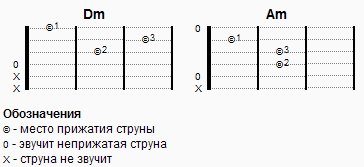 How do guitar chords typically appear on web pages?
 Pictures!
That's just not always convenient, because they have to draw.
So I got the idea:
display guitar chords using only HTML and CSS.
I describe the chord as follows:
Name, column of data on the sound of the string, field for the chord.
The mark indicates the clamped string and the finger pressing it. The values of the remaining labels are shown in the figure.
So far I have only displayed simple chords, chords from the time bar are not displayed.
If someone comes up - you are welcome with suggestions.
Actually the presentation of the guitar neck is made on the lists. 4 lists: 1 - for notes about the sound, 2..4 - for frets.
How it looks in HTML
- 0
- X
- X
- ©1
- ©2
- ©3
Empty lines must be filled with an inextricable space that is not displayed so that normal browsers (FF for example) display these lines.
Making Html Using CSS
  /* Accord */
  div.accord {
      width: 162px;
      margin: 1em;
  	}
   div.accord .accord-name { /* Название аккорда */
      text-align: center;
      font-size: 1.4em;
      font-weight: bold;
   }
      div.accord div.grif { /* Оформляем гриф */
         height: 7.4em;
         overflow: hidden;
      }
         div.accord div.grif .porojek { /* Оформляем порожек между ладами */
            width: 2px;
            height: 6.4em;
            float: left;
            background: black;
            margin: .4em 0 0 0;
         }
         div.accord div.grif .porojek.verx { /* Оформляем первый порожек, он больше в ширину */
            width: 4px;
         }
         div.accord .grif ul { /* одно поле под аккорд */
            width: 46px;
            float: left;
            margin-top: -.6em; /* поле подтягивем вверх */
            line-height: 11px;
         }
            div.accord .grif ul li {
               text-align: center; /* посередине поля расположим метку прижимаемой струны */
               border-bottom: 1px dotted gray; /* рисуем струну */
            }
               div.accord .grif ul li span {
                  position: relative;
                  bottom: -.6em; /* расположим метку посередине струны */
                  font-size: 1em;
                  font: Verdana;
               }
                  div.accord .grif ul li span small { /* номер прижимающего струну пальца */
                     font-size: .9em;
                     position: relative;
                     bottom: 2px; /* сдвинем относительно метки чуть вверх и вправо */
                     left: 1px;
                  }
   div.accord ul { /* отметки перед аккордом о звучании струн */
      width: 12px;
      float: left;
      line-height: 12px;
   }
   #content dl { /* список обозначений */
      font-size: 1.2em;
   }
   #content dl dt {
      font-weight: bold;
   }
To reset browser styles, default is reset.css from Yahoo! UI Library .
Watch the live demo of
UPD: only IE7, FF3, Opera 9
UPD tested. 03/21/2009 : Read the version with barre support in the next topic .









