 December 13, 2008 at 11:04
HP Jornada 690
Inspired by articles about the Toshiba Libretto 50ct, I decided to get myself something so small, cheap, long-playing and with Linux. As a result, the choice fell on the HP Jornada 690:
This miracle looks something like this:
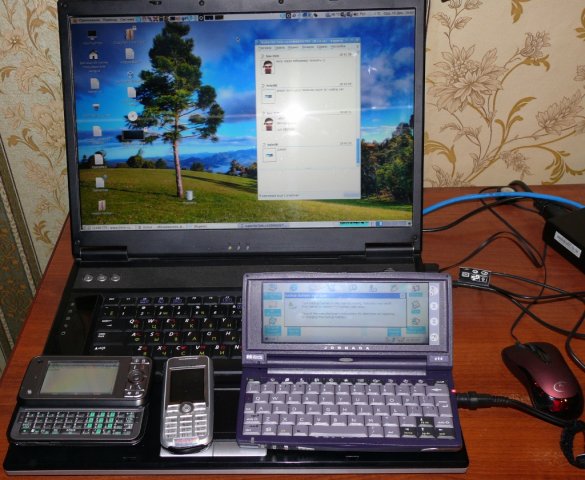
From left to right: Toshiba g900, SE k700i, HP Jornada 690
On board the default WinCE 2.11, I played around one day and bought a 2GB CF card to install Linux. Everything turned out to be extremely simple (http://jlime.com/):
The choice will be given 2 graphic shells, select iceWM and enjoy. There are already several programs on board: AbiWord, GIMP1, several games, a file and archive manager, 2 browsers (Dillo and Konquerror), a mailer and several console applications.
It turned out something like this:
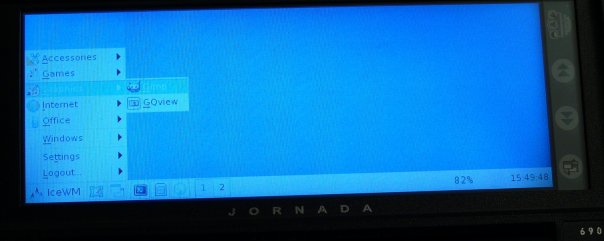
Running iceWM
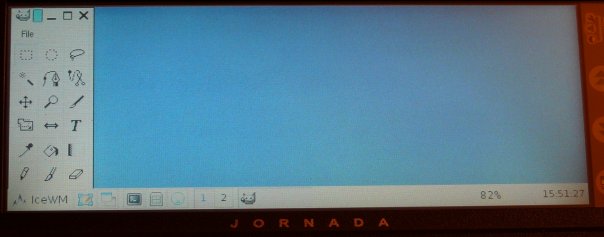
GIMP
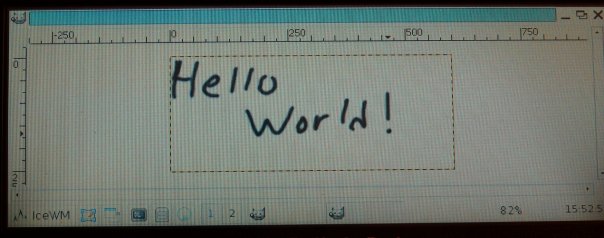
GIMP, I decided to try to draw - the response is quite acceptable and you can use it.
For the sake of experiment I put lighttpd + php5 there, as well as mysql4, but php5 doesn’t have any for mysql, you probably have to reassemble it. Installed ffmpeg and decided to check the performance. The test is a little synthetic and inaccurate, but gives an idea of the power of the device.
For the test, a video clip was taken from the film The Matrix, from the site hpc.ru.
Test video: (3635 frames)
video: 320x240 mpeg4 24fps, 650 kb / s
audio: mp3 44.1 kHz stereo 128 kb / s
I don’t have many computers, so I tested it on a laptop (core duo 1.66ghz * 2 / 2gb + 512swap Mandriva Gnome), with a bunch of running Pribluda, but in general the load of the processor was not higher than 1%.
Convert to:
video: 120x120 mpeg4 24fps, 64 kb / s
audio: mp2 44.1 kHz stereo 64 kb / s
Test results:
Notebook: FPS = 401
Jornada: FPS = 3
Many people asked me why I need such a device, because it is old and useless to anyone. It’s probably a technorandofetish or something like that. But as a result, I got a very working keyboard small device that works for about 5 hours for only 3000 rubles (not including the power supply and a 2Gb card).
So far, I can’t say anything about the modem, the com port and the infrared port, since I did not dig in this direction. I'm going to buy a PCMCIA Ethernet / wifi card, then it will be more interesting.
Either the hands are not the ones that the IR does not work as it should. The irda ircomm module is loaded in the kernel, there is ircomm0 ... N in the list of devices, I tried everything that I could, launched irdadump (as I understand the ulite telling me that it flows into the infrared port) - sent it from the phone, tried several remotes from the TV, no result: "0 batch accepted."
In WinCE I tried to configure Dial-Up through the IR court, also no result: the phone is silent. The only time the infrared port of the phone reacted was when I started a program in WinCE, as I understood for synchronization, but the phone didn’t understand what they wanted from it. If someone can tell something - tell me.
UPD (2009-03-28) I didn’t restrain myself, I registered in the crown so that I wrote uptime every minute ... the last line of the log:
for those who did not understand, the device lived for 10 hours and 58 minutes, of course the test is a bit wrong, since the device was not loaded with anything + after 5 hours (periodically pressed the buttons and on the screen so that the backlight that was at the maximum was not cut down) was already gone I’m going to sleep, so I really think about 7 hours (the battery is 99 years old), cool =) Today I’ll start coding some kind of movie to find out how much the load on the battery affects battery life.
UPD (2009-04-19) Made support for the Russian layout and finally sent the ordered Ethernet and WiFi cards , updated AbiWord, Dillo, installed Gaim, Gnumeric, the dandy emulator - below are screenshots (see! = Read):
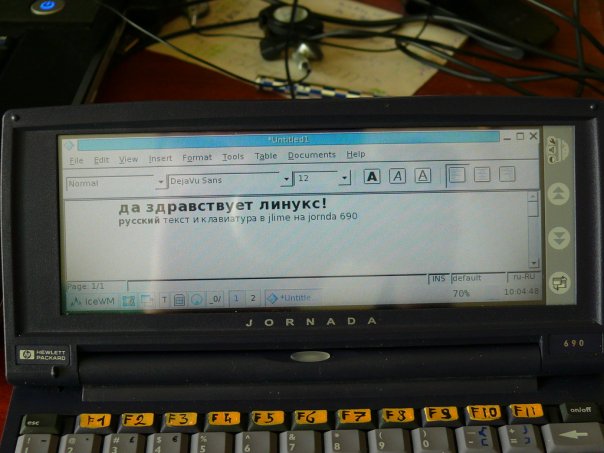
Russian keyboard and AbiWord

We ping ya.ru through an Ethernet card
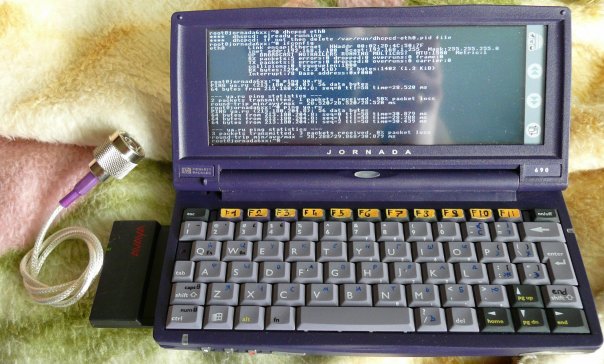
We ping ya.ru via WiFi (+ WPA 64bit encryption)

Good old Duke Newham 3D

MegaMan2
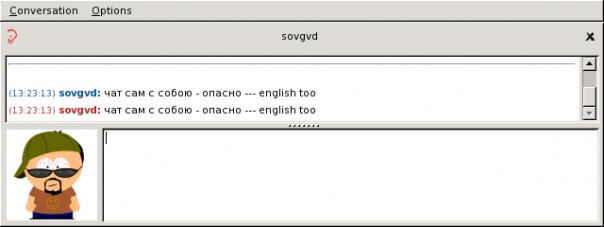
Gaim and XMPP

Konqueror and Google
Now, at least not carrying a 4..5kg laptop for http, smb, ftp and dhcp =)
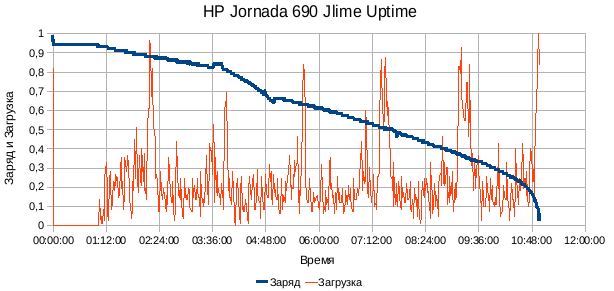
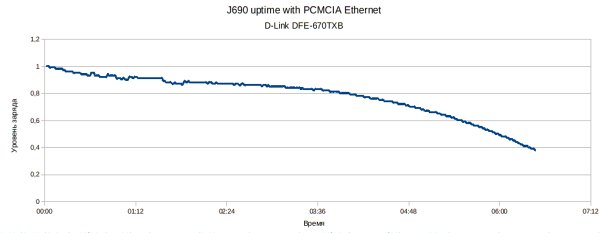
UPD (2009-05-09): test battery life with an inserted (and naturally active) Ethernet adapter - 6:30, charge of 37% - it was further cut down, apparently there was no energy to power the device itself and the card. Below chart:
- Processor: Hitachi 7709 (SH3) 133 MHz
- Screen: Color TFT (actually more like STN) 640 x 240 pixels 64k colors
- Batteries, power: Lithium-Ion battery, approximately 8 hours of operation (the battery is old, so it holds for 4 ... 5 hours)
- Expansion Slots: PC Card Type II (16 bit), CompactFlash Type I
- Communications: IrDA, COM port (no lanyard), modem
This miracle looks something like this:
From left to right: Toshiba g900, SE k700i, HP Jornada 690
Install Linux
On board the default WinCE 2.11, I played around one day and bought a 2GB CF card to install Linux. Everything turned out to be extremely simple (http://jlime.com/):
- inserted the card into the card reader,
- divided into 3 sections: FAT16 (26mb), ext2 (1800mb), swap (all that remains is about 150mb)
- on FAT16 loaded the bootloader, config and zImage, tweaked the config a bit, changed root = / dev / hda2, to root = / dev / sda2, otherwise during boot Kernel Panic
- on ext2, the section rewrote everything from the archive downloaded from jlime.com
- we insert the card into the device, go to StorageCard2 on the device, start shlo.exe, agree with the license and that all information will be deleted (but we did not create anything to delete something) and wait for everything to load
The choice will be given 2 graphic shells, select iceWM and enjoy. There are already several programs on board: AbiWord, GIMP1, several games, a file and archive manager, 2 browsers (Dillo and Konquerror), a mailer and several console applications.
It turned out something like this:
Running iceWM
GIMP
GIMP, I decided to try to draw - the response is quite acceptable and you can use it.
For the sake of experiment I put lighttpd + php5 there, as well as mysql4, but php5 doesn’t have any for mysql, you probably have to reassemble it. Installed ffmpeg and decided to check the performance. The test is a little synthetic and inaccurate, but gives an idea of the power of the device.
Test
For the test, a video clip was taken from the film The Matrix, from the site hpc.ru.
Test video: (3635 frames)
video: 320x240 mpeg4 24fps, 650 kb / s
audio: mp3 44.1 kHz stereo 128 kb / s
I don’t have many computers, so I tested it on a laptop (core duo 1.66ghz * 2 / 2gb + 512swap Mandriva Gnome), with a bunch of running Pribluda, but in general the load of the processor was not higher than 1%.
Convert to:
video: 120x120 mpeg4 24fps, 64 kb / s
audio: mp2 44.1 kHz stereo 64 kb / s
Test results:
Notebook: FPS = 401
Jornada: FPS = 3
In conclusion
Many people asked me why I need such a device, because it is old and useless to anyone. It’s probably a technorandofetish or something like that. But as a result, I got a very working keyboard small device that works for about 5 hours for only 3000 rubles (not including the power supply and a 2Gb card).
So far, I can’t say anything about the modem, the com port and the infrared port, since I did not dig in this direction. I'm going to buy a PCMCIA Ethernet / wifi card, then it will be more interesting.
IR port (added)
Either the hands are not the ones that the IR does not work as it should. The irda ircomm module is loaded in the kernel, there is ircomm0 ... N in the list of devices, I tried everything that I could, launched irdadump (as I understand the ulite telling me that it flows into the infrared port) - sent it from the phone, tried several remotes from the TV, no result: "0 batch accepted."
In WinCE I tried to configure Dial-Up through the IR court, also no result: the phone is silent. The only time the infrared port of the phone reacted was when I started a program in WinCE, as I understood for synchronization, but the phone didn’t understand what they wanted from it. If someone can tell something - tell me.
UPD (2009-03-28) I didn’t restrain myself, I registered in the crown so that I wrote uptime every minute ... the last line of the log:
23:39:00 up 10:58, 1 user, load average: 0.69, 0.42, 0.23for those who did not understand, the device lived for 10 hours and 58 minutes, of course the test is a bit wrong, since the device was not loaded with anything + after 5 hours (periodically pressed the buttons and on the screen so that the backlight that was at the maximum was not cut down) was already gone I’m going to sleep, so I really think about 7 hours (the battery is 99 years old), cool =) Today I’ll start coding some kind of movie to find out how much the load on the battery affects battery life.
UPD (2009-04-19) Made support for the Russian layout and finally sent the ordered Ethernet and WiFi cards , updated AbiWord, Dillo, installed Gaim, Gnumeric, the dandy emulator - below are screenshots (see! = Read):
Russian keyboard and AbiWord
We ping ya.ru through an Ethernet card
We ping ya.ru via WiFi (+ WPA 64bit encryption)
Good old Duke Newham 3D
MegaMan2
Gaim and XMPP
Konqueror and Google
Now, at least not carrying a 4..5kg laptop for http, smb, ftp and dhcp =)
UPD (2009-05-09): test battery life with an inserted (and naturally active) Ethernet adapter - 6:30, charge of 37% - it was further cut down, apparently there was no energy to power the device itself and the card. Below chart:









