November 6, 2008 at 07:50
Moving from one development planning tool to another - from XPlanner to Redmine
Moving from one development planning tool to another - from XPlanner to Redmine
“Mice cried, pricked, but continued to eat a cactus,” is my opinion on XPlanner users.
Preamble
It so happened that initially our team used XP and generally Agile development. XPlanner was originally chosen - it’s just sharpened for iterative software development.
Over time, development processes have changed, and it is less and less like those that were originally.
And only recently I managed to drag everyone to Redmine.
<offtopic> Personally, XPlanner always annoyed me ("annoyed" - the most accurate word) - too much had to be done to get what I wanted. More precisely, not even the desired - but the possible. Too incomprehensible, inconvenient and inhuman interface. Elementary things required tremendous effort from me and brought little benefit.
About XPlanner
Xplanner — XPlanner is a project planning and tracking tool for eXtreme Programming (XP) teams.Xplanner is a software tool for planning and managing tasks for teams working in the style of extreme programming. The project ceased to be updated in May 2006.
XP has several principles, some of them find support in XPlanner, namely:
- The software development process consists of short iterations (usually one or two weeks) during which it is necessary to complete a fairly complete block of product functionality. If it turns out that it is not possible to finish on time, it is necessary to reduce functionality, but not to shift the time.
- The blocks of functionality are divided into "stories" (story) - for each subsystem, or module - its own story is written. Stories are discussed at meetings and recorded.
- After this, the stories are divided into tasks that are assessed before starting development.
For this, XPlanner has the appropriate tools - projects consisting of iterations, iterations of stories, stories of tasks. There are performance metrics. Despite the large list of XPlanner features, in our team, in fact, only two were used:
- Dividing a process into iterations, stories, tasks.
- Time tracking.
Cons XPlanner (in my humble opinion)
In fact, it has evolved from a planning tool to a time tracking tool. Because how to plan every week, transfer tasks from iteration to iteration, from history to history, it was a very long time. But worse (from my point of view), he could not perform elementary things that were emulated by the hands of developers. For example, there were the following strange processes:
- Because XPlanner does not support notifications in the mail, each developer was obliged to write a letter of the form “The task completed
". - If, during development, the programmer realizes that he will not meet the deadline, he changes the score in XPlanner and (you guessed it?) - yes! writes a letter to the mailing list: “the assessment of the problem has been changed”.
Friends say that there are notifications in XPlanner, but I can’t say anything exactly about them - Every evening, the developer writes to the newsletter a report on the tasks (how much time was spent and what is closed).
- When committing, Id of the task was written as a comment. To find out the essence of the task by commit, I had to copy Id, open a browser and crawl in XPlanner - see.
- In addition, since XPlanner does not support task statuses, therefore, so that the tester knows which tasks have not yet been tested, the "Testing" history was started. The developer, having completed the task, in addition to the letter was obliged to go in and add a link to the task done in that story.
- The tester, in turn, was forced to view them on the subject of "but if there was anything new."
- Comments on the tasks were not used - everyone added them directly to the text of the task without forgetting the weighty “Vasya”.
- Tasks do not have priorities, therefore they were called like this: "(0) Error in modules 1", "(1) Not very important error."
- Tasks do not have additional statuses and are related to tasks (blocked, duplicates). Therefore, in the name of the problem it was possible to meet the construction "LOCK".
- There is no common pool of tasks, and tasks in development. For the pool, "Infinity Iteration" was used. From where every week iterations were not conveniently typed.
- There are no convenient things: filters for tasks (it’s very important! You can’t see statistics of all important errors for all projects), color schemes (so that tasks of priority 0 are immediately evident).
- No workflow. Anyone can create a task; anyone can close it. It is impossible to track whether it is tested or not. (But what about those who have a rather rigid development process and have a lot of states: created, approved, executed, blocked, tested, closed, returned, rejected?).
pros
- The development language is Java, in which we develop our products, which made it possible in principle to modify it ourselves, a couple of small things really
Now about Redmine
Redmine is a flexible project management web application. Written using Ruby on Rails framework, it is cross-platform and cross-database.Redmine is a flexible software development management tool. It is developed on the RoR platform and can use various databases (SQLite, MySQL, PostgreSQL).
At first glance, I liked Redmine because it allows you to flexibly configure almost everything from the interface, because it already has a lot of useful things, but at the same time there is nothing super-unnecessary.
Redmine Quick Features
- Reference books. A directory is a list of unmodifiable service or user entities that can be changed from the interface. You can configure the following things:
- List of task types (“Error”, “Refactoring”, “Support”, “New functionality”, etc.)
- List of task statuses (“Created”, “Running”, “Blocked”, etc.)
- Possible roles of employees in projects (Manager, Developer, Tester)
- Priorities of tasks.
- Categories (defined within the framework of projects). In fact - modules or subsystems within the framework of the project for additional task splitting
- Flex-attributes - for the task, project, user and time report, you can add fields: For example, “Location in the office” for the user, or “contact person on the client side” for the project.
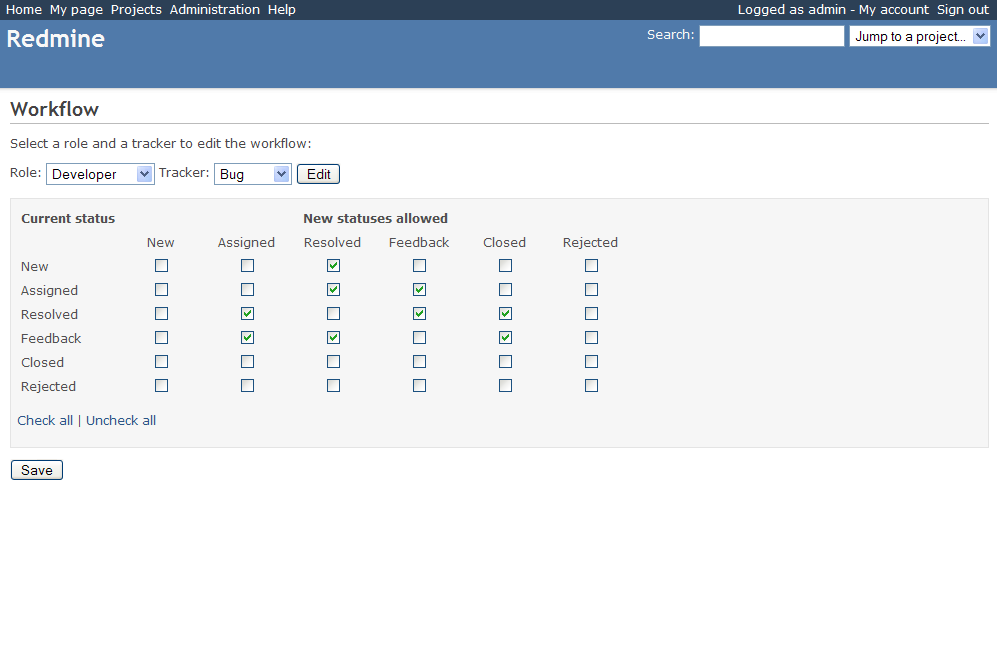
- Workflow of tasks - the relationship of status — type of task — role — possible transition. It determines who, in what state (tasks (:), what type of tasks it can translate into what status. For example: Only “manager” and “customer representative” can start tasks, moreover, “customer representative” only tasks like “error”. Finally Only a “tester” can close tasks, etc.
- Multiprojectivity. Unlike the popular Trac , Redmine out of the box supports multi-design. In addition, projects can be nested. The usage scenario, for example, is as follows: Project “CRM company name” - a project for a product and CRM system implementations. Nested projects "Implementation of CRM in the" Horns "", "Implementation of CRM in the" Hooves "."
- Role-based system of rights. Roles, besides participating in workflow, may have various rights in the system. It is configured by arranging several dozen checkmarks. Redmine can also be used as an external portal for customers - you just need to configure the "Client" role.
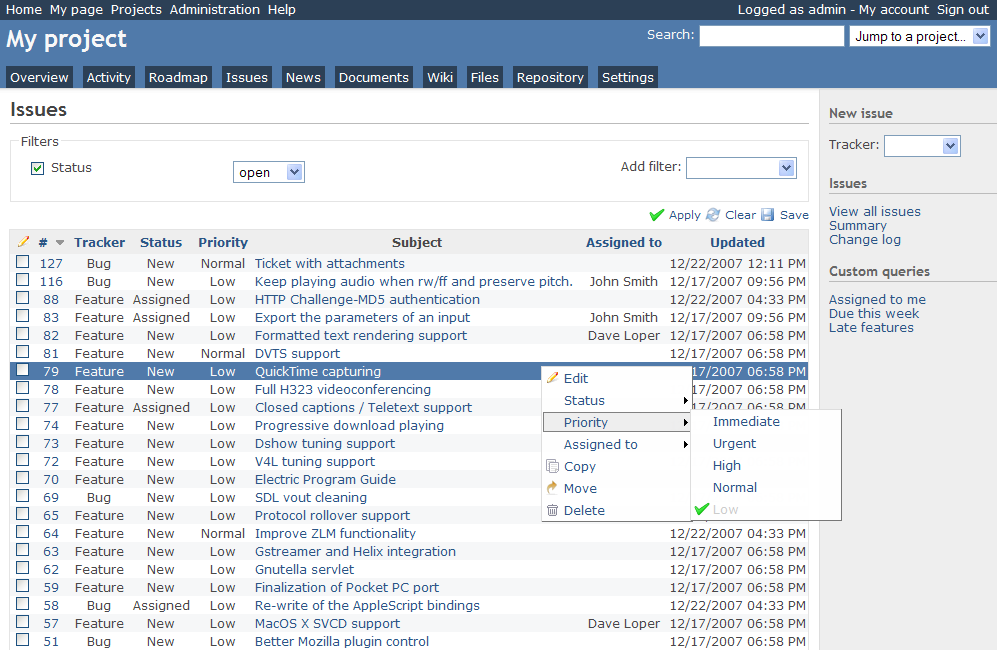
- Customizable to-do list . Of course, the main window of the system for the manager is the list of tasks. It provides:
- Setting the default column list (no column needed - unchecked and not visible).
- Column Sort
- Filtering. Filtering is possible according to several fields, for example: “0-priority errors assigned to Vasily Pupkin related to the module“ Authentication and access rights ”in the statuses“ Sent for testing ”or“ Closed ”.” The created filters can be saved for yourself (so as not to be configured once again) or for all project participants for quick access. For example - "open tasks of 0th priority."
- RSS or Email Notifications
- Each list (including filtered) can be received in the form of CSV, PDF, RSS. A scenario, for example, is this: The tester creates a filter for himself “Tasks in the status of“ Sent for testing, subscribes to RSS ”and that’s all - new tasks will fall to him automatically, no complicated or surrogate things for you — get new ones and test them.
- Email notifications. When changing tasks, evaluating, adding comments, etc. The system spam in the mail to users who it concerns. Developers will not have to write "I closed the task." Redmine will write it for him.
- Integration with SCM (Code Management Systems) - SVN, CVS, Git, Mercurial, Bazaar and Darcs
- Configure storage for each project.
- Web-based view of the repository. The system creates a web interface for viewing the code repository , the history of changes both in the form of commits and for files , it is able to compare versions (for non-binary files) and show diffs .
- Tracking commits. By specifying "id 333" in the comment for the commit (the template is customizable), the developer can automatically attach the commit to the task. When viewing a commit, you can go to the task description, and a list of commits will be displayed in the task card.
- Automatic transition to the "closed" status when committing. If the developer writes “fixed 333” (the template is customizable), then the commit will not only be attached to the task, but will also translate the task into the desired status - for example, “Sent for testing” - it will not need to go into Redmine.
- Tasks. On the task card, in addition to the above, the discussion history (which can be obtained in the form of RSS ), lists of related revisions, the history of version changes, ratings, and other parameters are displayed .
- CSS CSS styles deserve special attention. The system supports themes (they are skins), which are set using CSS. It’s quite soundly applied inside CSS, I haven’t yet found the object whose design could not be changed using CSS. Changes in our skin mainly concern the list of tasks (this is the main window of the project manager. Made: Color indication of statuses (Locked - red, tested - green, closed - gray). Color and brightness indication of priorities - (0 — brightest, 1 — less bright, everything after the 2nd is the same). The font in the input fields for the task description has been increased - it’s more convenient there (:
- Plugin system. Redmine has a plugin system that you can write yourself. Now there are 10 plugins, although literally a month ago it was 3 or 4.
- Good search
- Formation Roadmap . General statistics are displayed, and there is a detailed page for each version .
- Project Summary . The summary displays general overview statistics for solving problems in the project.
- Personal (personalized) page. The personal page displays the assigned tasks and some other blocks that the employee wants to see: calendar, time spent, documents, news, tracked tasks.
Other useful things that we do not use (For now)
- Integration with Mylyn. Mylyn is a plugin for the Eclipse IDE that takes developer tasks from the tracker and displays them directly in the IDE. Integration - it is said loudly, but there are instructions on how to make them friends together.
- News - allow you to publish project news, which can be received in the form of RSS. For example, to automatically publish them on the company's external website in the product section.
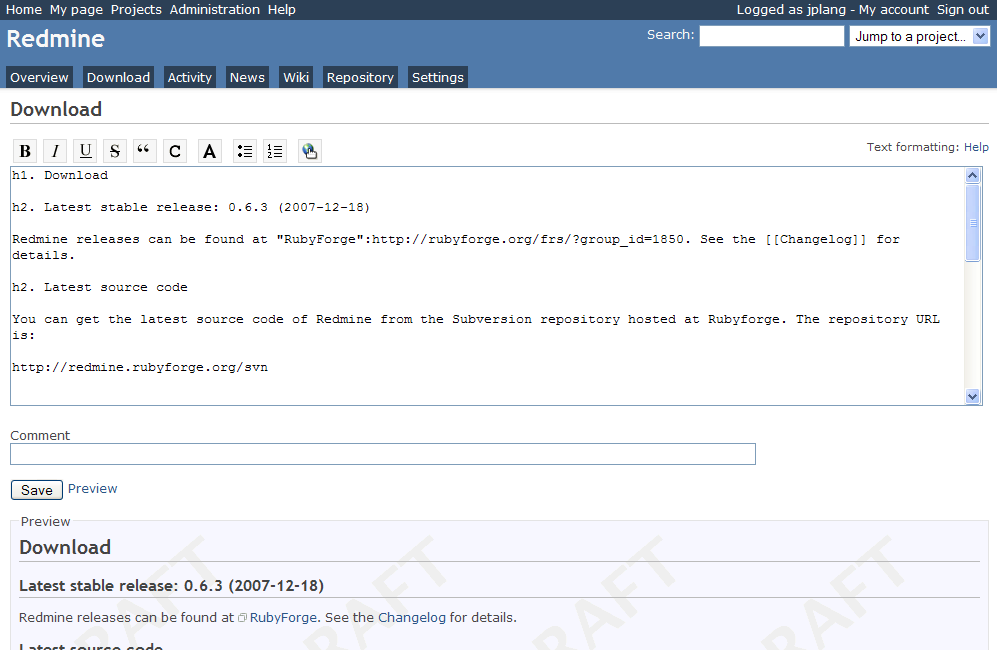
- Project wiki - for maintaining everything that may be useful - documentation, access details, etc. The trunk — version of the wiki is significantly better than the last 0.7.3 release — there is a hierarchy of pages, breadcrumbs in navigation, etc. I plan to drag the wiki that is being used now with MoinMoin onto Redmine — all in one place — is better.
- Integration with LDAP. Redmine supports integration with a domain controller over LDAP.
- Forums . Within the framework of discussion projects, you can create forums (quite standard functionality: discussions with notifications by e-mail, RSS, subscription to sections, topics). In the trunk version, it seems that you can respond to notifications and the answers will be posted on the forum - you can make some analogue of mailings.
- Documents. There is a document repository - a list of html files by authors. Something like a wiki article playlist
- Files. A repository of files related to the product version. A list is displayed, and the number of downloads - can be used to store downloaded versions of products.
- Self-registration of users. Redmine is used internally, so self-registration does not make sense.
- Activity . Tape to which task changes, commits, etc. are published.
- Change log (Changelog). Some types of tasks (for example, “Functions” and “Errors”) can be marked as “recorded in the change log, changelog will be generated automatically.
- Automatic construction of a calendar and Gantt chart .
- User avatars from Gravatar service
What is missing
There are little things that are lacking and that are clear how to do, but we do not have ruby programmers. Even taking into account the fact that these Wishlist are about 20 lines of code :)
- There is a desire for the “readiness” parameter to be calculated automatically based on the estimated and spent time - it is very lazy to fill it with your hands.
- I want a more convenient form of commentary on the task - just a separate link, not through the “update task”
More complicated things — I also want to:
- Fine-tune notifications - now the system is pretty spam-free - notifies you of all changes to tasks (comments, evaluation, etc.) . I would like to see the setting of spam categories.
- Integration of forums with mail is sufficient so that you can unsubscribe from mailing lists.
- User profiles within the system - so that reports on the time spent there are displayed not within the project, but for all, assigned tasks (again for all projects) and so on.
Cons Redmine
A fairly small (compared to the same Trac) community. Accordingly, a small number of plugins ( hack in Trac terminology).
One (mainly) developer - because of this, a relatively low development rate (for us personally this is not very important, because our needs are covered by 90 percent).
The first (and all subsequent doses) is free of charge.
Especially for Habr.