Storage and automatic sorting of photos and other files. Work with NAS Synology-based file storage
For a long time I wanted to write about how I store my files, how I do backups, but my hands did not reach. Recently, an article appeared here, somewhat similar to mine but with a different approach.
The article itself.
I’ve been trying for many years to find the ideal method for storing files. I think I found it, but there is always something to improve, if there are any thoughts on how to do it better, I read it with pleasure.
To begin with, I will tell you a few words about myself, I do web development and take photos in my free time. Hence the conclusion that I need to store work and personal projects, photos, videos and other files.
I have about 680 GB of files, of which 90 percent are photos and videos.
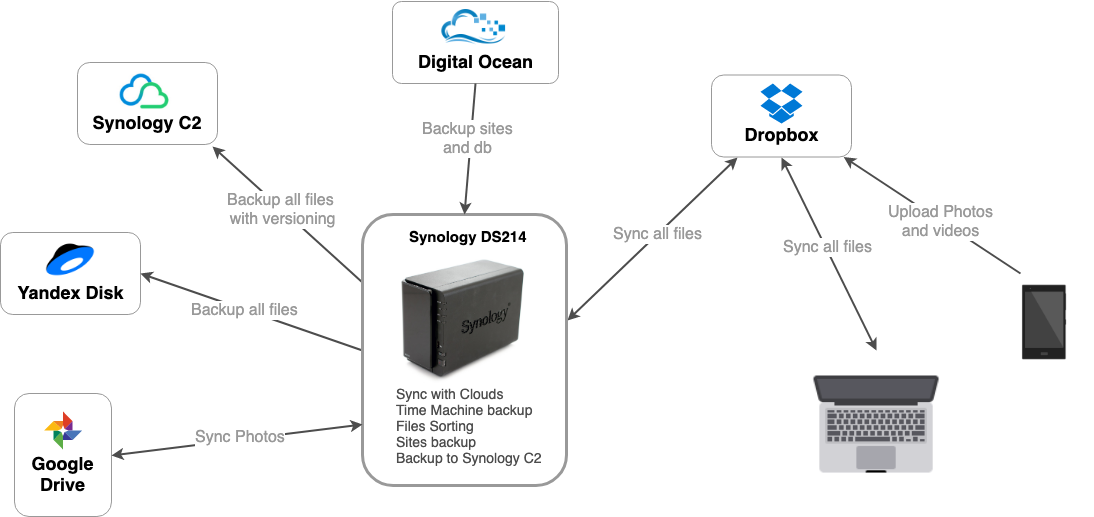
Here is an approximate diagram of how and where all my files are stored.
Now in more detail.
As you can see, the heart of everything is my NAS, namely Synology DS214, one of Synology’s simplest NASs, nevertheless, with everything I need it it copes.
I have a working machine macbook pro 13, 2015. I have 512GB there, but not all files fit by itself, I only store what I need at the moment. I synchronize all my personal files and folders with Dropbox, I know that it is not very reliable, but it performs only the synchronization function. And he does it best, at least from what I tried. And I tried all the famous and not very clouds.
Synology also has its own cloud, you can deploy it on your NAS, I tried several times to transfer from Dropbox to Synology Cloud Station, but there were always problems with synchronization, always some kind of errors, or not everything synchronized.
All important files are stored in the Dropbox folder, sometimes I save something to the desktop, so as not to lose something, I made a symlink to the Dropbox folder using the MacDropAny program.
My Download folder does not synchronize in any way, but there is nothing important there, only temporary files. If I download something important, I copy it to the appropriate folder in Dropbox.
Work files are stored on the production server, personal projects on GitLab, everything is simple here.
I also backup the entire system, excluding the Dropbox and Downloads folder by itself, so as not to take up space in vain. I make a backup of the system through Time Machine, an excellent tool, more than once helped out. I’m doing it on the same NAS, since there is such a function. You can do it on an external HDD of course, but it is not so convenient. Every time you need to connect an external drive and run Time Machine yourself. Because of laziness, often such backups were done once every few weeks. He automatically makes a backup to the server, I don’t even notice when he does it. I work from home, so I always have a fresh backup of my entire system. A copy is made several times a day, did not count how many times and how often.
This is where all the magic happens.
Synology has an excellent tool, it is called Cloud Sync, I think the name makes it clear what it does.
It can synchronize many cloud systems with each other, or rather synchronize files from the NAS server with other clouds. I think there is an overview of this program on the network. I will not go into details. I’d better describe how I use it.
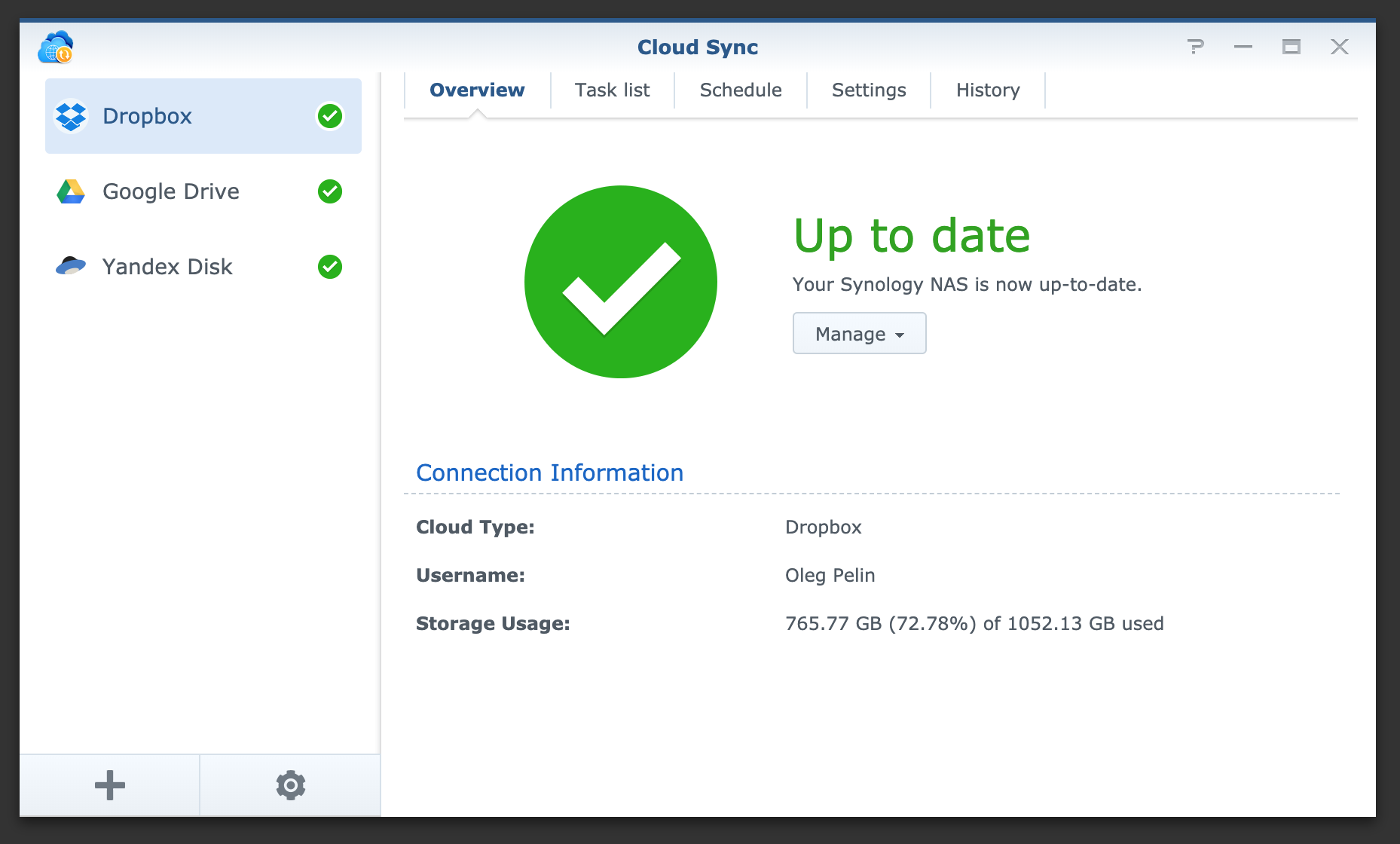
On the server, I have a drive folder called Dropbox, it is a copy of my Dropbox account, Cloud Sync is responsible for synchronizing all this. If something happened to the files in Dropbox, this will happen on the server, it doesn’t matter if it eats \ delete \ creation. In general, classic synchronization.
Further, I throw all these files to my Yandex drive, I use it as a home-made backup disk, that is, I drop the files there but do not delete anything from there, this dump of files turns out, but it helps a couple of times.
There I send only the Photos folder, also in synchronization mode, I do this only for convenient viewing of photos in Google photos and with the ability to delete photos from there and they are deleted everywhere (except for the Yandex disk by itself). I’ll write about the photo below, there you can generally write a separate article.
But all this is not very reliable, if you accidentally deleted a file, then it will be deleted everywhere and you can consider it lost. You can of course restore from a Yandex drive, but first of all, backup in one place is not very reliable by itself, and Yandex drive itself is not a service in which you can be 100% sure, although there have never been problems with it.
Therefore, I always tried to store files somewhere else, already with a normal backup system.
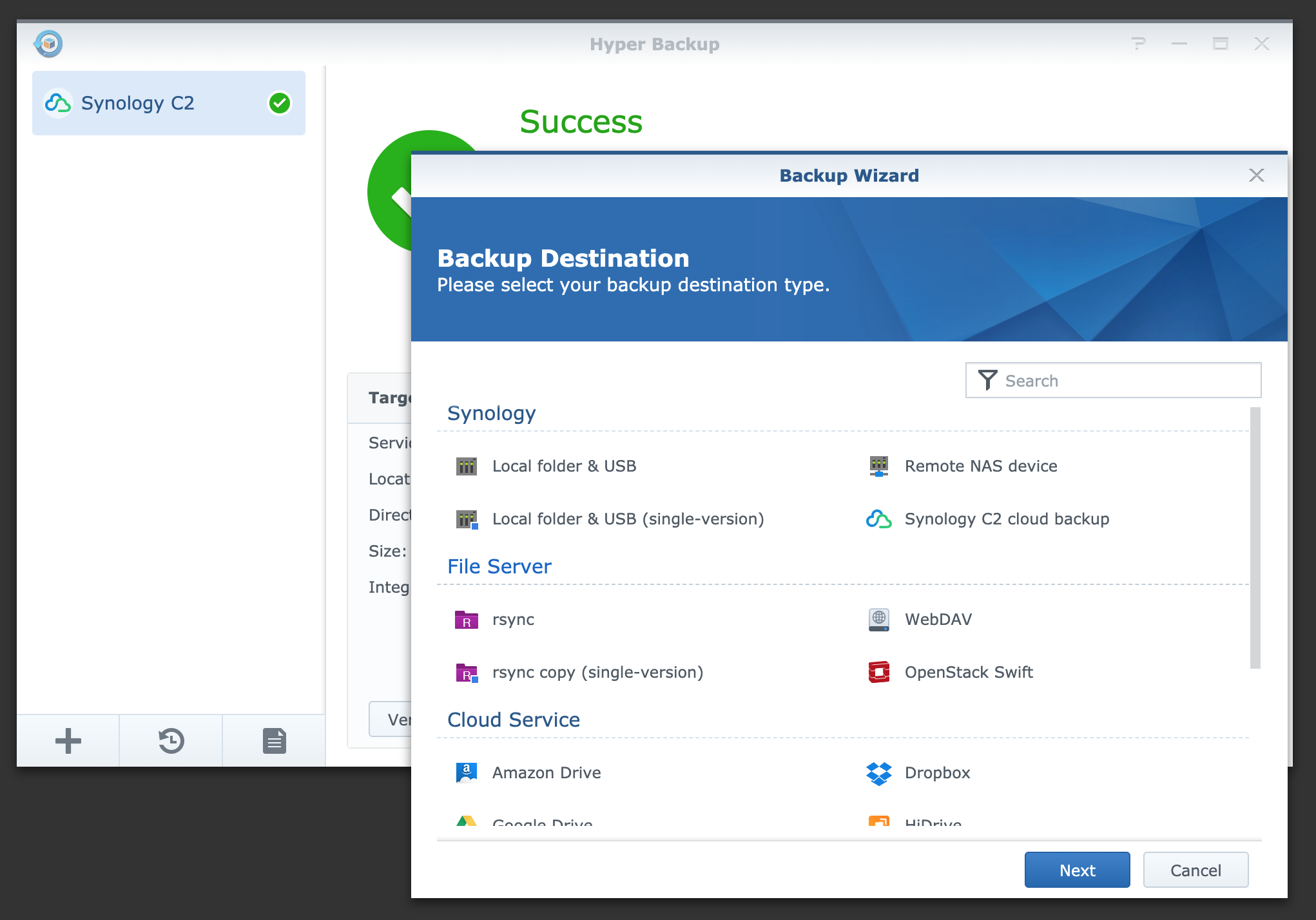
Synology also has a tool for this, it is called HyperBackup, it backups files either to other Synology servers, or to some third-party cloud solutions.
He also knows how to backup to external drives connected to NAS-y, as I did until recently. But this is also not reliable, for example, if the fire is over, then the server and the HDD will end.
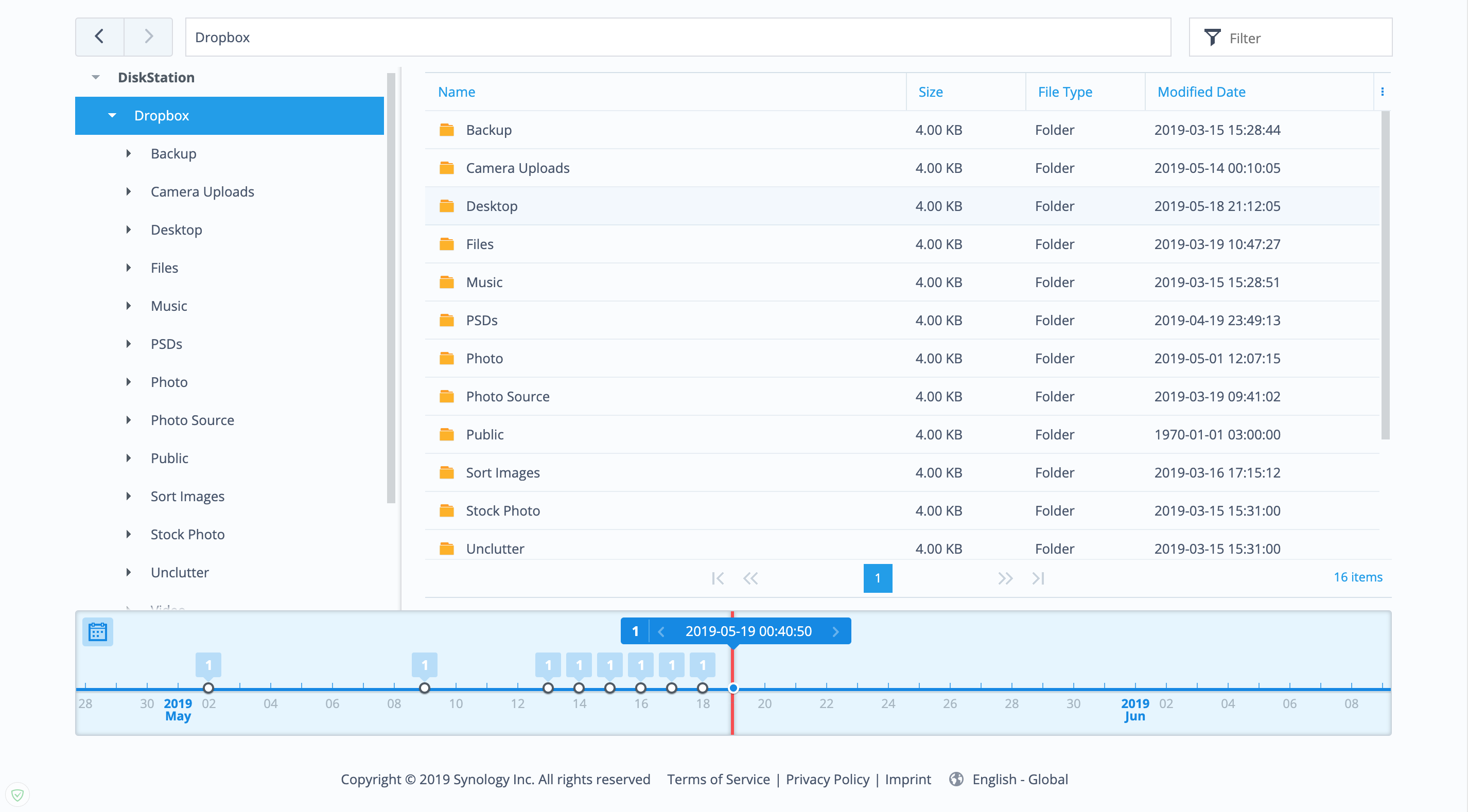
Here we smoothly approach another service, already from Synology itself. She has her own clouds for storing backups. It is sharpened specifically under HyperBackup, it makes a backup there every day, but this is a well-thought-out backup, it has file versions, a timeline and even clients for windows and mac os.
That's all with file storage, I hope my files are safe.
Now let's move on to sorting files.
Regular files, books, scans of documents and other unimportant files, I sort everything into folders by hand. Usually there are not many of them and I rarely open them.
The most difficult thing is to sort photos and videos, I have a lot of them.
I take photos from a few dozen to several hundred a month. I shoot on a DSLR, on a drone and sometimes on the phone. Photos are personal and for stocks. Also sometimes I shoot a home video (not what you thought, just family videos, often with a daughter). It also needs to be stored and sorted somehow so that there is no mess.
I have a folder in the same Dropbox called Sort Images, there are subfolders where all the photos and videos go, from there they are taken and sorted where necessary.

Sorting occurs on the NAS server, there bash scripts work that automatically run once a day and do their job. The NAS is also responsible for their launch, there is a task scheduler that is responsible for launching all scripts and other tasks. You can configure how often and when tasks will be started, crowns with an interface if easier.

Each folder has its own script. Now more about the folders:
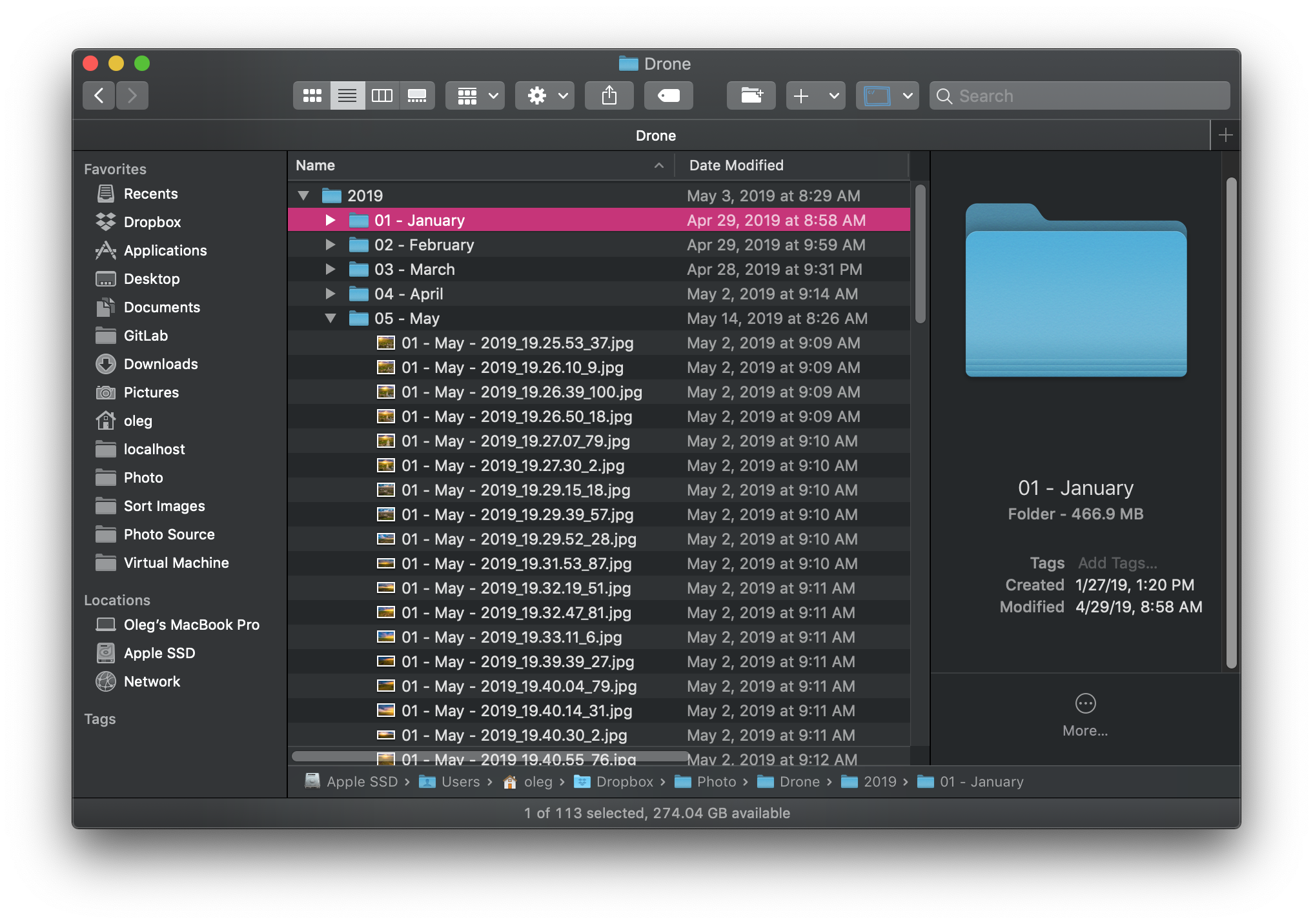
Drone - here are the photos from the drone that I shot for personal purposes. First, I process all the photos in lightroom, then I export JPG to this folder. from there they end up in another Dropbox folder, “Photo.”
There is a folder “Drone” and there they are already sorted by year and month. The scripts themselves create the necessary folders and rename the photos themselves according to my template, usually this is the date and time the photos were taken, I also add a random number at the end so that files with the same name will not work. I don’t remember why setting seconds in the file name was not suitable for these purposes.
The tree looks like this: Photo / Drone / 2019/05 - May / 01 - May - 2019_19.25.53_37.jpg
Drone Video- I don’t shoot a video with a drone yet, I need to learn a lot there, there’s no time for this now, but I already created a folder.
Images Operations - there are two folders inside, when the files come across there, they simply either are compressed on the maximum side up to 2000px for publication on the Internet or flip pictures are done, I don’t need it already, but I haven’t deleted the folder yet.
Panoramas - here they come across as it’s not difficult to guess the panoramas, I store them separately since this is a specific type of photo, I usually make them a drone. I make ordinary panoramas, but I also make 360 panoramas and sometimes spheres, such a panorama as small planets, I also make a drone. From this folder, all photos also fall into Photo / Panoramas / 2019/01 - May - 2019_19.25.53_37.jpg. Here I do not sort by month since there are not so many panoramas.
Personal Photo - Here I get photos that I take on a DSLR, usually these are family photos or travel, in general photos that are made for memory and for myself. I also process raw photos and lightroom and then export here.
From here they get here: Photo / 2019/05 - May / 01 - May - 2019_19.25.53_37.jpg
If I took off some kind of celebration or something else that would be better to keep separately, in the 2019 folder I create a folder with the name of the celebration and copy the photo there with my hands.
RAW - here the source of the photo falls. I always shoot in RAW, I keep all the photos in JPG, but sometimes I want to store RAW files as well, sometimes I want to process a frame differently. Usually this is nature and only the best shots get there, not all in a row.
Stock Photo- here I throw off photos for stocks, which I do either on a DSLR or on a drone. Sorting is the same as in other photos, just in your own separate folder.
In the root directory of Dropbox, there is a Camera Uploads folder, this is the default folder in which the Dropbox mobile application drops all the photos and videos there. All photos of the wife from the phone are discarded in this way. I also take off all my photos and videos from the phone here and from here already sort them into a separate folder. But I do it in a different way, more convenient for me. There is such a program for Android, FolderSync, it allows you to take all the photos from your mobile phone, upload them to Dropbox and then delete them from your phone. There are many settings, I recommend. The video from the phone also gets into this folder, they are also sorted like all photos, by year and month.
I collected all the scripts myself from any instructions on the Internet, I did not find any ready-made solutions. I don’t know anything about bash scripts, maybe there are some mistakes or some things that could be done better, but the most important thing is for me, they do their job and do what I need.
I uploaded the scripts to the github: https://github.com/pelinoleg/bash-scripts
Previously, I used Hazel to sort photos and videos under mac os, everything is easier there, all tasks are created visually, you don’t need to write code, but here there are two minuses. Firstly, you need to keep all the folders on your computer so that everything works well and secondly, if you suddenly switch to windows or linux then there are no such programs. I tried to look for an alternative but they were all about nothing. A solution with scripts on the server is a more universal solution.
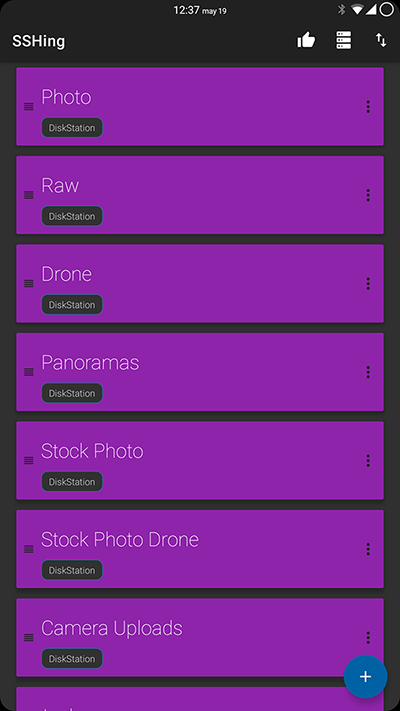
All scripts are configured to run once a day, usually at night. But if there is no time to wait and you need to somehow execute the necessary script now, there are two solutions: connect via SSH to the server and execute the necessary script, or go to the admin panel and also manually launch the necessary script. All this seems to me not convenient, so I found a third solution. There is a program for Android, it can send ssh commands. I created several commands, each has its own button and now if I need to sort for example photos that I took from the drone, then I just press one button and the script works. The program is called SSHing, there are other similar ones, but for me this is the most convenient.
I also have several of my sites, they are more for show, almost no one goes there, but still backup will not hurt. I keep the sites on DigitalOcean, there I installed the aaPanel panel. There is an opportunity to make backup copies of all files and all databases, but on the same disk.
Keeping a backup on the same drive is not the case, so I also knock through a bash script and copy everything to my server, archiving everything in one archive with the date in the name.
I hope at least someone will be helped by the methods that I use and which I shared.
As you can see from the article, I love automation and try to automate that everything that is possible, I have not described many things from the point of view of automation, as these are other topics and other articles.
The article itself.
I’ve been trying for many years to find the ideal method for storing files. I think I found it, but there is always something to improve, if there are any thoughts on how to do it better, I read it with pleasure.
To begin with, I will tell you a few words about myself, I do web development and take photos in my free time. Hence the conclusion that I need to store work and personal projects, photos, videos and other files.
I have about 680 GB of files, of which 90 percent are photos and videos.
File circulation in my vaults:
Here is an approximate diagram of how and where all my files are stored.
Now in more detail.
As you can see, the heart of everything is my NAS, namely Synology DS214, one of Synology’s simplest NASs, nevertheless, with everything I need it it copes.
Dropbox
I have a working machine macbook pro 13, 2015. I have 512GB there, but not all files fit by itself, I only store what I need at the moment. I synchronize all my personal files and folders with Dropbox, I know that it is not very reliable, but it performs only the synchronization function. And he does it best, at least from what I tried. And I tried all the famous and not very clouds.
Synology also has its own cloud, you can deploy it on your NAS, I tried several times to transfer from Dropbox to Synology Cloud Station, but there were always problems with synchronization, always some kind of errors, or not everything synchronized.
All important files are stored in the Dropbox folder, sometimes I save something to the desktop, so as not to lose something, I made a symlink to the Dropbox folder using the MacDropAny program.
My Download folder does not synchronize in any way, but there is nothing important there, only temporary files. If I download something important, I copy it to the appropriate folder in Dropbox.
My adventures with Dropbox
Once upon a time, somewhere in 2013-2014, I stored all the files in Dropbox-e and only in it, there were no backups. Then I did not have 1Tb, that is, I did not pay for it, I had somewhere 25Gb, which I earned by inviting friends or other tasks.
One fine morning I turned on the computer and all my files disappeared, I also received an email from Dropbox where they apologize and that my files disappeared through their fault. They gave me a link by which I could restore my files but by themselves nothing was restored. For that they gave me 1Tb for a year, after which I became their client, no matter how strange it may sound, but I never trusted them.
As I wrote above, I could not find a cloud more suitable for me, firstly there were no synchronization problems, and secondly, all sorts of services work only with Dropbox.
One fine morning I turned on the computer and all my files disappeared, I also received an email from Dropbox where they apologize and that my files disappeared through their fault. They gave me a link by which I could restore my files but by themselves nothing was restored. For that they gave me 1Tb for a year, after which I became their client, no matter how strange it may sound, but I never trusted them.
As I wrote above, I could not find a cloud more suitable for me, firstly there were no synchronization problems, and secondly, all sorts of services work only with Dropbox.
Git
Work files are stored on the production server, personal projects on GitLab, everything is simple here.
Time machine
I also backup the entire system, excluding the Dropbox and Downloads folder by itself, so as not to take up space in vain. I make a backup of the system through Time Machine, an excellent tool, more than once helped out. I’m doing it on the same NAS, since there is such a function. You can do it on an external HDD of course, but it is not so convenient. Every time you need to connect an external drive and run Time Machine yourself. Because of laziness, often such backups were done once every few weeks. He automatically makes a backup to the server, I don’t even notice when he does it. I work from home, so I always have a fresh backup of my entire system. A copy is made several times a day, did not count how many times and how often.
NAS
This is where all the magic happens.
Synology has an excellent tool, it is called Cloud Sync, I think the name makes it clear what it does.
It can synchronize many cloud systems with each other, or rather synchronize files from the NAS server with other clouds. I think there is an overview of this program on the network. I will not go into details. I’d better describe how I use it.
On the server, I have a drive folder called Dropbox, it is a copy of my Dropbox account, Cloud Sync is responsible for synchronizing all this. If something happened to the files in Dropbox, this will happen on the server, it doesn’t matter if it eats \ delete \ creation. In general, classic synchronization.
Yandex drive
Further, I throw all these files to my Yandex drive, I use it as a home-made backup disk, that is, I drop the files there but do not delete anything from there, this dump of files turns out, but it helps a couple of times.
Google drive
There I send only the Photos folder, also in synchronization mode, I do this only for convenient viewing of photos in Google photos and with the ability to delete photos from there and they are deleted everywhere (except for the Yandex disk by itself). I’ll write about the photo below, there you can generally write a separate article.
Hyperbackup
But all this is not very reliable, if you accidentally deleted a file, then it will be deleted everywhere and you can consider it lost. You can of course restore from a Yandex drive, but first of all, backup in one place is not very reliable by itself, and Yandex drive itself is not a service in which you can be 100% sure, although there have never been problems with it.
Therefore, I always tried to store files somewhere else, already with a normal backup system.
Synology also has a tool for this, it is called HyperBackup, it backups files either to other Synology servers, or to some third-party cloud solutions.
He also knows how to backup to external drives connected to NAS-y, as I did until recently. But this is also not reliable, for example, if the fire is over, then the server and the HDD will end.
Synology c2
Here we smoothly approach another service, already from Synology itself. She has her own clouds for storing backups. It is sharpened specifically under HyperBackup, it makes a backup there every day, but this is a well-thought-out backup, it has file versions, a timeline and even clients for windows and mac os.
That's all with file storage, I hope my files are safe.
Now let's move on to sorting files.
Regular files, books, scans of documents and other unimportant files, I sort everything into folders by hand. Usually there are not many of them and I rarely open them.
The most difficult thing is to sort photos and videos, I have a lot of them.
I take photos from a few dozen to several hundred a month. I shoot on a DSLR, on a drone and sometimes on the phone. Photos are personal and for stocks. Also sometimes I shoot a home video (not what you thought, just family videos, often with a daughter). It also needs to be stored and sorted somehow so that there is no mess.
I have a folder in the same Dropbox called Sort Images, there are subfolders where all the photos and videos go, from there they are taken and sorted where necessary.
Sorting occurs on the NAS server, there bash scripts work that automatically run once a day and do their job. The NAS is also responsible for their launch, there is a task scheduler that is responsible for launching all scripts and other tasks. You can configure how often and when tasks will be started, crowns with an interface if easier.
Each folder has its own script. Now more about the folders:
Drone - here are the photos from the drone that I shot for personal purposes. First, I process all the photos in lightroom, then I export JPG to this folder. from there they end up in another Dropbox folder, “Photo.”
There is a folder “Drone” and there they are already sorted by year and month. The scripts themselves create the necessary folders and rename the photos themselves according to my template, usually this is the date and time the photos were taken, I also add a random number at the end so that files with the same name will not work. I don’t remember why setting seconds in the file name was not suitable for these purposes.
The tree looks like this: Photo / Drone / 2019/05 - May / 01 - May - 2019_19.25.53_37.jpg
Drone Video- I don’t shoot a video with a drone yet, I need to learn a lot there, there’s no time for this now, but I already created a folder.
Images Operations - there are two folders inside, when the files come across there, they simply either are compressed on the maximum side up to 2000px for publication on the Internet or flip pictures are done, I don’t need it already, but I haven’t deleted the folder yet.
Panoramas - here they come across as it’s not difficult to guess the panoramas, I store them separately since this is a specific type of photo, I usually make them a drone. I make ordinary panoramas, but I also make 360 panoramas and sometimes spheres, such a panorama as small planets, I also make a drone. From this folder, all photos also fall into Photo / Panoramas / 2019/01 - May - 2019_19.25.53_37.jpg. Here I do not sort by month since there are not so many panoramas.
Personal Photo - Here I get photos that I take on a DSLR, usually these are family photos or travel, in general photos that are made for memory and for myself. I also process raw photos and lightroom and then export here.
From here they get here: Photo / 2019/05 - May / 01 - May - 2019_19.25.53_37.jpg
If I took off some kind of celebration or something else that would be better to keep separately, in the 2019 folder I create a folder with the name of the celebration and copy the photo there with my hands.
RAW - here the source of the photo falls. I always shoot in RAW, I keep all the photos in JPG, but sometimes I want to store RAW files as well, sometimes I want to process a frame differently. Usually this is nature and only the best shots get there, not all in a row.
Stock Photo- here I throw off photos for stocks, which I do either on a DSLR or on a drone. Sorting is the same as in other photos, just in your own separate folder.
In the root directory of Dropbox, there is a Camera Uploads folder, this is the default folder in which the Dropbox mobile application drops all the photos and videos there. All photos of the wife from the phone are discarded in this way. I also take off all my photos and videos from the phone here and from here already sort them into a separate folder. But I do it in a different way, more convenient for me. There is such a program for Android, FolderSync, it allows you to take all the photos from your mobile phone, upload them to Dropbox and then delete them from your phone. There are many settings, I recommend. The video from the phone also gets into this folder, they are also sorted like all photos, by year and month.
I collected all the scripts myself from any instructions on the Internet, I did not find any ready-made solutions. I don’t know anything about bash scripts, maybe there are some mistakes or some things that could be done better, but the most important thing is for me, they do their job and do what I need.
I uploaded the scripts to the github: https://github.com/pelinoleg/bash-scripts
Previously, I used Hazel to sort photos and videos under mac os, everything is easier there, all tasks are created visually, you don’t need to write code, but here there are two minuses. Firstly, you need to keep all the folders on your computer so that everything works well and secondly, if you suddenly switch to windows or linux then there are no such programs. I tried to look for an alternative but they were all about nothing. A solution with scripts on the server is a more universal solution.
All scripts are configured to run once a day, usually at night. But if there is no time to wait and you need to somehow execute the necessary script now, there are two solutions: connect via SSH to the server and execute the necessary script, or go to the admin panel and also manually launch the necessary script. All this seems to me not convenient, so I found a third solution. There is a program for Android, it can send ssh commands. I created several commands, each has its own button and now if I need to sort for example photos that I took from the drone, then I just press one button and the script works. The program is called SSHing, there are other similar ones, but for me this is the most convenient.
I also have several of my sites, they are more for show, almost no one goes there, but still backup will not hurt. I keep the sites on DigitalOcean, there I installed the aaPanel panel. There is an opportunity to make backup copies of all files and all databases, but on the same disk.
Keeping a backup on the same drive is not the case, so I also knock through a bash script and copy everything to my server, archiving everything in one archive with the date in the name.
I hope at least someone will be helped by the methods that I use and which I shared.
As you can see from the article, I love automation and try to automate that everything that is possible, I have not described many things from the point of view of automation, as these are other topics and other articles.









