Using PKCS # 11 cryptographic token mechanisms in scripting languages
In his comments on the article “An English-language cross-platform utility for viewing Russian qualified x509 certificates”, the user Pas very correctly noted PKCS # 11 tokens that they “themselves can count”. Yes, tokens are actually cryptographic computers. And it is natural to want to use these computers in scripting languages, be it Python, Perl or Ruby. One way or another, we have already considered the use of PKCS # 11 tokens with the support of Russian cryptography in Python for signing and encrypting documents, for creating a certificate request:
Here we continue the discussion about the Tcl language. In the previous articlewhen we considered viewing and validating certificates stored on PKCS # 11 tokens / smartcards, we used the TclPKCS11 version 0.9.9 package to access them (certificates) . As already noted, unfortunately, the package was developed for RSA cryptography and taking into account the PKCS # 11 v.2.20 standard. Today, the PKCS # 11 v.2.40 standard is already used and it is the TK-26 technical cryptography committee that is guided by it, issuing recommendations for domestic manufacturers of tokens / smartcards that support Russian cryptography. And with all this said, a new package TclPKCS11 version 1.0.1 has appeared . We will make a reservation right away that all cryptographic interfaces for RSA in the new version of the TclPKCS11 v.10.1 package are saved. The package library is written in C language.
So, what's new in the package? First of all, a command was added that allows you to get a list of cryptographic mechanisms supported by the connected token:
::pki::pkcs11::listmechs
How to get a list of slots with connected tokens is shown here (procedure - proc :: slots_with_token):
proc ::slots_with_token {handle} {
    set slots [pki::pkcs11::listslots $handle]
#    puts "Slots: $slots"
    array set listtok []
    foreach slotinfo $slots {
	set slotid [lindex $slotinfo 0]
	set slotlabel [lindex $slotinfo 1]
	set slotflags [lindex $slotinfo 2]
	if {[lsearch -exact $slotflags TOKEN_PRESENT] != -1} {
	    set listtok($slotid) $slotlabel
	}
    }
#Список найденных токенов в слотах
    parray listtok
    return [array get listtok]
}
Take a simple script:
#!/usr/bin/tclsh
lappend auto_path .
package require pki::pkcs11
#Библиотека для доступа к токенам семейства RuToken
set lib "/usr/local/lib64/librtpkcs11ecp_2.0.so"
set handle [pki::pkcs11::loadmodule $lib]
#Не забудьте вставить токен
#Получаем список слотов с метками подключенных токенов
set labslot [::slots_with_token $handle]
if {[llength $labslot] == 0} {
    puts "Вы не подключили ни одного токена"
    exit
}
set slotid 0
set lmech [pki::pkcs11::listmechs $handle $slotid]
set i 0
foreach mm $lmech {
#Ищем механизмы ГОСТ
    if {[string first "GOSTR3410" $mm] != -1} {
	puts -nonewline "[lindex $mm 0] "
	if {$i == 2} {puts "";set i  0}  else { incr i}
    }
}
puts "\n"
exit
This script allows you to get a list of GOSTR3410 cryptography mechanisms supported on RuToken family tokens. To start, let's take, as Pas wrote in the article , “Rutoken Light beloved by all kinds of EDOs”:
$ tclsh TEST_for_HABR.tcl
listtok(0) = ruToken Lite
0 {ruToken Lite                    }
$
And naturally it turns out that he does not support any GOST mezanism, which was to be proved. We take another token Rutoken EDS:
Yes, this token supports Russian cryptography, but only the signature of GOST R 34.10-2001, which is almost out of use . But if you take the Rutoken EDS-2.0 token, then everything will be fine, it supports GOST R 34.10-2012 with keys 256 and 512 bit long:
If we talked about supporting Russian cryptography, including grasshopper and magma encryption algorithms, with one or another token, then it is most fully supported by software and cloud tokens, and this is natural:
We move on to the next new feature added to the package:
set listcertsder [pki::pkcs11::listcertsder $handle $slotid]
This function returns a list of certificates stored by no token. The question naturally arises, but how does it differ from the existing function pki :: pkcs11 :: listcerts?
First of all, the new function does not use the :: pki package. One of the returned elements is the cert_der element, which contains the full certificate. This is convenient, for example, when exporting a certificate, or receiving its fingerprint. Previously, I had to collect the full certificate from the tbs certificate and its signature. A complete list of returned items for each certificate is clearly visible when printing the contents of one certificate:
The pkcs11_id element stores the attribute CKA_ID the value of the SHA-1 hash from the public key. The cert_der element is the CKA_VALUE of the certificate, pkcs11_label is CKA_LABEL.
The pkcs11_id element (CKA_ID in PKCS # 11 standard terminology) is, along with the pkcs11_handle library and the slot identifier with the pkcs11_slotid token, a key element for accessing keys and certificates stored on tokens.
So, if we want to change the label (pkcs11_label) of the certificate or keys, we execute a command of the form:
pki::pkcs11::rеname <список ключевых элементов>
To remove a certificate or keys from a token, a command of the form is executed:
pki::pkcs11::delete <список ключевых элементов>
The list of key elements can be formed as follows:
etc.
The function call in this case looks like this (we will delete the certificate and the keys associated with it):
pki::pkcs11::delete all $listparam
The reader has probably already guessed that this list can be arranged as a dict dictionary:
set listparam [dict create pkcs11_handle $pkcs11_handle]
dict set listparam pkcs11_slotid $pkcs11_slotid)
dict set listparam pkcs11_id $pkcs11_id
There are other ways, for example, through an array.
Once again, we note that the pkcs11_handle and pkcs11_slotid elements must always be present in the list of key elements, which uniquely identify the connected token. The rest of the composition is determined by a specific function.
The following function is used to install the certificate on the token:
set pkcs11_id_cert [::pki::pkcs11::importcert <список ключевых параметров>
The function returns the value CKA_ID in hexadecimal. The list of key parameters determines the token on which the certificate will be located:
{pkcs11_handle pkcs11_slotid }
Next up is our hash calculation. Three types of hash functions are used in Russian cryptography today:
- GOST R 34.11-94
- GOST R 34 .11-2012 with a hash value of 256 bits (stribog256)
- GOST R 34 .11-2012 with a hash length of 512 bits (stribog512)
To determine which hash supports the token, we have the function pki :: pkcs11 :: listmechs.
The hash calculation function has the following form:
set <результат> [pki::pkcs11::digest <данные для хеширования> <список ключевых элементов>]
Note that the calculation result of the calculation is presented in hexadecimal:
. . .
set listparam [dict create pkcs11_handle $pkcs11_handle]
dict set listparam pkcs11_slotid $pkcs11_slotid
set res_hex [pki::pkcs11::digest stribog256 0123456789 $listparam]
puts $res_hex
086f2776f33aae96b9a616416b9d1fe9a049951d766709dbe00888852c9cc021
To verify an electronic signature, whether it is a certificate or a list of revoked certificates or a signed document in a format, we now only need the signature verification function:
set result [pki::pkcs11::verify <хэш документа> <подпись документа> <список ключевых элементов>]]
If the signature passed the verification, then 1 is returned; otherwise, 0. To verify the electronic signature, the document signature itself, the document hash, determined by the type of signature, and the public key with which the signature was created, with all parameters (value, type and parameters), are required. . All information about the key in the form of the publickeyinfo asn1 structure should be included in the list of key elements:
The ASN1 public key structure is taken from the signatory certificate:
proc ::pki::x509::parse_cert_pubkeyinfo {cert_hex} {
	array set ret [list]
	set wholething [binary format H* $cert_hex]
	::asn::asnGetSequence wholething cert
	::asn::asnPeekByte cert peek_tag
	if {$peek_tag != 0x02} {
		# Version number is optional, if missing assumed to be value of 0
		::asn::asnGetContext cert - asn_version
		::asn::asnGetInteger asn_version ret(version)
	}
	::asn::asnGetBigInteger cert ret(serial_number)
	::asn::asnGetSequence cert data_signature_algo_seq
		::asn::asnGetObjectIdentifier data_signature_algo_seq ret(data_signature_algo)
	::asn::asnGetSequence cert issuer
	::asn::asnGetSequence cert validity
		::asn::asnGetUTCTime validity ret(notBefore)
		::asn::asnGetUTCTime validity ret(notAfter)
	::asn::asnGetSequence cert subject
	::asn::asnGetSequence cert pubkeyinfo
	binary scan $pubkeyinfo H* ret(pubkeyinfo)
	return $ret(pubkeyinfo)
}
The script text for verifying the electronic signature of certificates from a file is located
here
#! /usr/bin/env tclsh
package require pki
lappend auto_path .
package require pki::pkcs11
#Задайте путь к вашей библиотеке PKCS#11
#set pkcs11_module "/usr/local/lib/libcackey.so"
#set pkcs11_module "/usr/local/lib64/librtpkcs11ecp_2.0.so"
set pkcs11_module "/usr/local/lib64/libls11sw2016.so"
puts "Connect the Token and press Enter"
gets stdin yes
set handle [pki::pkcs11::loadmodule $pkcs11_module]
set slots [pki::pkcs11::listslots $handle]
foreach slotinfo $slots {
	set slotid [lindex $slotinfo 0]
	set slotlabel [lindex $slotinfo 1]
	set slotflags [lindex $slotinfo 2]
	if {[lsearch -exact $slotflags TOKEN_PRESENT] != -1} {
		set token_slotlabel $slotlabel
		set token_slotid $slotid
#Найден слот с токеном
		break
	}
}
#Из PEM в DER
proc ::cert_to_der {data} {
    if {[string first "-----BEGIN CERTIFICATE-----" $data] != -1} {
	set data [string map {"\r\n" "\n"} $data]
    }
    array set parsed_cert [::pki::_parse_pem $data "-----BEGIN CERTIFICATE-----" "-----END CERTIFICATE-----"]
    if {[string range $parsed_cert(data) 0 0 ] == "0" } {
#Очень похоже на DER-кодировка "0" == 0x30
	set asnblock $parsed_cert(data)
    } else {
	set asnblock ""
    }
    return $asnblock
}
proc usage {use error} {
    puts "Copyright(C) Orlov Vladimir (http://soft.lissi.ru) 2019"
    if {$use == 1} {
	puts $error
	puts "Usage:\nverify_cert_with_pkcs11  \[\]\n"
    }
}
set countcert [llength $argv]
if { $countcert < 1 ||  $countcert > 2 } {
    usage 1 "Bad usage!"
    exit
}
set file [lindex $argv 0]
if {![file exists $file]} {
    usage 1 "File $file not exist"
    exit
}
#Проверяемый сертификат cert_user
puts "Loading user certificate: $file"
set fd [open $file]
chan configure $fd -translation binary
set cert_user [read $fd]
close $fd
if {$cert_user == "" } {
    usage 1 "Bad file with certificate user: $file"
    exit
}
set cert_user [cert_to_der $cert_user]
if {$cert_user == ""} {
    puts "User certificate bad"
    exit
}
catch {array set cert_parse [::pki::x509::parse_cert $cert_user]}
if {![info exists cert_parse]} {
    puts "User certificate bad"
    exit
}
#parray cert_parse
if {$countcert == 1} {
    if {$cert_parse(issuer) != $cert_parse(subject)} {
	puts "Bad usage: not self signed certificate"
    } else {
	set cert_CA $cert_user
    }
} else {
    set fileca [lindex $argv 1]
    if {![file exists $fileca]} {
	usage 1 "File $fileca not exist"
	exit
    }
    #Сертификат издателя cert_CA
    puts "Loading CA certificate: $fileca"
    set fd [open $fileca]
    chan configure $fd -translation binary
    set cert_CA [read $fd]
    close $fd
    if {$cert_CA == "" } {
	usage 1 "Bad file with certificate CA=$fileca"
	exit
    }
    set cert_CA [cert_to_der $cert_CA]
    if {$cert_CA == ""} {
	puts "CA certificate bad"
	exit
    }
}
foreach slotinfo $slots {
	set slotid [lindex $slotinfo 0]
	set slotlabel [lindex $slotinfo 1]
	set slotflags [lindex $slotinfo 2]
	if {[lsearch -exact $slotflags TOKEN_PRESENT] != -1} {
		set token_slotlabel $slotlabel
		set token_slotid $slotid
	}
}
#Ключ от корневого сертификата
#array set cert_parse_CA [::pki::x509::parse_cert $cert_CA]
catch {array set cert_parse_CA [::pki::x509::parse_cert $cert_CA]}
#array set cert_parse_CA [::pki::x509::parse_cert $cert_CA_256]
#array set cert_parse_CA [::pki::x509::parse_cert $CA_12_512]
if {![info exists cert_parse_CA]} {
    puts "CA certificate bad"
    exit
}
###############################
set aa [dict create pkcs11_handle $handle pkcs11_slotid $token_slotid]
set tbs_cert [binary format H* $cert_parse(cert)]
#puts "SIGN_ALGO1=$cert_parse(signature_algo)"
catch {set signature_algo_number [::pki::_oid_name_to_number $cert_parse(signature_algo)]}
if {![info exists signature_algo_number]} {
    set signature_algo_number $cert_parse(signature_algo)
}
#puts "SIGN_ALGO=$signature_algo_number"
switch -- $signature_algo_number {
    "1.2.643.2.2.3" - "1 2 643 2 2 3" {
#    "GOST R 34.10-2001 with GOST R 34.11-94"
	set digest_algo "gostr3411"
    }
    "1.2.643.7.1.1.3.2" - "1 2 643 7 1 1 3 2" {
#     "GOST R 34.10-2012-256 with GOSTR 34.11-2012-256"
	set digest_algo "stribog256"
    }
    "1.2.643.7.1.1.3.3" - "1 2 643 7 1 1 3 3" {
#    "GOST R 34.10-2012-512 with GOSTR 34.11-2012-512"
	set digest_algo "stribog512"
    }
    default {
	puts "Неизвестная алгоритм подписи:$signature_algo_number"
	exit
    }
}
#Посчитать хэш от tbs-сертификата!!!!
set digest_hex    [pki::pkcs11::digest $digest_algo $tbs_cert  $aa]
puts "digest_hex=$digest_hex"
puts [string length $digest_hex]
#Получаем asn-структуру публичного ключа
#Создаем список ключевых элементов
binary scan $cert_CA H* cert_CA_hex
array set infopk [pki::pkcs11::pubkeyinfo $cert_CA_hex  [list pkcs11_handle $handle pkcs11_slotid $token_slotid]]
parray infopk
set lpk [dict create pkcs11_handle $handle pkcs11_slotid $token_slotid]
#Добавляем pybkeyinfo в список ключевых элементов
lappend lpk "pubkeyinfo"
#lappend lpk $pubinfo
lappend lpk $infopk(pubkeyinfo)
array set lpkar $lpk
parray lpkar
puts "Enter PIN user for you token \"$token_slotlabel\":"
#set password "01234567"
gets stdin password
if { [pki::pkcs11::login $handle $token_slotid $password] == 0 } {
    puts "Bad password"
    exit
}
if {[catch {set verify [pki::pkcs11::verify $digest_hex $cert_parse(signature) $lpk]} res] } {
    puts $res
    exit
}
if {$verify != 1} {
    puts "BAD SIGNATURE=$verify"
} else {
    puts "SIGNATURE OK=$verify"
}
puts "Конец!"
exit
Save the script in a file and try to execute it:
$./verify_cert_with_pkcs11.tcl
Copyright(C) Orlov Vladimir (http://museum.lissi-crypto.ru/)
Usage: verify_cert_with_pkcs11
$
One wonders, what about the certificates on the token? First, we solved the problem of using PKCS # 11 cryptographic machines. We used them. And to air a certificate with a token, there is a function of the pki :: pkcs11 :: listcertsder package, which allows you to select the desired certificate and verify it. This can be considered as homework.
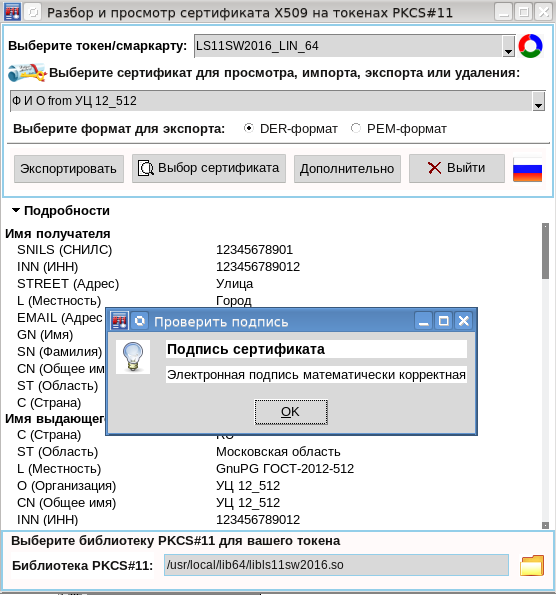
The appearance of the new version of the TclPKCS11v.1.0.1 package made it possible to refine the certificate viewing utility by adding the functions of importing a certificate for a token, deleting certificates and associated keys from a token, changing the labels of certificates and keys, etc.:
The most important added function is digital verification certificate signatures:
The attentive reader correctly noted that nothing was said about the generation of the key pair. This feature is also added to the TclPKCS11 package:
array set genkey [pki::pkcs11::keypair <тип ключа> <параметр> <список ключевых элементов>]
How the functions from the TclPKCS11 package are used, of course, can be found in the source code of the utility.
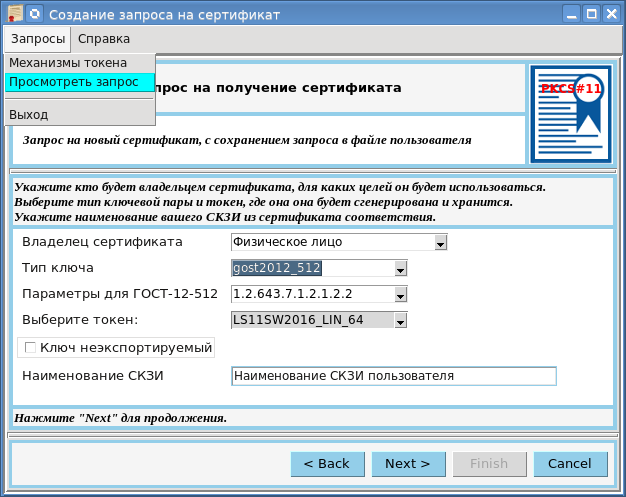
The function of generating a key pair will be discussed in detail in the next article, when the utility for creating a request for a qualified certificate with the generation of a key pair on the PKCS # 11 token, the mechanism for obtaining a certificate in a certification center ( CA ) and importing it into a token will be presented :
In the same article considered and the function of signing a document. This will be the last article in this series. Next, a series of articles are planned on supporting Russian cryptography in the Ruby scripting language, which is now in fashion. See you!
 April 25, 2019 at 12:21
 In his comments on the article “An English-language cross-platform utility for viewing Russian qualified x509 certificates”, the user Pas very correctly noted PKCS # 11 tokens that they “themselves can count”. Yes, tokens are actually cryptographic computers. And it is natural to want to use these computers in scripting languages, be it Python, Perl or Ruby. One way or another, we have already considered the use of PKCS # 11 tokens with the support of Russian cryptography in Python for signing and encrypting documents, for creating a certificate request: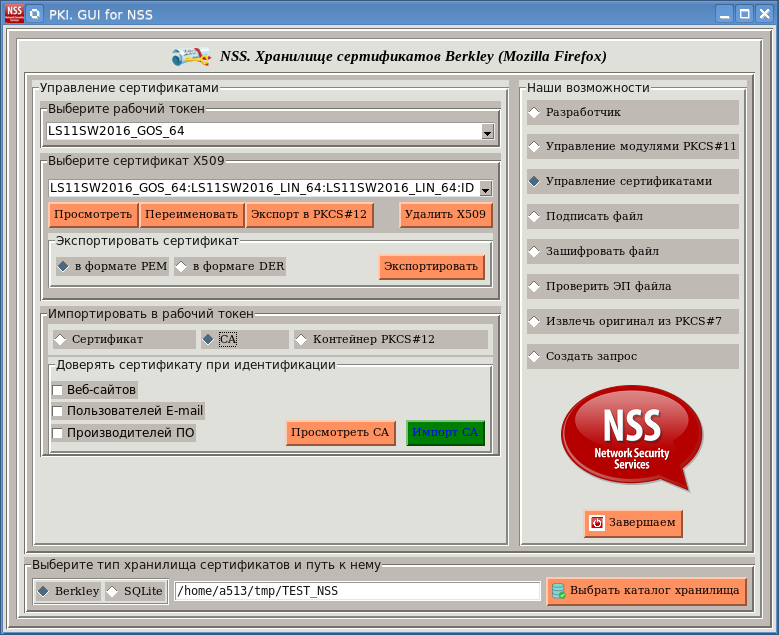
 If we talked about supporting Russian cryptography, including grasshopper and magma encryption algorithms, with one or another token, then it is most fully supported by software and cloud tokens, and this is natural: