
@Pythonetc compilation March 2019

This is the tenth collection of Python tips and programming from my @pythonetc feed.
Previous selections .
0_0
0_0 Is a completely correct expression in Python.Sort list with None
Sorting a list with
None-values can be a daunting task:In [1]: data = [
...: dict(a=1),
...: None,
...: dict(a=-3),
...: dict(a=2),
...: None,
...: ]
In [2]: sorted(data, key=lambda x: x['a'])
...
TypeError: 'NoneType' object isnot subscriptableYou can try to delete all None and return them back after sorting (to the beginning or to the end of the list, depending on the task):
In [3]: sorted(
   ...: 	(d for d in data if d isnotNone),
   ...: 	key=lambda x: x['a']
   ...: ) + [
   ...: 	d for d in data if d isNone
   ...: ]
Out[3]: [{'a': -3}, {'a': 1}, {'a': 2}, None, None]
But it is inconvenient. Better to use a more complex one
key:In [4]: sorted(data, key=lambda x: float('inf') if x isNoneelse x['a'])
Out[4]: [{'a': -3}, {'a': 1}, {'a': 2}, None, None]If we are talking about types for which infinity is unacceptable, you can sort the tuples:
In [5]: sorted(data, key=lambda x: (1, None) if x isNoneelse (0, x['a']))
Out[5]: [{'a': -3}, {'a': 1}, {'a': 2}, None, None]
Call random.seed ()
When you fork the process, the random seed you use will be copied to all the resulting processes. As a result, the same “random” result can be generated in them.
To avoid this, you must manually call in each process
random.seed(). But if you use the module multiprocessing, it will do it for you. For example:
import multiprocessing
import random
import os
import sys
deftest(a):
	print(random.choice(a), end=' ')
a = [1, 2, 3, 4, 5]
for _ in range(5):
	test(a)
print()
for _ in range(5):
	p = multiprocessing.Process(
	target=test, args=(a,)
	)
	p.start()
	p.join()
print()
for _ in range(5):
	pid = os.fork()
	if pid == 0:
	test(a)
	sys.exit()
	else:
	os.wait()
print()
Get something like this:
4 4 4 5 5
1 4 1 3 3
2 2 2 2 2
Moreover, if you use Python 3.7 and higher, then thanks to the new hook
at_forkyou can do the same with os.fork. The above Python 3.7 code gives this result:
1 2 2 1 5
4 4 4 5 5
2 4 1 3 1
Addition to 0
At first glance it seems that it is
sum([a, b, c])equivalent a + b + c, although in fact it will be equivalent 0 + a + b + c. So this expression cannot work with types that do not support addition to 0:classMyInt:def__init__(self, value):
self.value = value
def__add__(self, other):return type(self)(self.value + other.value)
def__radd__(self, other):return self + other
def__repr__(self):
class_name = type(self).__name__
returnf'{class_name}({self.value})'
In : sum([MyInt(1), MyInt(2)])
...
AttributeError: 'int' object has no attribute 'value'To fix this, you can provide a custom initial element that will be used instead
0:In : sum([MyInt(1), MyInt(2)], MyInt(0))
Out: MyInt(3)
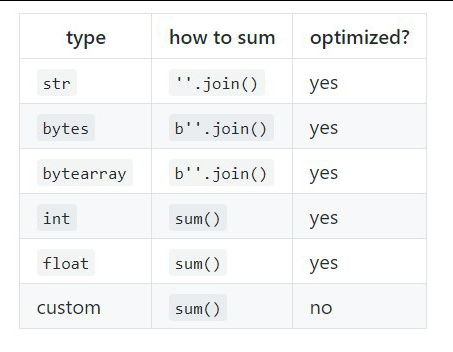
sumIt is intended for addition floatand int-types, although it can work with any other custom types. However, he refuses to fold bytes, bytearrayand str, since this is intended for this join:In : sum(['a', 'b'], '')
...
TypeError: sum() can't sum strings [use ''.join(seq) instead]
In : ints = [x for x in range(10_000)]
In : my_ints = [Int(x) for x in ints]
In : %timeit sum(ints)
68.3 µs ± 142 ns per loop (mean ± std. dev. of 7 runs, 10000 loops each)
In : %timeit sum(my_ints, Int(0))
5.81 ms ± 20.5 µs per loop (mean ± std. dev. of 7 runs, 100 loops each)
Index Completion in Jupyter Notebook
Using the method,
_ipython_key_completions_you can customize index completion in a Jupyter Notebook. This way you can control what is displayed on the screen if you press Tab after something like d["x: 
Note that the method does not receive the search string as an argument.