 February 21, 2019 at 19:49
From chaos to order, or “create a project structure in Unity and not only ...”
- Tutorial
When creating a new project, it is so clean, understandable, there is no excess rubbish ... it is empty. The longer development takes place, the more excess garbage, obscure folders, files appear in it, sometimes prefabs for other projects can get there and the whole organization flies to Tartar.
It turns out that the organization never existed, the project was three years old, it’s too late to put things in order, it’s not convenient to work and generally ...
Welcome to the chaos, you were here because:
Sooner or later you will come to your decision and it will be most suitable for you, I can only help in the search and offer your options. We will look at a few examples, analyze and draw up the most appropriate solution. We will also talk about structuring, hierarchy and proper names, and how ordering helps speed things up.

Welcome to cat.
Thanks to everyone who read my previous material. It was the comments below him that prompted me to write this article. More informative and useful, with a romantic introduction but practical content. Today we will talk about fairly obvious things, if there is anything to add, feel free to write and offer your own options.
The network has enough similar materials with examples, but not very many explanations of "why this is so." I will describe the solutions that I use myself and how they are convenient specifically for me. I don’t think that I will bring something new, but the right organization is the beginning of the beginning of any project.
Take for example colliders for the environment. What objects and planes do we have?
In the hierarchy of the scene, we can put this all in one game object , but it will be inconvenient to search.
Therefore, we will make a separate game object for colliders of floor, walls, ceiling and obstacles.
As an example, the level from the game.

If we have more than 10 child objects, then I recommend writing a tag, this simplifies the search. Again, colliders, if we are talking about 2D then edge, polygon, box, circle is used and each one can be a plane or obstacle collider. It can be called “coll_edge_N” or “coll_e_N” because wall colliders have a parent Wall object (which in turn has a Colliders parent object ) the question arises whether to write a plane tag"Coll_wall_edge_N" , stands for simplified search, when the number of objects is large you will save a lot of time.
We get something similar.


Organization of folders in Unity
There are quite clear rules inside the project.
Namely:
Of course, you can throw anything and anywhere without thinking about the organization.
For example, you

can do something more organized with a clear structure.
Something like this

And now let's look at what is needed, what is not.
It is very convenient to divide the project into internal assets and external assets , this is a plus.
In external assets , we have all the third-party assets and nothing more.
There is a separate Scene folder in which all the scenes are located.
The scripts folder is also separate, it’s more convenient.
The most interesting folder for us is internal assets

What folders are needed there?
As VFX Artist and 2D / 3D animation artist, I’ll dwell in more detail on the organization of these particular folders.
For unit animation, we need to make animator controlle r and animation clip , there are several animation clips, so it’s more convenient to put them in a folder. Plus you need a folder for the unit itself.
It will look like this.

In the folder with vfx you need the textures , materials folder and, if desired, prefabs . It is more convenient for a VFX artist to work in their folders and not to mess around the entire project, but to keep order in his garden. Textures for effects are always textures. Materials for effects have different settings from additive to alpha blend, and sometimes one texture goes to several materials, if the texture folder is nearby, then the search is easier. If you are writing shaders, then pulling textures from the VFX folder is more convenient; it’s also more convenient and logical to put the materials of the finished shader into VFX.
Often you need to delete something, not the fact that you can do it and everything will go smoothly, often something is lost and if you are not the lead programmer on the project, then you can do it. There is also a need to test a feature / idea and not the fact that it will take root and is generally needed. This is what the trash folder is for , all the tests, everything that needs to be deleted or everything that you don’t want to send with the current commit is better to put here and register ignore for the gita.
Organization of hierarchy in Unity
A little higher was an example about colliders. This rule obeys everything. In our project, we applied such a solution.
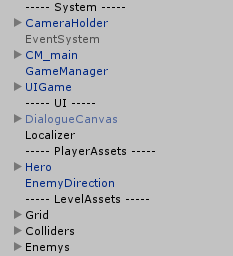
We just added "--- chapter name ---"this is an empty object that carries only a name. It seems to be a useless and superfluous thing, but it simplifies the search and understanding of the hierarchy on the stage at times. Such a simple solution allows you to speed up the visual search several times. For example, we have an object of opponents, we can complicate and make several child objects for each type of enemy and separate for bosses, plus make a tag for each enemy. And we can make one mother object for opponents flying, designate the symbol ^ , strong $ , and the boss designate as % . For colliders, this solution is not very convenient, but for opponents and their visual separation in the hierarchy - just fine.
Organization by the example of Spine
When we talk about 2D or 3D animation, the importance of organization and names goes to a different level. You can resort to animation mocap and not worry about the organization, but just make the necessary movements in the studio and make the final right there, unfortunately, this does not always happen. There are many things that need to be modified manually even when capturing movement, but we are not talking about that. How to correct all movements, determine the desired point, bone, when there are more than 20? A simple person with 5 bones will not be difficult to organize and understand the connections, and now add 10 fingers to him, it’s more difficult, right?
The rules are the same, but in the animation there are dependencies and child bones that simplify the organization. Also, for visual perception, a change in the color of the bones is used. There is always a key bone to which other bones are attached, to these bones there are still bones and so on until the very end. Often we call it simply Root , the hips or torso go further from it, the left or right hand from the torso, and so on. With the names, it’s easier for us to understand what and where.
And here is an example of highlighting, helps in the work (for example, Dragon Bones )
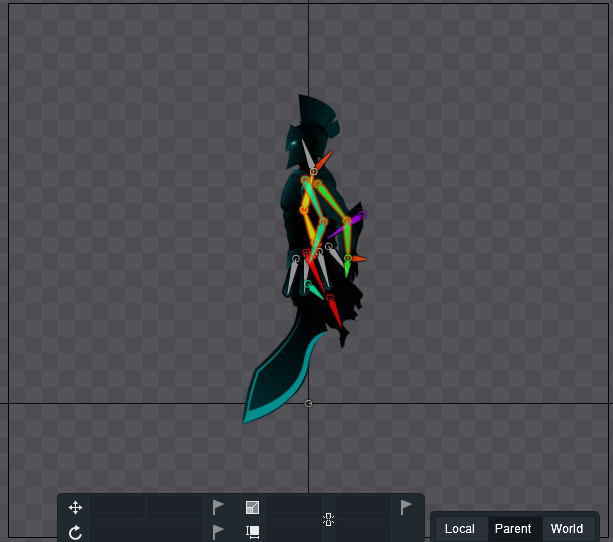
Examples are just my examples. Only one thing is obvious and certain for sure - names, structure, order, for each his own, but understandable to the people with whom you work, nobody will pick up your rubble. Large companies are often more demanding on the organization, the sooner you learn to keep order, the easier it will be for you in the future.
Leopotam
It turns out that the organization never existed, the project was three years old, it’s too late to put things in order, it’s not convenient to work and generally ...
Welcome to the chaos, you were here because:
- never thought why you need a project structure in Unity
- your projects have an eternal mess and you want to get rid of it
- in search of new ways to organize
- lost hope to put things in order in their project
Sooner or later you will come to your decision and it will be most suitable for you, I can only help in the search and offer your options. We will look at a few examples, analyze and draw up the most appropriate solution. We will also talk about structuring, hierarchy and proper names, and how ordering helps speed things up.
Welcome to cat.
Thanks to everyone who read my previous material. It was the comments below him that prompted me to write this article. More informative and useful, with a romantic introduction but practical content. Today we will talk about fairly obvious things, if there is anything to add, feel free to write and offer your own options.
To the point.Why do we need a structure? - time. We save a lot of time on debugging, adding new features, files, cleaning, provided that our organization is clear and convenient to us, provided that it is. Correct file names, order, tags and other small tricks can save time.
The network has enough similar materials with examples, but not very many explanations of "why this is so." I will describe the solutions that I use myself and how they are convenient specifically for me. I don’t think that I will bring something new, but the right organization is the beginning of the beginning of any project.
"How is it done?"
Take for example colliders for the environment. What objects and planes do we have?
- floor
- walls
- obstacles (boxes, barrels, stones, etc.)
- ceiling
In the hierarchy of the scene, we can put this all in one game object , but it will be inconvenient to search.
Therefore, we will make a separate game object for colliders of floor, walls, ceiling and obstacles.
As an example, the level from the game.
If we have more than 10 child objects, then I recommend writing a tag, this simplifies the search. Again, colliders, if we are talking about 2D then edge, polygon, box, circle is used and each one can be a plane or obstacle collider. It can be called “coll_edge_N” or “coll_e_N” because wall colliders have a parent Wall object (which in turn has a Colliders parent object ) the question arises whether to write a plane tag"Coll_wall_edge_N" , stands for simplified search, when the number of objects is large you will save a lot of time.
We get something similar.
Organization of folders in Unity
There are quite clear rules inside the project.
Namely:
- it should be clear where lies
- it is clear where to add new files and sources
- adaptive and comfortable structure
- the structure is not too complex and not crushed
Of course, you can throw anything and anywhere without thinking about the organization.
For example, you
can do something more organized with a clear structure.
Something like this
And now let's look at what is needed, what is not.
It is very convenient to divide the project into internal assets and external assets , this is a plus.
In external assets , we have all the third-party assets and nothing more.
There is a separate Scene folder in which all the scenes are located.
The scripts folder is also separate, it’s more convenient.
The most interesting folder for us is internal assets
Everything regarding the visible part of our game lies there.
What folders are needed there?
- Prefabs main folder for all prefabs
- Textures / Sprites to whom it is more convenient and depending on whether a 2D or 3D project
- Materials materials here and everything is clear
- Shaders similarly, few questions
- Animations
- Vfx
- Sound here is a simple organization in the folder itself and separation of sounds into BGM, Impact FX, etc.
As VFX Artist and 2D / 3D animation artist, I’ll dwell in more detail on the organization of these particular folders.
For unit animation, we need to make animator controlle r and animation clip , there are several animation clips, so it’s more convenient to put them in a folder. Plus you need a folder for the unit itself.
It will look like this.
It's comfortableNow about VFX.
In the folder with vfx you need the textures , materials folder and, if desired, prefabs . It is more convenient for a VFX artist to work in their folders and not to mess around the entire project, but to keep order in his garden. Textures for effects are always textures. Materials for effects have different settings from additive to alpha blend, and sometimes one texture goes to several materials, if the texture folder is nearby, then the search is easier. If you are writing shaders, then pulling textures from the VFX folder is more convenient; it’s also more convenient and logical to put the materials of the finished shader into VFX.
Why do I need a Trash folder?
Often you need to delete something, not the fact that you can do it and everything will go smoothly, often something is lost and if you are not the lead programmer on the project, then you can do it. There is also a need to test a feature / idea and not the fact that it will take root and is generally needed. This is what the trash folder is for , all the tests, everything that needs to be deleted or everything that you don’t want to send with the current commit is better to put here and register ignore for the gita.
Organization of hierarchy in Unity
A little higher was an example about colliders. This rule obeys everything. In our project, we applied such a solution.
We just added "--- chapter name ---"this is an empty object that carries only a name. It seems to be a useless and superfluous thing, but it simplifies the search and understanding of the hierarchy on the stage at times. Such a simple solution allows you to speed up the visual search several times. For example, we have an object of opponents, we can complicate and make several child objects for each type of enemy and separate for bosses, plus make a tag for each enemy. And we can make one mother object for opponents flying, designate the symbol ^ , strong $ , and the boss designate as % . For colliders, this solution is not very convenient, but for opponents and their visual separation in the hierarchy - just fine.
Organization by the example of Spine
When we talk about 2D or 3D animation, the importance of organization and names goes to a different level. You can resort to animation mocap and not worry about the organization, but just make the necessary movements in the studio and make the final right there, unfortunately, this does not always happen. There are many things that need to be modified manually even when capturing movement, but we are not talking about that. How to correct all movements, determine the desired point, bone, when there are more than 20? A simple person with 5 bones will not be difficult to organize and understand the connections, and now add 10 fingers to him, it’s more difficult, right?
The rules are the same, but in the animation there are dependencies and child bones that simplify the organization. Also, for visual perception, a change in the color of the bones is used. There is always a key bone to which other bones are attached, to these bones there are still bones and so on until the very end. Often we call it simply Root , the hips or torso go further from it, the left or right hand from the torso, and so on. With the names, it’s easier for us to understand what and where.
And here is an example of highlighting, helps in the work (for example, Dragon Bones )
Main rules
- clarity of names
- convenience
- reasonable approach
Conclusion
Examples are just my examples. Only one thing is obvious and certain for sure - names, structure, order, for each his own, but understandable to the people with whom you work, nobody will pick up your rubble. Large companies are often more demanding on the organization, the sooner you learn to keep order, the easier it will be for you in the future.
I won’t hire you a cleaning campaign, I gave you a broom, use it.
Comments
Leopotam
“ExternalAssets” is the way to nowhere if you need to not only add assets, but also update them. The most correct and simple solution is to isolate the local project assets (in the article it is “InternalAssets”), and store external assets as they were prepared by the authors - ideally, in separate folders at the “InternalAssets” folder level. In this case, the update becomes easy and simple, you do not need to sort by custom folders what can come in the update and which did not exist before. In addition, there are special folders that cannot be moved and which can only be in the root (Gizmos, Plugins / Android, Plugins / iOS, etc.).
Only registered users can participate in the survey. Please come in.
Which side are you on?
- 3.5% Chaos 2
- 50% Order 28
- 10.7% Periodically attracts me to the side of chaos 6
- 35.7% Sometimes I get pissed off by a mess and I start cleaning 20









