March 15, 2015 at 13:01
Review of the 75-inch 4K-TV Samsung UE75HU7500
Time goes by, diagonals of screens grow, and with them our appetites. Screens in 50-55 inches, which seemed huge only a few years ago, are now commonplace and are sold in any decent electronics store. They, according to my observations, offer the most beneficial combination of screen size and price.
But to the devil benefit! Our patient today is the 75-inch monster Samsung UE75HU7500 , the exact name of the model is Samsung UE75HU7500LXXN (since I live in the Netherlands, the version of the device is appropriate). Manufacturer's Recommended Price: 5499 Euro .
This is one of the largest televisions of the company, available in mass sales today; larger than it there are only “bent” 78-inch 78JU7500 and78HU9000 and mega-monster 85HU7500 with a diagonal of 85 "- but their prices are really sky-high (the 85-inch model costs ten thousand euros).
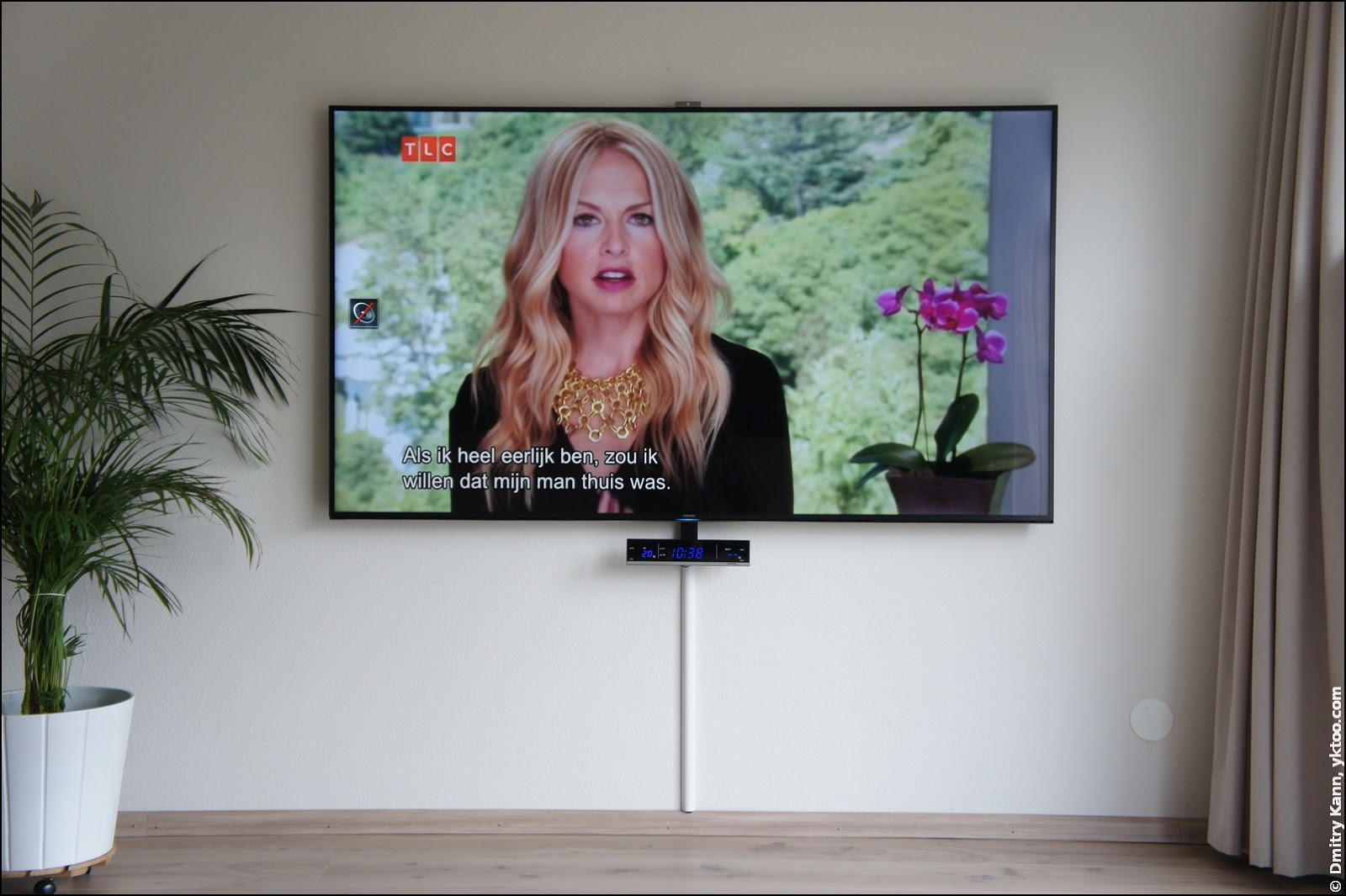
I have been actively using the TV for about a month and a half, so I can share the first-person experience. Under the cut lots of pictures.
Shortly after we moved to a new home, I began to think about a television suitable for our interior. In design, I like functional minimalism, so the desired configuration of the living room was this: a TV on the wall, a sofa opposite. But with a room width of five meters, the TV should be of the appropriate size, at least 60-65 inches.
Since the panel was supposed to be placed on the wall, the “curved” varieties disappeared immediately - they benefit in image quality, especially when viewed from a short distance, but look rather awkward when hung on a wall.
If you already buy a large TV, it makes sense to choose a model with a reserve for the future, with support for Ultra HD. In this regard, Samsung significantly outperforms other manufacturers (LG, Sony, Philips), offering similar models (in size, features, quality) one and a half times cheaper.
Samsung UE75HU7500 - LED-TV of the latest generation of the company (2014 model). It supports Ultra HD (4K video) as well as 3D video (using special glasses).
I'll start with a brief listing of the characteristics.
As you can see from the above table, there are so many things crammed into this model that you are unlikely to be able to use half of this. In any case, I have not yet managed.
The box of this TV is immense, it is almost two meters in length and a little more than a meter in height.

Here it is in comparison with a chair - for scale.

She weighs more than fifty pounds, so that alone to deal with it is almost impossible. Moreover, it is only 25 cm in thickness, which must be taken into account when unpacking - it does not differ in special stability. By the way, what is it written there?

Saved on an HDMI cable for five euros from a TV for five thousand. And not even ashamed to write about it on the packaging.
The upper part of the box can be easily removed by removing the plastic latches located at the bottom.

The panel is held in an upright position only by foam inserts in the corners, so you should not unpack this device during an earthquake. We remove the excess polystyrene, pull out both parts of the stand and the box with accessories.

That's all that comes with the kit: two remote controls with batteries, plastic bushings for attaching the VESA bracket, network cable, infrared emitter, adapter for CI +, two pairs of 3D glasses and instructions. There really is no HDMI cable, hmm ...

Gently attaching the panel to the stand (for the first time), we turn on the monster in the network. The first thing you pay attention to is the cooler noise! Yes, yes, this TV has a cooler and is pretty audible.
The setup wizard starts and first of all it asks to connect the device to the life-giving Internet - the benefit is both Ethernet and Wi-Fi are already built-in.

Then follow a few more screens with all sorts of things, like a license agreement and privacy policy. The turn comes to connect an infrared emitter (IR Extender) - a small plastic washer with a wire ending in a regular 3.5 mm plug.

The plug is stuck in a special socket on the back of the TV, and the puck must be put in front of the cable TV decoder (set-top box):

This mechanism allows the TV to independently control the decoder, including its power, changing channels or calling up the program schedule (TV guide), and this is extremely conveniently.
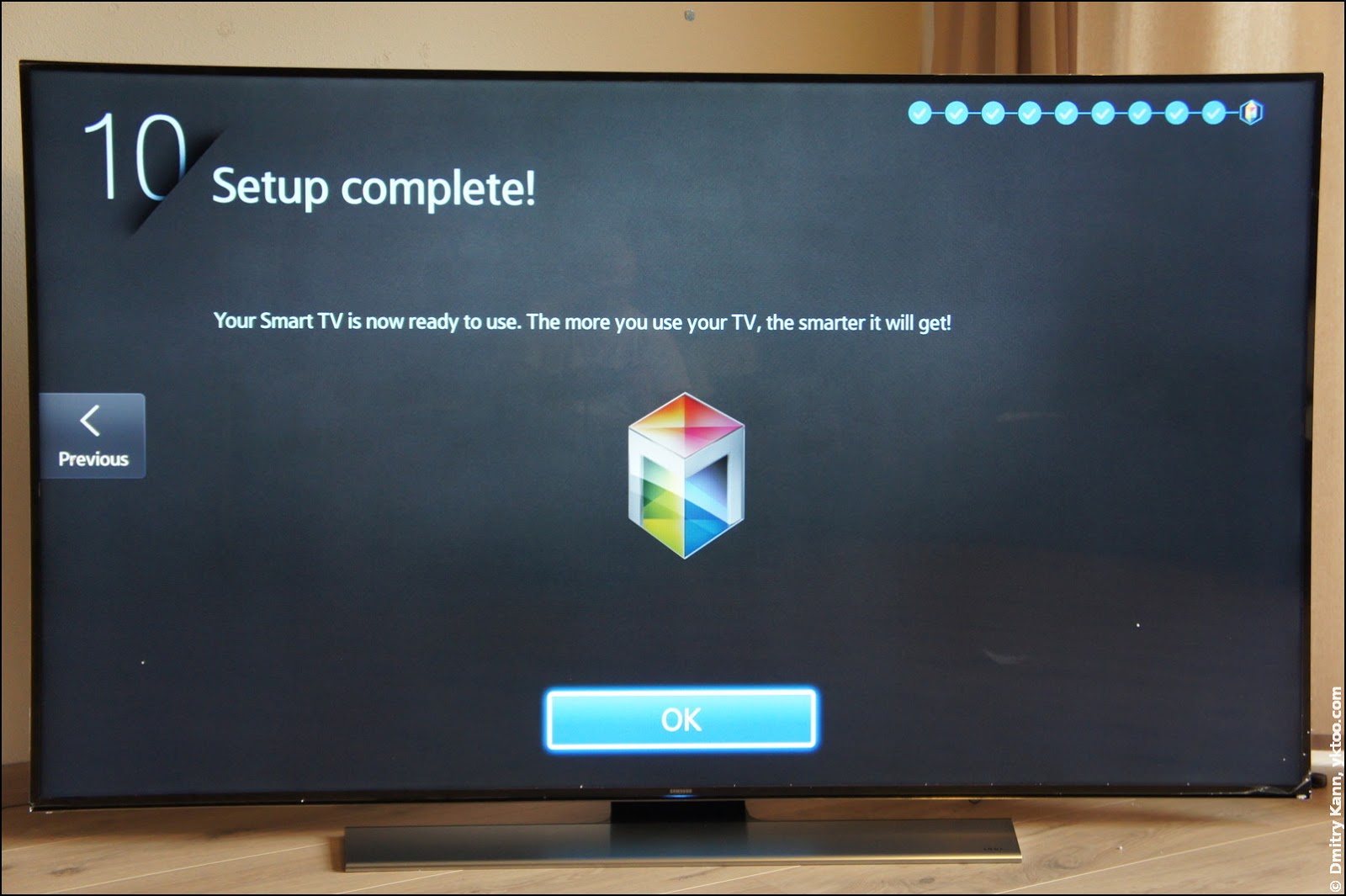
The tenth, final, screen promises that the TV itself will grow wiser day by day.
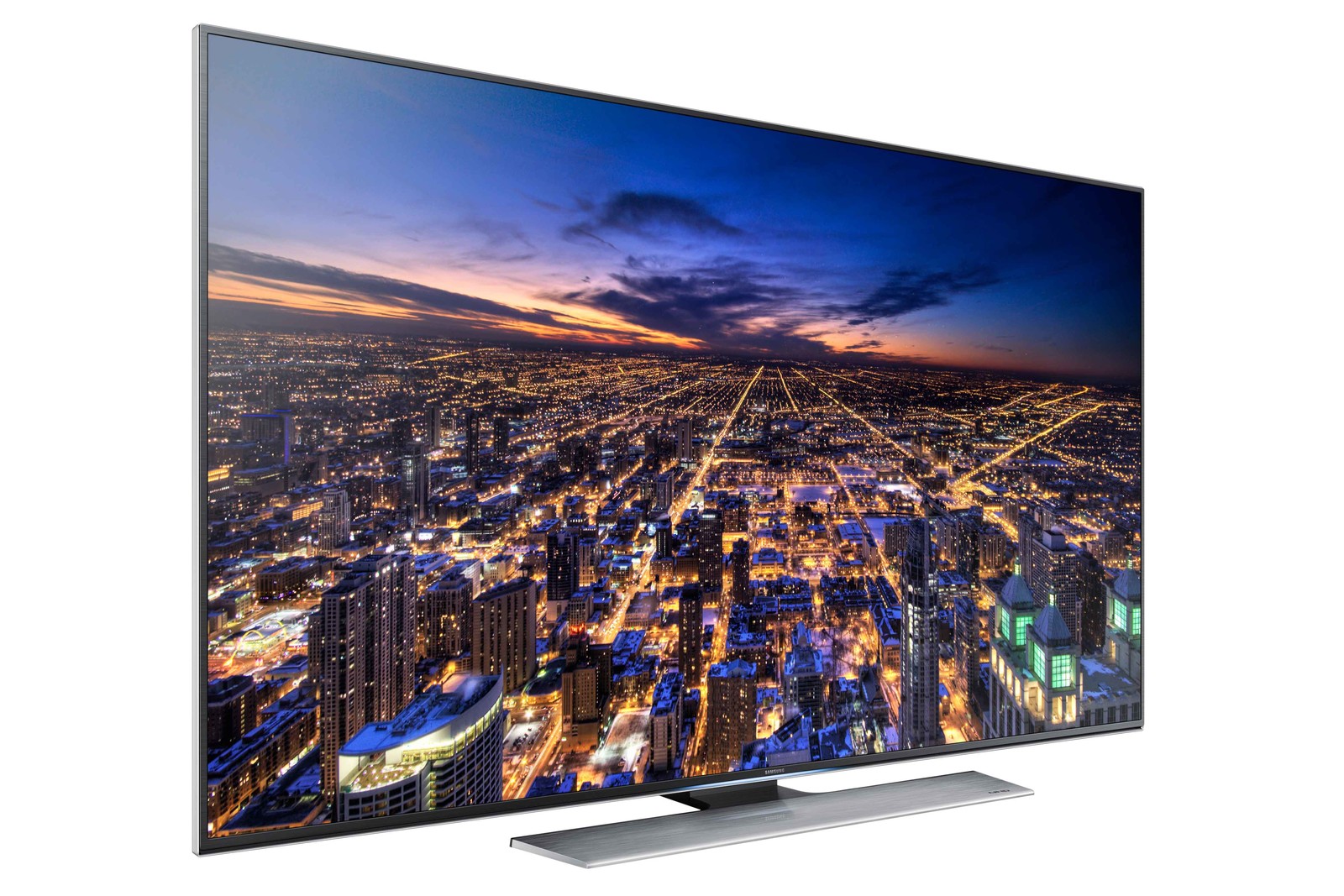
The monster looks, admittedly, pretty stylish. Very thin metal frame of the screen and the complete absence of any foreign objects on the front panel. A stand made of pure aluminum extends seven (!) Kilograms.

In profile, he is very thin, only 38 millimeters without the stand.

Right below the screen there is a blue power indicator, the operation of which can be configured through the TV menu (always on, always off, turns on with the TV):

Rear panel of the device: on the left is the connector block, in the middle there are four holes for the VESA bracket for wall mounting, on the right is the socket network cable. In the lower left corner is a tiny joystick that can be used to control the basic functions of the TV in the absence of a remote control.


What we have:
Not that there are too many, but these days the main thing is? That's right, HDMI, and there are already four of them.
If you have an extra four hundred euros, you can spend it on the aforementioned One Connect Box . When using it, all devices are connected through it, and a single cable goes to the TV.
Of the AV inputs, I used only HDMI. TV, unfortunately, does not support connecting to a local area network via HDMI (HDMI with Ethernet), so Ethernet (100 Mbps) needs to be connected separately. But there is support for Anynet + (HDMI-CEC), a system that allows you to control other devices via HDMI.
The TV also has two analog and two digital tuners (!), But all this wealth was not useful to me. There has been no analogue terrestrial television in the Netherlands for many years, although some cable providers still provide it. There is digital terrestrial TV (DVB-T), but only three state channels and several regional channels broadcast on it. But they are all in my cable package, and at the same time in Full HD quality.
There is also an input and a decoder for a satellite dish, and the TV even supports antenna positioning (rotation) systems (DiSEqC 1.2, USALS).
Samsung saved more than just the HDMI cable; there is also no camera in the standard kit - I can’t say that I approve of this approach.
Only a Samsung USB camera works with these TVs, and in addition to the considerable price (about 100 euros), it somehow turned out to be a rather rare bird, which we managed to find not without effort. In the end, I ordered the required model VG-STC4000 on eBay.
The camera is mounted on a sort of “knee” with two hinges that allow it to be mounted on the top edge of the TV in various positions:

It also has a stereo microphone and a mechanical shutter that can be used to close the lens when not in use.

The maximum resolution of the camera is 1920 × 1080. It is used, for example, in Skype, as well as for managing gestures and face recognition.
Two remote controls come with this TV at once, one traditional, the other - the so-called Smart Touch Control, reminiscent of a shape.

With a traditional remote control, everything is clear, it uses the usual infrared channel to communicate with the TV.
The second, remnant has some interesting features. Through IR, it only sends an on / off command, and everything else works via Bluetooth; In this regard, he has some delay in the reaction after a minute of inactivity - the radio falls asleep and it takes time to reconnect (thanks navion for clarification).
In addition to a minimal set of buttons (those that are smart in shape are quite convenient), it has a large oval megaphone in the center. If you just put your finger on it, the console turns into a sort of mouse - a light spot appears on the screen that serves as a pointer: You can

move the spot by tilting the mouse in different directions (the console has gyroscopes to track its position in space), for a “click” you just need to click on this megapitch. If you lift your finger from the button, the stain disappears. This is very convenient and generally works pretty well.
It is especially convenient to use the mouse mode for typing on the on-screen keyboard: The

megaphone is also a touchpad, with which you can, for example, scroll the page in the browser horizontally or vertically. This, unfortunately, works rather awkwardly.
But that is not all. If you press the Voice button, the TV volume decreases and the voice input icon appears on the screen. At the very top of Smart Touch Control there is a microphone, and voice commands are supposed to be dictated there. The system supports dozens of commands (up to ordering films and searching for programs), but the implementation is lame again - I could hardly find a common language with my TV.
If two remotes are not enough for you, you can connect a regular keyboard and / or mouse, and it supports both USB and Bluetooth connections. In the case of the keyboard, the function keys are responsible for the specific functions of the TV (for example, F6 = Source, F7 = channel list, F8 = Mute, etc.).
Another newfangled thing is gesture control. If you have a camera, you can move the cursor with your palm and click, bending your finger. However, either my finger was of the wrong design, or the lighting was inappropriate, I could not immediately launch this business. On the other hand, such a control system does not seem convenient to me - instead of long magical passes, it is much easier and faster to press a button on the remote control.
The infrared emitter mentioned above can send signals to various devices, so most often just a TV remote is enough. It is enough to configure it once, and the TV will turn the cable TV decoder on and off. In addition, it allows you to switch channels, call up menus and program schedules:
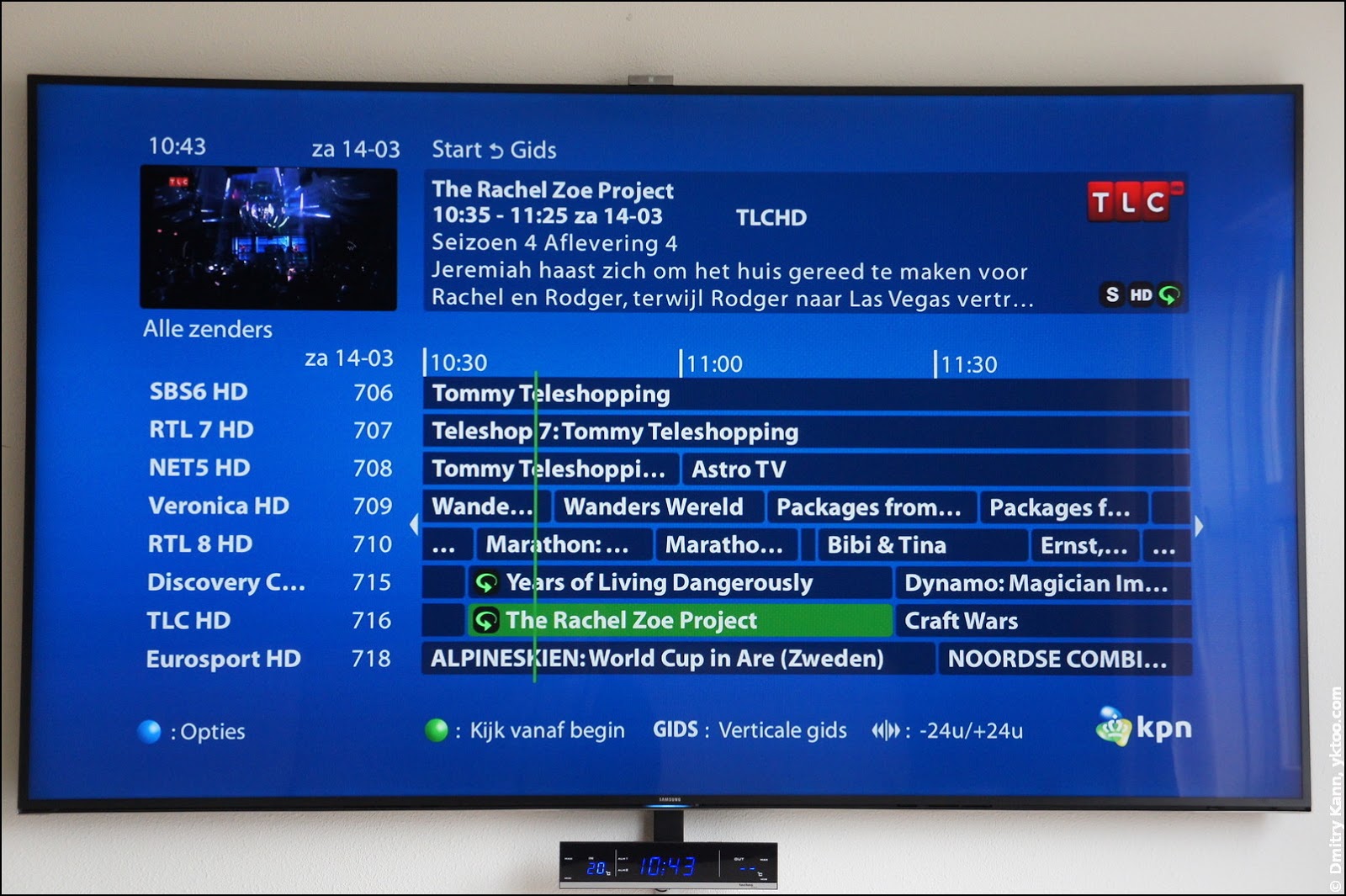
Mouse mode, of course, is not supported here (the decoder does not know anything about it), so you can only navigate with arrows, but it is implemented quite well.
Interactive TV mode, the so-called Smart Hub, consists of four main screens.

You can install paid and free applications on your TV, you need a Samsung account for this. Out of the box, YouTube, NetFlix, Spotify, and a few more are already preinstalled. Applications can also be installed on external USB-drives, and, of course, update and delete.

If you set up your location and your provider when setting up, TV will be able to load the program guide from the Internet. At the same time, a live video from the current source is shown here in the window.

Here you can rent movies and shows. What I have never done before ...
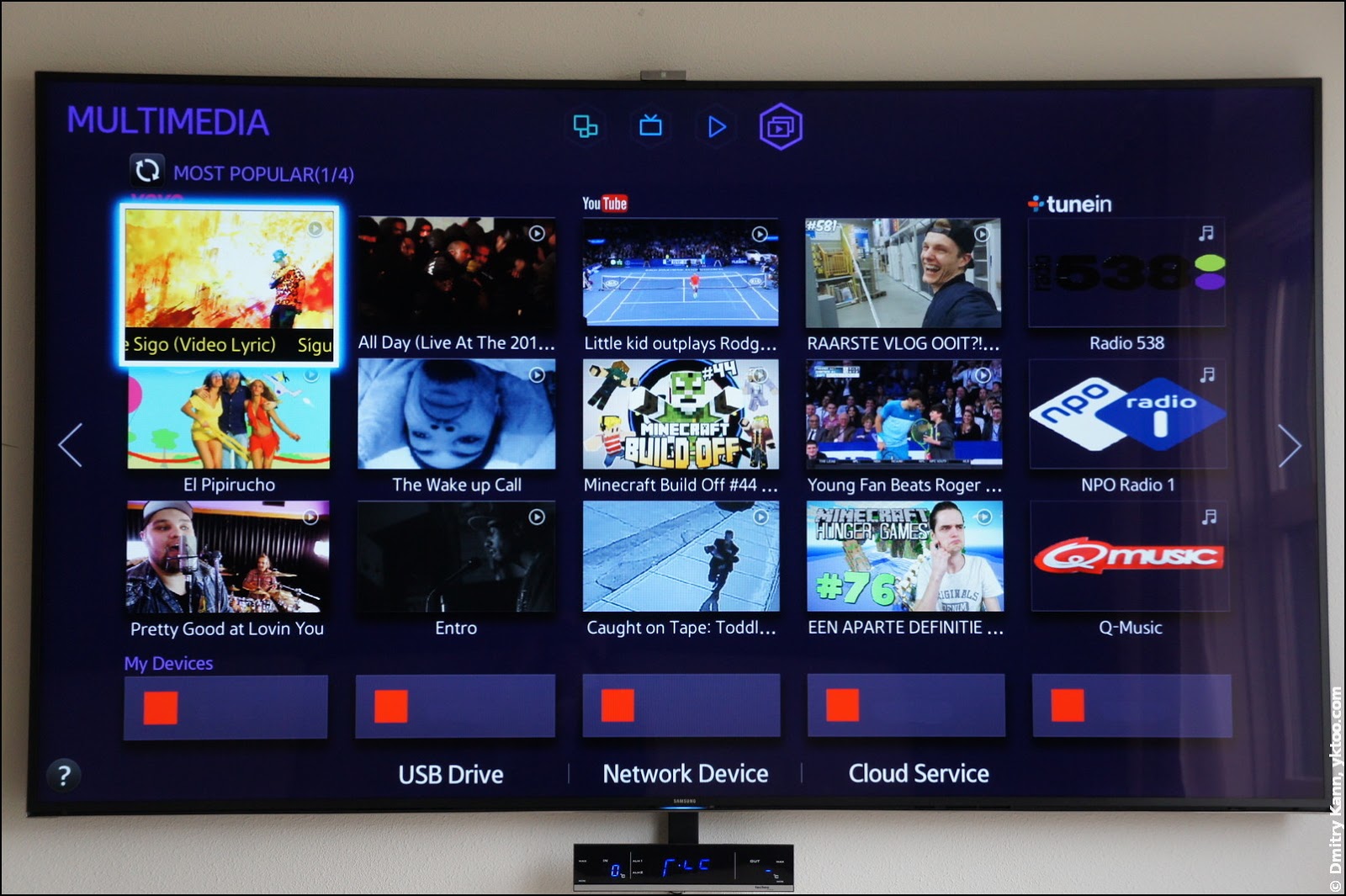
Connected USB drives and DLNA servers found on the network are displayed here; It is also possible to connect some cloud services such as Dropbox and SkyDrive. Unfortunately, Samsung does not support (or even plan to) connect to network resources, such as SMB or NFS servers (some enthusiasts even create alternative firmware with support for network drives).
In my home network, it is most convenient, in my opinion, to use a DLNA server, which in turn can connect to a NAS. Kodi (formerly XBMC) does an excellent job with an activated UPnP server running on a Mac Mini. You can just go through the folders and run movies directly over the network:

Skype starts and works well, but it sometimes freezes.

During the conversation, the camera automatically finds your face and zooms in on it. It looks pretty psychedelic. But you can walk around the room, talking with the interlocutor.
There are minimum settings in the application, but among other things there is a login mode by face. Recognition is working fine, as far as I can see. Supported mouse mode.
In the Spotify client, the mouse (Smart Touch) is not completely supported, so all navigation and even keyboard input are just buttons. Also, unfortunately, there is no radio mode.

The browser is quite functional and works well. Only here, scrolling along the touchpad on the Smart Touch behaves a little unpredictably.

There are "Favorites" and even a Google search field.

The YouTube application does not seem to (yet) support 4K video, which is becoming more and more on this service. But you can directly send video to it from a smartphone or tablet connected to the local network.
The built-in video player in the TV has impressive support for formats and codecs. Both FLV, MKV, and even the newfangled codecs H.265 and VP8 (WebM)

are supported : One of the main components of the merciless price of the device is its support for Ultra HD video , it's 4K, it's 2160p, i.e. 4096 × 2160 pixels ( taking into account that the native resolution of the panel is 3840 × 2160, it is either cropped or scaled).
What can I say about 4K video? Firstly, the only way to view it was to connect a USB drive. My Mac Mini, which I use as a media PC, is only capable of 1920 × 1080. When you try to play video over a network via DLNA, it noticeably “stumbles”.
Secondly, the quality is, of course, amazing - the smallest details are visible, but! this is if you stand no further than a meter and a half from the screen. Already from a distance of two meters, the video is visually not much different from Full HD (partly due to the very high-quality upscaling of HD video in this TV). I usually watch TV from the couch about five meters away (and, what’s already there, it's pretty stupid to stand a meter away from such a TV).
Thirdly, 4K video as such is almost absent in nature: basically, only demo videos of TV manufacturers are available. In addition, the files are huge. The only source I know of Ultra HD video is Netflix , but given the previous point, is it really necessary?
In general, for now, I see 4K support as an investment in the future.
As for 3D video, everything is OK here. The TV recognizes the 3D video stream one on top of the other or side-by-side and offers to switch to 3D mode. In addition, it has a 2D to 3D auto-conversion function, the meaning of which is not very clear to me. My personal opinion is that 3D does not add much to the experience of watching a movie.
Let's go back to the video player. Its interface is simple, like a Kalashnikov assault rifle.

It’s very good that subtitles are supported - both built-in and separate files (.srt, .sub, .psb, etc.)

You can also go through the chapters:

And, most often, rewind to an arbitrary place:

Supported audio formats: The

audio player is also pretty straightforward, and also a few ... uh ... big for such a screen.

The sound system in the TV is of very decent quality (for the form factor of a blackboard).
This TV appeared exactly on the eve of last year's World Cup, and one of its killer features advertised the “football mode” (for which Smart Touch Control even has a separate button). If activated, the grass becomes an unreal poisonous green color, and the noise of the stadium is noticeably amplified.
In general, this mode (and I agree with other observers in this) isstupid very specific and I personally do not need it. Yes, and I do not watch football.
It is impossible to talk about all the features of this model in one post, especially since I have not tried them all myself yet. To summarize my impressions of the device:
Pros:
Minuses:
In general, the operating experience of the TV is positive. The “iron” part is made, in my opinion, flawlessly. In terms of software, there are, of course, some flaws and roughnesses, but as without them. In addition, the TV is periodically updated via the Internet.
If you have any questions, I will be happy to answer them in the comments.
But to the devil benefit! Our patient today is the 75-inch monster Samsung UE75HU7500 , the exact name of the model is Samsung UE75HU7500LXXN (since I live in the Netherlands, the version of the device is appropriate). Manufacturer's Recommended Price: 5499 Euro .
This is one of the largest televisions of the company, available in mass sales today; larger than it there are only “bent” 78-inch 78JU7500 and78HU9000 and mega-monster 85HU7500 with a diagonal of 85 "- but their prices are really sky-high (the 85-inch model costs ten thousand euros).
I have been actively using the TV for about a month and a half, so I can share the first-person experience. Under the cut lots of pictures.
Content
- A little background
- Specifications
- Unpacking
- Looking around
- Connection
- Camera
- Remote controls
- IR emitter
- Smart hub and apps
- Video
- Audio
- One more thing
- Summarizing
A little background
Shortly after we moved to a new home, I began to think about a television suitable for our interior. In design, I like functional minimalism, so the desired configuration of the living room was this: a TV on the wall, a sofa opposite. But with a room width of five meters, the TV should be of the appropriate size, at least 60-65 inches.
Since the panel was supposed to be placed on the wall, the “curved” varieties disappeared immediately - they benefit in image quality, especially when viewed from a short distance, but look rather awkward when hung on a wall.
If you already buy a large TV, it makes sense to choose a model with a reserve for the future, with support for Ultra HD. In this regard, Samsung significantly outperforms other manufacturers (LG, Sony, Philips), offering similar models (in size, features, quality) one and a half times cheaper.
Samsung UE75HU7500 - LED-TV of the latest generation of the company (2014 model). It supports Ultra HD (4K video) as well as 3D video (using special glasses).
I'll start with a brief listing of the characteristics.
Specifications
| System | |
| - processor | Quad Core (Quad Core) |
| Screen | |
| - Screen diagonal | 75 inches, 189 cm |
| - Resolution | 3840 × 2160 (16: 9 ratio) |
| - screen type | LED (LED) |
| - Backlight control | Precision black (local dimming) |
| - Update frequency | 1000 Hz |
| - Auto brightness | Yes (built-in light sensor) |
| - 3D video support | Yes (active points required) |
| - Support HD / UHD | Yes, HD (max. 60 fps), UHD up to 4096 × 2160 (max. 30 fps) |
| Sound | |
| - speakers | 6 channels (2 front, 2 center, 2 woofers) |
| - Power | 60 W (2 × 10 W front, 2 × 10 W center, 2 × 10 W woofers) |
| - Decoders | Dolby Multistream Decoder MS11 , DTS Studio Sound , DTS Premium Sound 5.1 |
| - Auto volume | there is |
| - 3D sound | there is |
| Network support | |
| - Ethernet | 100 Mbps integrated |
| - wifi | Yes, built-in |
| Inputs and outputs | |
| - HDMI | 4 |
| - USB | 3 |
| - Composite input | 1 |
| - Component input | 1 (Y / Pb / Pr) |
| - SCART | 1 |
| - CI / CI + | CI + (1.3) 2CI Ready |
| - Antenna input | 1 |
| - Input for cable TV | 1 |
| - Entrance for satellite TV | 1 |
| - Camera | Purchased separately, connected via USB |
| Smart TV Support | |
| - Samsung Smart Hub | there is |
| - On TV (program guide) | There are 15 European countries |
| - Skype | Yes (camera required) |
| - YouTube | there is |
| - netflix | there is |
| - Spotify | there is |
| - web browser | there is |
| - Support for Smart TV applications | there is |
| Control | |
| - Remote control | 2 (regular and smart touch) |
| - Voice control | there is |
| - Gesture management | Yes (camera required) |
| - Face Recognition | Yes (camera required) |
| - Support for USB input devices | Keyboard, mouse |
| - Support for Bluetooth input devices | Keyboard, mouse |
| View Content | |
| - analog tuner | 2 |
| - Digital tuner | 2 (DVB-T / C / S2) |
| - Streaming video | Yes |
| - Screen Mirroring | Yes |
| - UPnP / DLNA | Yes |
| - External USB media | Yes |
| - Wi-Fi Direct | Yes |
| - Picture-in-picture | Yes |
| - Time Shift (pause / record video) | Yes |
| Dimensions and Weight | |
| - Package size | 1876 × 1085 × 250 mm |
| - Dimensions TV with stand | 1676 × 1006 × 340 mm |
| - TV dimensions without stand | 1676 × 961 × 38 mm |
| - Weight with packaging | 53.5 kg |
| - TV weight with stand | 43 kg |
| - TV weight without stand | 36.2 kg |
| Other | |
| - Nutrition | ~ 220-240 V, 50/60 Hz |
| - power consumption | 146 watts |
| - Remote control | 2 (regular and smart touch) |
| - 3D glasses | 2 pairs of active points SSG-5100GB |
| - wall mount | maybe |
As you can see from the above table, there are so many things crammed into this model that you are unlikely to be able to use half of this. In any case, I have not yet managed.
Unpacking
The box of this TV is immense, it is almost two meters in length and a little more than a meter in height.
Here it is in comparison with a chair - for scale.
She weighs more than fifty pounds, so that alone to deal with it is almost impossible. Moreover, it is only 25 cm in thickness, which must be taken into account when unpacking - it does not differ in special stability. By the way, what is it written there?
Saved on an HDMI cable for five euros from a TV for five thousand. And not even ashamed to write about it on the packaging.
The upper part of the box can be easily removed by removing the plastic latches located at the bottom.
The panel is held in an upright position only by foam inserts in the corners, so you should not unpack this device during an earthquake. We remove the excess polystyrene, pull out both parts of the stand and the box with accessories.
That's all that comes with the kit: two remote controls with batteries, plastic bushings for attaching the VESA bracket, network cable, infrared emitter, adapter for CI +, two pairs of 3D glasses and instructions. There really is no HDMI cable, hmm ...
Gently attaching the panel to the stand (for the first time), we turn on the monster in the network. The first thing you pay attention to is the cooler noise! Yes, yes, this TV has a cooler and is pretty audible.
The setup wizard starts and first of all it asks to connect the device to the life-giving Internet - the benefit is both Ethernet and Wi-Fi are already built-in.
Then follow a few more screens with all sorts of things, like a license agreement and privacy policy. The turn comes to connect an infrared emitter (IR Extender) - a small plastic washer with a wire ending in a regular 3.5 mm plug.
The plug is stuck in a special socket on the back of the TV, and the puck must be put in front of the cable TV decoder (set-top box):
This mechanism allows the TV to independently control the decoder, including its power, changing channels or calling up the program schedule (TV guide), and this is extremely conveniently.
The tenth, final, screen promises that the TV itself will grow wiser day by day.
Looking around
The monster looks, admittedly, pretty stylish. Very thin metal frame of the screen and the complete absence of any foreign objects on the front panel. A stand made of pure aluminum extends seven (!) Kilograms.
In profile, he is very thin, only 38 millimeters without the stand.
Right below the screen there is a blue power indicator, the operation of which can be configured through the TV menu (always on, always off, turns on with the TV):
Rear panel of the device: on the left is the connector block, in the middle there are four holes for the VESA bracket for wall mounting, on the right is the socket network cable. In the lower left corner is a tiny joystick that can be used to control the basic functions of the TV in the absence of a remote control.
Connection
What we have:
- Two USB 2.0 ports
- One USB 3.0 Port
- One Connect Box Connector
- Optical audio output
- Four HDMI inputs
- Satellite Dish Slots
- Coaxial antenna socket
- IR emitter jack
- Headphone output (absolutely hellish location, I must say)
- Some kind of service connector
- Ethernet RJ-45
- One scart
- Combined composite component input
- CI / CI + Adapter Connector
Not that there are too many, but these days the main thing is? That's right, HDMI, and there are already four of them.
If you have an extra four hundred euros, you can spend it on the aforementioned One Connect Box . When using it, all devices are connected through it, and a single cable goes to the TV.
Of the AV inputs, I used only HDMI. TV, unfortunately, does not support connecting to a local area network via HDMI (HDMI with Ethernet), so Ethernet (100 Mbps) needs to be connected separately. But there is support for Anynet + (HDMI-CEC), a system that allows you to control other devices via HDMI.
The TV also has two analog and two digital tuners (!), But all this wealth was not useful to me. There has been no analogue terrestrial television in the Netherlands for many years, although some cable providers still provide it. There is digital terrestrial TV (DVB-T), but only three state channels and several regional channels broadcast on it. But they are all in my cable package, and at the same time in Full HD quality.
There is also an input and a decoder for a satellite dish, and the TV even supports antenna positioning (rotation) systems (DiSEqC 1.2, USALS).
Camera
Samsung saved more than just the HDMI cable; there is also no camera in the standard kit - I can’t say that I approve of this approach.
Only a Samsung USB camera works with these TVs, and in addition to the considerable price (about 100 euros), it somehow turned out to be a rather rare bird, which we managed to find not without effort. In the end, I ordered the required model VG-STC4000 on eBay.
The camera is mounted on a sort of “knee” with two hinges that allow it to be mounted on the top edge of the TV in various positions:
It also has a stereo microphone and a mechanical shutter that can be used to close the lens when not in use.
The maximum resolution of the camera is 1920 × 1080. It is used, for example, in Skype, as well as for managing gestures and face recognition.
Remote controls
Two remote controls come with this TV at once, one traditional, the other - the so-called Smart Touch Control, reminiscent of a shape.
With a traditional remote control, everything is clear, it uses the usual infrared channel to communicate with the TV.
The second, remnant has some interesting features. Through IR, it only sends an on / off command, and everything else works via Bluetooth; In this regard, he has some delay in the reaction after a minute of inactivity - the radio falls asleep and it takes time to reconnect (thanks navion for clarification).
In addition to a minimal set of buttons (those that are smart in shape are quite convenient), it has a large oval megaphone in the center. If you just put your finger on it, the console turns into a sort of mouse - a light spot appears on the screen that serves as a pointer: You can
move the spot by tilting the mouse in different directions (the console has gyroscopes to track its position in space), for a “click” you just need to click on this megapitch. If you lift your finger from the button, the stain disappears. This is very convenient and generally works pretty well.
It is especially convenient to use the mouse mode for typing on the on-screen keyboard: The
megaphone is also a touchpad, with which you can, for example, scroll the page in the browser horizontally or vertically. This, unfortunately, works rather awkwardly.
But that is not all. If you press the Voice button, the TV volume decreases and the voice input icon appears on the screen. At the very top of Smart Touch Control there is a microphone, and voice commands are supposed to be dictated there. The system supports dozens of commands (up to ordering films and searching for programs), but the implementation is lame again - I could hardly find a common language with my TV.
If two remotes are not enough for you, you can connect a regular keyboard and / or mouse, and it supports both USB and Bluetooth connections. In the case of the keyboard, the function keys are responsible for the specific functions of the TV (for example, F6 = Source, F7 = channel list, F8 = Mute, etc.).
Another newfangled thing is gesture control. If you have a camera, you can move the cursor with your palm and click, bending your finger. However, either my finger was of the wrong design, or the lighting was inappropriate, I could not immediately launch this business. On the other hand, such a control system does not seem convenient to me - instead of long magical passes, it is much easier and faster to press a button on the remote control.
IR emitter
The infrared emitter mentioned above can send signals to various devices, so most often just a TV remote is enough. It is enough to configure it once, and the TV will turn the cable TV decoder on and off. In addition, it allows you to switch channels, call up menus and program schedules:
Mouse mode, of course, is not supported here (the decoder does not know anything about it), so you can only navigate with arrows, but it is implemented quite well.
Smart hub and apps
Interactive TV mode, the so-called Smart Hub, consists of four main screens.
Screen One: Applications
You can install paid and free applications on your TV, you need a Samsung account for this. Out of the box, YouTube, NetFlix, Spotify, and a few more are already preinstalled. Applications can also be installed on external USB-drives, and, of course, update and delete.
Screen Two: OnTV
If you set up your location and your provider when setting up, TV will be able to load the program guide from the Internet. At the same time, a live video from the current source is shown here in the window.
Screen Three: movie and TV show rental
Here you can rent movies and shows. What I have never done before ...
Screen Four: Multimedia Devices
Connected USB drives and DLNA servers found on the network are displayed here; It is also possible to connect some cloud services such as Dropbox and SkyDrive. Unfortunately, Samsung does not support (or even plan to) connect to network resources, such as SMB or NFS servers (some enthusiasts even create alternative firmware with support for network drives).
In my home network, it is most convenient, in my opinion, to use a DLNA server, which in turn can connect to a NAS. Kodi (formerly XBMC) does an excellent job with an activated UPnP server running on a Mac Mini. You can just go through the folders and run movies directly over the network:
Some applications
Skype starts and works well, but it sometimes freezes.
During the conversation, the camera automatically finds your face and zooms in on it. It looks pretty psychedelic. But you can walk around the room, talking with the interlocutor.
There are minimum settings in the application, but among other things there is a login mode by face. Recognition is working fine, as far as I can see. Supported mouse mode.
In the Spotify client, the mouse (Smart Touch) is not completely supported, so all navigation and even keyboard input are just buttons. Also, unfortunately, there is no radio mode.
The browser is quite functional and works well. Only here, scrolling along the touchpad on the Smart Touch behaves a little unpredictably.
There are "Favorites" and even a Google search field.
The YouTube application does not seem to (yet) support 4K video, which is becoming more and more on this service. But you can directly send video to it from a smartphone or tablet connected to the local network.
Video
The built-in video player in the TV has impressive support for formats and codecs. Both FLV, MKV, and even the newfangled codecs H.265 and VP8 (WebM)
are supported : One of the main components of the merciless price of the device is its support for Ultra HD video , it's 4K, it's 2160p, i.e. 4096 × 2160 pixels ( taking into account that the native resolution of the panel is 3840 × 2160, it is either cropped or scaled).
What can I say about 4K video? Firstly, the only way to view it was to connect a USB drive. My Mac Mini, which I use as a media PC, is only capable of 1920 × 1080. When you try to play video over a network via DLNA, it noticeably “stumbles”.
Secondly, the quality is, of course, amazing - the smallest details are visible, but! this is if you stand no further than a meter and a half from the screen. Already from a distance of two meters, the video is visually not much different from Full HD (partly due to the very high-quality upscaling of HD video in this TV). I usually watch TV from the couch about five meters away (and, what’s already there, it's pretty stupid to stand a meter away from such a TV).
Thirdly, 4K video as such is almost absent in nature: basically, only demo videos of TV manufacturers are available. In addition, the files are huge. The only source I know of Ultra HD video is Netflix , but given the previous point, is it really necessary?
In general, for now, I see 4K support as an investment in the future.
As for 3D video, everything is OK here. The TV recognizes the 3D video stream one on top of the other or side-by-side and offers to switch to 3D mode. In addition, it has a 2D to 3D auto-conversion function, the meaning of which is not very clear to me. My personal opinion is that 3D does not add much to the experience of watching a movie.
Let's go back to the video player. Its interface is simple, like a Kalashnikov assault rifle.
It’s very good that subtitles are supported - both built-in and separate files (.srt, .sub, .psb, etc.)
You can also go through the chapters:
And, most often, rewind to an arbitrary place:
Audio
Supported audio formats: The
audio player is also pretty straightforward, and also a few ... uh ... big for such a screen.
The sound system in the TV is of very decent quality (for the form factor of a blackboard).
One more thing
This TV appeared exactly on the eve of last year's World Cup, and one of its killer features advertised the “football mode” (for which Smart Touch Control even has a separate button). If activated, the grass becomes an unreal poisonous green color, and the noise of the stadium is noticeably amplified.
In general, this mode (and I agree with other observers in this) is
Summarizing
It is impossible to talk about all the features of this model in one post, especially since I have not tried them all myself yet. To summarize my impressions of the device:
Pros:
- Large, high-quality, clear and contrast screen
- Very thin
- Stylish performance
- A large number of built-in functions
- Excellent support for video and audio formats
- Very high refresh rate (1000 Hz) + high-quality upscaling of HD video
- High-quality built-in sound
- Two remote controls included, one of which can work in mouse mode
Minuses:
- Price (currently cataloged € 5499)
- Size and weight allow you to move the device only together
- Not all features are usable.
- Quite noticeable in the silence noise cooler
- Occasional interface slowdowns
In general, the operating experience of the TV is positive. The “iron” part is made, in my opinion, flawlessly. In terms of software, there are, of course, some flaws and roughnesses, but as without them. In addition, the TV is periodically updated via the Internet.
If you have any questions, I will be happy to answer them in the comments.
Only registered users can participate in the survey. Please come in.
What do you think of 4K video?
- 2.3% I use it, I can’t get enough 29
- 0.7% I use, but reluctantly 9
- 62.8% Interesting, but too expensive 764
- 29.2% Generally uninteresting, marketing husk 355
- 4.7% I don’t know anything about it and I don’t want to know 58