How to make a watch from an old navigator on Windows CE
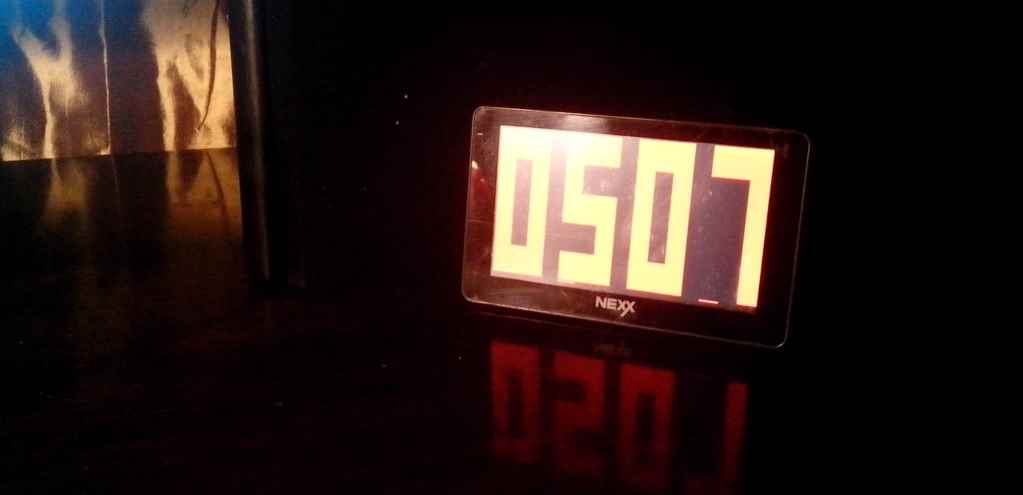
About ten years ago, Windows CE led the market for operating systems for mobile devices, defeating its competitors in the form of PalmOS, Symbian and others. Windows CE was everywhere - in navigators, radio, communicators, PDAs and even in medical equipment. But time passed, and now it is rather exotic, and the devices themselves are outdated and firmly settled in the pantries. One of them was found in my house in the face of the Chinese navigator Nexx. After some thought, it was decided to make a watch out of it. And I almost succeeded ...
At startup, navigators usually load the shell from the manufacturer, blocking access to the OS. This is easy enough: instead of the file of the navigation program, for example. Map: \ NaviOne \ NaviOne.exe , file manager is attached , e.g. TC.exe orcecmd.exe . Launching it from the shell as a navigation program, go to the Windows folder, run explorer.exe and see the "Start" button and the clock - Windows in miniature.
Now you can install your programs from cab-files. If there is no installer and cab files are not installed (sometimes it happens), then you can use cabinstl.exe . Quickly looking for a full-screen clock and not finding anything suitable, I decided that it’s easier to shake the antiquity and write it myself, since programming for Windows CE is not very different from the big brother when using WinAPI. The result is here .
It remains to add the clock to startup, so that when the device starts, the clock does not start the navigator shell. To do this, you need to change the registry key
As a result, we get a big watch that can please parents.
PS Archive with the mentioned programs can be taken here .
At startup, navigators usually load the shell from the manufacturer, blocking access to the OS. This is easy enough: instead of the file of the navigation program, for example. Map: \ NaviOne \ NaviOne.exe , file manager is attached , e.g. TC.exe orcecmd.exe . Launching it from the shell as a navigation program, go to the Windows folder, run explorer.exe and see the "Start" button and the clock - Windows in miniature.
Now you can install your programs from cab-files. If there is no installer and cab files are not installed (sometimes it happens), then you can use cabinstl.exe . Quickly looking for a full-screen clock and not finding anything suitable, I decided that it’s easier to shake the antiquity and write it myself, since programming for Windows CE is not very different from the big brother when using WinAPI. The result is here .
It remains to add the clock to startup, so that when the device starts, the clock does not start the navigator shell. To do this, you need to change the registry key
HKEY_LOCAL_MACHINE\initusing TC.exe (with the plugin) or regedit.exe . The registry should be edited with caution, as there is a chance to brick the device (which I did, because, after running it, I found out that there is no firmware or hard-reset for my navigator), and do not edit keys LaunchXXwith a number less than 60 ( it's systemic). As a result, we get a big watch that can please parents.
PS Archive with the mentioned programs can be taken here .