 April 18, 2016 at 19:06
Accelerate OpenVPN for $ 9.99 * or embed Orange Pi One in a router
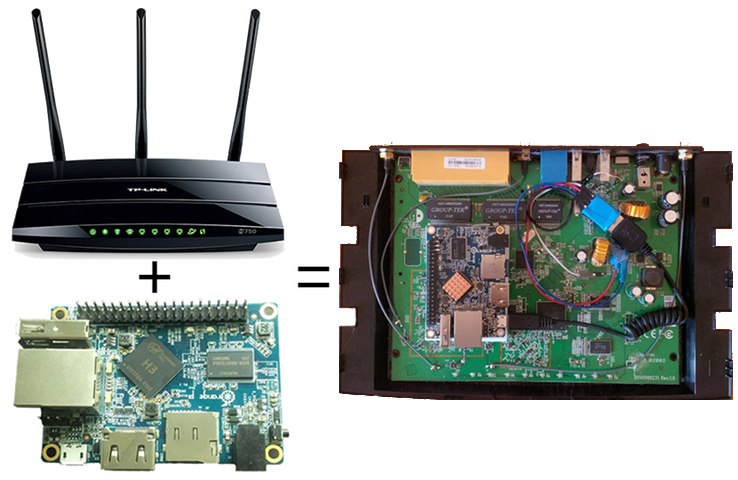
Some of us do not use the Internet without a VPN for one reason or another: someone needs a dedicated IP, and it’s easier and cheaper to buy VPS with two IPs than to buy an address from a provider, someone wants to access all websites, and not only permitted in the territory of the Russian Federation, the third one needs IPv6, but the provider does not provide it ...
Most often, a VPN connection is established on the device itself, which is used at a certain moment, which is justified if you only have one computer and one phone, and you have them rarely use at the same time. If your home network has a lot of devices, or, for example, there are those on which you cannot configure a VPN, it would be more convenient to raise the tunnel directly on your home router, so as not to think about configuring each device individually.
If you ever installed OpenVPN on your router, you were probably unpleasantly surprised at the speed of its operation. SoC 'and even cheap routers without any problems let through gigabit traffic through the transfer of routing and NAT functions to a separate chip designed exclusively for this task, and the main processors of such routers are rather weak, because there is practically no load on them. Such a compromise allows you to achieve a high speed router and significantly reduce the price of the finished device - routers with powerful processors are several times more expensive and are positioned not only as a box for distributing the Internet, but also as a NAS, torrent downloads and home multimedia systems.
My router, TP-Link TL-WDR4300, cannot be called new - the model appeared in mid-2012, and has a 560 MHz processor MIPS32 74Kc architecture, whose power is only enough for 20-23 Mb / s of encrypted traffic via OpenVPN, which by standards the speed of modern home internet is quite a bit.
How would we increase the speed of an encrypted tunnel? My router is quite functional, supports 3x3 MIMO, and indeed, it works well, I would not want to change it.
Since it’s now customary to make 10-megabyte web pages, write desktop applications on node.js and pack them into a 100-megabyte file, increase computing power instead of optimizing, we will do something terrible - we will transfer the VPN connection to a productive single-board “computer” Orange Pi One, which we install in the router case without occupying the existing network and USB ports, for only $ 9.99 *!
* + delivery, + taxes, + for beer, + MicroSD.
Openvpn
The router processor cannot be called completely weak - it is able to encrypt and hash data with the AES-128-CBC-SHA1 algorithm at a speed of 50 Mb / s, which is noticeably faster than how OpenVPN works, and the modern stream cipher CHACHA20 with the POLY1305 hash even develops 130 megabits per second! Why is the speed of the VPN tunnel so low? It's all about switching context between user space and kernel space: OpenVPN encrypts traffic and communicates with the outside world in the context of the user, and routing itself takes place in the context of the kernel. The operating system has to constantly switch back and forth to each received or transmitted packet, and this operation is not fast. This problem is inherent in all VPN applications running through the TUN / TAP driver, and it cannot be said that the low speed problem is caused by poor OpenVPN optimization (although, Of course, there are places that need to be redone). Not a single userspace VPN client even issues gigabits with encryption disabled on my laptop, let alone systems with a weak processor.Orange pi one
Xunlong Orange Pi One is the best offer at the moment in terms of performance / price. For $ 9.99 * you get a solid quad-core ARM Cortex-A7 processor, (stable) running at 1008 MHz, and clearly more productive than the Raspberry Pi Zero and Next Thing CHIP neighbors in the price category. On this, the pros end. Xunlong pays absolutely zero attention to the software of its boards, and at the time of the launch of One, it did not even provide a board configuration file, not to mention ready-made images. Allwinner - the manufacturer of SoC - is also not very kind to support its product. They are only interested in the minimal performance in Android 4.4.4, which means that we are forced to use the kernel version 3.4 with Android patches. Fortunately, there are enthusiasts who build distributions, rule the kernel, write code to support boards in the mainline core, i.e. actually doing the work for the producer, making this shit work acceptable. For my purposes, I chose the Armbian distribution, it is often and conveniently updated (new kernels are installed directly through the package manager, and not by copying files to a special section, as is usually the case with Allwinner), and it supports most peripherals, unlike the others.Router
In order not to load the weak processor of the router with encryption and speed up our VPN connection, we can shift this task to the shoulders of the more efficient Orange Pi processor, by connecting it to the router in some way. A connection either via Ethernet or via USB comes to mind - both of these standards are supported by both devices, but I did not want to occupy existing ports. Fortunately, there is a way out.The microcircuit of the USB hub GL850G, which is used in the router, supports 4 USB ports, two of which are not soldered. It is unclear why the manufacturer did not begin to unsolder them, I suppose, in order to prevent users from connecting immediately 4 devices with high current consumption (for example, hard drives), The standard power supply of the router is not designed for such a load. In any case, this is in our favor.
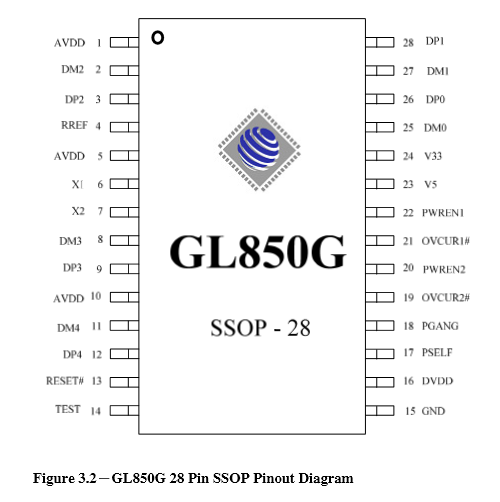
In order to get another USB port, just add two wires to 8 (D-) and 9 (D +) or 11 (D-) and 12 (D +) pins.

However, it’s not enough just to connect two USB devices and hope that everything will work by itself, as would be the case with Ethernet. Firstly, we need to make one of them work in USB Client mode, not USB Host, and secondly, we need to decide how the devices will determine each other. There are many drivers of the so-called USB Gadgets (by the name of the Linux kernel subsystem) that allow you to emulate various types of USB devices: network adapter, audio card, keyboard and mouse, USB flash drive, camera, console via serial port. Since our device will work with a network, emulation of an Ethernet adapter is best for us.
There are three Ethernet-over-USB standards:
- Remote NDIS (RNDIS) . An outdated standard from Microsoft, used primarily in the days of Windows XP.
- Ethernet Control Model (ECM) . A simple standard that encapsulates Ethernet frames in USB packets. Great for wired modems with a USB connection, where it’s convenient to transfer frames without processing, but because of its simplicity and limitations, the USB bus does not work too fast.
- Ethernet Emulation Model (EEM) . A smarter protocol that takes into account the limitations of USB and optimally aggregates several frames into one, thereby increasing throughput.
- Network Control Model (NCM) . The newest protocol. It has the advantages of EEM and further optimizes the work with the bus.
To make any of these protocols work on our board, as always, you will have to face some difficulties. Due to the fact that Allwinner is only interested in the Android part of the kernel, only Android Gadget works normally - the code that implements communication with adb, exporting the device via MTP and emulating a flash drive on Android devices. Android Gadget itself also supports the RNDIS protocol, but it is broken in the Allwinner kernel. If you try to compile the kernel with any other USB Gadget, the device simply will not appear on the system, no matter what you do.
To solve the problem, in a good way, you need to find the place where the USB controller is initialized in the Android.c Android gadget code modified by the developers, but there is also a workaround to make Ethernet emulation via USB work, at least:
--- sun8i/drivers/usb/sunxi_usb/udc/sunxi_udc.c 2016-04-16 15:01:40.427088792 +0300
+++ sun8i/drivers/usb/sunxi_usb/udc/sunxi_udc.c 2016-04-16 15:01:45.339088792 +0300
@@ -57,7 +57,7 @@
 static sunxi_udc_io_t g_sunxi_udc_io;
 static u32 usb_connect = 0;
 static u32 is_controller_alive = 0;
-static u8 is_udc_enable = 0;   /* is udc enable by gadget? */
+static u8 is_udc_enable = 1;   /* is udc enable by gadget? */
 #ifdef CONFIG_USB_SUNXI_USB0_OTG
static struct platform_device *g_udc_pdev = NULL;Now you should rebuild the kernel with this patch and the necessary gadget. I chose EEM because according to test results, it turned out to be more productive than NCM.
The Armbian team provides a very simple and convenient assembly system for all supported boards in the distribution. It is enough to download it, put our patch in
userpatches/kernel/sun8i-default/otg.patch, edit it a bit compile.shand select the necessary gadget: 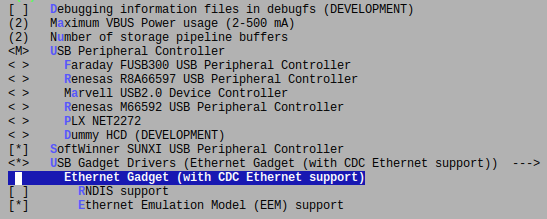
The kernel will assemble in a deb-package, which will not be difficult to install on the board via
dpkg. It remains only to connect the board via USB and configure our new network adapter to receive the address via DHCP. To do this, add something like the following to
/etc/network/interfaces:auto usb0
iface usb0 inet dhcp
hwaddress ether c2:46:98:49:3e:9d
pre-up /bin/sh -c 'echo 2 > /sys/bus/platform/devices/sunxi_usb_udc/otg_role'We connect the MicroUSB cable to the OTG connector, we connect power from the router (it can be supplied to the 2 and 3 pins of the comb, and not just to the power connector).
It remains to configure the router. It is enough to install the package with the EEM driver and add our new USB network device to the bridge of the local firewall zone:
opkg install kmod-usb-net-cdc-eem
To route all traffic to the VPN tunnel, you must either add the SNAT rule to the IP address of the board on the router side, or distribute the address of the board through dnsmasq as the gateway address. The latter is done by adding the following line to
/etc/dnsmasq.conf:dhcp-option = tag:lan, option:router, 192.168.1.100192.168.1.100is the IP address of your board. Do not forget to write the address of the router in the network settings on the board itself! To isolate the board's contacts from the router's contacts, a melamine sponge was used. It turned out somehow like this:
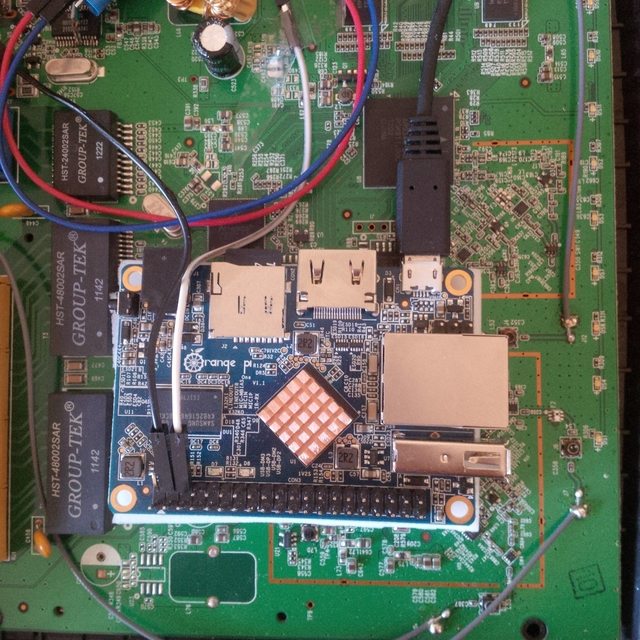
Conclusion
The network via USB works surprisingly fast: 100-120 Mb / s, I expected less. OpenVPN passes about 70 Mb / s of encrypted traffic through itself, which is also not very much, but enough for my needs. The router cover does not close tightly, leaving a slight gap. Aesthetes can drop Ethernet and USB Host-connectors on the board, which will allow the lid to close completely, and there will still be more space.And it’s better not to engage in such pornography and buy Turris Omnia .









