How to create your online course at Teachbase
- Tutorial
We decided to show how to create an English language course based on films in the TeachBase cloud service. That's what we got.
Objective: It is necessary to compose and conduct an online course for 30-100 or more people. Where to begin?

Let's try to make a list of what will be needed for this:
1. A file storage system for lesson materials in text, video and other formats.
2. The correct organization of files by lesson
3. A convenient platform for distributing material and assignments to users
4. Video conferencing for training webinars
5. Statistics and reporting on lessons learned - on courses and on students
It is necessary to pay attention to two important aspects:
1. It is desirable that all this be in one place - otherwise, if we later have several courses, we will get confused in them.
2. The system should be cross-platform \ web service so that there are no problems with the setup and work of students.
If all this is combined, you get TeachBase - a convenient tool for creating, behaving and controlling distance learning.
Everything is in one place, there is no need to configure and maintain anything from the technical side. You can add students simply by adding their mail to the system - they will receive a letter inviting them to join the online course.

You can enter the system in test mode in one click by adding your mailbox. While all the necessary notifications have arrived in the mail, we are already working hard to create our own training course “English for fun!” - very comfortably.
After entering the sequence, prompts appear on where and what to click to create a course: time to start is minimized, and this is nice.
We decided to try to create an English language course based on films and call it English for fun!

The “Create Course” button allows you to give it a name, a short description and an attractive image. After creating a course, we can work with the following characteristics:
1. Content
2. Students
3. Results
4. Statistics
Actually, these are the main tools for creating and conducting online courses. Let us dwell on their configuration.
Perhaps the most important part is the accessible formats of materials and how to present them to students. Since we are talking about teaching a foreign language on the basis of films, we add sequentially:
1. A video file with a fragment of a film
2. A file with exercises for this fragment
3. An image-scheme with grammar material
4. A file for downloading for students
There are no problems downloading files . It’s convenient that the video file can be downloaded directly (up to 512 MB), or just add a link from youtube. Such a video will be played by the student in his working window.

This will look like a finished package of materials for the first part of our course.
Copyright: our course materials are our intellectual property. It is important for us to prevent the distribution of material that we ourselves created on the network - the system is protected from downloading. All materials that you show students will be displayed in their special training window, which can only be opened or closed at any time, but cannot be saved to a local medium.
If you want to give students the opportunity to save some material to a local medium, simply add it as an attached file for download.
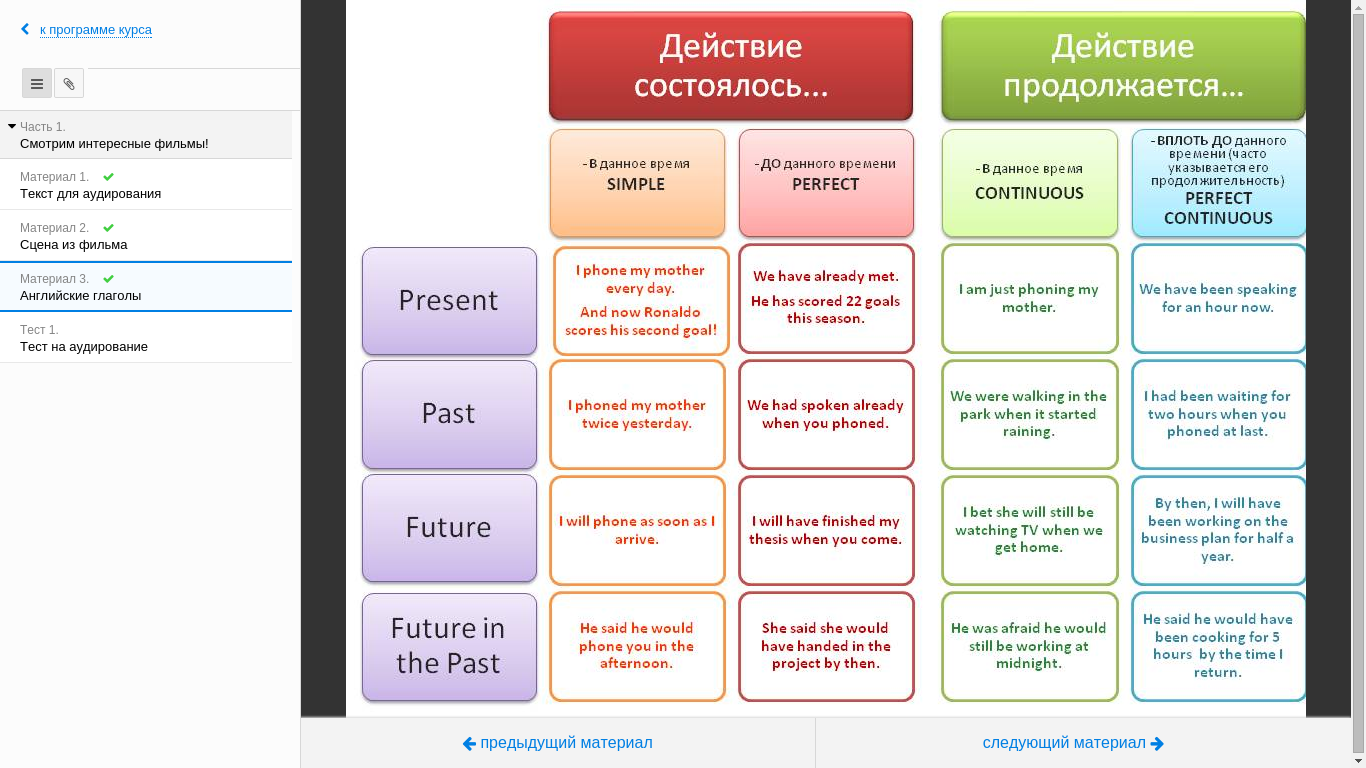
So the students will see the materials, which we will now add.
If your students are not yet in the TeachBase system, just add their mail in the Users section. The system itself will send them an invitation and a link to a convenient and quick entry. All they need to do is enter a password and a name.
Newly arrived users do not yet see our materials. Visibility settings allow you to give students courses designed for them. Those courses that you still have, but which are not intended for them, users will not see. In order to share the course materials with our students, we add them to the “Students” in the course itself.
Once you have enrolled users in the course, they will have access to all materials, including testing and handouts.
The TeachBase functionality allows students to show instructional videos and conduct interactive video conferences that can also be recorded. Thus, we get as many as three formats for working with video lessons:
1. Recording: attached in video format or by a link to youtube.
2. Interactive lesson: web conference
3. Recording an interactive lesson: a hybrid of the first and second.
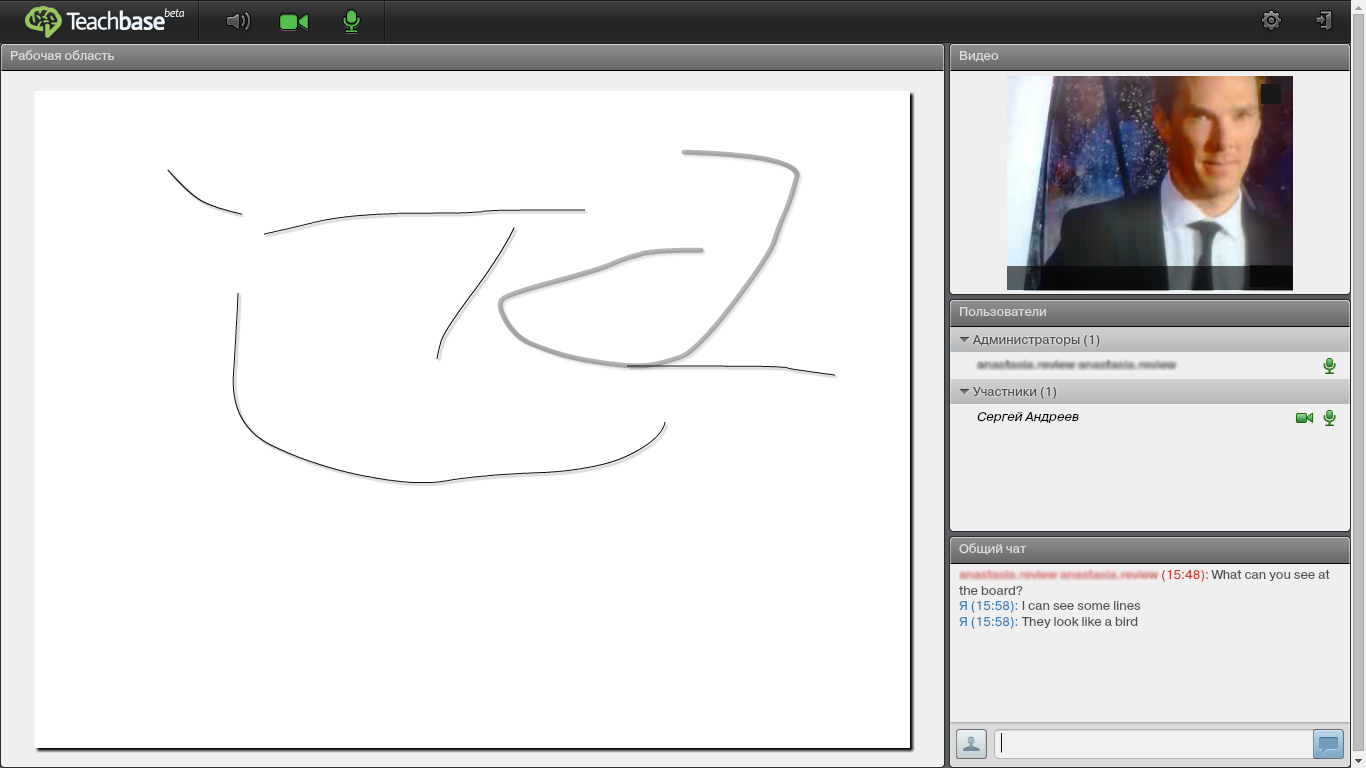
The standard interface for webinars connected with us quickly enough and without problems. The presentation is already very familiar, and in addition to audio and video communication, there is a chat and a real board on which you can write and draw like in a real lesson, with the only difference being that for the convenience of the teacher it is recommended to pick up an electronic pen and a tablet.

In order to check the quality of teaching and learning by students, when creating the first part of the course, we added a small test for understanding the video clip. The form for creating tests allows you to not only ask questions, the number of possible answers, time, deadlines, but also create educational tests in which students can make mistakes or give answers several times.

One of our students has already passed the test. When creating the test, we rolled out a fairly high “passing ball”, setting it at 45%. However, so far, our student has failed to test, which means that we will certainly not let him go to the next stage of the course and will go through the material with him once more thoroughly.
Thanks to this summary table, we will immediately see which students are progressing successfully in our course, and who else will need our help. Also, data on the course allow us to assess its complexity and whether we correctly compiled it.
TeachBase is mainly intended for creating corporate online training courses, therefore the price tag for working in the system is appropriate - from 2900 rubles per month for 30 users.
Nevertheless, for small teams there is also good news: although this is not written on the site, but after contacting those. support, we learned that for 5 users there is an unlimited free opportunity to use the service. Of course, you won’t be able to get a full class on a free license, but for a small group and taking one or two courses this may well be enough.
So, together we have compiled the first block of material for the English for fun training course! based on the TeachBase interactive platform. We have video and text materials collected in one place, which are shown to students in the right order, also, we conducted a video call, video tutorial and testing for the level of knowledge gained. Thus, the system allowed us to perform one training iteration and immediately evaluate its results.
By adding a number of similar iterations and going through them together with our students, we can build our distance learning English in accordance with all the requirements for educational standards, using all the necessary formats and communication channels for online learning.
Objective: It is necessary to compose and conduct an online course for 30-100 or more people. Where to begin?
Let's try to make a list of what will be needed for this:
1. A file storage system for lesson materials in text, video and other formats.
2. The correct organization of files by lesson
3. A convenient platform for distributing material and assignments to users
4. Video conferencing for training webinars
5. Statistics and reporting on lessons learned - on courses and on students
It is necessary to pay attention to two important aspects:
1. It is desirable that all this be in one place - otherwise, if we later have several courses, we will get confused in them.
2. The system should be cross-platform \ web service so that there are no problems with the setup and work of students.
If all this is combined, you get TeachBase - a convenient tool for creating, behaving and controlling distance learning.
Everything is in one place, there is no need to configure and maintain anything from the technical side. You can add students simply by adding their mail to the system - they will receive a letter inviting them to join the online course.
Beginning of work
You can enter the system in test mode in one click by adding your mailbox. While all the necessary notifications have arrived in the mail, we are already working hard to create our own training course “English for fun!” - very comfortably.
After entering the sequence, prompts appear on where and what to click to create a course: time to start is minimized, and this is nice.
Course Creation
We decided to try to create an English language course based on films and call it English for fun!
The “Create Course” button allows you to give it a name, a short description and an attractive image. After creating a course, we can work with the following characteristics:
1. Content
2. Students
3. Results
4. Statistics
Actually, these are the main tools for creating and conducting online courses. Let us dwell on their configuration.
Course Materials
Perhaps the most important part is the accessible formats of materials and how to present them to students. Since we are talking about teaching a foreign language on the basis of films, we add sequentially:
1. A video file with a fragment of a film
2. A file with exercises for this fragment
3. An image-scheme with grammar material
4. A file for downloading for students
There are no problems downloading files . It’s convenient that the video file can be downloaded directly (up to 512 MB), or just add a link from youtube. Such a video will be played by the student in his working window.
This will look like a finished package of materials for the first part of our course.
Copyright: our course materials are our intellectual property. It is important for us to prevent the distribution of material that we ourselves created on the network - the system is protected from downloading. All materials that you show students will be displayed in their special training window, which can only be opened or closed at any time, but cannot be saved to a local medium.
If you want to give students the opportunity to save some material to a local medium, simply add it as an attached file for download.
So the students will see the materials, which we will now add.
Adding Students
If your students are not yet in the TeachBase system, just add their mail in the Users section. The system itself will send them an invitation and a link to a convenient and quick entry. All they need to do is enter a password and a name.
Newly arrived users do not yet see our materials. Visibility settings allow you to give students courses designed for them. Those courses that you still have, but which are not intended for them, users will not see. In order to share the course materials with our students, we add them to the “Students” in the course itself.
Once you have enrolled users in the course, they will have access to all materials, including testing and handouts.
Video lessons
The TeachBase functionality allows students to show instructional videos and conduct interactive video conferences that can also be recorded. Thus, we get as many as three formats for working with video lessons:
1. Recording: attached in video format or by a link to youtube.
2. Interactive lesson: web conference
3. Recording an interactive lesson: a hybrid of the first and second.
The standard interface for webinars connected with us quickly enough and without problems. The presentation is already very familiar, and in addition to audio and video communication, there is a chat and a real board on which you can write and draw like in a real lesson, with the only difference being that for the convenience of the teacher it is recommended to pick up an electronic pen and a tablet.
Material mastery check and statistics
In order to check the quality of teaching and learning by students, when creating the first part of the course, we added a small test for understanding the video clip. The form for creating tests allows you to not only ask questions, the number of possible answers, time, deadlines, but also create educational tests in which students can make mistakes or give answers several times.
One of our students has already passed the test. When creating the test, we rolled out a fairly high “passing ball”, setting it at 45%. However, so far, our student has failed to test, which means that we will certainly not let him go to the next stage of the course and will go through the material with him once more thoroughly.
Thanks to this summary table, we will immediately see which students are progressing successfully in our course, and who else will need our help. Also, data on the course allow us to assess its complexity and whether we correctly compiled it.
Price tag
TeachBase is mainly intended for creating corporate online training courses, therefore the price tag for working in the system is appropriate - from 2900 rubles per month for 30 users.
Nevertheless, for small teams there is also good news: although this is not written on the site, but after contacting those. support, we learned that for 5 users there is an unlimited free opportunity to use the service. Of course, you won’t be able to get a full class on a free license, but for a small group and taking one or two courses this may well be enough.
Summary
So, together we have compiled the first block of material for the English for fun training course! based on the TeachBase interactive platform. We have video and text materials collected in one place, which are shown to students in the right order, also, we conducted a video call, video tutorial and testing for the level of knowledge gained. Thus, the system allowed us to perform one training iteration and immediately evaluate its results.
By adding a number of similar iterations and going through them together with our students, we can build our distance learning English in accordance with all the requirements for educational standards, using all the necessary formats and communication channels for online learning.