 May 22, 2018 at 15:39
Work with EventSystem in Unity. Basic things in working with UI
Hello! I haven’t written anything for a long time, but now I wanted to talk about a very convenient thing that many do not know about. This is an Event System in Unity. Many, for tasks in which the EventSystem is very convenient, use the usual Raycast. I’ll talk about how to use part of the EventSystem functionality (there are actually a lot of it) and how this tool allows you to quickly solve many problems associated with handling events of interfaces and objects. As always with the repository with examples. If you are interested, welcome to cat!

In this article, I will analyze and provide examples of working with the events IPointerEnterHandler, IPointerExitHandler, IPointerDownHandler, IPointerUpHandler, IPointerClickHandler, IDragHandler, IBeginDragHandler, IEndDragHandler (a full list of events can be found here ).
What is an EventSystem? EventSystem is a system responsible for handling various events in a scene. Basically, it allows you to:
In more detail, in this article we will analyze the third point, since it is the simplest and most convenient to use.
From the point of view of reykastov in EventSystem three main components are accessible:
An important detail for all interactions, be it physics or ui, is that the EventSystem object is present on the scene.
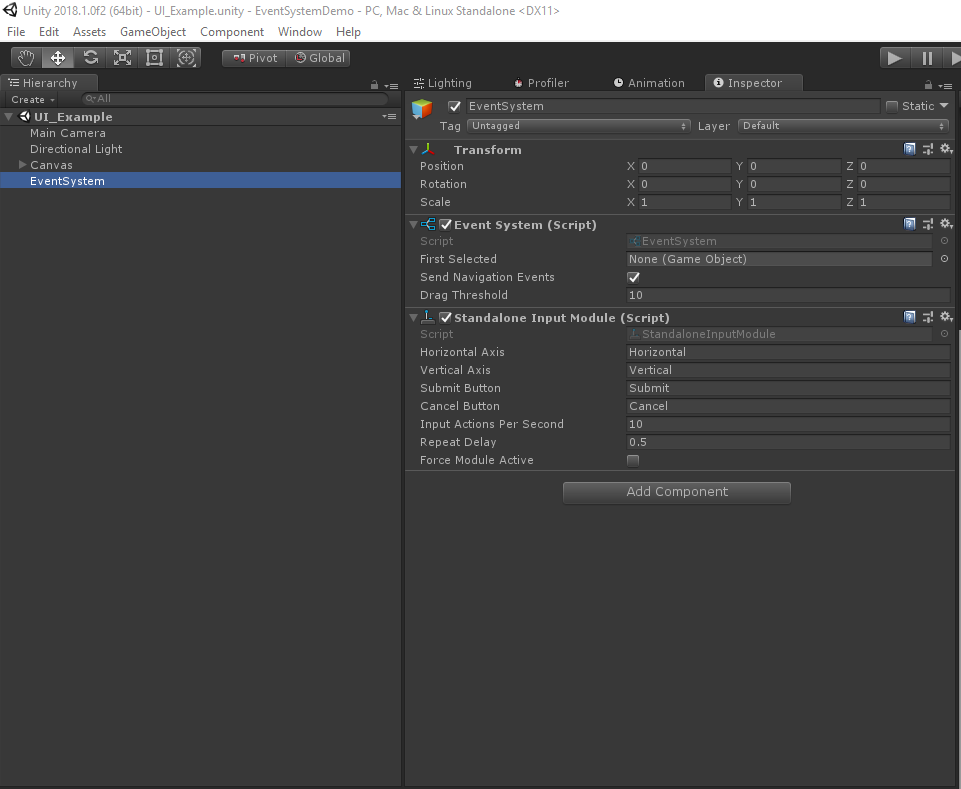
Let's start with the simplest - with the UI system. EventSystem works with it the easiest and best. The fact is that when creating Canvas, the unit immediately adds all the necessary components to the scene, such as the EventSystem itself and Graphic Raycaster.
In the case of the UI, the event system makes it easy to create your own buttons and basic interactions with different UI elements. For example, let's look at IPointerEnterHandler, IPointerExitHandler, IPointerDownHandler, IPointerUpHandler, IPointerClickHandler, IDragHandler, IBeginDragHandler, IEndDragHandler.
For the UI element to respond to input events (IPointerEnterHandler), output (IPointerExitHandler) of the mouse cursor, it is necessary to implement these interfaces into the necessary object. This helps in many cases when you need to select something, highlight, etc. Using the test scene and Image as an example, this allows you to make interactions like this in a few lines of code:

There are two other interfaces IPointerDownHandler, IPointerUpHandler, for handling events of clicking on a UI element.
Their implementation allows you to conveniently handle events of clicking on an object with a mouse or a wheelbarrow on mobile platforms:
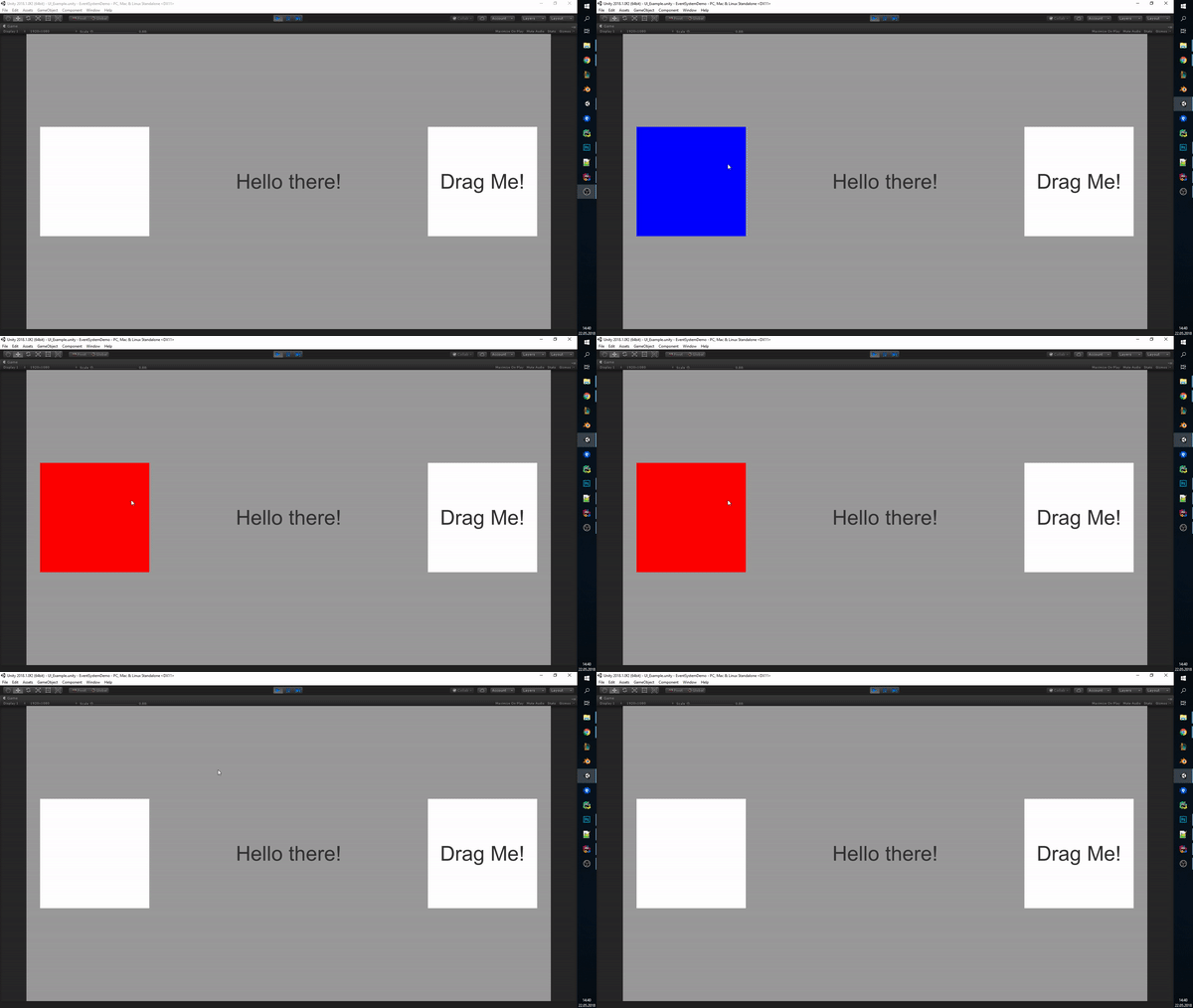
EventSystem works with any component of the UI system, which may be a RaycastTarget. For example, Text and the click event IPointerClickHandler (important, this event is similar to IPointerUpHandler, that is, it fires when the mouse is lifted, but the difference is that the cursor “release” must occur strictly within the boundaries of the object):

The most interesting events in my opinion are those that make it convenient to make Drag. This is a set of interfaces IDragHandler, IBeginDragHandler, IEndDragHandler. With them, everything is also very simple. The visual effect is highly dependent on the processing method, but these three events allow you to make a variety of interactions in a few minutes. In case the element you are going to move consists of different UI elements, it is important to turn off the RaycastTarget checkbox on those elements that are not interactive. (Important: in the case of the UI system, you need to use the screenPosition from PointerEventData which comes in all the event system methods associated with the mouse / touch)

In general, everything on the UI system, in fact, there are several more useful things from the point of view of the Event System, but I can write about them in future articles.
Work with physical objects differs in only two points. First, you need to carefully monitor that the EventSystem object is on the stage so that it works. The second - you need to hang the PhysicsRaycaster component on the main camera so that all this works in the same way as colliders. The rest is almost the same, a simple example you can find in the repository .
In general, EventSystem is a cool and convenient tool that allows you to do many things many times faster than regular rakcasts. In addition, EventSystem has a lot of useful functionality, such as that you can redefine inputs (for example, you are interested in a specific controller, say Leap Motion) and much more, which I can write about in future articles.
Thanks for attention!
In this article, I will analyze and provide examples of working with the events IPointerEnterHandler, IPointerExitHandler, IPointerDownHandler, IPointerUpHandler, IPointerClickHandler, IDragHandler, IBeginDragHandler, IEndDragHandler (a full list of events can be found here ).
What is an EventSystem? EventSystem is a system responsible for handling various events in a scene. Basically, it allows you to:
- Determine which GameObject is “selected”
- Manage input methods that are used
- Manage Reykasting
In more detail, in this article we will analyze the third point, since it is the simplest and most convenient to use.
From the point of view of reykastov in EventSystem three main components are accessible:
- Graphic Raycaster - used to work with UI
- Physics 2D Raycaster - used to interact with physical objects in 2D
- Physics Raycaster - used to interact with physical objects in 3D
An important detail for all interactions, be it physics or ui, is that the EventSystem object is present on the scene.
Let's start with the simplest - with the UI system. EventSystem works with it the easiest and best. The fact is that when creating Canvas, the unit immediately adds all the necessary components to the scene, such as the EventSystem itself and Graphic Raycaster.
In the case of the UI, the event system makes it easy to create your own buttons and basic interactions with different UI elements. For example, let's look at IPointerEnterHandler, IPointerExitHandler, IPointerDownHandler, IPointerUpHandler, IPointerClickHandler, IDragHandler, IBeginDragHandler, IEndDragHandler.
For the UI element to respond to input events (IPointerEnterHandler), output (IPointerExitHandler) of the mouse cursor, it is necessary to implement these interfaces into the necessary object. This helps in many cases when you need to select something, highlight, etc. Using the test scene and Image as an example, this allows you to make interactions like this in a few lines of code:
	public void OnPointerEnter(PointerEventData eventData)
	{
		_Image.color = Color.blue;
	}
	public void OnPointerExit(PointerEventData eventData)
	{
		_Image.color = Color.white;
	}
There are two other interfaces IPointerDownHandler, IPointerUpHandler, for handling events of clicking on a UI element.
Their implementation allows you to conveniently handle events of clicking on an object with a mouse or a wheelbarrow on mobile platforms:
	public void OnPointerDown(PointerEventData eventData)
	{
		_Image.color = Color.green;
	}
	public void OnPointerUp(PointerEventData eventData)
	{
		_Image.color = Color.red;
	}
EventSystem works with any component of the UI system, which may be a RaycastTarget. For example, Text and the click event IPointerClickHandler (important, this event is similar to IPointerUpHandler, that is, it fires when the mouse is lifted, but the difference is that the cursor “release” must occur strictly within the boundaries of the object):
using UnityEngine;
using UnityEngine.EventSystems;
using UnityEngine.UI;
[RequireComponent(typeof(Text))]
public class UITextExample : MonoBehaviour, IPointerClickHandler
{
	private Text _Text;
	private bool _IsClicked;
	private void Start ()
	{
		_Text = GetComponent();
	}
	public void OnPointerClick(PointerEventData eventData)
	{
		_Text.text = _IsClicked ? "Hello there!" : "General Kenobi";
		_IsClicked = !_IsClicked;
	}
}
The most interesting events in my opinion are those that make it convenient to make Drag. This is a set of interfaces IDragHandler, IBeginDragHandler, IEndDragHandler. With them, everything is also very simple. The visual effect is highly dependent on the processing method, but these three events allow you to make a variety of interactions in a few minutes. In case the element you are going to move consists of different UI elements, it is important to turn off the RaycastTarget checkbox on those elements that are not interactive. (Important: in the case of the UI system, you need to use the screenPosition from PointerEventData which comes in all the event system methods associated with the mouse / touch)
public class UIDragExample : MonoBehaviour, IDragHandler, IBeginDragHandler, IEndDragHandler
{
    [SerializeField] private Text _Text;
    public void OnDrag(PointerEventData eventData)
    {
        transform.position = eventData.pointerCurrentRaycast.screenPosition;
    }
    public void OnBeginDrag(PointerEventData eventData)
    {
        _Text.text = "You dragging!";
    }
    public void OnEndDrag(PointerEventData eventData)
    {
        _Text.text = "Drag me!";
    }
}
In general, everything on the UI system, in fact, there are several more useful things from the point of view of the Event System, but I can write about them in future articles.
Work with physical objects differs in only two points. First, you need to carefully monitor that the EventSystem object is on the stage so that it works. The second - you need to hang the PhysicsRaycaster component on the main camera so that all this works in the same way as colliders. The rest is almost the same, a simple example you can find in the repository .
In general, EventSystem is a cool and convenient tool that allows you to do many things many times faster than regular rakcasts. In addition, EventSystem has a lot of useful functionality, such as that you can redefine inputs (for example, you are interested in a specific controller, say Leap Motion) and much more, which I can write about in future articles.
Thanks for attention!









