May 15, 2018 at 12:00
How to plan Apache Ignite cluster capacity
We will publish the transcript of the video of the speech of Alexey Goncharuk (Apache Ignite PMC Member and Chief Architect GridGain) at the Apache Ignite community meeting in St. Petersburg on March 29. You can download the slides here .
Members of the Apache Ignite community are often asked, “How many nodes and memory do I need to load such a volume of data?” I want to talk about this today. Looking ahead: such forecasting is still a rather complicated, non-trivial task. To do this, you need to understand the Apache Ignite device a little. I will also tell you how to simplify your forecasting task, and what kind of optimization can be applied.
So, very often users come to us and say: “We have data presented in the form of files. "How much memory does it take to translate this data into Apache Ignite?”
With such a formulation, it is almost impossible to answer the question, because different file formats are translated into completely different models. For example, a file may be compressed. And if it is not compressed into some kind of classic binary form, but can deduplicate data, then the file is compressed implicitly.
Also, do not forget that Apache Ignite provides quick access to data by various keys or SQL indexes, therefore, in addition to the data that lies in the file, we build additional indexes with additional costs. So in the general case, it is incorrect to say that a single index will add some percentage of the total data volume, since the indexed field can have different sizes. That is, it is wrong to allocate a fixed percentage of memory to the index.
Let's reformulate the problem. We say that our model consists of several types, and we understand well the structure of each type. Moreover, if the model has fields of variable size, say, string, then we can approximately estimate the minimum and maximum data size, as well as the size distribution in the entire data set. Based on how many data types we have and how much information for each type, we will plan the amount of memory and disks.
The empirical approach may be a little inaccurate, but, from the point of view of the user, it does not require any deep immersion in the structure of the system. The essence of the approach is as follows.
Take a representative sample of the data and upload it to Apache Ignite. While loading, observe the increase in storage size. At certain volumes, you can do “cut-offs” so that you can then linearly extrapolate and predict the required storage volume for the entire data set.
A good question is usually asked here: “What should be a representative sample?”
Once we randomly generated a sample. But it turned out that the generator collected the data in such a way that the set included the remainder of the division during generation. At some point, it turned out that our random strings, which were supposed to have a uniform distribution, did not actually have this distribution. Therefore, when you evaluate the amount of storage, make sure that the distributions you are operating with are actually performed in the representative sample.
Also pay attention to the size spread of your objects. If you assume that they will be the same length, then, in general, a small number of objects is enough for a representative sample. The greater the variability, the more combinations of field sizes, the larger the sample will need to be downloaded to understand the relationship. From my own experience I’ll say that the dependence begins to clear up somewhere with a million objects that are loaded into one partition per node.
What exactly needs to be monitored during the loading of a representative sample? If you work with persistence, you can look at the amount of files that you get. Or you can simply turn on metrics for region data, metrics in the Apache Ignite configuration and monitor the memory increase through MX Bean, doing “cutoffs” and plotting.
In this case, we will go through all the stages of changing the data structure that your object undergoes when stored in Apache Ignite, and also look at the surrounding data structures, which can increase memory consumption. When we understand what changes are happening and what data structures are changing, we can fairly accurately estimate the amount of memory needed to load the data.
Let's analyze the cash put operation when writing to Apache Ignite. Data goes through 4 stages of transformation:
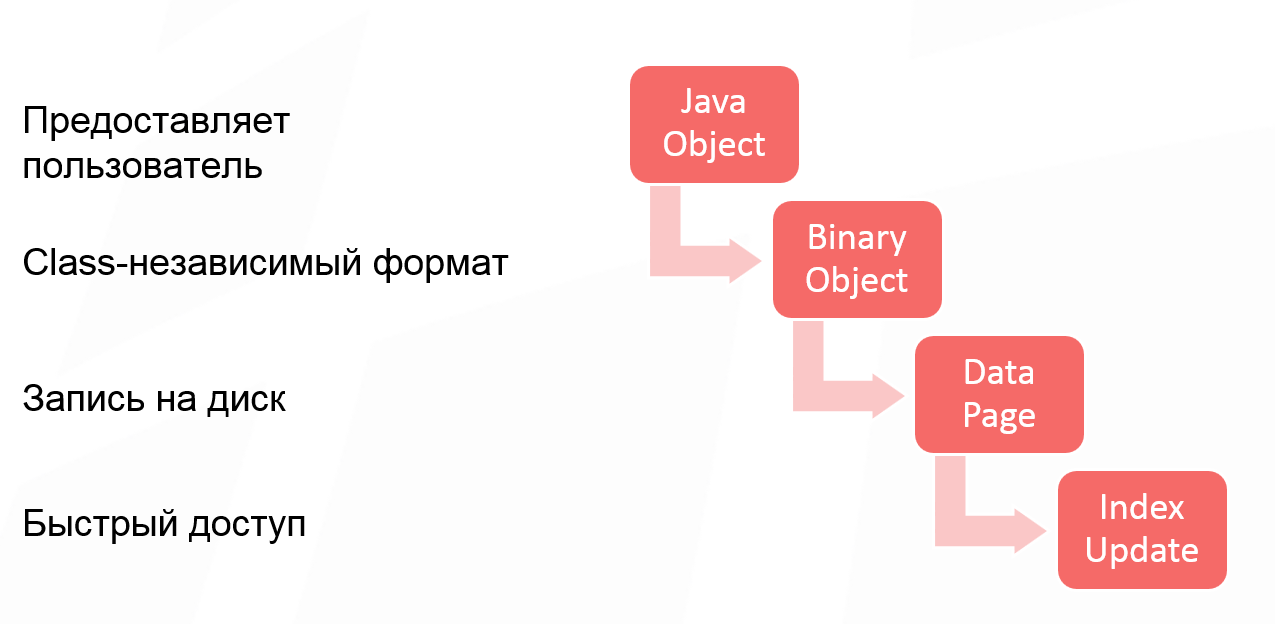
The first stage is optional, because some users work with the class and pass a Java object to Apache Ignite. Some users create a binary object directly, so the first stage of converting the object is skipped. But if you work with Java objects, then this is the first transformation that an object undergoes.
After converting the Java object into a binary object, we get a class-independent format. Its essence is that you can operate on binary objects in a cluster without having a class description. This allows you to change the structure of the class and perform the so-called rolling of changes in the structure of objects. That is, your model grows, changes, and you get the opportunity to work with your data without changing classes, without deploying them in a cluster.
The third stage of changes, introducing an additional overhead - write to disk. The unit of work with the disk is traditionally a page. And starting with Apache Ignite 2.0, we switched to page architecture. This means that each page has optional titles, some metadata, which also take up space when writing objects to the page.
And the last piece that also needs to be considered is updating the index. Even if you are not using SQL, in Apache Ignite you have quick key access. This is the main Apache Ignite cache API. Therefore, the primary key index is always built, and space is also wasted on it.
This is our binary object:
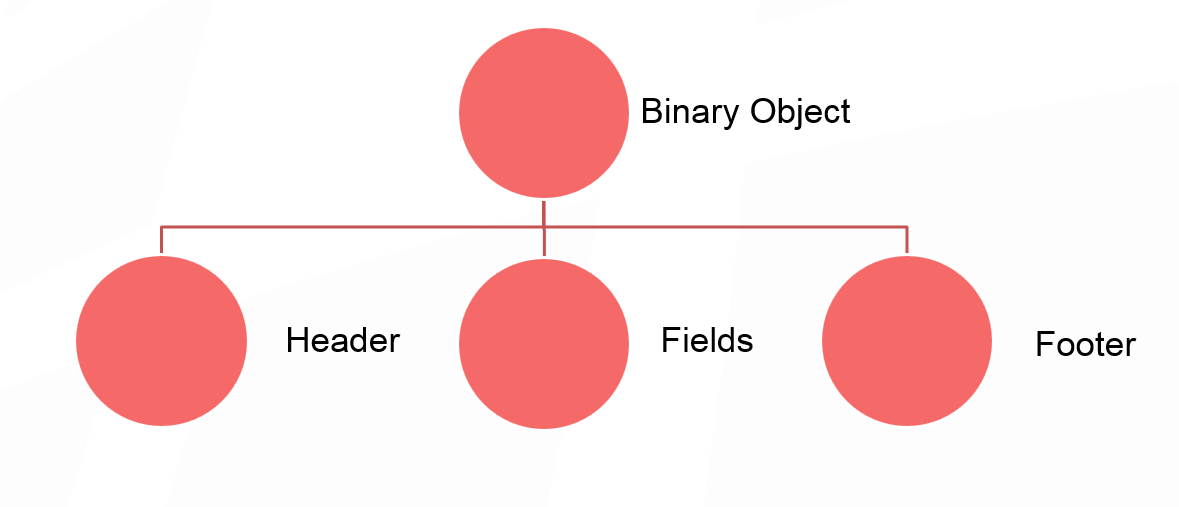
We will not go deep into the structure, in general terms it can be represented as a certain heading, then fields, our significant data and footer. The binary object header takes 24 bytes. Perhaps this is a lot, but so much is needed to support mutability of objects without classes.
If the model of data that you put in the cache assumes some kind of spreading internal structure, then it might be worth a look if it is possible to inline some small objects into your original large object? In principle, such inlining will save you 24 bytes per object, which, if the model is sufficiently large, gives a significant increase.
The footer size depends on the compactFooter flag, which allows you to write the structure of the object to additional metadata. That is, instead of writing the order of the fields in the object itself, we save them separately. And if compactFooter is true, then the footer will be very small. But at the same time, Apache Ignite takes additional steps to save and maintain this metadata. If compactFooter is false, then the object is self-contained and its structure can be read without additional metadata.
At the moment, there is no method in our public API that returns the size of a binary object. Therefore, if this is very interesting for you, you can make a hack and bring the object to implementation, then you will see its size. I think in Apache Ignite 2.5 we will add a method that will get the size of the object.
As I said, the unit of work with the disk is the page. This is done to optimize reading and writing to disk. But at the same time it imposes restrictions on the internal architecture of Apache Ignite, since any data structures that will be saved to disk should also work with pages.
In other words, any data structure, whether it be a tree or a freelist, is built from brick pages. Pages link to each other by a unique identifier. Using the same unique identifier, we can determine for a constant time the file from which these pages can be read, from which offset this or that page will be read from this file.
A single section, which is divided into many pages, can be represented in the form of such a scheme:
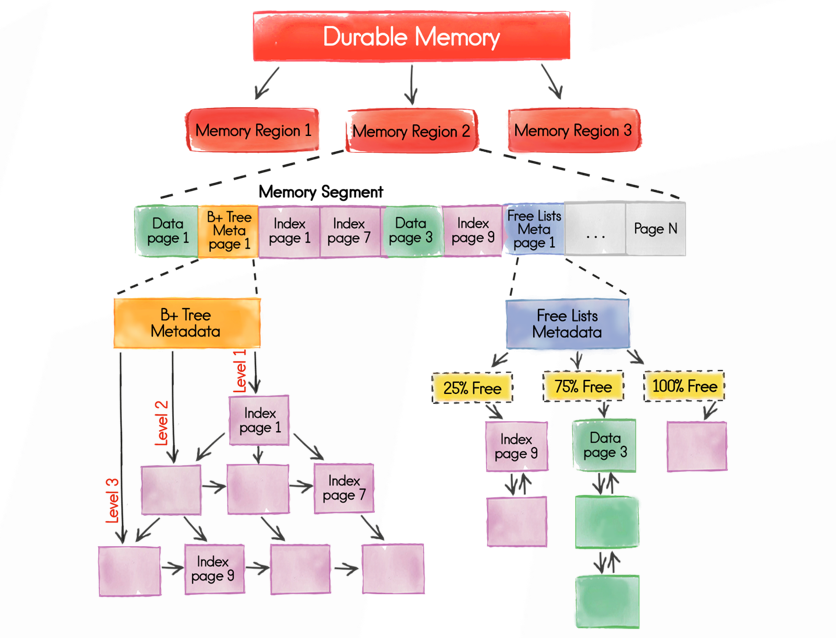
The start meta page allows you to reach any other page. They are divided into different types, of which there are many, but to simplify the example I will say that we have:
Why this is needed, we will talk a little lower.
Let's start with the data page . This block takes our key and value when we write data to Apache Ignite. First, a data page is taken that can accommodate our information, and data is written to it. When a link to them is received, information is written to the index.
The data page has a table organization. At the beginning there is a table that contains the offset to the key-value pairs. The key-value pairs themselves are written in reverse order. The very first entry is located at the end of the page. This is done in order to make it more convenient to work with free space. You ask why it was so complicated? Why can’t I write data directly to the page and refer to the offset within the page? This is done to defragment the page.

If you delete record number 2 here, then two free zones are formed. It is possible that in the future record No. 3 will need to be moved to the right to accommodate a larger record here. And if we have indirect addressing, then you simply change the offset of the corresponding record in the table. In this case, the external link that links to this page remains constant.
A string can be fragmented in the sense that its size will be larger than the page size. In this case, we take a blank page and write the tail of the line into it, and the rest into the data page.
In addition to the key and value, auxiliary information for the correct operation of the system is recorded in the data page, for example, the version number. If you use expire policy, expiry time is written there too. In general, additional metadata takes up 35 bytes. After you know the size of the binary object and the key, you add 35 bytes and get the amount of a specific record in the data page. And then you calculate how many records fit in the page.
It may turn out that there will be free space in the data page in which none of the records fit. Then in the metrics you will see a fill factor that is not equal to 1.
And a couple of words about the recording procedure. Suppose you had a blank page and you wrote some data into it. There is a lot of free space. It would be wrong to simply throw out the page so that it is lying somewhere and is no longer used.
Information about which pages have free space that makes sense to take into account is stored in the freelist data structure. If in this implementation and at the moment the page contains less than 8 bytes, it does not fall into freelist, because there will not be such a key-value pair that would fit in 8 bytes.
After we figured out the data pages and estimated their number, we can estimate the number of index pages that we need.
Any Apache Ignite index is a B-tree. This means that at the lowest - widest - level are links to absolutely all key-value pairs. The index starts at the root page. On each of the internal pages there are links to a lower level.
For an index, which is the primary key, the size of the item written to the index page is 12 bytes. Depending on which page you are looking at - on the inside or on the sheet - you will have a different number of maximum elements. If you take up such a numerical estimate, then you can see the number of maximum elements in the code. For the primary index, the link size is always fixed at 12 bytes. To roughly calculate the maximum number of page elements, you can divide the page size (4 megabytes by default) by 12 bytes.
Given the growth of the tree, we can assume that each page will be filled from 50% to 75%, depending on the order of data loading. Given that the lower level of the tree contains all the elements, you can also estimate the number of pages needed to store the index.
As for SQL indexes - or secondary ones - here the size of the element stored in the page depends on the configured inline size. You need to carefully analyze the data model in order to calculate the number of index pages.
Many questions cause additional memory consumption per unit partition. To start an empty cache in which literally one element is written in each partition, a significant amount of memory is required. The fact is that with this structure, all the necessary metadata must be initialized for each partition.
<illustration>
The default number of partitions is 1024, so if you start one node and start writing one element per partition, then you will immediately initialize a very large number of metastages, which results in such a large initial memory overhead.
With the empirical approach, you will load a fairly large amount of data, and the memory consumption for the partition becomes less noticeable. But it should be taken into account for a more accurate assessment. If we add the memory overhead to the partition, to all data pages and index pages, then you can accurately calculate the required memory size.
How can you make life easier for the user in the future? Apache Ignite is moving toward SQL systems, and there are many ideas for reducing overhead.
You can change the binary format to reduce the size of the header. If you switch to a more strictly typed data structure in any of the caches, but you can’t mix objects, but the amount of memory consumed will decrease.
The second solution is to group objects of the same type in the pages and select the title or its part. In this case, Apache Ignite will independently deduplicate data already at the page level.
Another smart idea: implement a custom data accounting threshold in freelist. If you understand that pages will be fragmented in such a way that there will be 100 bytes in them, and your data will never be less than 100 bytes, then it makes sense to tighten freelist so that the pages do not get there and do not waste space in this freelist itself.
Actively discussed and performed by the system data compression at the page level , transparent to the user. There are some technical difficulties, but in the general case, you will sacrifice performance in favor of a more compact data placement.
And the last, very popular optimization - cluster capacity calculator. The big question is what will be the input for such a utility. One sees the following scheme: the user loads the structure of objects into the calculator, indicates how many lines he plans to load, and the calculator says how much memory is needed, taking into account all the indexes and internal overhead of Apache Ignite.
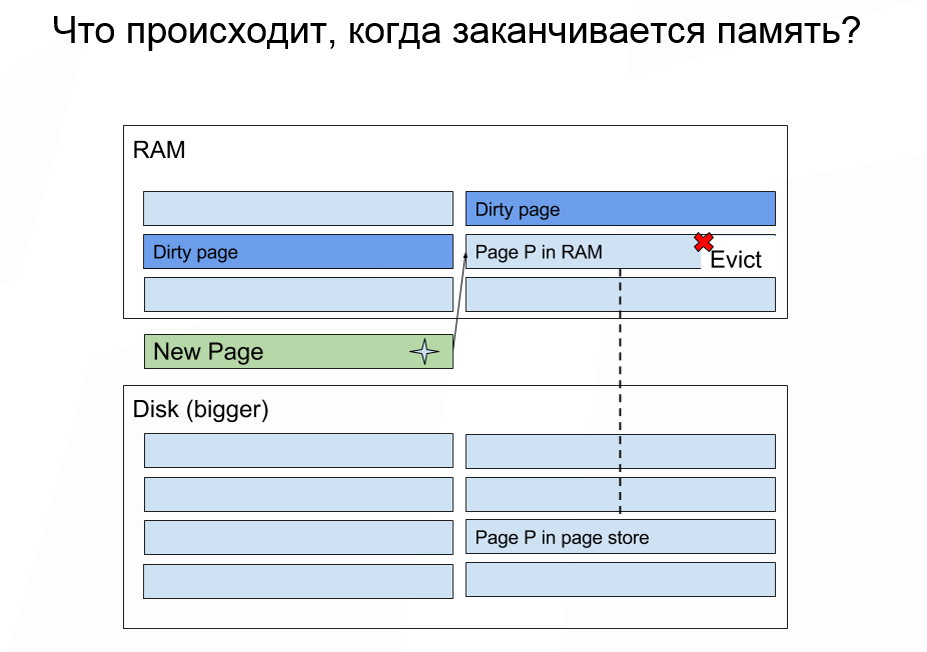
How much memory do we need to allocate, provided that the amount of data stored is greater than the amount of available memory? If you run out of memory, then Apache Ignite acts in approximately the same way as the OS: ejects some data from memory and loads the necessary data. Some data cannot be discarded, but for most cases this is not important.
Here you need to remember that the appearance of the page itself does not imply recording. Ejecting data from memory is cheap. And the subsequent reading of data for which a miss occurred from the disk is an expensive operation. In most cases, the most important feature that you should pay attention to is how many IOPS your drive can issue. If you are working with cloud deployment, then finding out the number of IOPS is very easy.
For example, when starting and mounting an image on Amazon, you can choose among the disks those that have a recording speed in Mb / s. But, in our experience, it’s far more useful to know IOPS. Since we operate on pages, in fact, IOPS is the maximum number of read or write operations that we can perform on disk per unit of time.
How to select a page that will be erased from memory? Now this is done according to the random LRU algorithm. Apache Ignite contains a page in memory that stores the mapping of the same page identifier to a specific physical address in the memory where the data is located. When we need to throw out one of the pages, we take n random pages from this table and select the oldest one. She will not always be the oldest in the absolute sense. But most often we will fall into one nth part, where n is the number of samples that we select.
To date, the random LRU algorithm is not resistant to full scanning, but we already have an implementation of the random LRU 2 algorithm, which is used in Apache Ignite for another task. And when we use random LRU 2 to supplant pages, the problem of resistance to full scanning will be solved.
Page extrusion significantly affects the latency of a single cache operation. Worst situation: you had some kind of underused SQL index or region in the cache, and it turned out that absolutely all pages of this region were pushed to disk, that is, erased from memory. If you turn to some key that will access all n pages, they will be sequentially read from disk. And we need to minimize the amount of possible reading from disk.
Starting with Apache Ignite 2.3, it became possible to split caches across different data regions. If you know that you have a subset of hot data, and you will probably work with them, and also have a subset of data that is historical, then it makes sense to divide these subsets into different data regions.
Also, to determine the disk / memory ratio, you always need to monitor the percentiles, not the median or average access time for a single operation in the cache, because they are the most complete way of presenting information.
In the worst case scenario, in one percent of cases the delay will be significantly higher, because the pages have to be read from disk. If you look simply at the average, you will never notice this feature. If strict SLAs are important to you, then you just need to analyze the percentiles in determining the proportion.
The last thing worth mentioning: do not run many Apache Ignite nodes with persistence enabled on the same physical medium. Since there is only one physical disk, the number of IOPS is shared between Apache Ignite nodes. Not only do you share the bandwidth between nodes, in addition to this, each of the nodes can run out of capacity on IOPS, and the behavior of the entire cluster will become unpredictable.
If for some reason you want to run several Apache Ignite nodes on the same machine, be sure to keep the physical repositories for the nodes different. This is in addition to the recommendation to transfer Write-Ahead Log to a separate physical medium.
You should not use a network with a bandwidth of less than 1 gigabit. Today, few people have networks with less bandwidth. The choice of CPU depends very much on the load profile, on the number of indices. Here it is worth returning to the empirical approach and simply generate the load profile expected for your application, and carefully monitor all the indicators of the system. If you see that some of the resources is completely exhausted, then it makes sense to add it.
We welcome any questions or ideas for improving Apache Ignite.
Join our meetings in Moscow and St. Petersburg .
Members of the Apache Ignite community are often asked, “How many nodes and memory do I need to load such a volume of data?” I want to talk about this today. Looking ahead: such forecasting is still a rather complicated, non-trivial task. To do this, you need to understand the Apache Ignite device a little. I will also tell you how to simplify your forecasting task, and what kind of optimization can be applied.
So, very often users come to us and say: “We have data presented in the form of files. "How much memory does it take to translate this data into Apache Ignite?”
With such a formulation, it is almost impossible to answer the question, because different file formats are translated into completely different models. For example, a file may be compressed. And if it is not compressed into some kind of classic binary form, but can deduplicate data, then the file is compressed implicitly.
Also, do not forget that Apache Ignite provides quick access to data by various keys or SQL indexes, therefore, in addition to the data that lies in the file, we build additional indexes with additional costs. So in the general case, it is incorrect to say that a single index will add some percentage of the total data volume, since the indexed field can have different sizes. That is, it is wrong to allocate a fixed percentage of memory to the index.
Let's reformulate the problem. We say that our model consists of several types, and we understand well the structure of each type. Moreover, if the model has fields of variable size, say, string, then we can approximately estimate the minimum and maximum data size, as well as the size distribution in the entire data set. Based on how many data types we have and how much information for each type, we will plan the amount of memory and disks.
Empirical approach
The empirical approach may be a little inaccurate, but, from the point of view of the user, it does not require any deep immersion in the structure of the system. The essence of the approach is as follows.
Take a representative sample of the data and upload it to Apache Ignite. While loading, observe the increase in storage size. At certain volumes, you can do “cut-offs” so that you can then linearly extrapolate and predict the required storage volume for the entire data set.
A good question is usually asked here: “What should be a representative sample?”
Once we randomly generated a sample. But it turned out that the generator collected the data in such a way that the set included the remainder of the division during generation. At some point, it turned out that our random strings, which were supposed to have a uniform distribution, did not actually have this distribution. Therefore, when you evaluate the amount of storage, make sure that the distributions you are operating with are actually performed in the representative sample.
Also pay attention to the size spread of your objects. If you assume that they will be the same length, then, in general, a small number of objects is enough for a representative sample. The greater the variability, the more combinations of field sizes, the larger the sample will need to be downloaded to understand the relationship. From my own experience I’ll say that the dependence begins to clear up somewhere with a million objects that are loaded into one partition per node.
What exactly needs to be monitored during the loading of a representative sample? If you work with persistence, you can look at the amount of files that you get. Or you can simply turn on metrics for region data, metrics in the Apache Ignite configuration and monitor the memory increase through MX Bean, doing “cutoffs” and plotting.
Numerical rating
In this case, we will go through all the stages of changing the data structure that your object undergoes when stored in Apache Ignite, and also look at the surrounding data structures, which can increase memory consumption. When we understand what changes are happening and what data structures are changing, we can fairly accurately estimate the amount of memory needed to load the data.
Let's analyze the cash put operation when writing to Apache Ignite. Data goes through 4 stages of transformation:
The first stage is optional, because some users work with the class and pass a Java object to Apache Ignite. Some users create a binary object directly, so the first stage of converting the object is skipped. But if you work with Java objects, then this is the first transformation that an object undergoes.
After converting the Java object into a binary object, we get a class-independent format. Its essence is that you can operate on binary objects in a cluster without having a class description. This allows you to change the structure of the class and perform the so-called rolling of changes in the structure of objects. That is, your model grows, changes, and you get the opportunity to work with your data without changing classes, without deploying them in a cluster.
The third stage of changes, introducing an additional overhead - write to disk. The unit of work with the disk is traditionally a page. And starting with Apache Ignite 2.0, we switched to page architecture. This means that each page has optional titles, some metadata, which also take up space when writing objects to the page.
And the last piece that also needs to be considered is updating the index. Even if you are not using SQL, in Apache Ignite you have quick key access. This is the main Apache Ignite cache API. Therefore, the primary key index is always built, and space is also wasted on it.
This is our binary object:
We will not go deep into the structure, in general terms it can be represented as a certain heading, then fields, our significant data and footer. The binary object header takes 24 bytes. Perhaps this is a lot, but so much is needed to support mutability of objects without classes.
If the model of data that you put in the cache assumes some kind of spreading internal structure, then it might be worth a look if it is possible to inline some small objects into your original large object? In principle, such inlining will save you 24 bytes per object, which, if the model is sufficiently large, gives a significant increase.
The footer size depends on the compactFooter flag, which allows you to write the structure of the object to additional metadata. That is, instead of writing the order of the fields in the object itself, we save them separately. And if compactFooter is true, then the footer will be very small. But at the same time, Apache Ignite takes additional steps to save and maintain this metadata. If compactFooter is false, then the object is self-contained and its structure can be read without additional metadata.
At the moment, there is no method in our public API that returns the size of a binary object. Therefore, if this is very interesting for you, you can make a hack and bring the object to implementation, then you will see its size. I think in Apache Ignite 2.5 we will add a method that will get the size of the object.
Page architecture
As I said, the unit of work with the disk is the page. This is done to optimize reading and writing to disk. But at the same time it imposes restrictions on the internal architecture of Apache Ignite, since any data structures that will be saved to disk should also work with pages.
In other words, any data structure, whether it be a tree or a freelist, is built from brick pages. Pages link to each other by a unique identifier. Using the same unique identifier, we can determine for a constant time the file from which these pages can be read, from which offset this or that page will be read from this file.
A single section, which is divided into many pages, can be represented in the form of such a scheme:
The start meta page allows you to reach any other page. They are divided into different types, of which there are many, but to simplify the example I will say that we have:
- data pages that store data;
- index pages that allow you to build an index tree;
- auxiliary pages for structures such as freelist or metadata.
Why this is needed, we will talk a little lower.
Let's start with the data page . This block takes our key and value when we write data to Apache Ignite. First, a data page is taken that can accommodate our information, and data is written to it. When a link to them is received, information is written to the index.
The data page has a table organization. At the beginning there is a table that contains the offset to the key-value pairs. The key-value pairs themselves are written in reverse order. The very first entry is located at the end of the page. This is done in order to make it more convenient to work with free space. You ask why it was so complicated? Why can’t I write data directly to the page and refer to the offset within the page? This is done to defragment the page.
If you delete record number 2 here, then two free zones are formed. It is possible that in the future record No. 3 will need to be moved to the right to accommodate a larger record here. And if we have indirect addressing, then you simply change the offset of the corresponding record in the table. In this case, the external link that links to this page remains constant.
A string can be fragmented in the sense that its size will be larger than the page size. In this case, we take a blank page and write the tail of the line into it, and the rest into the data page.
In addition to the key and value, auxiliary information for the correct operation of the system is recorded in the data page, for example, the version number. If you use expire policy, expiry time is written there too. In general, additional metadata takes up 35 bytes. After you know the size of the binary object and the key, you add 35 bytes and get the amount of a specific record in the data page. And then you calculate how many records fit in the page.
It may turn out that there will be free space in the data page in which none of the records fit. Then in the metrics you will see a fill factor that is not equal to 1.
And a couple of words about the recording procedure. Suppose you had a blank page and you wrote some data into it. There is a lot of free space. It would be wrong to simply throw out the page so that it is lying somewhere and is no longer used.
Information about which pages have free space that makes sense to take into account is stored in the freelist data structure. If in this implementation and at the moment the page contains less than 8 bytes, it does not fall into freelist, because there will not be such a key-value pair that would fit in 8 bytes.
After we figured out the data pages and estimated their number, we can estimate the number of index pages that we need.
Any Apache Ignite index is a B-tree. This means that at the lowest - widest - level are links to absolutely all key-value pairs. The index starts at the root page. On each of the internal pages there are links to a lower level.
For an index, which is the primary key, the size of the item written to the index page is 12 bytes. Depending on which page you are looking at - on the inside or on the sheet - you will have a different number of maximum elements. If you take up such a numerical estimate, then you can see the number of maximum elements in the code. For the primary index, the link size is always fixed at 12 bytes. To roughly calculate the maximum number of page elements, you can divide the page size (4 megabytes by default) by 12 bytes.
Given the growth of the tree, we can assume that each page will be filled from 50% to 75%, depending on the order of data loading. Given that the lower level of the tree contains all the elements, you can also estimate the number of pages needed to store the index.
As for SQL indexes - or secondary ones - here the size of the element stored in the page depends on the configured inline size. You need to carefully analyze the data model in order to calculate the number of index pages.
Many questions cause additional memory consumption per unit partition. To start an empty cache in which literally one element is written in each partition, a significant amount of memory is required. The fact is that with this structure, all the necessary metadata must be initialized for each partition.
<illustration>
The default number of partitions is 1024, so if you start one node and start writing one element per partition, then you will immediately initialize a very large number of metastages, which results in such a large initial memory overhead.
With the empirical approach, you will load a fairly large amount of data, and the memory consumption for the partition becomes less noticeable. But it should be taken into account for a more accurate assessment. If we add the memory overhead to the partition, to all data pages and index pages, then you can accurately calculate the required memory size.
Optimizations
How can you make life easier for the user in the future? Apache Ignite is moving toward SQL systems, and there are many ideas for reducing overhead.
You can change the binary format to reduce the size of the header. If you switch to a more strictly typed data structure in any of the caches, but you can’t mix objects, but the amount of memory consumed will decrease.
The second solution is to group objects of the same type in the pages and select the title or its part. In this case, Apache Ignite will independently deduplicate data already at the page level.
Another smart idea: implement a custom data accounting threshold in freelist. If you understand that pages will be fragmented in such a way that there will be 100 bytes in them, and your data will never be less than 100 bytes, then it makes sense to tighten freelist so that the pages do not get there and do not waste space in this freelist itself.
Actively discussed and performed by the system data compression at the page level , transparent to the user. There are some technical difficulties, but in the general case, you will sacrifice performance in favor of a more compact data placement.
And the last, very popular optimization - cluster capacity calculator. The big question is what will be the input for such a utility. One sees the following scheme: the user loads the structure of objects into the calculator, indicates how many lines he plans to load, and the calculator says how much memory is needed, taking into account all the indexes and internal overhead of Apache Ignite.
Determining the proportion of disk / memory
How much memory do we need to allocate, provided that the amount of data stored is greater than the amount of available memory? If you run out of memory, then Apache Ignite acts in approximately the same way as the OS: ejects some data from memory and loads the necessary data. Some data cannot be discarded, but for most cases this is not important.
Here you need to remember that the appearance of the page itself does not imply recording. Ejecting data from memory is cheap. And the subsequent reading of data for which a miss occurred from the disk is an expensive operation. In most cases, the most important feature that you should pay attention to is how many IOPS your drive can issue. If you are working with cloud deployment, then finding out the number of IOPS is very easy.
For example, when starting and mounting an image on Amazon, you can choose among the disks those that have a recording speed in Mb / s. But, in our experience, it’s far more useful to know IOPS. Since we operate on pages, in fact, IOPS is the maximum number of read or write operations that we can perform on disk per unit of time.
How to select a page that will be erased from memory? Now this is done according to the random LRU algorithm. Apache Ignite contains a page in memory that stores the mapping of the same page identifier to a specific physical address in the memory where the data is located. When we need to throw out one of the pages, we take n random pages from this table and select the oldest one. She will not always be the oldest in the absolute sense. But most often we will fall into one nth part, where n is the number of samples that we select.
To date, the random LRU algorithm is not resistant to full scanning, but we already have an implementation of the random LRU 2 algorithm, which is used in Apache Ignite for another task. And when we use random LRU 2 to supplant pages, the problem of resistance to full scanning will be solved.
Page extrusion significantly affects the latency of a single cache operation. Worst situation: you had some kind of underused SQL index or region in the cache, and it turned out that absolutely all pages of this region were pushed to disk, that is, erased from memory. If you turn to some key that will access all n pages, they will be sequentially read from disk. And we need to minimize the amount of possible reading from disk.
Starting with Apache Ignite 2.3, it became possible to split caches across different data regions. If you know that you have a subset of hot data, and you will probably work with them, and also have a subset of data that is historical, then it makes sense to divide these subsets into different data regions.
Also, to determine the disk / memory ratio, you always need to monitor the percentiles, not the median or average access time for a single operation in the cache, because they are the most complete way of presenting information.
In the worst case scenario, in one percent of cases the delay will be significantly higher, because the pages have to be read from disk. If you look simply at the average, you will never notice this feature. If strict SLAs are important to you, then you just need to analyze the percentiles in determining the proportion.
The last thing worth mentioning: do not run many Apache Ignite nodes with persistence enabled on the same physical medium. Since there is only one physical disk, the number of IOPS is shared between Apache Ignite nodes. Not only do you share the bandwidth between nodes, in addition to this, each of the nodes can run out of capacity on IOPS, and the behavior of the entire cluster will become unpredictable.
If for some reason you want to run several Apache Ignite nodes on the same machine, be sure to keep the physical repositories for the nodes different. This is in addition to the recommendation to transfer Write-Ahead Log to a separate physical medium.
CPU and network bandwidth planning
You should not use a network with a bandwidth of less than 1 gigabit. Today, few people have networks with less bandwidth. The choice of CPU depends very much on the load profile, on the number of indices. Here it is worth returning to the empirical approach and simply generate the load profile expected for your application, and carefully monitor all the indicators of the system. If you see that some of the resources is completely exhausted, then it makes sense to add it.
We welcome any questions or ideas for improving Apache Ignite.
Join our meetings in Moscow and St. Petersburg .