Terminal Server for AutoCAD
I have been interested in the terminal server for CAD systems for a long time and this article is the result of research on the Internet. In this article, we’ll talk specifically about the terminal server for AutoCAD.
AutoCAD is a rather resource-intensive application that requires all the hardware resources: RAM, and a video card, and a powerful processor and fast disks. And at once the idea suggests that freestanding powerful PCs are the best option. But we tried to deploy a terminal server for this application and put it into practice.
So, the configuration of our cool server:
In fact, the server was conceived to create virtual machines on windows 10 and deliver them to the user through the Citrix Receiver. Virtual machines exist, but I wanted to create not many virtual machines for many users, but one.
I was looking for how to make a terminal server with delivery via citrix receiver - I did not find the VDAforHDX 3dPro agent for the server OS, if anyone knows how and what, please drop the link in the comments, so I created a server with delivery via RDP.
Let's start in order:
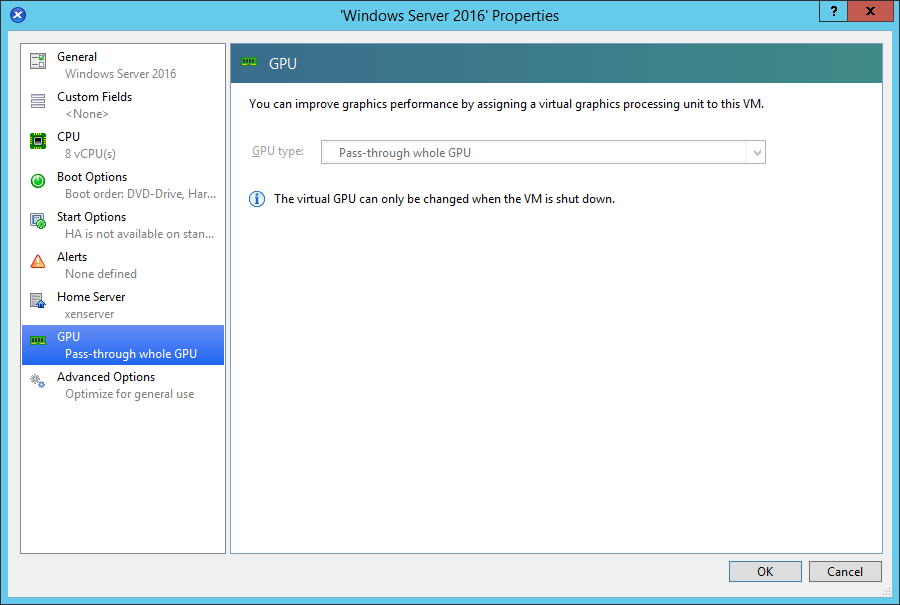
Further, according to the article, we install both drivers, but, I believe, only the grid driver could be installed for the virtual machine. Further drivers do nothing more from this article.
Then you need to go into the nvidia control panel and select the default video card Tesla m60 in the 3d parameters, by the way, after that I have lost the ability to select the default video card and now it always appears like this:

Next, you need to install the terminal server role and enable the following group policy:Computer Configuration - Administrative Templates - Windows Components - Remote Desktop Services - Remote Desktop Session Host - Remote Session Environment - Use the default hardware graphics adapter for all Remote Desktop Services sessions
Here is the article that helped me do this: Measuring GPU Utilizationin Remote Desktop Services
Since we are creating a terminal server, as a result of users working in one of the applications temporary files will be created, therefore, in order to minimize the load on the file subsystem, you can install a Ram disk and transfer temporary files to it - In the system settings - Additional system parameters - Advanced tab - button Environment variables :
Change the following variables for both the user and the system:
TMP
TEMP
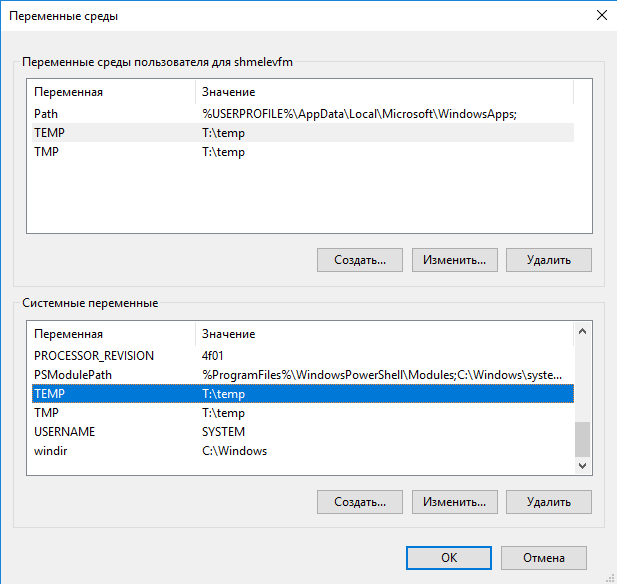
To change the ordinary user for these variables - make him an administrator - change the variables, and then take away the administrator rights. In the variables do not specify the root of the Ram-drive - some programs will not work because of this, create a folder in the Ram-drive - like mine T: \ temp. Also, give this user full rights to this folder.
After the reboot, the server is ready to work and if we run AutoCAD, we will see that hardware acceleration is turned on .
All tests were performed using the GridVirtualAPP license - in the Nvidia control panel - in the Licensing section. To use QuadroDataCenterWorkstationYou must install a licensing server and purchase the appropriate licenses. They were bought from us - but still testing was carried out under the GridVirtualaPP licenses .
So let's move on to the test results. First, according to the already mentioned article, we included testing WEbGL - launched in ie http://fishgl.com .
Launched on one client and saw a joyful 50-70 fps - the video card is working.
Launched at three and fps started jumping from 25 to 60 - an average of 35-40 - the quality noticeably subsided small lags began to appear.
Here is a graph of gpu congestion showing the difference in resource consumption between 1 and 3 users - where the load begins to increase - this is the point in time that two more users include fishgl.com on the ie site.

After turning on 3 more, everything got even worse fps started to sit up to 10 and the video card processor loaded up to 100%.
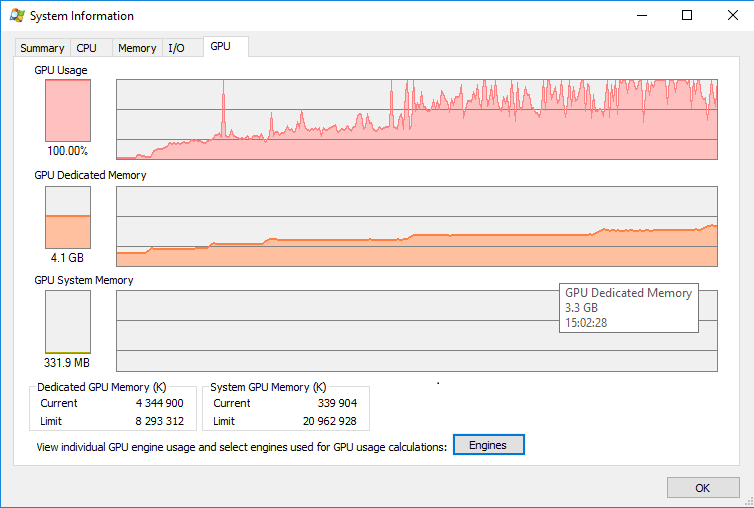
As a result of the results, we realized that it’s better not to run webgl technologies on the terminal server - and, in general, if you can provide Internet access from under local browser. First, the user can open 100 tabs in 10 browsers, and here certainly no server can stand it. And secondly, without the Internet, the terminal server will be more intact.
Now let's start the review of testing AutoCAD on our server.
First, we went to the terminal server with 16 thin clients and launched the AutoCAD, launched standard drawings in the AutoCAD, we didn’t do drawing.
Here are the graphics of the
CPU
Ethernet
GPU
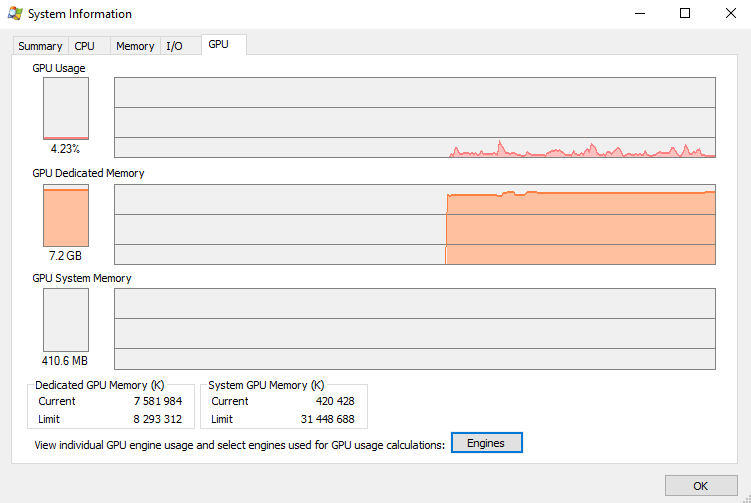
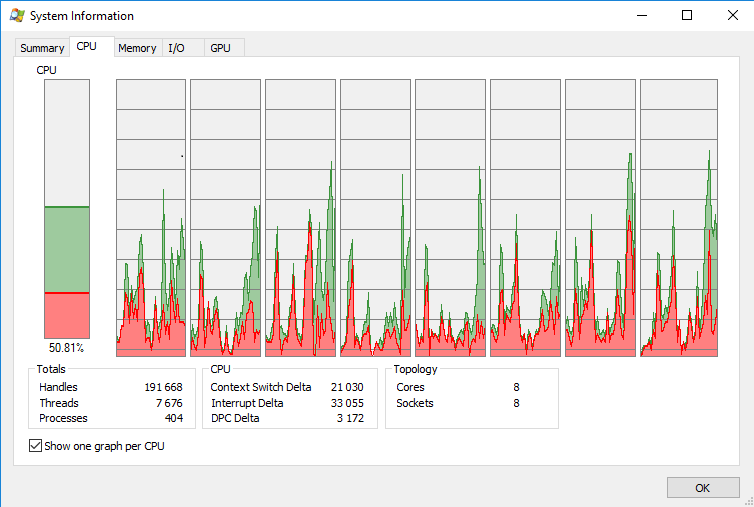
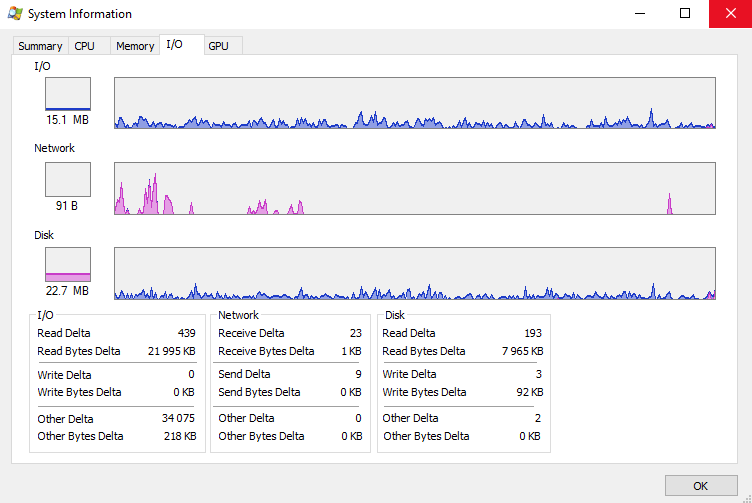
There is no schedule for the use of RAM, but I will say that the server first had 20 GB, but after connecting 13 clients it consumed 18.2 and AutoCAD began to display errors about out of memory. After that, we added another 10 GB of RAM and the errors were gone, and the memory consumption did not rise above 22 GB. It can be seen from the graphs that the server processor is used at 50%, the disk subsystem is not particularly involved, the network activity of a maximum of 20 Mbit / s gave out jumps, the average figure is up to 1 Mbit, oddly enough, but the use of video memory is significant 7.2 GB from 8. From here we can conclude that the maximum number of users is 16, and that is practically without a reserve, and at that moment when they did not draw in AutoCAD, but simply opened the drawing.
Next, we planted 3-year students as thin clients and asked us to draw small details in 3d and 2d. First, they launched an autocad from all thin clients:
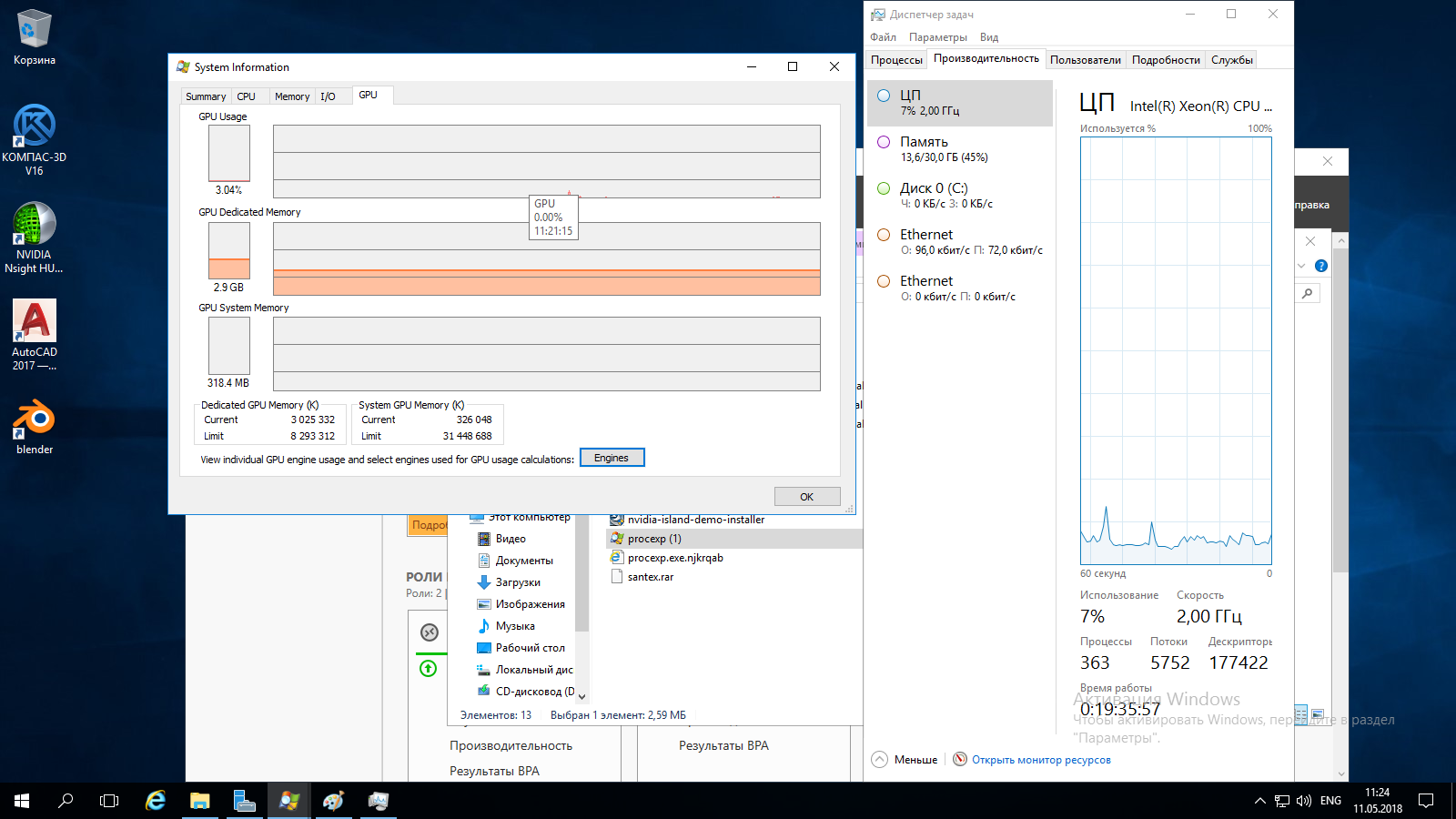
Video memory just launched an autocad without opening a drawing consumed 2.9 GB.
Then the students began to draw, who is 2d, who is 3d, about 50 to 50. There were no special complaints, I thought at the time the drawing was opened, and there were very small delays, which are very rare and the impression of drawing like on a local PC.
We can immediately conclude that in this configuration there are not enough 8 CPU cores, it is better to make 10 or 12, the RAM is quite enough, but it is better to allocate about 2-3 GB per user.
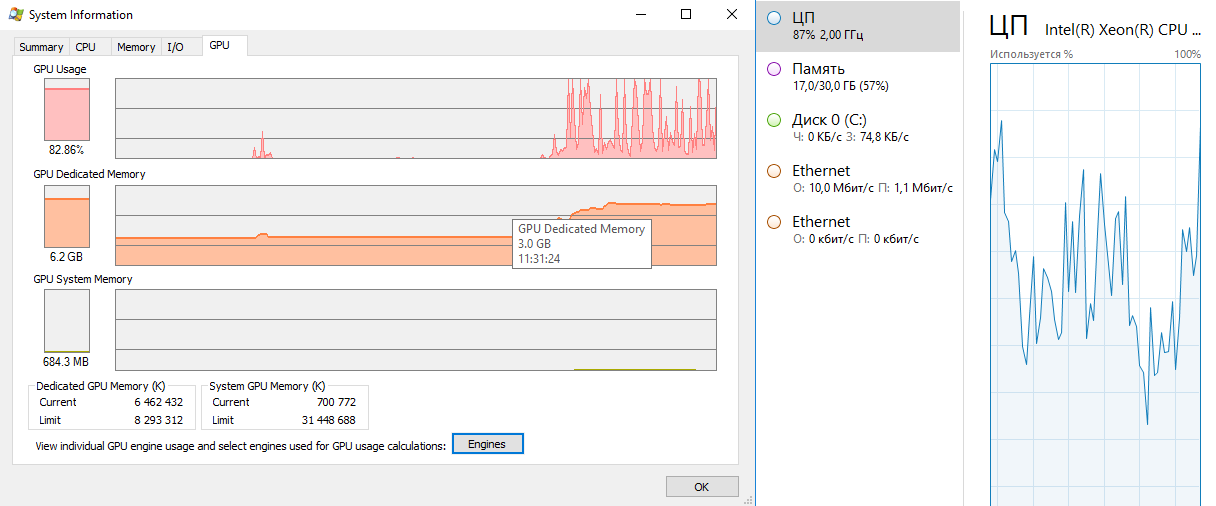
Then at one station they tried to render a drawing - they rendered a 3d model of 4 walls and immediately got lags in the auto-cad operation - some students started complaining that sometimes it became jerky to work. We asked 5 students to leave and the lags stopped, although, at one station, the drawing was still rendered. Below the graphs, when 16 students are working and the rendering is started - you can just see the moment the rendering started.
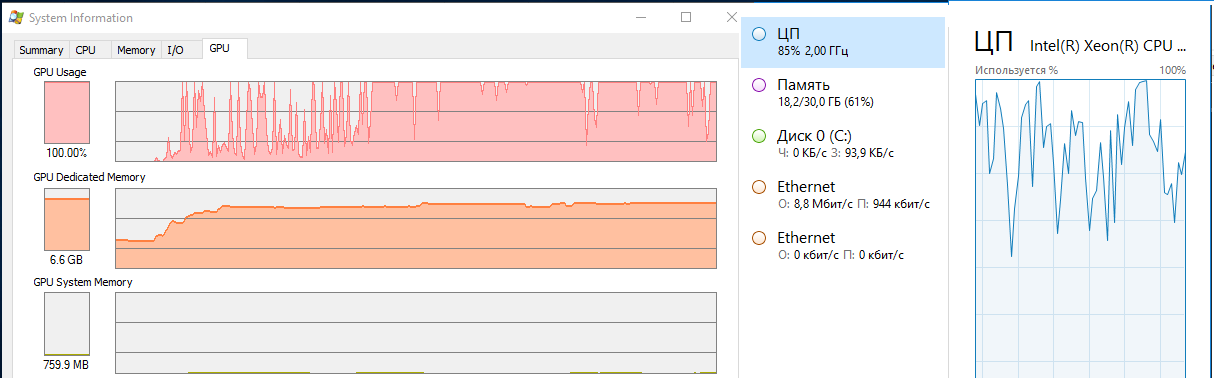
In principle, this was enough for us, but we decided to go ahead and started rendering in 3 more places and the autocad started to slow down everywhere so that it was obviously not pleasant to work, but still it was necessary to note one student, everything worked for him ... but also the drawing for he was out of lines 10 ...
From this we can conclude that the Terminal server in a virtual machine with the passthrough method 1st TeslaM60 forwarded can be used to work in the auto-cassette using the rdp protocol with up to 15 users, preferably about 12-13 per server, you can draw in 2d and 3d (small), but without rendering .
Where to use: when learning to work in AutoCAD - in those disciplines where you DO NOT need itrendering (or some other highly demanding technologies), for example, for automation engineers or technologists who draw only in 2d. Builders, mechanics, and other highly demanding autocad personalities will complain and spit heavily. But if you have such a server, and demanding personalities have very outdated computers, then they will be happy to draw on such a server without using rendering either, since rendering a drawing is the final stage immediately before passing the credit for discipline and this moment can be distributed in time, for example, run in turn. But this requires an adequate teacher or laboratory assistant who looks after the computer class in the drafting process.
What facilitates the terminal server: Firstly, the installation time is, on the strength, the day of installation and configuration, rather than reinstalling 15 computers, download updates and put on each auto-cad. Secondly, administration of one server, but not 15 computers.
Cons: Firstly, one server is one point of failure, the server has died, your educational process has died. Therefore, a second such server is necessary, but since it is a virtual server, it is better that there are two host servers and backups of virtual machines are made, and if one fails, you will quickly start the virtual machine from backup on the second.
Secondly, many users use the server resources at once, and if there is one too smart user who starts a lot of things, then there will be few resources and can be used by everyone. But this should be monitored by both the server administrator and the student group teacher.
Thirdly, rdp is also in rdp in Africa. The network will fail, it will be impossible to work, and the optimization of the rdp protocol will certainly significantly improve the quality of use, but there are still some complaints about the work of this technology and not all applications work normally with it.
Why choose rdp - because you read it hereAutoCAD supports work through this protocol. But it’s better to use the Citrix Receiver, but unfortunately I did not find a manual on how to use Citrix XenDesktop for a terminal server that has CAD applications - all found manuals are only for individual virtual machines with desktop os - win7, 8 or 10, in which during installation the type of VDA agent is indicated - forHDX 3dpro, but for the server OS there is no such agent, there is only just VDA. VDAforHDX 3dPro agent for virtual machines that have a video card. If anyone knows how to make the same terminal server using Citrix XenDesktop and if you know where to find VDAforHDX 3dPro for the server OS, please write in the comments.
Now let's calculate how much it all costs.
The iron server with 2 Tesla M60 cost us 1,500,000 rubles
XenServer7.0 hypervisor - 125
000 rub WindowsServer will cost about 60 000
Terminal license - 1 700 r (one piece)
We can create a maximum of 4 such terminal servers, because in the hypervisor 2 Tesla M60 video cards are displayed as 4. 4 terminal servers will pull max 50-60 customers.
When using XenServer as a hypervisor:
If 60 users per server
1,500,000+ 125,000 + 60,000 * 4 + 1,700 * 60 = 1,967,000
In terms of the workstation 3,783 p
If 50 users per server:
1,500,000 + 125,000 + 60,000 * 4 + 1700 * 50 = 1950000
In terms of the workplace 39000
If you take the WindowsServer 2016 DataCenter as a hypervisor, then you do not have to pay for the OS of virtual machines, and Server 2016 itself is in the DataCenter edition for 28 cores for approximately 250,000
1,500,000 + 250,000+ 1,700 * 60 = 1,852,000
30,886 rubles per workstation in terms of 60 users
Connection can be made, for example, using thin clients worth up to 20,000 rubles, for example, hp T620, or nettops, for example, Lenovo m600, but the best option is to use self-assembly. Here is an example of such self-assembly with nyx
AutoCAD is a rather resource-intensive application that requires all the hardware resources: RAM, and a video card, and a powerful processor and fast disks. And at once the idea suggests that freestanding powerful PCs are the best option. But we tried to deploy a terminal server for this application and put it into practice.
So, the configuration of our cool server:
- Supermicro platform (already awkward, but still pretty quick);
- 2 E5-2260 v4 processors with 28 physical cores, and 56 cores with hyperthreading enabled;
- hypervisor - host operating system Citrix Xenserver 7.0;
- Guest operating system Server 2016 Standart;
- Raid array of 10 - 4 HDDs of 1 TB each with a rotation speed of 10,000 rpm;
- Ethernet 1 Gb / sek;
- the most important component is 2 Tesla m60 16 Gb video accelerators.
In fact, the server was conceived to create virtual machines on windows 10 and deliver them to the user through the Citrix Receiver. Virtual machines exist, but I wanted to create not many virtual machines for many users, but one.
I was looking for how to make a terminal server with delivery via citrix receiver - I did not find the VDAforHDX 3dPro agent for the server OS, if anyone knows how and what, please drop the link in the comments, so I created a server with delivery via RDP.
Let's start in order:
- Creating a virtual machine in Citrix Xendesctop
- Installing the operating system for the Server 2016 Standart virtual machine
- installing updates for the virtual machine OS;
- installation of Citrix guest services on the virtual machine - after this, the shutdown and restart items will appear in the virtual machine’s context menu - which will allow shutting down and restarting the virtual machine from Xenserver correctly (before that there were only force shutdown and force reboot);
- forward the Teslam60 graphics card to the virtual machine using the passthrough method.
Further, according to the article, we install both drivers, but, I believe, only the grid driver could be installed for the virtual machine. Further drivers do nothing more from this article.
Then you need to go into the nvidia control panel and select the default video card Tesla m60 in the 3d parameters, by the way, after that I have lost the ability to select the default video card and now it always appears like this:
Next, you need to install the terminal server role and enable the following group policy:Computer Configuration - Administrative Templates - Windows Components - Remote Desktop Services - Remote Desktop Session Host - Remote Session Environment - Use the default hardware graphics adapter for all Remote Desktop Services sessions
Here is the article that helped me do this: Measuring GPU Utilizationin Remote Desktop Services
Since we are creating a terminal server, as a result of users working in one of the applications temporary files will be created, therefore, in order to minimize the load on the file subsystem, you can install a Ram disk and transfer temporary files to it - In the system settings - Additional system parameters - Advanced tab - button Environment variables :
Change the following variables for both the user and the system:
TMP
TEMP
To change the ordinary user for these variables - make him an administrator - change the variables, and then take away the administrator rights. In the variables do not specify the root of the Ram-drive - some programs will not work because of this, create a folder in the Ram-drive - like mine T: \ temp. Also, give this user full rights to this folder.
After the reboot, the server is ready to work and if we run AutoCAD, we will see that hardware acceleration is turned on .
All tests were performed using the GridVirtualAPP license - in the Nvidia control panel - in the Licensing section. To use QuadroDataCenterWorkstationYou must install a licensing server and purchase the appropriate licenses. They were bought from us - but still testing was carried out under the GridVirtualaPP licenses .
So let's move on to the test results. First, according to the already mentioned article, we included testing WEbGL - launched in ie http://fishgl.com .
Launched on one client and saw a joyful 50-70 fps - the video card is working.
Launched at three and fps started jumping from 25 to 60 - an average of 35-40 - the quality noticeably subsided small lags began to appear.
Here is a graph of gpu congestion showing the difference in resource consumption between 1 and 3 users - where the load begins to increase - this is the point in time that two more users include fishgl.com on the ie site.
After turning on 3 more, everything got even worse fps started to sit up to 10 and the video card processor loaded up to 100%.
As a result of the results, we realized that it’s better not to run webgl technologies on the terminal server - and, in general, if you can provide Internet access from under local browser. First, the user can open 100 tabs in 10 browsers, and here certainly no server can stand it. And secondly, without the Internet, the terminal server will be more intact.
Now let's start the review of testing AutoCAD on our server.
First, we went to the terminal server with 16 thin clients and launched the AutoCAD, launched standard drawings in the AutoCAD, we didn’t do drawing.
Here are the graphics of the
CPU
Ethernet
GPU
There is no schedule for the use of RAM, but I will say that the server first had 20 GB, but after connecting 13 clients it consumed 18.2 and AutoCAD began to display errors about out of memory. After that, we added another 10 GB of RAM and the errors were gone, and the memory consumption did not rise above 22 GB. It can be seen from the graphs that the server processor is used at 50%, the disk subsystem is not particularly involved, the network activity of a maximum of 20 Mbit / s gave out jumps, the average figure is up to 1 Mbit, oddly enough, but the use of video memory is significant 7.2 GB from 8. From here we can conclude that the maximum number of users is 16, and that is practically without a reserve, and at that moment when they did not draw in AutoCAD, but simply opened the drawing.
Next, we planted 3-year students as thin clients and asked us to draw small details in 3d and 2d. First, they launched an autocad from all thin clients:
Video memory just launched an autocad without opening a drawing consumed 2.9 GB.
Then the students began to draw, who is 2d, who is 3d, about 50 to 50. There were no special complaints, I thought at the time the drawing was opened, and there were very small delays, which are very rare and the impression of drawing like on a local PC.
We can immediately conclude that in this configuration there are not enough 8 CPU cores, it is better to make 10 or 12, the RAM is quite enough, but it is better to allocate about 2-3 GB per user.
Then at one station they tried to render a drawing - they rendered a 3d model of 4 walls and immediately got lags in the auto-cad operation - some students started complaining that sometimes it became jerky to work. We asked 5 students to leave and the lags stopped, although, at one station, the drawing was still rendered. Below the graphs, when 16 students are working and the rendering is started - you can just see the moment the rendering started.
In principle, this was enough for us, but we decided to go ahead and started rendering in 3 more places and the autocad started to slow down everywhere so that it was obviously not pleasant to work, but still it was necessary to note one student, everything worked for him ... but also the drawing for he was out of lines 10 ...
From this we can conclude that the Terminal server in a virtual machine with the passthrough method 1st TeslaM60 forwarded can be used to work in the auto-cassette using the rdp protocol with up to 15 users, preferably about 12-13 per server, you can draw in 2d and 3d (small), but without rendering .
Where to use: when learning to work in AutoCAD - in those disciplines where you DO NOT need itrendering (or some other highly demanding technologies), for example, for automation engineers or technologists who draw only in 2d. Builders, mechanics, and other highly demanding autocad personalities will complain and spit heavily. But if you have such a server, and demanding personalities have very outdated computers, then they will be happy to draw on such a server without using rendering either, since rendering a drawing is the final stage immediately before passing the credit for discipline and this moment can be distributed in time, for example, run in turn. But this requires an adequate teacher or laboratory assistant who looks after the computer class in the drafting process.
What facilitates the terminal server: Firstly, the installation time is, on the strength, the day of installation and configuration, rather than reinstalling 15 computers, download updates and put on each auto-cad. Secondly, administration of one server, but not 15 computers.
Cons: Firstly, one server is one point of failure, the server has died, your educational process has died. Therefore, a second such server is necessary, but since it is a virtual server, it is better that there are two host servers and backups of virtual machines are made, and if one fails, you will quickly start the virtual machine from backup on the second.
Secondly, many users use the server resources at once, and if there is one too smart user who starts a lot of things, then there will be few resources and can be used by everyone. But this should be monitored by both the server administrator and the student group teacher.
Thirdly, rdp is also in rdp in Africa. The network will fail, it will be impossible to work, and the optimization of the rdp protocol will certainly significantly improve the quality of use, but there are still some complaints about the work of this technology and not all applications work normally with it.
Why choose rdp - because you read it hereAutoCAD supports work through this protocol. But it’s better to use the Citrix Receiver, but unfortunately I did not find a manual on how to use Citrix XenDesktop for a terminal server that has CAD applications - all found manuals are only for individual virtual machines with desktop os - win7, 8 or 10, in which during installation the type of VDA agent is indicated - forHDX 3dpro, but for the server OS there is no such agent, there is only just VDA. VDAforHDX 3dPro agent for virtual machines that have a video card. If anyone knows how to make the same terminal server using Citrix XenDesktop and if you know where to find VDAforHDX 3dPro for the server OS, please write in the comments.
Now let's calculate how much it all costs.
The iron server with 2 Tesla M60 cost us 1,500,000 rubles
XenServer7.0 hypervisor - 125
000 rub WindowsServer will cost about 60 000
Terminal license - 1 700 r (one piece)
We can create a maximum of 4 such terminal servers, because in the hypervisor 2 Tesla M60 video cards are displayed as 4. 4 terminal servers will pull max 50-60 customers.
When using XenServer as a hypervisor:
If 60 users per server
1,500,000+ 125,000 + 60,000 * 4 + 1,700 * 60 = 1,967,000
In terms of the workstation 3,783 p
If 50 users per server:
1,500,000 + 125,000 + 60,000 * 4 + 1700 * 50 = 1950000
In terms of the workplace 39000
If you take the WindowsServer 2016 DataCenter as a hypervisor, then you do not have to pay for the OS of virtual machines, and Server 2016 itself is in the DataCenter edition for 28 cores for approximately 250,000
1,500,000 + 250,000+ 1,700 * 60 = 1,852,000
30,886 rubles per workstation in terms of 60 users
Connection can be made, for example, using thin clients worth up to 20,000 rubles, for example, hp T620, or nettops, for example, Lenovo m600, but the best option is to use self-assembly. Here is an example of such self-assembly with nyx
- Desktop SilverStone Milo ML05
Black Mini-iTX Without PSU 1 pc. 3,690 - NAVAN Power Supply
400W SFX (24 + 4pin) 1 pc. 1,378 - ASRock H110M-ITX (RTL) LGA1151 PCI-E DVI + HDMI GbLAN SATA Mini-ITX 2DDR4 1 pc. 4 305
CPU Intel Core i3-7320 4.1 GHz / 2core / SVGA HD Graphics 630 / 4Mb / LGA1151 1 pc. 10 331
SSD 120 Gb SATA 6Gb / s ADATA Ultimate SU7002.5 "3D TLC 1 pc. 3 813
Crucial DDR4 RDIMM 4GbCL15 ECC Registered 1 pc. 4 428
21.5 "Acer LCD MonitorV226HQL Abmd (LCD, Wide, 1920x1080, D-Sub, DVI) 1 pc. 6 703
2GbDDR3 MSI GT710 2GD3H LP (RTL) D-Sub + DVI + HDMI 1 pc.
3 321
Total: 37 969 rub. (617.48 cu)
Having bought a thin client, you will spend 30,000 rubles together with a monitor with a keyboard and mouse, it will have a pre-installed operating system designed only for remote connection somewhere and a browser that does not work correctly. But spending a little more and buying self-assembly for 40 thousand rublesYou will get a full-fledged PC with a good processor and video card. By installing free Linux on it, for example, Ubuntu or Linux Mint, you will get a full-fledged OS with the ability to install additional software - this can be a variety of applications - from text editors to CAD applications. It will even be possible to install AutoCAD analogues on them, for example, BricksCad, but nevertheless, if you are trained to work in applications for Windows at your educational institution, you will either have to install Windows on each workstation or deploy a terminal server.
I am for terminal servers, if the application allows you to use the launch mode of many users from one server. At the same time, increasing the number of users on the server, you will reduce the cost of the OS license per user. This is especially true at the present time, when Dream Spark is closed to the small ones for Russia, and the government decree prohibits the purchase without justification of foreign software for educational institutions. In addition, new May decrees plan to transfer the entire public sector to domestic software by the year 24, which is unclear, and therefore it is necessary to stock up on software now.
Let's calculate the price for a workstation in several ways.
Total in a minimal configuration one workplace will cost:
thin client - 20,000 r
monitor - 7,000 r
mouse keyboard - 2000 r
workstation on a terminal server - 30000 r
Total 59 000
If you buy self-assembly and Windows:
self-assembly with a monitor 38 000 r
keyboard mouse - 2000 r
Windows 10 pro - 9000 r
Total 49000
10000 r a small overpayment, but choosing the second option administration costs increase: installing windows and drivers takes longer than just turning on the thin client or installing Linux mint. In addition, you need to take care of antivirus software, and from experience I can say that 95 percent of all viruses are for Windows.
If we choose the third option - a terminal server and self-assembly with Linux, then we get: a
workstation on a terminal server - 30000 r
self-assembly with a monitor 38000
keyboard mouse 2000 r
total: 70 000 r The
price is quite large and for this money you can buy a good self-assembly, just for Cad applications, but again, administration of freestanding PCs is harder than server administration, especially when it comes to 60 cars. But performance will be better than on a terminal server, especially in rendering. I also want to note that the server is without load - when one user uses it, a good graphic station, which can be given to the department’s scientists for heavy rendering at a time when there are no pairs.
In addition, the server can be used by dividing its resources in time, for example, there are two computer classes with old equipment, but both need an autocad. Let some use it on the first pair, and the second on the second. Thus, you can increase the number of workstations in two and the price of one workplace drops below 30,000.
You can allow students to connect to the server from home or the university library, thereby providing all the software necessary for term, practical or graduate work.
Whether to use such servers in the educational process is a moot point. But time is moving forward and virtualization is becoming cheaper, more accessible and more stable. In addition, such a server allows you to increase the speed of creating a computer class at times.
Another point - if you buy a server not with 2 video cards but with 4, then the price for a workstation will fall again.
The issue is complex and it is necessary to weigh the pros and cons and build on the specific task for what and why.
PS Add comments - I would like to know your opinion on this issue.









