Creating a website in Delphi, or How to use uniGUI to a minimum
uniGUI is a library that allows you to create web applications in the classic Delphi-style, using visual components, and what is important, in most cases it completely hides the entire client (browser) "kitchen" from the developer: you do not need to know either HTML or CSS, no JavaScript, and all development is carried out in only one language - Delphi.
If you look at the picture from afar, 3 scenarios of using the library emerge:
Consider two situations.
The first is characterized by the fact that a certain Delphi developer is familiar with the web exclusively in one library (uniGUI, of course) and does not have the desire or time resources to search and study alternatives, and he has the following task: to create a modern-looking dynamic (with AJAX) the site according to the provided layout, the following of which must be very accurate - all colors, fonts, indents, possible shadows and other design solutions are reinforced concrete, departure from them is unacceptable. The probability that the layout will correspond to one of the themes supplied with the library is almost zero; the chance that using the standard settings (through the Object Inspector) and some tricks (via CSS) you can adjust the appearance of the components to the desired one is already higher, but also small. If it turns out that the design, among other things, contains various animations, then write is gone - uniGUI bypasses this topic and can not help.
Here, the best way out (meaning for the end user) is manual layout layout, plus which is also at maximum performance, because often even a few dozen uniGUI graphical objects are not only created with a noticeable delay, but they are also not instantly rendered, and if the bill comes to an end up to hundreds and above, then an unacceptable slowdown is almost guaranteed. Of course, when a Delphi programmer owns the layout, then he can do this part of the work, and if not, it is quite possible to transfer it to another person, because, as will be seen below, these structural blocks of the site are the client triad and server code - very independent and can be developed separately.
A second, rarer situation is also possible in which the approach described below is similarly applicable: initially, the work is carried out according to the first scenario, using any visual components, but then at some point, due to problems of the uniGUI itself that cannot be resolved or bypassed, it becomes it is impossible to continue creating and a different path is required (preferably with preservation of all already written server code).
So, having a mock up on hand, you need to decide on how to display it, which doesn’t have such an obvious solution, because the work is done on the basis of a particular library with its inherent limitations and rules, so the first task is clear - somehow embed arbitrary HTML in a container from uniGUI.
Let's try to start small and explore a minimal, empty project, using the wizard to create it:
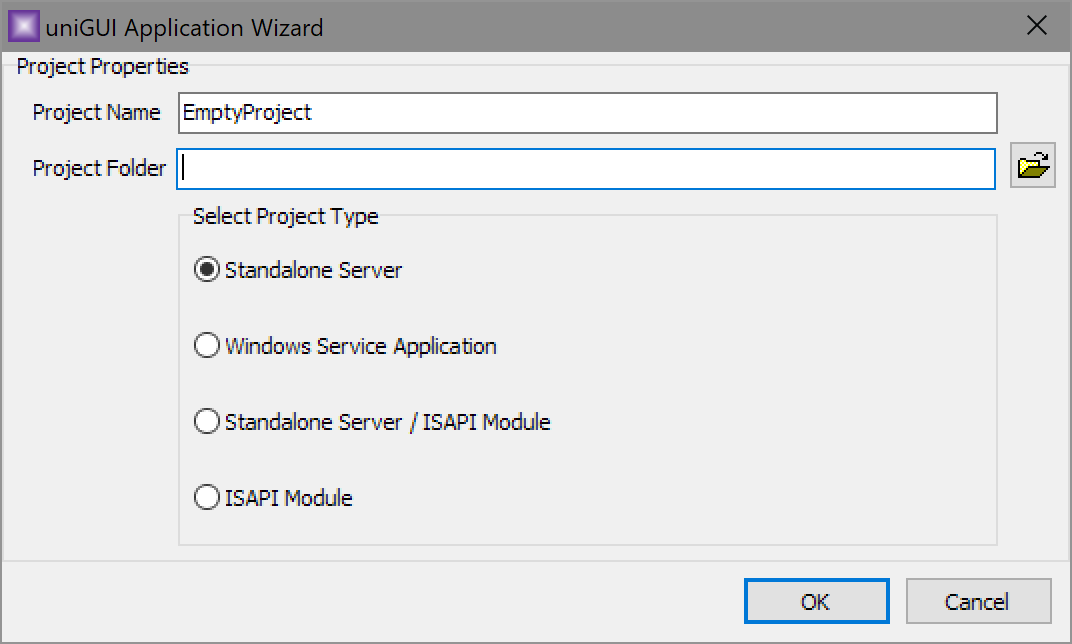
As a result of his work, a project with three files will appear:
Without changing anything, run the project (and actually the web server) and look at the result in the browser:
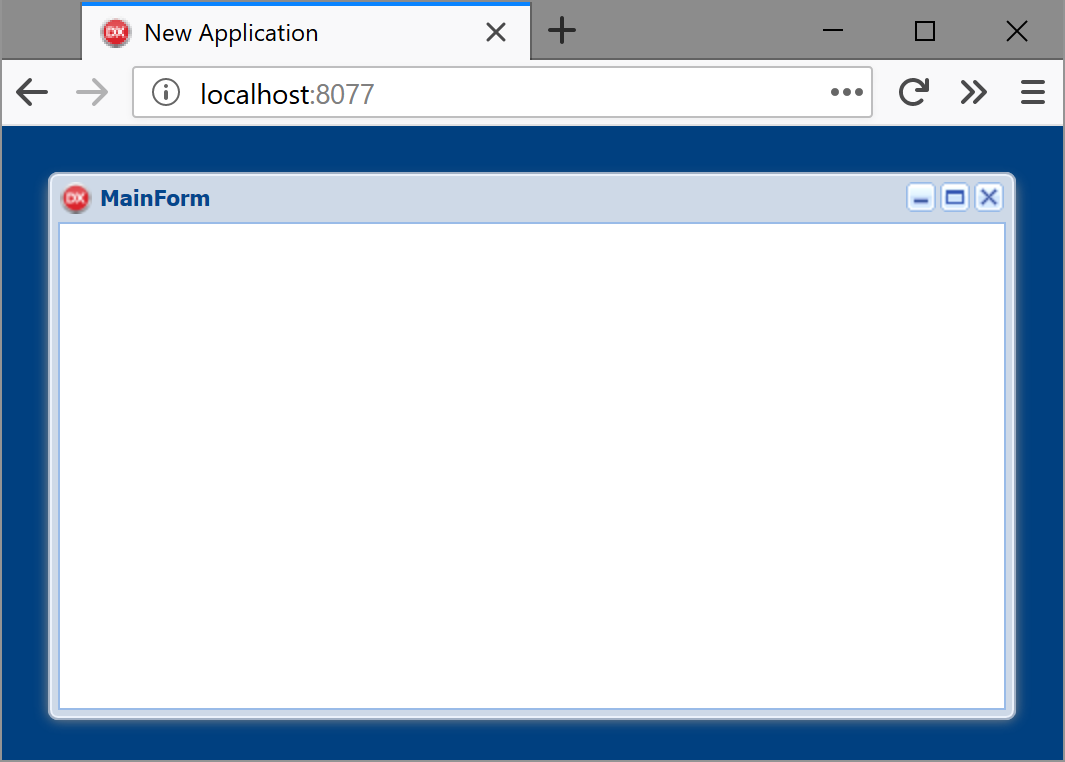
The current view, of course, is far from being called a typical site (everything looks like an imitation of a regular application), but so far it does not matter - we just study the structure, for which we will use the Inspector and examine the form shown:
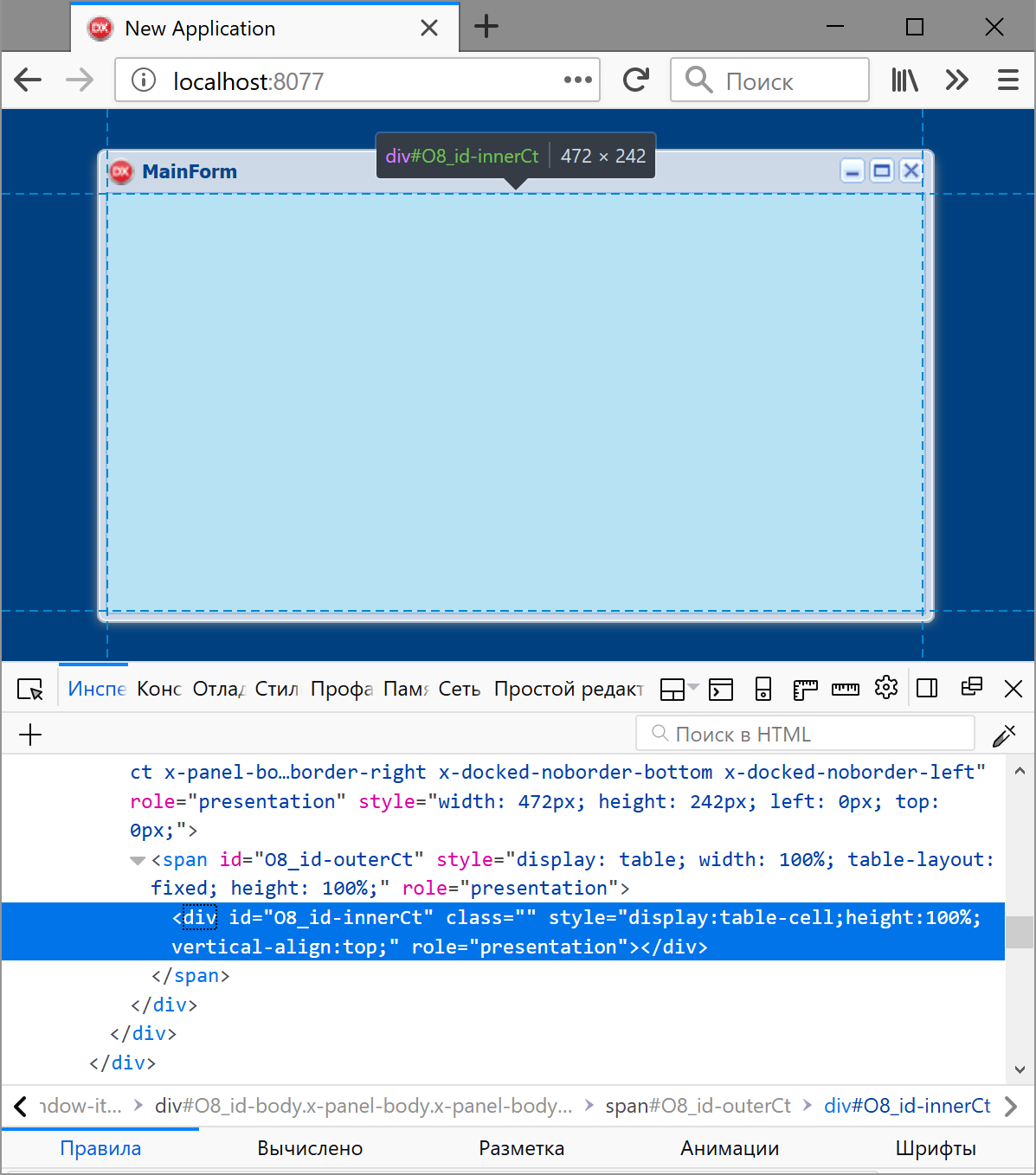
As you can see in the picture, it provides an empty block
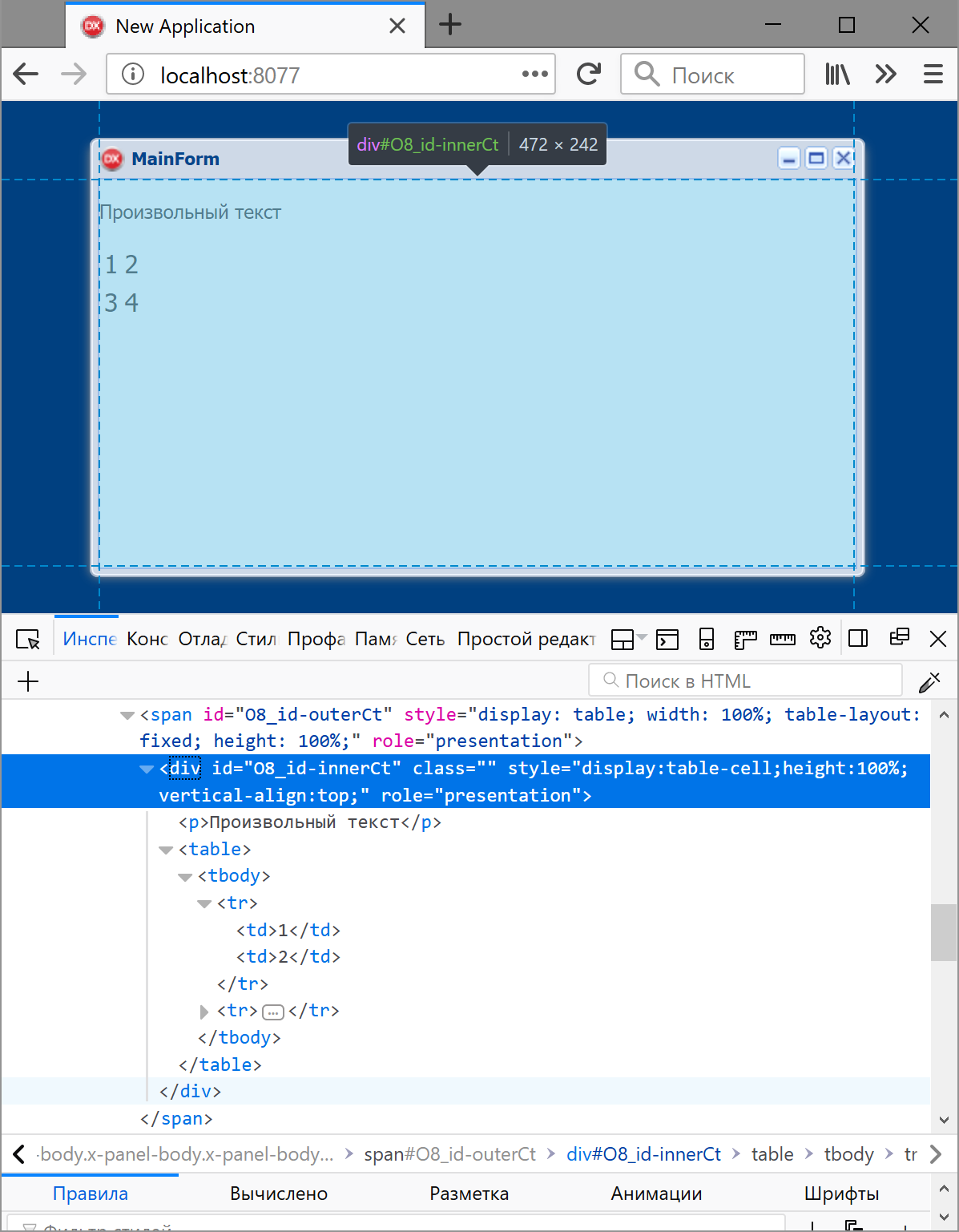
The result obtained in this way fully lives up to expectations:
After successful research with the search for a suitable HTML container, you need to get rid of the form in the form of a window, which is very simple - just use the property by setting its value to :
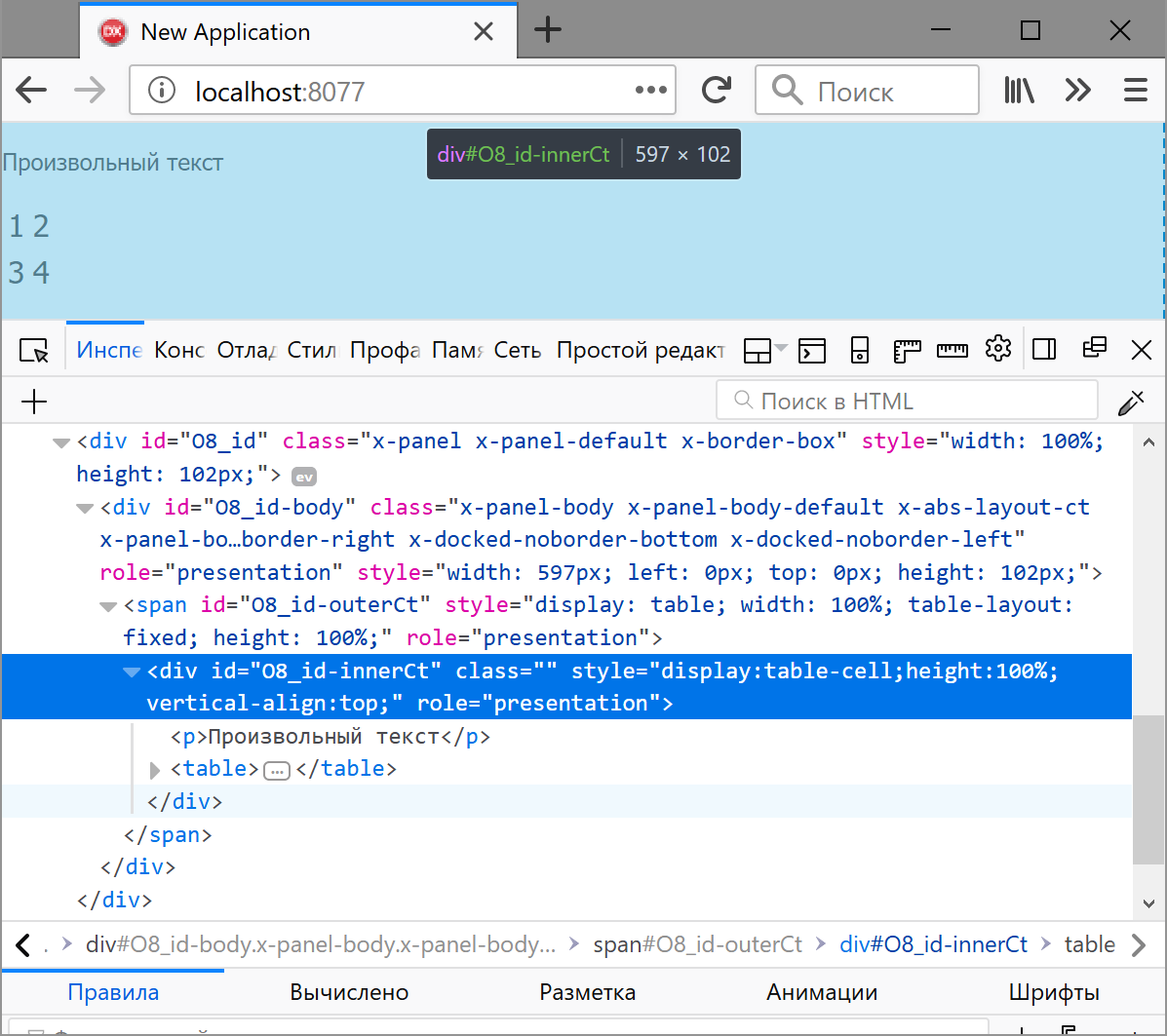
There remains the last stroke that does not follow directly from the image above: in order for the container to monitor resizing of the browser window, you need to configure a couple of form properties (an excerpt from the dfm file is given):
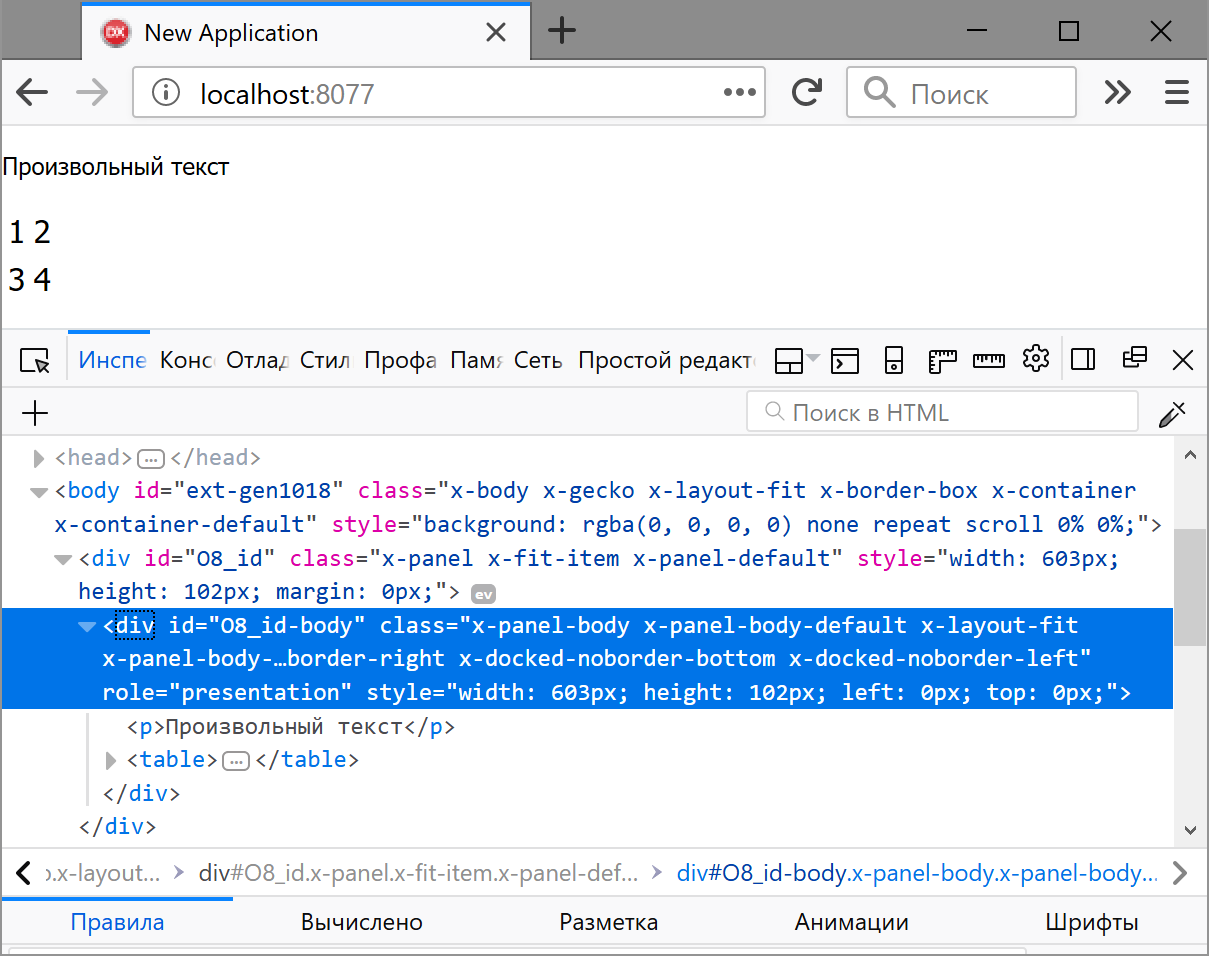
This manipulation, as can be seen from the picture, also reduces the nesting of the blocks that make up the form.
Thus, there is a way to display the static content of an arbitrary volume and complexity - usually these are the parts of the site that do not change during the entire session with it - the heading, menu, basement, block with secondary information, etc. The rest is the dynamics - reaction to user actions requiring server access.
This section will be illustrated by the example of a live site created using the method described in the article. Briefly about it, in order to understand the images below, it is an aggregator of prices for publications of a certain musical direction, where a user can see all the offers of a number of stores by the name of the artist (group) or album, for example:
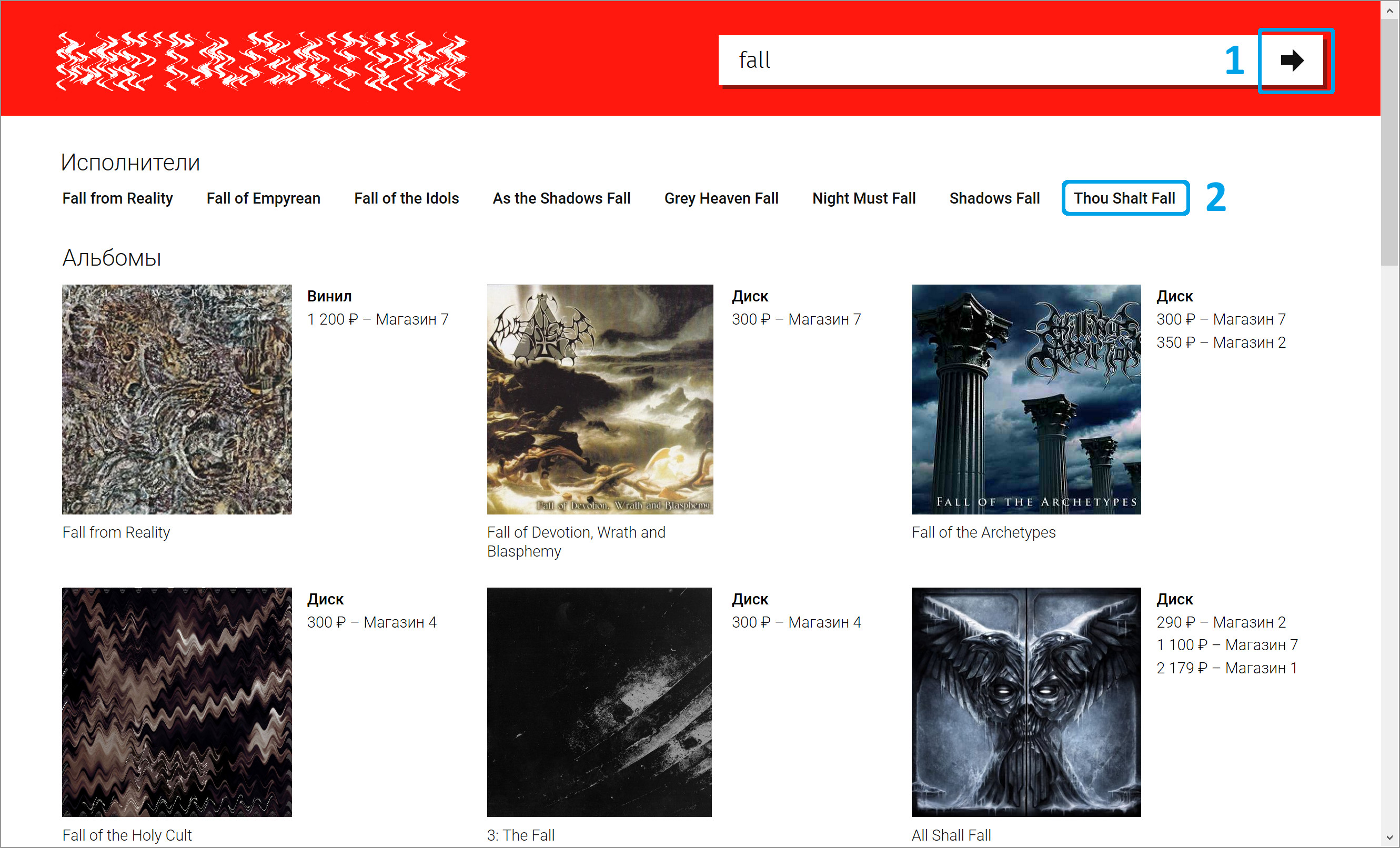
The numbers show the elements that, when clicked, send an AJAX request to the server:
Let's start with the client side. The arrow-shaped image that responds to a click is represented by the following HTML code:
Of interest here is only the event
It is necessary to dwell on the parameters applied
Further, in order not to interrupt the logical chain with the data stream, we will move on to the server side, or more precisely, to the event
The event code is trivial and needs no explanation, so consider the method
The last line of this code contains a function
For clarity, the image below shows one of the DOM nodes , the contents of which are dynamically changed in the above function:
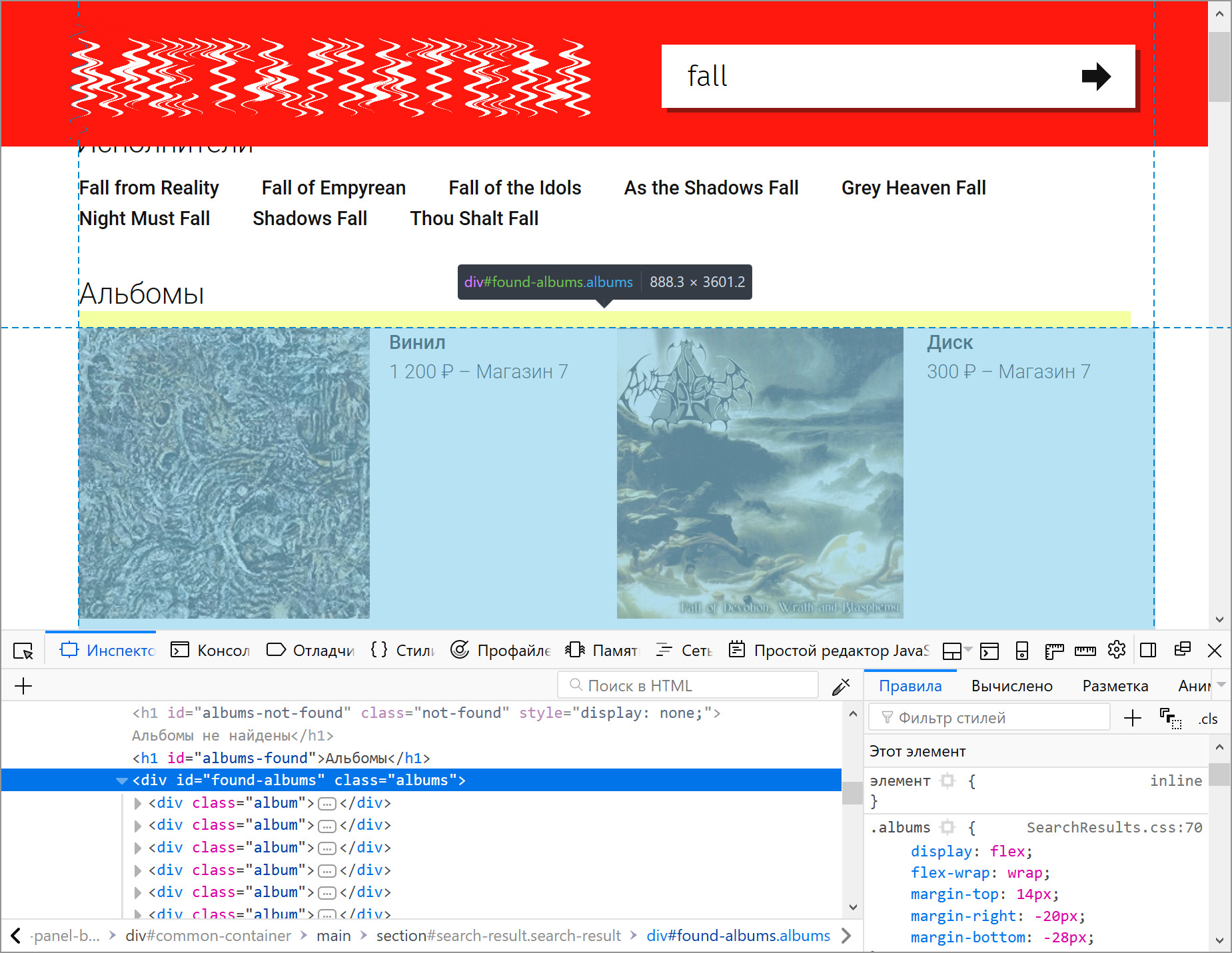
To finish the section, you need to go back a bit , where it was said about the need to configure the form so that it would be possible to identify it when sending an AJAX request, we were talking about a client event located in the property
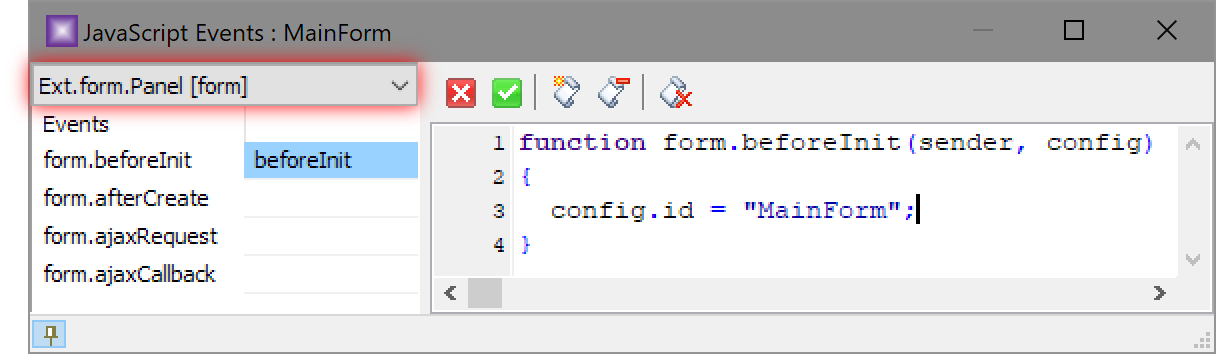
It just requires you to assign a text identifier to the form
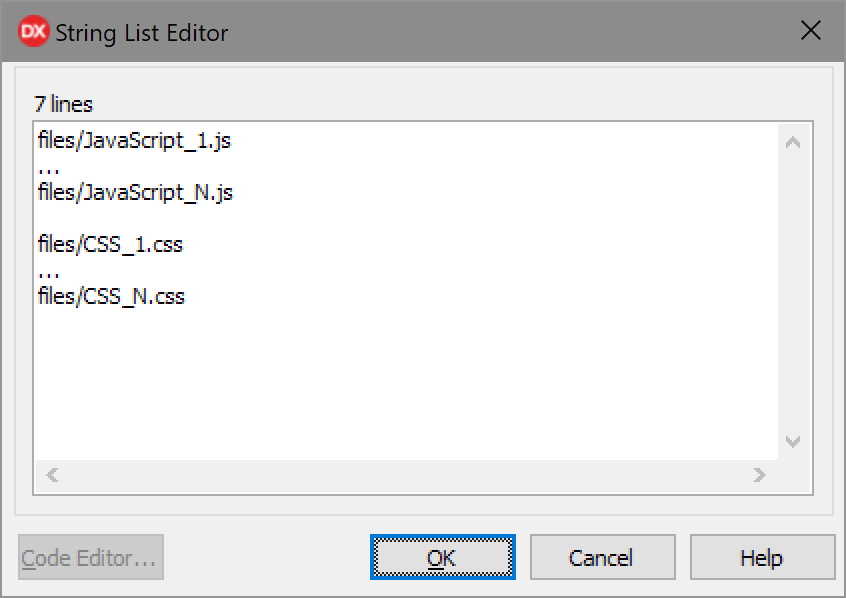
The deployment of a web application is described in detail in the uniGUI documentation , but in our case there are own files that are responsible for displaying manual typesetting - these are CSS and scripts; the paths to them should be explicitly written in the server data module
If you look at the picture from afar, 3 scenarios of using the library emerge:
- The most favorable one, for which it was created as a whole, when the described strong, iridescent side of uniGUI manifests itself fully, is the transfer (full or partial - no matter) of desktop applications to the web, which can be done quickly, in the usual way and with high quality only in cases when the components supplied with the library immediately provide the required functionality - for example, filtering and sorting by table columns.
- It is very similar to the first one and follows to some extent from it, with the only difference being that a regular set of components does not cover all the capabilities necessary for technical requirements ; if we again take the table as an example, then multilevel grouping of rows by arbitrary columns can become such a requirement. If you can find third-party solutions with the necessary capabilities, then the script comes down to the first, and if not, you need to do it yourself, which is already very nontrivial, because here you can not do without just knowledge of JavaScript, but also a deep knowledge of the Ext JS framework on the basis of which the browser side of uniGUI works.
- The latter scenario may seem strange and even foreign to those who used the first one in practice - it is about giving up the entire rich palette of visual components and developing the client side of the web application exclusively using its native triad - HTML, CSS and JavaScript. This article will show in which cases this is acceptable, as well as demonstrate a way to implement the plan.
Formulation of the problem
Consider two situations.
The first is characterized by the fact that a certain Delphi developer is familiar with the web exclusively in one library (uniGUI, of course) and does not have the desire or time resources to search and study alternatives, and he has the following task: to create a modern-looking dynamic (with AJAX) the site according to the provided layout, the following of which must be very accurate - all colors, fonts, indents, possible shadows and other design solutions are reinforced concrete, departure from them is unacceptable. The probability that the layout will correspond to one of the themes supplied with the library is almost zero; the chance that using the standard settings (through the Object Inspector) and some tricks (via CSS) you can adjust the appearance of the components to the desired one is already higher, but also small. If it turns out that the design, among other things, contains various animations, then write is gone - uniGUI bypasses this topic and can not help.
Here, the best way out (meaning for the end user) is manual layout layout, plus which is also at maximum performance, because often even a few dozen uniGUI graphical objects are not only created with a noticeable delay, but they are also not instantly rendered, and if the bill comes to an end up to hundreds and above, then an unacceptable slowdown is almost guaranteed. Of course, when a Delphi programmer owns the layout, then he can do this part of the work, and if not, it is quite possible to transfer it to another person, because, as will be seen below, these structural blocks of the site are the client triad and server code - very independent and can be developed separately.
A second, rarer situation is also possible in which the approach described below is similarly applicable: initially, the work is carried out according to the first scenario, using any visual components, but then at some point, due to problems of the uniGUI itself that cannot be resolved or bypassed, it becomes it is impossible to continue creating and a different path is required (preferably with preservation of all already written server code).
Statics
So, having a mock up on hand, you need to decide on how to display it, which doesn’t have such an obvious solution, because the work is done on the basis of a particular library with its inherent limitations and rules, so the first task is clear - somehow embed arbitrary HTML in a container from uniGUI.
Container Search
Let's try to start small and explore a minimal, empty project, using the wizard to create it:
As a result of his work, a project with three files will appear:
- ServerModule.pas - contains a data module
UniServerModule, which always exists in one instance and is created at the start of the web server. - MainModule.pas - as part of our little experiment, it is not interesting and, in principle, can be removed from the project, making it really minimally possible.
- Main.pas - contains the main form
MainForm- the only visual element available so far, so it is he who will undergo further dissection.
Without changing anything, run the project (and actually the web server) and look at the result in the browser:
The current view, of course, is far from being called a typical site (everything looks like an imitation of a regular application), but so far it does not matter - we just study the structure, for which we will use the Inspector and examine the form shown:
As you can see in the picture, it provides an empty block
div, which is quite suitable for our tasks; There are several ways to place arbitrary HTML in it, here the preferred option is one that allows you to take code from any source during application execution, for which you should use the OnCreateform event (to simplify the example, the download does not come from a file, database or other external resource, but nothing prevents to do otherwise):procedure TMainForm.UniFormCreate(Sender: TObject);
const
HTML =
'Произвольный текст
' +
'' +
'' +
'' +
'1 2 3 4
';
begin
WebForm.JSForm.Update(HTML);
end;The result obtained in this way fully lives up to expectations:
Form customization
After successful research with the search for a suitable HTML container, you need to get rid of the form in the form of a window, which is very simple - just use the property by setting its value to :
UniServerModule.MainFormDisplayModemfPageThere remains the last stroke that does not follow directly from the image above: in order for the container to monitor resizing of the browser window, you need to configure a couple of form properties (an excerpt from the dfm file is given):
object MainForm: TMainForm
  ...
  AlignmentControl = uniAlignmentClient
  Layout = 'fit'
end
This manipulation, as can be seen from the picture, also reduces the nesting of the blocks that make up the form.
Thus, there is a way to display the static content of an arbitrary volume and complexity - usually these are the parts of the site that do not change during the entire session with it - the heading, menu, basement, block with secondary information, etc. The rest is the dynamics - reaction to user actions requiring server access.
Dynamics
This section will be illustrated by the example of a live site created using the method described in the article. Briefly about it, in order to understand the images below, it is an aggregator of prices for publications of a certain musical direction, where a user can see all the offers of a number of stores by the name of the artist (group) or album, for example:
The numbers show the elements that, when clicked, send an AJAX request to the server:
- The name entered in the text box searches for groups and albums, the result of which is shown in the picture. Further examples will continue to use this particular option.
- There is a transition to all available albums of a particular artist.
Implementation
Let's start with the client side. The arrow-shaped image
that responds to a click is represented by the following HTML code:
Of interest here is only the event
onclickthat calls the function Searchwith a rather primitive implementation, because it only needs to pass the search phrase to the server:function Search(Input)
{
if (Input.value.trim() != '')
ajaxRequest( Ext.getCmp("MainForm"), "Search", ["Phrase=" + Input.value] );
}It is necessary to dwell on the parameters applied
ajaxRequest:Ext.getCmp("MainForm")- serves to indicate the server component that should process the AJAX request, but we, as mentioned in the section on statics, use only the form (empty), therefore we can only address the request. If the reader has experience with this library, then he probably knows that usually such a parameter looks different - if, for example, the request should receive a button, then it will be written asMainForm.Button1, and it would be logical in this case to write simplyMainForm, but it will not work, therefore a slightly more complex design is used, which, for its performance, will require simple actions in the server part."Search"- The name of the request so that it can be distinguished from others, if any.["Phrase=" + Input.value]- parameters as a string.
Further, in order not to interrupt the logical chain with the data stream, we will move on to the server side, or more precisely, to the event
OnAjaxEventresponsible for processing incoming requests:procedure TMainForm.UniFormAjaxEvent(Sender: TComponent; EventName: string; Params: TUniStrings);
begin
if EventName = 'Search' then
Search( Params.Values['Phrase'] );
...
end;The event code is trivial and needs no explanation, so consider the method
Searchthat forms the response and sends it to the browser:procedure TMainForm.Search(const Phrase: string);
function StringToJSString(const UnsafeString: string; const QuoteChar: Char = ''''): string;
begin
Result := QuoteChar + UnsafeString.Replace('\', '\\').Replace(QuoteChar, '\' + QuoteChar) + QuoteChar;
end;
var
BandsHTML, AlbumsHTML: string;
begin
// Формирование HTML-кода по данным из БД или любого другого источника.
BandsHTML := ...;
AlbumsHTML := ...;
UniSession.AddJS( Format('ShowSearchResults(%s, %s);', [StringToJSString(BandsHTML), StringToJSString(AlbumsHTML)]) );
end;The last line of this code contains a function
ShowSearchResultsthat will be called on the client side after the browser receives a response to the AJAX request. Its implementation also does not present any complexity:function ShowSearchResults(BandsHTML, AlbumsHTML)
{
document.getElementById("found-bands").innerHTML = BandsHTML;
document.getElementById("found-albums").innerHTML = AlbumsHTML;
}For clarity, the image below shows one of the DOM nodes , the contents of which are dynamically changed in the above function:
To finish the section, you need to go back a bit , where it was said about the need to configure the form so that it would be possible to identify it when sending an AJAX request, we were talking about a client event located in the property
ClientEvents.UniEvents:It just requires you to assign a text identifier to the form
MainForm(moreover, pay attention to the selected value of the list highlighted in red - by default it is different).3rd party files
The deployment of a web application is described in detail in the uniGUI documentation , but in our case there are own files that are responsible for displaying manual typesetting - these are CSS and scripts; the paths to them should be explicitly written in the server data module
UniServerModulein the property CustomFiles, for example like this:








