SAS Base programming basics. Lesson 3. Reading text files
In the previous article, we got acquainted with the concept of the SAS library, learned how to assign a library to an Excel file, and also got acquainted with the procedure that creates detailed reports.
Let me remind you that you can download the software on the SAS website , a link to the documentation for installing SAS UE is indicated in article No. 1 .
In this article, you will learn about several ways to read text files.

All examples are based on files that are stored in the c: \ workshop \ habrahabr directory and were created in advance in Notepad.
To create a SAS dataset from a text file, the first must be analyzed to correctly select the type of reading of the text file. A text file can contain both standard and non-standard data.
Standard data is data that SAS reads without any instructions, for example, the value of the Salary variable in a text file is stored as 12355.44 or the date is already recorded as the standard SAS date ( see Lesson 1) And if you need to process a value, for example, $ 12.355,44 or 01JAN2018, then you need to specify a reading rule, an instruction according to which these values are converted to SAS format. This article briefly describes how to use the INPUT statement to convert raw data into SAS datasets.
Consider the simplest example of a text file. The managers1.dat file is a comma delimited text file and looks like this:

The new SAS dataset must contain the following variables: ID, First_Name, Last_Name, Job_Title, Country, Gender, Salary. You may notice that the data stored in this file is standard, and SAS considers it without any problems.
Reading a text file is implemented using the INFILE and INPUT statements in the DATA step.
You can learn more about the INFILE statement in the SAS 9.4 DATA Step Statements: Reference .
The INFILE statement sets the external file to read.
General statement syntax:
file-specification - identifies the data source, it can be an external file or a link to an external file.
device-type - access method.
options are valid options.
operating-environment-options - parameters of the working environment.
In our particular case, the INFILE statement will be written as follows:
DLM = (or delimiter =) is an option of the INFILE statement that defines an alternative delimiter (space is the default delimiter) that will be used to read an external file. The list of delimiters is indicated in double quotation marks.
After we set the path, we need to set the variable names. In solving this problem, the INPUT operator will help us .
The general syntax for the INPUT statement is:
specification (s) - may include variables, variable lists, text type flag ($), pointer-control, column specification, reading formats, and so on (for more details, see the SAS 9.4 DATA Step Statements: Reference ).
@ - string hold specifier.
The INPUT statement in our case will be written as follows:
I repeat once again that reading a text file occurs at the DATA step, so the code required to read a text file will look like this:
We create a temporary SAS dataset called managers, which will be stored in the WORK library until the SAS session is closed ( see Lesson 2 ).
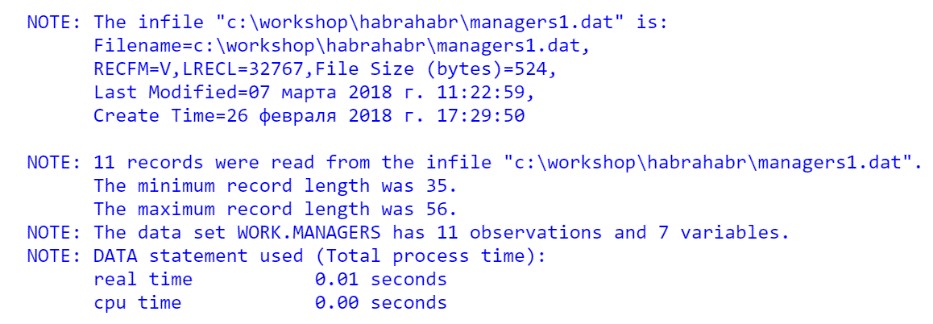
Check if the code works correctly. Run the program and check Log:
Print the data set:
The result of the PROC PRINT step:

Notice that the text values in some columns are “trimmed”. Run the PROC CONTENTS procedure to determine the length of the created variables:
The VARNUM option displays the variables in the order in which they are stored in the table
Fragment of the output of the procedure:

By default, SAS Base creates variables of any type with a length of 8 bytes. To avoid "clipped" values, the length must be set explicitly. This problem is easily solved with the help of the LENGTH operator .
It is important to know that this operator must be written before the INPUT operator, this is due to the features of the SAS Base.
So, our program code using the LENGTH operator will look like this:
Belonging to the type of variables we specified in the LENGTH operator, so in INPUT we simply listed the names of the variables. Note that in the INPUT statement, variables are listed in the order in which they are located in the source!
Run the program and study the results:
The result of the PROC PRINT step:

The result of executing PROC CONTENTS:
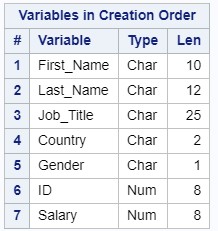
Variables are displayed in a different order. This is due to the fact that SAS Base reads everything sequentially: first the variables from the LENGTH operator are entered, and only then the INPUT is checked, and the data set is supplemented by the ID and Salary variables.
In order to display the columns in the original order, we can set the length of the ID and Salary variables explicitly in the LENGTH statement. The minimum length for numeric variables is 3 bytes, but do not forget that when you change the length of a numeric variable to a smaller one, you can lose the accuracy of the numeric values.
Thus, the program takes the following form:
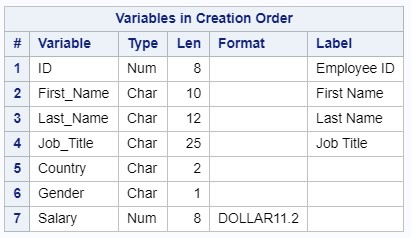
In the DATA step, we set the constant attributes to the variables: format and label. In this case, the attributes will be written to the descriptor of the output dataset and will be used at each PROC step.
The attributes of the output dataset are written to the descriptor:
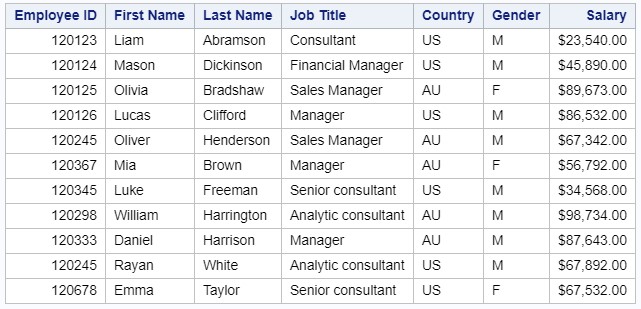
Create a report from the resulting SAS dataset. Please note that in the PROC PRINT options we specify the label parameter so that this procedure uses the specified labels in the report.
Consider the text file managers2.dat from the directory c: \ workshop \ habrahabr.
Compared to the previous one, there are columns that contain non-standard SAS data.
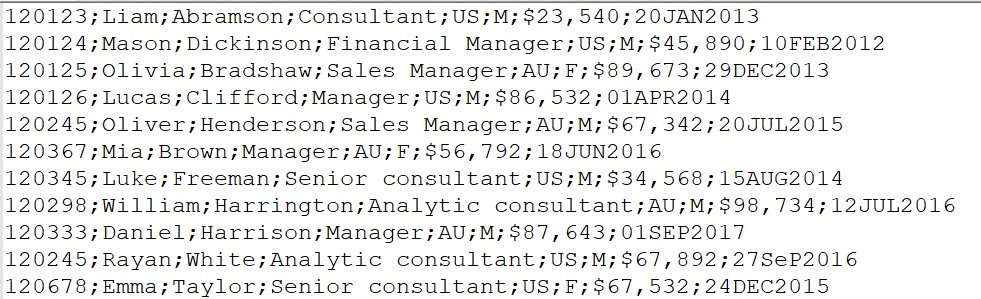
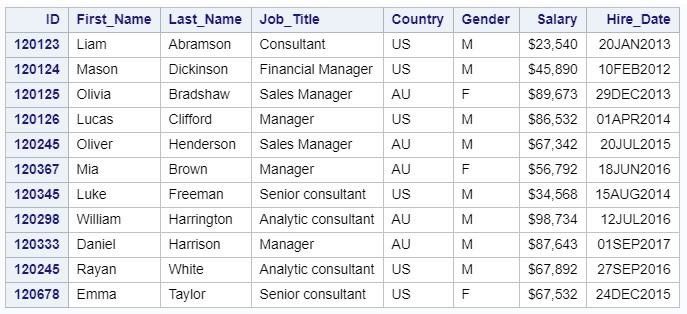
The new data set must contain the following variables: ID, First_Name, Last_Name, Job_Title, Country, Gender, Salary, Hire_Date.
The Salary variable contains special characters, also a date in SAS format is a number representing the number of days starting January 1, 1960 ( see Lesson 1 ), and HireDate stores other values. In order to read non-standard data it is necessary to use the input format Informat. It is important to remember that the data in the column must be of the same type to apply the input format.
All information on input formats can be found in the SAS 9.4 Formats and Informats: Reference .
Infromat is a rule that is used to read non-standard SAS input data. The type of read format corresponds to the SAS data type. For example, a value of $ 100,000 is stored in the source. To remove the dollar sign and comma before converting this value to a number, you must apply INFORMAT comma8. or dollar8. In this case, the value 100000 will be stored in the final table.
The general format syntax for reading is as follows:
$ Is a text type pointer.
Informat is the name of the format for reading.
w - field width, including all characters.
d is the number of decimal places.
We read the text file managers2.dat
The results of the procedure:
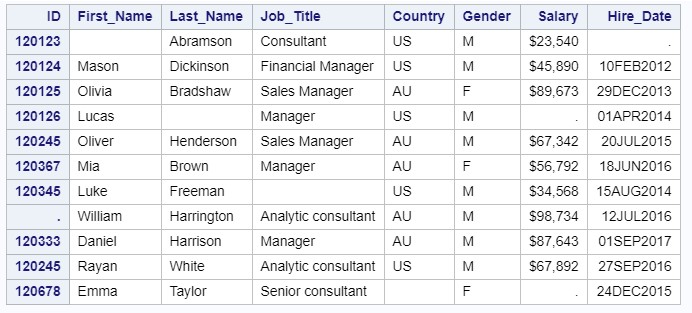
If there are missing values in the data, then 2 options DSD and MISSOVER can be used.
DSD searches for the missing value inside the string, and MISSOVER at the end.
Thus, if we want to read the managers2a file, in which two consecutive separators encode the missing value:

Using these options, we can easily read this text file:
The result of the program:
If the data in the column is of different types or formats, consider the following example.
The bad_data.dat file is stored in the c: \ workshop \ habrahabr directory

We write DATA Step, which considers this file:
Run the code and see Log:
In the log, an indication of an error reading data:

Two automatic variables are created : _N_ and _ERROR_.
_N_ is the iteration of the step.
_ERROR_ - a value of 1 indicates an error.
The result of the program:

Please note that the value “44” in the Country variable was considered without data reading errors, and for the Salary and Hire_Date variables in Log, an indication of a data reading error appeared.
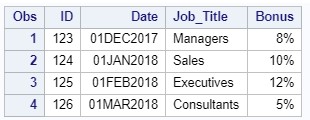
If we need to read a similar text file info.dat from the directory c: \ workshop \ habrahabr:

Another option to read an external file is to use the position indicator of the initial character of the variable.
The position, variable name and input format (informat) are indicated.
The code for our case will look like this:
Run the code and check the result:
If we need to read a text file in which one observation takes several lines:
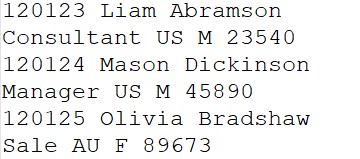
There are several ways to solve this problem:
In either case, the managers6 data set is created, which is located in the temporary WORK library ( see Lesson 2 ). We
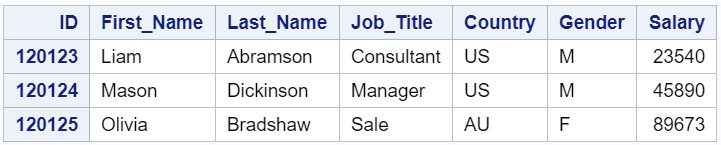
print the resulting data set:
The result of the procedure:
You can use the PROC IMPORT procedure to read external files .
Import the text file managers5.
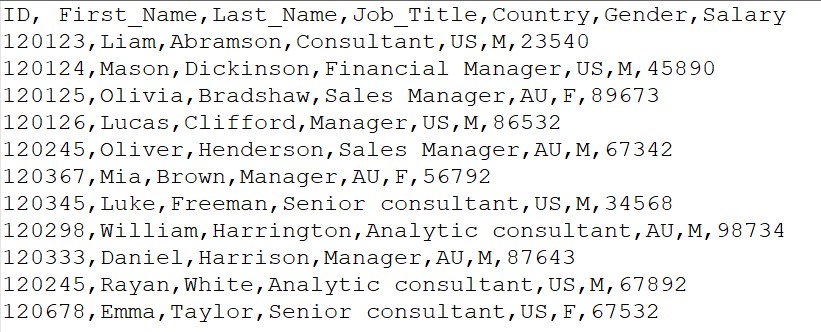
The PROC IMPORT procedure in our case is as follows:
Run the code and see Log:
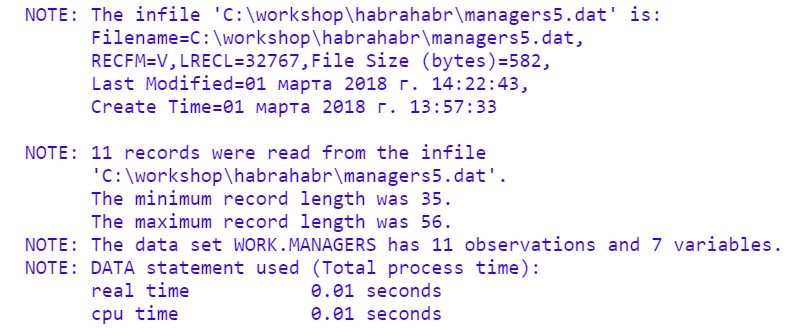
The result of the program:

So, this is briefly about reading text files. Please note that the functionality of the considered operators and procedures is much more extensive, a detailed description is presented in the documentation.
In the next article, we will look at creating SAS datasets. And, of course, traditionally - Grow with SAS!
Let me remind you that you can download the software on the SAS website , a link to the documentation for installing SAS UE is indicated in article No. 1 .
In this article, you will learn about several ways to read text files.
All examples are based on files that are stored in the c: \ workshop \ habrahabr directory and were created in advance in Notepad.
To create a SAS dataset from a text file, the first must be analyzed to correctly select the type of reading of the text file. A text file can contain both standard and non-standard data.
Standard data is data that SAS reads without any instructions, for example, the value of the Salary variable in a text file is stored as 12355.44 or the date is already recorded as the standard SAS date ( see Lesson 1) And if you need to process a value, for example, $ 12.355,44 or 01JAN2018, then you need to specify a reading rule, an instruction according to which these values are converted to SAS format. This article briefly describes how to use the INPUT statement to convert raw data into SAS datasets.
Reading a text file with standard delimited data.
Consider the simplest example of a text file. The managers1.dat file is a comma delimited text file and looks like this:
The new SAS dataset must contain the following variables: ID, First_Name, Last_Name, Job_Title, Country, Gender, Salary. You may notice that the data stored in this file is standard, and SAS considers it without any problems.
Reading a text file is implemented using the INFILE and INPUT statements in the DATA step.
You can learn more about the INFILE statement in the SAS 9.4 DATA Step Statements: Reference .
The INFILE statement sets the external file to read.
General statement syntax:
INFILE file-specification<device-type><options><operating-environment-options>;file-specification - identifies the data source, it can be an external file or a link to an external file.
device-type - access method.
options are valid options.
operating-environment-options - parameters of the working environment.
In our particular case, the INFILE statement will be written as follows:
infile"c:\workshop\habrahabr\managers1.dat" dlm=',';DLM = (or delimiter =) is an option of the INFILE statement that defines an alternative delimiter (space is the default delimiter) that will be used to read an external file. The list of delimiters is indicated in double quotation marks.
After we set the path, we need to set the variable names. In solving this problem, the INPUT operator will help us .
The general syntax for the INPUT statement is:
INPUT <specification(s)><@ | @@>;specification (s) - may include variables, variable lists, text type flag ($), pointer-control, column specification, reading formats, and so on (for more details, see the SAS 9.4 DATA Step Statements: Reference ).
@ - string hold specifier.
The INPUT statement in our case will be written as follows:
input ID First_Name $ Last_Name $ Job_Title $ Country $ Gender $ Salary;I repeat once again that reading a text file occurs at the DATA step, so the code required to read a text file will look like this:
data managers;
infile "c:\workshop\habrahabr\managers1.dat" dlm=',';
input ID First_Name $ Last_Name $ Job_Title $ Country $ Gender $ Salary;
run;
We create a temporary SAS dataset called managers, which will be stored in the WORK library until the SAS session is closed ( see Lesson 2 ).
Check if the code works correctly. Run the program and check Log:
Print the data set:
procprint data=managers;
run;
The result of the PROC PRINT step:
Notice that the text values in some columns are “trimmed”. Run the PROC CONTENTS procedure to determine the length of the created variables:
proc contents data=managers varnum;run;
The VARNUM option displays the variables in the order in which they are stored in the table
Fragment of the output of the procedure:
Variable Length
By default, SAS Base creates variables of any type with a length of 8 bytes. To avoid "clipped" values, the length must be set explicitly. This problem is easily solved with the help of the LENGTH operator .
It is important to know that this operator must be written before the INPUT operator, this is due to the features of the SAS Base.
So, our program code using the LENGTH operator will look like this:
data managers;
infile "c:\workshop\habrahabr\managers1.dat" dlm=',';
length First_Name $ 10 Last_Name $ 12 Job_Title $25 Country $2 Gender $1;
input ID First_Name Last_Name Job_Title Country Gender Salary;
run;
procprint data=managers;
run;
proc contents data=managers varnum;
run;
Belonging to the type of variables we specified in the LENGTH operator, so in INPUT we simply listed the names of the variables. Note that in the INPUT statement, variables are listed in the order in which they are located in the source!
Run the program and study the results:
The result of the PROC PRINT step:
The result of executing PROC CONTENTS:
Variables are displayed in a different order. This is due to the fact that SAS Base reads everything sequentially: first the variables from the LENGTH operator are entered, and only then the INPUT is checked, and the data set is supplemented by the ID and Salary variables.
In order to display the columns in the original order, we can set the length of the ID and Salary variables explicitly in the LENGTH statement. The minimum length for numeric variables is 3 bytes, but do not forget that when you change the length of a numeric variable to a smaller one, you can lose the accuracy of the numeric values.
Thus, the program takes the following form:
data managers;
infile "c:\workshop\habrahabr\managers1.dat" dlm=',';
length ID 8 First_Name $ 10 Last_Name $ 12 Job_Title $25 Country $2 Gender $1 Salary 8;
input ID First_Name Last_Name Job_Title Country Gender Salary;
run;
proc print data=managers;
run;
Permanent Attributes.
In the DATA step, we set the constant attributes to the variables: format and label. In this case, the attributes will be written to the descriptor of the output dataset and will be used at each PROC step.
data managers;
infile "c:\workshop\habrahabr\managers1.dat" dlm=',';
length ID 8 First_Name $ 10 Last_Name $ 12 Job_Title $25 Country $2 Gender $1 Salary 8;
input ID First_Name Last_Name Job_Title Country Gender Salary;
label 	ID = 'Employee ID'
		First_Name = 'First Name'
		Last_Name = 'Last Name'
		Job_Title = 'Job Title';
format Salary dollar11.2;
run;
proc contents data=managers varnum;
run;
The attributes of the output dataset are written to the descriptor:
Create a report from the resulting SAS dataset. Please note that in the PROC PRINT options we specify the label parameter so that this procedure uses the specified labels in the report.
proc print data=managers label noobs;
run;
Reading a text file with non-standard data with a separator.
Consider the text file managers2.dat from the directory c: \ workshop \ habrahabr.
Compared to the previous one, there are columns that contain non-standard SAS data.
The new data set must contain the following variables: ID, First_Name, Last_Name, Job_Title, Country, Gender, Salary, Hire_Date.
The Salary variable contains special characters, also a date in SAS format is a number representing the number of days starting January 1, 1960 ( see Lesson 1 ), and HireDate stores other values. In order to read non-standard data it is necessary to use the input format Informat. It is important to remember that the data in the column must be of the same type to apply the input format.
All information on input formats can be found in the SAS 9.4 Formats and Informats: Reference .
Infromat is a rule that is used to read non-standard SAS input data. The type of read format corresponds to the SAS data type. For example, a value of $ 100,000 is stored in the source. To remove the dollar sign and comma before converting this value to a number, you must apply INFORMAT comma8. or dollar8. In this case, the value 100000 will be stored in the final table.
The general format syntax for reading is as follows:
<$>informat<w>.<d>$ Is a text type pointer.
Informat is the name of the format for reading.
w - field width, including all characters.
d is the number of decimal places.
We read the text file managers2.dat
data managers2;
infile "c:\workshop\habrahabr\managers2.dat" dlm=';';
input ID :8. First_Name :$10. Last_Name :$12. Job_Title :$25.
      Country :$2. Gender :$1. Salary :dollar10. Hire_Date :date9.;
label   ID = 'Employee ID'
        First_Name = 'First Name'
        Last_Name = 'Last Name'
        Job_Title = 'Job Title';
format Salary dollar10. Hire_Date date9.;
run;
procprint data=managers2 noobs;
ID ID;
run;
The results of the procedure:
Handle missing values.
If there are missing values in the data, then 2 options DSD and MISSOVER can be used.
DSD searches for the missing value inside the string, and MISSOVER at the end.
Thus, if we want to read the managers2a file, in which two consecutive separators encode the missing value:
Using these options, we can easily read this text file:
data managers2a;
infile "c:\workshop\habrahabr\managers2a.dat" dlm=';' dsd missover;
input ID :8. First_Name :$10. Last_Name :$12. Job_Title :$25.
      Country :$2. Gender :$1. Salary :dollar10. Hire_Date :date9.;
label   ID = 'Employee ID'
        First_Name = 'First Name'
        Last_Name = 'Last Name'
        Job_Title = 'Job Title';
format Salary dollar10. Hire_Date date9.;
run;
procprint data=managers2a;
ID ID;
run;
The result of the program:
Error reading data.
If the data in the column is of different types or formats, consider the following example.
The bad_data.dat file is stored in the c: \ workshop \ habrahabr directory
We write DATA Step, which considers this file:
data new;
infile "c:\workshop\habrahabr\bad_data.dat" dlm=',';
input ID :8. First_Name :$10. Last_Name :$12. Job_Title :$25.
      Country :$2. Gender :$1. Salary :5. Hire_Date :date9.;
label   ID = 'Employee ID'
        First_Name = 'First Name'
        Last_Name = 'Last Name'
        Job_Title = 'Job Title';
format Salary dollar10. Hire_Date date9.;
run;
proc print data=new;
ID ID;
run;
Run the code and see Log:
In the log, an indication of an error reading data:
Two automatic variables are created : _N_ and _ERROR_.
_N_ is the iteration of the step.
_ERROR_ - a value of 1 indicates an error.
The result of the program:
Please note that the value “44” in the Country variable was considered without data reading errors, and for the Salary and Hire_Date variables in Log, an indication of a data reading error appeared.
Using the position indicator of the starting character of a variable when reading a text file
If we need to read a similar text file info.dat from the directory c: \ workshop \ habrahabr:
Another option to read an external file is to use the position indicator of the initial character of the variable.
The position, variable name and input format (informat) are indicated.
The code for our case will look like this:
data info;
infile "c:\workshop\habrahabr\info.dat";
input   @1 ID 3.
        @4 Date mmddyy10.
        @15 Job_Title $11.
        @26 Bonus percent3.;
format Date date9. Bonus percent.;
run;
 procprint data=info;
run;
Run the code and check the result:
Reading a text file with observation in several lines.
If we need to read a text file in which one observation takes several lines:
There are several ways to solve this problem:
- Use multiple INPUT statements.
data managers6; infile "c:\workshop\habrahabr\managers6.dat"; input ID :8. First_Name :$6. Last_Name :$10.; input Job_Title :$11. Country :$2. Gender :$1. Salary :8.; run; - Use a pointer.
SAS loads the following record (line) when a slash character (/) is found in the INPUT statement:data managers6; infile "c:\workshop\habrahabr\managers6.dat"; input ID :8. First_Name :$6. Last_Name :$10./ Job_Title :$11. Country :$2. Gender :$1. Salary :8.; run;
In either case, the managers6 data set is created, which is located in the temporary WORK library ( see Lesson 2 ). We
print the resulting data set:
proc print data=managers6 noobs;
idid;
run;
The result of the procedure:
Import external files
You can use the PROC IMPORT procedure to read external files .
Import the text file managers5.
The PROC IMPORT procedure in our case is as follows:
proc import datafile="C:\workshop\habrahabr\managers5.dat"
            dbms=dlm
            out=managers
            replace;
     delimiter=',';
     getnames=yes;
 run;
proc print data=managers;
run;
Run the code and see Log:
The result of the program:
So, this is briefly about reading text files. Please note that the functionality of the considered operators and procedures is much more extensive, a detailed description is presented in the documentation.
In the next article, we will look at creating SAS datasets. And, of course, traditionally - Grow with SAS!