 March 11, 2018 at 23:26
Thymeleaf Tutorial: Chapter 2. The Good Thymes Virtual Grocery Store
- Tutorial
Table of contents
The source code for the examples shown in this and future chapters of the manual can be found in the Good Thymes Virtual Grocery GitHub repository https://github.com/thymeleaf/thymeleafexamples-gtvg .
To better explain the concepts involved in processing templates with Thymeleaf, this tutorial will use a demo application that you can download from the project website.
This app is the website of an imaginary virtual grocery store and will provide us with many scenarios to demonstrate the many features of Thymeleaf.
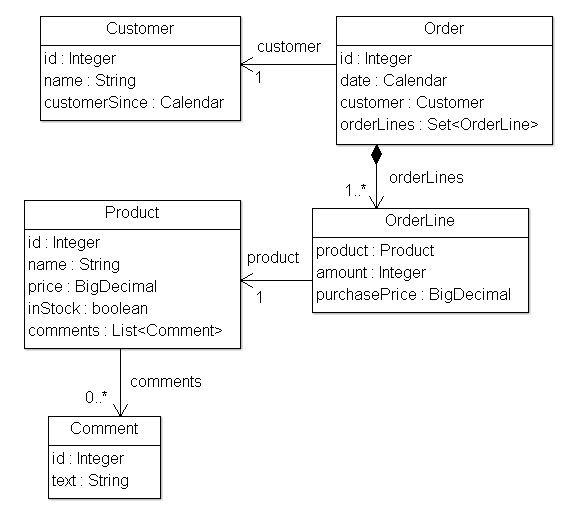
To begin with, we need a simple set of model objects for our application: Products that are sold to Customers through Orders. We will also manage product comments:
Our application will also have a very simple service level, consisting of Service objects containing methods such as:
At the web level, our application will have a filter that delegates the execution of Thymeleaf-enabled commands depending on the request URL:
Interface of our IGTVGController:
All that remains to be done is to implement the IGTVGController interface, which requests data from services and processes templates using the ITemplateEngine object.
In the end it will look like this:

The process (...) method in our filter contains this line:
This means that the GTVGApplication class is responsible for creating and configuring one of the most important objects in the Thymeleaf application: an instance of TemplateEngine (implementation of the ITemplateEngine interface).
Our org.thymeleaf.TemplateEngine object is initialized:
There are many ways to customize the TemplateEngine object, but for now, these few lines of code will inform us in sufficient detail about the necessary steps.
The Template Resolver
Let's start with the Template Resolver:
Template Resolvers are objects that implement the interface from the Thymeleaf API called org.thymeleaf.templateresolver.ITemplateResolver:
These objects are responsible for determining how templates will be available, and in this GTVG application org.thymeleaf.templateresolver.ServletContextTemplateResolver means that we are going to extract the template files as resources from the servlet context: at the application level javax.servlet.ServletContext that exists in every Java web application, and which resolves resources from the root of the web application.
But that is not all that we can say about the pattern recognizer, because we can set some configuration parameters on it. First, the template mode:
HTML is the default template mode for ServletContextTemplateResolver, but it's good practice to set it up anyway, so that our code documents clearly indicate what is happening.
The prefix and suffix change the names of the templates, which we will pass to the engine to get the names of real resources that will be used.
Using this configuration, the template name “product / list” will match:
Optional, but the amount of time during which the analyzed template can live in the cache is configured in the Template Resolver using the cacheTTLMs property:
The template can still disappear from the cache before reaching TTL if the maximum cache size is reached, and this is the oldest record.
The behavior and size of the cache can be defined by the user by implementing the ICacheManager interface or by changing the StandardCacheManager object to manage the default cache.
You can still say a lot of words about template resolvers, but let's get back to creating our Template Engine object.
Template Engine Template Engine
objects are an implementation of the org.thymeleaf.ITemplateEngine interface. One of these implementations is proposed by the Thymeleaf kernel: org.thymeleaf.TemplateEngine, and we instantiate it:
Simple, right? All we need to do is create an instance and set template resolvers for it.
Template resolvers is the only required parameter required by TemplateEngine, although there are many others that will be discussed later (message resolvers, cache sizes, etc.). So far, that's all we need.
Our template module is now ready, and we can start creating pages with Thymeleaf.
To be continued. Chapter 3. Using Text
2 Good Thymes Virtual Grocery
The source code for the examples shown in this and future chapters of the manual can be found in the Good Thymes Virtual Grocery GitHub repository https://github.com/thymeleaf/thymeleafexamples-gtvg .
2.1 Grocery Store Website
To better explain the concepts involved in processing templates with Thymeleaf, this tutorial will use a demo application that you can download from the project website.
This app is the website of an imaginary virtual grocery store and will provide us with many scenarios to demonstrate the many features of Thymeleaf.
To begin with, we need a simple set of model objects for our application: Products that are sold to Customers through Orders. We will also manage product comments:
Our application will also have a very simple service level, consisting of Service objects containing methods such as:
public class ProductService {
    ...
    public List findAll() {
        return ProductRepository.getInstance().findAll();
    }
    public Product findById(Integer id) {
        return ProductRepository.getInstance().findById(id);
    }
}
At the web level, our application will have a filter that delegates the execution of Thymeleaf-enabled commands depending on the request URL:
private boolean process(HttpServletRequest request, HttpServletResponse response)
        throws ServletException {
    try {
        // This prevents triggering engine executions for resource URLs
        if (request.getRequestURI().startsWith("/css") ||
                request.getRequestURI().startsWith("/images") ||
                request.getRequestURI().startsWith("/favicon")) {
            return false;
        }
        /*
         * Query controller/URL mapping and obtain the controller
         * that will process the request. If no controller is available,
         * return false and let other filters/servlets process the request.
         */
        IGTVGController controller = this.application.resolveControllerForRequest(request);
        if (controller == null) {
            return false;
        }
        /*
         * Obtain the TemplateEngine instance.
         */
        ITemplateEngine templateEngine = this.application.getTemplateEngine();
        /*
         * Write the response headers
         */
        response.setContentType("text/html;charset=UTF-8");
        response.setHeader("Pragma", "no-cache");
        response.setHeader("Cache-Control", "no-cache");
        response.setDateHeader("Expires", 0);
        /*
         * Execute the controller and process view template,
         * writing the results to the response writer.
         */
        controller.process(
                request, response, this.servletContext, templateEngine);
        return true;
    } catch (Exception e) {
        try {
            response.sendError(HttpServletResponse.SC_INTERNAL_SERVER_ERROR);
        } catch (final IOException ignored) {
            // Just ignore this
        }
        throw new ServletException(e);
    }
}
Interface of our IGTVGController:
public interface IGTVGController {
    public void process(
            HttpServletRequest request, HttpServletResponse response,
            ServletContext servletContext, ITemplateEngine templateEngine);
}
All that remains to be done is to implement the IGTVGController interface, which requests data from services and processes templates using the ITemplateEngine object.
In the end it will look like this:
2.2 Creating and Configuring Template Engine
The process (...) method in our filter contains this line:
ITemplateEngine templateEngine = this.application.getTemplateEngine();This means that the GTVGApplication class is responsible for creating and configuring one of the most important objects in the Thymeleaf application: an instance of TemplateEngine (implementation of the ITemplateEngine interface).
Our org.thymeleaf.TemplateEngine object is initialized:
public class GTVGApplication {
    ...
    private final TemplateEngine templateEngine;
    ...
    public GTVGApplication(final ServletContext servletContext) {
        super();
        ServletContextTemplateResolver templateResolver =
                new ServletContextTemplateResolver(servletContext);
        // HTML is the default mode, but we set it anyway for better understanding of code
        templateResolver.setTemplateMode(TemplateMode.HTML);
        // This will convert "home" to "/WEB-INF/templates/home.html"
        templateResolver.setPrefix("/WEB-INF/templates/");
        templateResolver.setSuffix(".html");
        // Template cache TTL=1h. If not set, entries would be cached until expelled by LRU
        templateResolver.setCacheTTLMs(Long.valueOf(3600000L));
        // Cache is set to true by default. Set to false if you want templates to
        // be automatically updated when modified.
        templateResolver.setCacheable(true);
        this.templateEngine = new TemplateEngine();
        this.templateEngine.setTemplateResolver(templateResolver);
        ...
    }
}
There are many ways to customize the TemplateEngine object, but for now, these few lines of code will inform us in sufficient detail about the necessary steps.
The Template Resolver
Let's start with the Template Resolver:
ServletContextTemplateResolver templateResolver =
        new ServletContextTemplateResolver(servletContext);
Template Resolvers are objects that implement the interface from the Thymeleaf API called org.thymeleaf.templateresolver.ITemplateResolver:
public interface ITemplateResolver {
    ...
    /*
     * Templates are resolved by their name (or content) and also (optionally) their
     * owner template in case we are trying to resolve a fragment for another template.
     * Will return null if template cannot be handled by this template resolver.
     */
    public TemplateResolution resolveTemplate(
            final IEngineConfiguration configuration,
            final String ownerTemplate, final String template,
            final Map templateResolutionAttributes);
}
These objects are responsible for determining how templates will be available, and in this GTVG application org.thymeleaf.templateresolver.ServletContextTemplateResolver means that we are going to extract the template files as resources from the servlet context: at the application level javax.servlet.ServletContext that exists in every Java web application, and which resolves resources from the root of the web application.
But that is not all that we can say about the pattern recognizer, because we can set some configuration parameters on it. First, the template mode:
templateResolver.setTemplateMode(TemplateMode.HTML);HTML is the default template mode for ServletContextTemplateResolver, but it's good practice to set it up anyway, so that our code documents clearly indicate what is happening.
templateResolver.setPrefix("/WEB-INF/templates/");
templateResolver.setSuffix(".html");
The prefix and suffix change the names of the templates, which we will pass to the engine to get the names of real resources that will be used.
Using this configuration, the template name “product / list” will match:
servletContext.getResourceAsStream("/WEB-INF/templates/product/list.html");Optional, but the amount of time during which the analyzed template can live in the cache is configured in the Template Resolver using the cacheTTLMs property:
templateResolver.setCacheTTLMs(3600000L);The template can still disappear from the cache before reaching TTL if the maximum cache size is reached, and this is the oldest record.
The behavior and size of the cache can be defined by the user by implementing the ICacheManager interface or by changing the StandardCacheManager object to manage the default cache.
You can still say a lot of words about template resolvers, but let's get back to creating our Template Engine object.
Template Engine Template Engine
objects are an implementation of the org.thymeleaf.ITemplateEngine interface. One of these implementations is proposed by the Thymeleaf kernel: org.thymeleaf.TemplateEngine, and we instantiate it:
templateEngine = new TemplateEngine();
templateEngine.setTemplateResolver(templateResolver);
Simple, right? All we need to do is create an instance and set template resolvers for it.
Template resolvers is the only required parameter required by TemplateEngine, although there are many others that will be discussed later (message resolvers, cache sizes, etc.). So far, that's all we need.
Our template module is now ready, and we can start creating pages with Thymeleaf.
To be continued. Chapter 3. Using Text









