February 14, 2018 at 18:34
Development of an isomorphic RealWorld application with SSR and Progressive Enhancement. Part 1 - Introduction and stack selection
- Tutorial
In the spring of 2017, Eric Simons , co-founder of the Thinkster training project , announced the RealWorld project , a demo application and specification for it. The project declared its goal to go beyond the usual "todo" demos for a more applied comparison and study of the capabilities of various frameworks and technologies, as well as development approaches and methods for solving problems.

The author describes the idea and meaning of the project as follows:
In fact, RealWorld is a clone of a blog-social platform like Medium or Habr, called “Conduit” , which is developed by enthusiasts using various frontend and backend (yes, full-stack) technologies according to the same specification and layouts. Anyone who wants to participate in the project needs to create a new issue in the repository on GitHub, in which they describe the desired technological stack, fork the starter-kit of the project and begin development. In addition, the developer has the opportunity to see the final result in action using a demo application written by Eric in AngularJS.
In fact, the result of each new implementation should be exactly the same application, but written using other technologies or approaches. Forks for React / Redux , Elm , Angular2 , React / MobX , Svelte / Sapper and other frameworks have already been implemented and published . On the way also Vue , Ember and others. Among backend technologies, the project is implemented on Node / Express, Laravel, Django, ASP.NET Core, Rails, and even more. At the end of 2017, the project prepared a comparison
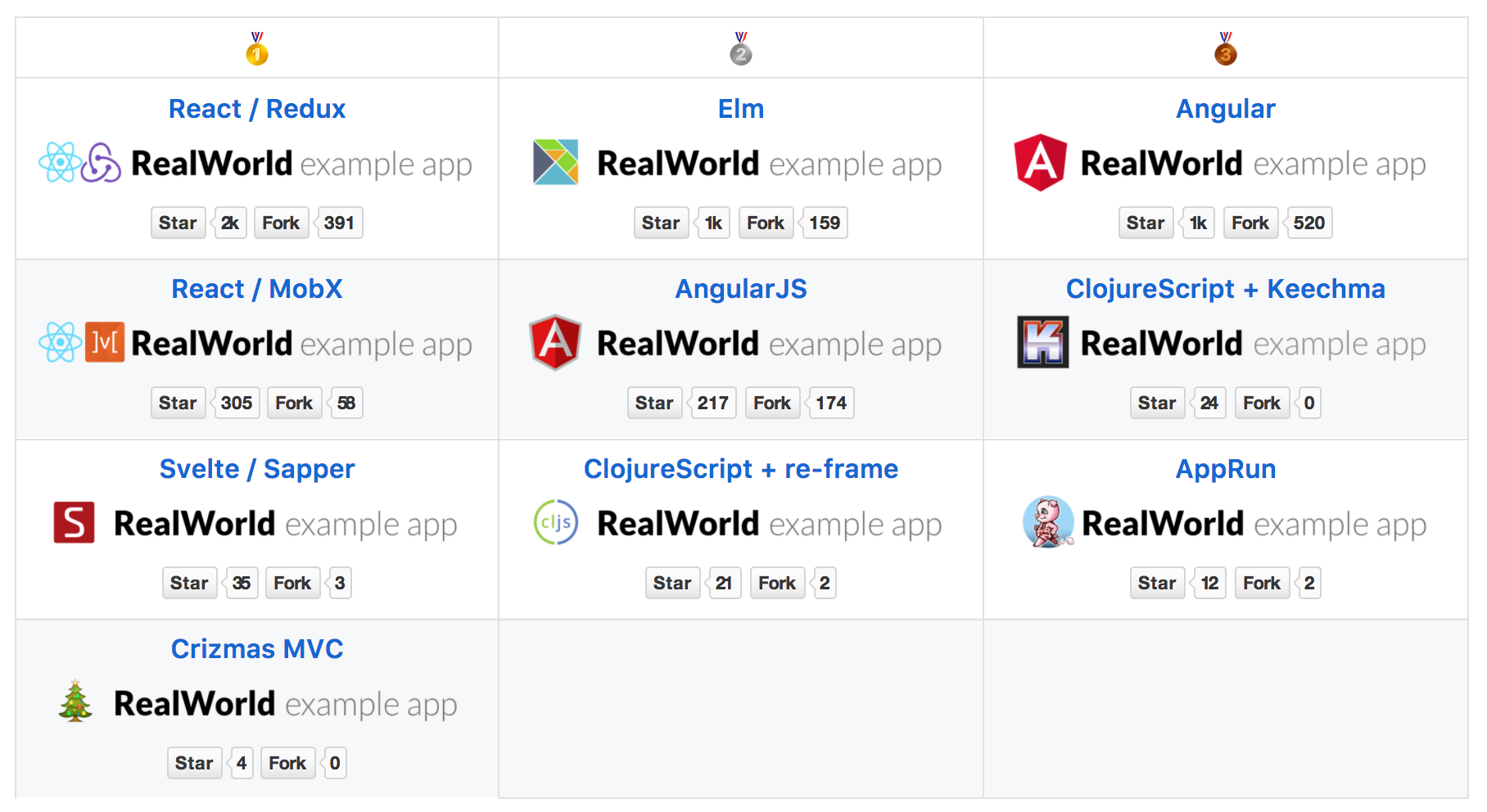
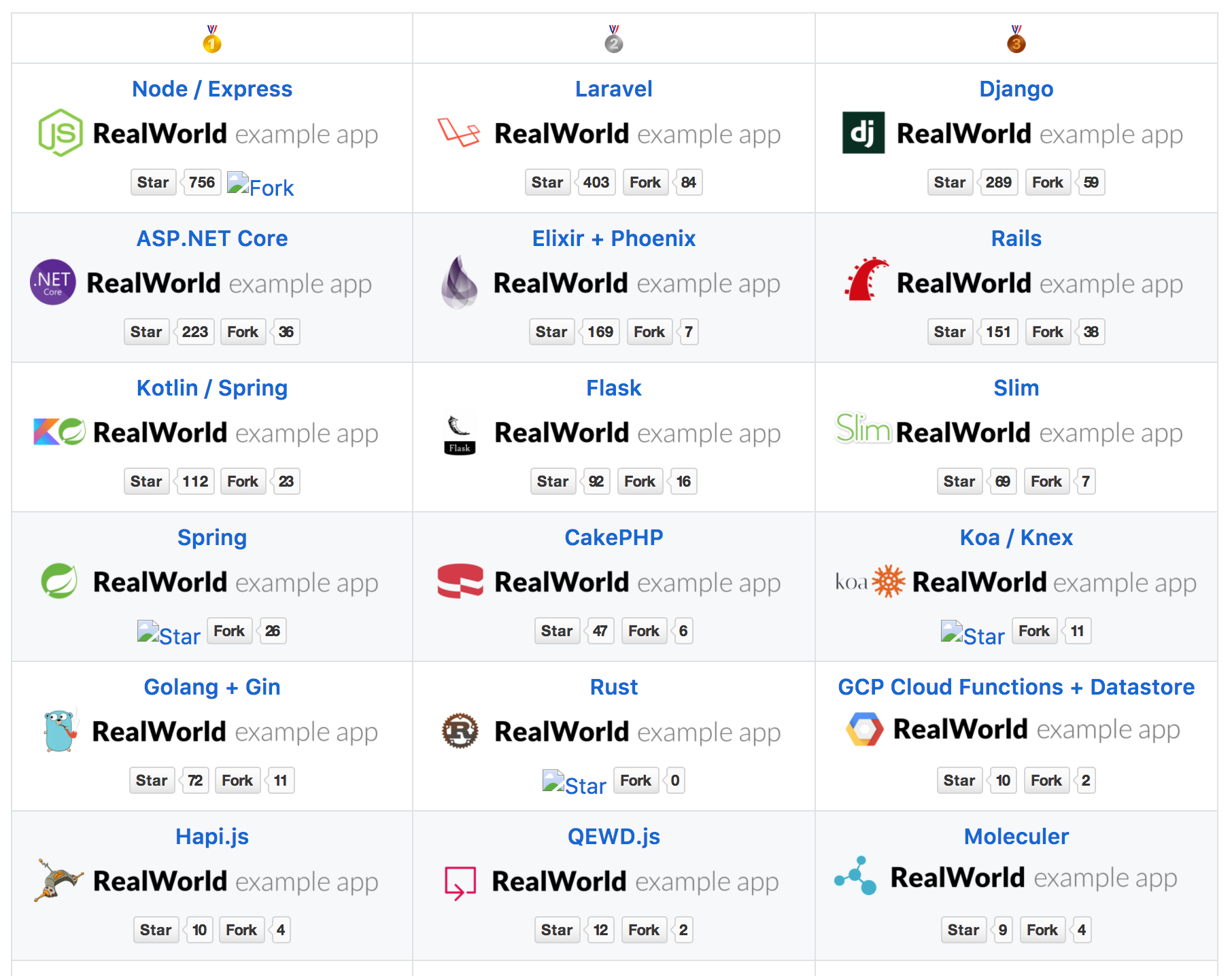
The 9 most popular frontend implementations according to 3 criteria: performance (first meaningful paint), the size of the bundle (s) (gzip) and the number of lines of code that are required to implement the project (loc).
At the moment, RealWorld is one of the best demo projects for web development. It includes solutions to the most common problems using an example of a fairly real web application and an up-to-date technology stack. The project has more than 12k stars on the github and, in my opinion, is quite useful and interesting. However, as often happens, on Habré there is practically no information about him. Just a couple of mentions in digests .
So, why am I writing all this. The last few years, I am actually an evangelist of an isomorphic (in other words, “universal”) approach to writing web applications. Our company also practices the approach that we call "environment-agnostic apps" , i.e. applications that can work in any environment (more precisely, some list of environments) without changes. This is especially important for us, because the company is developing for the widest list of platforms from the web to a variety of IoT.
"Evangelist" is still probably a too loud term, but during this time I participated in a considerable number of discussions and conferences, and also managed several timesread your own report on this difficult and controversial topic. In addition, I have long been very concerned about the problems of "accessibility" , "progressive enhancement" and "SEO" of modern web applications, as well as applications based on the web stack.
As part of my report, I implemented an isomorphic demo application in the form of a small blog based on one of the Material Design Lite templates . Let’s say frankly a small application, practically without a backend - its presence is only emulated with the help of such things as JSON Placeholder .
To my shame, I only learned about the RealWorld project at the end of last year, but then I did not find enough time to participate in it. Now it has become a little easier over time and I want to try to implement a RealWorld application (instead of the current one) that meets the following characteristics:
As you can see, the list is pretty ambitious. Here you have the controversial “isomorphism” and the coveted but unattainable “progressive enhancement” by everyone. And a blog platform working in the style of SPA, but at the same time supporting SEO. All this on a single code base on top of the existing backend and according to the TOR, which cannot be changed.
Speaking of that. This project is interesting for me because many haters of the isomorphic approach often say that in order to write a full-fledged isomorphic application, you need to rewrite the backend in some special way. That is, your existing backend will not work. Or you should definitely use NodeJS as a backend, which in itself is fu fu fu. Or that it is necessary in some special way to formulate requirements and TK and some other nonsense.
It is also quite often the opinion that isomorphic code is much more complicated and generally writing isomorphic applications is kapets as difficult, time-consuming and economical. The last three paragraphs of my “manifest”, including, arise from these misconceptions.
In short, for me this project is also an opportunity to completely or partially refute all this, as well as have fun. I really hope that I will succeed. If you are interested in the topic and would like to follow this path with me in steps - do not switch!
I am sure you already understood, but if not, then I clarify - we will write the frontend part of the application. For this, the RealWorld project provides Frontend with a specification that includes:
A complete list of instructions can be found here .

So, I’ll immediately try to perform step 8 of the manifest and select the simplest stack possible:
As you can see, while it looks pretty simple. There are no super-duper special solutions with the prefix "isomorphic-" and never will be.
Perhaps the "dark horse" in this list for many may be RactiveJS . Yes, indeed, the choice of a framework that is not part of the Big Three and does not break records of popularity may seem strange. However, it is great for this task, it is one of my favorite tools and I hope to diversify the usual everyday life of the “react-angular-view” tutorials a little. In addition, perhaps by doing this I will also be able to present a new look at some familiar things. Although this is not my goal.
Habr is still a technical resource and so that this article as a result does not turn out to be just a declaration of intent, perhaps already in this part we will implement the initial code of the web server. This code is independent of the specific project implementation. Well, in fact, I’ll just take the code from the existing demo project that I did for the report and adapt it.
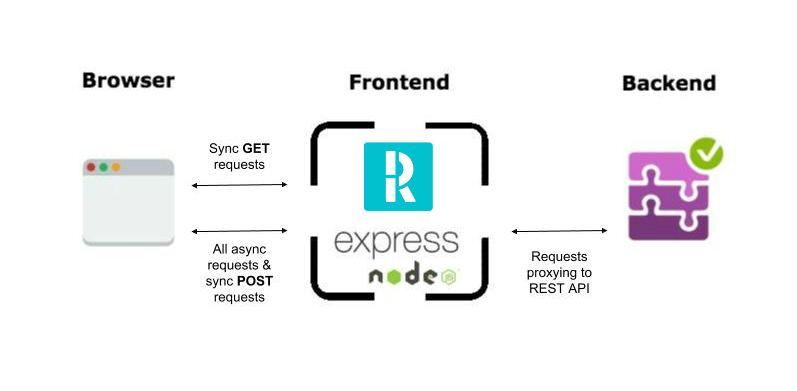
This is what the overall application architecture will look like. A few key points:
The process is completely normal for any isomorphic web applications and will work just as well in this case.
I will use the structure of a similar project that is completely familiar to me:

And of course, a whole bunch of all kinds of package.json , webpack.config.js and other configuration files, the description of which is beyond the scope of the tutorial.
The main code of the web server will be located in the file ./server.js . In addition to Express itself, I will also use some of its plug-ins ( “express-middleware” ) for solving utilitarian tasks. Previously, all the necessary modules, of course, must be registered in package.json using the npm i command .
First, connect the 3rd-party modules and Express itself:
All used Express extensions are completely ordinary and are not related to isomorphism. Most of them are quite standard. Here is a brief description and purpose:
Next, create several middlewares that do nothing so far and connect them:
Connect the common.json main server config , initialize Express and extensions:
Install mustache as a template engine for Express. Why exactly him? It’s just that Ractive uses mustache syntax for its templates and thus we will achieve uniformity.
Further we inform that we want to compress also all statics and that statics is located in the "./dist" folder (webpack bundles will be generated there too).
Next, the finishing touch:
The code does not require special explanations. Key points here are as follows:
It seems to me that even a purely frontend developer who does not have much experience with Express can easily figure out such primitive code. If, of course, he understands what “middleware” is and generally this concept.
So far, this code does practically nothing. In any case, it does not do what is required to be done within the framework of the project. In the next article, we will add purely server-side code and proceed to the code of the application itself.
Thank you for your attention and a good time of day!
UPD: Developing an isomorphic RealWorld application with SSR and Progressive Enhancement. Part 2 - Hello World
UPD 2: Updated the RactiveJS logo , and also added paragraphs 9 and 10 to the manifest (see part 3 )
Introduction
About RealWorld
The author describes the idea and meaning of the project as follows:
So about a year ago, I had this implementation about a problem I had:
Mastering the core concepts & ideology of a new framework is unnecessarily frustrating.
You read the docs, run a contrived example in a codepen, rip apart the “todo” example app & put it back together again, get their CLI installed locally ... and then you're off to the races!
Except you're not. Not even close. Because when you start actually trying to build out your own app, that's when Murphy's law hits you.
- Eric Simons
In fact, RealWorld is a clone of a blog-social platform like Medium or Habr, called “Conduit” , which is developed by enthusiasts using various frontend and backend (yes, full-stack) technologies according to the same specification and layouts. Anyone who wants to participate in the project needs to create a new issue in the repository on GitHub, in which they describe the desired technological stack, fork the starter-kit of the project and begin development. In addition, the developer has the opportunity to see the final result in action using a demo application written by Eric in AngularJS.
In fact, the result of each new implementation should be exactly the same application, but written using other technologies or approaches. Forks for React / Redux , Elm , Angular2 , React / MobX , Svelte / Sapper and other frameworks have already been implemented and published . On the way also Vue , Ember and others. Among backend technologies, the project is implemented on Node / Express, Laravel, Django, ASP.NET Core, Rails, and even more. At the end of 2017, the project prepared a comparison
The 9 most popular frontend implementations according to 3 criteria: performance (first meaningful paint), the size of the bundle (s) (gzip) and the number of lines of code that are required to implement the project (loc).
At the moment, RealWorld is one of the best demo projects for web development. It includes solutions to the most common problems using an example of a fairly real web application and an up-to-date technology stack. The project has more than 12k stars on the github and, in my opinion, is quite useful and interesting. However, as often happens, on Habré there is practically no information about him. Just a couple of mentions in digests .
What am i talking about
So, why am I writing all this. The last few years, I am actually an evangelist of an isomorphic (in other words, “universal”) approach to writing web applications. Our company also practices the approach that we call "environment-agnostic apps" , i.e. applications that can work in any environment (more precisely, some list of environments) without changes. This is especially important for us, because the company is developing for the widest list of platforms from the web to a variety of IoT.
"Evangelist" is still probably a too loud term, but during this time I participated in a considerable number of discussions and conferences, and also managed several timesread your own report on this difficult and controversial topic. In addition, I have long been very concerned about the problems of "accessibility" , "progressive enhancement" and "SEO" of modern web applications, as well as applications based on the web stack.
Disclaimer about the isomorphic approach and debate about it.
I am well aware of the fact that an isomorphic (universal) development approach is a rather complex and even holistic topic. Many articles are written, many mines are broken. A sufficiently large number of developers do not accept this approach, some act as outright haters.
Dear fellow developers, if for some reason you think that this approach to development does not have the right to life, I ask you to first see at least the introductory part of my report on YouTube, for example this one . Perhaps this will save me time on argumentation, and you will be saved from the desire to arrange a holivar on this topic in the comments to this or other articles of this tutorial.
Let's respect each other. I also ask you to respect separately the work that I plan to invest in the benefit of the community by developing this project and writing a detailed tutorial along the way. Please do not take this series of articles as forcing you or anyone else to use these approaches. World!
Dear fellow developers, if for some reason you think that this approach to development does not have the right to life, I ask you to first see at least the introductory part of my report on YouTube, for example this one . Perhaps this will save me time on argumentation, and you will be saved from the desire to arrange a holivar on this topic in the comments to this or other articles of this tutorial.
Let's respect each other. I also ask you to respect separately the work that I plan to invest in the benefit of the community by developing this project and writing a detailed tutorial along the way. Please do not take this series of articles as forcing you or anyone else to use these approaches. World!
As part of my report, I implemented an isomorphic demo application in the form of a small blog based on one of the Material Design Lite templates . Let’s say frankly a small application, practically without a backend - its presence is only emulated with the help of such things as JSON Placeholder .
To my shame, I only learned about the RealWorld project at the end of last year, but then I did not find enough time to participate in it. Now it has become a little easier over time and I want to try to implement a RealWorld application (instead of the current one) that meets the following characteristics:
Project Manifesto:
- Comply with the specifications of the RealWorld project;
- Fully support the work on the server (SSR and everything else);
- Work on the client as a full-fledged SPA;
- Indexed by search engines;
- Work with JS off on the client;
- 100% isomorphic (general) code; *
- For implementation, DO NOT use “half measures” and “crutches”; **
- Use the maximum simple and well-known technology stack; ***
- The size of the final bundle should not exceed 100Kb gzip;
- The number of lines of application code should not exceed 1000 loc.
* - about how to read the general code.
This is a bit of a moot point. I thought a lot about exactly how the general (isomorphic) code should be considered and came to the conclusion that such code is directly the code of the application itself written by me for its implementation. In other words, the code that implements the functionality of the current project, i.e. project dependent code.
That part of the code, which is only the basis of the application (for example, the code of a web server, etc.) and which can be used without changes in another project, will not be considered as the application code. You can call this code “starter-kit” or “boilerplate” or whatever. In any case, this code is not a direct part of a specific business task and implements a generalized base on the basis of which the application is written.
Once again, the application code will be considered code written by me personally for the implementation of a specific project.
That part of the code, which is only the basis of the application (for example, the code of a web server, etc.) and which can be used without changes in another project, will not be considered as the application code. You can call this code “starter-kit” or “boilerplate” or whatever. In any case, this code is not a direct part of a specific business task and implements a generalized base on the basis of which the application is written.
Once again, the application code will be considered code written by me personally for the implementation of a specific project.
** - my understanding of crutches and half measures.
Studying examples of isomorphic applications, one can pay attention to the fact that not quite justified things are often used, such as: (1) separate entry points for the server and client applications; (2) all kinds of conditional statements that check the current environment (ala “isServer”, etc.) and individual code branches within the framework of shared files; (3) server routing and data fetching is performed differently from client routing, etc. etc.
It is this poorly substantiated complication and code obfuscation, I suppose, that scares away not a small number of developers from trying. In my implementation, I will strive to use informed decisions of the architectural plan, instead of small-town crutches.
It is this poorly substantiated complication and code obfuscation, I suppose, that scares away not a small number of developers from trying. In my implementation, I will strive to use informed decisions of the architectural plan, instead of small-town crutches.
*** - about the stack.
Often, when it comes to isomorphic applications, people have the idea that it is necessary to use some special starter - whales , top - level - frameworks or other special things that change the usual technology stack.
Therefore, I will try to use the simplest, most accessible and well-known technology stack. In other words, reduce the use of any special tools to a minimum.
Therefore, I will try to use the simplest, most accessible and well-known technology stack. In other words, reduce the use of any special tools to a minimum.
As you can see, the list is pretty ambitious. Here you have the controversial “isomorphism” and the coveted but unattainable “progressive enhancement” by everyone. And a blog platform working in the style of SPA, but at the same time supporting SEO. All this on a single code base on top of the existing backend and according to the TOR, which cannot be changed.
Speaking of that. This project is interesting for me because many haters of the isomorphic approach often say that in order to write a full-fledged isomorphic application, you need to rewrite the backend in some special way. That is, your existing backend will not work. Or you should definitely use NodeJS as a backend, which in itself is fu fu fu. Or that it is necessary in some special way to formulate requirements and TK and some other nonsense.
It is also quite often the opinion that isomorphic code is much more complicated and generally writing isomorphic applications is kapets as difficult, time-consuming and economical. The last three paragraphs of my “manifest”, including, arise from these misconceptions.
In short, for me this project is also an opportunity to completely or partially refute all this, as well as have fun. I really hope that I will succeed. If you are interested in the topic and would like to follow this path with me in steps - do not switch!
Stack selection
I am sure you already understood, but if not, then I clarify - we will write the frontend part of the application. For this, the RealWorld project provides Frontend with a specification that includes:
- Ready backend with rest api supporting all the necessary functionality;
- Custom theme for Bootstap 4;
- HTML markup for all pages of the application;
- Guidelines for routing.
A complete list of instructions can be found here .
So, I’ll immediately try to perform step 8 of the manifest and select the simplest stack possible:
- Ractive + plugins for the application;
- Express + plugins for the web server;
- Webpack + plugins for assembly.
- Axios for http requests;
As you can see, while it looks pretty simple. There are no super-duper special solutions with the prefix "isomorphic-" and never will be.
Perhaps the "dark horse" in this list for many may be RactiveJS . Yes, indeed, the choice of a framework that is not part of the Big Three and does not break records of popularity may seem strange. However, it is great for this task, it is one of my favorite tools and I hope to diversify the usual everyday life of the “react-angular-view” tutorials a little. In addition, perhaps by doing this I will also be able to present a new look at some familiar things. Although this is not my goal.
Server side
Habr is still a technical resource and so that this article as a result does not turn out to be just a declaration of intent, perhaps already in this part we will implement the initial code of the web server. This code is independent of the specific project implementation. Well, in fact, I’ll just take the code from the existing demo project that I did for the report and adapt it.
Disclaimer
This tutorial is primarily intended for frontend developers of the middle and higher level. Who are familiar with modern development tools and are aware of what SPA and isomorphism are.
The tutorial will NOT cover the issues of installing npm modules, an introductory introduction to webpack, working with the command line or other basic things today. I presume that for most readers, routine operations for setting up a maiden environment and working with development tools, etc. already familiar and debugged.
The tutorial will NOT cover the issues of installing npm modules, an introductory introduction to webpack, working with the command line or other basic things today. I presume that for most readers, routine operations for setting up a maiden environment and working with development tools, etc. already familiar and debugged.
About architecture
This is what the overall application architecture will look like. A few key points:
- The Fontend part is divided into a client-server application on Ractive and a purely server-based application on Express / Node;
- RealWorld backend is located behind the frontend server;
- HTTP requests to the REST API are proxied through the frontend server to the backend.
Workflow
- The user enters the URL into the address bar;
- The client makes a synchronous request to the server;
- The server processes the incoming request and runs the main application code;
- At the moment the application is ready, the server renders the current state of the application in HTML and returns a response;
- The client interprets the received HTML and starts loading related resources (CSS, JS, images, fonts, etc.);
- The user receives the content;
- Application code is downloaded in the background and initialized;
- The user interacts with the interface;
- The client code of the application processes the actions, makes asynchronous requests to the server, and updates the state.
The process is completely normal for any isomorphic web applications and will work just as well in this case.
Project structure
I will use the structure of a similar project that is completely familiar to me:
- / assets - static resources;
- / config - json application configs;
- / dist - webpack output directory;
- / middleware - directory of server scripts;
- / src - application source code;
- / tests - tests;
- / tools - utilities;
- / views - purely server-side HTML templates;
- server.js - code of the web server on Express;
And of course, a whole bunch of all kinds of package.json , webpack.config.js and other configuration files, the description of which is beyond the scope of the tutorial.
Writing a code
The main code of the web server will be located in the file ./server.js . In addition to Express itself, I will also use some of its plug-ins ( “express-middleware” ) for solving utilitarian tasks. Previously, all the necessary modules, of course, must be registered in package.json using the npm i command .
First, connect the 3rd-party modules and Express itself:
const express = require('express'),
      helmet = require('helmet'),
      compress = require('compression'),
      cons = require('consolidate');
All used Express extensions are completely ordinary and are not related to isomorphism. Most of them are quite standard. Here is a brief description and purpose:
- helmet - helps protect our frontend from some common attacks by setting specific HTTP headers;
- compression - gzip compression for server responses;
- consolidate - a template module for Express.
Next, create several middlewares that do nothing so far and connect them:
const app = require('./middleware/app'),
      api = require('./middleware/api'),
      req = require('./middleware/req'),
      err = require('./middleware/err');
- app - the code that starts the application on the server will be located here;
- api is a proxy of http requests for api backend;
- req - pre-processing of all HTTP requests;
- err - server error handling.
Connect the common.json main server config , initialize Express and extensions:
const config = require('./config/common');
const server = express();
server.engine('html', cons.mustache);
server.set('view engine', 'html');
server.use(helmet());
server.use(compress({ threshold: 0 }));
server.use(express.static('dist'));
Install mustache as a template engine for Express. Why exactly him? It’s just that Ractive uses mustache syntax for its templates and thus we will achieve uniformity.
Further we inform that we want to compress also all statics and that statics is located in the "./dist" folder (webpack bundles will be generated there too).
Next, the finishing touch:
server.use(req());
server.all('/api/*', api());
server.use(app());
server.use(err());
server.listen(config.port);
The code does not require special explanations. Key points here are as follows:
- All requests to / api / * will be proxied to the REST API (api middleware);
- All other requests will launch our application (app middleware) and return HTML.
- It will be possible to add additional "middleware" to handle specific cases (for example, oauth). If the intermediate "middleware" did not work or went to next () , then control is always transferred to the "app middleware" ;
- If a server error occurs, then a stall occurs in the “err middleware”.
Web server summary code
const express = require('express'),
      helmet = require('helmet'),
      compress = require('compression'),
      cons = require('consolidate');
const app = require('./middleware/app'),
      api = require('./middleware/api'),
      req = require('./middleware/req'),
      err = require('./middleware/err');
const config = require('./config/common');
const server = express();
server.engine('html', cons.mustache);
server.set('view engine', 'html');
server.use(helmet());
server.use(compress({ threshold: 0 }));
server.use(express.static('dist'));
server.use(req());
server.all('/api/*', api());
server.use(app());
server.use(err());
server.listen(config.port);
It seems to me that even a purely frontend developer who does not have much experience with Express can easily figure out such primitive code. If, of course, he understands what “middleware” is and generally this concept.
So far, this code does practically nothing. In any case, it does not do what is required to be done within the framework of the project. In the next article, we will add purely server-side code and proceed to the code of the application itself.
Thank you for your attention and a good time of day!
UPD: Developing an isomorphic RealWorld application with SSR and Progressive Enhancement. Part 2 - Hello World
UPD 2: Updated the RactiveJS logo , and also added paragraphs 9 and 10 to the manifest (see part 3 )
Only registered users can participate in the survey. Please come in.
Are you interested in this topic and is it worth continuing the tutorial?
- 82.7% Yes, cool! 48
- 17.2% So write, we have freedom of speech. 10
- 0% Well, I don’t know, it sounds like crazy nonsense ... 0