On the waves of the Lee effect: Pythonize the generation of DAF
 According to statistics, 1-4% of the world's population is affected by speech impairment, characterized by frequent prolongation of sounds (syllables, words) and / or frequent stops in speech that violate its rhythmic flow. In common people, this phenomenon is known as stuttering.
 At the moment, the world does not know a panacea, 100% eliminating stuttering, but there is an interesting method that allows one way or another to stop this speech disorder from most stutters. The method is based on the Lee effect, which consists in the influence of the delay of acoustic auditory afferentation on the smoothness of speech, and is called DAF (Delayed Auditory Feedback).
Below, we’ll look at an example of building a simple voice feedback generator on the knee using Python and PyQt. Ooh, it's gonna be fun!
What to what and why
The Lee effect, named after submarine engineer Bernard Lee ( Lee , 1951), manifests itself in the fact that in an ordinary person listening to his own speech through headphones is delayed using special equipment for 80-200 ms (immediately at the time of the conversation) causes stuttering very reminiscent of stuttering. At the same time, on a person prone to stuttering, the Lee effect has the exact opposite effect. This is the basis of the DAF method. The meaning of the delay in the reproduction of speech in the headphones is to synchronize the work of the speech centers - the Wernicke auditory center and Brock's speech-motor center ( crypto metaphor: delay = gamma generation function for a self-synchronizing stream cipher) Various studies have revealed that a delay in the range of 50-75 ms can reduce stuttering by 60-80% in normal and accelerated speech. The delay of 190 ms turned out to be slightly more effective than 75 ms, however, the optimal delay value is selected individually based on the subject's sensations.
The idea of a hardware approach to normalizing speech is as old as the world - the first device working on the principle of “feedback regulation” was constructed in 1959. Being large, wired and awkward, it seemed ineffective for use in everyday life, but the technology does not stand still , and now there are a number of ways to conveniently generate DAF: both with the help of separate mini-devices, and in the form of software for the Vedroid, Apple (a search by the keyword “DAF” in your application store will show the entire selection of such solutions) and a PC (here with more wrongly, see the next paragraph).
Why this post
The cost of applications for mobile platforms varies within a few dollars. Allowed. However, for Windows there is only one such program worth $ 30 for the basic version for "personal needs only" (I will not give the name - it lies with the same keyword on the first link of the search engine). Here it became interesting to me how many lines of code the self-made implementation of such a trivial functional would get. The result of this interest was a lone GUI-interface window hiding a simple DAF generator under the hood, which I want to share with others - maybe someone will come in handy.
Trial. CLI interface
To get started, we’ll sketch a concept in the form of a test script. We will use the " Python3 + PyAudio " bundle , where PyAudio is the module for working with sound. The kernel will look like this:
CHANNELS = 2
RATE = 44100defgenDAF(delay):
	bufferSize = floor(delay / 1000 * RATE)
	device = PyAudio()
	try:
		streamIn = device.open(
			format=paFloat32,
			channels=CHANNELS,
			rate=RATE,
			input=True,
			frames_per_buffer=bufferSize
		)
		streamOut = device.open(
			format=paFloat32,
			channels=CHANNELS,
			rate=RATE,
			output=True,
			frames_per_buffer=bufferSize
		)
	except OSError:
		print('genDAF: error: No input/output device found! Connect and rerun')
		return
	print('CTRL-C to stop capture')
	while streamIn.is_active():
		start = clock()
		audioData = streamIn.read(bufferSize)
		streamOut.write(audioData)
		actualDelay = floor((clock() - start) * 1000)
		print('Actual Delay:  {} ms'.format(actualDelay))
The genDAF procedure accepts a delay value in milliseconds, calculates the required buffer size (based on the optimal bit rate of 44.1 kHz) for voice recording, after which, if there are audio input and output connections (aka microphone and speakers), it creates two streams of input and output, respectively. Then, in the main loop, reading and instant playback of the recorded piece of audio data begins, while the actual delay required to complete a pair of read / write operations is counted against the background. It took ~ 20 lines of code.
Full source CLI implementation under the spoiler:
dafgen_cli.py
#!/usr/bin/env python3# -*- coding: utf-8 -*-# Usage: python3 dafgen_cli.py <delay_in_ms>from pyaudio import PyAudio, paFloat32
from math import floor
from time import clock
import sys
CHANNELS = 2
RATE = 44100defgenDAF(delay):
	bufferSize = floor(delay / 1000 * RATE)
	device = PyAudio()
	try:
		streamIn = device.open(
			format=paFloat32,
			channels=CHANNELS,
			rate=RATE,
			input=True,
			frames_per_buffer=bufferSize
		)
		streamOut = device.open(
			format=paFloat32,
			channels=CHANNELS,
			rate=RATE,
			output=True,
			frames_per_buffer=bufferSize
		)
	except OSError:
		print('genDAF: error: No input/output device found! Connect and rerun')
		return
	print('CTRL-C to stop capture')
	while streamIn.is_active():
		start = clock()
		audioData = streamIn.read(bufferSize)
		streamOut.write(audioData)
		actualDelay = floor((clock() - start) * 1000)
		print('Actual Delay:  {} ms'.format(actualDelay))
defmain():if len(sys.argv) != 2:
		print('Usage: python3 {} <delay_in_ms>'.format(sys.argv[0]))
		sys.exit(1)
	try:
		delay = int(sys.argv[1])
	except ValueError:
		print('main: error: Invalid input type')
		sys.exit(1)
ifnot50 <= delay <= 200:
	print('main: error: Delay must be in [50; 200] ms')
	sys.exit(1)
	print('Delay:  {} ms\n'.format(delay))
	try:
		genDAF(delay)
	except KeyboardInterrupt:
		print('Stopped')
if __name__ == '__main__':
	main()
Final GUI interface
Green letters on the black background of the terminal are romantic, but not always convenient, we can do better. We add to our bundle of tools a framework for graphics, we get " Python3 + PyAudio + PyQt5 ".
Let's sketch in the designer a couple of buttons, a slider and 2 text fields:
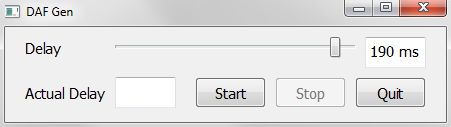
We add logic by distributing the main DAF generation code into two classes: the control application (MainApp) and the class for a separate thread (Worker), which is responsible for executing the while loop of the _genDAF method so that the main window does not hang. The full code is given at the end of the paragraph, and now only the main part.
Management application:
classMainApp(QMainWindow, Ui_DAFGen):
	_CHANNELS = 2
	_RATE = 44100def__init__(self):
		super().__init__()
		self.setupUi(self)
		# ...# ...def_startCapture(self):
		bufferSize = floor(self.delaySlider.value() / 1000 * self._RATE)
		device = PyAudio()
		try:
			streamIn = device.open(
				format=paFloat32,
				channels=self._CHANNELS,
				rate=self._RATE,
				input=True,
				frames_per_buffer=bufferSize
			)
			streamOut = device.open(
				format=paFloat32,
				channels=self._CHANNELS,
				rate=self._RATE,
				output=True,
				frames_per_buffer=bufferSize
			)
		except OSError:
			QMessageBox.critical(self, 'Error', 'No input/output device found! Connect and rerun.')
			return
		self._workerThread = Worker(bufferSize, streamIn, streamOut)
		self._workerThread._trigger.connect(self._updateActualDelay)
		# ...
		self._workerThread.start()
Second thread:
classWorker(QThread):
	_trigger = pyqtSignal(float)
	def__init__(self, bufferSize, streamIn, streamOut):
		QThread.__init__(self)
		self._bufferSize = bufferSize
		self._streamIn = streamIn
		self._streamOut = streamOut
	def__del__(self):
		self.wait()
	def_genDAF(self):while self._streamIn.is_active():
			start = clock()
			audioData = self._streamIn.read(self._bufferSize)
			self._streamOut.write(audioData)
			actualDelay = clock() - start
			self._trigger.emit(actualDelay)
	defrun(self):
		self._genDAF()
Source for the logic of the GUI implementation under the spoiler:
dafgen.py
#!/usr/bin/env python3# -*- coding: utf-8 -*-# Usage: python3 dafgen.pyfrom PyQt5.QtWidgets import *
from PyQt5.QtCore import *
from ui_dafgen import Ui_DAFGen
from pyaudio import PyAudio, paFloat32
from math import floor
from time import clock
import sys
classWorker(QThread):
	_trigger = pyqtSignal(float)
	def__init__(self, bufferSize, streamIn, streamOut):
		QThread.__init__(self)
		self._bufferSize = bufferSize
		self._streamIn = streamIn
		self._streamOut = streamOut
	def__del__(self):
		self.wait()
	def_genDAF(self):while self._streamIn.is_active():
			start = clock()
			audioData = self._streamIn.read(self._bufferSize)
			self._streamOut.write(audioData)
			actualDelay = clock() - start
			self._trigger.emit(actualDelay)
	defrun(self):
		self._genDAF()
classMainApp(QMainWindow, Ui_DAFGen):
	_CHANNELS = 2
	_RATE = 44100def__init__(self):
		super().__init__()
		self.setupUi(self)
		self.stopButton.setEnabled(False)
		self._updateDelay()
		self.delaySlider.valueChanged.connect(self._updateDelay)
		self.startButton.clicked.connect(self._startCapture)
		self.stopButton.clicked.connect(self._stopCapture)
		self.quitButton.clicked.connect(QApplication.quit)
	def_updateDelay(self):
		self.delayEdit.setPlainText(str(self.delaySlider.value()) + ' ms')
	def_startCapture(self):
		bufferSize = floor(self.delaySlider.value() / 1000 * self._RATE)
		device = PyAudio()
		try:
			streamIn = device.open(
				format=paFloat32,
				channels=self._CHANNELS,
				rate=self._RATE,
				input=True,
				frames_per_buffer=bufferSize
			)
			streamOut = device.open(
				format=paFloat32,
				channels=self._CHANNELS,
				rate=self._RATE,
				output=True,
				frames_per_buffer=bufferSize
			)
		except OSError:
			QMessageBox.critical(self, 'Error', 'No input/output device found! Connect and rerun.')
			return
		self._workerThread = Worker(bufferSize, streamIn, streamOut)
		self._workerThread._trigger.connect(self._updateActualDelay)
		self.startButton.setEnabled(False)
		self.delaySlider.setEnabled(False)
		self.stopButton.setEnabled(True)
		self._workerThread.start()
	def_stopCapture(self):
		self._workerThread.terminate()
		self.actualDelayEdit.clear()
		self.startButton.setEnabled(True)
		self.delaySlider.setEnabled(True)
		self.stopButton.setEnabled(False)
	def_updateActualDelay(self, t):
		newValue = floor(t * 1000)
		self.actualDelayEdit.setPlainText(str(newValue) + ' ms')
defmain():
	app = QApplication(sys.argv)
	win = MainApp()
	win.show()
	sys.exit(app.exec_())
if __name__ == '__main__':
	main()
Conclusion and Code
Actually everything I wanted to tell. Feel free to use.
I’ll also leave a link to the entire project: in addition, there are GUI code and a template for PyQt Designer.
Thanks for attention!
Literature
Missulovin L. Ya., Yurova M. S. Overcoming stuttering in adolescents and adults using apparatus of the “AIR” type // Scientific and Methodological Electronic Journal “Concept”. - 2015. - No. S23. - S. 46-50. - URL: e-koncept.ru/2015/75287.htm .









