January 24, 2018 at 20:45
How to import CSV accounts into Zimbra
One of the common questions when migrating a system from another mail server
(Microsoft Exchange, MDaemon, Qmail or Postfix) to Zimbra is importing an
email account.

Consider the option when account information is publicly available. The import process in this case can be easily optimized using a special script.
How to work with the table:
1. Download the excel file .
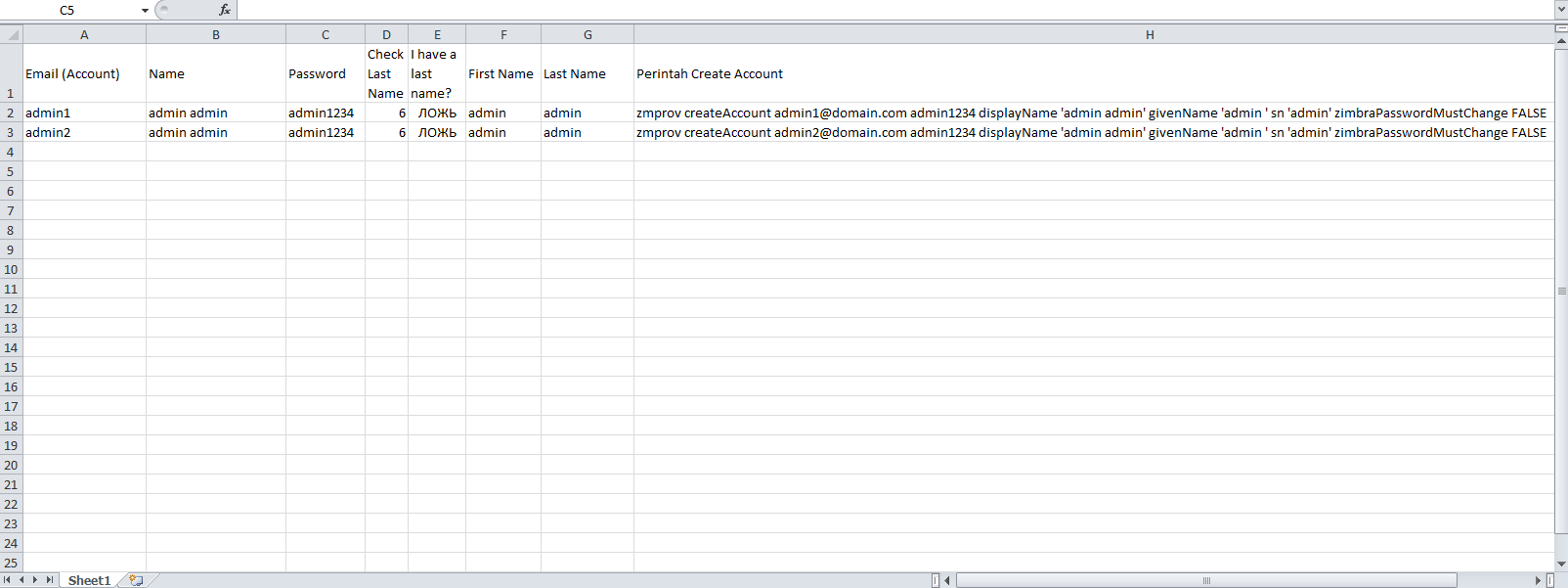
2. Complete columns A, B, and C. Columns D, E, F, G, and H are formulas.
3. When done, copy all the rows of column H, except for the row of
column headers .
4. Create a new file. For example, account-zimbra.sh
5. Copy the attached data to a new file and transfer it
6. Open the console and run the following command with root privileges (copy the file name /
folder):
7. Done, with no luck, all accounts should be well imported
Note:
Hope this was helpful.
For all questions related to the Zextras Suite, you can contact the representative of Zextras Katerina Triandafilidi by e-mail [email protected]
(Microsoft Exchange, MDaemon, Qmail or Postfix) to Zimbra is importing an
email account.
Consider the option when account information is publicly available. The import process in this case can be easily optimized using a special script.
How to work with the table:
1. Download the excel file .
2. Complete columns A, B, and C. Columns D, E, F, G, and H are formulas.
3. When done, copy all the rows of column H, except for the row of
column headers .
4. Create a new file. For example, account-zimbra.sh
5. Copy the attached data to a new file and transfer it
6. Open the console and run the following command with root privileges (copy the file name /
folder):
su
cd /home/hoadmin
chmod +x acount-zimbra.sh
su – zimbra
sh /home/hoadmin/account-zimbra.sh
7. Done, with no luck, all accounts should be well imported
Note:
- A domain name (for example: domain.com) must be created first.
- Make sure the password length matches the minimum password length available in the menu.
- Zimbra admin.
- If you want to change the password at the first login, change the command:
zimbraPasswordMustChange FALSE
zimbraPasswordMustChange TRUE
Hope this was helpful.
For all questions related to the Zextras Suite, you can contact the representative of Zextras Katerina Triandafilidi by e-mail [email protected]