Apache Ignite.NET 2.4: Thin and Cross-Platform
Recently, a new version of the Apache Ignite distributed SQL database has been released . I suggest looking at the new features from the .NET perspective.
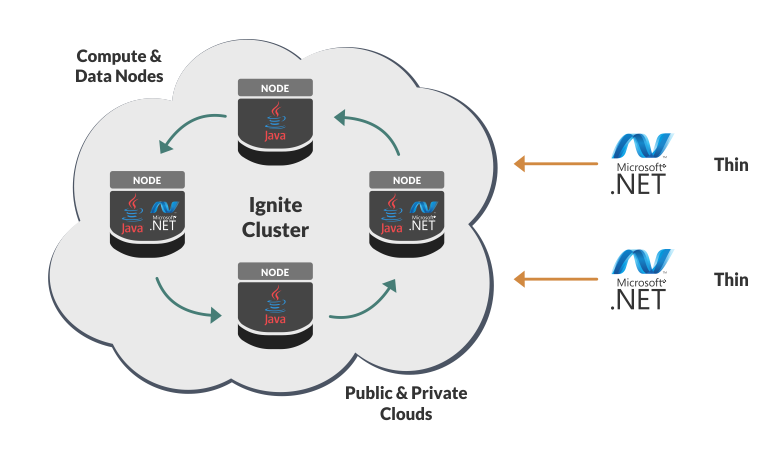
Thin .NET Client
Prior to version 2.4 in both Java and .NET , there were two options for connecting to a cluster: Server and Client. In general, the client mode differs from the server mode only in that the client nodes do not store data and do not perform calculations (compute, map-reduce). For the rest, the existing discovery & communitaction components are reused. Joining a client node to a cluster is a relatively heavy process that can take several seconds.
The situation with .NET is complicated by the fact that the JVM starts inside the process, consuming a lot of resources and introducing additional requirements for the environment.
All these problems are solved by our new “thin” client :
- Connects to one of the server nodes via a socket, an instant process.
- Does not require Java on the machine, does not start the JVM.
- Virtually memory free.
- Connects to any type of Ignite node: Java-only, .NET, C ++.
Of the functionality there is so far only Cache + LINQ, in the future it is planned to add everything else.
In this case, the API looks identical:
var cfg = new IgniteClientConfiguration { Host = "127.0.0.1" };
using (var client = Ignition.StartClient(cfg))
{
    var cache = client.GetCache<int, Person>("persons");
    cache[1] = new Person(1, "Vasya");
    cache[2] = new Person(2, "Petya");
    // SQL
    cache.Query(new SqlFieldsQuery("select name from person where id > 1"));
    // LINQ
    cache.AsCacheQueryable().Where(x => x.Value.Id > 1) ...;
}
It should be noted that the appearance of a thin client does not mean at all that the existing "thick" API will be sent to the dump in the future:
- The speed of a thin client will always be slightly lower, since it works through an intermediary.
- Many features, such as Compute and Services , work on server nodes through the "thick" API (even if called from the client).
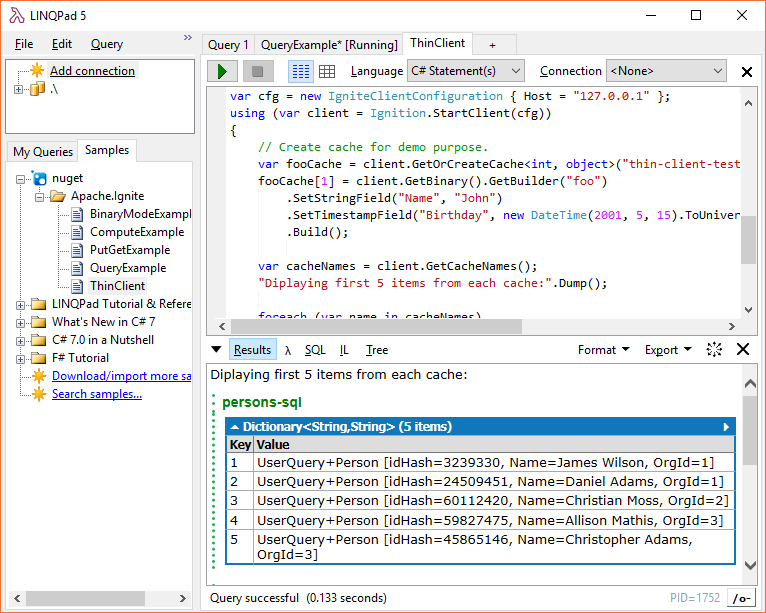
An example in LINQPad
In the process of working with Ignite, you may want to quickly connect to the cluster, look at the data in the caches, start some kind of request. To do this, there are tools such as Visor Command Line and Web Console .
With the advent of the thin client, all this can be done quickly and conveniently through LINQPad . It is enough to add the NuGet package Apache.Ignitethrough "Add NuGet ...", and the finished sample code will be downloaded automatically.
.NET Core, Mono, Linux, macOS
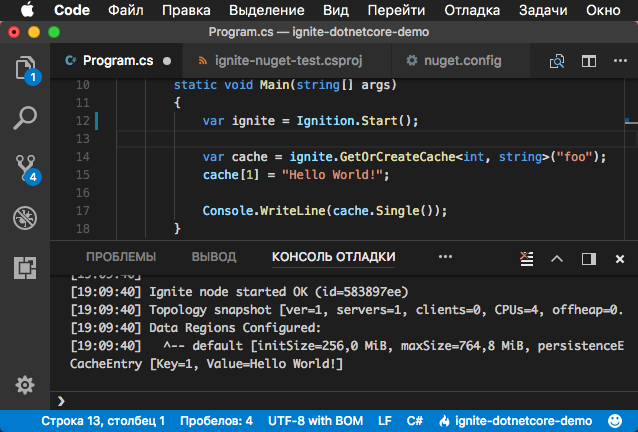
The title speaks for itself, now Ignite.NET can be used on the following platforms and OS:
- Windows (.NET 4.0+, .NET Core 2.0+, Mono)
- Linux (any distribution that runs .NET Core 2.0+ or Mono)
- macOS (again under .NET Core 2.0+ or Mono)
How to try?
Under .NET Core, the instruction is the same for all platforms:
dotnet new consoledotnet add package Apache.Ignite- In Program.cs add
Apache.Ignite.Core.Ignition.Start(); dotnet run
The assembly of the project will give a warning warning NU1701: Package 'Apache.Ignite 2.4.0' was restored using '.NETFramework,Version=v4.6.1' instead of the project target framework '.NETCoreApp,Version=v2.0'. This package may not be fully compatible with your project.
The reason is that inside the NuGet package is the only dll built under .NET 4.0, which was done to simplify the process. This does not prevent her from working under .NET Core. You can suppress a warning using the line <PropertyGroup><NoWarn>NU1701</NoWarn></PropertyGroup>in the file csproj.
Mono
Mono works with the usual 'Classic .NET' solutions, you can create them on Linux in MonoDevelop .
One of the user cases for Mono is 32-bit processors, because .NET Core requires x64. I came across this while testing the launch of Ignite.NET on everything that came to hand, and the old EEE PC 901 with Lubuntu installed , where everything started successfully under Mono , came to hand .
Linux and macOS Development
In addition to use, Ignite.NET can now also be developed on Linux and macOS. Under Mono, the main solution compiles as is. Under .NET Core, separate solution files and projects for .NET Core were added for this:
Apache.Ignite.DotNetCore.sln .
Conclusion
Ignite.NET now covers all major platforms and operating systems. One of the popular use cases that has become possible is a cluster of .NET nodes running on Linux, and client applications running through the thin protocol on Windows workstations.
Further development of the .NET Core line is planned: integration with ASP.NET Core (caching) and Entity Framework Core (caching, data provider). Such integrations already exist for classic ASP.NET and EF.









