 January 23, 2018 at 12:15
We read data from the open part of KOMPAS-3D files for integration with Pilot-ICE
KOMPAS-3D files contain information about the document: the name and designation of the drawing, the name of the developer, checking and approving, type of document, format, number of sheets. When an enterprise uses a system to automate workflow, the designer very often has to enter this information manually.

Adding a document to the document management system (Document card) The
data that you need to enter into the card can already be in the source file, and therefore the input process can be automated.
Since the 16th version, serious changes have occurred in the COMPAS-3D data format. Firstly, it has become more open, and secondly, the file size has decreased. The KOMPAS-3D file format version 16 and higher is a zip archive that contains metadata in XML format with information about the attributes and objects of this document. To read KOMPAS-3D files, I developed the KompasFileReader .NET library , which is published under the MIT license [1].
As a workflow system we use Pilot-ICE. The user algorithm in the system is very simple. All source files during the design are located on the Pilot-Storage virtual disk, similar to Dropbox. If you want to publish an electronic document and carry out its coordination, a Pilot-XPS virtual printer is used, as a result of printing an electronic document is generated. The user selects a folder in the electronic archive and fills out a document card, then saves the document to the archive and performs its approval (if necessary). But if we work in the KOMPAS-3D system, correctly and accurately draw up documents and, as a result, fill in the main inscription of the drawing, we can automatically transfer the data from the main inscription to the Pilot-ICE document card. How to create a similar plugin will be written below.
The Pilot-ICE system supports the ability to develop plug-ins, the SDK can be downloaded from the link in the download center [3].
You can create a new project according to the instructions in the SDK (Documentation.html).
In order to automatically fill out a document card, you need to intercept the call to print a virtual printer and load a document card.
The plugin must use the IAutoImportHandler and IObjectCardHandler interfaces. To analyze the source file, you need to implement the Handle method of the IAutoImportHandler interface, and to fill in the card, use the method with the exact same IObjectCardHandler interface name.
Fragment of the plugin:
We intercept the path to the source file that we print, analyze the file and get its attributes.
Immediately after printing, the document card opens, intercept its fields and fill out on the basis of the data obtained above.
where _pairPilotKompasAttrs is a pair of attribute name values in the Pilot ICE and KOMPAS-3D systems.
* The listings are given in a simplified form, you can look in more detail on the project page [1].
As an example, take any drawing that is located on the Pilot-Storage.
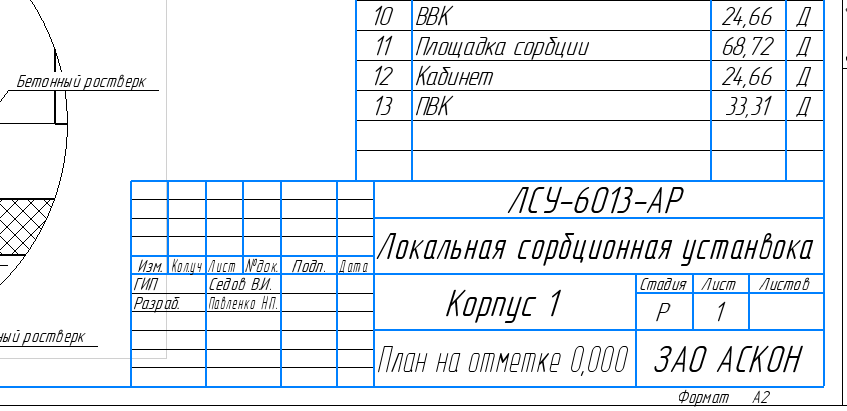
The drawing should be filled with the main inscription. We are
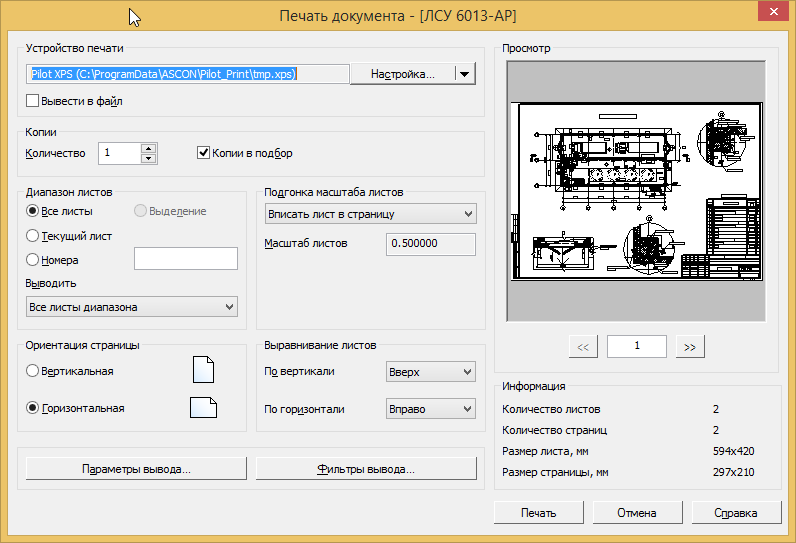
printing to a virtual printer.
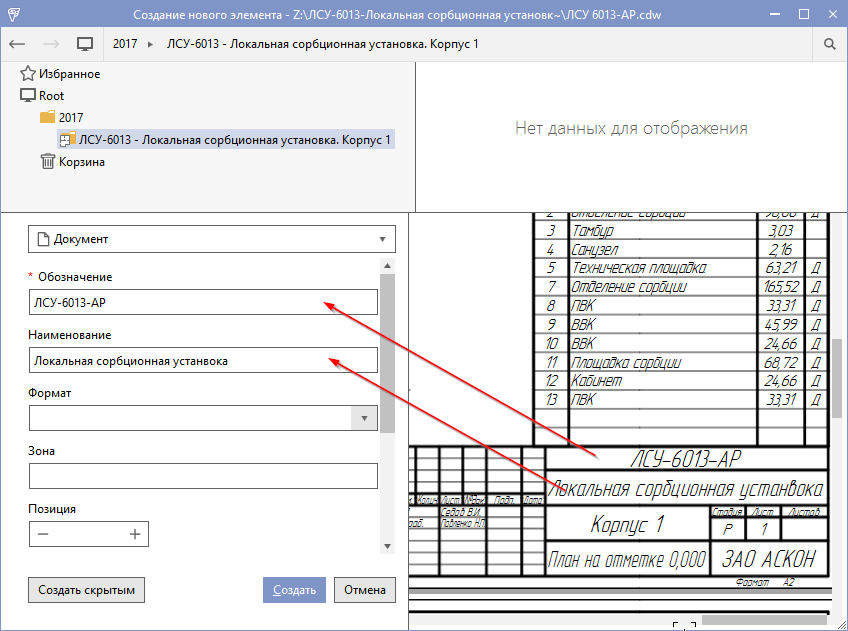
Great! The document card is filled in automatically!
To adapt the plug-in to the configuration of your enterprise, we will provide the ability to configure the correspondence between the KOMPAS-3D attributes and the attributes of the workflow system.
To do this, you can use the JSON format and store this data in the general system settings.
Settings example:
where NameAttrPilot is the name of the attribute in the Pilot-ICE system, you can see it in Pilot-myAdmin,
NamePropKompas is the name of the attribute in the KOMPAS-3D system, you can find out by opening the KOMPAS-3D file as a zip archive and studying the MetaInfo file.
Oleg Kozintsev
Adding a document to the document management system (Document card) The
data that you need to enter into the card can already be in the source file, and therefore the input process can be automated.
Library for receiving data from KOMPAS-3D
Since the 16th version, serious changes have occurred in the COMPAS-3D data format. Firstly, it has become more open, and secondly, the file size has decreased. The KOMPAS-3D file format version 16 and higher is a zip archive that contains metadata in XML format with information about the attributes and objects of this document. To read KOMPAS-3D files, I developed the KompasFileReader .NET library , which is published under the MIT license [1].
Workflow integration
As a workflow system we use Pilot-ICE. The user algorithm in the system is very simple. All source files during the design are located on the Pilot-Storage virtual disk, similar to Dropbox. If you want to publish an electronic document and carry out its coordination, a Pilot-XPS virtual printer is used, as a result of printing an electronic document is generated. The user selects a folder in the electronic archive and fills out a document card, then saves the document to the archive and performs its approval (if necessary). But if we work in the KOMPAS-3D system, correctly and accurately draw up documents and, as a result, fill in the main inscription of the drawing, we can automatically transfer the data from the main inscription to the Pilot-ICE document card. How to create a similar plugin will be written below.
The Pilot-ICE system supports the ability to develop plug-ins, the SDK can be downloaded from the link in the download center [3].
You can create a new project according to the instructions in the SDK (Documentation.html).
In order to automatically fill out a document card, you need to intercept the call to print a virtual printer and load a document card.
The plugin must use the IAutoImportHandler and IObjectCardHandler interfaces. To analyze the source file, you need to implement the Handle method of the IAutoImportHandler interface, and to fill in the card, use the method with the exact same IObjectCardHandler interface name.
Fragment of the plugin:
namespace Ascon.Pilot.SDK.KompasAttrAutoImport
{
    [Export(typeof(IAutoimportHandler))]
    [Export(typeof(IObjectCardHandler))]
    public class KompasAttrAutoImport : IAutoimportHandler, IObjectCardHandler, ...
    {
        ...
		public bool Handle(string filePath, string sourceFilePath, AutoimportSource autoimportSource)
		{
			...
		}
		public bool Handle(IAttributeModifier modifier, ObjectCardContext context)
        {
			...
		}
    }
}
Getting and analyzing the source file
We intercept the path to the source file that we print, analyze the file and get its attributes.
public bool Handle(string filePath, string sourceFilePath, AutoimportSource autoimportSource)
{
	// проверка на наличая пути к исходному файлу
    if (string.IsNullOrWhiteSpace(sourceFilePath)) return false;
    // если исходный файл компас. Проверяем расширения.
    if (!IsFileExtension(sourceFilePath, CDW_EXT)
		return false;
    using (var inputStream = new FileStream(sourceFilePath, FileMode.Open, FileAccess.Read))
    {
	var ms = new MemoryStream();
        inputStream.Seek(0, SeekOrigin.Begin);
        inputStream.CopyTo(ms);
        ms.Position = 0;
        if (IsFileExtension(sourceFilePath, SPW_EXT))
        {
	    var taskOpenSpwFile = new Task(() => new SpwAnalyzer(ms));
            taskOpenSpwFile.Start();
            taskOpenSpwFile.Wait();
            if (taskOpenSpwFile.Result.IsCompleted)
            {
		var spc = taskOpenSpwFile.Result.GetSpecification;
                spc.FileName = sourceFilePath;
                _doc = spc;
            }
            ...
        }
        ...
    }
    return false;
}
Filling out a document card
Immediately after printing, the document card opens, intercept its fields and fill out on the basis of the data obtained above.
public bool Handle(IAttributeModifier modifier, ObjectCardContext context)
{
    var isObjectModification = context.EditiedObject != null;
    if (isObjectModification || context.IsReadOnly)
	return false;
    if (_doc == null)
	return false;
    var docProp = _doc.GetProps();
    foreach (var pairPilotKompasAttr in _pairPilotKompasAttrs)
    {
	var val = docProp.FirstOrDefault(x => x.Name == pairPilotKompasAttr.NamePropKompas)?.Value;
        if (val != null)
		modifier.SetValue(pairPilotKompasAttr.NameAttrPilot, ValueTextClear(val));
    }
    return true;
}
where _pairPilotKompasAttrs is a pair of attribute name values in the Pilot ICE and KOMPAS-3D systems.
* The listings are given in a simplified form, you can look in more detail on the project page [1].
Work demonstration
As an example, take any drawing that is located on the Pilot-Storage.
The drawing should be filled with the main inscription. We are
printing to a virtual printer.
Great! The document card is filled in automatically!
Plugin configuration
To adapt the plug-in to the configuration of your enterprise, we will provide the ability to configure the correspondence between the KOMPAS-3D attributes and the attributes of the workflow system.
To do this, you can use the JSON format and store this data in the general system settings.
Settings example:
[{
		"NameAttrPilot": "name",
		"NamePropKompas": "Наименование"
	}, {
		"NameAttrPilot": "mark",
		"NamePropKompas": "Обозначение"
	}
]
where NameAttrPilot is the name of the attribute in the Pilot-ICE system, you can see it in Pilot-myAdmin,
NamePropKompas is the name of the attribute in the KOMPAS-3D system, you can find out by opening the KOMPAS-3D file as a zip archive and studying the MetaInfo file.
References:
- The plugin for integrating the Pilot-ICE system with KOMPAS-3D is github.com/kozintsev/Pilot.CADReader .
- Pilot-ICE - project management system - pilotems.com .
- Pilot System Download Center - pilot.ascon.ru .
Oleg Kozintsev









