January 20, 2018 at 15:58
As I wrote a telegram bot and uploaded it to a remote server
Introduction
As soon as the ban on anonymity in messengers entered into force on the territory of the Russian Federation, my hands reached to write a post about the telegram bot . In the process of creating the bot, I encountered a large number of problems that had to be solved separately, and literally filter out grains of information from all over the Internet. And after several months of suffering and torment (coding is not my main occupation), I finally finished with the bot, figured out all the problems, and was ready to tell my story to you.

First steps
First you need to install telegram on your PC and register in the messenger. Find in search @BotFather is the father of all bots in telegram, it is he who creates them. We write him / newbot and answer two simple questions: the name of the bot and its username. Then @BotFather will congratulate us on the successful creation of the bot and send us its token - 523870826: AAF0O8T-e7riRi8m6qlRz4pBKKdh0OfHKj8.
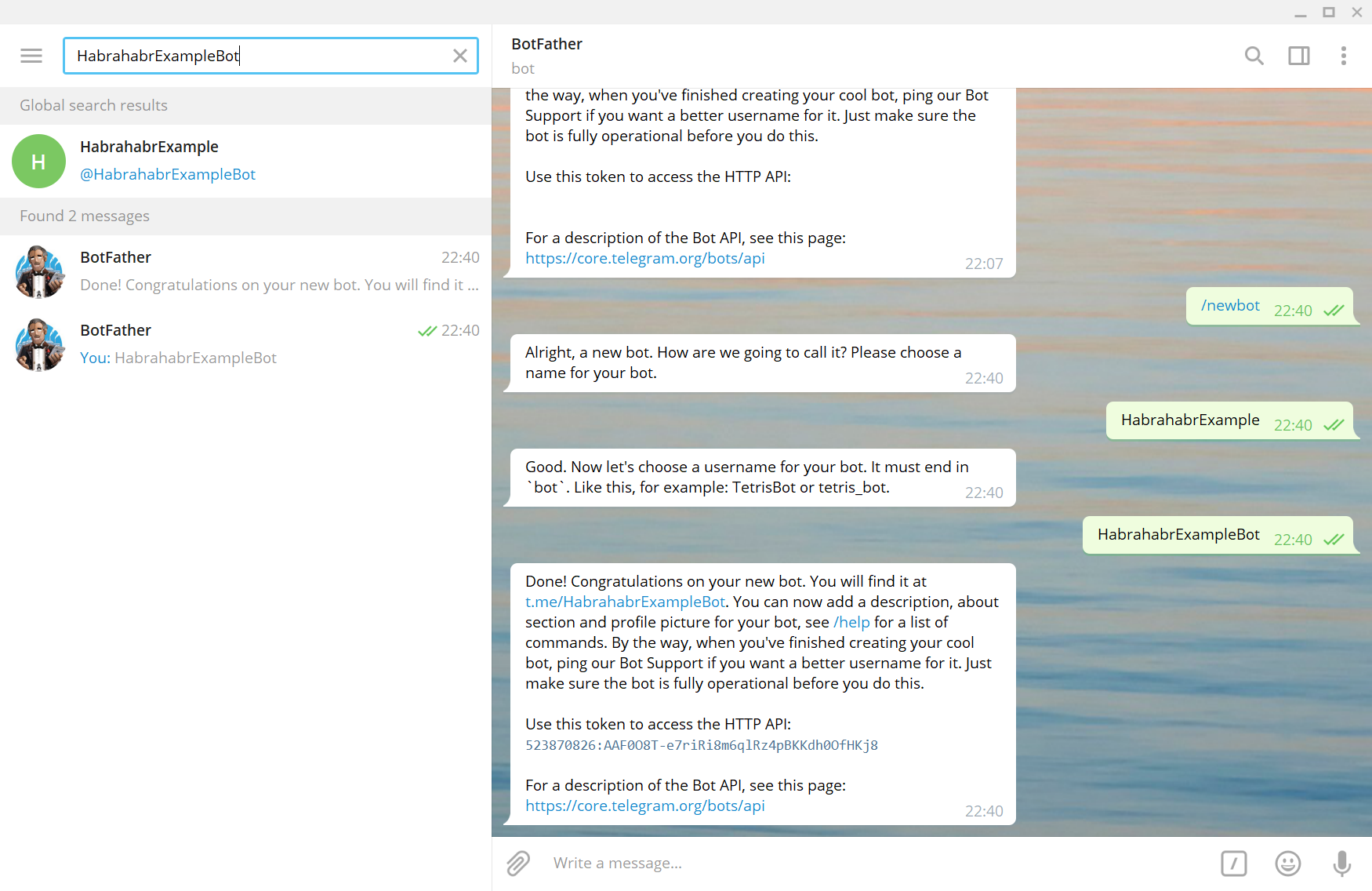
Note: token is the only identification key to the bot. Do not upload it anywhere, otherwise other people will be able to control your bot. The bot with this token was deleted at the time the article was posted.
What programming language to choose for writing a bot?
Here I did not bother for a long time and settled on Python, since I know it well enough, and a convenient library is also present. I decided to use PyTelagramBotAPI (at the time of this writing, the latest available version is 3.5.1).
Let's move on to the first code.
Import the PyTelegramBotAPI library.
# -*- coding: utf-8 -*-
import telebot
Let's create a bot.
bot = telebot.TeleBot("523870826:AAF0O8T-e7riRi8m6qlRz4pBKKdh0OfHKj8")
We will write a simple message processing using the bot .message_handler decorator .
@bot.message_handler(content_types=["text"])
def handle_text(message):
    if message.text == "Hi":
        bot.send_message(message.from_user.id, "Hello! I am HabrahabrExampleBot. How can i help you?")
    elif message.text == "How are you?" or message.text == "How are u?":
        bot.send_message(message.from_user.id, "I'm fine, thanks. And you?")
    else:
        bot.send_message(message.from_user.id, "Sorry, i dont understand you.")
We put the bot in a mode of continuous processing of information coming from telegram servers.
bot.polling(none_stop=True, interval=0)
In the variable message telegram passes a dictionary (map) of the following form:
{'content_type': 'text',
 'message_id': 1,
 'from_user': {
     'id': None,
     'is_bot': False,
     'first_name': None,
     'username': None,
     'last_name': None,
     'language_code': None},
 'date': None,
 'chat': {
     'type': 'private',
     'last_name': None,
     'first_name': None,
     'username': None,
     'id': None,
     'title': None,
     'all_members_are_administrators': None,
     'photo': None,
     'description': None,
     'invite_link': None,
     'pinned_message': None,
     'sticker_set_name': None,
     'can_set_sticker_set': None},
 'forward_from_chat': None,
 'forward_from': None,
 'forward_date': None,
 'reply_to_message': None,
 'edit_date': None,
 'author_signature': None,
 'text': '/start',
 'entities': '[]',
 'caption_entities': None,
 'audio': None,
 'document': None,
 'photo': None,
 'sticker': None,
 'video': None,
 'video_note': None,
 'voice': None,
 'caption': None,
 'contact': None,
 'location': None,
 'venue': None,
 'new_chat_member': None,
 'new_chat_members': None,
 'left_chat_member': None,
 'new_chat_title': None,
 'new_chat_photo': None,
 'delete_chat_photo': None,
 'group_chat_created': None,
 'supergroup_chat_created': None,
 'channel_chat_created': None,
 'migrate_to_chat_id': None,
 'migrate_from_chat_id': None,
 'pinned_message': None,
 'invoice': None,
 'successful_payment': None}
There are also other decorators that can receive audio files, videos, pictures, documents, geolocation, etc.
# Обработчик команд '/start' и '/help'.
@bot.message_handler(commands=['start', 'help'])
def handle_start_help(message):
    pass
 # Обработчик для документов и аудиофайлов
@bot.message_handler(content_types=['document', 'audio'])
def handle_document_audio(message):
    pass
Final code.
# -*- coding: utf-8 -*-
import telebot
bot = telebot.TeleBot("523870826:AAF0O8T-e7riRi8m6qlRz4pBKKdh0OfHKj8")
@bot.message_handler(content_types=["text"])
def handle_text(message):
    if message.text == "Hi":
        bot.send_message(message.from_user.id, "Hello! I am HabrahabrExampleBot. How can i help you?")
    elif message.text == "How are you?" or message.text == "How are u?":
        bot.send_message(message.from_user.id, "I'm fine, thanks. And you?")
    else:
        bot.send_message(message.from_user.id, "Sorry, i dont understand you.")
bot.polling(none_stop=True, interval=0)
# Обработчик команд '/start' и '/help'.
@bot.message_handler(commands=['start', 'help'])
def handle_start_help(message):
    pass
 # Обработчик для документов и аудиофайлов
@bot.message_handler(content_types=['document', 'audio'])
def handle_document_audio(message):
    pass
bot.polling(none_stop=True, interval=0)
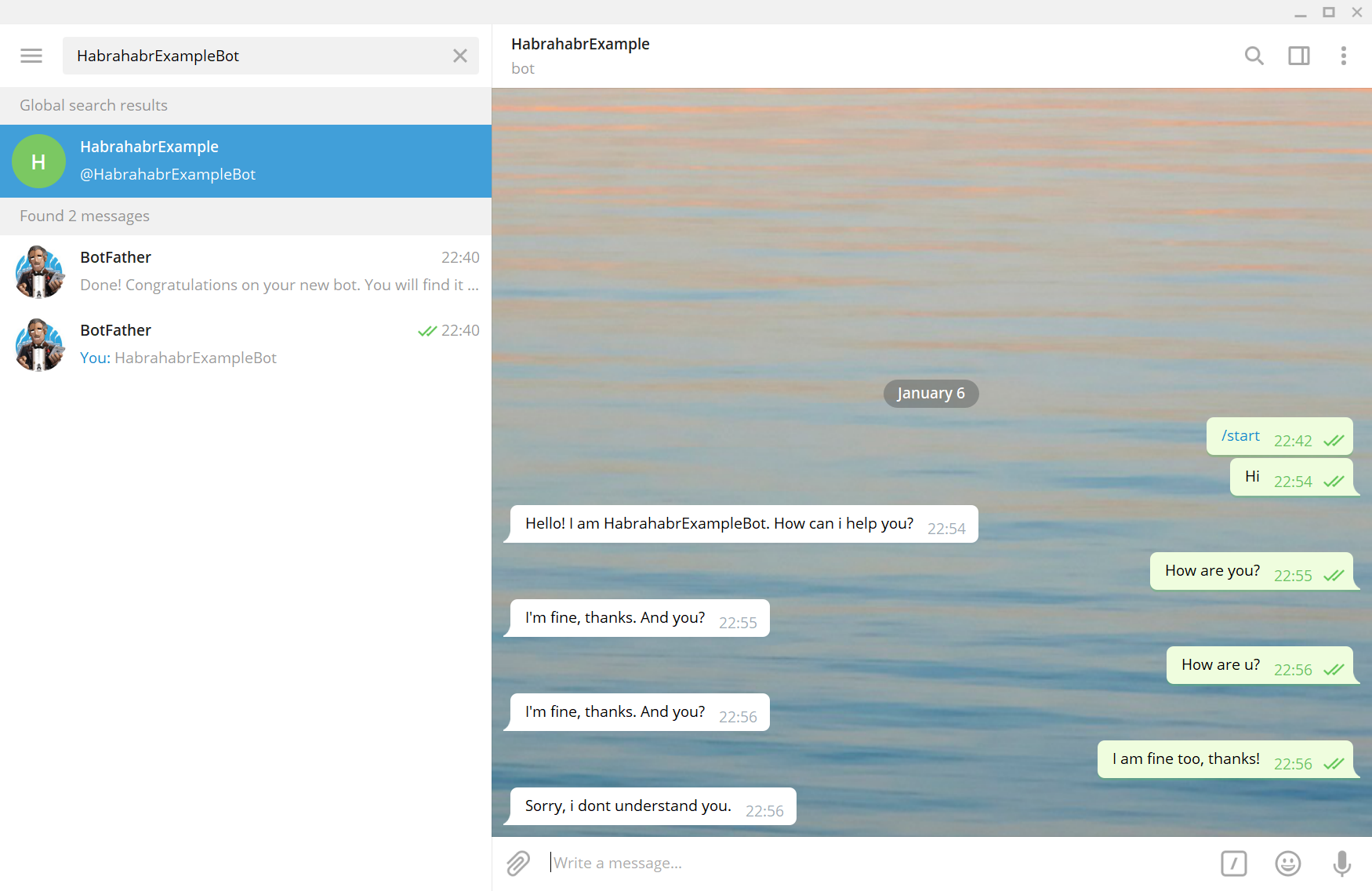
In general, telegram allows bots to perform a lot of cool operations from creating custom keyboards to making payments. Link to the official Telegram documentation.
To save user data, I decided to use the sqlite3 database .
import sqlite3
connection = sqlite3.connect("database", check_same_thread = True)
cursor = connection.cursor()
cursor.execute("CREATE TABLE IF NOT EXISTS Inventory_on (ID INT, 'Primary weapon' TEXT, 'Secondary weapon' TEXT)")
cursor.execute("CREATE TABLE IF NOT EXISTS Clans (Name TEXT, Points INT)")
cursor.execute("CREATE TABLE IF NOT EXISTS WorkStatus (ID INT, Status INT)")
connection.commit()
connection.close()
Parallel processes were launched using the threading library. For example: battle calculation function.
import threading
threading.Thread(target=name_of_your_function).start()
Then it all depends on your imagination.
Where to launch your bot?
I don’t want to leave my own PC on 24/7, and it’s not practical. Therefore, I decided to use the free heroku service, but I was unsuccessful due to the database I selected. It turned out that every time you restart the bot, heroku deletes all sqlite3 commits for the last session without exception. After that, I decided to buy VDS (Virtual Dedicated Server, a virtual dedicated server) - a remote PC on which a certain power and memory is allocated for you, and to which you are given access to the command line. Most often, the operating system of such a machine will be linux. The fee is small - 400 rubles / month, so, without much moral suffering, I paid for VDS based on Debian GNU / Linux and began to figure out how to turn on the bot on a remote server.
How to connect to VDS?
There are different methods, I decided on an SSH connection through Putty. Download Putty through the official website and open. Enter the IP-address of VDS and click open.

A window should open where you need to enter the login and password from the server.
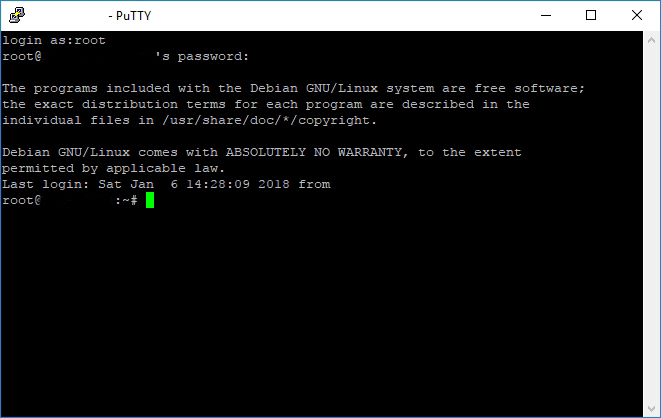
All of the above data will be provided by the company from which you purchase VDS. Further VDS is a server.
How to install on the server all the programming languages and libraries you need?
Everything is simple here. By entering these 5 commands into the server console in this sequence, you will install python3, setuptools, pip3 and the pyTelegramBotAPI library on the server.
apt-get update
apt-get install python3
apt-get install python3-setuptools
apt-get install python3-pip
pip3 install pyTelegramBotAPI
All additional libraries that are not included in the main python3 package must also be installed on the principle.
pip3 install ‘name_of_site_package’
How to upload files from my PC to the server?
First, create a folder in which we will upload all the necessary files. On the server, go to the / usr / local / bin directory and create the bot folder.
cd /usr/local/bin
mkdir bot
I have windows installed on my PC, respectively, and the commands will be for the windows command line . First you need to go to the directory where putty.exe is located.
cd /program files/putty
Next, load bot.py, which is located in the directory C: \ Users \ Ilya \ PycharmProjects \ Bot (you need to substitute your directory) in the directory on the server / usr / local / bin / bot.
pscp.exe "C:\Users\Ilya\PycharmProjects\Bot\bot.py" [email protected]:/usr/local/bin/bot
The line [email protected] must be replaced with a line of the form login @ IP_address, respectively with your username and IP address (mentioned above in the section "How to connect to VDS?"). Replacing bot.py with the names of other files, download all the necessary ones.
How to download files from a server to a PC?
The same as when uploading files to the server at a command prompt in the directory where putty.exe is located. And enter this command to download the database file to the desktop of your PC.
pscp.exe [email protected]:/usr/local/bin/bot/database "C:\Users\Ilya\Desktop
How to launch a bot?
The first and easiest option is to go to the directory with the executable files and register python3 bot.py, but then when closing putty the bot will turn off.
The second option is to launch the bot using screen - a module that creates parallel desktops, but then the bot will not restart automatically in the event of a crash, and this happens often - several times a week due to a night restart of the telegram servers (at 3:00 a.m. MSC).
The third way is systemd , a system manager, a daemon for initializing other daemons in Linux. Simply put, systemd will launch the bot and will restart it if it crashes.
Install systemd:
apt-get install systemd
Create a file on your PC with the name bot.service with the following contents:
[Unit]
Description=Telegram bot 'Town Wars'
After=syslog.target
After=network.target
[Service]
Type=simple
User=root
WorkingDirectory=/usr/local/bin/bot
ExecStart=/usr/bin/python3 /usr/local/bin/bot/bot.py
RestartSec=10
Restart=always
[Install]
WantedBy=multi-user.target
And load it into the desired directory:
pscp.exe "C:\Users\Ilya\PycharmProjects\Bot\bot.service" [email protected]:/etc/systemd/system
Next, you need to register 4 commands in the server console:
systemctl daemon-reload
systemctl enable bot
systemctl start bot
systemctl status bot
In my case, due to certain implementation errors, specifically multithreading, I had to transfer the function for calculating the battles (battle_counter.py) to a separate daemon.
[Unit]
Description=Battle counter for telegram bot 'Town Wars'
After=syslog.target
After=network.target
[Service]
Type=simple
User=root
WorkingDirectory=/usr/local/bin/bot
ExecStart=/usr/bin/python3 /usr/local/bin/bot/battle_counter.py
RestartSec=10
Restart=always
[Install]
WantedBy=multi-user.target
After which a message should appear similar to the following:
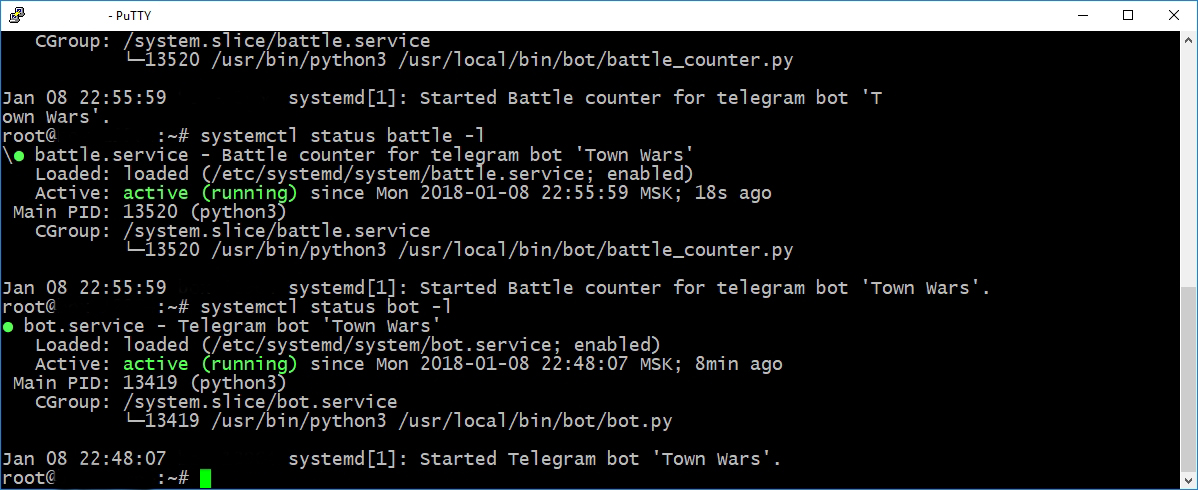
Your bot is up and running!
THANKS
This was my first relatively large project and I was faced with a huge amount of new problems for me. Many thanks I want to express to Yurii Drake , who helped me deal with them!
LINKS
Telegram
Telegram bot
Official telegram documentation
Informal documentation
PyTelagramBOTAPI
VDS
Debian GNU / Linux
Putty
Windows
Command Prompt Command Prompt Mac
Screen
Systemd