December 23, 2017 at 18:08
How to make vertical alignment, indentation and TextHint in TMemo
Prologue
So, because of what everything actually happened. I am writing plugins for LedearTask. Also, in 2017, he wrote a vector editor for the Turkish firm of machine tools for the production of seals MATUYA. What LeaderTask, what MATUYA, set interesting requirements - vertical alignment in a multi-line editor, indentation and TextHint. TextHint means - such a gray prompt to enter at least something when the input element is empty.

LeaderTask: plugin "Ladder of Goals" (input and hint in the center in a multi-line editor)
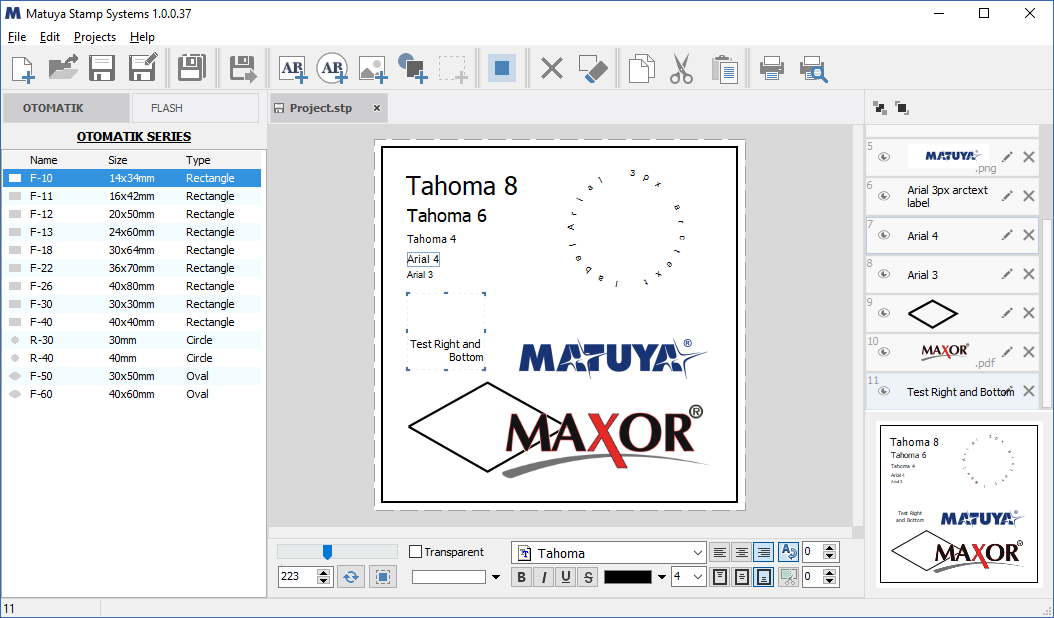
Matuya Stamp Systems (text input aligned to the right and bottom)
As you know, vertical alignment, unlike horizontal, does not exist in the standard Windows API for controls .
Also, prompts for entering some information in multi-line Windows controls are not supported .
Thus, a dilemma arises - how? I would like to use standard components, but at the same time have advanced capabilities for entering textual information.
Small digression
Since some, quite distant, pores, I do not write components and do not use third-party ones. In the conditions of an eternal deadline it is much more profitable, faster and more economical to write everything yourself. What will be created in real-time. Those. use the rich capabilities of the Delphi designer, but replace classes on the fly in real-time. How it all looks, I hope to describe in more detail a little later. What does this mean in the current case, I will describe now.
What is needed
In fact, TMemo is required of me, in which there is a vertical alignment, say, the Layout property, the TextHint property - an “invitation” to enter some text. Also, you need to indent from top-bottom-left-right to enter and display text so that it does not “stick” to the edges of the control.
Theory
Requires TMemo with additional features. Obviously, you have to write an heir from TMemo. Not from TCustomMemo, much less from TCustomEdit. We need TMemo, because we are not going to write a library of components, but want to make a project quickly and on time.
Vertical alignment is not available to us. Well, then we can set the text input rectangle for the controls. This is as follows .
In our case, it will look like this:
Perform(EM_SETRECT, 0, LPARAM(@ARect)) Where ARect is the search rectangle for text input. Obviously, its upper bound should depend on the value of the Layout property . Also, this rectangle can define the margins of the indent from the edges for entering text.
Next, digging up the sources a bit, we find the virtual method:
procedure PaintWindow(DC: HDC); virtual;It is called anyway, that for DoubleBuffered, that without it. Its call will be carried out in the presence of csCustomPaint in the ControlState component, after all significant rendering of the component. We will use it to render TextHint.
Practice
I will not dwell on some, I think, not particularly interesting implementation details.
To begin with, we have the following additional properties:
//-- выравнивание по вертикали ----------------------------------------
property Layout : TTextLayout read FLayout write SetLayout default tlTop;
//-- отступы от краев контрола, описание в исходниках ниже----------
property Margin : TxMargin read FMargin write SetMargin;
//-- серое приглашение ввести что-нибудь в пустой элемент ----------
property TextHint : string read FTextHint write SetTextHint;
And the main points.
1. The class declaration is by far the following:
type
  TxIPMemo = class (TMemo)
2. In the constructor, write the line:
Constructor TxIPMemo.Create (AOwner : TComponent);
begin
  inherited Create (AOwner);
  //-- для того, чтобы метод PaintWindow был вызван ---------------
  ControlState := ControlState + [csCustomPaint];
…
end;
3. Purpose of input rectangle:
function TxIPMemo.SetRect (ARect : TRect) : boolean;
begin
  result := Perform(EM_SETRECT, 0, LPARAM(@ARect))>0;
end;
4. Calculation of the input rectangle:
function TxIPMemo.CalcRect : TRect;
var s : string;
    h : Integer;
    rct : TRect;
begin
  rct := Rect(0,0,ClientWidth,ClientHeight);
  //-- вначале определяем смещения от краев контрола ----------------
  rct.Top := rct.Top + FMargin.Top;
  rct.Left := rct.Left + FMargin.Left;
  rct.Right := rct.Right - FMargin.Right;
  rct.Bottom := rct.Bottom - FMargin.Bottom;
  //-- если выравнивание по верху - ничего не высчитваем, выходим ---
  result := rct;
  if Layout = tlTop then exit;
  //-- битмап создается в конструкторе ------------------------------
  FBitmap.Canvas.Font.Assign(Font);
  s := Lines.Text;
  //-- если строка пуста и нет фокуса берем значение хинта для расчетов
  if (s = '') and (not Focused) then s := TextHint;
  //-- вычисляем выосту текста --------------------------------------
  h := CalcHeight(FBitmap.Canvas.Handle, WidthRect(rct)-2, s,
                  TrueWordWrap);
  //-- находим смещение сверху для прямоугольника ввода -------------
  case FLayout of
    tlCenter : H := rct.Top + (HeightRect(rct) - H) div 2;
    tlBottom : H := rct.Bottom - H;
  end;
  //-- небольша проверка на валидность ------------------------------
  if (H > rct.Top) then
    rct.Top := H;
  result := rct;
end;
5. What is TrueWordWrap in the CalcHeight function call above. This is a method that returns the true line break value for TMemo, which actually depends on a number of parameters:
function TxIPMemo.TrueWordWrap : boolean;
begin
  result := not ((Alignment = taLeftJustify) and
                      (ScrollBars in [ssHorizontal, ssBoth]))
            and (WordWrap or (Alignment <> taLeftJustify));
end;
6. Where is the call to recalculate and assign the input rectangle:
    procedure DoEnter; override;
    procedure DoExit; override;
    procedure Change; override;
    procedure WMSetFont(var Message: TWMSetFont); message WM_SETFONT;
    procedure CMRecreateWnd(var Message: TMessage); message CM_RECREATEWND;
7. Assigning the TextHint property is extremely simple, but considering if someone suddenly wants to register a component:
procedure TxIPMemo.SetTextHint (Value : string);
begin
  if FTextHint = Value then exit;
  FTextHint := Value;
  if not (csLoading in ComponentState) then
    Change;
end;
8. We draw TextHint:
procedure TxIPMemo.PaintWindow(DC: HDC);
var rct : TRect;
    str : string;
    cnv : TCanvas;
begin
  inherited PaintWindow(DC);
  if Focused then exit;
  str := Lines.Text;
  if str <> '' then exit;
  str := FTextHint;
  if str = '' then exit;
  rct := CalcRect;
  InflateRect (rct, -2,-2);
  cnv := TCanvas.Create;
  cnv.Handle := DC;
  cnv.Font.Assign(Font);
  cnv.Font.Color := clBtnShadow;
  DrawTextEx(cnv,rct,str,tlTop,Alignment,TrueWordWrap,false);
  cnv.Free;
end;
9. To facilitate the "substitution" of standard TMemo for ours, there is the following method. It takes all the main events and properties from the passed pointer to TCustomMemo. When the AWithFree flag is set, it destroys the instance of the old and takes its place. That is, if everything in the code is tied to the "old" TCustomMemo, nothing bad will happen. Everything will work with the new instance, as with the old one, with the exception of those moments when properties that you are already aware of will be used, and you will still have to access them like TxIPMemo:
function TxIPMemo.SetMemo (AMemo : PMemoControl; AWithFree : boolean = true) : boolean;
var s : string;
begin
  result := AMemo <> nil;
  if not result then exit;
  s := Amemo^.Name;
  BoundsRect := AMemo^.BoundsRect;
  Parent := AMemo^.Parent;
  Align := Amemo^.Align;
  Alignment := TxIPMemo(Amemo^).Alignment;
{$IFDEF VER_XE}
  OnMouseEnter := TxIPMemo(Amemo^).OnMouseEnter;
  OnMouseLeave := TxIPMemo(Amemo^).OnMouseLeave;
{$ENDIF}
  BorderStyle := TxIPMemo(Amemo^).BorderStyle;
  Font.Assign(TxIPMemo(Amemo^).Font);
  Color := TxIPMemo(Amemo^).Color;
  Visible := Amemo^.Visible;
  TabOrder := TxIPMemo(Amemo^).TabOrder;
  ScrollBars := TxIPMemo(Amemo^).ScrollBars;
  WantTabs  := TxIPMemo(Amemo^).WantTabs;
  WantReturns := TxIPMemo(Amemo^).WantReturns;
  WordWrap := TxIPMemo(Amemo^).WordWrap;
  OnKeyPress := TxIPMemo(Amemo^).OnKeyPress;
  OnKeyDown := TxIPMemo(Amemo^).OnKeyDown;
  OnKeyUp := TxIPMemo(Amemo^).OnKeyUp;
  OnChange := TxIPMemo(Amemo^).OnChange;
  OnClick := TxIPMemo(Amemo^).OnClick;
  OnMouseDown := TxIPMemo(Amemo^).OnMouseDown;
  OnMouseMove := TxIPMemo(Amemo^).OnMouseMove;
  OnMouseUp := TxIPMemo(Amemo^).OnMouseUp;
  OnEnter := TxIPMemo(Amemo^).OnEnter;
  OnExit := TxIPMemo(Amemo^).OnExit;
  if AWithFree then begin
    Amemo^.Free;
    Name := s;
    AMemo^ := self;
  end;
end;
How to use
Suppose you already have a TMemo component on a form that you either use in dynamics, similar to the above-briefly described editors, or a static component created in a design. This is all not important.
1. We declare somewhere as follows:
FMemo : TxIPMemo;2. In the OnCreate event of the form, or in its constructor, write the following:
  FMemo := TxIPMemo.Create (self);
//-- назначение дополнительных свойств ------------------
  FMemo.TextHint := 'Введите сюда что-нибудь ...';
  FMemo.Layout := tlCenter;
We don’t worry about destroying an instance of a class - it will be guaranteed to be destroyed in the destructor.
3. Perhaps in the same FormCreate handler we write:
FMemo.SetMemo (@Memo1);Thus taking away the properties and events from Memo1, and destroying it, becoming in its place.
4. Actually, that's all. Assign the necessary properties to our component. And we use TMemo with the possibility of vertical alignment, indentation (which may be negative), prompts for the user with empty Text.
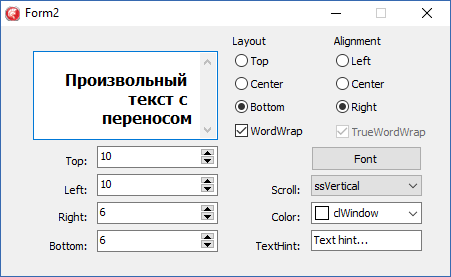
Demo Application Window
Epilogue
In the sources, the link to which is below, all auxiliary functions used in the text are presented.
The compiler version is determined by the {$ I} include file pro_param.inc.
Because, due to the specifics of the work, I adhere to the concept of one module - different versions, the presented sources are compiled in Delphi 7, Delphi XE 7 and Delphi 10.1 Berlin. For the simple reason that I purchased Delphi 7, and Delphi 10.1 Berlin is a free license for commercial products. And the customer recently wants to be completely “white”. Therefore, I do not use any paid libraries.
I hope the material will help in situations of varying severity.
Download:
xIPMemo
Demo D7, XE 7