December 7, 2017 at 14:41
When a butler is a victim

Introduction
At first, a little theory. We are developing PVS-Studio - a static code analyzer for C, C ++ and C #. For internal testing of our product, we use a variety of tools and techniques: Unit and UI tests of Visual Studio, a joint review of the code, specialized tester applications. I will dwell in more detail on the last point.
When developing new diagnostic rules, as well as when changing the internal mechanisms of the analyzer, it is always necessary to understand how exactly the changes made affected the quality of the analysis. To solve this problem, we carry out test runs of the analyzer on a set of large open projects. About 150 projects are used for C / C ++ code, 52 - for C #. The tester for analyzing C / C ++ projects in Windows is called SelfTester. Further, we will focus on this tool. There is also a specialized system for Linux, but now it will remain behind the scenes.
All work is done on the build server with Windows 10. As the build system, we use Jenkins, which is configured to regularly run nightly, including testers. Starting Jenkins itself is done from the cmd-file with the command:
java -jar jenkins.war >
%JENKINS_PROJECTS%\Logs\%YYYY%.%MM%.%DD%_%HH%.%MI%.log 2>&1
The JENKINS_PROJECTS variable sets the location of the Jenkins project folder on the local drive. The variables YYYY , MM , DD , HH and MI contain, respectively, the date and time at the time of execution. Thus, after starting Jenkins, the output of its console will be redirected to a file with the name of the form:
2017.11.08_17.58.logThe cmd file starts using the Windows task scheduler. Running Jenkins as a Windows service turned out to be inapplicable to us, since in this case there were problems in the work of the Visual Studio UI tests: the service does not have a desktop. So the run chain looks like this:
Windows Task Manager -> cmd.exe -> java.exeSo, having familiarized ourselves with a brief introduction, we turn to the question of what went wrong.
Problem
About six months ago, we began to notice that from time to time Jenkins closes during nightly builds. As a result, you had to start it manually, check the logs and restart some tasks. The problem was reproduced quite regularly. The investigation was decided to start with a closer look at the behavior of Jenkins, because it was he who did all the "dirty work" and was the first to be suspected. Yes, that butler.
Jenkins
First of all, the configuration and settings of Jenkins tasks were checked. The audit did not reveal anything serious. Moreover, if a mistake had been made, for example, in the order, priority or time of launching tasks, the problem would probably have manifested itself differently. And it is unlikely that Jenkins will crash due to configuration errors.
As a temporary measure, the Windows Scheduler task was reconfigured to run Jenkins periodically every 30 minutes. To protect against restarting, a check was made for the presence of an already running process.
The next step is to study the logs of the Jenkins console. As you probably remember, with us they are saved in the % JENKINS_PROJECTS% \ Logs folder, and the file names contain the timestamp of the creation (in fact, the Jenkins restart time). After some time, we examined the contents of this folder and, as expected, found a fairly large number of files there. This indicated that Jenkins was continuing to restart. At the same time, the Jenkins console logs themselves did not contain anything criminal. But the problem has acquired a slightly different character: part of the nightly tests have ceased to be performed. They just did not start. And those that started often ended up with errors.
All this spoke in favor of the fact that Jenkins himself was probably not to blame. Someone from outside interferes with his work, "killing" the java.exe process.

Windows
Windows was chosen as the next suspect. Well, really, who else but the operating system should be responsible for the unplanned termination of processes. Perhaps the system reboots after installing the updates, or for some reason closes only the java.exe process. This is possible when someone prevents a restart and it is not performed, but the system has already managed to kill part of the processes. One way or another, but the analysis of Windows logs yielded no results. Yes, sometimes the system really rebooted, but everything happened as usual. And the time and place of the "crime" did not coincide.
At about the same time that we were conducting our investigation, another incident happened, which did not immediately attach much importance. One of our nights, our build server “crashed” due to the occurrence of BSOD. An automatic reboot did not happen, so in the morning we could see a very bleak picture.
To analyze the memory dump, Windows Debugger (WinDbg) was used. The utility was found along the path "C: \ Program Files (x86) \ Windows Kits \ 10 \ Debuggers \ x64 \ windbg.exe". The dump was located on the standard path "C: \ Windows \ MEMORY.DMP". After analyzing the dump in WinDbg, the reason and the culprit of the BSOD was discovered:
CRITICAL_PROCESS_DIED (ef)
CRITICAL_PROCESS:  svchost.exe
....
FAILURE_BUCKET_ID:
0xEF_svchost.exe_BUGCHECK_CRITICAL_PROCESS_TERMINATED_BY_
SelfTester.exe_6771c7c0
As you understand, forcibly closing process instances of svchost.exe usually leads to BSOD. You can check.
Yes, our impeccable SelfTester tool crashed Windows. But since this was the first such incident in the long history of the tester, and the last changes to its code were made a long time ago, it was decided to consider that "it seemed to us."
Meanwhile, the investigation went on as usual. To find out the culprit in completing the java.exe process, a standard Windows utility was used to configure the Global Flags registry keys. Among other things, it allows you to set the monitoring mode for the completion of the specified process with recording the event in the system log:
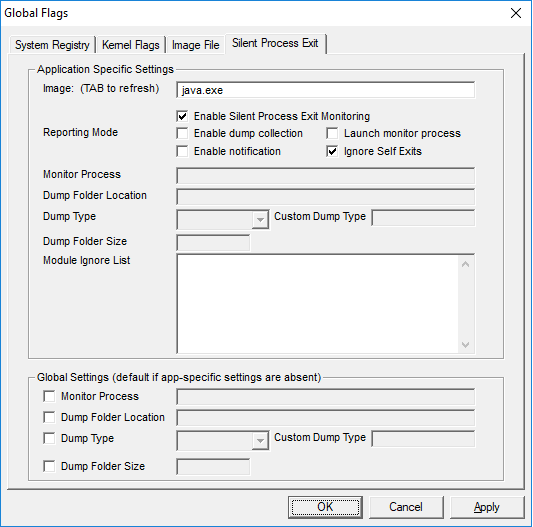
If the process is forced to end by a third-party process, the Application log should contain an event with Event ID = 3001 from the Process Exit Monitor source.
As often happens in such cases, it was worth setting traps, as the production immediately hid. Over the next couple of weeks, the server worked perfectly, the tasks were successfully completed, and the Windows log did not contain the required events.
Finally, one fine morning the problem recurred, and the following entry appeared in the system log:
The process' C: \ Program Files \ java \ jre1.8.0_102 \ bin \ java.exe 'was terminated by the process' D: \ SelfTester \ SelfTester.exe 'with termination code 0. The creation time for the exiting process was 0x01d3541edc4f867b.
SelfTester again. It turns out that it was his fault that the java.exe process ended, which generated it. Incredible treachery.

Selftester
Finding the culprit is only half the battle. Now you need to understand what exactly is happening and how to fix it. To do this, we will understand the mechanisms of the tester.
To analyze each C ++ project, the tester starts the analyzer process (PVS-Studio_cmd.exe) with parameters. Upon completion of the analysis, the tester does not directly wait for the completion of the process, but responds to the event that the verification report (plog) has been created, and then, just in case, it completes the analyzer process and its child processes. Probably, at this moment something unexpected is happening.
In fact, this algorithm of work is a legacy of the past and now it is no longer necessary. Earlier, for analysis, devenv.exe with parameters was launched. The check was performed by the PVS-Studio plugin for Visual Studio. In the course of this, many child processes were generated that needed to be completed.
To understand what exactly is happening, it was necessary to add logging of the process termination mechanism. After studying the logs, it was possible to find out the following. The child processes for PVS-Studio_cmd.exe in the tester are searched by the following WMI request:
SELECT * FROM Win32_Process WHERE ParentProcessId={0}The problem is that at the time this request is executed, the process may no longer exist. He honestly worked and completed, but the tester does not know this. Sometimes a situation arises when the process ID matches (was reused) with the process that originally spawned cmd.exe, on which java.exe hangs (the Task Scheduler process). At the same time, Windows remembers the ID of the parent processes, even if they have already completed. So we get this cmd.exe and terminate it, as well as its child processes (recursively).

Decision
The problem was solved by adding two conditions to the tester code under which it is impossible to terminate child processes:
- The parent process has already completed.
- The parent process did not end, but it started later than its alleged children. In this case, he could reuse the ID of an already completed process.
Conclusion
So, the investigation is completed. All suspicions are removed from the innocent, and the perpetrators are found and severely punished (corrected).
In conclusion, I want to note that the described situation is, in my opinion, a good example of how even a small oversight can lead to a difficult to reproduce error.
We are not shy to admit our mistakes and, I think, readers were interested to get acquainted with one of them.
A codeless code and successful builds!