 November 8, 2017 at 11:45
Bitrix24 - CRM or more?
Often the best decisions come from where they are not expected at all. One has only to look at ordinary things from a slightly different angle, as soon as the “thought lamp” lights up above your head.
Exactly the same story happened with our team, when we received the task of developing a system for managing the class schedule and accounting for college students.
Looking ahead, as a result, we managed to solve the problem by developing applications for the cloud CRM Bitrix 24.
Using our case study as an example, we would like to show how this crm can be used, at first glance, not quite for standard purposes. We dare to hope that our experience will be useful, faced with the task of custom integration of bitrix24 and at least inspire for such solutions.

The project became a logical continuation of the site that we launched for the client earlier.
The site already had a schedule, but lacked convenient management and an internal, personalized space for participants in the learning process - teachers and students.
Having collected the basic requirements, we got approximately the following list:
Bitrix24, frankly, is our work environment. We know it well from the point of view of the user. Here we conduct our projects, exchange documents, conduct communications with customers, conduct our tasks in the tracker.
Also, by the time the task arrived, we had some experience in developing applications for b24:
But more or less serious integrations, except for kanban boards from the Sibiriks company, we did not know at that time and did not realize.
Applications in bitrix24 is your development, which can be hosted and run on your site, but built into the bitrix24 portal via Iframe. This integration allows the use of Oauth 2.0 authorization and provides work with portal data through the API. In this case,
Bitrix24 will be a “black box”, you can implement your solutions as you wish. For example, we got React + Laravel on the stack, more near the end of the article.
An application in bitrix24 is a solution to problems that cannot be solved by means of the functionality existing in the service.
That is, if you, for example, are not satisfied with the “basic” display of the list of tasks or any other entity, you can implement your own application in which you can display the list of tasks as you need. If you need to automatically carry out any manipulations with the data of bitrix entities or their characteristics, this can also be solved by means of custom solutions.
But bitrix24 is first of all a CRM system, where does the portal for automating the educational process come from?
Using bitrix24 as a platform for our task, in fact, looked attractive.
Almost “out of the box” we got a solution to the problem of communication between students and teachers through the use of functional working groups. You just had to look at the working groups from the right angle.
The group can be educational - to unite the curator-teacher and students, allowing the exchange of local information for the group.
A group can be subject - physics, chemistry ... etc. Thanks to the capabilities of b24, in such a group you can easily organize a “knowledge domain” of information on a subject. For this, there is all the necessary functionality:
The presence of a platform for developing chatbots, which are automatically available on the mobile version of the portal, immediately suggested the creation of at least a bot that would provide information on the lesson schedule and inform about its changes, in addition to sms notifications.
Under those requirements that remained uncovered by the platform’s functionality, we decided to develop iframe applications.
There were no working examples of such an implementation to show "it will be something like this." Therefore, a small sketch of the concept was created. We have compiled a document briefly describing how we see the implementation of the project on bitrix24. This played an important role in the decision to develop.
We have defined the requirements and tools, now we can consider the development process itself.
The sequence of description will be as follows:
So let's go!
As we said earlier, we have three separate entities. A functioning website, a bitrix CRM system and an iframe application that we are going to develop. The data contained in these entities can be schematically depicted as the following mind map.
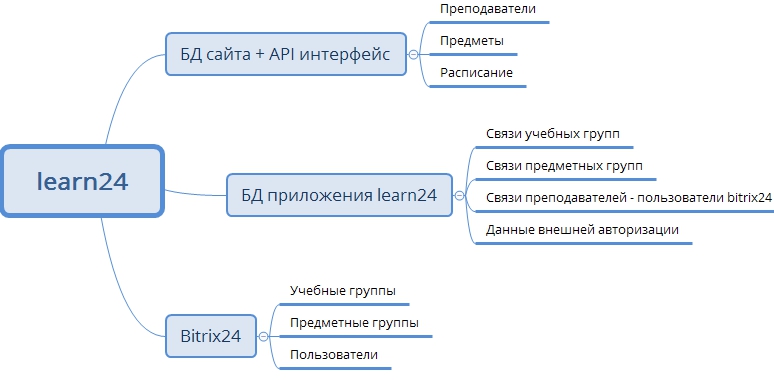
We needed to “make friends” these heterogeneous entities and solve the issue of data integrity.
Since the database on all directories and the schedule itself has already been created and operated on the site, we decided to simply implement the REST API for it so that this data can be obtained in our bitrix24 application.
A separate application was implemented for each of the user roles. Under the scheme will be described why this was done.
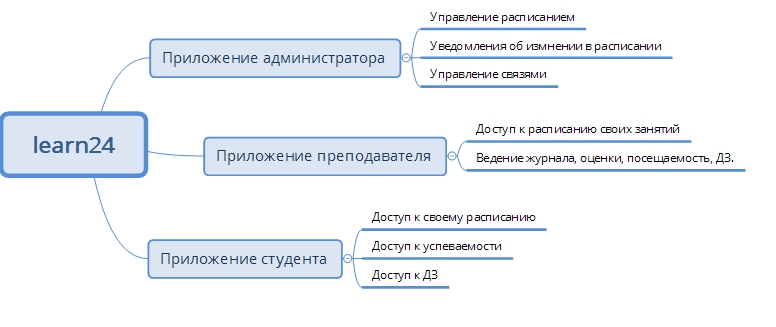
We decided to distribute the functionality in this way, since if the application were one, then we would have to implement the access distribution logic. Students do not need access to the journal with grades, the teacher does not need to manage the schedule, etc. In general, this is not a terrible task, but we use an environment in which it is possible to configure an access policy for applications at the level of user groups out of the box. In addition, we see bitrix24 as a development platform - why not use existing functionality.
At present, there are 4 departments in the application: portal administrators, Teachers, Students and Chat Bots.

Initially, before detailing the requirements and before deciding on the implementation of a full-fledged application, the task was to change the schedule management system, since the implementation on the site turned the work on scheduling into hellish torments and took a lot of time.
In fact, this is adding / editing records to the database via the bitrix info-block interface.
That is, to place an activity in the schedule, it was necessary to create an element in the table interface.
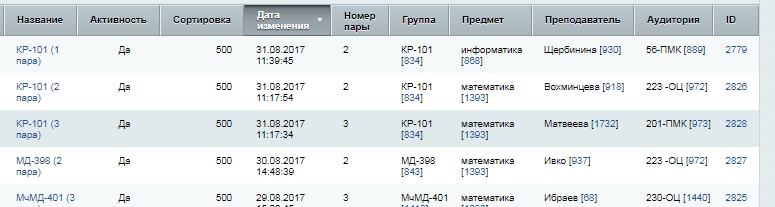
In the process of finding a more convenient solution, we thought - what could be more convenient than editing the schedule in the interface that looks like a schedule?
And they developed a functional prototype.
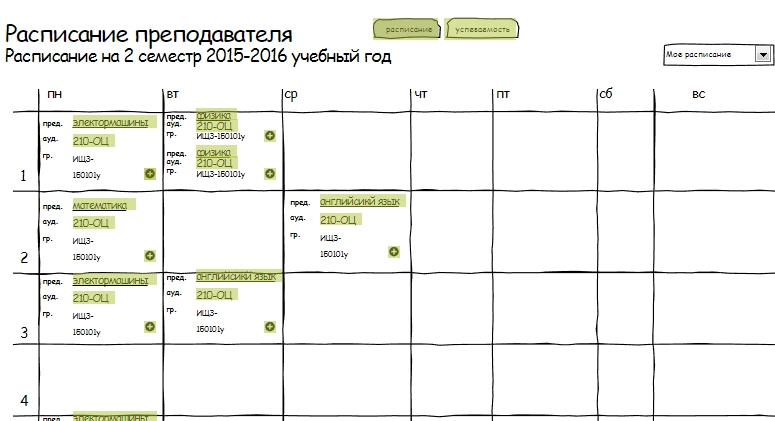
And then they added colors, drag & drop, sidebars and notifications. And they drew an owl.
For a more detailed view of the application, we recorded a small screencast , it displays part of the solution’s functionality.
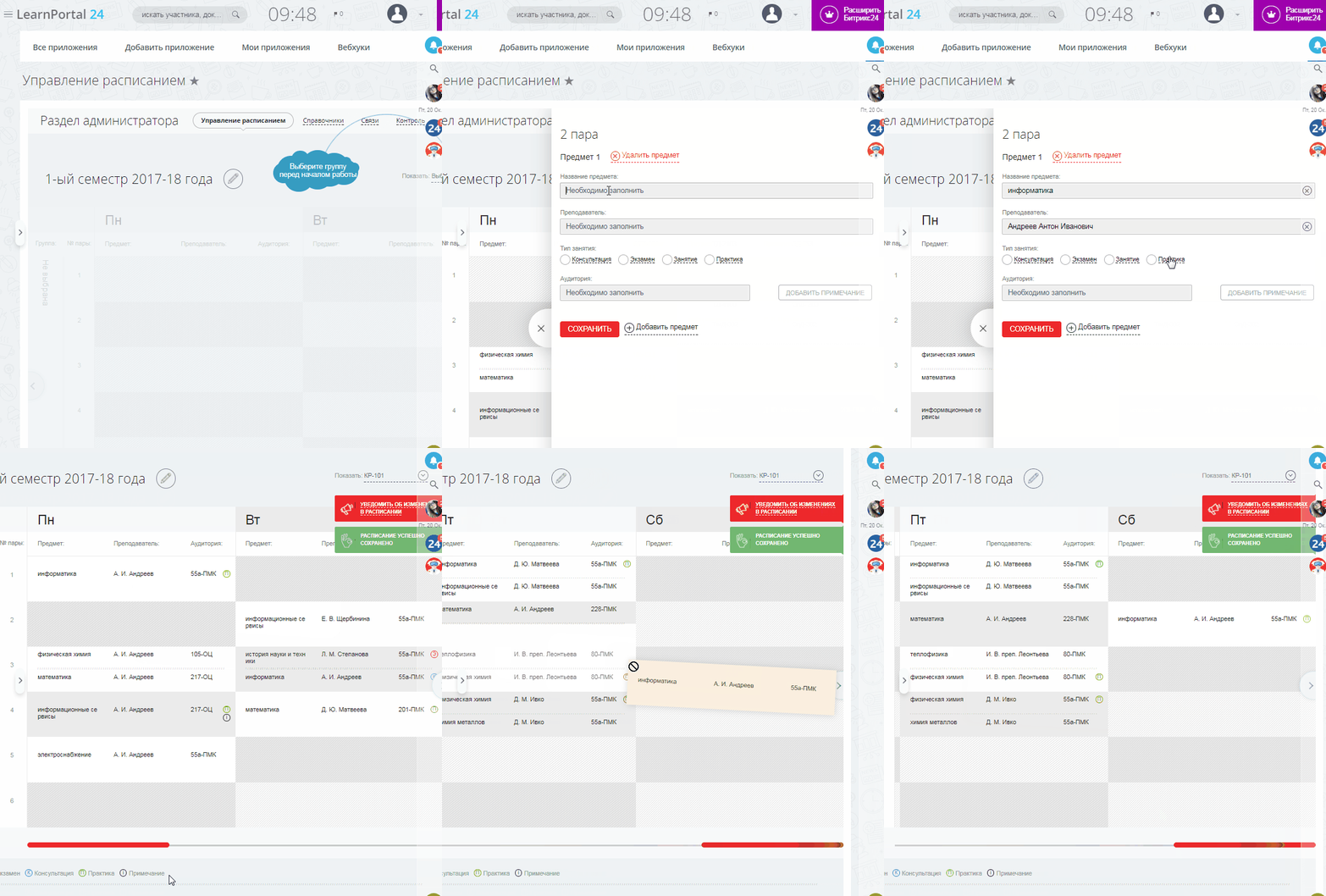
Functionality, which is implemented:
The requirements also included sending notifications in case of a schedule change. It is said - implemented. Notifications are delivered by the chatbot (also available in the mobile application) via the sms gateway and are posted to the group’s news feed (well, for sure).
By default, notifications are sent to students and teachers whose groups have changed, but the administrator can also select the list of recipients. The texts of the notifications themselves are generated according to the template, but you can easily make changes to them.

Another problem that we solved in the admin interface is mapping, a combination of teachers and groups of the site with teachers and groups in Bitrix. It is in the social. bitrix24 groups are determined by what schedule to show the teacher what the student sees. That is, data in the API, and filter them according to data from bitrix24. To do this, we implemented a special CRUD interface in which these dependencies were affixed.
The administrator, to create a connection, can choose a teacher from existing ones on the site

or invite a new one by sending him a notification by email

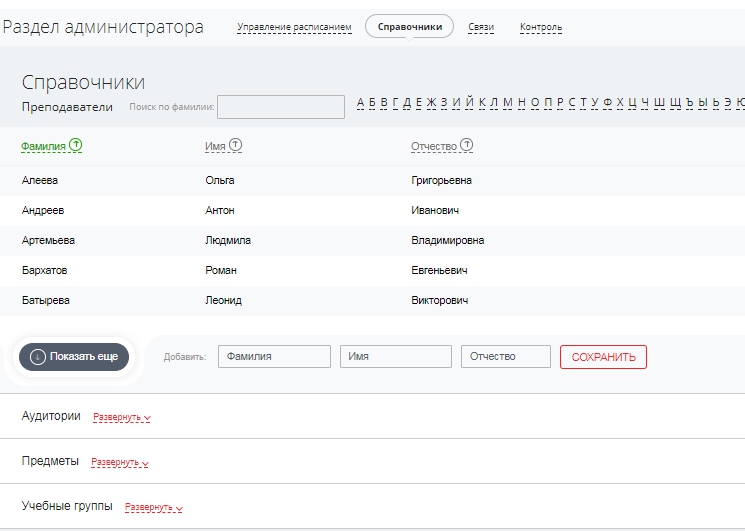
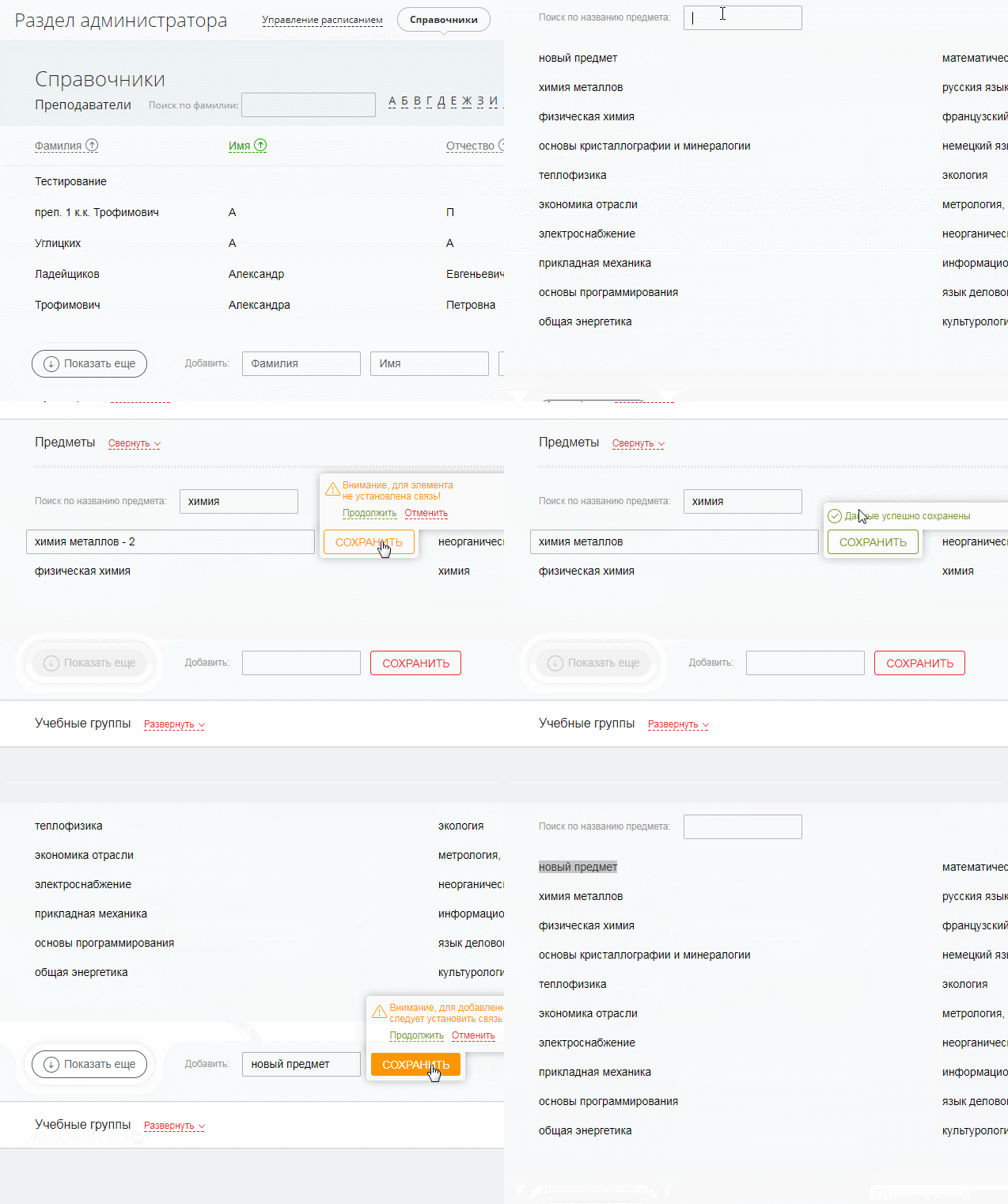
Also, the administrator's tasks include managing reference data, from which the schedule is “collected” - subjects, teachers, classrooms. In general, this work can be done in the admin interface of the site, but for the administrator to be in a single environment, we implemented the interface directly in the application.
For the teacher, we developed an application that consists of three main parts: Class Schedule, Journal and Student Achievement.
On the Class Schedules page, the teacher can view his schedule, with a filter by the groups in which he teaches. In addition, the teacher can create an unlimited number of journal entries of a certain type on the basis of a schedule entry (lecture, seminar, laboratory work, practice, homework, etc.).
In the Journal, the teacher can record information about grades, student attendance and set homework.
Creating, deleting, editing classes, as well as chat with a student, look like this:


The most important thing a student needs to know is class schedule, academic performance, and homework. By analogy with the administrator and teacher interfaces, a page for viewing the class schedule was created. Appearance is slightly changed and excess functionality is removed.

On the performance page, the student looks at current grades and the average mark in subjects. There is also a semester filter.

For the time being, we have assigned the chat bot simple duties of sending a message about a change in the schedule and sending the schedule grid on request. You can request a schedule for a specific day or for the entire week. The chat bot, as a service available in the chat rooms of the portal, is automatically available on the mobile version of the portal - it is extremely convenient. Thus, we provided easy access to the schedule from mobile devices.

There was a great temptation to use such an image as a chatbot icon.

But we did not, considering that it would be too ironic.
We are jealous of the result of our work, application errors and user problems when working with our application hurt our hearts.
To ensure cardio-security and high-quality operation of the application, we apply a set of measures.
We use 3 independent servers for development testing and operation.
The git-flow model is in development .
For auto testing, we use codeception , test user scripts and api data from the site.
To build the application on staging and production, we use gitlab-ci, placing the files in the necessary application directories (we got a few of them in fact, see above), we start the front-end npm run build, composer and auto tests.
No matter how we try to cover everything with tests it is impossible, there will always be exceptional situations. One way or another, mistakes cannot be avoided. If they cannot be avoided, then surely you can somehow control it?
Probably, we are all used to the fact that if an error suddenly occurs on the server, then it is written to the logs and after that it can be diagnosed. But what to do with the mistakes that occur on the front end? Everything that happens with the client remains with him. If the error is critical enough, then you can find out about it through angry customer feedback. This is clearly not our method.
To catch errors that may occur during the production process of the application, we use and terribly rejoice at this service https://sentry.io. This service builds both client and server errors. All errors are tracked and must be resolved.
As a bonus, we set up integration in slack, so that at the moment of a precedent, a notification will appear in the project channel. Thanks to this, we can find out about errors before the customer creates a ticket in the support system, and take prompt action if the situation is critical.
Zabbix is used to track the production status of a machine . All basic machine parameters are monitored from availability to resource use.
When forming site-portal links, creating a schedule, conflicts can arise that violate data integrity. For example, there may be a situation when one teacher is mistakenly assigned several classes on the same day and on the same couple.
Man is not a robot. You definitely can’t keep track of everything. To solve such problems, we collected the “Control” diagnostic screen, in which we placed a list of checks and their results in the form of a check list.

From a technical point of view, the whole project is quite complicated, so we approached the choice of technologies thoroughly. As a server programming language, we decided to use PHP, coupled with MySQL DBMS. This bundle is very popular in the world of web development, moreover, it is well known to our team.
Since the project is based on the use of CRM Bitrix 24, a lot is tied to the use of the portal API. Calling various methods will be used very often, therefore, this part should be simplified to the maximum. For this purpose, we decided to use bitrix24-php-sdk , which provides a convenient object approach. At the same time, we are participating a bit in the development of this library.
Writing native PHP in 2017 is far from the best option, especially for a project of this size. Therefore, it was necessary to choose a framework. Of the requirements - the presence of MVC, ORM, migrations and seeds, work with queues. Many Laravel, YII2, Zend, Phalcon, etc. little-known frameworks are suitable for these requirements. We decided to choose Laravel, because our team had more experience working with him.
From the frontend's point of view, choosing a good instrument was no less important. We focused on the React / Redux / React Router bundle.
At the heart of React is a component approach, which is very suitable for us. It is convenient to implement one component and then reuse it in several places of the application.
So, for example, it was with a component for displaying a class schedule. In general terms, it is the same for both the student and the administrator and teacher. All distinctive features are well configured through the properties of the components.
React also has a huge community and a large number of different implemented components. The react dnd component helped us a lot in implementing the class transfer mechanism.
To write styles, we used the Less preprocessor, which significantly reduces the number of lines of CSS code through the use of hierarchical structures, impurities and variables.
We are responsible for the assembly of the project Webpack. In fact, the choice of the collector was not so fundamental, since we did not have any special moments or requirements.
Working on the project, we gained experience that is difficult to describe in a single post. The disclosure of individual issues is more reasonable to do in separate publications.
We have some content plan for the near future, in particular we would like to tell and share the boilerplate on the laravel-react-bitrix24 api bunch that we formed in the process of work. If some points arouse interest in the community and cannot be revealed as part of the comments, we will be happy to share our knowledge and experience in new materials.
Exactly the same story happened with our team, when we received the task of developing a system for managing the class schedule and accounting for college students.
Looking ahead, as a result, we managed to solve the problem by developing applications for the cloud CRM Bitrix 24.
Using our case study as an example, we would like to show how this crm can be used, at first glance, not quite for standard purposes. We dare to hope that our experience will be useful, faced with the task of custom integration of bitrix24 and at least inspire for such solutions.
Task
The project became a logical continuation of the site that we launched for the client earlier.
The site already had a schedule, but lacked convenient management and an internal, personalized space for participants in the learning process - teachers and students.
Having collected the basic requirements, we got approximately the following list:
- schedule management system
- Sending schedule change sms
- attendance accounting, performance journal
- communication between students and teachers, including exchange of documents
Bitrix24, frankly, is our work environment. We know it well from the point of view of the user. Here we conduct our projects, exchange documents, conduct communications with customers, conduct our tasks in the tracker.
Also, by the time the task arrived, we had some experience in developing applications for b24:
- we made our application that solves the tasks of monitoring the load on technical support
- released the first commercial chat bot for b24
- put together an end-to-end analytics solution using google analytics and call tracker
But more or less serious integrations, except for kanban boards from the Sibiriks company, we did not know at that time and did not realize.
Applications in bitrix24 is your development, which can be hosted and run on your site, but built into the bitrix24 portal via Iframe. This integration allows the use of Oauth 2.0 authorization and provides work with portal data through the API. In this case,
Bitrix24 will be a “black box”, you can implement your solutions as you wish. For example, we got React + Laravel on the stack, more near the end of the article.
An application in bitrix24 is a solution to problems that cannot be solved by means of the functionality existing in the service.
That is, if you, for example, are not satisfied with the “basic” display of the list of tasks or any other entity, you can implement your own application in which you can display the list of tasks as you need. If you need to automatically carry out any manipulations with the data of bitrix entities or their characteristics, this can also be solved by means of custom solutions.
But bitrix24 is first of all a CRM system, where does the portal for automating the educational process come from?
Using bitrix24 as a platform for our task, in fact, looked attractive.
Almost “out of the box” we got a solution to the problem of communication between students and teachers through the use of functional working groups. You just had to look at the working groups from the right angle.
The group can be educational - to unite the curator-teacher and students, allowing the exchange of local information for the group.
A group can be subject - physics, chemistry ... etc. Thanks to the capabilities of b24, in such a group you can easily organize a “knowledge domain” of information on a subject. For this, there is all the necessary functionality:
- file storage
- news feed
- wiki
- chats
The presence of a platform for developing chatbots, which are automatically available on the mobile version of the portal, immediately suggested the creation of at least a bot that would provide information on the lesson schedule and inform about its changes, in addition to sms notifications.
Under those requirements that remained uncovered by the platform’s functionality, we decided to develop iframe applications.
There were no working examples of such an implementation to show "it will be something like this." Therefore, a small sketch of the concept was created. We have compiled a document briefly describing how we see the implementation of the project on bitrix24. This played an important role in the decision to develop.
Appendix 24
We have defined the requirements and tools, now we can consider the development process itself.
The sequence of description will be as follows:
- entity description
- application structure description
- admin interface
- teacher interface
- student interface
- stack of used technologies and processes
So let's go!
Key Entities
As we said earlier, we have three separate entities. A functioning website, a bitrix CRM system and an iframe application that we are going to develop. The data contained in these entities can be schematically depicted as the following mind map.
We needed to “make friends” these heterogeneous entities and solve the issue of data integrity.
Since the database on all directories and the schedule itself has already been created and operated on the site, we decided to simply implement the REST API for it so that this data can be obtained in our bitrix24 application.
Bitrix24 side solution structure
A separate application was implemented for each of the user roles. Under the scheme will be described why this was done.
We decided to distribute the functionality in this way, since if the application were one, then we would have to implement the access distribution logic. Students do not need access to the journal with grades, the teacher does not need to manage the schedule, etc. In general, this is not a terrible task, but we use an environment in which it is possible to configure an access policy for applications at the level of user groups out of the box. In addition, we see bitrix24 as a development platform - why not use existing functionality.
At present, there are 4 departments in the application: portal administrators, Teachers, Students and Chat Bots.
Back end structure
To implement the scheme of 3 applications at the backend level, we have formed the following requirements for ourselves:
- Each application must have its own unique url (entry point)
- Each application must have a unique identifier and access key (generated by bitrix24 when creating the application, required when working)
- Using a single git repository
- All three applications must have a common database (all three applications work with the same entities)
As a result, we got:
- The code for each application is located in a separate virtual host directory
- All characteristic, configuration information is stored in each application's .env file
- Under git, we host only the admin application. Student and teacher application hosts contain a minimum of entities, only to “get” laravel, which is used as a framework on the backend. At the same time, entities that are stored on the main host and are needed in the work of all applications are simply linked by symlink. Each application has its own bundle js and css, located, again, in the administrative application directory and connected via the entry points of the corresponding applications.
- All 3 applications have one database. So that there is no conflict with migrations and seeds, the database directory is linked from the student and teacher hosts to the directory under git in the administrator application.
Admin interface
Work with the schedule
Initially, before detailing the requirements and before deciding on the implementation of a full-fledged application, the task was to change the schedule management system, since the implementation on the site turned the work on scheduling into hellish torments and took a lot of time.
In fact, this is adding / editing records to the database via the bitrix info-block interface.
That is, to place an activity in the schedule, it was necessary to create an element in the table interface.
In the process of finding a more convenient solution, we thought - what could be more convenient than editing the schedule in the interface that looks like a schedule?
And they developed a functional prototype.
And then they added colors, drag & drop, sidebars and notifications. And they drew an owl.
For a more detailed view of the application, we recorded a small screencast , it displays part of the solution’s functionality.
Functionality, which is implemented:
- create \ edit \ delete lesson
- changing the place of employment in the schedule grid
- creation of paired classes in the framework of one pair
The requirements also included sending notifications in case of a schedule change. It is said - implemented. Notifications are delivered by the chatbot (also available in the mobile application) via the sms gateway and are posted to the group’s news feed (well, for sure).
By default, notifications are sent to students and teachers whose groups have changed, but the administrator can also select the list of recipients. The texts of the notifications themselves are generated according to the template, but you can easily make changes to them.
How it works
Since the process of sending a large number of messages can be delayed, we have compiled the implementation of sending notifications based on the gearman task manager . That is, there are several workers launched by the background who are in a constant state of readiness to accept the task for sending, be it sms or a chatbot message.
So we got:
- control over resources - there are as many “wokers” hanging as we can afford in terms of resources and tasks
- speed of work - due to the "parallel" execution we can process quickly a large number of messages
- control over sending messages - in case of a delivery error, we can track the status of the task and, for example, initiate a resending
CRUD Connections
Another problem that we solved in the admin interface is mapping, a combination of teachers and groups of the site with teachers and groups in Bitrix. It is in the social. bitrix24 groups are determined by what schedule to show the teacher what the student sees. That is, data in the API, and filter them according to data from bitrix24. To do this, we implemented a special CRUD interface in which these dependencies were affixed.
The administrator, to create a connection, can choose a teacher from existing ones on the site
or invite a new one by sending him a notification by email
Work with directories
Also, the administrator's tasks include managing reference data, from which the schedule is “collected” - subjects, teachers, classrooms. In general, this work can be done in the admin interface of the site, but for the administrator to be in a single environment, we implemented the interface directly in the application.
Notifications
To inform the user about various events, the application uses about 25 notifications of 4 types:
- success
- warning
- pending
- error
We could limit ourselves to one “placement” of showing notifications - the upper right corner, but unfortunately (or maybe even fortunately) we ran into limitations of embedded Iframe-applications.
The standard height of the Iframe block on the bitrix portal was about 800px; it was not possible to fit anything sensible on such a scrap. When this value is exceeded, the iframe block has its own vertical scrollbar. Two Scrollbar on one page? - “Too much!”. Fortunately, the bitrix library had a built-in fitWindow method, which stretches the iframe block according to the size of its contents.
We got rid of the second scroll, but also the possibility of using fixed positioning. And so we added notifications next to the source of their initiation.
And here is what they look like:
An error occurred while saving the teacher’s record
Successfully saving the subject name
An attempt to remove something important
With a long request, the button pending-state appears.
The use of such notifications has a very positive effect on user perception, because the application has become more lively and responsive.


Teacher interface
For the teacher, we developed an application that consists of three main parts: Class Schedule, Journal and Student Achievement.
On the Class Schedules page, the teacher can view his schedule, with a filter by the groups in which he teaches. In addition, the teacher can create an unlimited number of journal entries of a certain type on the basis of a schedule entry (lecture, seminar, laboratory work, practice, homework, etc.).
In the Journal, the teacher can record information about grades, student attendance and set homework.
Creating, deleting, editing classes, as well as chat with a student, look like this:
Student interface
The most important thing a student needs to know is class schedule, academic performance, and homework. By analogy with the administrator and teacher interfaces, a page for viewing the class schedule was created. Appearance is slightly changed and excess functionality is removed.
On the performance page, the student looks at current grades and the average mark in subjects. There is also a semester filter.
Chat bot
For the time being, we have assigned the chat bot simple duties of sending a message about a change in the schedule and sending the schedule grid on request. You can request a schedule for a specific day or for the entire week. The chat bot, as a service available in the chat rooms of the portal, is automatically available on the mobile version of the portal - it is extremely convenient. Thus, we provided easy access to the schedule from mobile devices.
There was a great temptation to use such an image as a chatbot icon.
But we did not, considering that it would be too ironic.
Quality control
We are jealous of the result of our work, application errors and user problems when working with our application hurt our hearts.
To ensure cardio-security and high-quality operation of the application, we apply a set of measures.
Assembly and tests
We use 3 independent servers for development testing and operation.
The git-flow model is in development .
For auto testing, we use codeception , test user scripts and api data from the site.
To build the application on staging and production, we use gitlab-ci, placing the files in the necessary application directories (we got a few of them in fact, see above), we start the front-end npm run build, composer and auto tests.
Error control
No matter how we try to cover everything with tests it is impossible, there will always be exceptional situations. One way or another, mistakes cannot be avoided. If they cannot be avoided, then surely you can somehow control it?
Probably, we are all used to the fact that if an error suddenly occurs on the server, then it is written to the logs and after that it can be diagnosed. But what to do with the mistakes that occur on the front end? Everything that happens with the client remains with him. If the error is critical enough, then you can find out about it through angry customer feedback. This is clearly not our method.
To catch errors that may occur during the production process of the application, we use and terribly rejoice at this service https://sentry.io. This service builds both client and server errors. All errors are tracked and must be resolved.
As a bonus, we set up integration in slack, so that at the moment of a precedent, a notification will appear in the project channel. Thanks to this, we can find out about errors before the customer creates a ticket in the support system, and take prompt action if the situation is critical.
Monitoring
Zabbix is used to track the production status of a machine . All basic machine parameters are monitored from availability to resource use.
Diagnostics
When forming site-portal links, creating a schedule, conflicts can arise that violate data integrity. For example, there may be a situation when one teacher is mistakenly assigned several classes on the same day and on the same couple.
Man is not a robot. You definitely can’t keep track of everything. To solve such problems, we collected the “Control” diagnostic screen, in which we placed a list of checks and their results in the form of a check list.
How diagnostics work
Диагностику неплохо бы запускать в ситуациях, которые потенциально могут создать проблемы, например, при формировании расписания. Можно на «месте» делать сразу проверку, но мы применили более гибкое и масштабируемое решение.
Чек-лист контроля мы планировали как расширяемый. Некоторые операции могут быть достаточно ресурсоемкими. Чтобы не блокировать работу приложения диагностикой, используя gearman, отправляем задачу на проверку в очередь, при возникновении «потенциально опасного» события и первом запуске приложения администратора.
В случае ошибки по одному из чеков мы запускаем нашего «злого робота» с настоятельной рекомендацией пройти в раздел контроля.
Диагностику мы не стали выносить в «сборочные» тесты, т.к разработчик может не решить, например, конфликт расписания.

Что мы использовали в работе
From a technical point of view, the whole project is quite complicated, so we approached the choice of technologies thoroughly. As a server programming language, we decided to use PHP, coupled with MySQL DBMS. This bundle is very popular in the world of web development, moreover, it is well known to our team.
Since the project is based on the use of CRM Bitrix 24, a lot is tied to the use of the portal API. Calling various methods will be used very often, therefore, this part should be simplified to the maximum. For this purpose, we decided to use bitrix24-php-sdk , which provides a convenient object approach. At the same time, we are participating a bit in the development of this library.
Writing native PHP in 2017 is far from the best option, especially for a project of this size. Therefore, it was necessary to choose a framework. Of the requirements - the presence of MVC, ORM, migrations and seeds, work with queues. Many Laravel, YII2, Zend, Phalcon, etc. little-known frameworks are suitable for these requirements. We decided to choose Laravel, because our team had more experience working with him.
From the frontend's point of view, choosing a good instrument was no less important. We focused on the React / Redux / React Router bundle.
At the heart of React is a component approach, which is very suitable for us. It is convenient to implement one component and then reuse it in several places of the application.
So, for example, it was with a component for displaying a class schedule. In general terms, it is the same for both the student and the administrator and teacher. All distinctive features are well configured through the properties of the components.
React also has a huge community and a large number of different implemented components. The react dnd component helped us a lot in implementing the class transfer mechanism.
To write styles, we used the Less preprocessor, which significantly reduces the number of lines of CSS code through the use of hierarchical structures, impurities and variables.
We are responsible for the assembly of the project Webpack. In fact, the choice of the collector was not so fundamental, since we did not have any special moments or requirements.
Conclusion
Working on the project, we gained experience that is difficult to describe in a single post. The disclosure of individual issues is more reasonable to do in separate publications.
We have some content plan for the near future, in particular we would like to tell and share the boilerplate on the laravel-react-bitrix24 api bunch that we formed in the process of work. If some points arouse interest in the community and cannot be revealed as part of the comments, we will be happy to share our knowledge and experience in new materials.









