 November 6, 2017 at 13:12
Strategies in Moxy (Part 2)
- Tutorial
In part 1, we figured out why strategies are needed in Moxy and in what cases it is appropriate to apply each of them. In this article, we will consider the mechanism of working strategies from the inside, we will understand in which cases we may need custom strategies, and try to create our own.
Why custom strategies are needed
Why does Moxy even support the creation of
custom strategies? When designing the library, we (I) tried to take into account all possible cases, and the built-in strategies cover them almost one hundred percent. However, in some cases, more power over the situation may be required, and we did not want to limit you. Consider one of these cases.
The presenter is responsible for choosing a business lunch, which consists of a burger and a drink.
Commands depending on the function we have are divided into the following types:
- customize the burger (add / remove cheese, choose rye / wheat bun, etc.);
- customize the drink (choose the number of tablespoons of sugar, add / remove lemon, etc.);
- Notify that the order has been shipped.
So, we want to be able to separately manage the queues of teams for a burger and for a drink. The default strategies for this will not be enough, in addition we need burger and drink! Let's invent them, but first we’ll figure out how the mechanism for applying commands is generally structured and what strategies influence.
Moxy Team Mechanics
Let's start from afar: a ViewState is created in the presenter constructor , all commands are proxied through it. ViewState contains a command queue - ViewCommands (the class that is responsible for the list of commands and strategies) and the View list . The View list may contain several Views, if you are using a presenter such as Global or Weak , or none (in a situation where your fragment has gone to the back stack).
First, let's figure out what constitutes a strategy:
public interface StateStrategy {
     void beforeApply(
        List> currentState,
        ViewCommand incomingCommand);
     void afterApply(
        List> currentState,
        ViewCommand incomingCommand);
}
This is an interface with two methods: beforeApply and afterApply . Each input method accepts a new command and the current list of commands, which will change (or remain unchanged) in the body of the method. For each command, we can get a tag (this is a line that can be specified in the StateStrategyType annotation ) and the type of strategy (see the listing below). How it changed my resolve, relying only on the information.
public abstract class ViewCommand {
    private final String mTag;
    private final Class mStateStrategyType;
    protected ViewCommand(
        String tag,
        Class stateStrategyType) {
        mTag = tag;
        mStateStrategyType = stateStrategyType;
    }
    public abstract void apply(View view);
    public String getTag() {
        return mTag;
    }
    public Class getStrategyType() {
        return mStateStrategyType;
    }
}
Let's understand when these methods will be called. So, we have the SimpleBurgerView interface , which can only add a little cheese (II).
interface SimpleBurgerView : BaseView {
    @StateStrategyType(value = AddToEndSingleStrategy::class, tag = "Cheese")
    fun toggleCheese(enable: Boolean)
}
Consider what happens when the toggleCheese method is called on the generated LaunchView $$ State class (see listing):
@Override
public  void toggleCheese( boolean p0_32355860) {
    ToggleCheeseCommand toggleCheeseCommand = new ToggleCheeseCommand(p0_32355860);
    mViewCommands.beforeApply(toggleCheeseCommand);
    if (mViews == null || mViews.isEmpty()) {
        return;
    }
    for(com.redmadrobot.app.presentation.launch.LaunchView view : mViews) {
        view.toggleCheese(p0_32355860);
    }
    mViewCommands.afterApply(toggleCheeseCommand);
}
1) The ToggleCheeseCommand command is created (see the listing below)
public class ToggleCheeseCommand extends ViewCommand {
    public final boolean enable;
    ToggleCheeseCommand( boolean enable) {
        super("toggleCheese", com.arellomobile.mvp.viewstate.strategy.AddToEndStrategy.class);
            this.enable = enable;
        }
    @Override
    public void apply(com.redmadrobot.app.presentation.launch.SomeView mvpView) {
        mvpView.toggleCheese(enable);
    }
}
2) The beforeApply method is called for the ViewCommands class for this command. In it, we get the strategy and call its beforeApply method . (see listing below)
public void beforeApply(ViewCommand viewCommand) {
    StateStrategy stateStrategy = getStateStrategy(viewCommand);
    stateStrategy.beforeApply(mState, viewCommand);
}
Hurrah! Now we know when the beforeApply method of the strategy is executed : immediately after the corresponding call to the method of ViewState and only then . Continue to dive!
In case we have View:
3) The toggleCheese method is proxied to them one by one.
4) The afterApply method is called for the ViewCommands class for this team. In it, we get the strategy and call its afterApply method.
However, afterApply is called not only in this case. It will also be called in case of a new View attachment. Let's look at this case. Attachment View calls the attachView method (View view)
Method attachView (View view) is called from the method onAttach () class MvpDelegate . That, in turn, is called quite often: from the onStart () and onResume () methods . However, the library ensures that afterApply is called once for the attached view (see the listing below).
public void attachView(View view) {
    if (view == null) {
        throw new IllegalArgumentException("Mvp view must be not null");
    }
    boolean isViewAdded = mViews.add(view);
    if (!isViewAdded) {
        return;
    }
    mInRestoreState.add(view);
    Set> currentState = mViewStates.get(view);
    currentState = currentState == null ? Collections.>emptySet() : currentState;
    restoreState(view, currentState);
    mViewStates.remove(view);
    mInRestoreState.remove(view);
}
1) The view is added to the list.
2) If it was not in this list, the view is transferred to the StateRestoring state
.
This makes it possible for the activity / view / fragment to understand that the state is being restored. The presenter has an isInRestoreState () method . This mechanism is necessary in order not to perform some actions twice (for example, starting the animation to translate the view into the desired state). This is the only presenter method that returns no void . This method belongs to presenter , because view and mvpDelegate can have several presenters and putting them in these classes would lead to collisions.
3) Next, the state is restored
It is worth noting that the afterApply method can be called several times. Pay attention to this when you write your custom strategies.
We got acquainted with how strategies work, it's time to consolidate skills in practice.
Create a custom strategy
Scheme of work
So, for starters, let's understand what kind of strategy we want to get. We agree on the notation.

This scheme is similar to the scheme from the first part, but there is an important difference in it — the tag designation appeared. The absence of a tag from the command means that we did not specify it and it accepted the default value - null
We want to implement the following strategy:
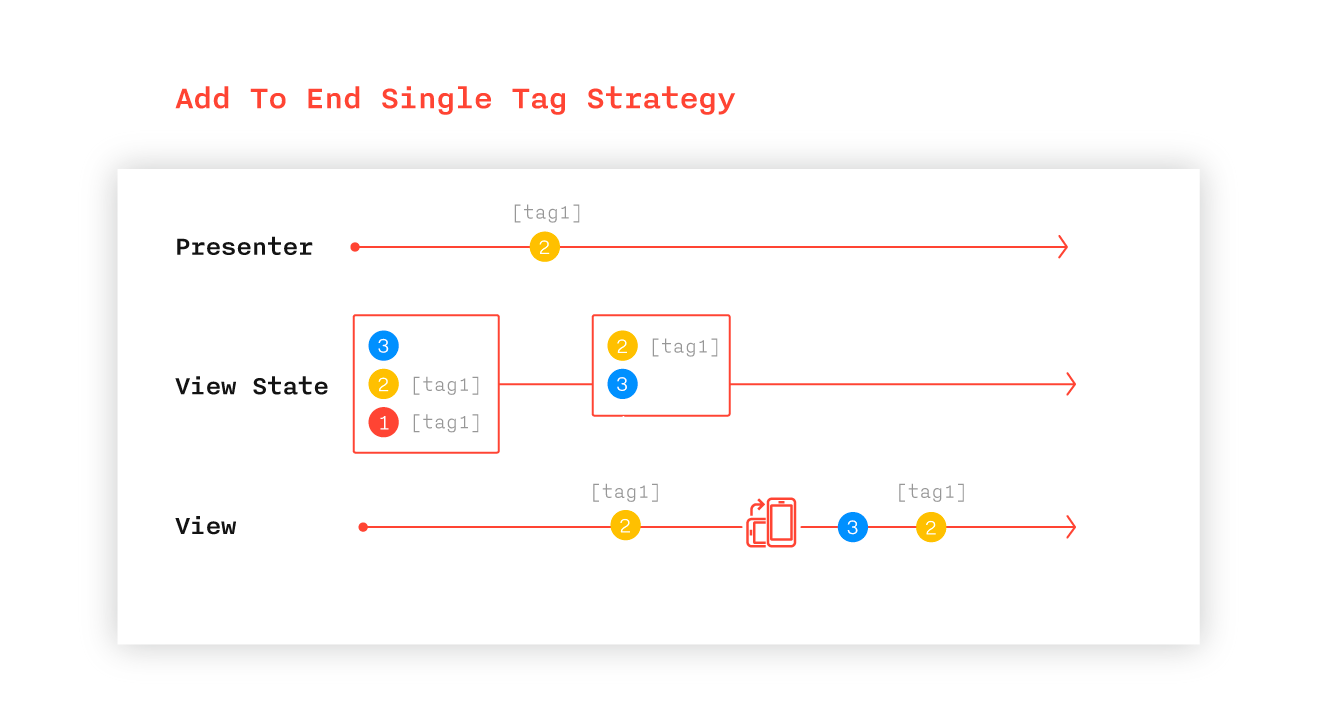
When the presenter calls command (2) with the AddToEndSingleTagStrategy strategy:
- Command (2) is added to the end of the ViewState queue.
- If any other team with the same tag was already in the queue, it is removed from the queue.
- Command (2) is applied to the View, if it is in the active state.
When you recreate the View:
- ViewState commands are sequentially applied to View
Реализация
1) Реализуем интерфейс StateStrategy. Для этого переопределяем методы beforeApply и afterApply
2) Реализация метода beforeApply будет очень похожа на реализацию аналогичного метода в классе AddToEndSingleStrategy.
Мы хотим удалить из очереди абсолютно все команды с данным тегом, т.е. удаляться будут даже команды с другой стратегией, но аналогичным тегом.
Поэтому мы вместо строчки entry.class == incomingCommand.class будем использовать entry.tag == incomingCommand.tag
В Kotlin == равносильно .equals в Java
Также нам необходимо убрать строку break, так как в отличие от AddToEndSingleStrategy у нас в очереди могут появиться несколько команд для удаления.
3) Реализацию метода afterApply оставим пустой, так как у нас нет необходимости менять очередь после применения команды.
Итак, что у нас получилось:
class AddToEndSingleTagStrategy() : StateStrategy {
    override fun  beforeApply(
            currentState: MutableList>,
            incomingCommand: ViewCommand) {
        val iterator = currentState.iterator()
        while (iterator.hasNext()) {
            val entry = iterator.next()
            if (entry.tag == incomingCommand.tag) {
                iterator.remove()
            }
        }
        currentState.add(incomingCommand)
    }
    override fun  afterApply(
            currentState: MutableList>,
            incomingCommand: ViewCommand) {
            //Just do nothing
    }
}
Вот и все, осталось проиллюстрировать, как мы будем использовать стратегию (см. листинг ниже).
interface LaunchView : MvpView {
    @StateStrategyType(AddToEndSingleStrategy::class, tag = BURGER_TAG)
    fun setBreadType(breadType: BreadType)
    @StateStrategyType(AddToEndSingleStrategy::class, tag = BURGER_TAG)
    fun toggleCheese(enable: Boolean)
    @StateStrategyType(AddToEndSingleTagStrategy::class, tag = BURGER_TAG)
    fun clearBurger(breadType: BreadType, cheeseSelected: Boolean)
    //Другие функции
    companion object {
        const val BURGER_TAG = "BURGER"
    }
}
Полный пример кода можно посмотреть в репозитории Moxy. Напоминаю, что это сэмпл и решения в нем приведены сугубо для иллюстрации функционала фреймворка
Предназначение..
Why else can you use custom strategies:
1) glue the previous commands into one;
2) change the order of execution of commands if the commands are not commutative (a • b! = B • a);
3) throw out all commands that do not contain the current tag;
4) ..
If you often use commands, but they are not in the list of defaults - write, we will discuss their addition.
You can discuss Moxy in the community chat
We are waiting for comments and suggestions on the article and the library;)
(I) hereinafter “we” are the authors of Moxy: Xanderblinov , senneco and all the guys from the community who helped with advice, comments and pull-quests. A complete list of contributors can be found here.
(II) The code in listings is written in Kotlin









