October 10, 2017 at 12:14
Announcement: Veeam Backup & Replication 9.5 New Features (and Beyond)
Veeam plans to release Update 3 for Veeam Backup & Replication 9.5 this quarter, followed by its 10th anniversary edition. This is our well-known flagship product for protecting data in a virtual environment, but recently solutions for physical machines are also gaining popularity: Veeam Agent for Microsoft Windows and Veeam Agent for Linux.
Naturally, the number of users who want to work with backups of virtual and physical machines using a single console is growing. Therefore, our engineers decided to implement this opportunity in Veeam Backup & Replication, without delay, and I'll tell you about it today. For details, welcome to cat.

I'll start with the look. Since Veeam Backup & Replication will now work with both virtual and physical machines, it was decided to move the Inventory section that previously lived in the VMs view into a separate view. It will display all the machines protected by Veeam, be it Veeam Backup & Replication or any of Veeam Agents.
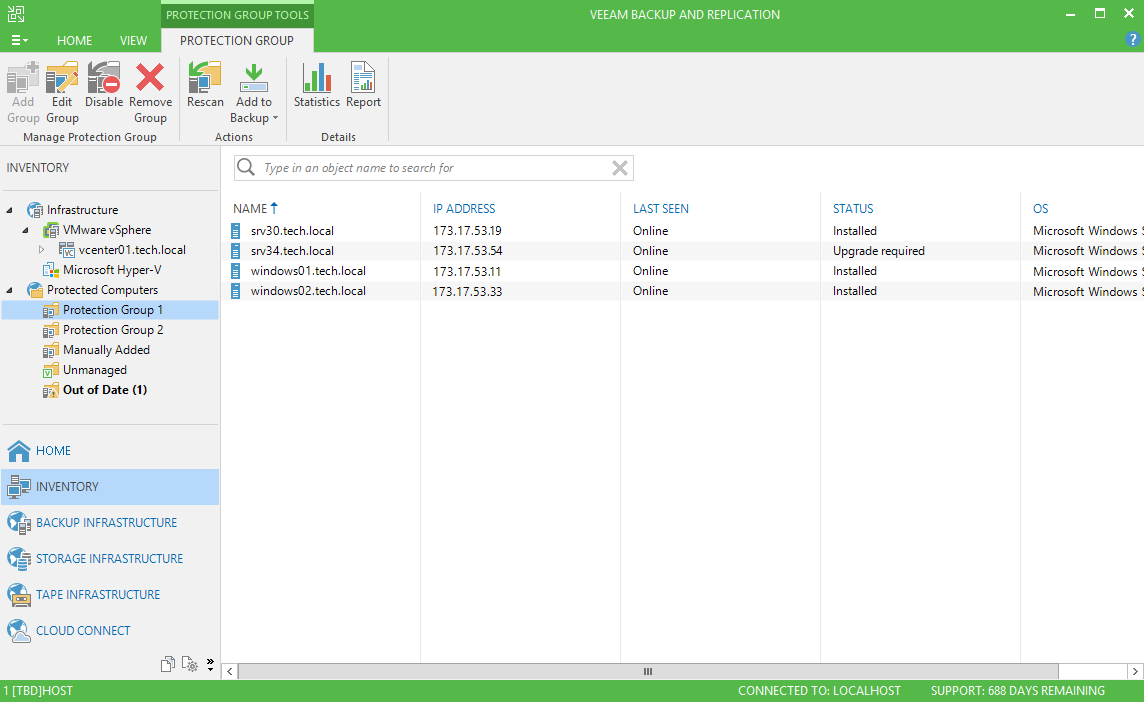
In order to provide the ability to manage and configure protection through the console, you need to create the appropriate logical containers - the so-called Protection Groups (protection groups) - and then the necessary objects will be placed there.
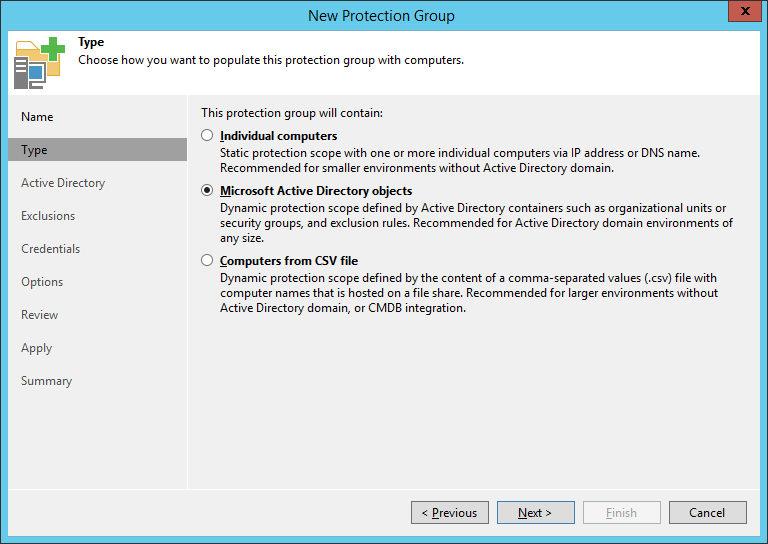
First of all, we understand the type of objects for which we will configure protection. In the Type step of the Create Defense Group wizard, there are several options:
Since the organizations most likely will most likely use groups for Active Directory objects, we will dwell on them in more detail first.
If the Microsoft Active Directory objects protection group type was selected , the Veeam Backup & Replication server will automatically request information about the Active Directory structure of its home domain and display it.
Note: You can change the default setting and display, for example, a subdomain or another domain in general as a selection area. You can also exclude individual objects from the selection area - for example, you can exclude computer accounts that have been turned off during the last month, or you can exclude an entire OU.
So, we indicated from which selection area our AD objects will be. Veeam will install the Veeam Agent executable module on these objects , which, in fact, will back up. Of course, to install agents, the Veeam Backup Service account must have the appropriate rights.
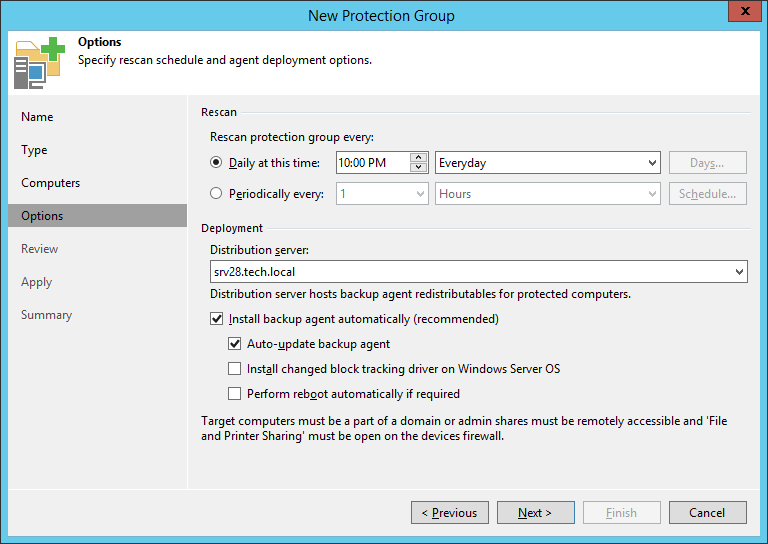
Then you need to specify how often we want to scan our selection area - this entity is dynamic, that is, as soon as new objects are detected at the next scan, they will immediately be automatically included in their protective group.
In the scan options ( Options step ) for a group of any type, you can choose whether we want Veeam Agent to be automatically placed on newly discovered objects - if we want, then check the boxInstall backup agent automatically (recommended) :
After we have properly grouped our computers, we set up backups for them using an agent. To do this, select the desired protective group and create a new task for it (or include it in an existing one).
Depending on what kind of machines we want to process, we select the type of task. It could be:

At the same step, it is necessary to determine in what mode the agent responsible for the backup will work. Depending on the type of machine to be protected, either both or one of two options will be available:
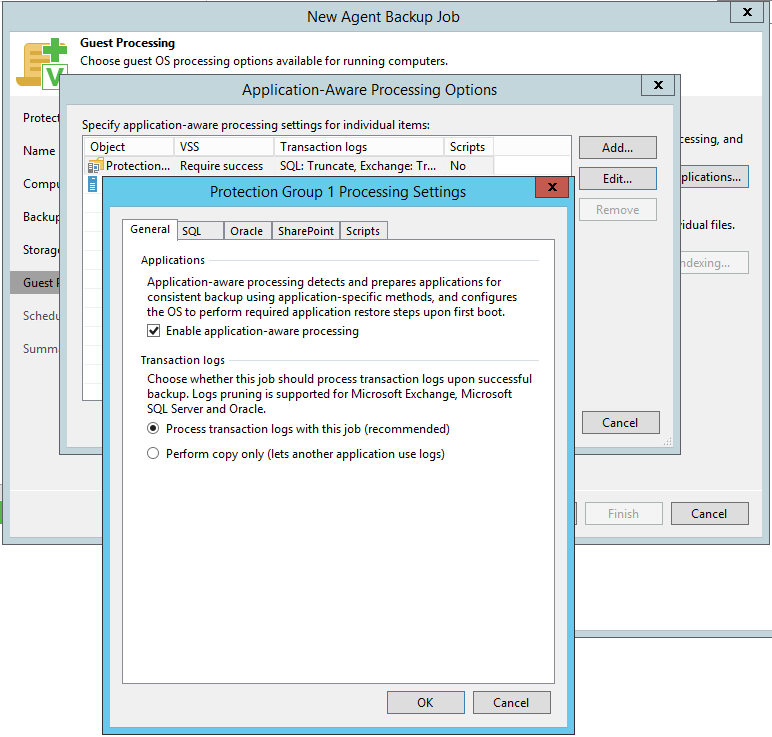
At the Guest Processing step, you can specify that the backup should be performed taking into account the applications running on the machine (application consistency). The following applications are supported:
To restore the objects of these applications from backup, you can use tools from the Veeam Explorers line.
For SQL and Oracle databases, backup of transaction logs will be supported - for the possibility of recovery to a selected point in time.
Yes, yes, this year we invite our readers and all those interested to participate in the VeeamON Forum 2017 Russia , dedicated to data accessibility issues. The event will be held on October 26, the venue - Lotte Hotel Moscow.
In the forum program:
In addition, for everyone who knows and knows how to work with Veeam Availability Suite 9.5, exciting LabWarz competitions will be held . The prize for victory is a certificate worth 30,000 rubles. to take any training course at any Veeam certified training center.
Participation in VeeamON Forum Russia 2017 is free, you only need to pre-register. I recommend not to postpone registration at the last moment, and even more so on the day of the event, especially for those wishing to participate in laboratory work and in competitions.
On the conference website you can also find a detailed description of the program and materials from VeeamON Forum Russia 2016 . The report on the forum-2015 was published in our blog on Habré.
Naturally, the number of users who want to work with backups of virtual and physical machines using a single console is growing. Therefore, our engineers decided to implement this opportunity in Veeam Backup & Replication, without delay, and I'll tell you about it today. For details, welcome to cat.
I'll start with the look. Since Veeam Backup & Replication will now work with both virtual and physical machines, it was decided to move the Inventory section that previously lived in the VMs view into a separate view. It will display all the machines protected by Veeam, be it Veeam Backup & Replication or any of Veeam Agents.
Logical Containers Protection Groups
In order to provide the ability to manage and configure protection through the console, you need to create the appropriate logical containers - the so-called Protection Groups (protection groups) - and then the necessary objects will be placed there.
First of all, we understand the type of objects for which we will configure protection. In the Type step of the Create Defense Group wizard, there are several options:
- If we want to place individual computers in a container (group), we assign the type Individual computers to the group . We get a static union (changes are not picked up on the fly), to which computers can be added by specifying their IP address or domain name. These groups are recommended for small infrastructures where the Active Directory domain is not configured.
- If we want to have a dynamic group, where we will place Microsoft Active Directory objects, we assign the type of Microsoft Active Directory objects to the group . This is a container of a dynamic type, where objects will fall automatically after they are included, for example, in Active Directory OU or security group. It is recommended that you use these groups for infrastructures of any size that work with Active Directory.
- If you have a rather large infrastructure, but you do not use Active Directory, or you have configured integration with CMDB, it is recommended that you use protection groups that are updated through the list of computers imported from the CSV file - Computers from CSV file .
Since the organizations most likely will most likely use groups for Active Directory objects, we will dwell on them in more detail first.
If the Microsoft Active Directory objects protection group type was selected , the Veeam Backup & Replication server will automatically request information about the Active Directory structure of its home domain and display it.
Note: You can change the default setting and display, for example, a subdomain or another domain in general as a selection area. You can also exclude individual objects from the selection area - for example, you can exclude computer accounts that have been turned off during the last month, or you can exclude an entire OU.
So, we indicated from which selection area our AD objects will be. Veeam will install the Veeam Agent executable module on these objects , which, in fact, will back up. Of course, to install agents, the Veeam Backup Service account must have the appropriate rights.
Then you need to specify how often we want to scan our selection area - this entity is dynamic, that is, as soon as new objects are detected at the next scan, they will immediately be automatically included in their protective group.
In the scan options ( Options step ) for a group of any type, you can choose whether we want Veeam Agent to be automatically placed on newly discovered objects - if we want, then check the boxInstall backup agent automatically (recommended) :
Backup
After we have properly grouped our computers, we set up backups for them using an agent. To do this, select the desired protective group and create a new task for it (or include it in an existing one).
Job Type
Depending on what kind of machines we want to process, we select the type of task. It could be:
- Work page - then select the option Workstation
- Server - we select, of course, Server
- And - according to the numerous requests of the user audience! - Failover Cluster
Job control mode
At the same step, it is necessary to determine in what mode the agent responsible for the backup will work. Depending on the type of machine to be protected, either both or one of two options will be available:
- Centralized control from the Veeam backup server ( Managed by backup server ).
If this mode was selected, a lightweight version of Veeam Agent will be installed on the machines - without a GUI, without a local configuration database. All settings will need to be done on the Veeam backup server.
In this version, the server controls all the work, including remote start and stop of the task, viewing statistics, etc.
This mode is convenient for backup machines that are always connected to the infrastructure. It will always be assigned for backup clusters, and will also be the option of choice for backup servers. - Task control is performed by the agent itself ( Managed by agent ).
If you select this mode, the full version of Veeam Agent will be installed on the machines.
All schedule settings and job management are performed on the side of the agent itself.
This mode is convenient for backup machines, for which it is not always possible to ensure a constant connection to the infrastructure through a good channel, but for which, however, it is necessary to fulfill the RPO requirements. It will always be assigned to backup workstations, and will also be an option for backup servers.
Creating a backup based on running applications
At the Guest Processing step, you can specify that the backup should be performed taking into account the applications running on the machine (application consistency). The following applications are supported:
- SQL Server, including support for Always-On Groups,
- Oracle
- Exchange, including with DAG support
- Active Directory
- SharePoint
To restore the objects of these applications from backup, you can use tools from the Veeam Explorers line.
For SQL and Oracle databases, backup of transaction logs will be supported - for the possibility of recovery to a selected point in time.
Invitation to VeeamON Forum Russia 2017
Yes, yes, this year we invite our readers and all those interested to participate in the VeeamON Forum 2017 Russia , dedicated to data accessibility issues. The event will be held on October 26, the venue - Lotte Hotel Moscow.
In the forum program:
- Veeam expert stories about best practices, announcements of new versions of our products
- Speeches by representatives of storage companies (NEC, Quantum, Infinidat) with a talk about integrated solutions
- question and answer sessions
- prize draws
- 4 flows of laboratory work that will go in parallel with the main session
In addition, for everyone who knows and knows how to work with Veeam Availability Suite 9.5, exciting LabWarz competitions will be held . The prize for victory is a certificate worth 30,000 rubles. to take any training course at any Veeam certified training center.
Participation in VeeamON Forum Russia 2017 is free, you only need to pre-register. I recommend not to postpone registration at the last moment, and even more so on the day of the event, especially for those wishing to participate in laboratory work and in competitions.
On the conference website you can also find a detailed description of the program and materials from VeeamON Forum Russia 2016 . The report on the forum-2015 was published in our blog on Habré.