One secure password for all occasions
I will not argue, the title is provocative. But the continuation is no better ...
Good morning! I am a complete paranoid. Therefore, I love complex passwords. But keeping them in your head is very troublesome ... Do you still remember that I'm paranoid? And therefore, I do not use password managers, except for those that I can put on my servers and can control traffic. But I still can’t physically check for bookmarks. Not enough time or experience. Therefore, I am afraid to use someone else’s password managers.
Let's imagine that one secure password for all resources is possible. Traditionally, I ask everyone who are interested in the topic under the cat.
Once an idea came to me - I can keep a passphrase in my head! She will be alone for all occasions. But thanks to the one-way functions, I can store modifiers to it in the form of open and accessible text for everyone. Here in this form:
For example:
And keep such a list simply in a notebook. When it was necessary to go to the resource, then with simple Ctrl-F I find the resource and drive the necessary data into the form .
In the field of the passphrase - the very SuperSecretFrase, in the field of the modifier - according to certain rules, a modifier formed from open data. In general, of course, you can not greatly distort and just hammer a modifier, the result will not be affected.
Red underlines the result of the one-way function, with the last two values replaced by + F. On the one hand, this adds complexity to recovery, on the other hand it allows you to access resources where special characters and capital letters are needed.
From experience: even if all the characters do not fit into the password input field on the resource, in any case, with the same actions by the user, the result will be the same, i.e. authorization will be completed.
In general, the approach that I propose will allow, on the one hand, to have one password on all resources, and on the other, not to be afraid of compromising the password on one of them, because “stolen knowledge” will not lead to the discovery of other resources.
He made the lower groups of numbers rather for himself, because so it’s more convenient for me to read them from the phone.
It took about 2 hours to write, which shows a low level of code complexity. Those. most residents of the Habr, if desired, write this for themselves much faster. At the same time, passwords are not saved anywhere and those who wish can use the ready-made form. Well, or, if it’s quite interesting what this is all about, I’ll publish the code (I say right away it is “unobtrusive”, the main idea is all the same).
Well, for dessert - the whole exchange at the time of password generation.
and brief instructions for use:
Thanks for attention. Special thanks for the comments (in advance, I hope that they will be).
UPD: As a result of the first reading of the comments, I would like to focus on several points:
UPD2:
I will explicitly indicate the pros and cons of some approaches to working with passwords:
Local Password Manager : Pros - cryptographic strength, minus: possible loss of the device.
Cloud Password Manager (on a foreign server) : Pros - cryptographic strength, accessibility. Cons: hacking a resource, malicious intent, surrender to regulatory authorities without your knowledge.
Own Resource By Generating Passwords : pluses - control, the ability to deploy at least on the iron (in my case), strength due to the lack of saved passwords. Cons (in my case): password generation on the server. And it’s rather half-minus, because the server and the system are completely mine.
Good morning! I am a complete paranoid. Therefore, I love complex passwords. But keeping them in your head is very troublesome ... Do you still remember that I'm paranoid? And therefore, I do not use password managers, except for those that I can put on my servers and can control traffic. But I still can’t physically check for bookmarks. Not enough time or experience. Therefore, I am afraid to use someone else’s password managers.
Let's imagine that one secure password for all resources is possible. Traditionally, I ask everyone who are interested in the topic under the cat.
Once an idea came to me - I can keep a passphrase in my head! She will be alone for all occasions. But thanks to the one-way functions, I can store modifiers to it in the form of open and accessible text for everyone. Here in this form:
| ресурс | логин | модификатор |For example:
habrahabr.ru | acyp | Walhall |And keep such a list simply in a notebook. When it was necessary to go to the resource, then with simple Ctrl-F I find the resource and drive the necessary data into the form .
In the field of the passphrase - the very SuperSecretFrase, in the field of the modifier - according to certain rules, a modifier formed from open data. In general, of course, you can not greatly distort and just hammer a modifier, the result will not be affected.
The result of entering the SSF and the modifier from the example (screenshot)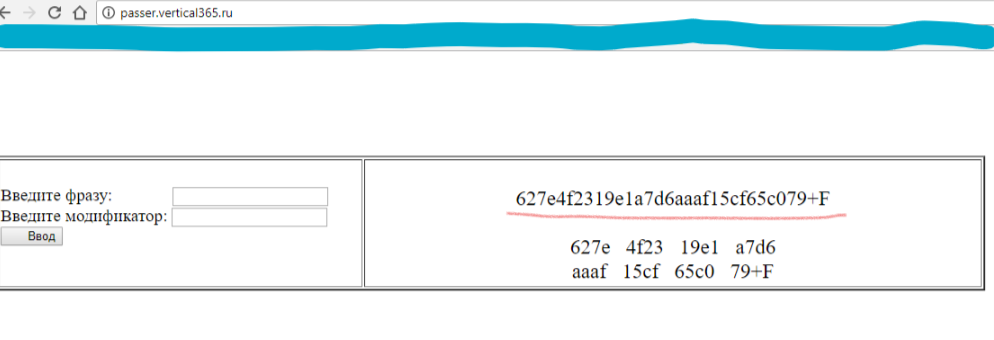
Red underlines the result of the one-way function, with the last two values replaced by + F. On the one hand, this adds complexity to recovery, on the other hand it allows you to access resources where special characters and capital letters are needed.
From experience: even if all the characters do not fit into the password input field on the resource, in any case, with the same actions by the user, the result will be the same, i.e. authorization will be completed.
In general, the approach that I propose will allow, on the one hand, to have one password on all resources, and on the other, not to be afraid of compromising the password on one of them, because “stolen knowledge” will not lead to the discovery of other resources.
He made the lower groups of numbers rather for himself, because so it’s more convenient for me to read them from the phone.
It took about 2 hours to write, which shows a low level of code complexity. Those. most residents of the Habr, if desired, write this for themselves much faster. At the same time, passwords are not saved anywhere and those who wish can use the ready-made form. Well, or, if it’s quite interesting what this is all about, I’ll publish the code (I say right away it is “unobtrusive”, the main idea is all the same).
Well, for dessert - the whole exchange at the time of password generation.
Nginx logs
and brief instructions for use:
Instructions for those who are too lazy to write their own
1. Get yourself a journal or file that can be stored openly to which you have permanent access. And keep it all open information. Those. even if you are forced to change the password on the resource (or there is such a need), just change the modifier
2. Register on the resource, generating a password using the link to the passer'a form. In this case, enter all the necessary data (from the modifier field) into the log.
3. If necessary, enter this resource - take data from the log and also use passer to restore the password. Feature: In places where I'm not sure, I do this from the phone, transferring the password to the input form. Then, being in a trusted place, in the log I change the modifier and change the password.
Frankly speaking, I’m doing easier: A passphrase in my head, in the modifier of the resource I want to access. And since I changed passwords on a small number of resources and I remember all of them, I simply add vN to the modifier on such resources (N is the password change number). And I don’t even keep a journal.
2. Register on the resource, generating a password using the link to the passer'a form. In this case, enter all the necessary data (from the modifier field) into the log.
3. If necessary, enter this resource - take data from the log and also use passer to restore the password. Feature: In places where I'm not sure, I do this from the phone, transferring the password to the input form. Then, being in a trusted place, in the log I change the modifier and change the password.
Frankly speaking, I’m doing easier: A passphrase in my head, in the modifier of the resource I want to access. And since I changed passwords on a small number of resources and I remember all of them, I simply add vN to the modifier on such resources (N is the password change number). And I don’t even keep a journal.
Thanks for attention. Special thanks for the comments (in advance, I hope that they will be).
UPD: As a result of the first reading of the comments, I would like to focus on several points:
- I do not ask to use my application. Moreover, I rather insist that if you have your own fully controlled resource (which is important), write an application on your own that will generate a hash password according to certain rules. I just described the methodology.
- In the imageman's commentary, an application was heard on .js ( chriszarate.github.io/supergenpass ), if I knew about the existence of which, then most likely there would be no article. The method proposed by me is fully illustrated by him. I’m unlikely to use it at present, because I don’t understand the code yet. But if I find time to study and analyze, then I will use it with pleasure. From a functional point of view, I liked it more than my own.
UPD2:
I will explicitly indicate the pros and cons of some approaches to working with passwords:
Local Password Manager : Pros - cryptographic strength, minus: possible loss of the device.
Cloud Password Manager (on a foreign server) : Pros - cryptographic strength, accessibility. Cons: hacking a resource, malicious intent, surrender to regulatory authorities without your knowledge.
Own Resource By Generating Passwords : pluses - control, the ability to deploy at least on the iron (in my case), strength due to the lack of saved passwords. Cons (in my case): password generation on the server. And it’s rather half-minus, because the server and the system are completely mine.