 August 4, 2017 at 18:35
Engineer Tips: Huawei S5720-52X-PWR-SI V2R9SPC500 Review

Hello, Habr! Huawei Blog is back in touch!
The next issue of "Tips for Engineers" is on the air.
And today, our guest is the Honored Switch of China, the holder of the honorary title “Decent Replacement of the Cisco 2960S-24-PWR Model”, the leader of the Huawei line in the ratio “functional / price” - the Huawei S5720-52X-PWR-SI V2R9SPC500 switch.
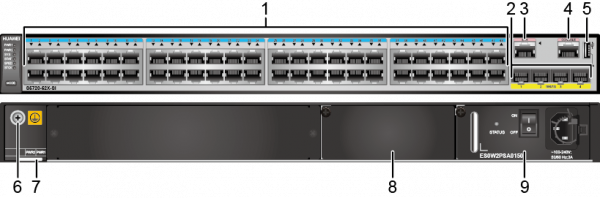
Short dossier on our hero:
48GE PoE +, 4 * 10GE ports.
SI version supports L3 routing, including RIP and OSPF.
Software Version V200R009C00SPC500.
The power supply is 500W, 370 is available for PoE.
Stacking is possible through 1 / 10GE Uplinks.
10GE interfaces support almost any transceiver, including SNR.
Management via the web interface and CLI (telnet, ssh v2), SNMP v2c / v3, centralized through eSight are supported.
And today we will focus on our experience of using the S5720 as an access switch for connecting workstations and IP phones.
Initially, we laid down a certain redundancy, as For this task, a cheaper line of S5700-LI switches is enough, but with a view to future use, this model was taken, and it was justified - by the end of testing, routing unexpectedly was needed.
But, let's get to the point - what did you find out about the S5720 and verify in practice?
The first experience. VLAN
Created VLANs for the office network and for telephones. Configured trunks and user ports. LLDP enabled.
For operation of Voice VLAN ports are configured in the "hybrid" mode. Yealink IP phones have the ability to obtain LLDP settings, which we have successfully used.
After configuration, user traffic remained in the office network, and voice traffic moved to Voice VLAN. At the same time, additional configuration of phones and workstations was not required, which is very convenient during migration.
Enabling LLDP allows PoE to be allocated in accordance with the requirements of the connected device and economically consumes the power budget of the switch.
There were no questions when setting up routing - everything works. Basic routing settings:
router id 192.168.30.4

#

ospf 1

 area 0.0.0.0

 network 10.0.50.0 0.0.0.255

#

interface Vlanif50

 mtu 9198

ospf timer hello 1

ospf timer dead 3
Peer authentication has not been verified. In order to accelerate convergence, non-standard timings (the so-called “LAN-based design”) were configured. ASA5512 is successfully used as a "neighbor" - it works.
Not without its nuances: despite the fact that the SI series supports dynamic routing, it is possible only between Vlan (Vlanif) interfaces. Those. the port cannot be put into L3 mode and assigned an IP address. This is only possible for the EI, HI series.
The second experience. Security
As protection against the most common types of threats, we set up DHCP snooping, IP Source Guard, ARP security - all of this together allows us to avoid some types of attacks that are most common in the office network, including unintentional ones.
It's no secret that for administrators it becomes a headache the appearance of an illegal DHCP server on the network. DHCP snooping is designed to solve this problem. distribution of addresses in this case is possible only from a trusted port, but on the others it is blocked.
Based on DHCP snooping, the IP Source Guard and ARP security functions that protect against forgery of IP and MAC addresses. Here the bottom line is that work is possible only with the address obtained by DHCP, and a bunch of “port — IP — MAC” is created and checked automatically.
This setting will save us if someone wants to use someone else's IP-MAC, or organize an attack like MITM-attack ("Man-in-the-Middle").
The third type of possible threat is STP attacks. Here, BPDU filtering is enabled as protection on user ports (that is, no STP frames are sent to or received from the user).
In addition, the appearance of extraneous BPDUs stp bpdu-protection is monitored, which is possible when connecting to another switch or attacking stp root.
The activated option “stp edge-port enable” excludes the port from the STP calculation, reducing convergence time and the load on the switch.
The combination of stp bpdu-protection and stp edge-port enable is similar to Cisco spanning-tree portfast.
Actually, configuration examples:
dhcp enable

#

dhcp snooping enable

dhcp snooping alarm dhcp-rate enable

dhcp snooping user-bind autosave flash:/dhcp-bind.tbl write-delay 6000

arp dhcp-snooping-detect enable

dhcp server detect


vlan 2

 name office

 dhcp snooping enable

 dhcp snooping check dhcp-request enable

 dhcp snooping check dhcp-rate enable

 arp anti-attack check user-bind enable

 ip source check user-bind enable


vlan 3

 name guest

 dhcp snooping enable

 dhcp snooping check dhcp-request enable

 dhcp snooping check dhcp-rate enable

 arp anti-attack check user-bind enable

 ip source check user-bind enable


vlan 4

 name voice

 dhcp snooping enable

 dhcp snooping check dhcp-request enable

 dhcp snooping check dhcp-rate enable

 arp anti-attack check user-bind enable

 ip source check user-bind enable


interface GigabitEthernet0/0/1

 port link-type hybrid

 voice-vlan 4 enable

 port hybrid pvid vlan 2

 port hybrid tagged vlan 4

 port hybrid untagged vlan 2

 stp root-protection

 stp bpdu-filter enable

 stp edged-port enable

 trust dscp


stp instance 0 root primary

stp bpdu-protection
The third experience. Administration
The administrative part, which includes NTP, SNMP, AAA, Radius, has been configured.
It turned out that you can activate up to 16 VTY lines, while the default is only 5.
And, in fact, some administration convenience. What is important to note more? To access via SSH, it is necessary to add exactly SSH users, except for the user in the AAA section. RSA keys are already generated, but if you changed the name and domain on the switch, we recommend that you generate the keys again. By default, ssh v1 is disabled, but you can enable it if necessary (although we do not recommend doing this). We also managed to configure administrator authentication through Radius.
user-interface maximum-vty 15

user-interface con 0

 authentication-mode aaa

 history-command max-size 20

 screen-length 40

user-interface vty 0 14

 authentication-mode aaa

 history-command max-size 20

 idle-timeout 30 0

 screen-length 40
stelnet server enable
[HUAWEI] aaa
[HUAWEI-aaa] local-user admin123 password irreversible-cipher Huawei@123
[HUAWEI-aaa] local-user admin123 service-type ssh
[HUAWEI-aaa] local-user admin123 privilege level 15
[HUAWEI-aaa] quit
[HUAWEI] ssh user admin123 authentication-type passwordIt should be noted that a scheme called domain default_admin is used for administrators!
domain default_admin

 authentication-scheme default

 accounting-scheme Radius

 service-scheme Admin

 radius-server Radius
The fourth experience. Replacing a device certificate with a valid one
“To the heap” we decided to replace the factory, self-written certificate with a valid one (since there is a valid certificate for signing).
Certificate import is possible only from CLI.
Faced that the keys and certificate must be separate, despite the fact that the “pfx” format allows you to export the private key as part of the certificate.
Moreover, if you are trying to import a chain of certificates, then the device certificate must be written first, and then all the others (for example, intermediate CAs).
With standard export to pem, CA certificates first go to the file and only the device certificate comes to the end.
For import to work, certificate files on the device must be placed in the security folder on flash. This folder is missing by default; you need to create it.
We present you a step-by-step algorithm:
1. Generate a certificate on an external CA.
2. Export separately the certificate or chain and private key.
3. If this is a chain - open the certificate file with notepad and transfer the last block (device certificate) to the beginning of the file, save.
4. On the switch, create the mkdir flash: / security
folder 5. Place the certificate file and tftp 192.168.0.1 key in the folder chain-servercert.pem /security/chain-servercert.pem
After that, according to the instructions, create a policy and import.
system-view
[HUAWEI] ssl policy http_server
[HUAWEI-ssl-policy-http_server] certificate load pfx-cert servercert.pfx key-pair rsa key-file serverkey.pfx auth-code cipher 123456
# Load a PEM certificate chain for the SSL policy.
system-view
[HUAWEI] ssl policy http_server
[HUAWEI-ssl-policy-http_server] certificate load pem-chain chain-servercert.pem key-pair rsa key-file chain-servercertkey.pem auth-code cipher 123456
To apply the policy, you must restart https server, but separately it does not restart. Therefore, you must restart the entire web service.
http server disable
http server enable
As a result, the export was successful, and the web interface uses a valid certificate.
To summarize
As a result, a few figures and conclusions:
- The CPU load of the switch, even at idle, is about 20%, and increases periodically to 30%. No traffic impact was noticed.
CPU utilization for five seconds: 25%: one minute: 25%: five minutes: 24%
TaskName CPU Runtime (CPU Tick High / Tick Low) Task Explanation
VIDL 75% 2 / 187119ff DOPRA IDLE
OS 12% 0 / 55d4a7fe Operation System
POE 4% 0 / 204e4380 POE Power Over Ethernet
- When migrating virtual machines between connected ESXs, the load on the interface was 804 Mbit / s and 999 Mbit / s, without packet loss.
Input peak rate 804556024 bits / sec, Record time: 2016-08-15 15:09:17
Output peak rate 999957528 bits / sec, Record time: 2016-08-12 12:20:09
- One of the phones flatly refused to connect at a speed of 1000 Mbit / s, only at 100 Mbit / s. AUTO settings, on both sides. Direct connection to the switch 1m patch cord, changing the port of the switch did not help. At the same time, the phone connected to Cisco 2960 on 1G stably. This is one of 20 similar phones. The issue has not been resolved.
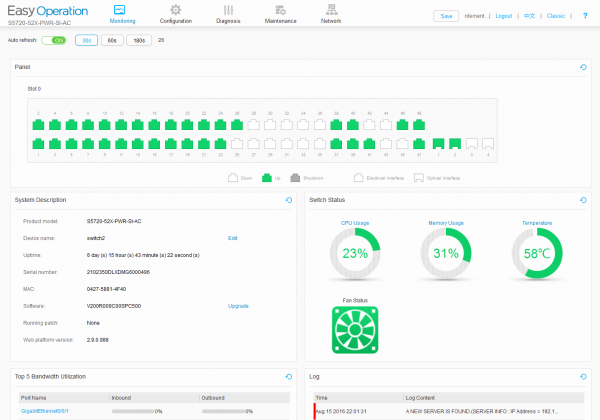
- Very modest web interface, the most basic functions are available.
PS See you in the next issues, gentlemen, Engineers!









