GitLab CI for continuous integration and delivery in production. Part 1: our pipeline
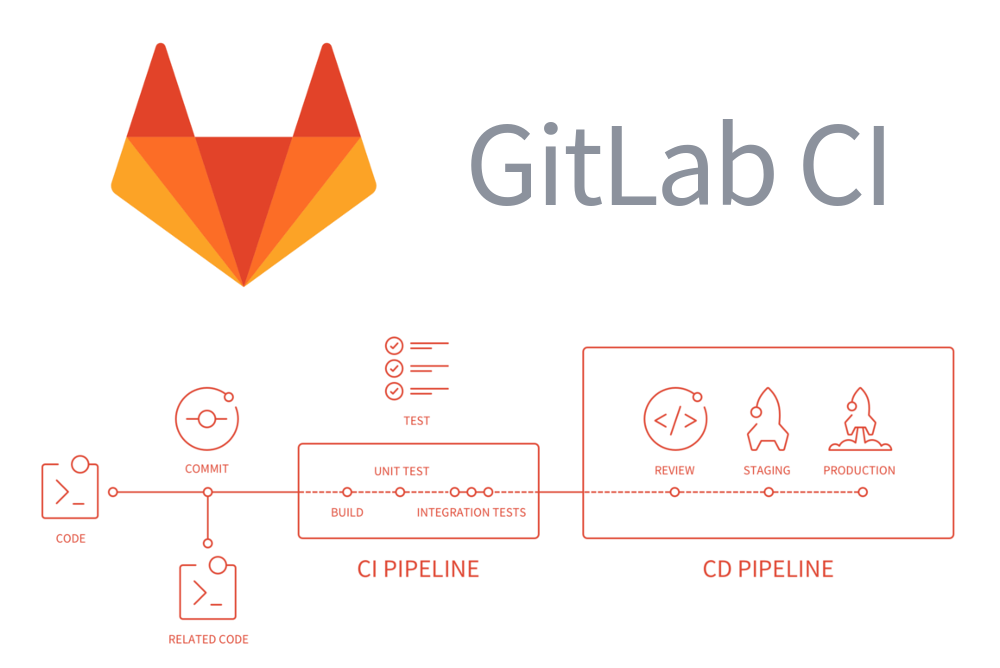
So, GitLab CI : what else can you tell about it? On a habr already there are articles about installation, about setup of runners, about command use, about GitLab Flow. Perhaps, there is not enough description of how GitLab CI is used in a real project, where several teams are involved. And in the modern world of software development, this is really so: after all, there are (at least) developers, testers, DevOps and release engineers. We have been working with a similar division into teams for several years. In this article, I’ll talk about how we, using and improving the capabilities of GitLab CI, implemented and use continuous integration (CI) and, in part, application delivery (CD) processes for a team of several teams.
Our pipeline
If you have encountered CI-systems before, then you are familiar with the concept of a pipeline — this is the sequence of stages (hereinafter in the article for the term stage I use the translation “stage”) , each of which includes several tasks (hereinafter in the job article - “ task ") . From the moment of making changes to the code until rolling out to production, the application takes turns in the hands of different teams - similar to how it happens on the pipeline. From this came the term pipeline (“conveyor” - one of the options for literal translation) . In our case, it looks like this:
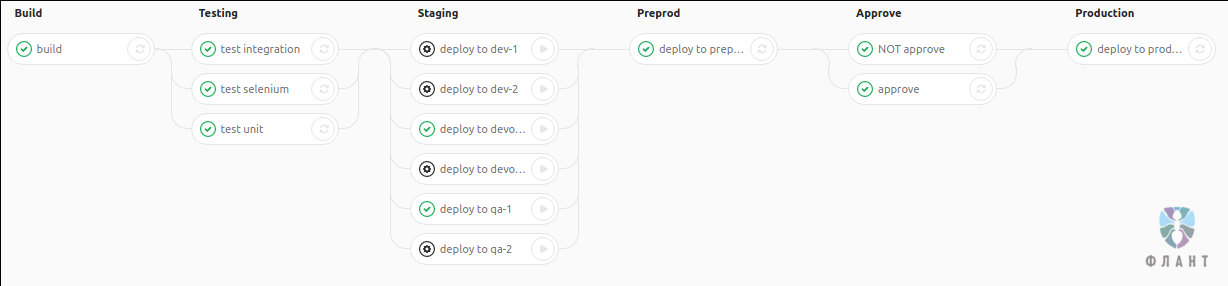
Brief explanations of the stages used:
- build - build the application;
- testing - autotests;
- staging - application deployment for developers, DevOps, testers;
- pre-production - deployment to "preliminary production" for the tester team;
- approve - “fuse”, due to which the customer’s release engineer may refuse to deploy a certain tag to production;
- production - deployment to production.
Note : There is nothing completely universal, therefore, for your specific case, this pipeline is most likely not suitable: it is either redundant or simple. However, the purpose of the article is not to describe the only true option that suits everyone. The goal is to give an example of how several teams can work in GitLab CI and what opportunities are there to implement such a pipeline. Based on this information, you can develop your own GitLab CI configuration.
How is it used?
I'll start with the story about the pipeline in terms of its use - what can be called a user story. Here it turns out that in fact we have even two pipelines: shortened for branches and full for tags. And here is what these sequences look like:
- Developers put application code in branches with the feature_ prefix , and DevOps engineers put infrastructure code in branches with the infra_ prefix . Each git push in these branches launches the application assembly process ( build stage ) and automatic tests ( testing stage ).
- Tasks in the following stages are not called automatically, but are defined as tasks with manual start (manual).
- At the staging stage, you can run the task and roll out the assembled and tested application to a simplified environment. This can be done by developers, DevOps engineers, testers. At the same time, all tests must be passed to roll out to the testers' environments.
- After successfully passing the tests and rolling out to one of the staging environments, you can roll out the application in pre-production - only testers, DevOps engineers or release engineers do this.
- As the successfully tested features accumulate, the release engineer prepares a new version and creates a tag in the repository . A pipeline for a tag differs from a pipeline for a branch in two additional stages.
- After successful assembly, tests and roll-out, additional manual tests of the new version, showing to the customer and other “bullying” of the application are carried out in pre-production. If everything went well, then the release engineer starts the approve task . If something went wrong, the release engineer starts the not approve task .
- Rollout of the application to production is possible only after successful rollout to pre-production and completing the approve task . A rollout to production can be triggered by a release engineer or DevOps engineer.

Pipeline Release Engineer Role
Pipeline and stages in detail
Tasks at the build stage build the application. To do this, we use our development - the Open Source utility dapp (read about its main features and see this article + video ) , which accelerates incremental builds well. Therefore, the assembly starts automatically for branches with the prefixes feature_ (application code), infra_ (infrastructure code) and tags, and not just for several traditionally “main” branches (master / develop / production / release).
Updated September 6, 2019: the dapp project has now been renamed werf , its code has been rewritten to Go, and the documentation has been significantly improved.
The next stage is stagingIs a set of environments for developers, DevOps engineers and testers. Here, several tasks are announced that deploy applications from branches with the prefixes feature_ and infra_ in stripped-down environments to quickly test new functionality or infrastructure changes (application build code is stored in the application repository).
The pre-production and production stages are only available for tags. Typically, a tag is hung after release engineers accept multiple merge requests from tested branches. In general, we can say that we use GitLab Flow with the only difference that there is no automaticdeployment on production and therefore there are no separate branches, but tags are used.
The approve stage is two tasks: approve and not approve . The first includes the ability to deploy to production, the second - off. These tasks exist so that in case of production problems it can be seen that the deployment did not happen just like that, but with the consent of the release engineer. However, the point is not in depriving someone of the prize, but in that the direct deployment to production is often carried out not by the release engineer himself, but by the DevOps team. The release engineer, by launching the approve task , allows "click on the button" deploy to productionDevOps team. We can say that this stage brings to the surface that which could remain in postal correspondence or orally.
This interaction scheme showed itself well in the work, but I had to work hard to implement it. As it turned out, GitLab CI does not support some of the necessary things out of the box ...
Development .gitlab-ci.yml
Having studied the documentation and various articles, you can quickly sketch out such an option .gitlab-ci.yml , corresponding to the described pipeline stages:
stages:
  - build
  - testing
  - staging
  - preprod
  - approve
  - production
## build stage
build:
  stage: build
  tags: [deploy]
  script:
    - echo "Build"
## testing stage
test unit:
  stage: testing
  tags: [deploy]
  script:
    - echo "test unit"
test integration:
  stage: testing
  tags: [deploy]
  script:
    - echo "test integration"
test selenium:
  stage: testing
  tags: [deploy]
  script:
    - echo "test selenium"
## staging stage
.staging-deploy: &staging-deploy
  tags: [deploy]
  stage: staging
  when: manual
  script:
    - echo $CI_BUILD_NAME
deploy to dev-1:
  <<: *staging-deploy
deploy to dev-2:
  <<: *staging-deploy
deploy to devops-1:
  <<: *staging-deploy
deploy to devops-2:
  <<: *staging-deploy
deploy to qa-1:
  <<: *staging-deploy
deploy to qa-2:
  <<: *staging-deploy
## preprod stage
deploy to preprod:
  stage: preprod
  tags: [deploy]
  when: manual
  script:
    - echo "deploy to preprod"
## approve stage
approve:
  stage: approve
  tags: [deploy]
  when: manual
  script:
    - echo "APPROVED"
NOT approve:
  stage: approve
  tags: [deploy]
  when: manual
  script:
    - echo "NOT APPROVED"
## production stage
deploy to production:
  stage: production
  tags: [deploy]
  when: manual
  script:
    - echo "deploy to production!"
Everything is quite simple and most likely understandable. The following directives are used for each task:
stage- defines the stage to which the task belongs;script- actions that will be performed when the task starts;when- type of task (manualmeans that the task will be launched from the pipeline manually);tags- tags, which in turn determine which runner the task will run on.
Note : Runner is part of GitLab CI, similar to other CI systems, i.e. An agent that receives tasks from GitLab and executes them
script. 
Slide about runners from the presentation “ Coding the Next Build ” (ⓒ 2016 Niek Palm)
By the way, did you notice this block ?
.staging-deploy: &staging-deploy
  tags: [deploy]
  stage: staging
  when: manual
  script:
    - echo $CI_BUILD_NAME
It demonstrates the ability of the YAML format to define common blocks and connect them to the right place at the right level. See the documentation for more details .
The pipeline description said that the approve and production stages are only available for tags. In
.gitlab-ci.ymlthis can be done with the help of the directive only. It defines the branches for which the pipeline will be created, and using the keyword tagsyou can enable the creation of a pipeline for tags. Unfortunately, the directive onlyis only for tasks - it cannot be specified when describing the stage. Thus, tasks at the stages of build , testing , staging , pre-production, which should be accessible for infra_ , feature_ branches , and tags, take the following form:
test unit:
  stage: testing
  tags: [deploy]
  script:
    - echo "test unit"
  only:
    - tags
    - /^infra_.*$/
    - /^feature_.*$/
And tasks at the stages of approve and production , which are available only for tags, have the following form:
deploy to production:
  stage: production
  tags: [deploy]
  script:
    - echo "deploy to production!"
  only:
    - tags
In the full version, the directive is
onlyplaced in a common block (an example of this .gitlab-ci.ymlis available here ).What's next?
On this, the creation
.gitlab-ci.ymlfor the described pipeline is slowed down, because GitLab CI does not provide directives, firstly, to separate tasks by users, and secondly, to describe the dependencies of task execution on the status of the execution of other tasks. I would also like to allow .gitlab-ci.ymlonly individual users to change . Full implementation of the plan became possible only thanks to a few patches for GitLab and the use of task artifacts. Read more about this in the next part of the article: “ GitLab CI for continuous integration and delivery in production. Part 2: overcoming difficulties . ”









