June 6, 2017 at 16:31
Mikrotik. QoS for home
Today I would like to talk a little about priorities.

The article does not purport to cover all QoS information on Mikrotik. This is a demonstration of a set of rules that allow you to configure a simple traffic prioritization scheme and replenish it as necessary.
Hope colleagues help with tips in the comments.
Speaking about QoS, they usually mean two directions - more or less evenly dividing the channel by the number of users, or prioritizing traffic. These directions completely complement each other, but for home, for family, I don’t see any sense in sharing the channel, and if you are interested in this topic, I will refer to an exhaustively revealing article “ MikroTik QoS - debunking myths ”.
I’ll concentrate on traffic prioritization, since it’s a bit easier.
Limiting the data transfer rate can be performed in two ways:
1. All packets that exceed the transmission rate limit (shaper) are discarded.
2. Delay of packets in the queue that exceeded the specified limit of transmission speed and sending them later as soon as possible; equalization of transmission speed (sheduler).
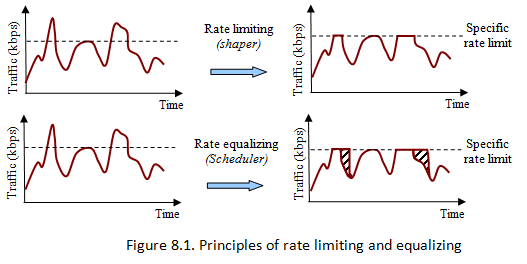
As you can see in the illustration, the shaper cuts everything that does not fit, and the sheduler simply slows down.
Accordingly, we need a sheduler.
Now you need to divide the traffic into classes and set each class its priority. The first class is served in the first place, the last - in the last.
The simplest version of this solution, which is often used, is simply to prioritize VoIP traffic, and the rest will be left over, but I will make it a little more complicated.
So, the plan is:
prio_1: DNS, ICMP, ACK - first of all, there is service traffic. Setting and breaking connections, resolving names, etc.
prio_2: SIP - VoIP is very fond of minimal latency.
prio_3: SSH and games -Remote access is important for work. Games are for relaxation.
prio_4: RDP and HTTP / HTTPS - web, video, etc.
prio_5: everything that is not identified above - in principle, you can force torrents here. Fortunately, the ports with which customers work are well known at home. .
A little lyrical digression:
If we look for information on QoS in Mikrotik, we will find several script options, starting from the monstrous QOS script by Greg Sowell or the Mother of all QoS Trees explicitly based on it , ending with Traffic Prioritization Script(by the way, I advise you to treat him with great caution, the author clearly understands quite vaguely what he is doing, and therefore the script is obviously not doing what was intended). All these scripts have one common problem - they were written for a long time and are largely outdated for one simple reason - the world has changed.
Today, thanks to universal traffic encryption, we can’t easily catch and use L7-regexp to catch youtube traffic, for example, or Skype. Therefore, using such scripts, carefully consider the issue of determining traffic. This, in my opinion, is the only difficulty in this matter.
Now mark the traffic according to the plan above. In code, I use interfaceBandwidth, i.e. channel width. I have it symmetrical and equal to 100M. If your channel width is different, then you need to change the interfaceBandwidth value to the required one. If the channel is asynchronous, then the script will be more difficult due to the need to separately mark packets for incoming and outgoing traffic. This is not difficult, but it will significantly increase the script, impairing its readability and, in general, is beyond the scope of the article.
In the address-list, I demonstrate the ability to mass insert addresses from the FQDN (for example, the addresses of clusters from the World Tanks wiki are taken). Of course, you can simply register the necessary IP manually.
And the last, since Mikrotik supports WMM, it would be logical to mark the traffic for him as well.
This is done by the same mangle using the set_priority command. According to Mikrotik’s wiki, the WMM priority table looks pretty bizarre:
1,2 - background
0,3 - best effort
4,5 - video
6,7 - voice.
Prioritize using the same rules as for marking packets:
In principle, that’s all.
In the future, if necessary, you can think about the formation of dynamic address lists periodically generated from the DNS cache by scripts such as:
to select an online video.
Or detect Skype by searching upnp rules:
But so far I have no such need.
Scripts from the article are available on GitHub . If something didn’t work for you, have ideas or comments - write.
Thanks for attention!
UPD: There was an error in the original version of the article in scripts (incorrectly selected chain). Scripts fixed.
The article does not purport to cover all QoS information on Mikrotik. This is a demonstration of a set of rules that allow you to configure a simple traffic prioritization scheme and replenish it as necessary.
Hope colleagues help with tips in the comments.
Speaking about QoS, they usually mean two directions - more or less evenly dividing the channel by the number of users, or prioritizing traffic. These directions completely complement each other, but for home, for family, I don’t see any sense in sharing the channel, and if you are interested in this topic, I will refer to an exhaustively revealing article “ MikroTik QoS - debunking myths ”.
I’ll concentrate on traffic prioritization, since it’s a bit easier.
Limiting the data transfer rate can be performed in two ways:
1. All packets that exceed the transmission rate limit (shaper) are discarded.
2. Delay of packets in the queue that exceeded the specified limit of transmission speed and sending them later as soon as possible; equalization of transmission speed (sheduler).
As you can see in the illustration, the shaper cuts everything that does not fit, and the sheduler simply slows down.
Accordingly, we need a sheduler.
Now you need to divide the traffic into classes and set each class its priority. The first class is served in the first place, the last - in the last.
The simplest version of this solution, which is often used, is simply to prioritize VoIP traffic, and the rest will be left over, but I will make it a little more complicated.
So, the plan is:
prio_1: DNS, ICMP, ACK - first of all, there is service traffic. Setting and breaking connections, resolving names, etc.
prio_2: SIP - VoIP is very fond of minimal latency.
prio_3: SSH and games -Remote access is important for work. Games are for relaxation.
prio_4: RDP and HTTP / HTTPS - web, video, etc.
prio_5: everything that is not identified above - in principle, you can force torrents here. Fortunately, the ports with which customers work are well known at home. .
A little lyrical digression:
If we look for information on QoS in Mikrotik, we will find several script options, starting from the monstrous QOS script by Greg Sowell or the Mother of all QoS Trees explicitly based on it , ending with Traffic Prioritization Script(by the way, I advise you to treat him with great caution, the author clearly understands quite vaguely what he is doing, and therefore the script is obviously not doing what was intended). All these scripts have one common problem - they were written for a long time and are largely outdated for one simple reason - the world has changed.
Today, thanks to universal traffic encryption, we can’t easily catch and use L7-regexp to catch youtube traffic, for example, or Skype. Therefore, using such scripts, carefully consider the issue of determining traffic. This, in my opinion, is the only difficulty in this matter.
Now mark the traffic according to the plan above. In code, I use interfaceBandwidth, i.e. channel width. I have it symmetrical and equal to 100M. If your channel width is different, then you need to change the interfaceBandwidth value to the required one. If the channel is asynchronous, then the script will be more difficult due to the need to separately mark packets for incoming and outgoing traffic. This is not difficult, but it will significantly increase the script, impairing its readability and, in general, is beyond the scope of the article.
In the address-list, I demonstrate the ability to mass insert addresses from the FQDN (for example, the addresses of clusters from the World Tanks wiki are taken). Of course, you can simply register the necessary IP manually.
#Set bandwidth of the interface
:local interfaceBandwidth 100M
# address-lists
:for i from=1 to=10 do={/ip firewall address-list add list=WoT address=("login.p"."$i".".worldoftanks.net")}
#
/ip firewall mangle
# prio_1
    add chain=prerouting action=mark-packet new-packet-mark=prio_1 protocol=icmp
    add chain=prerouting action=mark-packet new-packet-mark=prio_1 protocol=tcp port=53
    add chain=prerouting action=mark-packet new-packet-mark=prio_1 protocol=udp port=53
    add chain=prerouting action=mark-packet new-packet-mark=prio_1 protocol=tcp tcp-flags=ack packet-size=0-123
# prio_2
    add chain=prerouting action=mark-packet new-packet-mark=prio_2 dscp=40
    add chain=prerouting action=mark-packet new-packet-mark=prio_2 dscp=46
    add chain=prerouting action=mark-packet new-packet-mark=prio_2 protocol=udp port=5060,5061,10000-20000 src-address=192.168.100.110
    add chain=prerouting action=mark-packet new-packet-mark=prio_2 protocol=udp port=5060,5061,10000-20000 dst-address=192.168.100.110
# prio_3
    add chain=prerouting action=mark-packet new-packet-mark=prio_3 protocol=tcp port=22
    add chain=prerouting action=mark-packet new-packet-mark=prio_3 src-address-list=WoT
    add chain=prerouting action=mark-packet new-packet-mark=prio_3 dst-address-list=WoT
# prio_4
    add chain=prerouting action=mark-packet new-packet-mark=prio_4 protocol=tcp port=3389
    add chain=prerouting action=mark-packet new-packet-mark=prio_4 protocol=tcp port=80,443
Аккуратно уложим размеченный трафик в очередь:
queue tree add max-limit=$interfaceBandwidth name=QoS_global parent=global priority=1
:for indexA from=1 to=4 do={
   /queue tree add \
      name=( "prio_" . "$indexA" ) \
      parent=QoS_global \
      priority=($indexA) \
      queue=ethernet-default \
      packet-mark=("prio_" . $indexA) \
      comment=("Priority " . $indexA . " traffic")
}
/queue tree add name="prio_5" parent=QoS_global priority=5 \
    queue=ethernet-default packet-mark=no-mark comment="Priority 5 traffic"
And the last, since Mikrotik supports WMM, it would be logical to mark the traffic for him as well.
This is done by the same mangle using the set_priority command. According to Mikrotik’s wiki, the WMM priority table looks pretty bizarre:
1,2 - background
0,3 - best effort
4,5 - video
6,7 - voice.
Prioritize using the same rules as for marking packets:
/ip firewall mangle
# prio_1
    add chain=prerouting action=set-priority new-priority=7 protocol=icmp
    add chain=prerouting action=set-priority new-priority=7 protocol=tcp port=53
    add chain=prerouting action=set-priority new-priority=7 protocol=udp port=53
    add chain=prerouting action=set-priority new-priority=7 protocol=tcp tcp-flags=ack packet-size=0-123
# prio_2
    add chain=prerouting action=set-priority new-priority=6 dscp=40
    add chain=prerouting action=set-priority new-priority=6 dscp=46
    add chain=prerouting action=set-priority new-priority=6 protocol=udp port=5060,5061,10000-20000 src-address=192.168.100.110
    add chain=prerouting action=set-priority new-priority=6 protocol=udp port=5060,5061,10000-20000 dst-address=192.168.100.110
# prio_3
    add chain=prerouting action=set-priority new-priority=5 protocol=tcp port=22
    add chain=prerouting action=mark-packet new-packet-mark=prio_3 src-address-list=WoT
    add chain=prerouting action=mark-packet new-packet-mark=prio_3 dst-address-list=WoT
# prio_4
    add chain=prerouting action=set-priority new-priority=3 protocol=tcp port=3389
In principle, that’s all.
In the future, if necessary, you can think about the formation of dynamic address lists periodically generated from the DNS cache by scripts such as:
:foreach i in=[/ip dns cache all find where (name~"youtube" || name~"facebook" || name~".googlevideo")]
    do={:put [/ip dns cache get $i address]}
to select an online video.
Or detect Skype by searching upnp rules:
:foreach i in=[/ip firewall nat find dynamic and comment~"Skype"]
    do={:put [/ip firewall nat get $i dst-port]}
But so far I have no such need.
Scripts from the article are available on GitHub . If something didn’t work for you, have ideas or comments - write.
Thanks for attention!
UPD: There was an error in the original version of the article in scripts (incorrectly selected chain). Scripts fixed.