 April 24, 2017 at 17:57
Why do we need chat bots, or the story of Bitrix24
We are often asked why the Microsoft Bot Framework can be used, except for creating bots for a fan and chatting with them, and whether there are real cases of using chat bots in projects in nature. So, they exist. We asked one of our partners, Bitrix24, to share our experience and technical details of integrating bots into the project. I pass the floor to Sergey Pokoev, the developer of the system, who will talk about its architecture and the use of the Bot Framework to connect to Skype.

The company’s communication with customers has long been transformed: to replace emails and phone calls, first came social networks, and then messengers. Agree, now it is much more convenient, and, most importantly, ask a support question faster on Facebook, VKontakte, What's App or Telegram.
The abundance of channels not only provides great opportunities, but also creates some problems:
Therefore, many companies are thinking about data aggregation in one place, which is easy to control and manage. For them, the Bitrix24 * service just has the Open Lines tool , which we will talk about below.
By the way, we’ll immediately answer the question that worries many: “Why do we need chat bots?” In our case, their application depends on the tasks that need to be solved: starting from simple ones, chat bots that can send a request to one of the departments of the company, complex - allowing you to automate customer support.
* Help: Bitrix24 Service- a set of online tools for organizing the work of the company. It includes task and project management, omnichannel CRM, internal messenger of the company, working social network, working time management, document management and other functionality.
The client writes to the company's official account on social networks or in instant messengers. This message arrives in a processing queue common to all channels. From it, messages are distributed between employees who respond to them inside the Bitrix24 messenger. As you can understand, this is an automated process and for the responder there is no difference in which channel the client wrote.
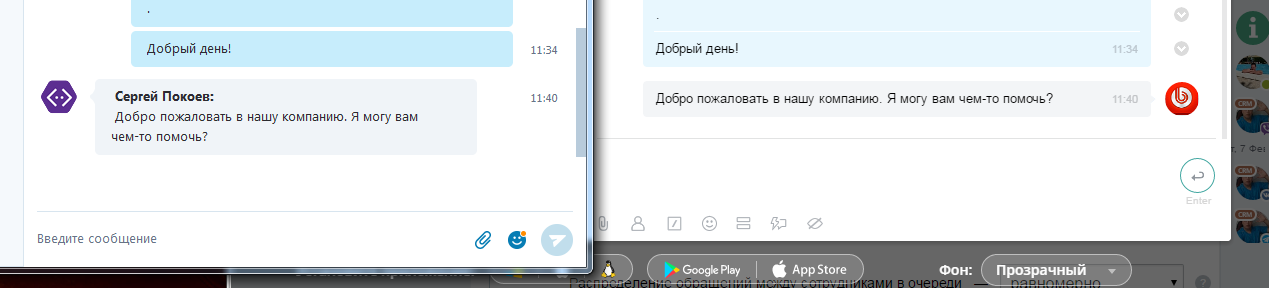
Microsoft Bot Framework is an environment that allows you to create an intelligent chat bot in the cloud, with which you can then communicate through various communication channels: from Skype and Telegram to Slack and SMS. It can also be used as a proxy. This is convenient since it is not necessary to implement integration separately for each of these channels.
For integration with the Microsoft Bot Framework, the existing Open Lines working scheme was used with some improvements.
We have created a special connector server. It is the link between external communication channels - social networks, instant messengers, online chats, forms on the site and so on - and the Bitrix24 client. The main advantages of the server:

Data exchange between the Bitrix24 client and the connector server is performed using its own protocol. In this case, the server acts as a router, with preliminary processing of incoming and outgoing data.
It has slightly different server environment requirements than Bitrix24: PHP starting with 5.4, MySql 5.5.3, InnoDB.
To minimize the overhead during data exchange between the Bitrix24 client and the connector server, it was decided:
The message sending queue on the server is implemented on the basis of MySQL. There is currently no need for more sophisticated but flexible tools like Redis. A database-based queue avoids additional overhead, is easier to maintain, and can easily withstand current loads.
The queue guarantees message delivery, even if the portal has been unavailable for some time. The incoming message is processed and placed in the database. A separate process continuously selects messages in the database for sending. At the same time, it forms packets from several messages and sends them to portals.
If delivery confirmation does not arrive on the server, then the next sending to this portal to this “Open Line” will occur only after the end of the blocking period. After each attempt, the duration of the lock increases. If the last attempt is unsuccessful, then sending messages will be blocked for 12 hours. In total, it turns out 24 hours from the first attempt to send messages to the portal. After the last attempt, all messages for this portal of this Open Line are deleted, and the lock is released.
If the server receives confirmation, then the delivered messages are deleted from the queue, and the blocking of this Open Line is removed. That is, new messages will be immediately sent to the portal.
We applied the “factory method” pattern to organize the code responsible for each communication channel. Defined a standard set of methods that each connector should support. In addition, each channel can have its own unique methods.
For the channel to work, you need to perform initial configuration on the portal. Users do it, and the portal controls the connection using special methods. Settings for different types of connectors vary significantly in sets of methods. Microsoft Bot Framework uses a simple configuration option. A remote method is called from the portal
The portal then calls the remote connector method
Webhook is specified when creating a bot on the Bot Framework site. We give the necessary address when setting up the user.
The configuration interface on the portal side looks like this.

Beginners can use the step-by-step wizard, which will help you quickly register a new bot.
After a successful connection, we get records in three data structures.
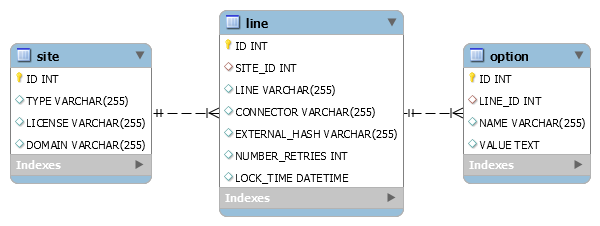
Record with information about the site . An important parameter is the portal domain. The server will access it in certain cases.
Open line / connector record . It clearly defines:
Recordings of connection parameters for a specific connector of a particular Open Line . For different types of connectors, the set of parameters can vary greatly.
The Bot Framework contains a whole set of channels. Therefore, we introduced the concepts of “real channel” and “virtual channel”.
For the connector to work:
1. In the bot settings, specify the necessary WebHook.
2. In the channel settings in “Bitrix24” indicate the correct ones:
Thanks to WebHook, the connector server determines which Open Line this bot is attached to. If the binding could not be found, an error is returned.
If there is no error, then we process the received data:

After all conversions, the message is added to the message queue.
When sending messages from Bitrix24 to an external messenger, the reverse conversion from one format to another is performed. The message is sent using the POST method
In this case, binary data is not transmitted. All attached files are put into Bitrix24.Disk and sent as links. This saves traffic. And if necessary, you can block access to the file at any time.
Chat begins with a message from a user of a social network or messenger. A single entry point is used. This is a single URL, distinguished by a GET parameter, which contains the "Open Line" hash. Using a hash, the system determines where to send the incoming message.
There are situations when they try to connect the same essence of an external system (group, bot) to several portals or to different Open Lines within the same portal. If such cases are not handled, then abnormal situations and failures may occur. Therefore, we implemented a mechanism for checking the uniqueness of the connection.
Attempts to reconnect for different channels are defined differently. The Microsoft Bot Framework checks for the presence of a specific bot identifier in the system. If the current connection is not the only one (repeated), then it continues to work as usual, and the data of the previous connection is completely deleted from the server. At the same time, a request is sent to the portal marking this Open Line connector as “emergency”, requiring administrator attention.
The client connector module is used for:
The Open Lines module is responsible for routing messages, creating a message queue, directing to operators and other functions.
In the Open Lines module, the class
The class
Disadvantages : the speed of the "magic" methods is slightly lower. But they are used to work with external systems, so the delay is not so noticeable.
Benefits: You can work with external methods as with internal ones. That is, the developer locally calls remote methods. All work is standardized. No need to keep a list of methods on the client, no need to synchronize this list. It is enough to add the method to the server, and you can use it on the client.
Some methods of the external server have local wrappers. They perform various tasks before sending a request to a remote server. For example, they cache data (to reduce the load on the remote server), do preprocessing, and so on.
All incoming requests are handled by the class
Types of incoming requests:
The class

Received messages are further processed. Shortname Emoji are converted to a special tag
All attached files are processed. They are downloaded and registered in the internal system. And in the array describing the files, the links to them are replaced with internal IDs.
It checks the presence on the portal of an internal user created for an external user of a social network or messenger. If he is not, he is created. If the user is, then the md5 hash from the user data is checked. It is compared with the received data, and if the hashes are different, then the user data is updated. Then they are replaced in the incoming array with the user ID inside the Bitrix24 portal.
Such a converted data array is placed in the generated event
Outgoing requests are practically not processed. They are routed to a remote connector server. For the Bot Framework, an additional handler is made on the client.
This connector differs from all others in that it is necessary to transmit information about the sender in outgoing messages. It is not transmitted to us when connected. But we can get it in the input. Therefore, a separate table has been created to store supporting information about each chat and each dialogue.
With incoming messages for this connector, a method is called
Currently, most Bitrix24 users connect the Bot Framework channel to work with their audience via Skype. At the time of publication of the article, the number of connected bots is 9 thousand.
Background
The company’s communication with customers has long been transformed: to replace emails and phone calls, first came social networks, and then messengers. Agree, now it is much more convenient, and, most importantly, ask a support question faster on Facebook, VKontakte, What's App or Telegram.
The abundance of channels not only provides great opportunities, but also creates some problems:
- Sales data are difficult to account for and analyze.
- Personnel errors lead to customer dissatisfaction.
Therefore, many companies are thinking about data aggregation in one place, which is easy to control and manage. For them, the Bitrix24 * service just has the Open Lines tool , which we will talk about below.
By the way, we’ll immediately answer the question that worries many: “Why do we need chat bots?” In our case, their application depends on the tasks that need to be solved: starting from simple ones, chat bots that can send a request to one of the departments of the company, complex - allowing you to automate customer support.
* Help: Bitrix24 Service- a set of online tools for organizing the work of the company. It includes task and project management, omnichannel CRM, internal messenger of the company, working social network, working time management, document management and other functionality.
How it works: user view
The client writes to the company's official account on social networks or in instant messengers. This message arrives in a processing queue common to all channels. From it, messages are distributed between employees who respond to them inside the Bitrix24 messenger. As you can understand, this is an automated process and for the responder there is no difference in which channel the client wrote.
How it works: a look from the developer
Integration with Microsoft Bot Framework
Microsoft Bot Framework is an environment that allows you to create an intelligent chat bot in the cloud, with which you can then communicate through various communication channels: from Skype and Telegram to Slack and SMS. It can also be used as a proxy. This is convenient since it is not necessary to implement integration separately for each of these channels.
For integration with the Microsoft Bot Framework, the existing Open Lines working scheme was used with some improvements.
We have created a special connector server. It is the link between external communication channels - social networks, instant messengers, online chats, forms on the site and so on - and the Bitrix24 client. The main advantages of the server:
- provides guaranteed delivery of messages from social networks and instant messengers to Bitrix24;
- works with both Bitrix24 cloud and boxed ones;
- allows you to quickly connect the company's official account on the social network or messenger to Bitrix24.
Data exchange between the Bitrix24 client and the connector server is performed using its own protocol. In this case, the server acts as a router, with preliminary processing of incoming and outgoing data.
It has slightly different server environment requirements than Bitrix24: PHP starting with 5.4, MySql 5.5.3, InnoDB.
To minimize the overhead during data exchange between the Bitrix24 client and the connector server, it was decided:
- Do not transfer files attached to messages from external channels and from the server. The server sends to Bitrix24 only links to files from external sources. And the Bitrix24 client downloads them on their own;
- when sending files from Bitrix24, only transmit links to download them. The files themselves are stored on Bitrix24.Disk;
- for frequently used actions (receiving, sending a message, sending delivery statuses, reading a message, etc.) after sending a message, do not expect a response and close the connection.
Connector server message queue
The message sending queue on the server is implemented on the basis of MySQL. There is currently no need for more sophisticated but flexible tools like Redis. A database-based queue avoids additional overhead, is easier to maintain, and can easily withstand current loads.
The queue guarantees message delivery, even if the portal has been unavailable for some time. The incoming message is processed and placed in the database. A separate process continuously selects messages in the database for sending. At the same time, it forms packets from several messages and sends them to portals.
If delivery confirmation does not arrive on the server, then the next sending to this portal to this “Open Line” will occur only after the end of the blocking period. After each attempt, the duration of the lock increases. If the last attempt is unsuccessful, then sending messages will be blocked for 12 hours. In total, it turns out 24 hours from the first attempt to send messages to the portal. After the last attempt, all messages for this portal of this Open Line are deleted, and the lock is released.
If the server receives confirmation, then the delivered messages are deleted from the queue, and the blocking of this Open Line is removed. That is, new messages will be immediately sent to the portal.
The mechanism of the connector server
We applied the “factory method” pattern to organize the code responsible for each communication channel. Defined a standard set of methods that each connector should support. In addition, each channel can have its own unique methods.
For the channel to work, you need to perform initial configuration on the portal. Users do it, and the portal controls the connection using special methods. Settings for different types of connectors vary significantly in sets of methods. Microsoft Bot Framework uses a simple configuration option. A remote method is called from the portal
saveSettings, in which the necessary parameters are passed. They are stored in the database and are used in the work of the channel in the future. The portal then calls the remote connector method
testConnect, which checks the connectivity with the specified data, and also checks the availability of the connected portal. Webhook is specified when creating a bot on the Bot Framework site. We give the necessary address when setting up the user.
The configuration interface on the portal side looks like this.
Beginners can use the step-by-step wizard, which will help you quickly register a new bot.
After a successful connection, we get records in three data structures.
Record with information about the site . An important parameter is the portal domain. The server will access it in certain cases.
Open line / connector record . It clearly defines:
- connector type;
- id of the open line on the client;
- link to the site;
- a special hash to determine which Open Line the request refers to when accessing via WebHook;
- information for the message queue: number of attempts to send messages to the client and time to block sending.
Recordings of connection parameters for a specific connector of a particular Open Line . For different types of connectors, the set of parameters can vary greatly.
Work on the server directly with the Microsoft Bot Framework
The Bot Framework contains a whole set of channels. Therefore, we introduced the concepts of “real channel” and “virtual channel”.
Botframework- the real channel, since one point of contact is used here. Botframework.skype- A virtual channel that implements work with the Skype bot through the Microsoft Bot Framework. For the connector to work:
1. In the bot settings, specify the necessary WebHook.
2. In the channel settings in “Bitrix24” indicate the correct ones:
- bot handle;
- Application ID
- application secret.
Thanks to WebHook, the connector server determines which Open Line this bot is attached to. If the binding could not be found, an error is returned.
If there is no error, then we process the received data:
- we form an array of data in the format of the exchange between the client and server;
- parse the text and transform all the entities into the Bitrix24 messenger format that is understandable. For different channels, these transformations are different;
- convert all incoming emoticons to the universal Emoji format. We tried to cover the maximum of smiles supported by all channels.
After all conversions, the message is added to the message queue.
When sending messages from Bitrix24 to an external messenger, the reverse conversion from one format to another is performed. The message is sent using the POST method
/v3/conversations/{conversationId}/activities. All the data necessary for sending comes with the message. In this case, binary data is not transmitted. All attached files are put into Bitrix24.Disk and sent as links. This saves traffic. And if necessary, you can block access to the file at any time.
How Open Lines Works
Chat begins with a message from a user of a social network or messenger. A single entry point is used. This is a single URL, distinguished by a GET parameter, which contains the "Open Line" hash. Using a hash, the system determines where to send the incoming message.
Uniqueness of connection
There are situations when they try to connect the same essence of an external system (group, bot) to several portals or to different Open Lines within the same portal. If such cases are not handled, then abnormal situations and failures may occur. Therefore, we implemented a mechanism for checking the uniqueness of the connection.
Attempts to reconnect for different channels are defined differently. The Microsoft Bot Framework checks for the presence of a specific bot identifier in the system. If the current connection is not the only one (repeated), then it continues to work as usual, and the data of the previous connection is completely deleted from the server. At the same time, a request is sent to the portal marking this Open Line connector as “emergency”, requiring administrator attention.
The work mechanism of the client part of Bitrix24
The client connector module is used for:
- communication channel connection settings;
- receiving messages, processing and converting to the Bitrix24 messenger format. With the subsequent generation of the event;
- user processing: registering or updating user data of Bitrix24, which is associated with an external user;
- downloading files coming with messages.
The Open Lines module is responsible for routing messages, creating a message queue, directing to operators and other functions.
Implementing data exchange on the client
In the Open Lines module, the class
Outputis responsible for sending messages to the server and additional processing. The method querydirectly forms outgoing packets to a remote server and signs messages. The class
Outputuses “magic” methods to call remote server methods as if they were local. This has advantages and disadvantages. Disadvantages : the speed of the "magic" methods is slightly lower. But they are used to work with external systems, so the delay is not so noticeable.
Benefits: You can work with external methods as with internal ones. That is, the developer locally calls remote methods. All work is standardized. No need to keep a list of methods on the client, no need to synchronize this list. It is enough to add the method to the server, and you can use it on the client.
Some methods of the external server have local wrappers. They perform various tasks before sending a request to a remote server. For example, they cache data (to reduce the load on the remote server), do preprocessing, and so on.
All incoming requests are handled by the class
Input. It parses the incoming packet, verifies the signature (that the request really came from the server), and redirects the data to a class Routerthat routes incoming requests. Types of incoming requests:
- Connection testing . This method is called by the remote server when it checks for client availability.
- Incoming messages (all types) . More details below.
- Delivery status . Together with the delivery status comes an external message ID, which then allows you to manage external data. For example, we cannot delete a message on a remote server without knowing its external ID.
- Read status .
- Deactivate the connector . Called when this connector is connected to another portal or Open Line.
Receiving messages by the Bitrix24 client
The class
inputreceives an incoming message (message array) from the portal and starts processing. A message delivery notification is sent to the server. He removes them from the queue and removes the blocking of further sending messages. Received messages are further processed. Shortname Emoji are converted to a special tag
iconsupported by the Bitrix24 messenger. This provides support for all available Emoji. All attached files are processed. They are downloaded and registered in the internal system. And in the array describing the files, the links to them are replaced with internal IDs.
It checks the presence on the portal of an internal user created for an external user of a social network or messenger. If he is not, he is created. If the user is, then the md5 hash from the user data is checked. It is compared with the received data, and if the hashes are different, then the user data is updated. Then they are replaced in the incoming array with the user ID inside the Bitrix24 portal.
Such a converted data array is placed in the generated event
OnReceivedMessage. It is "caught" by the Open Lines module.Outgoing Bitrix24 requests
Outgoing requests are practically not processed. They are routed to a remote connector server. For the Bot Framework, an additional handler is made on the client.
This connector differs from all others in that it is necessary to transmit information about the sender in outgoing messages. It is not transmitted to us when connected. But we can get it in the input. Therefore, a separate table has been created to store supporting information about each chat and each dialogue.
With incoming messages for this connector, a method is called
furtherMessageProcessingthat selects and stores the necessary information. And when sending a message to the Botframework channel, the method sendMessageProcessingmixes the necessary data.Instead of conclusions
Currently, most Bitrix24 users connect the Bot Framework channel to work with their audience via Skype. At the time of publication of the article, the number of connected bots is 9 thousand.









