Simplify your work with CloudKit, or Zen-style sync
Introduction
Cloud synchronization is a natural trend of the last few years. If you are developing for one or several Apple platforms (iOS, macOS, tvOS, watchOS) and the task is to implement the synchronization functionality between applications, then you have at your disposal a very convenient tool, or even a whole service - CloudKit.
Our team constantly has to tighten the data synchronization functionality with CloudKit, including in projects that use CoreData as a data warehouse. Therefore, the idea arose and then was realized - to write a universal interface for synchronization.
CloudKit is not just a framework. This is a full BaaS (Backend as a Service), i.e. a comprehensive service with a full-fledged infrastructure, including cloud storage, push notifications, access policies and much more, as well as offering a universal cross-platform programming interface (API).

CloudKit is easy to use and relatively affordable. Just because you are a member of the Apple Developer Program , you are completely free to use:
- 10Gb storage for resources
- 100MB for database
- 2GB of traffic per day
- 40 requests per second
And these numbers can be increased if there is such a need. It is worth noting that CloudKit does not use the user's iCloud storage. The latter is used only for authentication.
This article is not an advertisement of CloudKit and not even another overview of the basics of working with it. There will be nothing about setting up a project, configuring the App ID in your developer profile, creating a CK container or Record Type in the CloudKit dashboard. In addition, not only the backend component remains outside the scope of the article, but also the entire software component that relates directly to the CloudKit API. If you would like to understand exactly the basics of working with CloudKit, then there are already great introductory articles for this, which there is no point in repeating.
This article is, in a sense, the next step.
When you have already mastered with something that you have been using for a long time, sooner or later the question arises: how to automate the process, make it even more convenient and more unified? This is how design patterns came about. This is how our framework for facilitating work with CloudKit, ZenCloudKit, was created, which has already been successfully applied in a number of projects. About it, namely, about the new technical way of working with CloudKit, and we will discuss it further.
Universal interface
Creating the framework, our ultimate goal was to implement such an interface that would be compatible with CoreData entities, allowing, with a minimum of effort, synchronizing - saving, deleting and receiving data - taking into account the existing database connections, regardless of the complexity of the existing architecture.
The framework is written in Swift 3 and it is Swift developers who will be able to fully appreciate the advantages that its use gives. For Objective-C, a fully-fledged bridge is possible, but for well-known reasons, similar things will look redundant and more cumbersome to implement in it. The code examples in this article will be written in Swift.
We turn to the review, in parallel, considering an example of implementation.
Implementation example
Let's take a look at some typical synchronization operations as an introduction: save and delete methods. The final implementation is as follows:
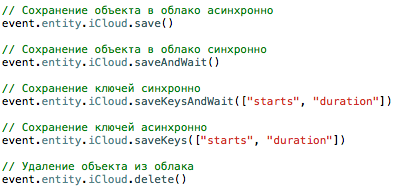
What is going on here?
Suppose we have an event object with an entity property , where entity is an NSManagedObject. This NSManagedObject, like any database object, has fields, some of which are properties, some links, reference , to other NSManagedObject objects, forming one-to-one or one-to-many relationships.
To save this object (or delete the corresponding one) synchronously or asynchronously into the CloudKit database, while forwarding all the connections, a proxy object is used - iCloud, which contains the appropriate methods. It is enough to call entity.iCloud.save () (asynchronous) or entity.iCloud.saveAndWait () (synchronous saving) so that all entity fields are written to the corresponding fields of the CloudKit object, and the unique UUID from the newly saved CKRecord (i.e. string the recordName property of the CKRecordID object) was automatically written back to the field of the entity object designated for this purpose, thereby forming a connection between the local and the remote object.
If you have never used CloudKit and it all sounds strange, it’s easier to say that any entity has .iCloud.save () and this is enough to save both the object itself and all its connections. No more many identical methods for different entities and dirt in the client code. Convenient, isn't it?
Configure synchronization objects
In order for this to work, several conditions must be met.
The work is based on the widely used property mapping scheme, which is used in many libraries, in various web parsers (such as RestKit), etc. Mapping is implemented in the classical manner - through KVC, which is supported only by heirs of NSObject. Hence, the first condition:
1) Each synchronized object must be an inheritor of NSObject (for example, NSManagedObject is an excellent choice).
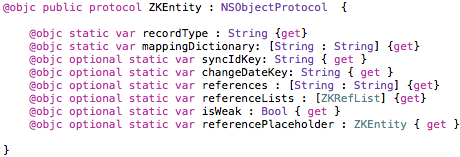
2) Each synchronized object must implement the ZKEntity protocol, which is as follows:
If you work with CoreData, then you need to implement it directly in your (sub-) class:

As you can see from the protocol, the required fields are recordType and mappingDictionary. Consider both.
// REQUIRED (required fields)
1) recordType - the corresponding record type, Record Type, in CloudKit.
Example: the Person class contains the property recordType = “Person”. After calling save () on its instance, a record will be opened in the CloudKit dashboard in this table (“Person”).
Implementation:
static var recordType = "Person"2) mappingDictionary - a dictionary of mapping properties.
Scheme: [local key: remote key (field in the CloudKit table)].
Example: the Person class contains the firstName and lastName fields. To save them to the Person table in CloudKit under the same names, you must write the following:
static var mappingDictionary = [ "firstName" : “firstName”, “lastName” : “lastName” ]// OPTIONAL (optional fields)
The rest of the protocol fields are optional,
3) syncIdKey - the name of the local property that will store the ID of the remote object. ID is the object passport required for communication local <—> remote.
The field is conditionally optional. When initializing the framework controller, which will be described below, it is possible to specify the name of the property for all entities. However, it is specified individually in the entity class, it has a higher priority and when parsing it will be checked first. And only then, if the implementation is empty, will the universal key be used (see below).
Implementation:
static var syncId: String = "cloudID"changeDateKey - the name of the local property that will store the date the object changed. Another utility feature required for synchronization.
Similar to the previous one, it is conditionally optional. It is possible to omit the implementation and specify the property name for all synchronized objects during the initialization of ZenCloudKit (see below).
Implementation:
static var changeDateKey: String = "changeDate"references - a dictionary containing keys that implement * -to-one communication.
Scheme: [“local key”: “remote key”]
The requirement here is that the property “local key” with its type has a class that satisfies the basic requirements (inherits NSObject and implements the ZKEntity protocol).
When you call save () on a local object, ZenCloudKit will also try to save everything associated with it.
Implementation:
static var references : [String : String] =
                                        ["homeAddress" : "address"]
referenceLists - a dictionary containing an array of ZKRefList objects, each of which carries information about a specific connection * -to-many: the type of objects and the name of the key by which to request and save this list.
Schema: ZKRefList (entityType: ZKEntity.Type,
localSource: local property that returns an array of ZKEntity objects,
remoteKey: key in CloudKit to store the array of links (CKReference))
Implementation:
            static var referenceLists: [ZKRefList] = [ZKRefList(entityType: Course.self,
                                                    localSource: "courseReferences",
                                                    remoteKey: "courses")]
courseReferences is a user-defined property that returns an array of ZKEntity objects that you would like to save and links to which should be placed in the list of links of the root object.
Code (continued):
 var courseReferences : [Course]? {
             get {
                 return self.courses?.allObjects as? [Course]
             }
             set {
                 DispatchQueue.main.async {
                     self.mutableSetValue(forKey: "courses").removeAllObjects()
                     self.mutableSetValue(forKey: "courses").addObjects(from: newValue!)
                 }
             }
Implementing the appropriate setter is also necessary so that the application can save objects received from CloudKit. Thus, the localSource field of the ZKRefList object is essentially a reference to a handler that handles input and output operations.
isWeak is an optional flag that, when set (true), indicates that any other object that refers to an instance of this type forms a weak link (similar to the weak modifier) in CloudKit. This means that the record about it will be deleted in cascade as soon as the object that contains the link to it is deleted.
Example: there is an object A referencing object B.
If you set B.isWeak = true, object A will be saved in CloudKit with a “weak link” to B. Object B will be deleted automatically as soon as you delete object A.
This flag is an implementation of the native CloudKit API and appeals to the CKReference constructor with the flag. deleteSelf:
CKReference.init(record: , action: .deleteSelf) Therefore, the removal mechanics are entirely the CloudKit's prerogative; the framework simply offers a more convenient interface. In the future, this functionality can be expanded so that cascading deletion can be configured for different entities.
Implementation:
static var isWeak = truereferencePlaceholder - a property that, when declared, avoids the nil value when retrieving an object from CloudKit, replacing it with the default value.
If it is assumed that a CoreData entity object should always contain some value other than nil as a reference to another object, then whenever this object is not present in CloudKit during synchronization, the local property can be automatically set to the default value.
Example: there is a class A with property b and, mirroring it, the same Record Type in CloudKit.
CloudKit has an object A, which is missing locally, having an empty reference to B (no value). In a normal scenario, as a result of synchronization, you would get an object A whose property b would be nil. But with the default value set in the local class ( referencePlaceholder = ...), ZenCloudKit will automatically assign the value b you specified:
Ab = referencePlaceholder,
where the latter is an instance of B.
So, as a result of a full synchronization cycle, objects with filled links will always be created in your application , even if on all other devices they were kept empty.
Implementation:
static var referencePlaceholder: ZKEntity = B.defaultInstance()Please note that the referencePlaceholder is specified in the target class. If it is necessary that property b of object A does not turn out to be nil (Ab! = Nil), then it is in class B that it is necessary to implement referencePlaceholder, and not in the root class A, which we obtained as a result of synchronization.
// SUMMARY
At the time of writing, this is all the functionality supported by ZKEntity. Let us summarize the above again as a concrete example.
Suppose there is an Event class:
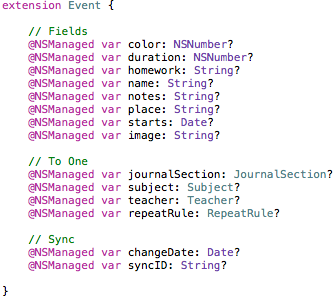
A ZKEntity implementation might look like this:
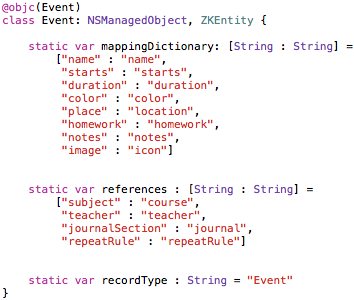
Here:
- dictionary for mapping properties.
- dictionary for mapping links (optional)
- CloudKit Record Type
SyncIdKey and changeDateKey omitted. In the example, the syncID and changeDate properties correspond to them. Since similar properties (changeDate, syncID) are present in the interface of other classes, they were recorded at the ZenCloudKit initialization phase (which will be discussed later) as universal, therefore, the private implementation was omitted.
Setting up the controller and delegate
After the entities have been configured, it is necessary to initialize the controller and assign it a delegate. You can do this in various ways, but the best thing is to set aside a separate class for this and write a callable initializer.
First, you can create a global variable that will store a link to a static instance of the controller.

The delegate class will have to implement the following protocol:
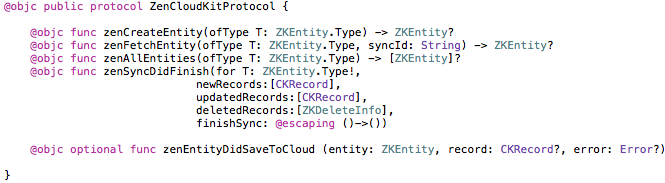
Before considering each method individually, let's try to look at a variant of the finished implementation (with the exception of the zenSyncDIdFinish method).
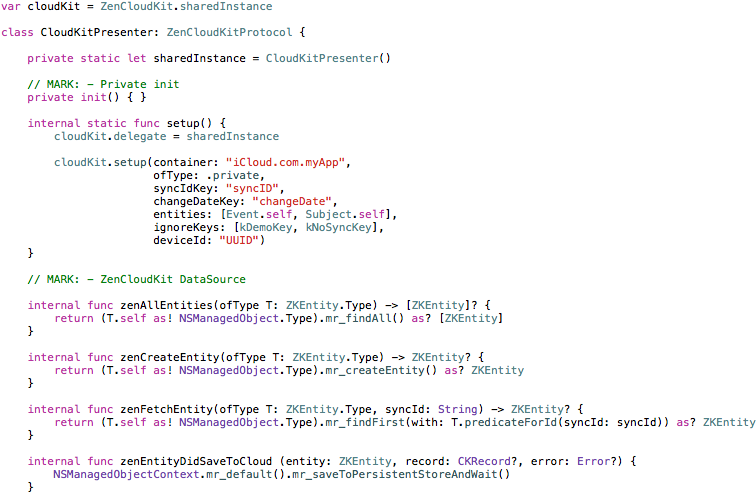
The CloudKitPresenter class in the example is a ZenCloudKit delegate. This is where the initialization and calling of the callback functions necessary to implement the complete synchronization cycle takes place. A complete synchronization cycle is a sequence of off-screen operations in which local and remote objects are compared in terms of time of change and their actualization at both ends. For this, for each type, i.e. for each registered ZKEntity entity, the framework must be provided with three functions that implement creation, querying an object by ID (fetch), and querying all available objects, respectively. In each of the three functions, the ZKEntity class (ofType T: ZKEntity.Type) acts as a parameter. As a result of the execution, ZenCloudKit expects to receive objects of this particular type.
zenAllEntities (ofType T: ZKEntity.Type)
- expects to get an array of all entities of type T
zenCreateEntity (ofType T: ZKEntity.Type)
- expects to get a new instance of T.
zenFetchEntity (ofType T: ZKEntity.Type, syncId: String)
- expects to get an existing instance of T by given syncId (or nil if there is none).
For example, if you work with Person and Home entities, then the T parameter in these functions will be equal to one of these two types. Your task is to provide a result for each of them (a new object, existing and all). This can be done either by checking the type and writing code for each, or using interface polymorphism.
In the above example, the MagicalRecord standard methods are used to perform the above operations to search for an existing one, create a new one, and query all objects that work as extension methods (or category methods, expressed in the spirit of Objective-C) for NSManagedObject. This greatly simplifies the implementation. The code becomes universal, since there is no need to do a type-check for each case T.
Functions are a concrete implementation of generic abstraction, although, strictly speaking, generalizations in the function signature are not used to ensure compatibility with Objective-C.
The last function uses the T.predicateForId (...) statement. This is an extension method provided by ZenCloudKit that returns the correct search predicate for a given type T by a given syncId (to avoid the hardcode and possible errors associated with it in the name of the property locally storing the ID).
zenEntityDidSaveToCloud (entity: ZKEntity, record: CKRecord ?, error: Error?)
- is called every time when saving is completed in CloudKit. In this phase, the entity already received the ID of the remote object, so here you can, for example, save the main database context.
The delegate implements a private Singleton (sharedInstance is not visible to the client). In order to initialize both the controller and its delegate, it is enough to call the method somewhere from the outside at the right time:

In the initialization method, the framework is configured:

The default settings for CloudKit are set:
- container name (container)
- database type (ofType: .public / .private)
Next are the syncIdKey and changeDateKey keys already discussed above - the names of the properties that store the record IDs and the date they were changed. It should be noted that these values can be left blank (nil). In this case, when calling the appropriate methods on ZKEntity instances (for example, save ()), ZenCloudKit will search for their implementation among the declarations of each class. Conversely, it is enough to specify these keys only here to omit a specific implementation. If both the general and the private implementation are empty, then the call to cloudKit.setup () will throw an error in the log, and synchronization will not work.
In the entities parameter, we pass an array of all types that we are going to work with.
ignoreKeys - an array of string keys, upon detecting which, ZenCloudKit should ignore the object (for example, do not save or delete it).
deviceId - device ID. A very important parameter if several devices are involved in synchronization. The uniqueness of this parameter should be taken care of by the developer. By default, Hardware UUID is taken, but other options are possible.
// RECAP
Implementation of the settings described so far is a necessary and sufficient condition for the basic functionality provided by the iCloud proxy object to work, which, in turn, implements the ZKEntityFunctions protocol:

With the exception of the update () function, the purpose of which is to update a local object from a remote object, represented in the code as CKRecord. This function should be used in the delegate method zenSyncDIdFinish, which is called at the end of the full synchronization cycle, which, in turn, starts as follows:

The first option is synchronization in standard mode. Each subsequent synchronization cycle is fixed by ZenCloudKit; if successful, the date of the last synchronization is saved (the framework takes care of all this). Saving the date is very important: it allows you to select only those objects whose modification date is later than the date of the last successful cycle. Otherwise, if, say, you have 100 objects in the database, then each cycle would include a meaningless check of objects that have long been synchronized, not changing. This is completely unnecessary and, moreover, a resource-consuming operation.
The second option is forced synchronization (forced: true). There may be times when data integrity is compromised. Then you can force check each synchronized object, ignoring the date of the last successful cycle, and update the data locally and remotely. Local objects will be updated with what lies in CloudKit (if for some reason this did not happen earlier). And in CloudKit can be saved local objects, which also for some reason were not saved. Depending on the specifics of your application, you yourself can determine in which place to force a synchronization (for example, at startup, during long periods of inactivity, or take this function to settings). In general, there is no need for this call and, most likely, you will not have to resort to it.
Calling the syncEntities () method at the controller level does the same, only for all registered entities. The specific parameter accepts specific types that you would like to synchronize (nil - if you need to apply to all).
It remains to parse the zenSyncDIdFinish method, whose signature looks like this:

Parameters:
T - type of entity whose objects you want to create or update.
newRecords , updatedRecords - Arrays of CKRecord, objects that need to be created or updated locally. A reference point in the search for local matching is a unique ID, which is standardly stored in the CKRecord.recordID.recordName property. The entity, among the objects of which you want to look for correspondences and the instance of which to create, is T.
deletedRecords - an array of objects ZKDeleteInfo, each of which stores information about the deleted object: the local ZKEntity type and object ID. These objects can be of various types, therefore, focusing on type T in this case is not necessary. The type of the deleted object should be viewed in the entityType property, and the object ID in the syncId property of the ZKDeleteInfo object. The class is as follows:
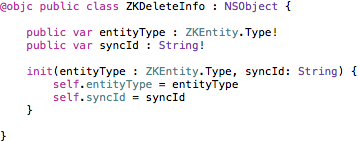
ZenCloudKit generates this list before completing the deletion by sending it to the zenSyncDidFinish handler in the deletedRecords array so that you can perform the necessary local cleanup. Once everything has been successfully deleted locally, you need to call the callback-method finishSync (). If this is not done, then no changes will be made to the CloudKit database. This scheme was adopted for security reasons: only after making sure that the local database is up to date, you call the finalizer - finishSync ().
Always call finishSync () at the end of synchronization.
This applies not only to the deletion phase described above, but also to the creation and update phases.
To summarize the above, considering a fragment of the implementation of the zenSyncDIdFinish function:
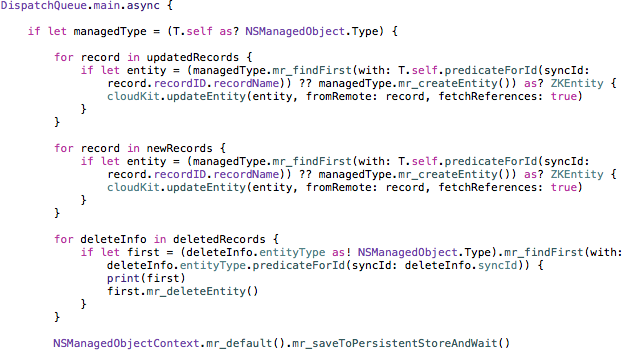
Immediately after this fragment should follow:
- call finishSync ()
- UI update functions that would reflect the changed state of the database (if required).
With the following instruction:

we fill the fields of the local object with the fields CKRecord, which is available to us as an argument in one of the arrays. The fetchReferences flag allows loading all links. By loading links, we mean the actual loading of the corresponding objects (listed in the references and referenceLists arrays described in the ZKEntity protocol) from CloudKit and their binding to this entity object . If upon loading the connection it is found that the corresponding local object does not exist ( zenFetchEntity == nil), it will be automatically created in the local database by calling the delegate method zenCreateEntity .
If the formation of these links involves changing the UI, you need to take care of this additionally (updateEntity - in terms of filling in the links - works asynchronously and you should not wait for it to complete). In the ZKRefList handler , this can be done in the setter, as already mentioned:
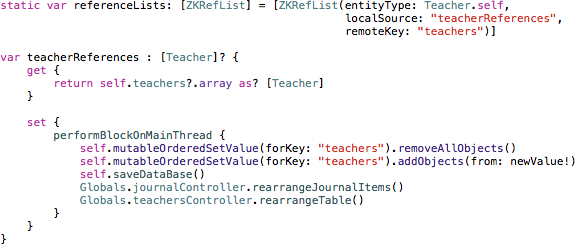
Here the following happens:
When receiving links * -to-many (as a result of calling updateEntity with the flag fetchReferences = true), an array of Teacher objects gets into the setter of teacherReferences. In the main thread, we update this list at the root NSManagedObject, and then call the UI update methods.
Mapping of links * -to-one (the references array containing the name of the properties-links to other ZKEntity entities) does not involve handlers (get / set), therefore, if you want to track the formation of these links, you must either use the same method as keys in to specify the handlers in the references array and redefine their getter and setter - either use ReactiveCocoa or other means to monitor the properties.
Working with links seems to be rich in nuances, and this is true, however, these nuances are a natural consequence of the binding and automation of the two systems - CoreData and CloudKit.
If you need more direct control over linking, updating the UI, or other sync-related processes, you can combine ZenCloudKit and the native CloudKit API at your discretion. Arrays of CKRecord objects are passed in the zenSyncDidFinish method, which, in addition to properties, contain CKReference objects. This means that you can customize the parsing, as well as manually load the objects that you need.
This completes the setup of ZenCloudKit.
The nuances of using
The standard way to access the functionality of the framework is through an instance (singleton) of ZenCloudKit controller:

As arguments - all the same instances and classes of ZKEntity.
The shortened version (through the .iCloud proxy class) is currently available only in Swift.
Push notifications
Push notification processing can also be passed to ZenCloudKit:

The result of his work will be the invocation of the delegate method zenSyncDIdFinish, with one of three filled arrays (newRecords, updatedRecords, deletedRecords), the execution of which will automatically lead to the updating of the database and UI (if you took care of this in the body of this function). Let me remind you that the usual push notification processing scenario involves a number of rather monotonous actions: checking the type of notification (CKNotification), the reasons for notification (queryNotificationReason), parsing - determining the entity to which the notification relates and only then calling the corresponding handler. ZenCloudKit takes care of all this.
Sync lock
Sooner or later, your application code will be filled with .save () or .delete () instructions in different places. If you assume the ability to disable synchronization from within the application (and not in the system properties), then instead of checking a flag at every place in the client code, you can disable synchronization at the framework level:

Resuming synchronization, as you might guess, is achieved by passing false . And your code stays clean.
Logging
All the main stages of the framework are logged. Enabling / disabling the debugMode flag allows you to control the output of service information to the console (default is true):


Container setup:
For successful operation, the application and ZenCloudKit require read and write access to all used Record Type, including query rights to the modifiedDate key (CKRecord). Remember to include all this in a dashboard. In addition, tables within the database will be created under the name Device and DeleteQueue. The first will contain a list of registered devices that access your database. The second - the delete queue - is a table with meta-information about the deleted objects that must be deleted on each device (for each device - the corresponding entry). After this device locally deletes the corresponding object, the record from DeleteQueue will also be erased. These two tables are official, they must have full read and write access for each device.
Security
The last noteworthy moment of the work of ZenCloudKit is security.
The procedure for saving objects to CloudKit is usually reduced to two stages: (1) checking for the presence of the desired object, and only then - (2) saving. Consider a situation where in the shortest amount of time you atomically save 15 new objects (or the same several times in a row), or this happens as a result of a failure. In the standard CloudKit scenario, this can happen like this: first, the fetch handle will work several times, returning nil, and then the save command will be called the same number of times (after all, the object was not found). As a result, not wanting to, you will get multiple instances of the same object in CloudKit. Without additional measures (see GCD), this is inevitable, because the CloudKit API is based on asynchronous blocks, the sequence of which is difficult to predict even by setting the priority and QoS flags of CKQueryOperation.
The above scenario is guaranteed not to happen with ZenCloudKit, which, at the initialization stage, creates a queue for each registered ZKEntity type, providing a strict sequence in the execution of save operations. If among 15 objects there are 3 objects of different types (a total of 5 types), then when they are saved simultaneously, the “at one time” saving process will start for 5 objects, without any threat. Also, the scheme negates the possibility of failure (DoS).
Conclusion
The framework was created by one person for about two months. Most of the time was spent not so much on programming as on design and refactoring. The goal was simple - to simplify and unify the performance of typical synchronization operations with CloudKit, providing an acceptable level of compatibility with CoreData. No cardinal malfunctions and serious bugs during the application have been found to date.
Some features are not described in this article (for example, managing a lost connection and automatically starting a full synchronization cycle as it is restored). Some nuances are also known: for example, at the moment there is no support for CKAssets (however, it is not difficult to implement it).
At the moment, the framework along with the demo project is being prepared for calculation. If you would like to receive the source code of ZenCloudKit or if you have any questions or comments, we will be glad to know about them in the comments to this article or through the PM.









