AP Failover and AP Fallback in Cisco Unified Wireless Implementation
- Tutorial
When the access point has already connected to the controller (AP Join), there are two mechanisms that affect the choice of controller:
- If the access point loses connection with the existing controller, the AP Failover mechanism starts.
- If the access point needs to switch to another controller without losing contact with the controller, AP Fallback mechanism exists for this
AP failover
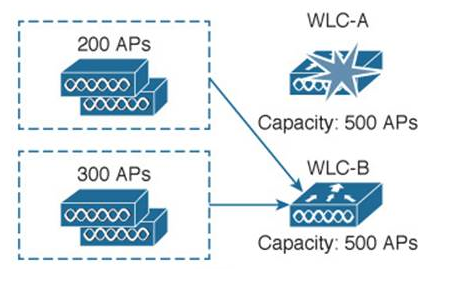
AP Failover uses the following information in order of priority (first highest priority).
- Per AP Primary, Secondary, and Tertiary controller
- Global Backup Primary / Secondary WLC
- These options only begin to work when FastHeartbeat Timeout is activated.
- This information is not immediately activated on the point, but after some time. It should appear in the so-called Backup WLC arrey.
- WLC Mobility Group Membership
WLC Mobility Group Membership
We will conduct testing, starting with the lowest priority, gradually increasing it.
We have an access point connected to the vwlc2 controller (10.0.194.4), on which only the Mobility Group member vwlc (10.0.193.4) is configured.
LAP1#sh capwap cli con
mwarName
mwarIPAddress 0.0.0.0
mwarName
mwarIPAddress 0.0.0.0
mwarName
mwarIPAddress 0.0.0.0
Configured Switch 1 Addr 10.0.193.4
Configured Switch 2 Addr 10.0.194.4
Next, turn off all interfaces on vwlc2.
config port adminmode all disableAnd look at the reaction of the access point.
*Mar 2009:29:18.207: %DTLS-5-SEND_ALERT: Send FATAL : Close notify Alert to10.0.194.4:5246
*Mar 2009:29:54.000: %CAPWAP-5-DTLSREQSEND: DTLS connection request sent peer_ip: 10.0.193.4 peer_port: 5246
*Mar 2009:29:54.520: %CAPWAP-5-DTLSREQSUCC: DTLS connection created sucessfully peer_ip: 10.0.193.4 peer_port: 5246
*Mar 2009:29:54.521: %CAPWAP-5-SENDJOIN: sending Join Request to10.0.193.4
Without the Discovery phase, the access point connected to 10.0.193.4, that is, to the existing Mobility Group member.
Global Backup Primary / Secondary WLC
Now let's test the next priority mechanism - Backup Primary / Secondary WLC. We will write the Backup Primary 10.0.191.4 (wlc2504) address on the vwlc2 controller, it is not in the mobility group members.
config advanced backup-controller primary wlc2504 10.0.191.4You can see how these settings “descended” to a point using the command
LAP1#sh capwap cli ha
fastHeartbeatTmr disabled
primaryDiscoverTmr(sec) 120
primaryBackupWlcIp 10.0.191.4
primaryBackupWlcName wlc2504
secondaryBackupWlcIp 0.0.0.0
secondaryBackupWlcName
DHCP renew try count 0
Fwd traffic stats get 0
Fast Heartbeat sent 0
Discovery attempt 0
Backup WLC array:
Now turn off all interfaces on the connected controller. The connection occurred to the controller in the same mobility group (10.0.193.4). This happened because FastHeartbeat Timeout was not configured. Set them up.
config advanced timers ap-fast-heartbeat local enable 10Let's verify that this setting "went down" to the point
LAP1#sh capwap cli ha
fastHeartbeatTmr(sec) 10 (enabled)
primaryDiscoverTmr(sec) 120
primaryBackupWlcIp 10.0.191.4
primaryBackupWlcName wlc2504
secondaryBackupWlcIp 0.0.0.0
secondaryBackupWlcName
DHCP renew try count 0
Fwd traffic stats get 12
Fast Heartbeat sent 12
Discovery attempt 0
Backup WLC array:
Index [3] System name wlc2504
Index [3] IP 10.0.191.4Index [3] Aging Count 0
Significant changes are visible: the "Fast Heartbeat sent" and "Fwd traffic stats get" counts increase, the wlc2504 controller appeared in Backup WLC arrey (it does not appear immediately, but after some time, only after that the mechanism starts to work!)
Now turn off all interfaces on the connected controller.
*Mar 2009:29:18.207: %DTLS-5-SEND_ALERT: Send FATAL : Close notify Alert to10.0.194.4:5246
*Mar 2009:29:54.000: %CAPWAP-5-DTLSREQSEND: DTLS connection request sent peer_ip: 10.0.191.4 peer_port: 5246
*Mar 2009:29:54.520: %CAPWAP-5-DTLSREQSUCC: DTLS connection created sucessfully peer_ip: 10.0.191.4 peer_port: 5246
*Mar 2009:29:54.521: %CAPWAP-5-SENDJOIN: sending Join Request to10.0.191.4
Now everything works, the access point is connected to Backup Primary.
Per AP Primary, Secondary, and Tertiary controller
We will configure the Primary controller again on vwlc - 10.0.193.4 and make sure that Backup Primary is also configured.
LAP1#sh capwap cli con
mwarName wvlc
mwarIPAddress 10.0.193.4
LAP1#sh capwa cli ha
fastHeartbeatTmr(sec) 10 (enabled)
primaryDiscoverTmr(sec) 120
primaryBackupWlcIp 10.0.191.4
primaryBackupWlcName wlc2504
secondaryBackupWlcIp 0.0.0.0
secondaryBackupWlcName
DHCP renew try count 0
Fwd traffic stats get 32
Fast Heartbeat sent 32
Discovery attempt 0
Backup WLC array:
Index [3] System name wlc2504
Index [3] IP 10.0.191.4Index [3] Aging Count 0
Now turn off the controller.
*Mar 2009:29:18.207: %DTLS-5-SEND_ALERT: Send FATAL : Close notify Alert to10.0.194.4:5246
*Mar 2009:29:54.000: %CAPWAP-5-DTLSREQSEND: DTLS connection request sent peer_ip: 10.0.193.4 peer_port: 5246
*Mar 2009:29:54.520: %CAPWAP-5-DTLSREQSUCC: DTLS connection created sucessfully peer_ip: 10.0.193.4 peer_port: 5246
*Mar 2009:29:54.521: %CAPWAP-5-SENDJOIN: sending Join Request to10.0.193.4
As you can see, the access point connected to the Primary controller, ignoring the setting for Backup Primary.
AP Fallback
When the AP Fallback function is activated (tab CONTROLLER-> General), the access point can change the controller even if communication with the current controller is not lost.
This may occur in the following cases.
- If Per AP Primary, Secondary, and Tertiary controller are configured on the point and the access point is not on one of these three controllers. With Secondary, the access point will not migrate to Primary.
- If the controller is configured with Global Backup Primary / Secondary WLC, which in turn is set to Master Controller Mode.
We will try to check both options.
The access point is connected to the vwlc2 controller (10.0.194.4), we will write the 2504 controller (10.0.191.4) on the Primary controller and see what happens. After some time, the point switches independently to the controller, while mobility members are not registered on both controllers.
*Mar 2009:29:18.207: %DTLS-5-SEND_ALERT: Send FATAL : Close notify Alert to10.0.194.4:5246
*Mar 2009:29:54.000: %CAPWAP-5-DTLSREQSEND: DTLS connection request sent peer_ip: 10.0.191.4 peer_port: 5246
*Mar 2009:29:54.520: %CAPWAP-5-DTLSREQSUCC: DTLS connection created sucessfully peer_ip: 10.0.191.4 peer_port: 5246
*Mar 2009:29:54.521: %CAPWAP-5-SENDJOIN: sending Join Request to10.0.191.4
In the second case, we will register on wlc2504 Master Controller Mode (all other settings, namely Global Backup Primary WLC, remained from the AP Failover check. After some time, the access point connects to 10.0.191.4!
*Mar 2009:29:18.207: %DTLS-5-SEND_ALERT: Send FATAL : Close notify Alert to10.0.194.4:5246
*Mar 2009:29:54.000: %CAPWAP-5-DTLSREQSEND: DTLS connection request sent peer_ip: 10.0.191.4 peer_port: 5246
*Mar 2009:29:54.520: %CAPWAP-5-DTLSREQSUCC: DTLS connection created sucessfully peer_ip: 10.0.191.4 peer_port: 5246
*Mar 2009:29:54.521: %CAPWAP-5-SENDJOIN: sending Join Request to10.0.191.4