How to wake up an application in iOS: scheduled and not very
 Push notifications are a good way to interact with users, get them involved and return to applications (who hasn’t woken up at least once at night from an out-of-time notification?). However, the pushy has another interesting feature that not everyone knows about.
 Imagine that your messenger, so beloved by the user, goes to the background and "falls asleep" there. How can he receive a call without being connected to the server? The answer lies precisely in the push - the message “wakes up” the application, it goes into active mode and can already receive a call.
In iOS, there are several ways to wake an application and give it control over what is happening.
There is UILocalNotification - pending notifications tied to a certain point in the future. Since we do not know when the call will be received, it is impossible to work with UILocalNotification for organizing teleconferences.
There is Background Fetch , described by UIBackgroudnModes . It is also tied to time and can wake an application for downloading and updating data at the right time. Since we cannot specify the exact time of the call, background wakeup cannot work with calls either.
You can wake the application with remote notifications. If you are creating your own project, this feature is enabled in the “Capabilities” tab of the Xcode project, there is a “Background Modes” section and the “Remote notifications” option (you can also enable the UIBackgroundModes key with the “remote-notification” value in Info.plist ) .
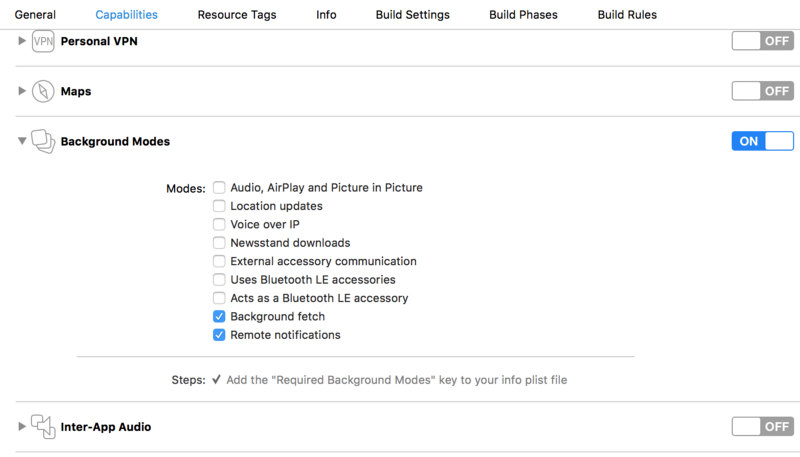
In the notification itself, you need to make the key content-available with a value of 1:
{
	"aps" : {
    	"content-available" : 1
	},
	"content-id" : 42
}
only then will the application wake up (or start) and call the application: didReceiveRemoteNotification: fetchCompletionHandler method . Just in it you can already implement the necessary functionality.
- (void) application:(UIApplication *)application didReceiveRemoteNotification:(NSDictionary *)userInfo
     fetchCompletionHandler:(void (^)(UIBackgroundFetchResult))completionHandler
{
	NSLog(@"Remote Notification userInfo is %@", userInfo);
	NSNumber *contentID = userInfo[@"content-id"];
	// Do something with the content ID
	completionHandler(UIBackgroundFetchResultNewData);
}
In this handler, you can download the necessary content, connect to the server and, for example, check for calls (for working with pushing, I recommend the article “Notifications in iOS 10” from e-Legion, which addresses issues in more detail).
Apple for VoIP applications recommends waking up right through UIBackgroundModes , but, of course, not by time, but by listening to incoming traffic. The messenger in the background monitors a specific socket and, when traffic appears in it, calls a handler that starts the necessary procedures.
Voximplant Push for iOS is based on the VoIP version. To work, you need:
1. Subscribe to notifications at application startup:
PKPushRegistry *voipRegistry = [[PKPushRegistry alloc] initWithQueue:dispatch_get_main_queue()];
voipRegistry.delegate = self;
voipRegistry.desiredPushTypes = [NSSet setWithObject:PKPushTypeVoIP];
2. Process incoming messages and transfer the incoming token to the SDK:
- (void)pushRegistry:(PKPushRegistry *)registry didUpdatePushCredentials:(PKPushCredentials *)credentials forType:(PKPushType)type {
	// 'self.sdk'is an instance of the 'VoxImplantSDK'
	[self.sdk registerPushNotificationsToken:credentials.token];
}
3. After receiving the push, if the application is not connected to the Voximplant cloud, you need to reconnect and receive an incoming call:
- (void)pushRegistry:(PKPushRegistry *)registry didReceiveIncomingPushWithPayload:(PKPushPayload *)payload forType:(PKPushType)type {
	NSDictionary* custom = [[payload.dictionaryPayload objectForKey:@"aps"] objectForKey:@"voximplant"];
	if (custom) {
    	// This call notifies Voximplant cloud that notification is successfully received.
    	[self.sdk handlePushNotification:payload.dictionaryPayload];
 	}
}
Pushi is a powerful means of remote communication with the application, and not just a means of showing the user information that strangers have plundered his farm. This is the ability to receive information in the background, “turn on” the application on a call, update user data. Ultimately, all this is a means of convenient work and user involvement in the application.
Illustration before kat: www.davidrevoy.com