March 15, 2017 at 07:42
Online tools for the simplest Pentest
Before every system administrator, sooner or later, the question arises about the effectiveness of existing network protection tools. How to verify that the firewall is configured fairly securely? Do I need streaming antivirus and does IPS work? Is mail protected? As a rule, to solve such issues, they propose to conduct a Penetration Test. However, it is either too expensive or too complicated (if you do it yourself), and such a thorough analysis is not always necessary. Fortunately, there are online resources that allow you to conduct basic checks of your protection tools (mainly checking the firewall and anti-virus protection). This, of course, cannot replace the full PenTest, however, it gives an idea of how secure your network is from the simplest and most common types of attacks.
If you are interested in this topic, then welcome to ...
Check Point CheckMe - Instant Security Check
I would like to start the review with a tool that makes a comprehensive analysis of the security level of your firewall (whether it is UTM or NGFW). This is Check Point CheckMe .
This service includes a series of tests that checks your computer and network for vulnerabilities from ransomware, phishing, zero-day attacks, bot networks, code injections, the use of anonymizers and data leakage.

How does CheckMe work?
- Follow the link .
- Run a scan in your browser.
- Your browser will exchange data with CheckMe to analyze the security of your network (without any real risk to your network)
Example of a page with the results of checking the network:
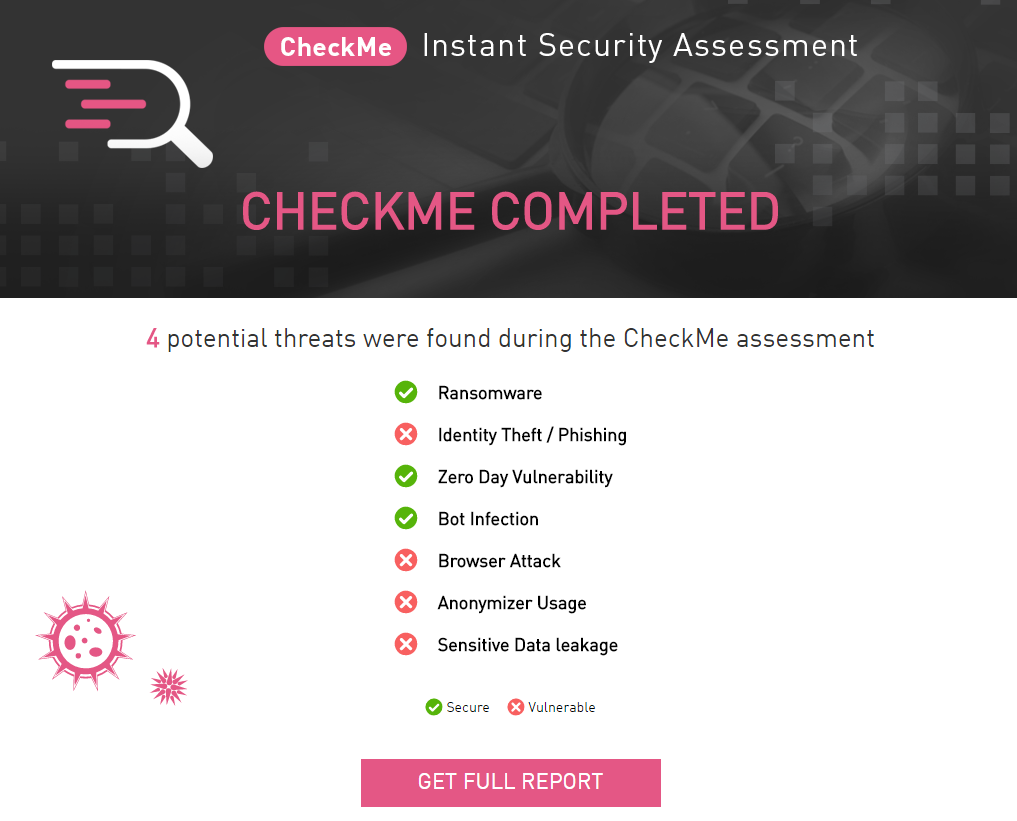
By clicking on the “GET FULL REPORT” button at the bottom, you will receive a detailed report with the results and the correction manual to your e-mail (it will be sent from “[email protected]” with the subject “CheckMe Report” )
What threats are checked?
CheckMe simulates various scenarios that could be the starting point for the following attack vectors:
- Extortion software is malware that encrypts user files and requires a ransom for decrypting them.
- Identity Theft / Phishing Attacks - Theft of personal information using fake websites that look like real ones.
- Zero-day attacks - uses an element of surprise and uses a hole in software that is unknown to the developer.
- Bots - perform malicious attacks that allow attackers to gain full control over the infected computer.
- Attack on the browser - the introduction of a malicious script on websites to steal cookies from victims in order to impersonate a victim.
- Anonymous web surfing - allows users to hide their network activity. It can open gaps in the organization’s network.
- Data leakage - the transfer of secret or confidential information outside the organization’s network through theft or accidental exposure.
Description of tests
1) Threat - extortion software
This test downloads a virus test file (EICAR-Test-File) through your network.
2) Threat - Identity Theft / Phishing Attacks
This test generates connections to phishing and malicious sites through your network.
A successful connection attempt indicates that you could be a victim of a phishing attack and your personal information could be stolen.
CheckMe simulates this test by downloading the favicon.ico file from the following sites:
Site 1
Site 2
3) Threat - Zero-day attacks
This test downloads files in various formats that are often used in zero-day attacks.
CheckMe simulates this test by downloading the following files:
File 1
File 2
File 3
4) Threat - Attack on the browser
This test verifies that your network is protected from Cross-Site Scripting (XSS), SQL injection, and command injection.
CheckMe simulates this test by connecting to the following test sites:
Site 1
Site 2
Site 3
5) Threat - Infection with a bot
This test simulates the activity of a bot through the well-known Command and Control protocol.
CheckMe simulates this test by placing the line:
creditcard = 1234 & expyear = 2017 & ccv = 123 & pin = 1234
at
www.cpcheckme.com/check/testsAssets/post.html
6) Threat - Using anonymizers
This test checks if anonymizers can connect to sites through your network.
CheckMe simulates connections while trying to access www.hidemyass.com
7) Threat - Leak of confidential data
This test generates structured traffic, test credit card numbers (via HTTP and HTTPS) on public sites through your network.
All tests are safe and pose no risk to user devices and the network!
The administrator can see security alerts that notify of test simulations.
Fortinet Test
The validation provided by Fortinet will also be interesting. The test is not so complex and, in a general sense, tests various delivery methods for the test virus (eicar). The ability to download the eicar file in open form, in the form of archives of various degrees of nesting (archive in the archive - up to 10 degrees of nesting) is checked. The archives themselves are of several types: zip, rar, tar, cab, 7zip. There is also a password-protected archive. Based on the results, you can see what type of threats your systems cannot handle.
Run Fortinet
Eicar test in the archive via HTTPS.
Most antivirus tests use the Eicar file. Therefore, you can not access third-party services (many do not trust vendor tests) and use the eicar.org website directly .
Here we can also download a test file and the following options are possible:
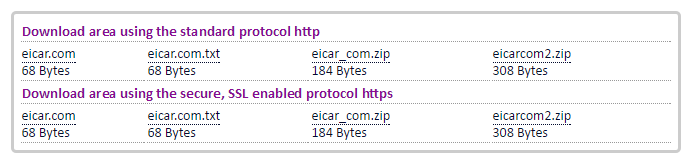
As you can see, there is an eicar file in open form, in the form of an archive. A distinctive feature is the ability to download a file via the https protocol. Those. if https inspection is not configured on your firewall (be it Cisco, CheckPoint, Fortinet, or any other), then the file will be downloaded without any problems. It will probably be blocked by the operating system (at least in Winodws 10), but this is already a serious “bell”, because most modern resources have long switched to https, which means that without https inspection, your security tools simply don’t see anything and will let viruses pass through the sieve like water.
Online sandboxes (sandbox)
I will not consider in detail the question “What is a sandbox?”, Especially since a little later we will devote a short series of articles to this. The main task of sandboxes is to run the file and see what will happen after that. According to the results, a verdict on the harmfulness of this file is issued. Sandboxes help fight malware that conventional antiviruses don't detect at all. There are several online services where you can check files in the sandbox:
These services are very useful for checking your streaming antivirus. For example, you can download a virus file in Tor-networks, run it through your antivirus (better on the layout, and not in the working environment) and check in the online sandbox. Then compare the results and make sure that anti-virus protection is no longer enough.
Online antivirus
Dozens of links could be listed here, as almost every self-respecting antivirus has an online scanner. However, almost all of these links can be replaced with one - VirusTotal
Resource allows you to scan files and links for infection. Moreover, the analysis is performed using many antiviruses and you can see the verdict for each of them.
The url check functionality is very interesting. With it, you can check the effectiveness of your Proxy or Web traffic protection tool. Find the viral site, check it in virustotal, and then see if it opens through your proxy.
Online Firewall and Port Scanners
These tools can also come in handy when testing your network:
Online Anti-spam and Email Security Scanners
EmailSecurityCheck
This resource allows you to check the security of your mail server. To do this, several emails with test virus files will be sent, which are packaged in various ways. If you still received any of these letters, then this is an occasion to reflect on the security of your email server.
What's next?
Using the above services, you can draw some conclusions regarding the effectiveness of existing security features. Pay attention not only to the effectiveness of protection, but also to the incident detection process. You should be as informed as possible about all IB events. This is achieved either using the built-in tools (email alerts, dashboards of devices, etc.) or third-party (SIEM or Log-managment systems).
The next logical step is to conduct a network security audit. This can be done using CheckPoint or Fortinet, and for free. You can read more about this here and here . We have already partially described the architecture of Check Point solutions and in the following posts we will describe how to use it to make a free network security audit.
PS If you use Check Point, but still did not pass the test, then here you can see how to strengthen your protection, so to speak, “tighten the screws”.