 March 9, 2017 at 13:16
Windows Server 2016 and Hyper-V Integration Services
Hyper-V Integration Services is responsible for the effective interaction of virtual machines and the hypervisor by installing additional services in the guest OS. To understand the importance, we suggest a brief look at each of them, as well as key changes in Windows Server 2016.

By default, not all services are enabled. Guest Services is usually included as needed. The rest are responsible for more important functionality.

Operating System Shutdown - includes the ability to shut down a VM (an analogy to the usual shutdown from a guest OS) using Hyper-V Manager or PowerShell / WMI.
Time Synchronization - is responsible for providing time synchronization between the host and the virtual machine.
Data Exchange or KVP (key-value pairs)- provides functionality for exchanging key + value format values of the strings type located in the registry branch HKLM \ Software \ Microsoft \ Virtual Machine \ or in the kvp_pool_x files (for Linux OS) via VMbus. On the host side, VMMS.exe ( AddKvpItems , ModifyKvpItems and RemoveKvpItems functions ) handles WMI queries . In turn, the Hyper-V Data Exchange Service must be running on the VM.
HKLM \ Software \ Microsoft \ Virtual Machine \ Auto contains the VM information that is generated the first time the Hyper-V Data Exchange Service is started.

HKLM \ Software \ Microsoft \ Virtual Machine \ Externalcontains data sent by the user from the host side. By default, this section is empty and does not contain any KVP objects.
HKLM \ Software \ Microsoft \ Virtual Machine \ Guest presents the data that must be sent to the virtualization node from this VM. For example, information about AVMA activation or custom parameters that your application needs to pass a level higher (yes, in general, we can add our own key + value pairs and work with them through KVP and WMI without providing credentials. A new analogy is PowerShell Direct, but with its pros and cons).
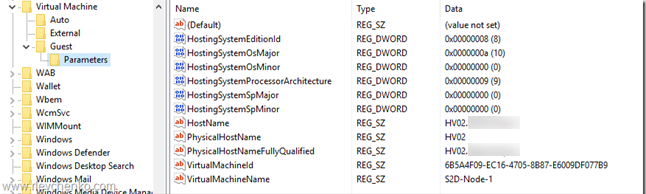
HKLM \ Software \ Microsoft \ Virtual Machine \ Guest \ Parameters contains information about the virtualization node (name, FQDN, VMID, and so on). Remember this branch - it will be useful to us further.
HeartbeatIt is responsible for checking the state of the VM through hearbeats that run at a specific interval between the VM and the node.

Backup (volume snapshot) includes the ability to use VM backup tasks at the host level to ensure backup consistency.
Guest Services provide file transfers to VMs via WMI or PowerShell (Copy-VMFile). By default, not enabled. More details can be found here .

Everyone remembers that to install the integration services, you had to mount the ISO image (% systemroot% \ system32 \ vmguest.iso) through the " Insert Integration Services Setup Disk " option in the VM console and start the installation process inside the VM. Then check the IS version from time to time to update it (vmguest.iso, like the node, was also updated via Windows Update). This process has changed significantly in Windows Server 2016. Now there are no options in the console, as well as vmguest.iso itself. Now the distribution of IS on the VM is done by Windows Update itself. But there are features that we will consider below.
Automatic IS delivery through Windows Update is available for new operating systems inside the VM (starting with Windows Server 2012 R2 / Windows 8.1 and later ). No further action is required from you.
If the guest OS is based on Windows Server 2012 / Windows 8 and older , then the availability of the working Data Exchange Service (discussed above) is required. DES provides access to the / values of HostSystemOSMajor and HostSystemOSMinor , located in the HKLM \ SOFTWARE \ Microsoft \ Virtual Machine \ Guest \ Parameters branch , to determine if the IS needs to be updated on the VM. These parameters must be present and have values. Otherwise (for example, if DES is not enabled for the VM or the service is not running), IS will not be provided through the WU.

TIP : we can manually create or modify these registry values to give a “false” signal, but this action is not officially supported.
Suppose that within the VM, Windows Server 2012 R2 is running, and Windows Server 2016 is running on the host. DES receives information about the VM, compares the values between those on the host and received from the VM, and they turn out to be different, so the ISs on the VM are not relevant and their The update will be done through WU.

In the case of Linux-based OSs , as a rule, ISs go embedded. In some cases, the Linux Integration Services or FreeBSD Integration Services package is required . For detailed information on requirements for various distributions and functionality, see the article “ Supported Linux and FreeBSD virtual machines for Hyper-V on Windows ”.
If you still have virtualized Windows Server 2003, which is no longer supported, it is at least recommended to install IS using vmguest.iso from Windows Server 2012 R2, for example. Reliability and performance are not guaranteed, but 2003 was already 14 years ago. Of course, migration to newer versions of the OS will be preferable in this case.
If DES is not running or Windows Update is not accessible from the VM, then there is a special KB for self-downloading IS " Hyper-V integration components update for Windows virtual machines that are running on a Windows 10 or Windows Server 2016-based host " (available in KB version IS: 6.3.9600.17903) + IS Update to fix problems with Windows Server Guest OSes (IS ver.6.3.9600.18080, applicable for Windows 7 / 8.1).
First you need to make sure that you have installed April 2014, update rollup for Windows RT 8.1, Windows 8.1, and Windows Server 2012 R2 (2919355) and Service Pack 1 for Windows 7 .
IS from KB is available as a cab file that can be applied through PowerShell:Add-WindowsPackage -PackagePath -Online . If you need to apply the IS update on a switched off VM ( offline vm servicing ), we recommend that you refer to this guide .
Note : a newer version of IS is available as vmguest.iso (see below, an unofficial download source) to simplify the process of self-updating.
Download VMGuest.ISO here . This image contains the IS Windows Server 2012 R2 that is currently updated (February, 2017. IS version 6.3.9600.18398). You can use them to install or upgrade IS “prehistoric” OSs on Windows Server 2016 hosts (migration to new OSs is preferred) or on Windows Server 2012 R2 / Windows 8.1 hosts.
 Roman Levchenko began his IT career in 2007 and currently works as a System Architect in a leading integrator. He has experience building complex systems primarily based on Microsoft products using Azure cloud technologies and a wide range of hardware from leading vendors. Certified by Windows Server, Hyper-V, System Center, VMware vSphere, and Unified Communications. First received MVP status in 2014 and has been VMware vExpert since 2016. He shares his practical experience in automation (PowerShell), cloud technologies (Azure, Hybrid / Private Clouds) and blog virtualization, and is actively involved in the life of technical communities.
By default, not all services are enabled. Guest Services is usually included as needed. The rest are responsible for more important functionality.
Operating System Shutdown - includes the ability to shut down a VM (an analogy to the usual shutdown from a guest OS) using Hyper-V Manager or PowerShell / WMI.
Time Synchronization - is responsible for providing time synchronization between the host and the virtual machine.
Data Exchange or KVP (key-value pairs)- provides functionality for exchanging key + value format values of the strings type located in the registry branch HKLM \ Software \ Microsoft \ Virtual Machine \ or in the kvp_pool_x files (for Linux OS) via VMbus. On the host side, VMMS.exe ( AddKvpItems , ModifyKvpItems and RemoveKvpItems functions ) handles WMI queries . In turn, the Hyper-V Data Exchange Service must be running on the VM.
HKLM \ Software \ Microsoft \ Virtual Machine \ Auto contains the VM information that is generated the first time the Hyper-V Data Exchange Service is started.
HKLM \ Software \ Microsoft \ Virtual Machine \ Externalcontains data sent by the user from the host side. By default, this section is empty and does not contain any KVP objects.
HKLM \ Software \ Microsoft \ Virtual Machine \ Guest presents the data that must be sent to the virtualization node from this VM. For example, information about AVMA activation or custom parameters that your application needs to pass a level higher (yes, in general, we can add our own key + value pairs and work with them through KVP and WMI without providing credentials. A new analogy is PowerShell Direct, but with its pros and cons).
HKLM \ Software \ Microsoft \ Virtual Machine \ Guest \ Parameters contains information about the virtualization node (name, FQDN, VMID, and so on). Remember this branch - it will be useful to us further.
HeartbeatIt is responsible for checking the state of the VM through hearbeats that run at a specific interval between the VM and the node.
Backup (volume snapshot) includes the ability to use VM backup tasks at the host level to ensure backup consistency.
Guest Services provide file transfers to VMs via WMI or PowerShell (Copy-VMFile). By default, not enabled. More details can be found here .
What to consider in Windows Server 2016?
Everyone remembers that to install the integration services, you had to mount the ISO image (% systemroot% \ system32 \ vmguest.iso) through the " Insert Integration Services Setup Disk " option in the VM console and start the installation process inside the VM. Then check the IS version from time to time to update it (vmguest.iso, like the node, was also updated via Windows Update). This process has changed significantly in Windows Server 2016. Now there are no options in the console, as well as vmguest.iso itself. Now the distribution of IS on the VM is done by Windows Update itself. But there are features that we will consider below.
Automatic IS delivery through Windows Update is available for new operating systems inside the VM (starting with Windows Server 2012 R2 / Windows 8.1 and later ). No further action is required from you.
If the guest OS is based on Windows Server 2012 / Windows 8 and older , then the availability of the working Data Exchange Service (discussed above) is required. DES provides access to the / values of HostSystemOSMajor and HostSystemOSMinor , located in the HKLM \ SOFTWARE \ Microsoft \ Virtual Machine \ Guest \ Parameters branch , to determine if the IS needs to be updated on the VM. These parameters must be present and have values. Otherwise (for example, if DES is not enabled for the VM or the service is not running), IS will not be provided through the WU.
TIP : we can manually create or modify these registry values to give a “false” signal, but this action is not officially supported.
Suppose that within the VM, Windows Server 2012 R2 is running, and Windows Server 2016 is running on the host. DES receives information about the VM, compares the values between those on the host and received from the VM, and they turn out to be different, so the ISs on the VM are not relevant and their The update will be done through WU.
In the case of Linux-based OSs , as a rule, ISs go embedded. In some cases, the Linux Integration Services or FreeBSD Integration Services package is required . For detailed information on requirements for various distributions and functionality, see the article “ Supported Linux and FreeBSD virtual machines for Hyper-V on Windows ”.
If you still have virtualized Windows Server 2003, which is no longer supported, it is at least recommended to install IS using vmguest.iso from Windows Server 2012 R2, for example. Reliability and performance are not guaranteed, but 2003 was already 14 years ago. Of course, migration to newer versions of the OS will be preferable in this case.
How to install IS manually?
If DES is not running or Windows Update is not accessible from the VM, then there is a special KB for self-downloading IS " Hyper-V integration components update for Windows virtual machines that are running on a Windows 10 or Windows Server 2016-based host " (available in KB version IS: 6.3.9600.17903) + IS Update to fix problems with Windows Server Guest OSes (IS ver.6.3.9600.18080, applicable for Windows 7 / 8.1).
First you need to make sure that you have installed April 2014, update rollup for Windows RT 8.1, Windows 8.1, and Windows Server 2012 R2 (2919355) and Service Pack 1 for Windows 7 .
IS from KB is available as a cab file that can be applied through PowerShell:Add-WindowsPackage -PackagePath
Note : a newer version of IS is available as vmguest.iso (see below, an unofficial download source) to simplify the process of self-updating.
Where can I find VMGuest.iso?
Download VMGuest.ISO here . This image contains the IS Windows Server 2012 R2 that is currently updated (February, 2017. IS version 6.3.9600.18398). You can use them to install or upgrade IS “prehistoric” OSs on Windows Server 2016 hosts (migration to new OSs is preferred) or on Windows Server 2012 R2 / Windows 8.1 hosts.
about the author
Roman Levchenko began his IT career in 2007 and currently works as a System Architect in a leading integrator. He has experience building complex systems primarily based on Microsoft products using Azure cloud technologies and a wide range of hardware from leading vendors. Certified by Windows Server, Hyper-V, System Center, VMware vSphere, and Unified Communications. First received MVP status in 2014 and has been VMware vExpert since 2016. He shares his practical experience in automation (PowerShell), cloud technologies (Azure, Hybrid / Private Clouds) and blog virtualization, and is actively involved in the life of technical communities.








