Zabbix: LLD monitoring of iron under Windows on PowerShell
Changelog
It's time for me to put together my bike to monitor the physical state of the Windows hardware. It has not been possible to find a ready-made solution, or even more or less working, from the moment I met Zabbix, and this is more than 3 years. And even more so that it was ... elegant or something. Personally, even in such things, I want to see harmony and maximum functionality. That is why only LLD and PowerShell are considered below. And of course, only free software.
So, what will be monitored:
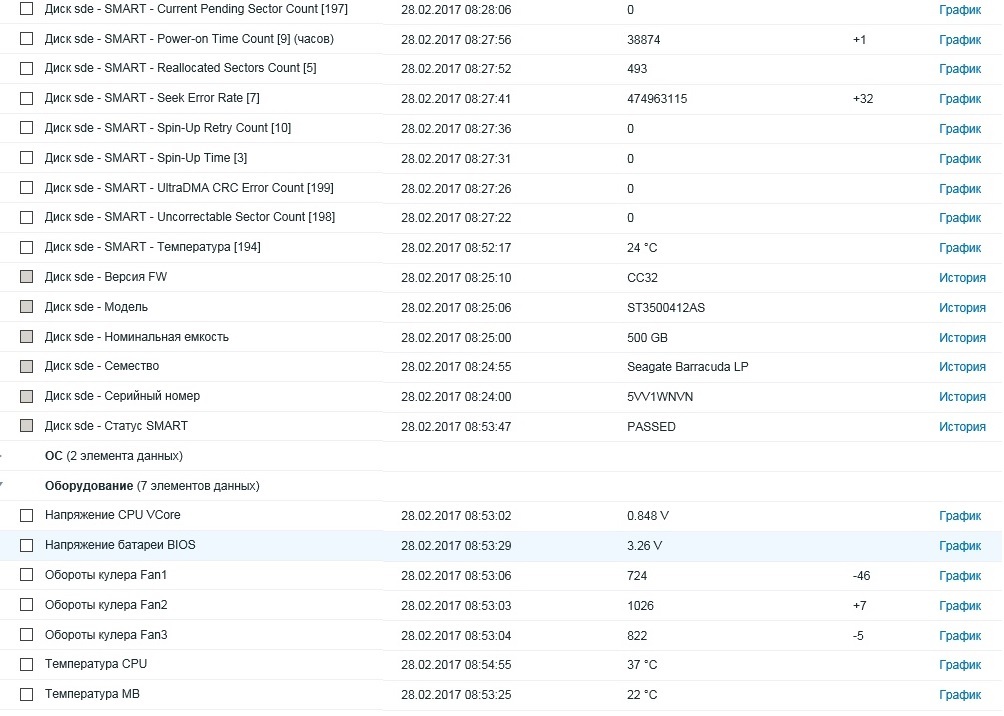
And it will look something like this:
Total needed:
Under the spoiler is the current template. Just save the contents in xml format and import into your Zabbix.
The template was created in Zabbix version 3.2, it may work in earlier versions. The keys are standard and have the form ZScript [script_name, parameter1, .., parameterN] . Parameters are passed directly to the script itself.
I hope the template is as simple and straightforward as possible.
Below are the necessary scripts. Inside, there are already both detection and query of individual elements. Work was tested on Windows from XP SP3 to 2016. Of course, the decision with the Execution Policy is yours.
Only drives with SMART enabled are detected. Parameters are requested from the "RAW_VALUE" column. Want to monitor another parameter? Just enter its number. By default, parentheses and their contents are discarded. If the disk you need does not return the parameter, an empty field is returned.
By default, the script does not detect the names of sensors that contain # . For what it is needed, see below.
One sensor name is also reserved - Vbat. This is the voltage of the BIOS battery. Its value is taken out in a separate element for the trigger (it works if less than 2.9V).
The values of the temperatures and revolutions of the coolers at the output are integer, the voltage values are transmitted as is.
Theoretically, it is possible to detect other indicators (loads, frequencies, ..). Use the corresponding second parameter in the key for this. For example: ZScript [hard, discovery, load] .
For maximum unification, I use the following and only parameter for my scripts:
This gives maximum flexibility and uniformity. If you need to add more parameters for any scripts, you can simply add variables in quotation marks. It will not affect current running scripts. I use the windows prefix just in case, it’s so convenient for me to store templates for guaranteed identification.
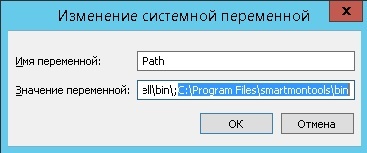
Smartmontools (version 6.5 at the time of writing) is used to monitor the status of disks. When installing the software, smartctl-nc is installed by default — it is used in the script to make the life of your server easier. You will also need to register let the bin folder in variable environments.
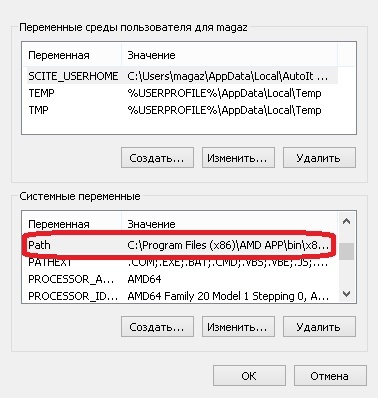
We simply add the path to the end of the Path variable through a semicolon. The default is C: \ Program Files \ smartmontools \ bin
For sensors, OHM is used. Software is free open source. Installation is trivial, but for the full work you need to run the program as a service. There is NSSM for such things, I would still advise downloading the latest build . And here you can see the syntax.
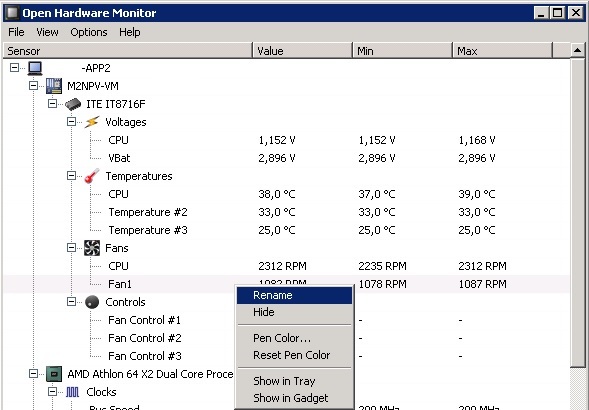
The promised selection of sensors is ensured by the fact that the names of the sensors can be changed ! Change the names to readable ones (they will be used in element names), and comment on unnecessary sensors #.
Remember to restart the program / service to apply renaming.
The result is a good monitoring tool. Those who wish can hang their triggers on the necessary prototypes of elements. Or completely rework the template.
2017/07/05 UPDATE : a bug in windows.hdd.ps1 has been fixed - now a comma does not appear in JSON at the beginning.
It's time for me to put together my bike to monitor the physical state of the Windows hardware. It has not been possible to find a ready-made solution, or even more or less working, from the moment I met Zabbix, and this is more than 3 years. And even more so that it was ... elegant or something. Personally, even in such things, I want to see harmony and maximum functionality. That is why only LLD and PowerShell are considered below. And of course, only free software.
So, what will be monitored:
- SMART drives (information, general status and selected indicators)
- Temperature, voltage, cooler speed ( your choice )
And it will look something like this:
Total needed:
- smartmontools
- Openhardwaremonitor
- Nssm
- 2 scripts on PS below
- template
Template
Under the spoiler is the current template. Just save the contents in xml format and import into your Zabbix.
Template
The template was created in Zabbix version 3.2, it may work in earlier versions. The keys are standard and have the form ZScript [script_name, parameter1, .., parameterN] . Parameters are passed directly to the script itself.
I hope the template is as simple and straightforward as possible.
PS Scripts
Below are the necessary scripts. Inside, there are already both detection and query of individual elements. Work was tested on Windows from XP SP3 to 2016. Of course, the decision with the Execution Policy is yours.
windows.hdd.ps1 -> For smartmontools
Only drives with SMART enabled are detected. Parameters are requested from the "RAW_VALUE" column. Want to monitor another parameter? Just enter its number. By default, parentheses and their contents are discarded. If the disk you need does not return the parameter, an empty field is returned.
windows.hard.ps1 -> for OHM
By default, the script does not detect the names of sensors that contain # . For what it is needed, see below.
One sensor name is also reserved - Vbat. This is the voltage of the BIOS battery. Its value is taken out in a separate element for the trigger (it works if less than 2.9V).
The values of the temperatures and revolutions of the coolers at the output are integer, the voltage values are transmitted as is.
Theoretically, it is possible to detect other indicators (loads, frequencies, ..). Use the corresponding second parameter in the key for this. For example: ZScript [hard, discovery, load] .
Preparing a Zabbix Agent
For maximum unification, I use the following and only parameter for my scripts:
UserParameter=ZScript[*],powershell C:\System\Zabbix\Scripts\windows.$1.ps1 "$2" "$3"This gives maximum flexibility and uniformity. If you need to add more parameters for any scripts, you can simply add variables in quotation marks. It will not affect current running scripts. I use the windows prefix just in case, it’s so convenient for me to store templates for guaranteed identification.
smartmontools
Smartmontools (version 6.5 at the time of writing) is used to monitor the status of disks. When installing the software, smartctl-nc is installed by default — it is used in the script to make the life of your server easier. You will also need to register let the bin folder in variable environments.
We simply add the path to the end of the Path variable through a semicolon. The default is C: \ Program Files \ smartmontools \ bin
Openhardwaremonitor
For sensors, OHM is used. Software is free open source. Installation is trivial, but for the full work you need to run the program as a service. There is NSSM for such things, I would still advise downloading the latest build . And here you can see the syntax.
The promised selection of sensors is ensured by the fact that the names of the sensors can be changed ! Change the names to readable ones (they will be used in element names), and comment on unnecessary sensors #.
Remember to restart the program / service to apply renaming.
Total
The result is a good monitoring tool. Those who wish can hang their triggers on the necessary prototypes of elements. Or completely rework the template.
2017/07/05 UPDATE : a bug in windows.hdd.ps1 has been fixed - now a comma does not appear in JSON at the beginning.









