 February 10, 2017 at 14:05
ChairInput We are writing a game in Unity, controlled using the Android virtual keyboard. The problem with the camera angle
Hello everyone, I wrote a keyboard simulator for Android in Unity3D, it is not very tailored for special children , but is intended for the general user (well, I think so) . And in this post I want to talk about the problem of blocking part of the screen with the keyboard and how to solve it.
Although this is not related to the topic of the post, I’ll tell you a little about the game:
The principle is simple, you select one of the proposed texts or enter your own and start training to print. When you press the right button in the letter, the ball flies. If you are mistaken, the green curtain is released and does not rise until you erase the excess.
I was asked by the teachers to make this game, since the popular simulators are very sharpened on the speed of printing and sharpened on the speed and proper placement of the fingers. It is not very suitable for special people alike. how can I print with only two fingers (the rest do not unbend), and my girlfriend generally foot. I am generally silent about print speed. So I'm not trying to beat the guys from klava.org or klavagonka, but I'm writing my own.
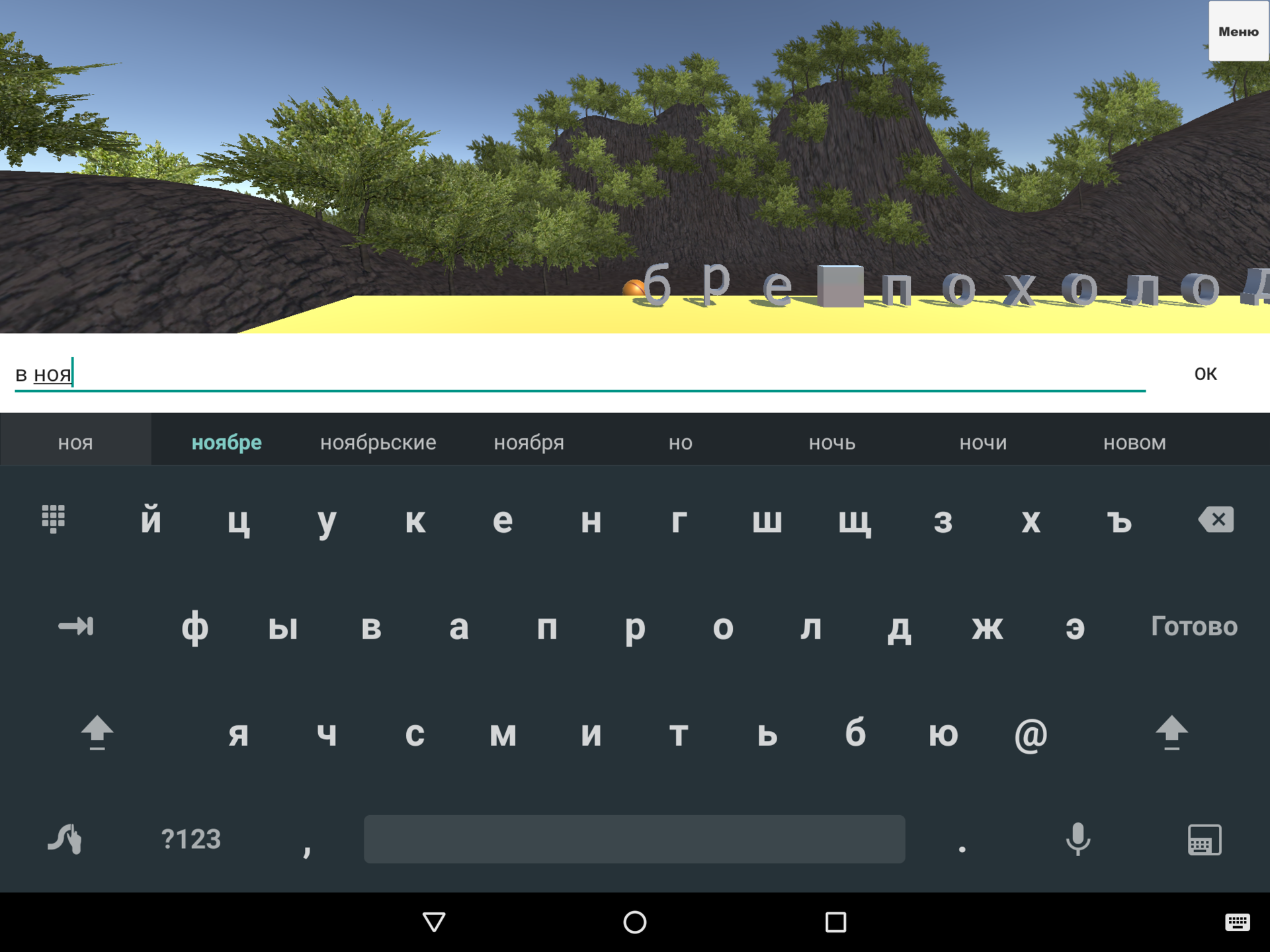
I decided to work with text input through the standard Unity UI InputField, the event of a button click and the last character is obtained like this.
Then there is boring magic of throwing balls into letters, I will not publish it, becausethere is a lot of govnokod it requires refactoring.
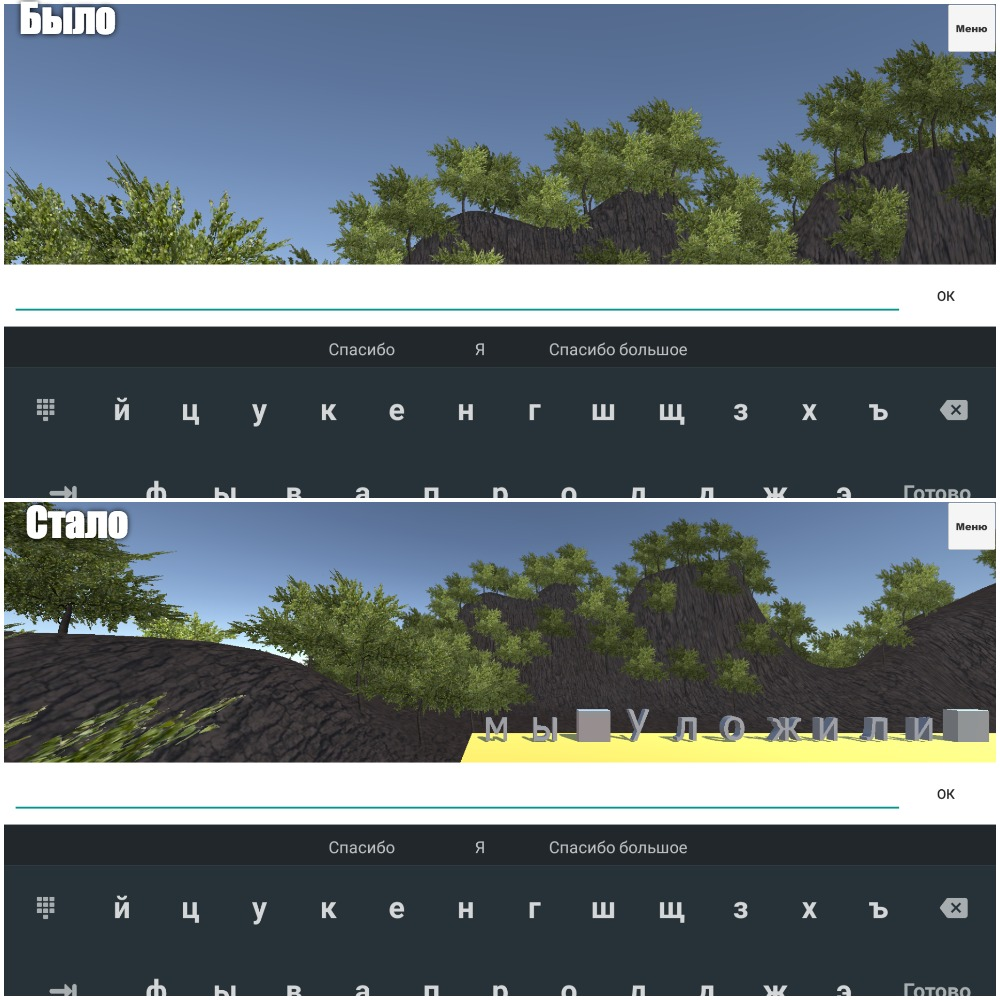
Everything worked fine on the computer, but when I launched the game on Android, I sawAusterlitz's Endless Sky , that the keyboard had moved into the main game space and blocked everything.

I didn’t find anything good in Google (maybe I just don’t know how to google) and I began to pick the camera’s properties myself.
In the settings, I found the Viewport Rect property and set Y to 0.5 in it, I thought that this was the end of my problems, but no.

In the vertical orientation of the screen, the keyboard stopped bumping into the screen, but in the horizontal keyboard I still bumped into the picture, then I played around with the numbers and picked up the value for horizontal, 0.3. And rightly so, everything left in the vertical.
Thinking, I realized that the keyboard height factor to the screen height. I decided to write a script that changes this coefficient, calculating from the current keyboard height. I found a height gain script on stackoverflow and wrote this script:
Everything worked perfectly judging by Profiler without losing FPS.
→ The game can be downloaded here
→ My site: aacidov.ru
A little bit about the game
Although this is not related to the topic of the post, I’ll tell you a little about the game:
The principle is simple, you select one of the proposed texts or enter your own and start training to print. When you press the right button in the letter, the ball flies. If you are mistaken, the green curtain is released and does not rise until you erase the excess.
I was asked by the teachers to make this game, since the popular simulators are very sharpened on the speed of printing and sharpened on the speed and proper placement of the fingers. It is not very suitable for special people alike. how can I print with only two fingers (the rest do not unbend), and my girlfriend generally foot. I am generally silent about print speed. So I'm not trying to beat the guys from klava.org or klavagonka, but I'm writing my own.
Work with input
I decided to work with text input through the standard Unity UI InputField, the event of a button click and the last character is obtained like this.
	InputField field;
	public void Start()
	{
		field = GetComponent ();
		field.onValueChange.AddListener (delegate {ValueChangeCheck ();});
		// focus on field on loading scene
		field.Select ();
		field.ActivateInputField ();
	}
	// Invoked when the value of the text field changes.
	public void ValueChangeCheck()
	{
		string symbol = field.text.Length==0?null: field.text[field.text.Length-1]+"";
        }
Then there is boring magic of throwing balls into letters, I will not publish it, because
Problem
Everything worked fine on the computer, but when I launched the game on Android, I saw
I didn’t find anything good in Google (maybe I just don’t know how to google) and I began to pick the camera’s properties myself.
Solution
In the settings, I found the Viewport Rect property and set Y to 0.5 in it, I thought that this was the end of my problems, but no.
In the vertical orientation of the screen, the keyboard stopped bumping into the screen, but in the horizontal keyboard I still bumped into the picture, then I played around with the numbers and picked up the value for horizontal, 0.3. And rightly so, everything left in the vertical.
Thinking, I realized that the keyboard height factor to the screen height. I decided to write a script that changes this coefficient, calculating from the current keyboard height. I found a height gain script on stackoverflow and wrote this script:
using System.Collections;
using System.Collections.Generic;
using UnityEngine;
public class CameraController : MonoBehaviour {
	Camera cam;
	// Use this for initialization
	void Start () {
		cam = GetComponent ();
	}
	#if (UNITY_ANDROID)
	Rect KeyBoardRect = new Rect(0, 0, 1,1);
	void FixedUpdate () {
		KeyBoardRect.y = ((float)GetKeyboardSize ()) / Screen.height;
		cam.rect = KeyBoardRect;
	}
	public int GetKeyboardSize()
	{
		using (AndroidJavaClass UnityClass = new AndroidJavaClass("com.unity3d.player.UnityPlayer"))
		{
			AndroidJavaObject View = UnityClass.GetStatic("currentActivity").Get("mUnityPlayer").Call("getView");
			using (AndroidJavaObject Rct = new AndroidJavaObject("android.graphics.Rect"))
			{
				View.Call("getWindowVisibleDisplayFrame", Rct);
				return Screen.height - Rct.Call("height");
			}
		}
	}
	#endif
}
Everything worked perfectly judging by Profiler without losing FPS.
→ The game can be downloaded here
→ My site: aacidov.ru









