
Network Controller: Software Defined Networks in Windows Server 2016. Part 1: Features and Services
Last year we talked about Storage Spaces Direct ?? - ?? software-defined storage in Windows Server 2016. Today we’ll talk about another new product from Microsoft, this time from the field of software-defined networks (SDN). Network Controller is a network infrastructure management service in Windows Server 2016.
Contents

VLAN The first virtual networks appeared in 1998. These were local virtual VLANs using the IEEE 802.1Q protocol. The technology allows you to split one L2 network into many logical L2 networks. But VLAN has a limitation, which turned out to be significant with an increase in the number of networks: the maximum number of connections on one L2 network is 4096. To overcome it, manufacturers began to develop new protocols with greater scalability, for example: IEEE 802.1ad and IEEE 802.1ah. We will not dwell on them in detail and move on.
VXLAN, STT and NVGRE.In 2011, VMware, Arista, and Cisco released the VXLAN protocol, which allows you to create up to 16 million logical L2 segments on a single network. In parallel with them, Microsoft is creating an NVGRE protocol with a similar specification, which is starting to evolve in Windows Server 2012. Nicira offers the STT protocol. The issue of limited scalability has been resolved; you can create as many networks as you like. With the growth of networks, the infrastructure becomes difficult to manage, and there is a need for a centralized console to configure virtual and physical equipment. So the concept of software-defined networks (SDN) with centralized management of network infrastructure.
SDNNetwork management approach with unified software tools. Nicira was one of the first to introduce SDN technology. After purchasing Nicira, VMware creates the VMware NSX product using the VXLAN protocol.
In 2013, Microsoft offers its version of a software-defined network in the edition of Windows Server 2012R2 based on the NVGRE protocol. The NVGRE protocol had several disadvantages:
In the Windows Server 2016 edition, Microsoft introduced a new implementation of software-defined networks based on the VXLAN protocol - Network Controller (NC). This service is available only in the edition of Windows Server 2016 Datacenter. Let's look at the features of Network Controller.
Network Controller - a single point of management and monitoring for all physical and virtual domain networks. It configures IP subnets, VLANs, routers, and firewalls. NС stores information on network topology, balances traffic and sets NAT rules.
In general, the principle of the Network Controller architecture is this: the controller nodes are located on separate VMs, and the routing, traffic balancing and firewall services are located on virtualization servers.
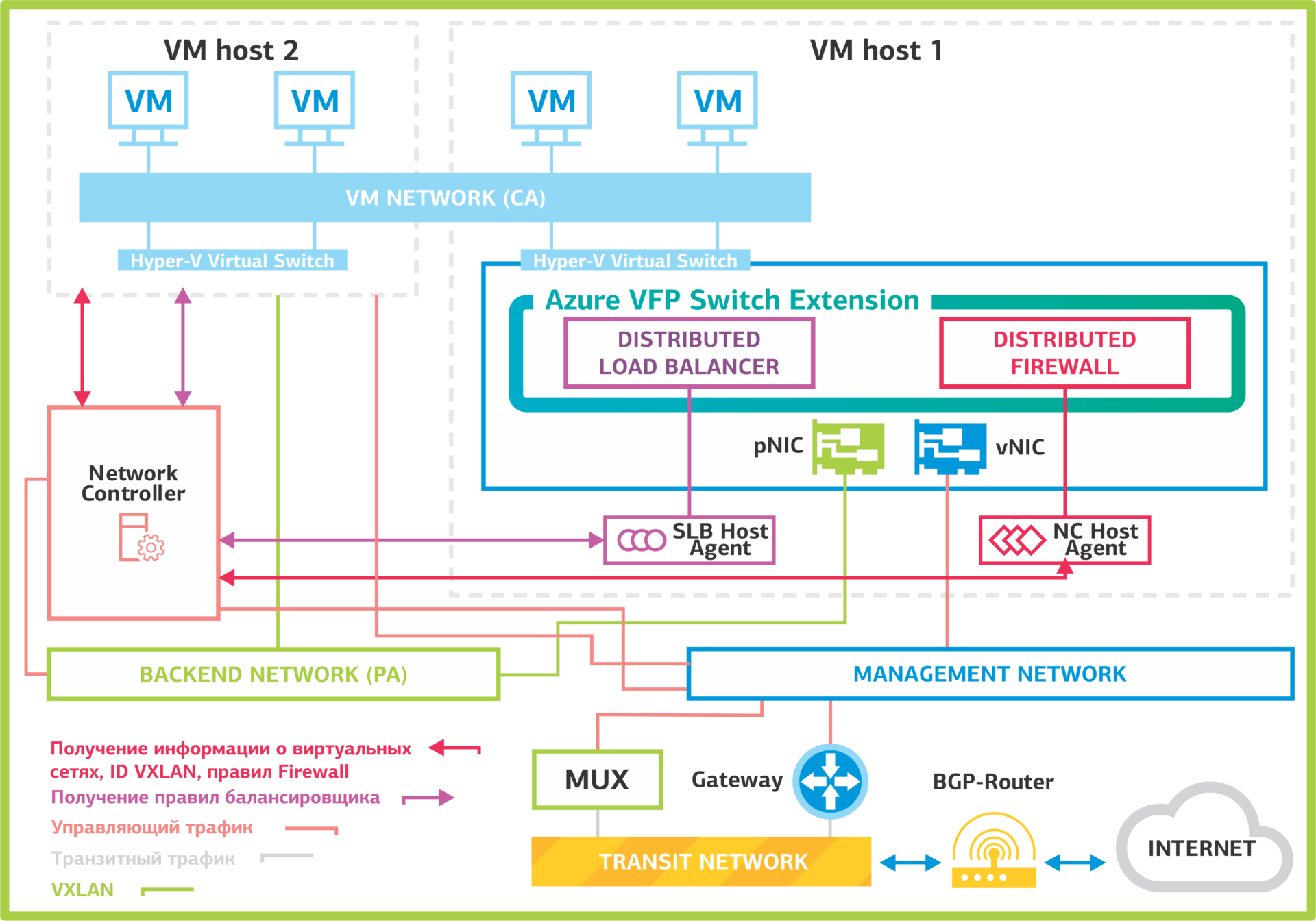 Network Controller Architecture.
Network Controller is based on the Open vSwitch software switch. This switch is also used on VMWare NSX and OpenStack Neutron software-defined networks. It supports the OVSDB (Open vSwitch Database) management protocol , which is responsible for exchanging information between network equipment.
Let's see how Network Controller works. Servers, virtual machines, virtual switch hypervisors are registered in the NC. After registration and configuration, the servers establish a connection with the Network Controller and receive from it all the necessary information about virtual machine networks, balancing rules and VPN tunnels.
Host virtual networks are connected to a Hyper-V virtual switch with the Azure VFP Switch Extension. Through it, the virtual ports to which the VMs are connected are controlled:
Let us examine in detail which services are included in the Network Controller and what they control.
Virtual Network Management. This is a service for creating and managing virtual networks. It manages the Hyper-V virtual switches and virtual network adapters in virtual machines. Virtual Network Management contains the virtual network settings that are used by other Network Controller services.
Firewall ManagementThis service simplifies the organization of firewalling: you do not need to configure the firewalls on each VM manually and remember the configurations. The Network Controller stores all Access Control Lists (ACL) settings for virtual machines and networks. Distributed Firewall on hosts requests information from it and applies the rules to the necessary networks and virtual machines. Configuration on the side of virtual machines is not required.
Below is a diagram of how firewalling works in Network Controller. On it, Northbound is the interface through which the Network Controller is controlled using the REST API. Southbound is used to communicate with network devices, SLB multiplexers, gateways and servers, for network discovery and other services. Gateways determine for which virtual network tunnels are required. Then they forward the received packets through the tunnel to servers with virtual machines connected to the desired virtual network.
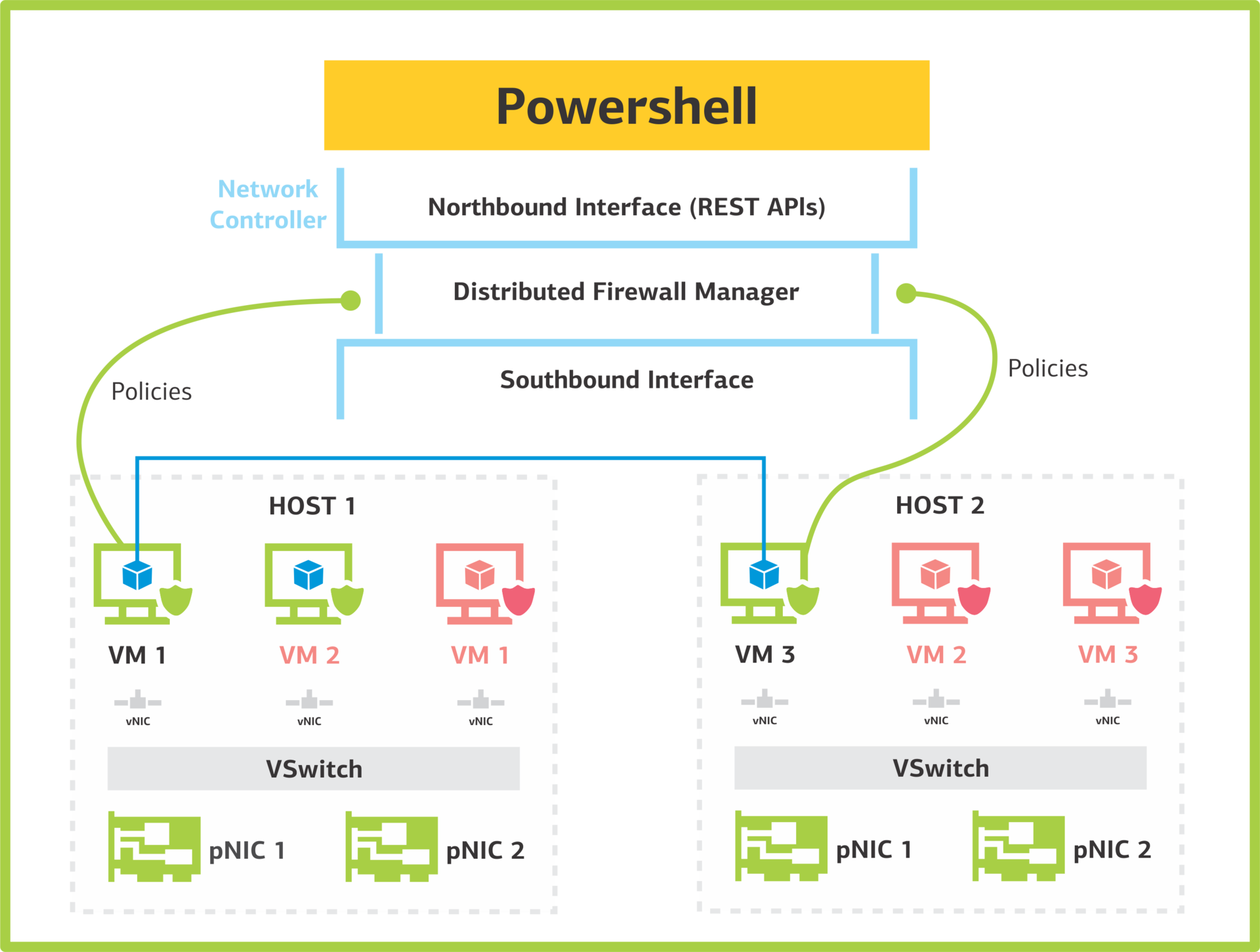
This is how the firewall service in Network Controller works.
Software Load Balancer Management.The service works at the level of virtualized networks and balances traffic at the L4 level. Traffic balancing is performed using SLB Multiplexer (MUX) service virtual machines and BGP routers. On one NC, you can make 8 MUX. Network Controller MUX receives routing rules. Multiplexers announce / 32 routes for each VIP through BGP routers.
Example
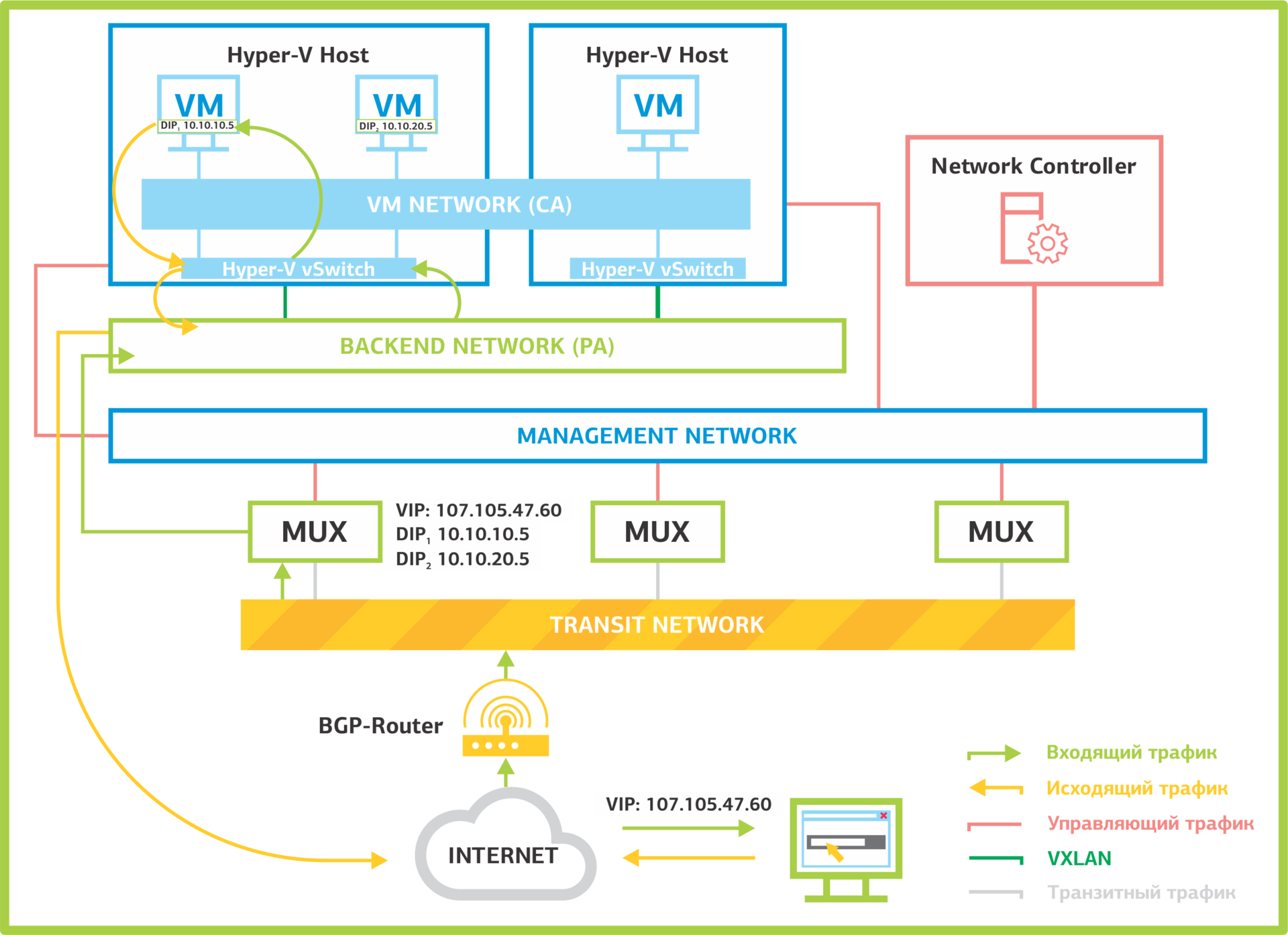
Traffic balancing in Network Controller.
In Windows Server 2016, NAT rules are now also defined through Software Load Balancer Management. Network Controller knows which network NAT is organized for. MUX contains information about hosts and virtual machines connected to the network for which NAT is organized.
Network Controller NAT is implemented by balancing traffic for a group from a single host. Currently, balancing only TCP and UDP traffic is supported.
RAS Gateway Manager. This service creates VPN tunnels for connecting the cloud infrastructure with the physical. In Network Controller, you can build a VPN in any convenient way:
The tunnel endpoint is the virtual Gateway. It organizes a tunnel, encapsulates traffic in VXLAN packets and is forwarded to its hosts.

RAG Gateway Management VPN Tunnel Service.
iDNS: Internal DNS. The service allows you to create virtual DNS servers. At the moment, it exists as an implementation of the concept and supports working with only one DNS zone, which is inconvenient for clients. The multi-tenant mode will be added in the next edition of Windows Server 2016.
Let's see how the iDNS service works. A DNS zone is organized in which client zones will be created. Network Controller is configured: the served DNS zone and upstream DNS servers that will handle requests coming from clients are specified.
Once configured, iDNS Network Controller distributes information to hosts. The iDNS proxy service on hosts processes DNS queries from clients. It works like this:
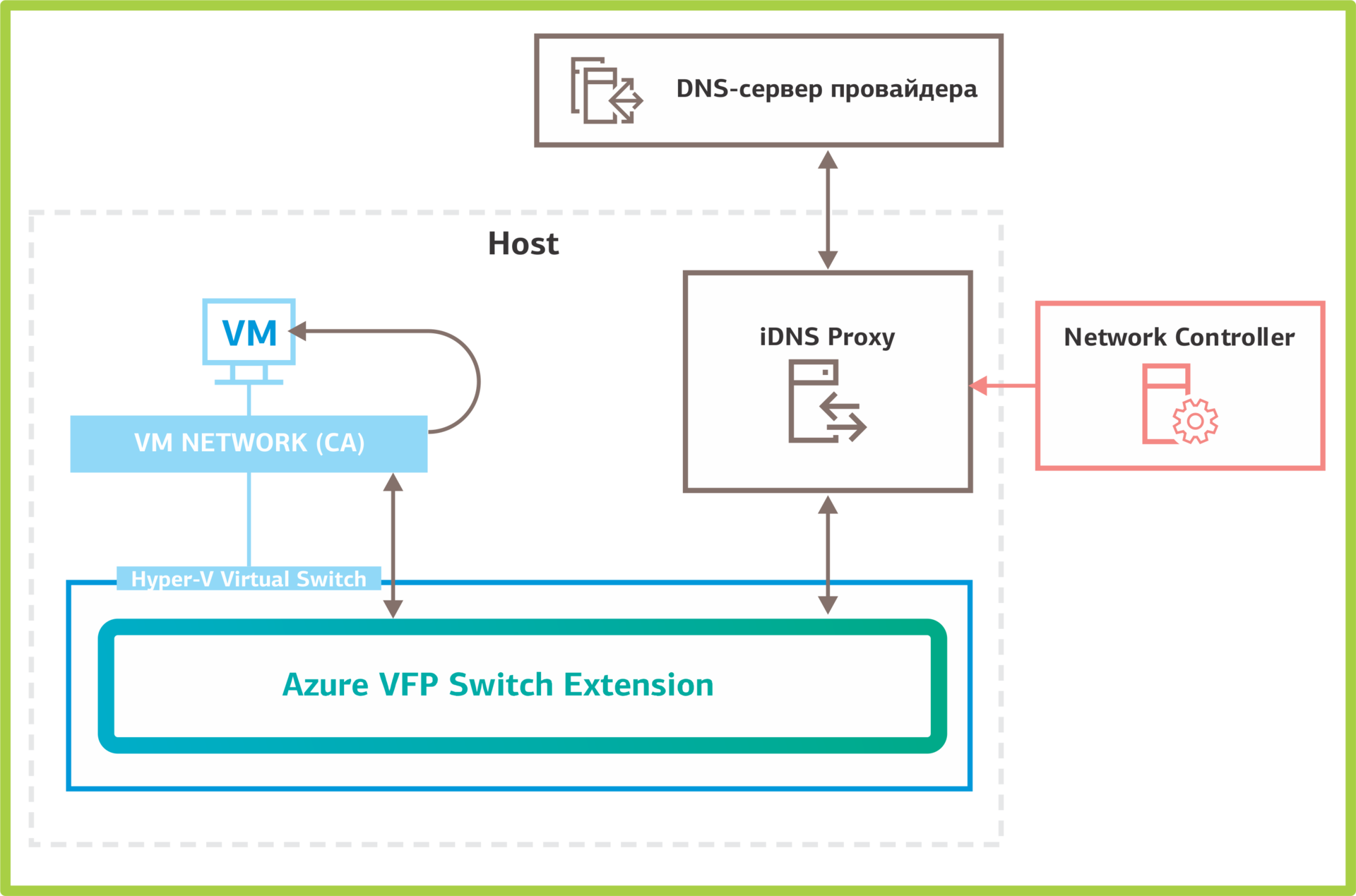
How iDNS works in Network Controller.
Example
All that we discussed in detail above is the Network Controller services, which were included in the official release of Windows Server 2016. We also managed to test the services included in the Technical Preview, but removed from the release. One such service is Canary Network Diagnostics to monitor network performance, collect statistics on physical and virtual network equipment, and detect errors. Add-ons should be included in the release of Windows Server 2016R2, and we will talk about them in the future.
In the next part, we will tell you how to deploy Network Controller and some interesting “pitfalls” that we found during testing.
Write questions in the comments.
Posted by: Sergey Gruzdov
Contents
Where did the virtual networks come from?
Windows Server 2016: Network Controller Network Controller
Services
Where did the virtual networks come from?
VLAN The first virtual networks appeared in 1998. These were local virtual VLANs using the IEEE 802.1Q protocol. The technology allows you to split one L2 network into many logical L2 networks. But VLAN has a limitation, which turned out to be significant with an increase in the number of networks: the maximum number of connections on one L2 network is 4096. To overcome it, manufacturers began to develop new protocols with greater scalability, for example: IEEE 802.1ad and IEEE 802.1ah. We will not dwell on them in detail and move on.
VXLAN, STT and NVGRE.In 2011, VMware, Arista, and Cisco released the VXLAN protocol, which allows you to create up to 16 million logical L2 segments on a single network. In parallel with them, Microsoft is creating an NVGRE protocol with a similar specification, which is starting to evolve in Windows Server 2012. Nicira offers the STT protocol. The issue of limited scalability has been resolved; you can create as many networks as you like. With the growth of networks, the infrastructure becomes difficult to manage, and there is a need for a centralized console to configure virtual and physical equipment. So the concept of software-defined networks (SDN) with centralized management of network infrastructure.
SDNNetwork management approach with unified software tools. Nicira was one of the first to introduce SDN technology. After purchasing Nicira, VMware creates the VMware NSX product using the VXLAN protocol.
In 2013, Microsoft offers its version of a software-defined network in the edition of Windows Server 2012R2 based on the NVGRE protocol. The NVGRE protocol had several disadvantages:
- virtual network management in Windows Server 2012R2 was carried out only through Virtual Machine Manager (VMM). It was a storage point for all virtual infrastructure configurations and a single point of failure.
- equipment manufacturers used VXLAN as their primary protocol, and few implemented NVGRE support.
In the Windows Server 2016 edition, Microsoft introduced a new implementation of software-defined networks based on the VXLAN protocol - Network Controller (NC). This service is available only in the edition of Windows Server 2016 Datacenter. Let's look at the features of Network Controller.
Windows Server 2016: Network Controller
Network Controller - a single point of management and monitoring for all physical and virtual domain networks. It configures IP subnets, VLANs, routers, and firewalls. NС stores information on network topology, balances traffic and sets NAT rules.
Glossary
Services:
- Virtual Network Management - a service for managing virtualized networks.
- Software Load Balancer Management - a service for balancing traffic and NAT rules.
- Firewall Management - service for configuring firewalls and VM access control sheets.
- RAS Gateway Management - a service for organizing VPN tunnels.
- iDNS is a service for creating virtual DNS servers.
Networks:
- Backend Network (provider addresses, PA) - a network with provider addresses. Virtual tunnels are created here and traffic flows.
- Management Network - a management network through which traffic flows between the components of the SDN.
- VM network (customer addresses, CA) - a virtualized network to which virtual machines are connected.
- Transit Network - a transit network. It exchanges traffic between BGP and the SLB Multiplexer / Gateway. Routes on BGP are published over the transit network.
Services on the host:
- Azure VFP Switch Extension - Hyper-V Switch Extension. Adds the functionality of the L3 switch to the virtual switch. Includes distributed load balancer (DLB) and Distributed firewall (DFW).
- Distributed load balancer - traffic balancer.
- Distributed firewall - a firewall responsible for enforcing VM access rules.
- Distributed router (vSwitch) - a virtual router.
- NC Host Agent - receives information about virtual networks and Firewall rules from NC.
- SLB Host Agent - receives balancing rules from NC.
Service virtual machines:
- SLB multiplexer (MUX) - Windows Server virtual machines with the Software Load Balancing role. They contain information about traffic balancing rules. MUXs publish routes to BGP and process incoming packets.
- Gateway is a virtual gateway.
In general, the principle of the Network Controller architecture is this: the controller nodes are located on separate VMs, and the routing, traffic balancing and firewall services are located on virtualization servers.
Network Controller Architecture. Network Controller is based on the Open vSwitch software switch. This switch is also used on VMWare NSX and OpenStack Neutron software-defined networks. It supports the OVSDB (Open vSwitch Database) management protocol , which is responsible for exchanging information between network equipment.
Let's see how Network Controller works. Servers, virtual machines, virtual switch hypervisors are registered in the NC. After registration and configuration, the servers establish a connection with the Network Controller and receive from it all the necessary information about virtual machine networks, balancing rules and VPN tunnels.
Host virtual networks are connected to a Hyper-V virtual switch with the Azure VFP Switch Extension. Through it, the virtual ports to which the VMs are connected are controlled:
- enable and disable ports;
- bandwidth management in both directions;
- prioritizing packages by classes (COS);
- Purpose: statistics and ACL management on virtual switch ports.
Network Controller Services
Let us examine in detail which services are included in the Network Controller and what they control.
Virtual Network Management. This is a service for creating and managing virtual networks. It manages the Hyper-V virtual switches and virtual network adapters in virtual machines. Virtual Network Management contains the virtual network settings that are used by other Network Controller services.
Firewall ManagementThis service simplifies the organization of firewalling: you do not need to configure the firewalls on each VM manually and remember the configurations. The Network Controller stores all Access Control Lists (ACL) settings for virtual machines and networks. Distributed Firewall on hosts requests information from it and applies the rules to the necessary networks and virtual machines. Configuration on the side of virtual machines is not required.
Below is a diagram of how firewalling works in Network Controller. On it, Northbound is the interface through which the Network Controller is controlled using the REST API. Southbound is used to communicate with network devices, SLB multiplexers, gateways and servers, for network discovery and other services. Gateways determine for which virtual network tunnels are required. Then they forward the received packets through the tunnel to servers with virtual machines connected to the desired virtual network.
This is how the firewall service in Network Controller works.
Software Load Balancer Management.The service works at the level of virtualized networks and balances traffic at the L4 level. Traffic balancing is performed using SLB Multiplexer (MUX) service virtual machines and BGP routers. On one NC, you can make 8 MUX. Network Controller MUX receives routing rules. Multiplexers announce / 32 routes for each VIP through BGP routers.
Example
- A packet arrives at the BGP router for a specific virtual IP address.
- The BGP router checks which packet has the next node. In this case, it is MUX.
- According to the tables of balancing rules received from Network Controller, MUX determines the purpose of the packet: virtualized network, host and virtual machine.
- Next, MUX forms a VXLAN packet and sends it to the host on the Backend network.
- The host receives the packet and passes it to the virtual switch (vSwitch), which defines the virtual machine to receive the packet.
- The package is decapsulated, analyzed and sent to the virtual machine.
- The virtual machine processes the packet. The sender address does not change after the packet passes through the MUX. Therefore, the virtual machine does not see the MUX balancer behind it and reads that the packet came directly from the Internet. Such balancing is called transparent (transparent load balancing).
- The VM sends a response.
- The virtual switch on the host determines that this is a response to the packet that came from the balancer and sends it back to the Internet. Moreover, it doesn’t follow the same chain, but rewrites the sender address to the balancer’s IP and sends it immediately to the Internet. This approach is called Direct Server Return (DSR). This greatly speeds up the processing of packages.
Traffic balancing in Network Controller.
In Windows Server 2016, NAT rules are now also defined through Software Load Balancer Management. Network Controller knows which network NAT is organized for. MUX contains information about hosts and virtual machines connected to the network for which NAT is organized.
Network Controller NAT is implemented by balancing traffic for a group from a single host. Currently, balancing only TCP and UDP traffic is supported.
RAS Gateway Manager. This service creates VPN tunnels for connecting the cloud infrastructure with the physical. In Network Controller, you can build a VPN in any convenient way:
- through IPsec, which now works with both IKEv1 and IKEv2;
- Create SSTP tunnels
- create GRE tunnels.
The tunnel endpoint is the virtual Gateway. It organizes a tunnel, encapsulates traffic in VXLAN packets and is forwarded to its hosts.
RAG Gateway Management VPN Tunnel Service.
iDNS: Internal DNS. The service allows you to create virtual DNS servers. At the moment, it exists as an implementation of the concept and supports working with only one DNS zone, which is inconvenient for clients. The multi-tenant mode will be added in the next edition of Windows Server 2016.
Let's see how the iDNS service works. A DNS zone is organized in which client zones will be created. Network Controller is configured: the served DNS zone and upstream DNS servers that will handle requests coming from clients are specified.
Once configured, iDNS Network Controller distributes information to hosts. The iDNS proxy service on hosts processes DNS queries from clients. It works like this:
- The client sends a name resolution request.
- iDNS-proxy looks to see if it serves requests coming from this virtual network. This is determined by the primary DNS suffix of the network adapter. It must match the zone served by iDNS. If iDNS-proxy serves requests from this network, it sends a request to the upstream DNS server.
- The DNS server checks to see if the request is for internal zones. If the client tries to resolve the internal name, then the DNS server processes it. If not, send the request further.
How iDNS works in Network Controller.
Example
There is a virtual network for which iDNS is available. When connecting virtual machines to this network, in the root zone of the DNS specified during configuration, a zone will be created with a name that matches the virtual network ID. In this zone, A-records for virtual machines will be created.
A-records of virtual machines in the iDNS service.

All that we discussed in detail above is the Network Controller services, which were included in the official release of Windows Server 2016. We also managed to test the services included in the Technical Preview, but removed from the release. One such service is Canary Network Diagnostics to monitor network performance, collect statistics on physical and virtual network equipment, and detect errors. Add-ons should be included in the release of Windows Server 2016R2, and we will talk about them in the future.
In the next part, we will tell you how to deploy Network Controller and some interesting “pitfalls” that we found during testing.
Write questions in the comments.
Posted by: Sergey Gruzdov