February 1, 2017 at 17:35
Criminals discovered using Windows Defender ATP service
- Transfer
When in December 2016 a German industrial conglomerate reported that it had been attacked at the beginning of the year, it turned out that a professional criminal group engaged in industrial espionage was behind the data hacking. According to the German press, the attack was carried out on the basis of an embedded file from the Winnti family , which provided attackers with constant access to the conglomerate network from February 2016.
Under the cat, we will look at the introduced Winnti malicious file in the form in which it was used by two well-known criminal groups BARIUM and LEAD. We will see how they injected the file into various systems, and also find out with what methods Microsoft researchers tracked it.

To show how to deal with this and similar threats, we will look at how the serviceWindows Defender Advanced Threat Protection (ATP) marks activities related to BARIUM, LEAD, and other known crime groups and provides them with advanced threat analytics. We will follow the process of installing the Winnti embedded file and examine how the ATP service in Windows Defender captures the methods and tools used at that time, providing clear contextual information for investigating a real attack and taking a response. We will then discuss how centralized response is part of the enhanced Windows Defender ATP service available in the Windows 10 Creators Update, allows you to quickly stop threats. In particular, the service blocks communications for management and control purposes, prohibits embedded files from installing additional components and spreading the threat to other computers within the network.
Microsoft Threat Intelligence analysts associate Winnti malware with various criminal groups. These conclusions are made on the basis of a number of attack artifacts (collections of malware, related infrastructure, Internet personalities, victim profiles, etc.), with the help of which Microsoft's intelligent security graph categorizes malicious activity, relating it to one or another performer. Each of these groups receives the code name of one of the elements of the periodic table. In the case of this malware, Winnti, the BARIUM and LEAD groups actively use it. Despite a common attack tool, the intrusion scenarios of these groups are significantly different.
BARIUM begins its attacks by building relationships with potential victims on social networks, especially among those who work in the business development department or in the human resources department. Having established a personal contact, the members of BARIUM proceed to the target phishing of the victim. For this, a variety of simple software installation vectors are used, including malicious shortcut files (LNK) with hidden content, compiled HTML help files (CHM) or Microsoft Office documents with macros and exploits. At the initial stage of the invasion, an embedded Win32 / Barlaiy file is used., which often uses to manage and control social media profiles, document sharing sites and blogs. Next, for permanent access, the Winnti file is used. Most of the victims recorded at the moment worked in the field of electronic games, multimedia and Internet content, although among them there were also employees of technology companies.
The LEAD group, by contrast, has established itself as a professional in industrial espionage. In the past few years, the victims of LEAD have been:
LEAD's goal was to steal confidential data, including research materials, technology documents, and project plans. LEAD members also stole software signature certificates to sign their malware in subsequent attacks.
In most cases, LEAD attacks did not use advanced exploit technology. In addition, the group did not seek to establish contact with the victim prior to the attack. Instead, they simply e-mailed Winnti's installer to potential victims, using basic social engineering techniques to convince the recipient to run embedded malware. In some cases, LEAD gained access to the target by recognizing the credentials for login and access by means of a selection attack, by implementing SQL code or exploits on insecure web servers. After that, the Winnti installer was directly copied to the hacked computer.
The Microsoft Analytics service shows that the Winnti threat is related to intrusions committed over the past 6 months in Asia, Europe, Oceania, the Middle East and the USA (see Figure 1). The most recent series of observed attacks occurred in December 2016.

Figure 1. Geography of using Winnti from July to December 2016
Although tracing threats like Winnti requires traditional research, Microsoft Threat Intelligence analysts are taking a new level with machine learning. When the attackers used Winnti to maintain access to the web servers, they masked the malicious file as reliable and verified and left it in plain sight. This happened during two well-known attacks in 2015 - then the attackers called the embedded DLL-library ASPNET_FILTER.DLL, which is consonant with the name of the DLL-library for the ASP.NET ISAPI filter (see table 1). Although there were obvious differences between a reliable and a malicious file, to filter the latter one would have to analyze a data set with millions of possible file names, software publishers, and certificates.
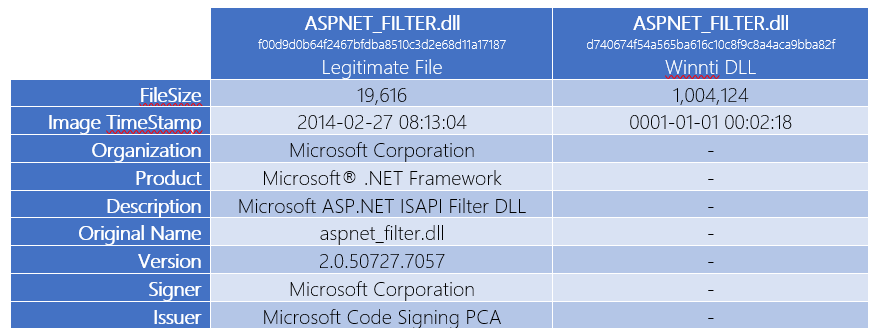
Table 1. Reliable ASPNET_FILTER.dll file and a disguised Winnti sample
Windows Defender ATP technology helps network security professionals take a versatile approach to tackle attacks from malicious groups like LEAD and BARIUM. The following examples were developed using the Winnti installer, which was used in attacks in December 2016.
Microsoft Threat Intelligence specialists continuously monitor LEAD and BARIUM teams, capturing the tactics, methods, and procedures that they use in their attacks. Particular attention is paid to the means and infrastructure with which these attacks are carried out. Windows Defender ATP technology constantly monitors protected systems, identifying such indicators of malicious activity and alerting Security Center Operations Center (SOC) personnel about their presence.

Figure 2. Threat alert in Windows Defender ATP
To provide the context for such alerts, Windows Defender ATP also provides a short summary of the group’s history, its goals, methods and tools (Fig. 3) with links to more detailed documentation for tech-savvy users.

Figure 3. Brief information about the Lead group and the extensive
ATP documentation in Windows Defender can also detect previously unknown attacks by tracking indicators of malicious behavior in the system’s behavior, including:
For example, many malware families are registered as services during installation in order to maintain their presence after reboots. Most malicious programs using these methods modify the necessary registry keys in a way that does not match the profile of a trusted program. Winnti is no exception, and therefore, during the installation of Winnti, the Windows Defender ATP service may generate alerts about abnormal behavior (Figure 4).

Figure 4. Abnormal service creation alerts
To improve coverage and reduce the number of false positives, an intelligent security graph is used to distinguish suspicious from harmless behavior. So alerts are generated only with full confidence in the dangers of a particular file or process. At the same time, along with the method of creating the service, the age of the file, its global distribution and the presence of a valid digital signature are taken into account.
Windows Defender ATP visualized contextual information provides detailed visualized technical information on alerts triggered by a special threat analysis service tied to action groups, or simply suspicious behavior. Visual information allows SOC staff to collect information about alerts and related artifacts, understand the magnitude of the gap, and prepare a comprehensive action plan. The screenshots below show how ATP in Windows Defender clearly displays the Winnti installation, in which the installer flushes the DLL to disk (Fig. 5), loads the DLL using rundll32 (Fig. 6), configures the DLL as a service (Fig. 7) and saves a copy of itself in C: \ Windows \ Help (Fig. 8).

Figure 5. Winnti installer flushes the DLL
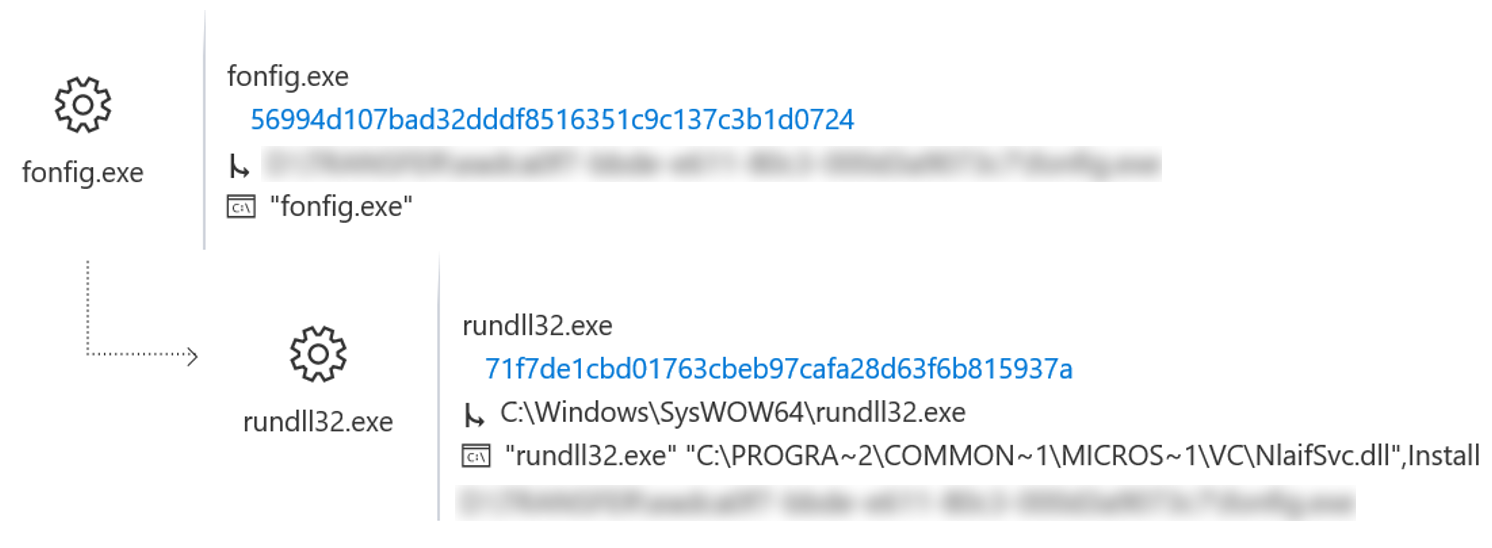
Figure 6. Winnti installer loads the DLL using rundll32
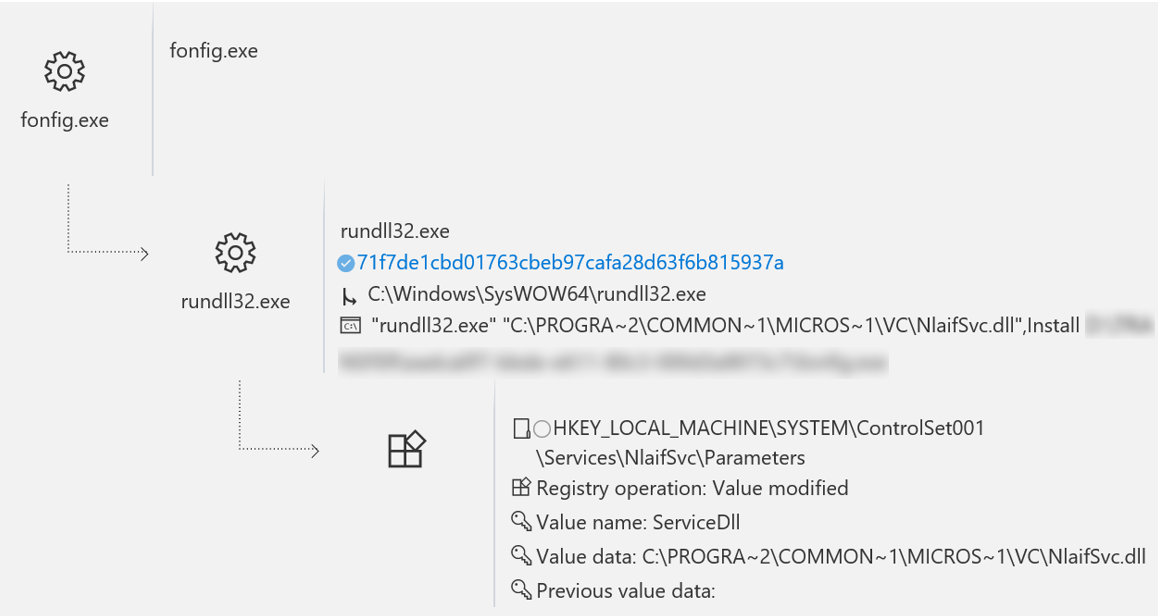
Figure 7. Winnti configures itself as a service for persistence

Figure 8. The installer is copied to C: \ Windows \ Help \
ATP in Windows Defender and displays these actions as a process tree in the timeline of the infected computer. Using the process tree, analysts can easily extract detailed information about how the embedded library is reset by the installer, which command is used to run rundll32.exe and load the DLL, and which registry changes are made to configure the DLL as a service. This information provides insight into what primary tools can be used to assess the magnitude of the gap.
Windows 10 Creators Update introduces some additional Windows Defender ATP settings that give SOC staff the options to immediately address the risks of a detected threat. If an attacker attacks a computer with ATP installed in Windows Defender, SOC staff can isolate this computer from the network, blocking the control and monitoring of a copy of the malicious program, thereby preventing attackers from installing additional malicious programs and switching to other computers on the network. Meanwhile, the connection to the ATP service in Windows Defender remains. While the computer is isolated, SOC personnel can instruct the infected computer to collect operational data, such as the DNS cache or security event logs, which they then use to check alerts, access the intrusion state, and take further action.

Figure 9. Variants of the threat response for the attacked computer
Stopping and quarantining a Winnti copy is another answer option that allows you to stop the attack on one computer. There is no evidence that LEAD and BARIUM are used for full-scale targeted phishing, so SOC personnel are unlikely to encounter several computers simultaneously attacking malware from these groups. However, Windows Defender ATP also supports blocking copies of malware throughout the enterprise, stopping full-blown attacks in the early stages (Figure 10).

Figure 10. Threat response options for the Winnti file
According to new reports, the detection and elimination of the risks of attacks on industrial conglomerates can take several months. The time that has elapsed from the moment the gap occurred to its discovery can be enough for an attacker to determine the location of important information and copy it.
With advanced detection capabilities after an ATP attack in Windows Defender, SOC staff can reduce this time to several hours or even minutes, significantly reducing the impact of a persistent attacker’s network access. Windows Defender ATP provides comprehensive information about the groups of actions responsible for the attack, allowing customers to understand aspects of the attack, such as general tricks of applied sociology and regional attack features that cannot be received through the network and endpoint sensors. With up-to-date visualized information, analysts can study the behavior of malware on infected computers, right down to planning a response. And finally, in connection with the upcoming Creators Update, Windows Defender ATP will get additional opportunities to detect such threats,
The Windows Defender ATP service is built into the core of Windows 10 Enterprise, and its performance can be evaluated for free .
Under the cat, we will look at the introduced Winnti malicious file in the form in which it was used by two well-known criminal groups BARIUM and LEAD. We will see how they injected the file into various systems, and also find out with what methods Microsoft researchers tracked it.
To show how to deal with this and similar threats, we will look at how the serviceWindows Defender Advanced Threat Protection (ATP) marks activities related to BARIUM, LEAD, and other known crime groups and provides them with advanced threat analytics. We will follow the process of installing the Winnti embedded file and examine how the ATP service in Windows Defender captures the methods and tools used at that time, providing clear contextual information for investigating a real attack and taking a response. We will then discuss how centralized response is part of the enhanced Windows Defender ATP service available in the Windows 10 Creators Update, allows you to quickly stop threats. In particular, the service blocks communications for management and control purposes, prohibits embedded files from installing additional components and spreading the threat to other computers within the network.
Winnti Crime Groups: BARIUM and LEAD
Microsoft Threat Intelligence analysts associate Winnti malware with various criminal groups. These conclusions are made on the basis of a number of attack artifacts (collections of malware, related infrastructure, Internet personalities, victim profiles, etc.), with the help of which Microsoft's intelligent security graph categorizes malicious activity, relating it to one or another performer. Each of these groups receives the code name of one of the elements of the periodic table. In the case of this malware, Winnti, the BARIUM and LEAD groups actively use it. Despite a common attack tool, the intrusion scenarios of these groups are significantly different.
BARIUM begins its attacks by building relationships with potential victims on social networks, especially among those who work in the business development department or in the human resources department. Having established a personal contact, the members of BARIUM proceed to the target phishing of the victim. For this, a variety of simple software installation vectors are used, including malicious shortcut files (LNK) with hidden content, compiled HTML help files (CHM) or Microsoft Office documents with macros and exploits. At the initial stage of the invasion, an embedded Win32 / Barlaiy file is used., which often uses to manage and control social media profiles, document sharing sites and blogs. Next, for permanent access, the Winnti file is used. Most of the victims recorded at the moment worked in the field of electronic games, multimedia and Internet content, although among them there were also employees of technology companies.
The LEAD group, by contrast, has established itself as a professional in industrial espionage. In the past few years, the victims of LEAD have been:
- Transnational diversified giants in areas such as textiles, chemicals and electronics.
- Pharmaceutical companies.
- A company in the chemical industry.
- University Department of Aviation Design and Research.
- A company involved in the design and manufacture of automotive engines.
- A cybersecurity company that protects industry-specific management systems.
LEAD's goal was to steal confidential data, including research materials, technology documents, and project plans. LEAD members also stole software signature certificates to sign their malware in subsequent attacks.
In most cases, LEAD attacks did not use advanced exploit technology. In addition, the group did not seek to establish contact with the victim prior to the attack. Instead, they simply e-mailed Winnti's installer to potential victims, using basic social engineering techniques to convince the recipient to run embedded malware. In some cases, LEAD gained access to the target by recognizing the credentials for login and access by means of a selection attack, by implementing SQL code or exploits on insecure web servers. After that, the Winnti installer was directly copied to the hacked computer.
Winnti Spying
The Microsoft Analytics service shows that the Winnti threat is related to intrusions committed over the past 6 months in Asia, Europe, Oceania, the Middle East and the USA (see Figure 1). The most recent series of observed attacks occurred in December 2016.
Figure 1. Geography of using Winnti from July to December 2016
Although tracing threats like Winnti requires traditional research, Microsoft Threat Intelligence analysts are taking a new level with machine learning. When the attackers used Winnti to maintain access to the web servers, they masked the malicious file as reliable and verified and left it in plain sight. This happened during two well-known attacks in 2015 - then the attackers called the embedded DLL-library ASPNET_FILTER.DLL, which is consonant with the name of the DLL-library for the ASP.NET ISAPI filter (see table 1). Although there were obvious differences between a reliable and a malicious file, to filter the latter one would have to analyze a data set with millions of possible file names, software publishers, and certificates.
Table 1. Reliable ASPNET_FILTER.dll file and a disguised Winnti sample
Measures Against Winnti Attacks
Windows Defender ATP technology helps network security professionals take a versatile approach to tackle attacks from malicious groups like LEAD and BARIUM. The following examples were developed using the Winnti installer, which was used in attacks in December 2016.
Active Intrusion Alerts
Microsoft Threat Intelligence specialists continuously monitor LEAD and BARIUM teams, capturing the tactics, methods, and procedures that they use in their attacks. Particular attention is paid to the means and infrastructure with which these attacks are carried out. Windows Defender ATP technology constantly monitors protected systems, identifying such indicators of malicious activity and alerting Security Center Operations Center (SOC) personnel about their presence.
Figure 2. Threat alert in Windows Defender ATP
To provide the context for such alerts, Windows Defender ATP also provides a short summary of the group’s history, its goals, methods and tools (Fig. 3) with links to more detailed documentation for tech-savvy users.
Figure 3. Brief information about the Lead group and the extensive
ATP documentation in Windows Defender can also detect previously unknown attacks by tracking indicators of malicious behavior in the system’s behavior, including:
- Install, save and activate malware.
- Hidden management and control processes (through backdoors).
- Credential theft.
- Distribution to other computers within the network.
For example, many malware families are registered as services during installation in order to maintain their presence after reboots. Most malicious programs using these methods modify the necessary registry keys in a way that does not match the profile of a trusted program. Winnti is no exception, and therefore, during the installation of Winnti, the Windows Defender ATP service may generate alerts about abnormal behavior (Figure 4).
Figure 4. Abnormal service creation alerts
To improve coverage and reduce the number of false positives, an intelligent security graph is used to distinguish suspicious from harmless behavior. So alerts are generated only with full confidence in the dangers of a particular file or process. At the same time, along with the method of creating the service, the age of the file, its global distribution and the presence of a valid digital signature are taken into account.
Windows Defender ATP visualized contextual information provides detailed visualized technical information on alerts triggered by a special threat analysis service tied to action groups, or simply suspicious behavior. Visual information allows SOC staff to collect information about alerts and related artifacts, understand the magnitude of the gap, and prepare a comprehensive action plan. The screenshots below show how ATP in Windows Defender clearly displays the Winnti installation, in which the installer flushes the DLL to disk (Fig. 5), loads the DLL using rundll32 (Fig. 6), configures the DLL as a service (Fig. 7) and saves a copy of itself in C: \ Windows \ Help (Fig. 8).
Figure 5. Winnti installer flushes the DLL
Figure 6. Winnti installer loads the DLL using rundll32
Figure 7. Winnti configures itself as a service for persistence
Figure 8. The installer is copied to C: \ Windows \ Help \
ATP in Windows Defender and displays these actions as a process tree in the timeline of the infected computer. Using the process tree, analysts can easily extract detailed information about how the embedded library is reset by the installer, which command is used to run rundll32.exe and load the DLL, and which registry changes are made to configure the DLL as a service. This information provides insight into what primary tools can be used to assess the magnitude of the gap.
Threat Response Options
Windows 10 Creators Update introduces some additional Windows Defender ATP settings that give SOC staff the options to immediately address the risks of a detected threat. If an attacker attacks a computer with ATP installed in Windows Defender, SOC staff can isolate this computer from the network, blocking the control and monitoring of a copy of the malicious program, thereby preventing attackers from installing additional malicious programs and switching to other computers on the network. Meanwhile, the connection to the ATP service in Windows Defender remains. While the computer is isolated, SOC personnel can instruct the infected computer to collect operational data, such as the DNS cache or security event logs, which they then use to check alerts, access the intrusion state, and take further action.
Figure 9. Variants of the threat response for the attacked computer
Stopping and quarantining a Winnti copy is another answer option that allows you to stop the attack on one computer. There is no evidence that LEAD and BARIUM are used for full-scale targeted phishing, so SOC personnel are unlikely to encounter several computers simultaneously attacking malware from these groups. However, Windows Defender ATP also supports blocking copies of malware throughout the enterprise, stopping full-blown attacks in the early stages (Figure 10).
Figure 10. Threat response options for the Winnti file
Conclusion: reduced time to detect gaps to reduce the consequences
According to new reports, the detection and elimination of the risks of attacks on industrial conglomerates can take several months. The time that has elapsed from the moment the gap occurred to its discovery can be enough for an attacker to determine the location of important information and copy it.
With advanced detection capabilities after an ATP attack in Windows Defender, SOC staff can reduce this time to several hours or even minutes, significantly reducing the impact of a persistent attacker’s network access. Windows Defender ATP provides comprehensive information about the groups of actions responsible for the attack, allowing customers to understand aspects of the attack, such as general tricks of applied sociology and regional attack features that cannot be received through the network and endpoint sensors. With up-to-date visualized information, analysts can study the behavior of malware on infected computers, right down to planning a response. And finally, in connection with the upcoming Creators Update, Windows Defender ATP will get additional opportunities to detect such threats,
The Windows Defender ATP service is built into the core of Windows 10 Enterprise, and its performance can be evaluated for free .