How I parsed the entire Metacritic game database
Metacritic is an English-language aggregator site that collects reviews of music albums, games, films, television shows, and DVDs. (from Wikipedia).
Used libraries: lxml , asyncio , aiohttp (lxml - a library for parsing HTML pages using Python, we will use asyncio and aiohttp for asynchrony and quick data extraction). We will also actively use XPath. Who does not know what it is, an excellent tutorial .
First you have to work a little pens. We go to www.metacritic.com/browse/games/genre/metascore/action/all?view=detailed and collect all the
URLs from this list:

And save them in a .json file called genres.json . We will use these links to parse all games from the site by genre.
After a little thought, I decided to collect all the links to the games in .csv files, divided into genres. Each file will have a name corresponding to the genre. We go to the above link and immediately see the page of the Action genre. We notice that there is pagination.
We look in the html-pages:

And we see that the desired element a , which contains the maximum number of pages, is the heir of the li elementwith the unique attribute class = page last_page , we also notice that the urls of all pages except the first are of the form+ <& page = page_number>, and that the second page in the query parameter is 1.
We compile XPath to get the maximum page number:
// li [@ class = 'page last_page'] / a / text ()
Now we need to get each link to every game from this sheet.
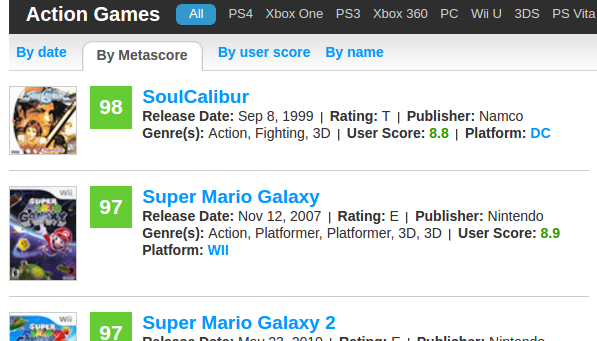
We look at the layout of the sheet and study html.
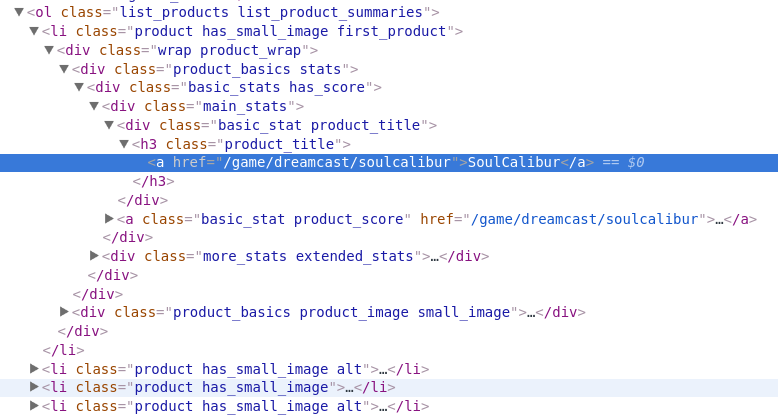
First, we need to get the list itself (ol) as the root element for the search . It has a class = list_products list_product_summaries attribute, which is unique to the html code of the page . Then we see that li has a child element h3 with a child element a , in the href attribute of which there is the desired link to the game.
Putting it all together:
// ol [@ class = 'list_products list_product_summaries'] // h3 [@ class = 'product_title'] / a / @ href
Great! Half the battle is done, now you need to programmatically organize a loop through the pages, collect links and save them in files. To speed up, we parallelize the operation on all the cores of our PC.
We merge all files with links into one file. If you are under Linux, then just use cat and redirect STDOUT to a new file. Under Windows we will write a small script and run it in a folder with genre files.
Now we have one large .csv file with links to all games on Metacritic. Large enough, 25 thousand records. Plus there are duplicates, since one game can have several genres.
What is our plan next? Follow each link and extract information about each game.
We go, for example, to the Portal 2 page .
We will retrieve:
To shorten the post, I’ll immediately list the xpaths with which I extracted this information.
Name of the game:
// h1 [@ class = 'product_title'] // span [@ itemprop = 'name'] // text ()
We can have several platforms, so we need two queries:
// span [@ itemprop = ' device '] // text ()
// li [@ class =' summary_detail product_platforms'] // a // text () The
description is in Summary:
// span [@ itemprop = 'description'] // text ( )
Metascore:
// span [@ itemprop = 'ratingValue'] // text ()
Genre:
// span [@ itemprop = 'description'] // text ()
Release Date:
// span [@ itemprop = 'datePublished' ] // text ()
We recall that we have 25 thousand pages and clutch our heads. What to do? Even with multiple threads will be long. There is a solution - asynchrony and non-blocking coroutines. Here is a great video from PyCon . Async-await simplifies asynchronous programming in python 3.5.2. Tutorial on Habré .
We are writing a code for our parser.
It turned out very well, on my computer Intel i5 6600K, 16 GB RAM, lan 10 mb / s it turned out somewhere around 10 games / sec. You can tweak the code and adapt the script to music \ movies.
Used libraries: lxml , asyncio , aiohttp (lxml - a library for parsing HTML pages using Python, we will use asyncio and aiohttp for asynchrony and quick data extraction). We will also actively use XPath. Who does not know what it is, an excellent tutorial .
Getting links to the pages of all games
First you have to work a little pens. We go to www.metacritic.com/browse/games/genre/metascore/action/all?view=detailed and collect all the
URLs from this list:
And save them in a .json file called genres.json . We will use these links to parse all games from the site by genre.
After a little thought, I decided to collect all the links to the games in .csv files, divided into genres. Each file will have a name corresponding to the genre. We go to the above link and immediately see the page of the Action genre. We notice that there is pagination.
We look in the html-pages:
And we see that the desired element a , which contains the maximum number of pages, is the heir of the li elementwith the unique attribute class = page last_page , we also notice that the urls of all pages except the first are of the form
We compile XPath to get the maximum page number:
// li [@ class = 'page last_page'] / a / text ()
Now we need to get each link to every game from this sheet.
We look at the layout of the sheet and study html.
First, we need to get the list itself (ol) as the root element for the search . It has a class = list_products list_product_summaries attribute, which is unique to the html code of the page . Then we see that li has a child element h3 with a child element a , in the href attribute of which there is the desired link to the game.
Putting it all together:
// ol [@ class = 'list_products list_product_summaries'] // h3 [@ class = 'product_title'] / a / @ href
Great! Half the battle is done, now you need to programmatically organize a loop through the pages, collect links and save them in files. To speed up, we parallelize the operation on all the cores of our PC.
# get_games.py
import csv
import requests
import json
from multiprocessing import Pool
from time import sleep
from lxml import html
# Базовый домен.
root = 'http://www.metacritic.com/'
# При большом количестве запросов Metacritic выдает ошибку 429 с описанием 'Slow down'
# будем избегать её, останавливая поток на определенное количество времени.
SLOW_DOWN = False
def get_html(url):
    # Metacritic запрещает запросы без заголовка User-Agent.
    headers = {"User-Agent": "Mozilla/5.001 (windows; U; NT4.0; en-US; rv:1.0) Gecko/25250101"}
    global SLOW_DOWN
    try:
        # Если у нас в каком-либо потоке появилась ошибка 429, то приостанавливаем все потоки
        # на 15 секунд.
        if SLOW_DOWN:
            sleep(15)
            SLOW_DOWN = False
        # Получаем html контент страницы стандартным модулем requests
        html = requests.get(url, headers=headers).content.decode('utf-8')
        # Если ошибка в html контенте, то присваеваем флагу SLOW_DOWN true.
        if '429 Slow down' in html:
            SLOW_DOWN = True
            print(' - - - SLOW DOWN')
            raise TimeoutError
        return html
    except TimeoutError:
        return get_html(url)
def get_pages(genre):
    # Сложим все жанры в папку Games
    with open('Games/' + genre.split('/')[-2] + '.csv', 'w') as file:
        writer = csv.writer(file, delimiter=',',
                            quotechar='"', quoting=csv.QUOTE_MINIMAL)
        # Структура url страниц > 1
        genre_page_sceleton = genre + '&page=%s'
        def scrape():
            page_content = get_html(genre)
            # Получаем корневой lxml элемент из html страницы.
            document = html.fromstring(page_content)
            try:
                # Извлекаем номер последней страницы и кастим в int.
                lpn_text = document.xpath("//li[@class='page last_page']/a/text()"
                last_page_number = int(lpn_text)[0])
                pages = [genre_page_sceleton % str(i) for i in range(1, last_page_number)]
                # Не забываем про первую страницу.
                pages += [genre]
                # Для каждой страницы собираем и сохраняем ссылки на игры в файл жанра.
                for page in pages:
                    document = html.fromstring(get_html(page))
                    urls_xpath = "//ol[@class='list_products list_product_summaries']//h3[@class='product_title']/a/@href"
                    # К ссылке каждой игры прибавляем url корня сайта.
                    games = [root + url for url in document.xpath(urls_xpath)]
                    print('Page: ' + page + " - - - Games: " + str(len(games)))
                    for game in games:
                        writer.writerow([game])
            except:
                # Скорее всего опять 429 ошибка. Парсим страницу заново.
                scrape()
        scrape()
def main():
    # Загружаем ссылки на страницы жанров из нашего .json файла.
    dict = json.load(open('genres.json', 'r'))
    p = Pool(4)
    # Простой пул. Функцией map отдаем каждому потоку его порцию жанров для парсинга.
    p.map(get_pages, [dict[key] for key in dict.keys()])
    print('Over')
if __name__ == "__main__":
    main()
We merge all files with links into one file. If you are under Linux, then just use cat and redirect STDOUT to a new file. Under Windows we will write a small script and run it in a folder with genre files.
from os import listdir
from os.path import isfile, join
onlyfiles = [f for f in listdir('.') if isfile(join(mypath, f))]
fout=open("all_games.csv","a")
for path in onlyfiles:
    f = open(path)
    f.next()
    for line in f:
         fout.write(line)
    f.close()
fout.close()
Now we have one large .csv file with links to all games on Metacritic. Large enough, 25 thousand records. Plus there are duplicates, since one game can have several genres.
Retrieving information about all games
What is our plan next? Follow each link and extract information about each game.
We go, for example, to the Portal 2 page .
We will retrieve:
- Name of the game
- Platforms
- Description
- Metascore
- Genre
- Release date
To shorten the post, I’ll immediately list the xpaths with which I extracted this information.
Name of the game:
// h1 [@ class = 'product_title'] // span [@ itemprop = 'name'] // text ()
We can have several platforms, so we need two queries:
// span [@ itemprop = ' device '] // text ()
// li [@ class =' summary_detail product_platforms'] // a // text () The
description is in Summary:
// span [@ itemprop = 'description'] // text ( )
Metascore:
// span [@ itemprop = 'ratingValue'] // text ()
Genre:
// span [@ itemprop = 'description'] // text ()
Release Date:
// span [@ itemprop = 'datePublished' ] // text ()
We recall that we have 25 thousand pages and clutch our heads. What to do? Even with multiple threads will be long. There is a solution - asynchrony and non-blocking coroutines. Here is a great video from PyCon . Async-await simplifies asynchronous programming in python 3.5.2. Tutorial on Habré .
We are writing a code for our parser.
from time import sleep
import asyncio
from aiohttp import ClientSession
from lxml import html
# Считываем ссылки на все игры из нашего файла, убираем дупликаты.
games_urls = list(set([line for line in open('Games/all_games.csv', 'r')]))
# Сюда будем складывать результат.
result = []
# Сколько всего страниц наша программа запарсила на данный момент.
total_checked = 0
async def get_one(url, session):
    global total_checked
    async with session.get(url) as response:
        # Ожидаем ответа и блокируем таск.
        page_content = await response.read()
        # Получаем информацию об игре и сохраняем в лист.
        item = get_item(page_content, url)
        result.append(item)
        total_checked += 1
        print('Inserted: ' + url + '  - - - Total checked: ' + str(total_checked))
async def bound_fetch(sm, url, session):
    try:
        async with sm:
            await get_one(url, session)
    except Exception as e:
        print(e)
        # Блокируем все таски на 30 секунд в случае ошибки 429.
        sleep(30)
async def run(urls):
    tasks = []
    # Выбрал лок от балды. Можете поиграться.
    sm = asyncio.Semaphore(50)
    headers = {"User-Agent": "Mozilla/5.001 (windows; U; NT4.0; en-US; rv:1.0) Gecko/25250101"}
    # Опять же оставляем User-Agent, чтобы не получить ошибку от Metacritic
    async with ClientSession(
            headers=headers) as session:
        for url in urls:
            # Собираем таски и добавляем в лист для дальнейшего ожидания.
            task = asyncio.ensure_future(bound_fetch(sm, url, session))
            tasks.append(task)
        # Ожидаем завершения всех наших задач.
        await asyncio.gather(*tasks)
def get_item(page_content, url):
    # Получаем корневой lxml элемент из html страницы.
    document = html.fromstring(page_content)
    def get(xpath):
        item = document.xpath(xpath)
        if item:
            return item[-1]
        # Если вдруг какая-либо часть информации на странице не найдена, то возвращаем None
        return None
    name = get("//h1[@class='product_title']//span[@itemprop='name']//text()")
    if name:
	name = name.replace('\n', '').strip()
    genre = get("//span[@itemprop='genre']//text()")
    date = get("//span[@itemprop='datePublished']//text()")
    main_platform = get("//span[@itemprop='device']//text()")
    if main_platform:
        main_platform = main_platform.replace('\n', '').strip()
    else:
        main_platform = ''
    other_platforms = document.xpath("//li[@class='summary_detail product_platforms']//a//text()")
    other_platforms = '/'.join(other_platforms)
    platforms = main_platform + '/' + other_platforms
    score = get("//span[@itemprop='ratingValue']//text()")
    desc = get("//span[@itemprop='description']//text()")
    #Возвращаем словарь с информацией об игре.
    return {'url': url,
		'name': name,
		'genre': genre,
		'date': date,
		'platforms': platforms,
		'score': score,
		'desc': desc}
def main():
    #Запускаем наш парсер.
    loop = asyncio.get_event_loop()
    future = asyncio.ensure_future(run(games_urls))
    loop.run_until_complete(future)
    # Выводим результат. Можете сохранить его куда-нибудь в файл.
    print(result)
    print('Over')
if __name__ == "__main__":
    main()
It turned out very well, on my computer Intel i5 6600K, 16 GB RAM, lan 10 mb / s it turned out somewhere around 10 games / sec. You can tweak the code and adapt the script to music \ movies.