 December 22, 2016 at 10:31
Backup using Commvault: some statistics and cases
In previous posts, we shared instructions for setting up Veeam-based backup and replication . Today we want to talk about backup using Commvault. There will be no instructions, but we will tell you what and how our customers are already backing up.

Storage backup systems based on Commvault in the OST-2 data center.
Commvault is a platform for backing up applications, databases, file systems, virtual machines, and physical servers. In this case, the source data can be on any site: with us - on the client side, in another commercial data center or cloud.
The client installs the agent — iData Agent — on the backup objects and configures it in accordance with the required backup policies. The iData Agent collects the necessary data, compresses, deduplicates, encrypts and transfers it to the DataLine backup system.
Proxy-servers provide connectivity of the client network and our network, isolation of channels through which data is transmitted.
On the DataLine side, Media Agent Server receives data from the iData Agentand sends it to storage for storage, tape libraries, etc. CommServe manages all this . In our configuration, the main management server is located on the OST site, and the backup server is on the NORD site.
By default, client data is added to one site, but you can back up to two locations at once or set up a schedule for transferring backups to the second site. This option is called an auxiliary copy. For example, all full backups at the end of the month will be automatically duplicated or move to the second site.
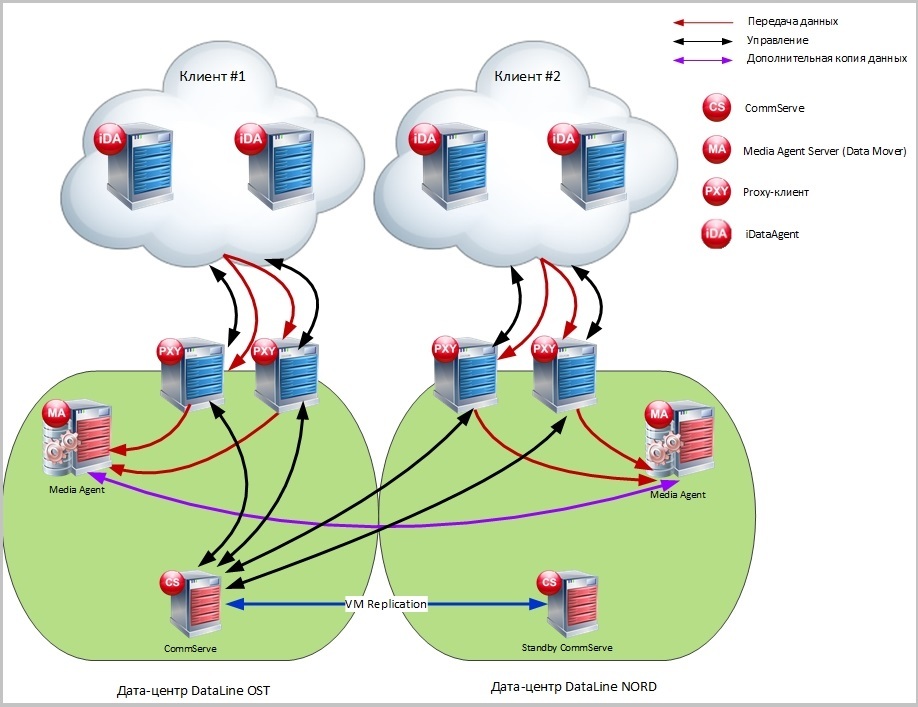
Commvault backup system flow chart.
The backup system works primarily on VMware virtualization: CommServe, Media Agent and Proxy servers are deployed on virtual machines. If the client uses our equipment, then the backups are placed on the storage system of the Huawei OceanStor 5500 V3. To back up client storage systems and store backups on tape libraries, separate Media Agents on physical servers are used.
From our practice, customers who choose Commvault for backup pay attention to the following points.
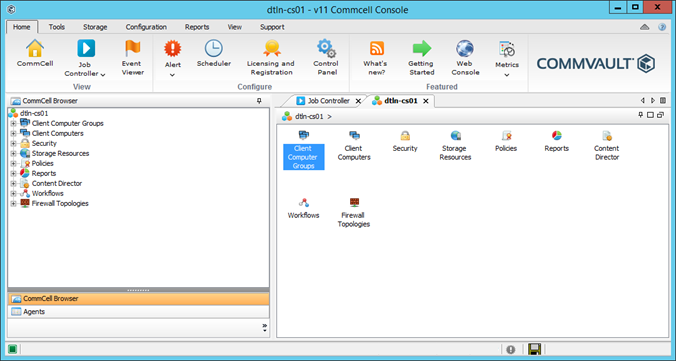
Console. Customers want to manage the backup themselves. All basic operations are available in the Commvault console:
Deduplication. Deduplication allows you to find and delete duplicate data blocks during the backup process. Thus, it helps to save storage space and reduces the amount of transmitted data, reducing channel speed requirements. Without deduplication, backups would take up two to three times the size of the original data.
In the case of Commvault, deduplication can be configured on the client side or on the Media Agent side. In the first case, non-unique data blocks will not even be transferred to the Media Agent Server. In the second, the repeating block is discarded and not written to the storage system.
Such block deduplication is based on hash functions. Each block is assigned a hash, which is stored in a hash table, a kind of database (Deduplication Database, DDB). When transmitting data, the hash “breaks through” this database. If such a hash is already in the database, then the block is marked as non-unique and is not transmitted to the Media Agent Server (in the first case) or is not written to the storage system (in the second).
Thanks to deduplication, we manage to save up to 78% of the storage space. Now 166.4 TB are stored on the storage system. Without deduplication, we would have to store 744 TB.
The ability to distinguish between rights. Commvault has the ability to set different levels of access to backup management. The so-called “roles” determine which actions will be alloweduser in relation to the backup objects. For example, developers can only restore the server with the database to a specific location, and the administrator can start an extraordinary backup for the same server, add new users.
Encryption. You can encrypt data during backup through Commvault in the following ways:
Available encryption algorithms: Blowfish, GOST, Serpent, Twofish, 3-DES, AES (recommended by Commvault).
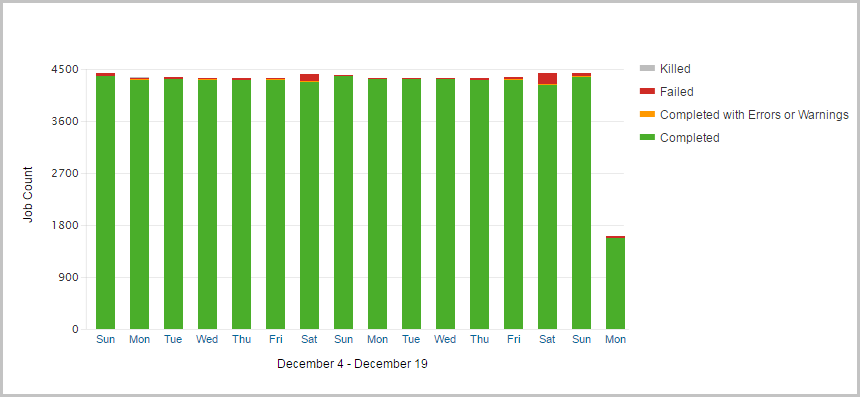
In mid-December, with the help of Commvault we have 27 customers backed up. Most of them are retailers and financial institutions. The total volume of the original copy data is 65 TB.
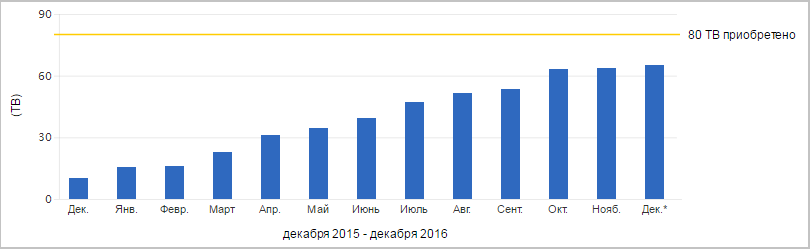
About 4400 tasks are completed per day. Below are statistics on completed assignments over the past 16 days.
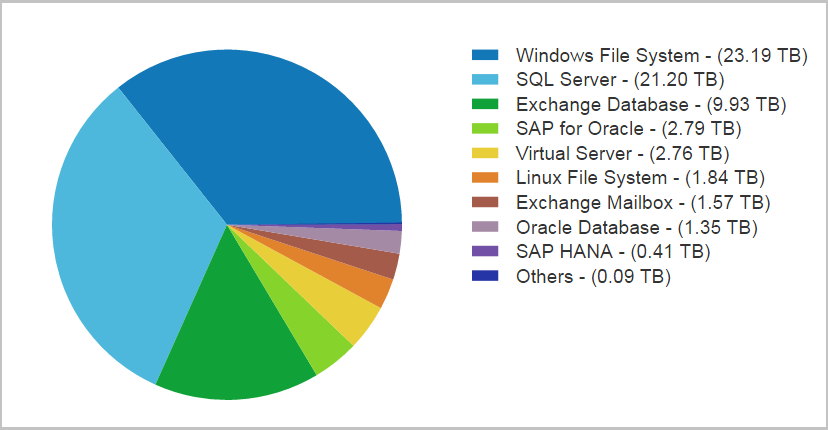
Most of all, through Commvault, Windows File System, SQL Server and Exchange databases are backed up.
And now the promised cases. Although they are impersonal (NDA says hello :)), but they give an idea of why and how customers use Commvault-based backup. Below are cases of clients who use a single backup system, i.e., common software, Media Agent Servers and storage systems.
Customer. The Russian trading and manufacturing company of the confectionery market with a distributed network of branches in Russia.
Task. Organization of backup for Microsoft SQL databases, file servers, application servers, Exchange Online mailboxes.
The source data is located in offices throughout Russia (more than 10 cities). You need to back up to the DataLine site with subsequent data recovery at any of the company's offices.
At the same time, the client wanted complete independent management with access control.
Depth of storage - a year. For Exchange Online - 3 months for online copies and a year for archives.
Decision.For databases, an additional copy was set up for the second site: the last full backup of the month is transferred to another site and stored there for a year.
The quality of the channels from the client’s remote offices did not always allow backup and recovery at the optimum time. To reduce the amount of transmitted traffic, deduplication has been configured on the client side. Thanks to it, a full backup time was acceptable given the remoteness of the offices. For example, a full backup of a 131 GB database from St. Petersburg is done in 16 minutes. From Yekaterinburg, the 340 GB database is backed up for 1 hour 45 minutes.
Using roles, the client configured different permissions for its developers: only for backup or restore.

Customer. Russian chain of children's goods stores.
Task. Organization of backup for:
Highly loaded MS SQL cluster based on 4 physical servers;
virtual machines with a site, application servers, 1C, Exchange and file servers.
All of the specified client infrastructure is distributed between the OST and NORD sites.
RPO for SQL servers - 30 minutes, for the rest - 1 day.
Depth of storage - from 2 weeks to 30 days depending on the type of data.
Decision. We chose a combination of solutions based on Veeam and Commvault. For file backups from our cloud, Veeam is used. Database servers, Active Directory, mail and physical servers are backed up through Commvault.
To achieve high backup speed, the client allocated a separate network adapter for backup tasks on physical servers with MS SQL. A full 3.4 TB database backup takes 2 hours 20 minutes, and a full recovery takes 5 hours 5 minutes.
The client had a large amount of source data (almost 18 TB). If you put the data on a tape library, as the client did before, then several dozen cartridges would be required. This would complicate the management of the entire client backup system. Therefore, in the final implementation, the tape library was replaced by storage.

Customer. Supermarket chain in the CIS
. Task. The customer wanted to organize backup and recovery of SAP systems located in our cloud. For SAP HANA databases, RPO = 15 minutes, for virtual machines with application servers RPO = 24 hours. Depth of storage - 30 days. In the event of an accident, RTO = 1 hour, to restore a copy at the request of RTO = 4 hours.
Decision. For the HANA database, backup of DATA-files and Log-files with the set frequency was configured. Log files were archived every 15 minutes or when a certain size was reached.
To reduce the recovery time of the database, we set up a two-level backup storage based on the storage and tape library. Operational copies are added to the disks with the possibility of recovery at any time during the week. When the backup becomes older than 1 week, it is transferred to the archive, to the tape library, where it is stored for another 30 days.
A full backup of one of the 181 GB databases is done in 1 hour 54 minutes.
When setting up the backup, the SAP backint interface was used, which allows integrating third-party backup systems with SAP HANA Studio. Therefore, backups can be managed directly from the SAP console. This makes life easier for SAP administrators who don’t need to get used to the new interface.
Backup management is also available to the client through the standard Commvault client console.

That's all for today. Ask questions in the comments.
Storage backup systems based on Commvault in the OST-2 data center.
How it works?
Commvault is a platform for backing up applications, databases, file systems, virtual machines, and physical servers. In this case, the source data can be on any site: with us - on the client side, in another commercial data center or cloud.
The client installs the agent — iData Agent — on the backup objects and configures it in accordance with the required backup policies. The iData Agent collects the necessary data, compresses, deduplicates, encrypts and transfers it to the DataLine backup system.
Proxy-servers provide connectivity of the client network and our network, isolation of channels through which data is transmitted.
On the DataLine side, Media Agent Server receives data from the iData Agentand sends it to storage for storage, tape libraries, etc. CommServe manages all this . In our configuration, the main management server is located on the OST site, and the backup server is on the NORD site.
By default, client data is added to one site, but you can back up to two locations at once or set up a schedule for transferring backups to the second site. This option is called an auxiliary copy. For example, all full backups at the end of the month will be automatically duplicated or move to the second site.
Commvault backup system flow chart.
The backup system works primarily on VMware virtualization: CommServe, Media Agent and Proxy servers are deployed on virtual machines. If the client uses our equipment, then the backups are placed on the storage system of the Huawei OceanStor 5500 V3. To back up client storage systems and store backups on tape libraries, separate Media Agents on physical servers are used.
What is important to customers?
From our practice, customers who choose Commvault for backup pay attention to the following points.
Console. Customers want to manage the backup themselves. All basic operations are available in the Commvault console:
- adding and removing servers for backup;
- setting up iData Agent;
- creation and manual launch of tasks;
- self-restore backups;
- setting up alerts for the status of backup tasks;
- differentiation of access to the console depending on the role and user group.
Deduplication. Deduplication allows you to find and delete duplicate data blocks during the backup process. Thus, it helps to save storage space and reduces the amount of transmitted data, reducing channel speed requirements. Without deduplication, backups would take up two to three times the size of the original data.
In the case of Commvault, deduplication can be configured on the client side or on the Media Agent side. In the first case, non-unique data blocks will not even be transferred to the Media Agent Server. In the second, the repeating block is discarded and not written to the storage system.
Such block deduplication is based on hash functions. Each block is assigned a hash, which is stored in a hash table, a kind of database (Deduplication Database, DDB). When transmitting data, the hash “breaks through” this database. If such a hash is already in the database, then the block is marked as non-unique and is not transmitted to the Media Agent Server (in the first case) or is not written to the storage system (in the second).
Thanks to deduplication, we manage to save up to 78% of the storage space. Now 166.4 TB are stored on the storage system. Without deduplication, we would have to store 744 TB.
The ability to distinguish between rights. Commvault has the ability to set different levels of access to backup management. The so-called “roles” determine which actions will be alloweduser in relation to the backup objects. For example, developers can only restore the server with the database to a specific location, and the administrator can start an extraordinary backup for the same server, add new users.
Encryption. You can encrypt data during backup through Commvault in the following ways:
- on the client agent side: in this case, the data will be transferred to the backup system already in encrypted form;
- on the side of the Media Agent;
- at the channel level: data is encrypted on the client agent side and decrypted on the Media Agent Server.
Available encryption algorithms: Blowfish, GOST, Serpent, Twofish, 3-DES, AES (recommended by Commvault).
Some statistics
In mid-December, with the help of Commvault we have 27 customers backed up. Most of them are retailers and financial institutions. The total volume of the original copy data is 65 TB.
About 4400 tasks are completed per day. Below are statistics on completed assignments over the past 16 days.
Most of all, through Commvault, Windows File System, SQL Server and Exchange databases are backed up.
And now the promised cases. Although they are impersonal (NDA says hello :)), but they give an idea of why and how customers use Commvault-based backup. Below are cases of clients who use a single backup system, i.e., common software, Media Agent Servers and storage systems.
Case 1
Customer. The Russian trading and manufacturing company of the confectionery market with a distributed network of branches in Russia.
Task. Organization of backup for Microsoft SQL databases, file servers, application servers, Exchange Online mailboxes.
The source data is located in offices throughout Russia (more than 10 cities). You need to back up to the DataLine site with subsequent data recovery at any of the company's offices.
At the same time, the client wanted complete independent management with access control.
Depth of storage - a year. For Exchange Online - 3 months for online copies and a year for archives.
Decision.For databases, an additional copy was set up for the second site: the last full backup of the month is transferred to another site and stored there for a year.
The quality of the channels from the client’s remote offices did not always allow backup and recovery at the optimum time. To reduce the amount of transmitted traffic, deduplication has been configured on the client side. Thanks to it, a full backup time was acceptable given the remoteness of the offices. For example, a full backup of a 131 GB database from St. Petersburg is done in 16 minutes. From Yekaterinburg, the 340 GB database is backed up for 1 hour 45 minutes.
Using roles, the client configured different permissions for its developers: only for backup or restore.
Case 2
Customer. Russian chain of children's goods stores.
Task. Organization of backup for:
Highly loaded MS SQL cluster based on 4 physical servers;
virtual machines with a site, application servers, 1C, Exchange and file servers.
All of the specified client infrastructure is distributed between the OST and NORD sites.
RPO for SQL servers - 30 minutes, for the rest - 1 day.
Depth of storage - from 2 weeks to 30 days depending on the type of data.
Decision. We chose a combination of solutions based on Veeam and Commvault. For file backups from our cloud, Veeam is used. Database servers, Active Directory, mail and physical servers are backed up through Commvault.
To achieve high backup speed, the client allocated a separate network adapter for backup tasks on physical servers with MS SQL. A full 3.4 TB database backup takes 2 hours 20 minutes, and a full recovery takes 5 hours 5 minutes.
The client had a large amount of source data (almost 18 TB). If you put the data on a tape library, as the client did before, then several dozen cartridges would be required. This would complicate the management of the entire client backup system. Therefore, in the final implementation, the tape library was replaced by storage.
Case 3
Customer. Supermarket chain in the CIS
. Task. The customer wanted to organize backup and recovery of SAP systems located in our cloud. For SAP HANA databases, RPO = 15 minutes, for virtual machines with application servers RPO = 24 hours. Depth of storage - 30 days. In the event of an accident, RTO = 1 hour, to restore a copy at the request of RTO = 4 hours.
Decision. For the HANA database, backup of DATA-files and Log-files with the set frequency was configured. Log files were archived every 15 minutes or when a certain size was reached.
To reduce the recovery time of the database, we set up a two-level backup storage based on the storage and tape library. Operational copies are added to the disks with the possibility of recovery at any time during the week. When the backup becomes older than 1 week, it is transferred to the archive, to the tape library, where it is stored for another 30 days.
A full backup of one of the 181 GB databases is done in 1 hour 54 minutes.
When setting up the backup, the SAP backint interface was used, which allows integrating third-party backup systems with SAP HANA Studio. Therefore, backups can be managed directly from the SAP console. This makes life easier for SAP administrators who don’t need to get used to the new interface.
Backup management is also available to the client through the standard Commvault client console.
That's all for today. Ask questions in the comments.









