Under the hood of the new Dell + EMC crafts - flash storage at the price of disk
I must say the main thing right away - the statement about the "disk price" applies only to special promotional prices for Unity, which EMC gave us as an official partner in Russia under the promo storage model. The promotion does not apply to all, details in the mail. Regular prices are just a solid good midrange for your specifics.
So let's go. For many years, EMC is not indifferent to flash, but last year it was specifically confused, deciding that the future lay with it. And released a working and not very expensive thing. This is almost the usual midrange with SSDs (nuances a bit later). We don’t stick “scrap, but it continues to work”, but impressive performance for databases and virtual machines plus various small chips.
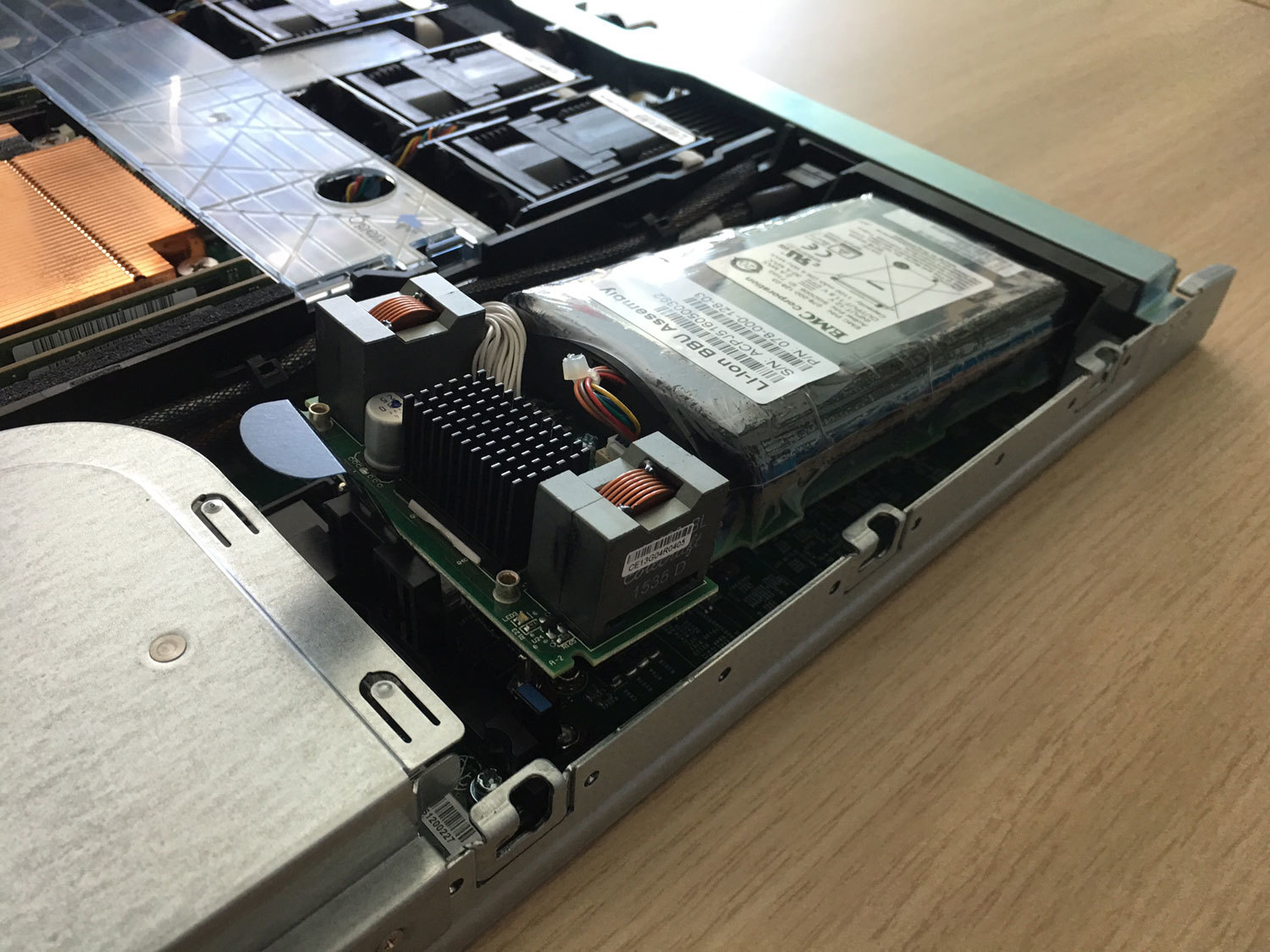
Here is a striking example of optimization - before there was a separate UPS module in its casing, and it changed “to hot”. And now - a Li-ion battery with polyethylene leakage protection inside the controller.
And they also stepped on many vendors on their pet peeve and made the support price the same for the whole time. And then, you know, many large vendors like to set such a price for the 4th and 5th year that it is easier to replace iron with a new one. Well and yes, for these guys a disc failure due to wear is considered a warranty case, unlike some lovers of asterisks and small print in the warranty policy.
That's it, now let's go stick a crowbar into it and test it. Looking ahead, I’ll say that 80 thousand Iops were removed from 9 discs.
The main question is what will happen to the storage line after the merger. Most of all they asked, and even those who had the glands of three years ago called. There is no official message yet, but EMC in the mid-range segment has always been in the lead, and here Dell will not chop the chicken that lays golden eggs. And the release of the new Unity is a confirmation of this.
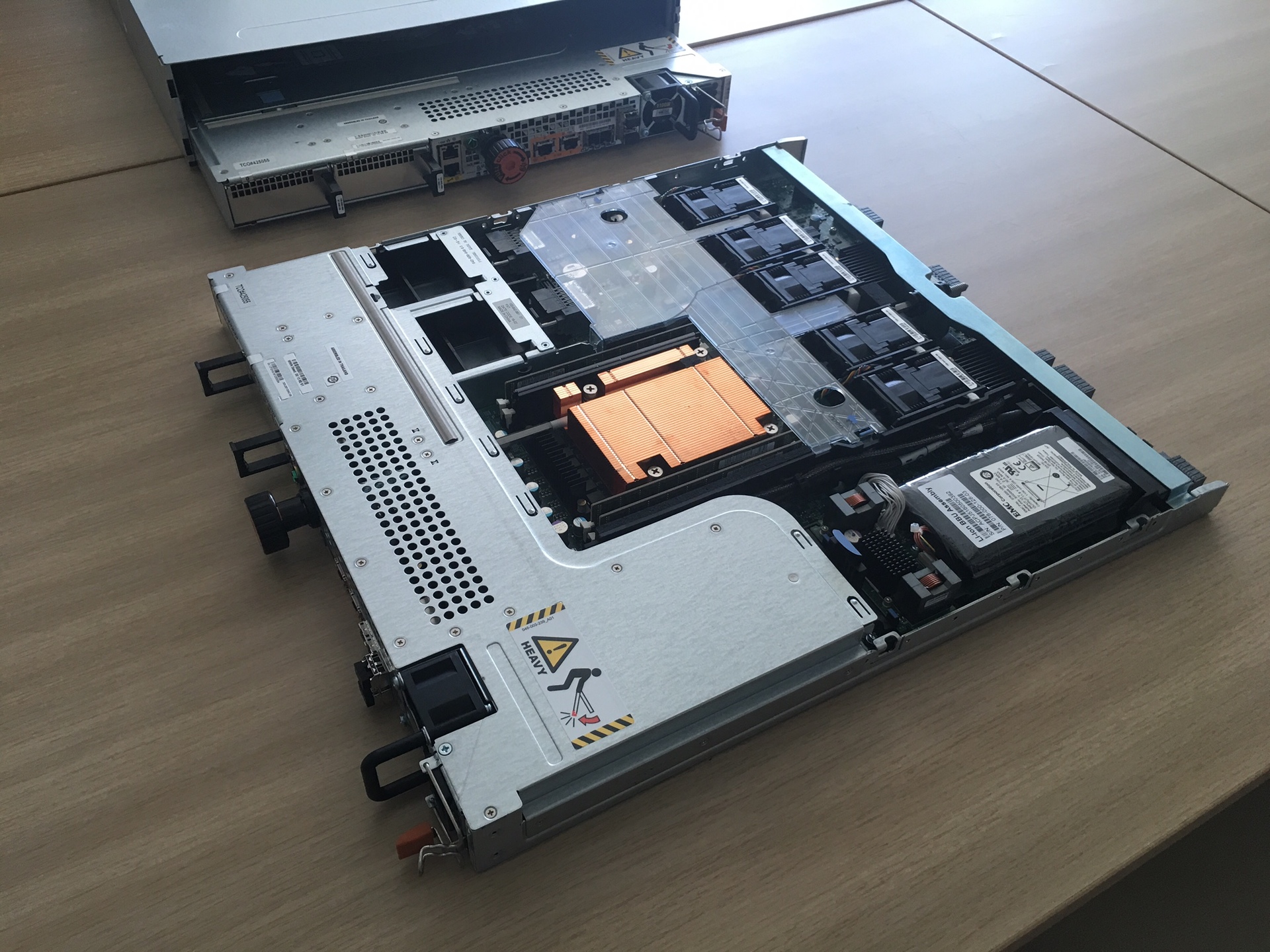
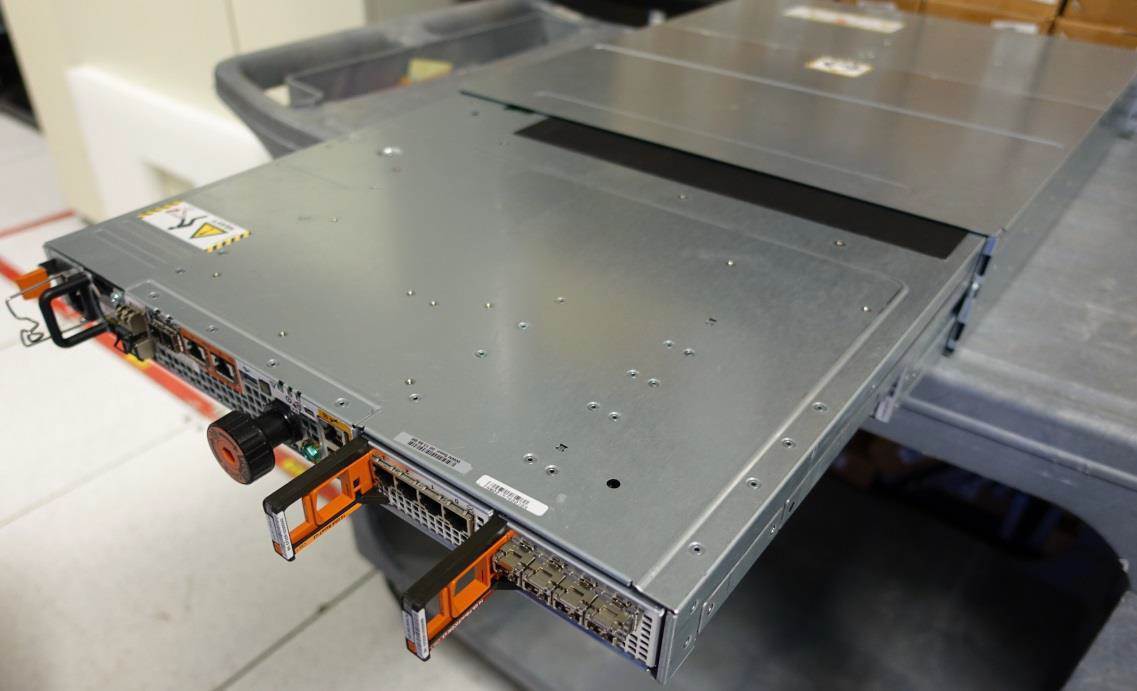
The black blocks at the top right are cooling (the flash thing is hot, you need to constantly blow), then the battery, in the middle the entire filling and the processor (here you can see the DIMM near the orange block), to the left in the L-shaped casing - the power supply, fans too (do not forget blow by percent) and a place for IO-modules.
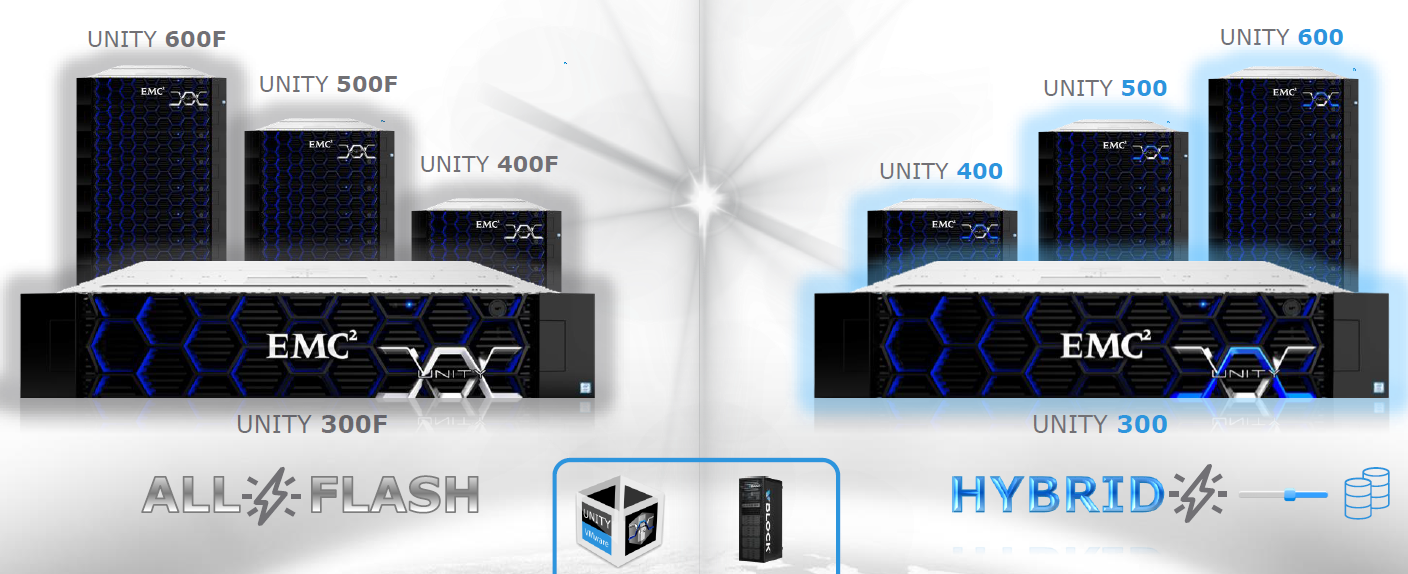
Unity in itself is a replacement for the current VNX in terms of marketing. The hardware here is standard, two controllers based on x86 processors plus shelves with SSD disks connected via the SAS3 bus. But the microcode here is heavily redesigned (and it was partially written by Russian programmers from St. Petersburg), just like the new algorithms for working with disks. The approach was non-standard: even though there are flash and hybrid systems in the lineup, development came from all-flash, and only then compatibility with HDD was done (this is a good question). That is, there is, of course, an overhead on top of the SSD (it isn’t only where instead of drives we use bare flash factory microchips, but these are generally different prices), but it turned out to optimize the delays and performance very well.
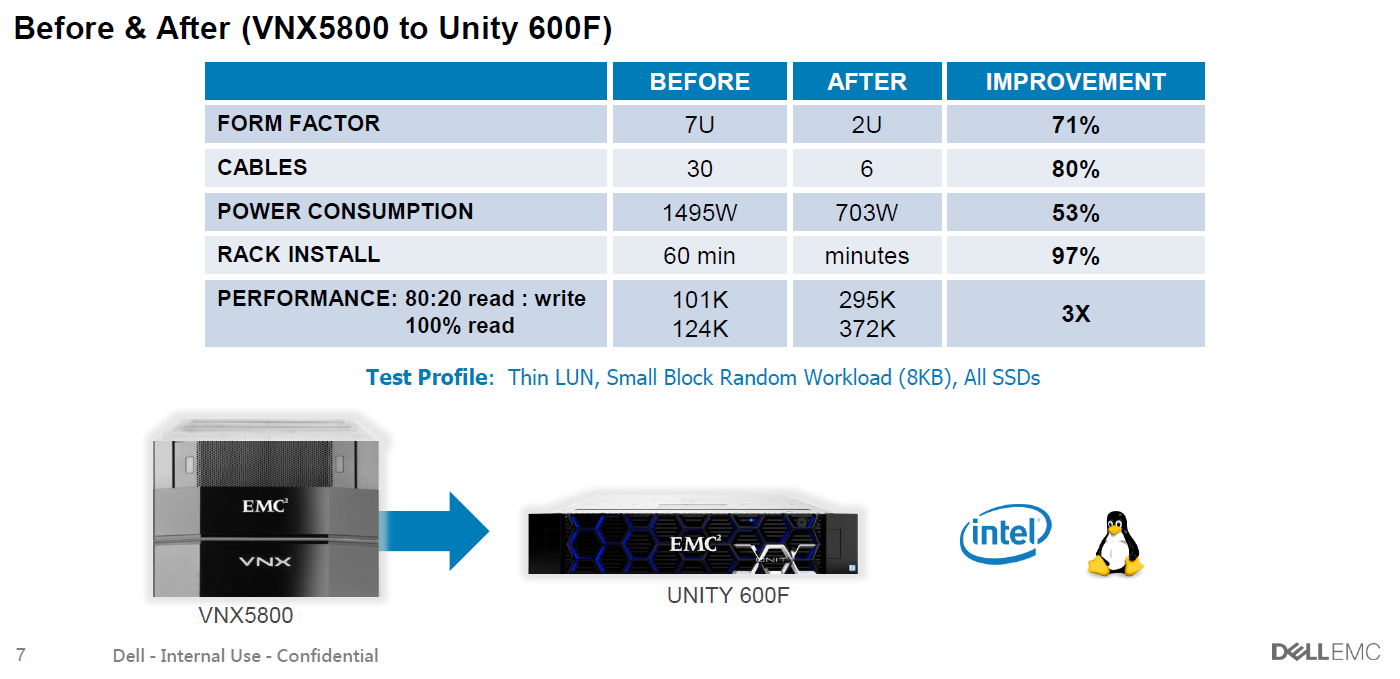
Just do not read the small signature :)
The main motivation to say goodbye to spindles is the price. In my spare time, I considered the price of a hybrid storage system and all-flash - the expansion is 30-40%, taking into account discounts (they are more for flash). This is no longer the order, as before, and, therefore, you can think about using them where the HDD was previously run. Yes, and this is wild - I recall how I had to type 100 spindles for performance, and then cut their volume, because extra terabytes turned out. And do not forget to subtract penalties on RAID. And sometimes, a customer comes with a request for 10-15 thousand IOPS from a 3-4 TB basen. And what do you say - 300GB 15k in the mirror ??? Now in the line of SSDs from 400 GB to 15 (!) TB. In general, you need to consider it as a task. Please contact the contacts below. But something I was distracted.
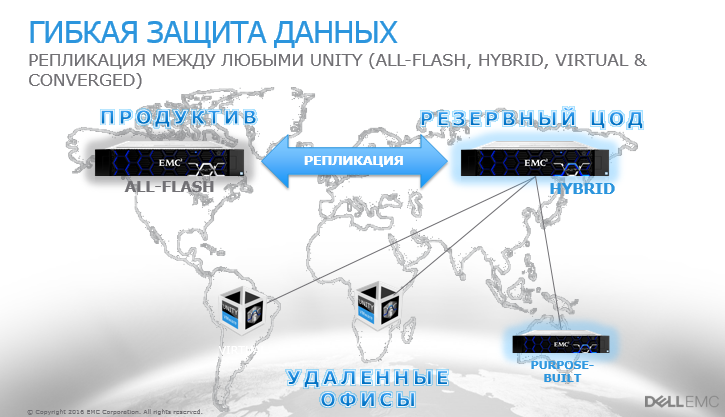
Architects did not forget about small branches of companies. There is a version in the form of a virtual machine for Vmware (other hypervisors also promise to pull it up if there is demand), which is put in a distant small branch on top of the server with disks or a very simple shelf, and after that all its space will be seen as a full Unity storage. it provides features such as branch replication, snapshots and single-window management. Because Unity, in fact.
Previously, it was necessary to separately purchase a capacity license for iron. For many customers, this was inconvenient. Now this is not. And there are no separate products - replication, block and file protocols, snapshots, tearing and fast cache (for hybrid systems) are included in the delivery.
All-flash is constantly asked about reliability - and EMC concluded that it is normal to support flash systems because the flash is almost eternal, because without moving parts it wears out very slowly. And therefore, the price is the same for each year of support, as I said (but this does not apply to hybrid storage). Still tasty - again, I mentioned, while the array is under warranty or extended warranty - if the disk fails due to wear, they will change it no matter what year. For another well-known vendor, this is considered a customer problem and a non-warranty case. They also found someone to step on the corn.
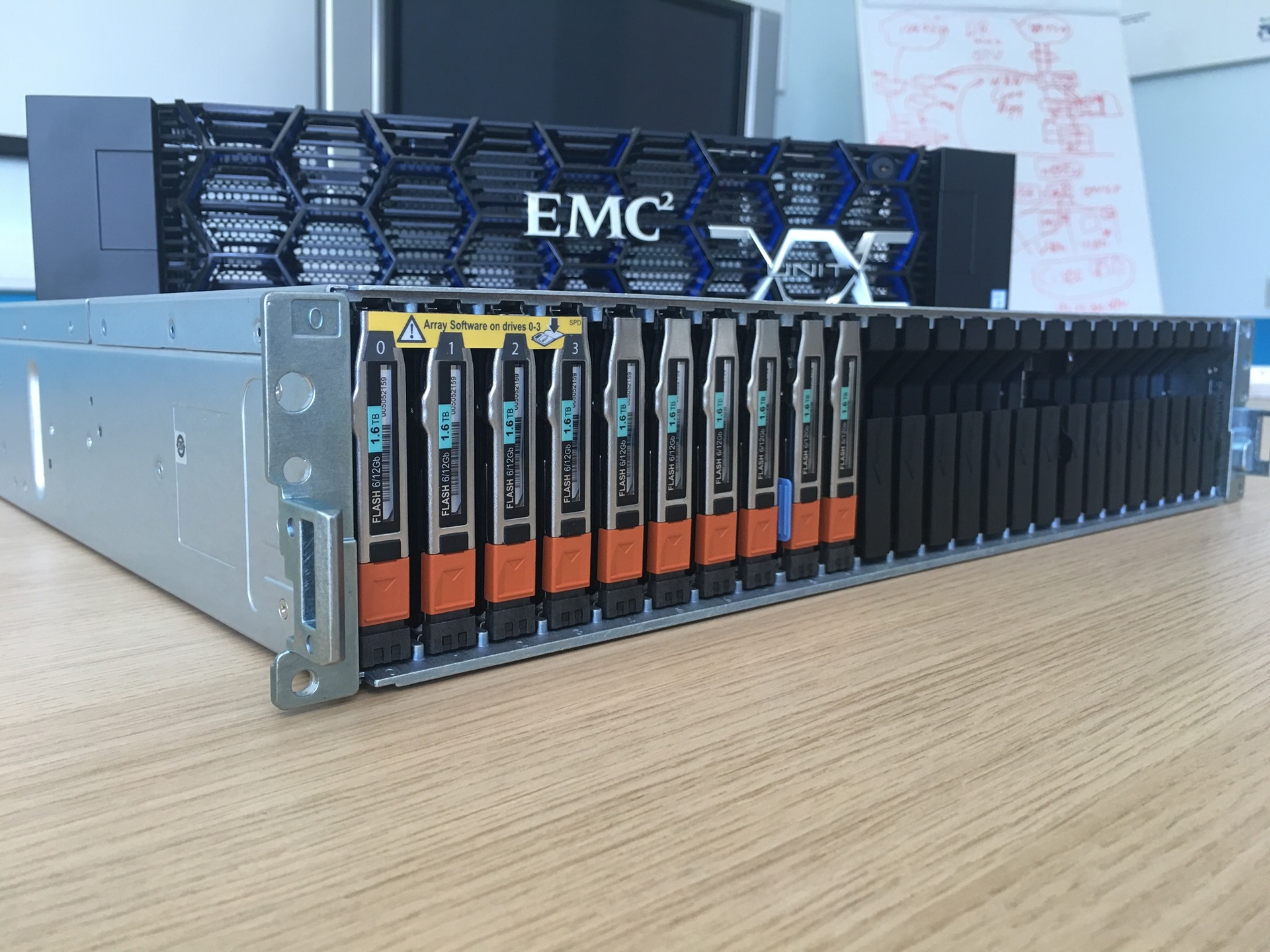
It’s very convenient in volume - you can stuff at least 200 TB into one shelf, if necessary. Compared to spindle storage, it’s very nice.
We already have combat deployments - despite the May release of the piece of iron. The customer spread ROI, TCO and realized that taking a hybrid is not profitable. As a result, there Unity 400F (F means Flash) 47 SSDs of 1.6 each, it turns out about 60 TB of usable space in RAID5. All this in 4 units. Gives 140 thousand iops.
In general, the system, as usual, is made in Irish (they have a plant in Cork in Ireland). The assembly is neat and beautiful, but very original according to the solutions. For example, controllers (two blades) are attached to the chassis with a hefty bolt that runs through the entire array. Thanks to this axis, all connectors smoothly fit into each other on the backplane.
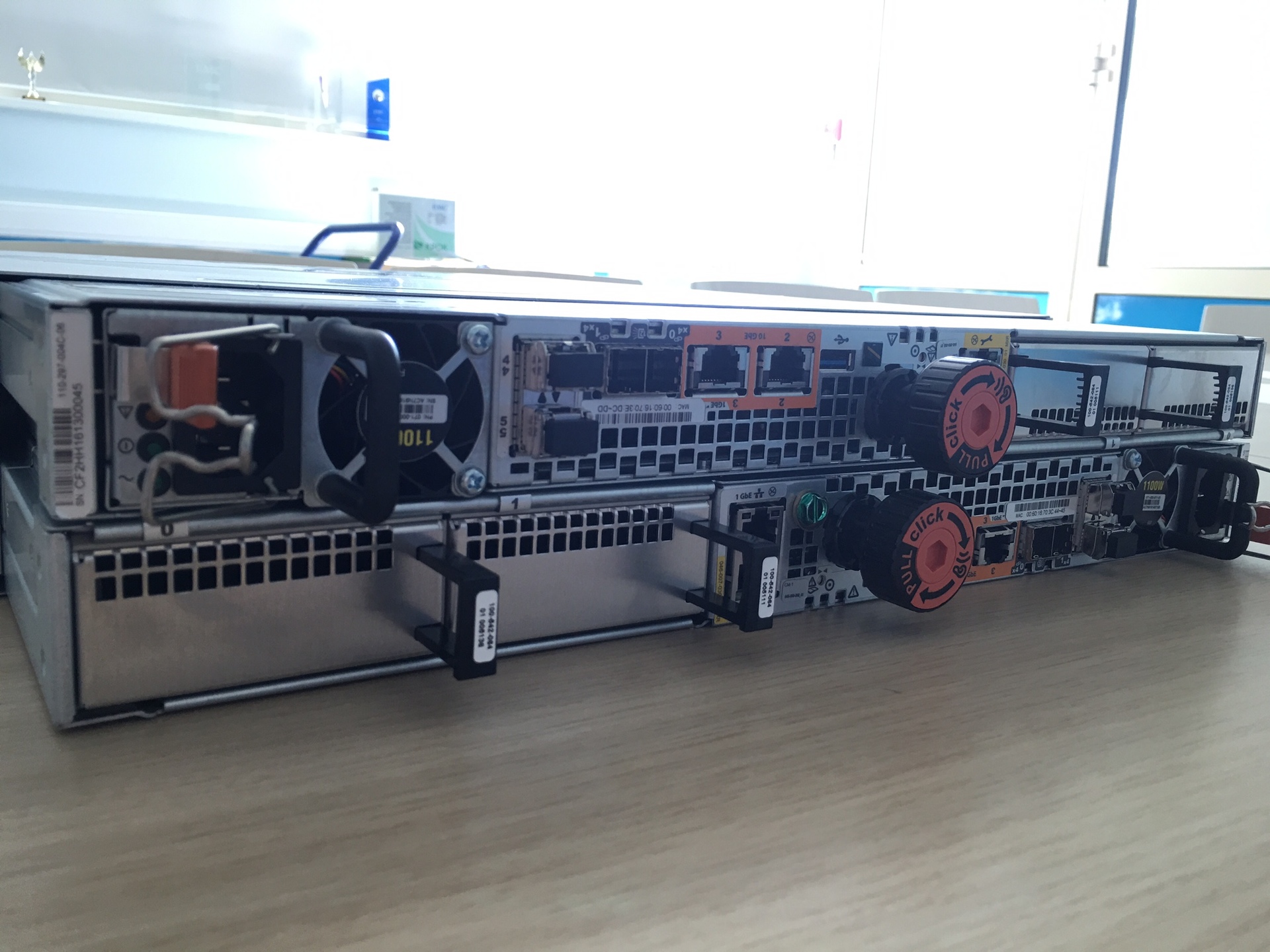
These are the bolts. While you gently spin them on the last centimeter, the feeling is like when docking with the ISS.
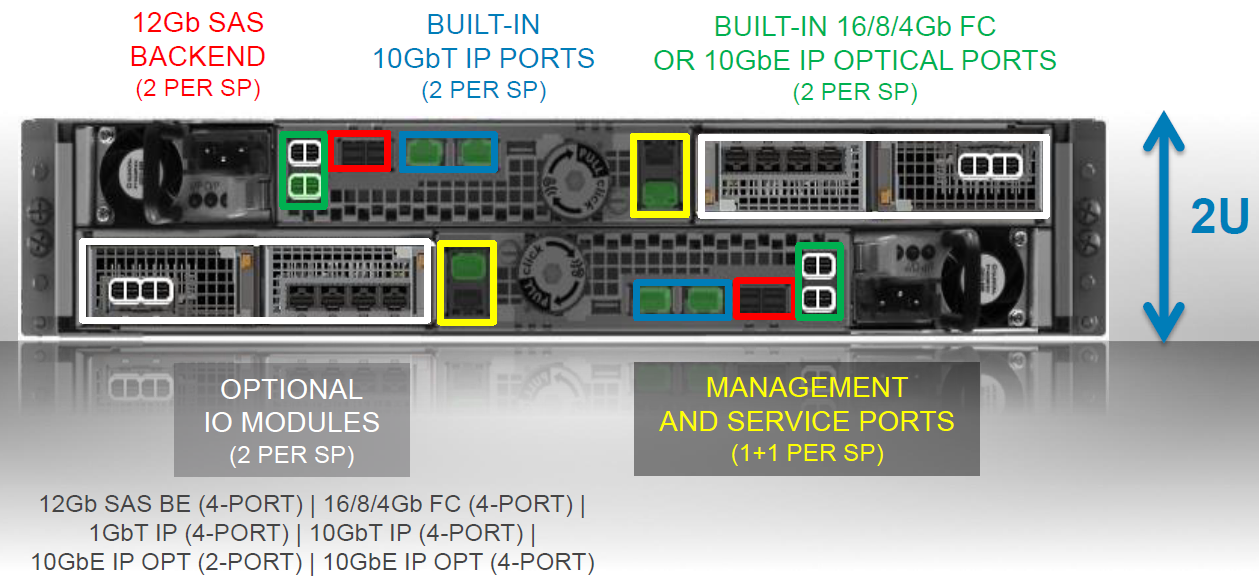
On board there is a built-in 10 BASE-T for distribution via file protocols or block iSCSI. It is cheap, so it does not increase the cost of construction, but it will certainly bring benefits. But the main communication port you choose for your infrastructure. When ordering, you can choose which transceivers will go to the converged I / O connector (16 FC or 10 Eth / ISCSI). There are 2 of them per controller. More is needed - there is an expansion module where you can get these ports. See the diagram below. And no separate file controllers - everything is already on board. This is damn convenient, I must say, although it is more relevant for hybrid models than fully solid ones. Still, for file washes, flash is still a little expensive. Well, or for fans of building Vmware on NFS, which is very popular lately.
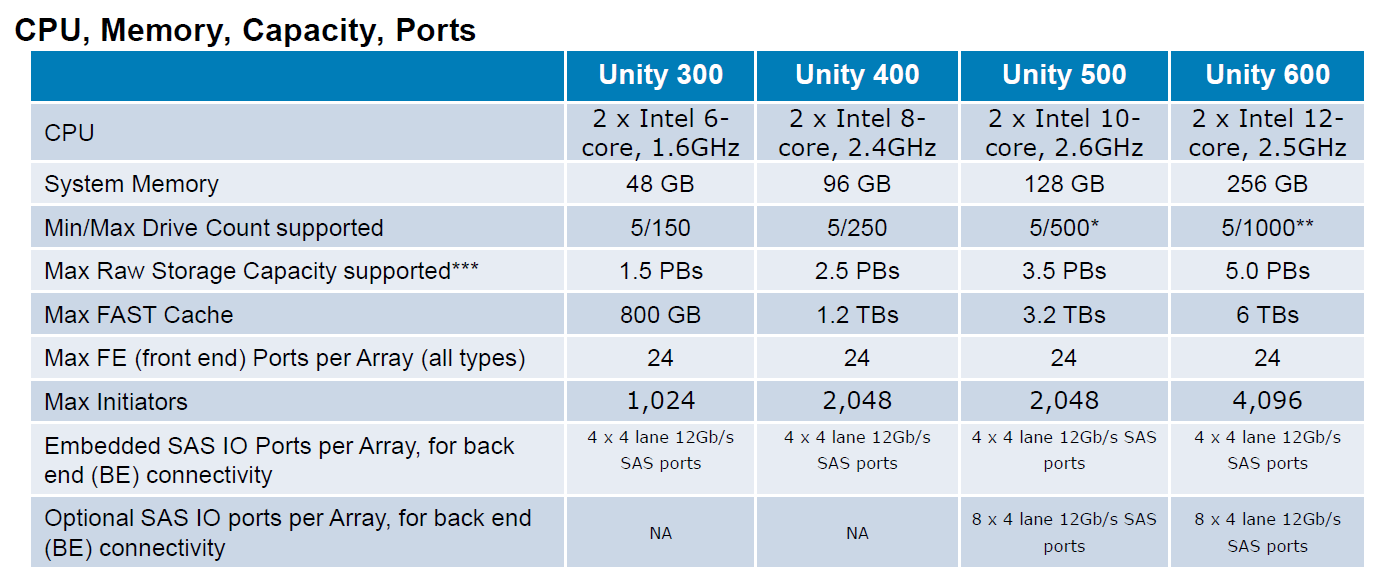
Processors and memory are not surprising - the good old Intel.
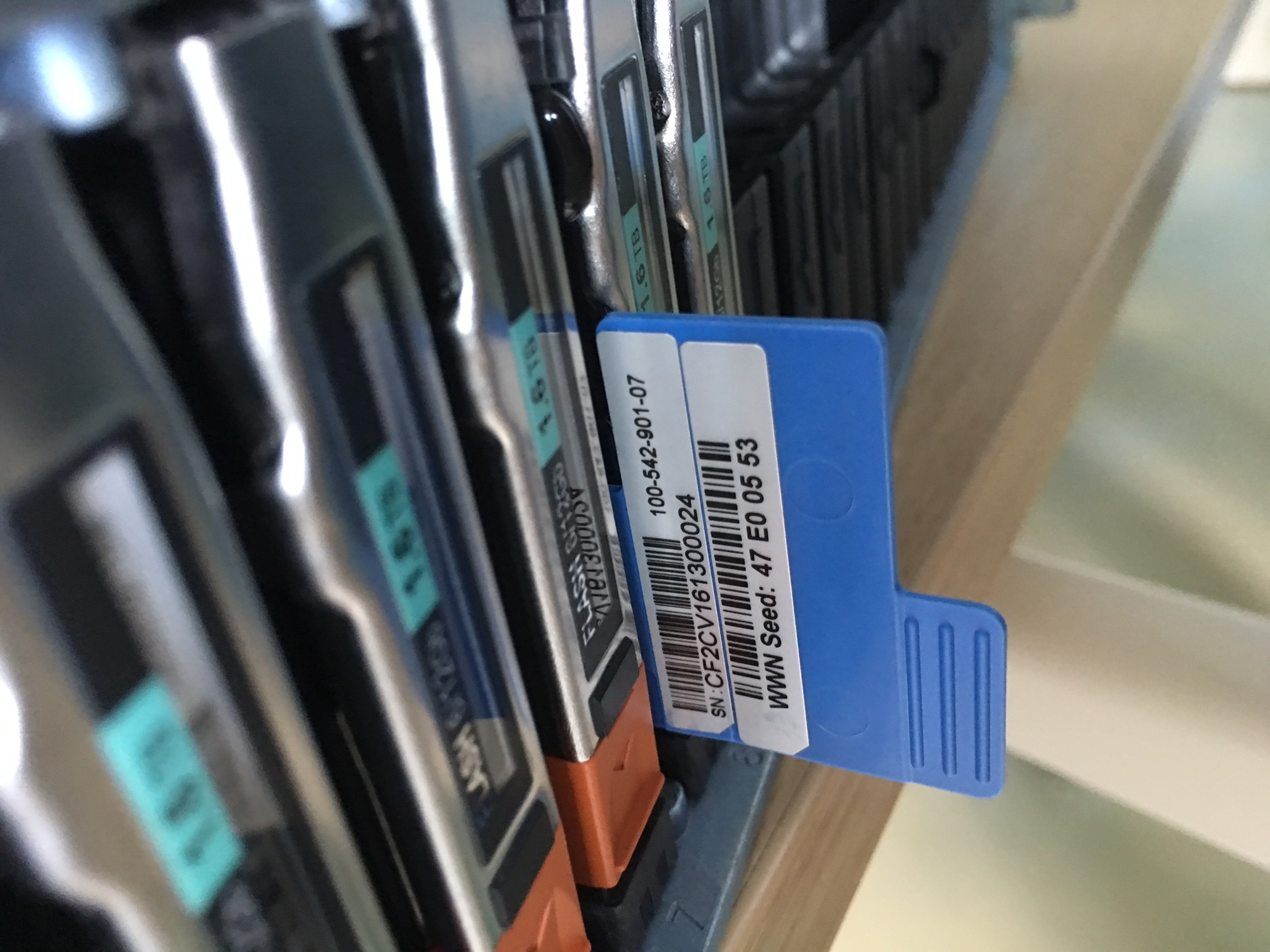
Inside, there are two SSDs for flushing the dirty cache when the power is turned off, each controller has its own. OS is placed on the first 4 disks. I will please those who are familiar with the previous line from EMC: these disks can now be combined with everyone else in a pool for data. Previously, they often became a dead weight, on which, in addition to images of virtual machines, there was nothing to put. Yes, and the vendor did not recommend loading them. Now, please. Only for heavily loaded installations, we still recommend adhering to this old rule. They are therefore systemic, which are important. And without load, the rebuild always goes faster. Rebild 1.6TB disk under a load of 50t IOPS, by the way, took a little less than two hours. This result seems to me quite worthy.
2 power cables (black and gray at the edges), 2 control cables (green to unit), 2 frontend (blue).
A good Jedi has a blue sword, and a very good one has a silver one: pay attention to the logos. For attention to detail, the manufacturer is a separate plus in karma.
Tested the standard method for us recently from rpokruchin .
The results are as follows:
1. Let's start with the SSD-specific loads — random reading and writing. Highlighted the values that can be taken as a standard. By the way, it can be seen that the system inside itself works with 8K block, because the number of IOPS begins to decrease only at a larger size, and on smaller shows almost the same result. If we approach the issue strictly, the result on random reading is 63.5 thousand IOPS (when we take 1ms for the cutoff and everything above is not counted). If you do not focus on this, then we can assume that 86 thousand we squeezed out of it. Although everyone is free to decide for himself which results are considered correct. To do this, the whole table is shown on different blocks and queues:
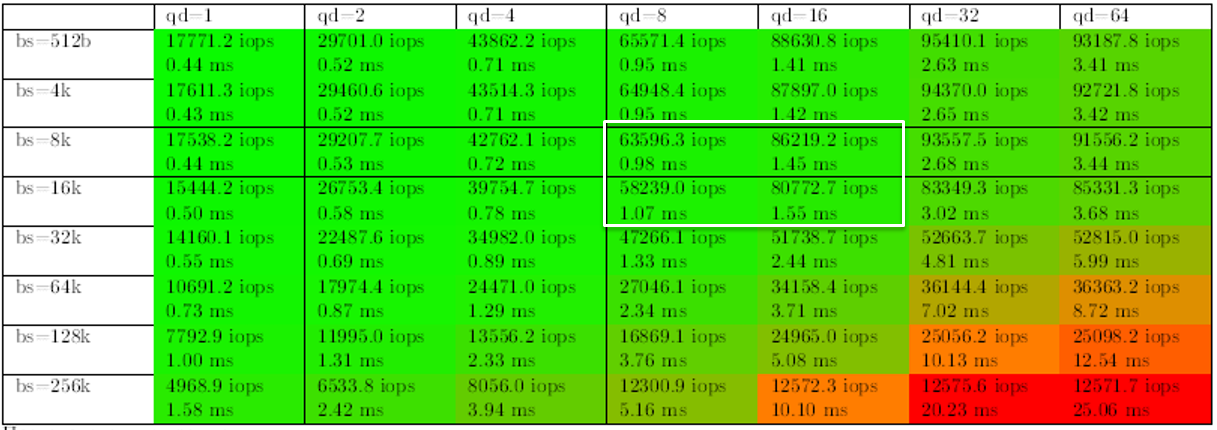
Interestingly, on a random record, the results were better than we thought. Performance was only 20% worse. Maybe, of course, the storage cache worked for the top five, although they tried to bypass it in every possible way, but they just turned it off. But that would be wrong, because it wasn’t included in the design for dashing guys from KROK to extinguish it. Yes, and in the product it will still be included.
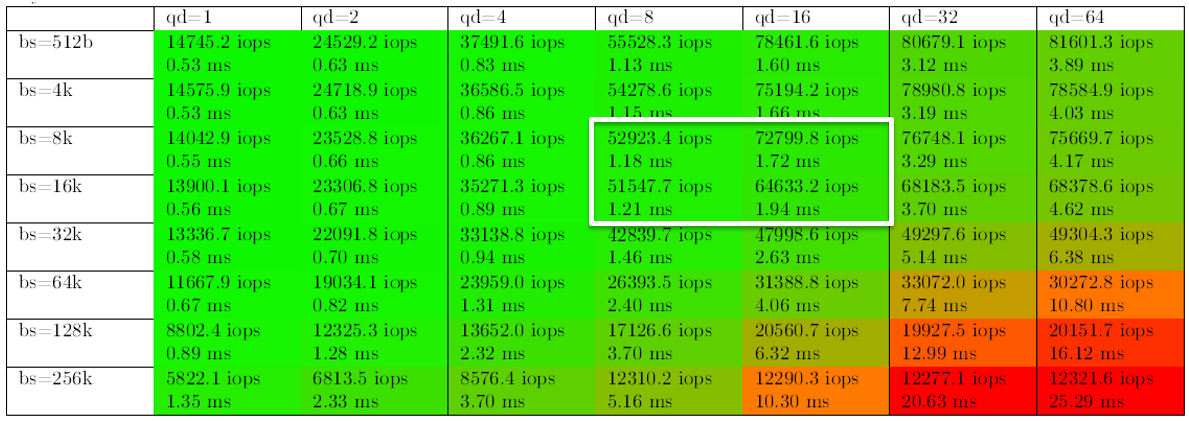
The backup loads were also not disregarded, when sequential readings are carried out in a large block and bandwidth is more important than response time and Iops (who wants to throw a brick at me, I agree in advance that yes, with backups, the block can be even larger, but overall this does not change the picture):
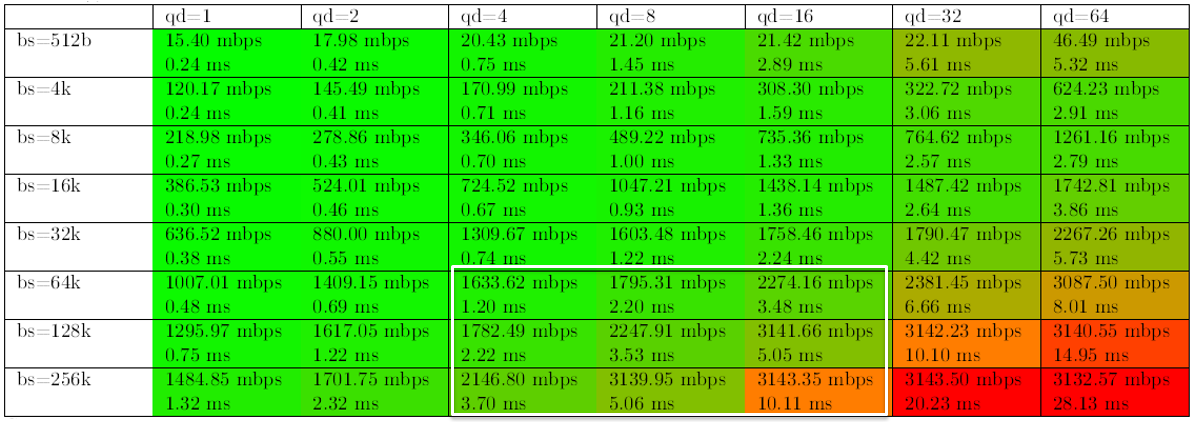
And, finally, the load characteristic of filling data is sequential recording in large blocks.
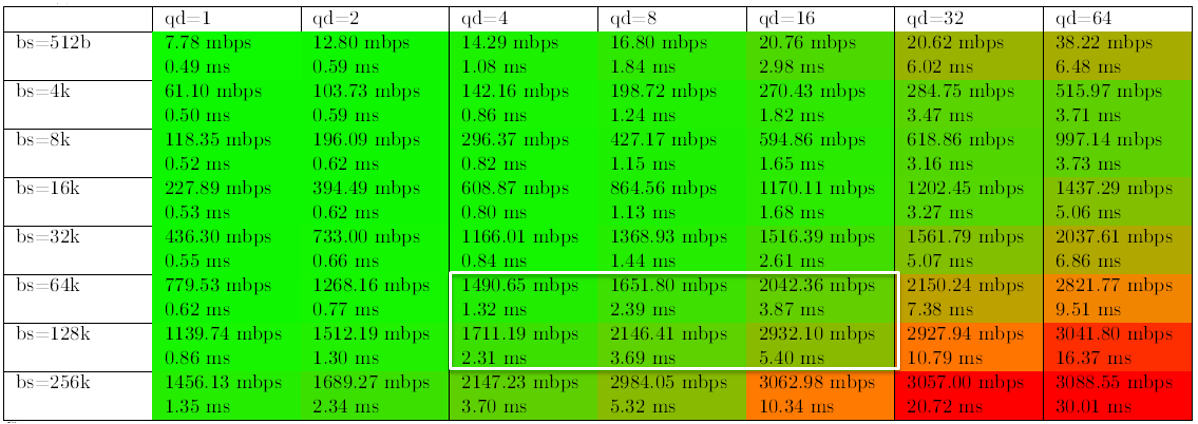
You can see from the table that after a certain moment, productivity is no longer growing, but the response time is increasing. Here we have to remember that after all, the system is midrange, and did not promise stars from heaven. Especially on 9 disks, of which 4 are system (Yes, we are bad guys, we do not follow our own best practices). You just need to know from the very beginning its ceiling and monitor your productivity. The higher the model in the lineup, the higher its ceiling. Incidentally, it is indicated fairly honestly in the datasheet (see the links below). This must be considered when buying.
What is interesting, of course, it reaches high rates on a small number of disks - with an increase in the number of disks, it quickly rests against the designated ceiling and productivity will not grow further, but it works for its money. As we understood, the reason is that the system rests on the power of the controller. An answer was received to a logical question - you have to pay for everything in this life. If you need more performance, you need a larger model.
Of course, when you look at the free slots for memory dies on the motherboard, you want to add several server slots for several hundred dollars there and get an additional cache (the cache there is regular 16 Gb DIMMs). Or change the processors at the same time (in the younger model, six-core 1.6 GHz). But such an action will remove the zhelzka and guarantees immediately, alas. True, I know a man who somehow managed to remove the magnetic disk destruction system from his storage system and give out a complete refusal for a warranty case, so maybe someone will rearrange them before the engineers arrive, but something is unlikely.
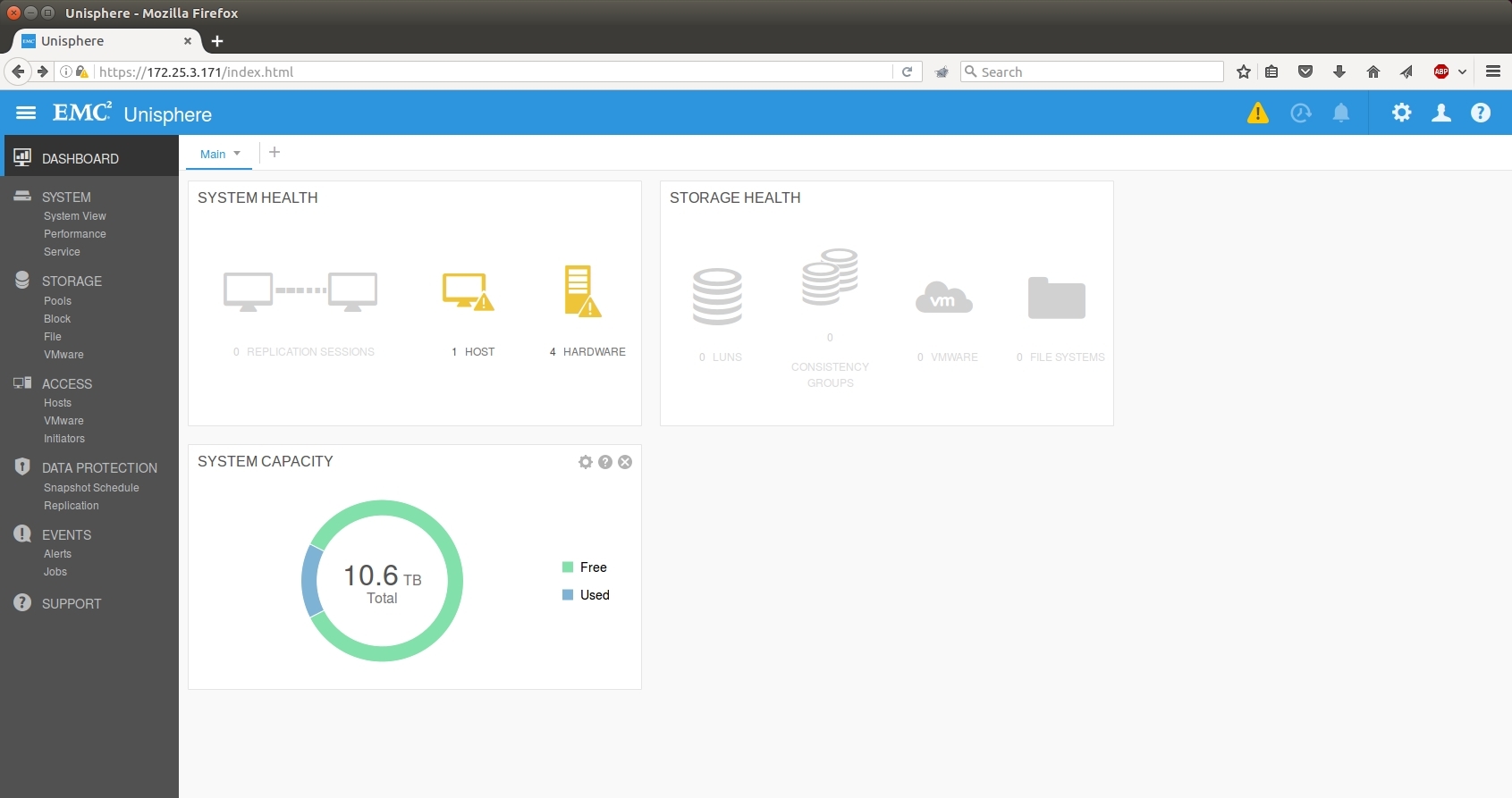
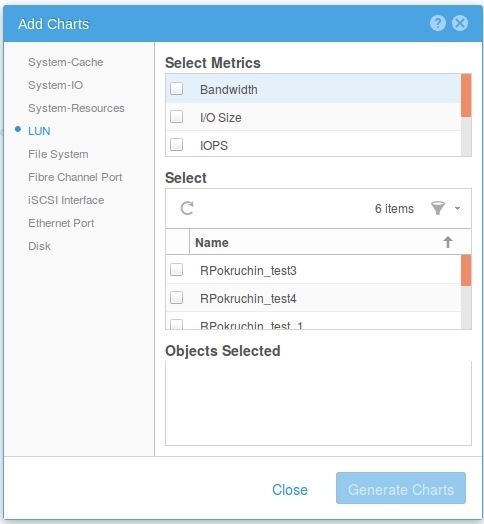
Now in HTML 5. The GUI works fine on Windows and Linux, for connoisseurs of automation there is a cli and REST API. A lot of effort was put into optimization. Performing tasks is really easier. Convenient wizards replaced the legwork on several tabs. Realt-time and historical performance statistics can be viewed online without the use of additional utilities. Charts are configured in the same interface, management is very flexible.
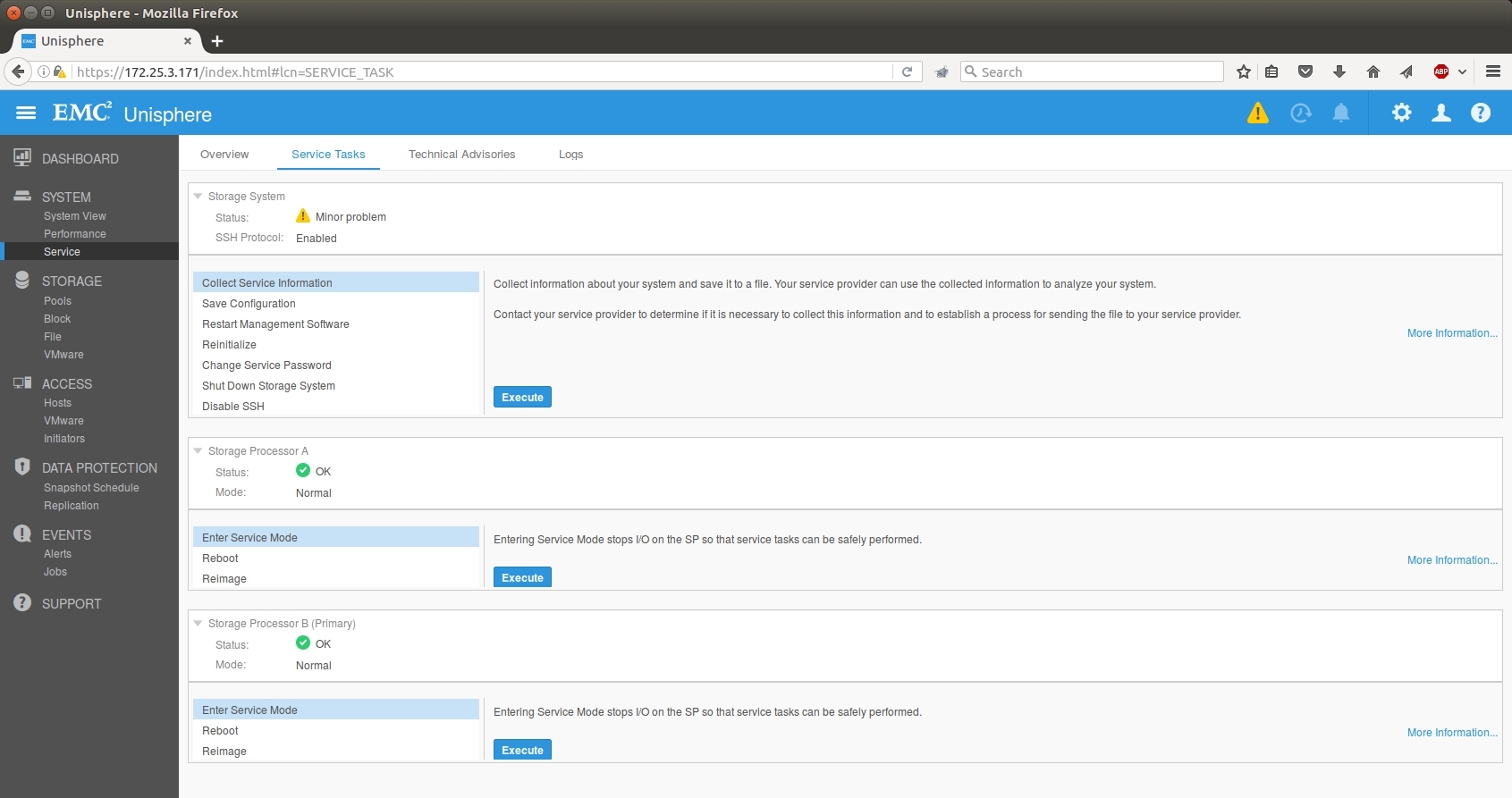
In addition to administrative tasks, service operations were greatly simplified. All of them are now collected in one tab. Logs from the array are collected faster and immediately from both controllers. Operations such as Reimage and updating the code of the array \ disks appeared in the Web GUI.
There is control from the cloud: if you wish, you can register in a special service where the system will merge its counters - tips for optimizing resources and management will be offered. This is done, of course, so that you do not miss the upgrade and additional purchase of iron, but, it seems, there is also benefit.
There are still cool tools from partners for assessing the current infrastructure - you can collect logs from your arrays, analyze and at the exit find out which Unity, taking into account the growth by 3-5 years, will replace all current arrays. And plus to this, you can understand whether allflash or hybrid is enough.
You can play with virtual Unity - it is downloaded as a demo with a license for non-commercial use for free at this link .
The manufacturer put itself in the place of the customer and took into account its mistakes: it released a decent-sized storage, simplified the interface and licensing, and provided a predicted cost of ownership due to the fixed cost of support.
In addition to the traditionally high quality of products and services, we can safely say that the system is worthy of the attention of corporate customers of almost any level. The only question is what will happen to EMC in the light of the merger with Dell. Personally, I think that everything will remain so, but this, as they say, only Dell knows.
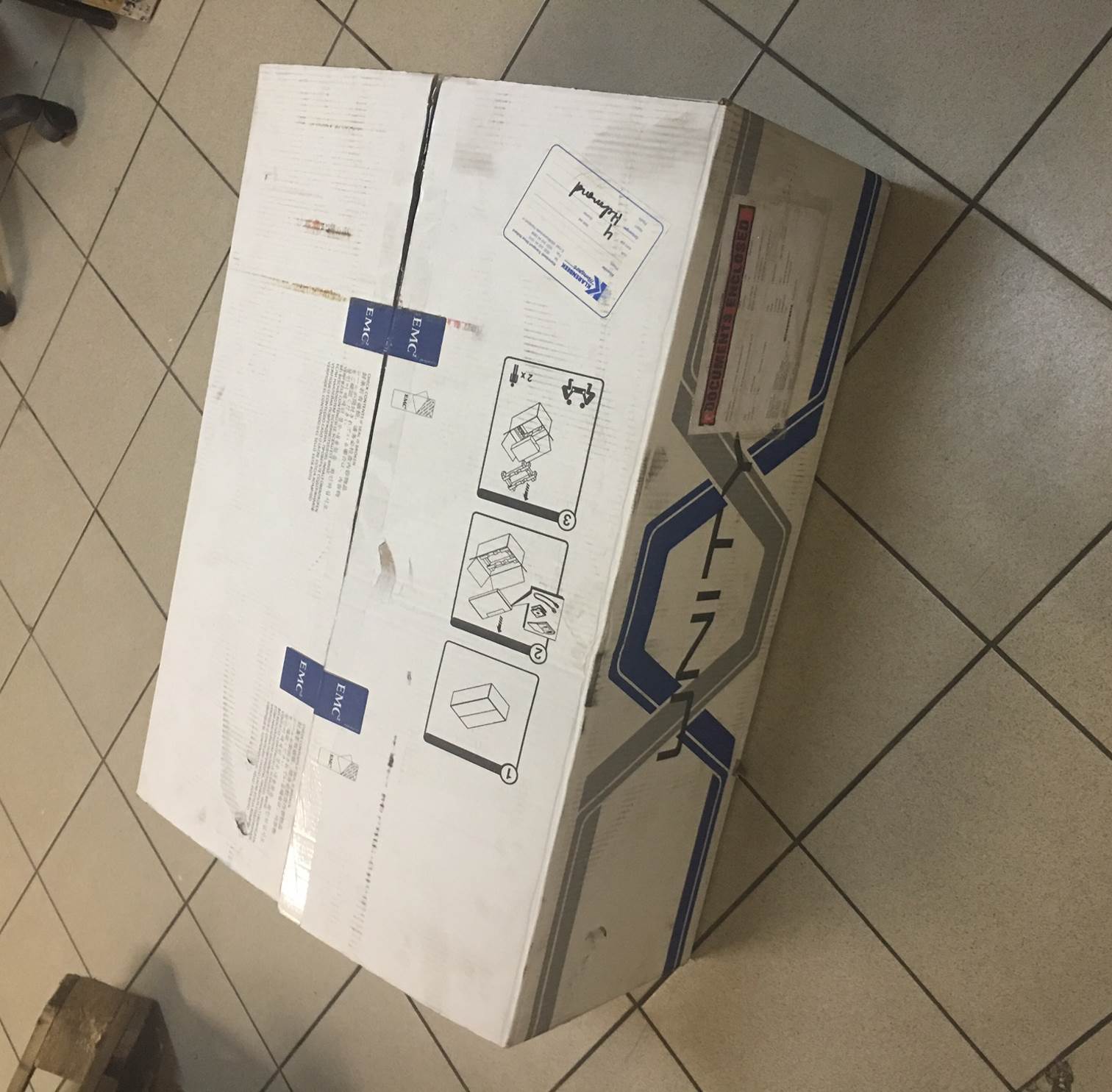
This is how a 100TB flash might look like now
The system was released in May, we have positive experience with monthly tests and implementation with customers (one of the examples above). In secret, I’ll say that in addition to the test one, we “bought quietly” for our infrastructure one hybrid and one flash system and are already operating them for internal tasks.
So let's go. For many years, EMC is not indifferent to flash, but last year it was specifically confused, deciding that the future lay with it. And released a working and not very expensive thing. This is almost the usual midrange with SSDs (nuances a bit later). We don’t stick “scrap, but it continues to work”, but impressive performance for databases and virtual machines plus various small chips.
Here is a striking example of optimization - before there was a separate UPS module in its casing, and it changed “to hot”. And now - a Li-ion battery with polyethylene leakage protection inside the controller.
And they also stepped on many vendors on their pet peeve and made the support price the same for the whole time. And then, you know, many large vendors like to set such a price for the 4th and 5th year that it is easier to replace iron with a new one. Well and yes, for these guys a disc failure due to wear is considered a warranty case, unlike some lovers of asterisks and small print in the warranty policy.
That's it, now let's go stick a crowbar into it and test it. Looking ahead, I’ll say that 80 thousand Iops were removed from 9 discs.
Combining Dell and EMC
The main question is what will happen to the storage line after the merger. Most of all they asked, and even those who had the glands of three years ago called. There is no official message yet, but EMC in the mid-range segment has always been in the lead, and here Dell will not chop the chicken that lays golden eggs. And the release of the new Unity is a confirmation of this.
What a piece of iron and how it is made
The black blocks at the top right are cooling (the flash thing is hot, you need to constantly blow), then the battery, in the middle the entire filling and the processor (here you can see the DIMM near the orange block), to the left in the L-shaped casing - the power supply, fans too (do not forget blow by percent) and a place for IO-modules.
Unity in itself is a replacement for the current VNX in terms of marketing. The hardware here is standard, two controllers based on x86 processors plus shelves with SSD disks connected via the SAS3 bus. But the microcode here is heavily redesigned (and it was partially written by Russian programmers from St. Petersburg), just like the new algorithms for working with disks. The approach was non-standard: even though there are flash and hybrid systems in the lineup, development came from all-flash, and only then compatibility with HDD was done (this is a good question). That is, there is, of course, an overhead on top of the SSD (it isn’t only where instead of drives we use bare flash factory microchips, but these are generally different prices), but it turned out to optimize the delays and performance very well.
Just do not read the small signature :)
The main motivation to say goodbye to spindles is the price. In my spare time, I considered the price of a hybrid storage system and all-flash - the expansion is 30-40%, taking into account discounts (they are more for flash). This is no longer the order, as before, and, therefore, you can think about using them where the HDD was previously run. Yes, and this is wild - I recall how I had to type 100 spindles for performance, and then cut their volume, because extra terabytes turned out. And do not forget to subtract penalties on RAID. And sometimes, a customer comes with a request for 10-15 thousand IOPS from a 3-4 TB basen. And what do you say - 300GB 15k in the mirror ??? Now in the line of SSDs from 400 GB to 15 (!) TB. In general, you need to consider it as a task. Please contact the contacts below. But something I was distracted.
Architects did not forget about small branches of companies. There is a version in the form of a virtual machine for Vmware (other hypervisors also promise to pull it up if there is demand), which is put in a distant small branch on top of the server with disks or a very simple shelf, and after that all its space will be seen as a full Unity storage. it provides features such as branch replication, snapshots and single-window management. Because Unity, in fact.
Previously, it was necessary to separately purchase a capacity license for iron. For many customers, this was inconvenient. Now this is not. And there are no separate products - replication, block and file protocols, snapshots, tearing and fast cache (for hybrid systems) are included in the delivery.
All-flash is constantly asked about reliability - and EMC concluded that it is normal to support flash systems because the flash is almost eternal, because without moving parts it wears out very slowly. And therefore, the price is the same for each year of support, as I said (but this does not apply to hybrid storage). Still tasty - again, I mentioned, while the array is under warranty or extended warranty - if the disk fails due to wear, they will change it no matter what year. For another well-known vendor, this is considered a customer problem and a non-warranty case. They also found someone to step on the corn.
It’s very convenient in volume - you can stuff at least 200 TB into one shelf, if necessary. Compared to spindle storage, it’s very nice.
We already have combat deployments - despite the May release of the piece of iron. The customer spread ROI, TCO and realized that taking a hybrid is not profitable. As a result, there Unity 400F (F means Flash) 47 SSDs of 1.6 each, it turns out about 60 TB of usable space in RAID5. All this in 4 units. Gives 140 thousand iops.
In general, the system, as usual, is made in Irish (they have a plant in Cork in Ireland). The assembly is neat and beautiful, but very original according to the solutions. For example, controllers (two blades) are attached to the chassis with a hefty bolt that runs through the entire array. Thanks to this axis, all connectors smoothly fit into each other on the backplane.
These are the bolts. While you gently spin them on the last centimeter, the feeling is like when docking with the ISS.
On board there is a built-in 10 BASE-T for distribution via file protocols or block iSCSI. It is cheap, so it does not increase the cost of construction, but it will certainly bring benefits. But the main communication port you choose for your infrastructure. When ordering, you can choose which transceivers will go to the converged I / O connector (16 FC or 10 Eth / ISCSI). There are 2 of them per controller. More is needed - there is an expansion module where you can get these ports. See the diagram below. And no separate file controllers - everything is already on board. This is damn convenient, I must say, although it is more relevant for hybrid models than fully solid ones. Still, for file washes, flash is still a little expensive. Well, or for fans of building Vmware on NFS, which is very popular lately.
Processors and memory are not surprising - the good old Intel.
Inside, there are two SSDs for flushing the dirty cache when the power is turned off, each controller has its own. OS is placed on the first 4 disks. I will please those who are familiar with the previous line from EMC: these disks can now be combined with everyone else in a pool for data. Previously, they often became a dead weight, on which, in addition to images of virtual machines, there was nothing to put. Yes, and the vendor did not recommend loading them. Now, please. Only for heavily loaded installations, we still recommend adhering to this old rule. They are therefore systemic, which are important. And without load, the rebuild always goes faster. Rebild 1.6TB disk under a load of 50t IOPS, by the way, took a little less than two hours. This result seems to me quite worthy.
2 power cables (black and gray at the edges), 2 control cables (green to unit), 2 frontend (blue).
Ruler
A good Jedi has a blue sword, and a very good one has a silver one: pay attention to the logos. For attention to detail, the manufacturer is a separate plus in karma.
Tests
Tested the standard method for us recently from rpokruchin .
The results are as follows:
1. Let's start with the SSD-specific loads — random reading and writing. Highlighted the values that can be taken as a standard. By the way, it can be seen that the system inside itself works with 8K block, because the number of IOPS begins to decrease only at a larger size, and on smaller shows almost the same result. If we approach the issue strictly, the result on random reading is 63.5 thousand IOPS (when we take 1ms for the cutoff and everything above is not counted). If you do not focus on this, then we can assume that 86 thousand we squeezed out of it. Although everyone is free to decide for himself which results are considered correct. To do this, the whole table is shown on different blocks and queues:
Interestingly, on a random record, the results were better than we thought. Performance was only 20% worse. Maybe, of course, the storage cache worked for the top five, although they tried to bypass it in every possible way, but they just turned it off. But that would be wrong, because it wasn’t included in the design for dashing guys from KROK to extinguish it. Yes, and in the product it will still be included.
The backup loads were also not disregarded, when sequential readings are carried out in a large block and bandwidth is more important than response time and Iops (who wants to throw a brick at me, I agree in advance that yes, with backups, the block can be even larger, but overall this does not change the picture):
And, finally, the load characteristic of filling data is sequential recording in large blocks.
You can see from the table that after a certain moment, productivity is no longer growing, but the response time is increasing. Here we have to remember that after all, the system is midrange, and did not promise stars from heaven. Especially on 9 disks, of which 4 are system (Yes, we are bad guys, we do not follow our own best practices). You just need to know from the very beginning its ceiling and monitor your productivity. The higher the model in the lineup, the higher its ceiling. Incidentally, it is indicated fairly honestly in the datasheet (see the links below). This must be considered when buying.
What is interesting, of course, it reaches high rates on a small number of disks - with an increase in the number of disks, it quickly rests against the designated ceiling and productivity will not grow further, but it works for its money. As we understood, the reason is that the system rests on the power of the controller. An answer was received to a logical question - you have to pay for everything in this life. If you need more performance, you need a larger model.
Of course, when you look at the free slots for memory dies on the motherboard, you want to add several server slots for several hundred dollars there and get an additional cache (the cache there is regular 16 Gb DIMMs). Or change the processors at the same time (in the younger model, six-core 1.6 GHz). But such an action will remove the zhelzka and guarantees immediately, alas. True, I know a man who somehow managed to remove the magnetic disk destruction system from his storage system and give out a complete refusal for a warranty case, so maybe someone will rearrange them before the engineers arrive, but something is unlikely.
Interface
Now in HTML 5. The GUI works fine on Windows and Linux, for connoisseurs of automation there is a cli and REST API. A lot of effort was put into optimization. Performing tasks is really easier. Convenient wizards replaced the legwork on several tabs. Realt-time and historical performance statistics can be viewed online without the use of additional utilities. Charts are configured in the same interface, management is very flexible.
In addition to administrative tasks, service operations were greatly simplified. All of them are now collected in one tab. Logs from the array are collected faster and immediately from both controllers. Operations such as Reimage and updating the code of the array \ disks appeared in the Web GUI.
There is control from the cloud: if you wish, you can register in a special service where the system will merge its counters - tips for optimizing resources and management will be offered. This is done, of course, so that you do not miss the upgrade and additional purchase of iron, but, it seems, there is also benefit.
There are still cool tools from partners for assessing the current infrastructure - you can collect logs from your arrays, analyze and at the exit find out which Unity, taking into account the growth by 3-5 years, will replace all current arrays. And plus to this, you can understand whether allflash or hybrid is enough.
You can play with virtual Unity - it is downloaded as a demo with a license for non-commercial use for free at this link .
Summary
The manufacturer put itself in the place of the customer and took into account its mistakes: it released a decent-sized storage, simplified the interface and licensing, and provided a predicted cost of ownership due to the fixed cost of support.
In addition to the traditionally high quality of products and services, we can safely say that the system is worthy of the attention of corporate customers of almost any level. The only question is what will happen to EMC in the light of the merger with Dell. Personally, I think that everything will remain so, but this, as they say, only Dell knows.
This is how a 100TB flash might look like now
The system was released in May, we have positive experience with monthly tests and implementation with customers (one of the examples above). In secret, I’ll say that in addition to the test one, we “bought quietly” for our infrastructure one hybrid and one flash system and are already operating them for internal tasks.
References
- Old VNX review
- EMC ScaleIO - referred to software-defined storage
- My mail for questions and for requesting promotional prices (alas, each member of EMC agrees on promotional prices separately, so the procedure is not trivial) - [email protected]
- Well, for lovers of datasheets: flash and hybrid lines of storage systems









